

Boot ransomware – a Djvu-related malware strain that might fake to be from DHL or FedEx shipping companies to provide malicious content
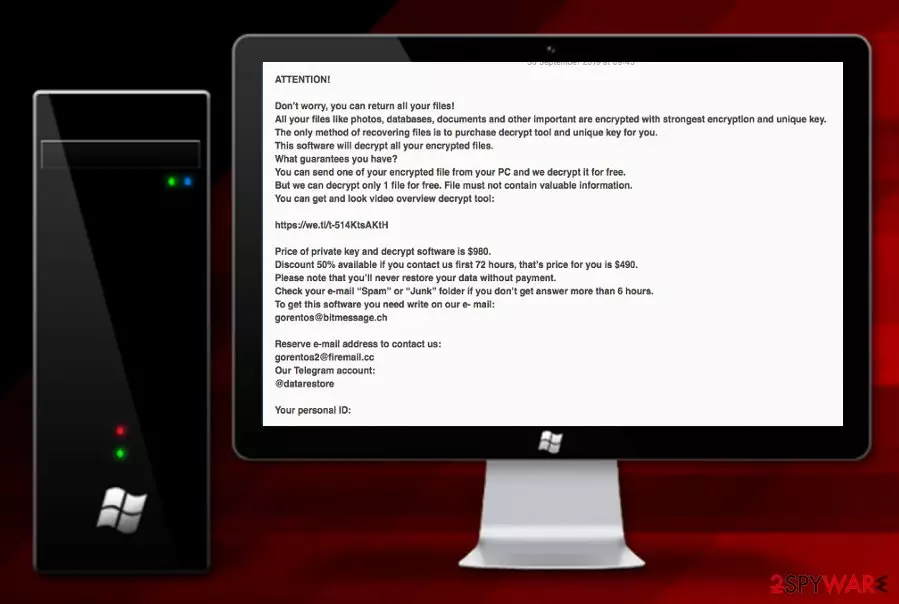
Boot ransomware is another recently-released form of Djvu ransomware that uses ciphers such as AES/RSA for trapping data files. The infection process starts by planting malicious executables in the Task Manager and launching commands that allow encrypting[1] documents and files located on the infected system. Files that were operating properly before, now are locked by an algorithm with the .boot appendix and remain inaccessible unless you agree to pay the $490 or $980 ransom price that is demanded via the _readme.txt message. Criminals have their own conditions and if you want to buy the decryption software with a 50% discount, you need to contact them by gorentos@bitmessage.ch, gorentos2@firemail.cc, or @datarestore telegram and transfer the money within 72 hours of time.
| Name | Boot ransomware |
|---|---|
| Type | Ransomware/file-encrypting virus |
| Families | This notorious cyber threat comes from the Djvu ransomware and STOP virus families |
| Encryption | Once you are attacked by this malware string, your files end up with the .boot extension when locked with unique ciphers that are based on AES or RSA algorithms |
| Ransom note | The malware places the _readme.txt note where ransom demands are written on the desktop and in each folder that includes locked files |
| Ransom demands | Criminals urge for $490 as a 50% discount from $980 if the money is transferred if three days. If the victim appears to be late, the price remains $980 |
| Crooks' contacts | The hackers urge to contact them via gorentos@bitmessage.ch, gorentos2@firemail.cc, or @datarestore telegram |
| Additional features | It is known that .boot files virus is capable of damaging the Windows hosts file, eliminating Shadow Copies via PowerShell commands, and injecting the AZORult Trojan horse into the system |
| Distribution | Ransomware-related payload can be carried via tricky email messages that pretend to come from shipping companies such as DHL or FedEx. Also, this malware might spread via the TCP port 3389 and p2p networks such as The Pirate Bay |
| Detection tool | Try using software such as FortectIntego for a thorough system scan. Once the tool provides you with a list of malicious components, use automatical programs to get rid of the entire infection |
There is no need to follow the criminals' demands as Boot ransomware is used for collecting revenue[2] and the ransom message might appear to be a way to scam you. The hackers might collect money from you but leave you with no decryption tool available even though they provide some visual material on the key via https://we.tl/t-514KtsAKtH:
ATTENTION!
Don’t worry, you can return all your files!
All your files like photos, databases, documents and other important are encrypted with strongest encryption and unique key.
The only method of recovering files is to purchase decrypt tool and unique key for you.
This software will decrypt all your encrypted files.
What guarantees you have?
You can send one of your encrypted file from your PC and we decrypt it for free.
But we can decrypt only 1 file for free. File must not contain valuable information.
You can get and look video overview decrypt tool:https://we.tl/t-514KtsAKtH
Price of private key and decrypt software is $980.
Discount 50% available if you contact us first 72 hours, that’s price for you is $490.
Please note that you’ll never restore your data without payment.
Check your e-mail “Spam” or “Junk” folder if you don’t get answer more than 6 hours.
To get this software you need write on our e- mail:
gorentos@bitmessage.chReserve e-mail address to contact us:
gorentos2@firemail.cc
Our Telegram account:
@datarestoreYour personal ID:
Boot ransomware also offers to send one small file for free decryption as evidence that the tool really exists. However, do not follow any demands provided by the criminals as you might spend a very big sum of money and get scammed easily. Even though the original decryption software has not yet been released for .boot file, there are other options that you can try.
For example, cybersecurity researchers from DrWeb offer victims of malware such as Boot ransomware to try their free decryption tool and if it works, the users are suggested to purchase a Rescue Pack for $150 which is a package of data decryption software and antivirus protection that is valid for a 2 year time period.

However, the first step to take is towards Boot ransomware removal. Use automatical software to complete the process and do not forget to perform a full check-up for identifying malicious strings. For this purpose, you can employ FortectIntego. Do not try to eliminate the cyber threat on your own as it might bring you even more danger.
Once you successfully remove Boot ransomware from your Windows computer, there are some other data recovery solutions provided at the end of this article. Go throughout all of the suggestions and pick the most suitable one for you. Note that any other option than paying the demanded ransom price is a much better variant.
Other more complex features of Boot ransomware
As already known, Boot ransomware comes from the Djvu ransomware category which means that the malware is related to STOP ransomware also. This signals about the possibility of secret distribution of the AZORult Trojan virus that comes along with the ransomware virus.
Banking malware such as AZORult might be very dangerous for your computer system as it can cause severe and irreparable damage for the structure and software. Besides, you can easily get your private data and even money swindled straight from your bank account.
Besides from injecting other malware, Boot ransomware supposedly modifies the Windows hosts file in order to prevent the victims from accessing security-related networks and viewing some helpful details on virus removal. Once you are completing the ransomware removal process, do not forget to eliminate the hosts file also or the access might remain blocked.
In addition, Boot ransomware developers might want to make the decryption process more difficult with outside software for you to encourage you to purchase their own provided decryption software. Due to this, the malware might be capable of running PowerShell commands that eliminate Shadow Volume Copies of locked documents and files.

Ransomware-related payload gets inserted by fake email messages
According to researchers from LosVirus.es,[3] ransomware payload is often carried by fake shipping messages that pretend to come from well-known companies such as DHL or FedEx. If you ever receive such a misleading email, you might be urged to proceed with a specific order confirmation link or open an attached document that supposedly includes information about some type of order that you have never made.
Be careful with email spam and bogus messages that travel to your inbox section. Sort out all of your emails once in a while, eliminate all dubious-looking ones, and do not open any attachments before scanning them with reliable antimalware products. Sadly, this is not the only way how ransomware viruses might end up on your computer system and bring big damage.
This malware is also capable of spreading through hacked RDP such as the TCP port 3389. Cybercriminals remotely hack the vulnerable RDP[4] and forcibly insert the password in order to connect to the targeted machine. In addition, ransomware might be distributed through peer-to-peer networks and come as a fake video-downloading link on websites such as The Pirate Bay.
Advanced removal guidelines for Boot ransomware
Removing difficult malware such as ransomware requires advanced removal guidelines. This also is valid for .boot files virus that might bring numerous malicious components to the system and hide them silently so that the victim would not be able to find them so easily.
The only option for you here is to remove Boot ransomware by using reputable AV tools. This type of software will deal with the cyber threat within less time than you would be able to and, of course, in a much safer and effective way. Besides, you can use FortectIntego, SpyHunterCombo Cleaner, or MalwarebytesMalwarebytes for locating all malicious objects.
Before you employ reputable security products and proceed with Boot ransomware removal, you should boot up your system via Safe Mode with Networking or by using the System Restore feature. Detailed guidelines on how to launch these boot options are provided below.
Did this guide help?
Be the first to comment