

Mac Tweak Pro is an alleged Mac optimization tool that shows fake notifications
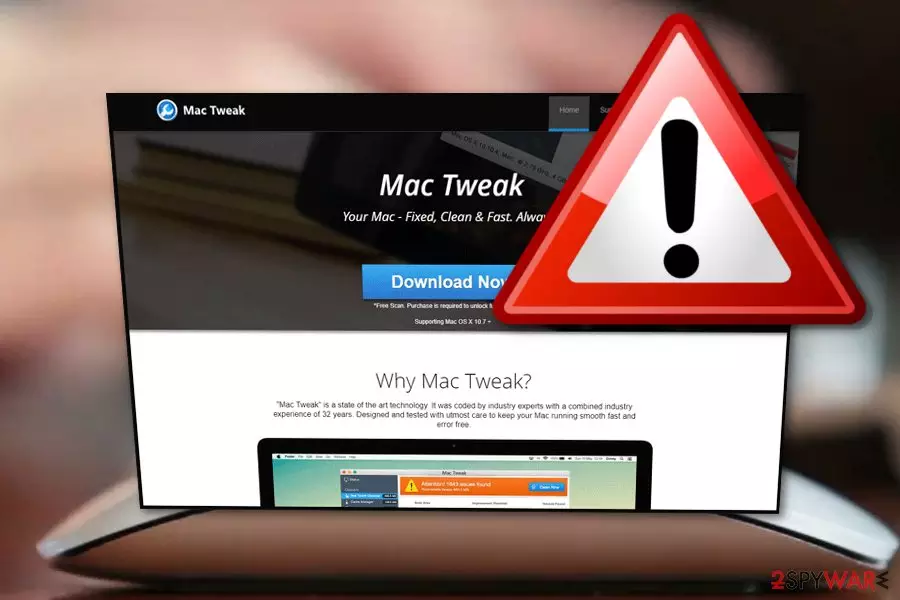
Mac Tweak Pro is a tool that belongs to the scareware[1] category. Developed for Mac, this application is exceptionally similar to hundreds of fake optimization tools floating around the internet. In addition to using dubious distribution tactic called software bundling, Mac Tweak also relies on adware delivering its links and redirects to end users. Once installed, the potentially unwanted program instantaneously performs a system scan, flagging up hundreds of the alleged issues. However, it a renowned trick used by developers to make users purchase a full version of the application. Additionally, fake tools like Mac Tweak Pro will not only fail to improve Mac's performance but might also damage certain files that should never be touched.
| Name | Mac Tweak Pro |
|---|---|
| Type | Scareware |
| Category | Mac virus |
| Similar software | Mac Auto Fixer, Mac Optimizer, Advanced Mac Cleaner, Mac Cleanup Pro, etc. |
| Danger level | Medium. Might delete legitimate files used by the system |
| Usefulness | None. Does not fulfill any of its promises |
| Distribution | Use the original website, third-party download sites, software bundles, fake ads |
| Prevention | Avoid unknown pages and programs, use the Custom installation mode only |
| Elimination | Eliminate the threat safely. Use FortectIntego to find all PUP-related content |
There are many other fake system tools[2] such as Mac Tweak Pro virus which are spread by developers for beneficial reasons. However, some users fall for believing that the software will truly fix “all problems found”. Similar programs are:
- Advanced MacTuneup
- Advanced Mac Cleaner
- Mac Optimizer
- Mac Rapidizer
- Mac Auto Fixer
- Mac Tonic
- Mac Cleanup Pro
Note that these potentially unwanted applications do not show true scan results. If you want to figure out the truth, get a reliable computer tool to perform a system scan. After that, measure the results with the ones that Mac Tweak Pro has provided. We can assure you that almost no similarities will be found between the provided issues.
This just shows that the program is an unreliable system tool. You should remove Mac Tweak virus from the system as it will bring nothing useful. Nevertheless, the potentially unwanted application might cause annoying pop-ups which promote the fake tool and try to convince users about its usefulness. Get rid of the false system optimization tool by using antimalware programs or removing the program manually.
If you want to shorten the Mac Tweak Pro removal, we suggest downloading and installing a reputable computer program such as FortectIntego to detect all content that might be left by the rogue software. Furthermore, note that such programs might inject unwanted components into your web browsers[3] such as Chrome, Firefox, Edge, Explorer, or Safari, so, you need to check your browsers for adware signs also.
Tools such as Mac Tweak Pro often have their original websites from where they can be downloaded. If you ever enter such page, do not get tricked by the tool's nice-looking promotion. We suggest searching for reviews on the program and just then thinking about downloading it. However, note that you need to be able to choose which tools will be useful for your computer in order to avoid unwanted money losses while downloading unreliable software.

Fake system tools are promoted by developers on their original websites
According to IT specialists from NoVirus.uk,[4] fake computer cleaning tools can be promoted in a few ways one of which is – original websites. Developers create pages for their programs and promote them by advertising their useful abilities. However, lots of users get tricked by such promotion and decide to download the program to their computers.
We suggest staying careful while visiting such third-party websites. Better download system optimization tools only from trusted developers. Furthermore, potentially unwanted applications can appear as a result of bundling.[5] This means the rogue app can enter the system thru other regular software that you decide to download from the Internet.
In order to avoid the installation of fake tools, you should be serious about your downloads. Do not skip any downloading/installing steps, and even better – use the Custom or Advanced option over the Quick or Recommended one. Additionally, avoid visiting unknown pages and do not click on links that you are not sure about.
Delete Mac Tweak Pro unwanted application from your Mac computer
If you are infected with a potentially unwanted program such as a fake system optimization tool, you can get rid of it manually or with antimalware. If you want to remove Mac Tweak Pro virus on your own, you can read and look thru our below-provided guide. Furthermore, check Google Chrome, Mozilla Firefox, Microsoft Edge, and other web browsers for rogue content also.
Perform the Mac Tweak removal in a faster way by leaning on reputable tools. These programs will help you with the process and ensure you that the elimination will be completed safely. After the removal, make sure to refresh your used web browsers to ensure that they are not infected. Furthermore, do not forget to be more careful in the future to protect your computer from rogue programs and other similar infections.
Delete from macOS
Remove the unwanted application:
- From the menu bar, select Go > Applications.
- In the Applications folder, look for any suspicious entries, then drag them to Trash (or right-click and pick Move to Trash).


Delete leftover files and folders:
- Select Go > Go to Folder.
- Enter /Library/Application Support and remove any suspicious folders related to the unwanted program.
- Repeat the same check in the /Library/LaunchAgents and /Library/LaunchDaemons folders, deleting any suspicious entries.

- Finally, empty the Trash to permanently remove the leftovers.

Did this guide help?
Be the first to comment