

Merl ransomware – a new Djvu ransomware variant that is currently undecryptable
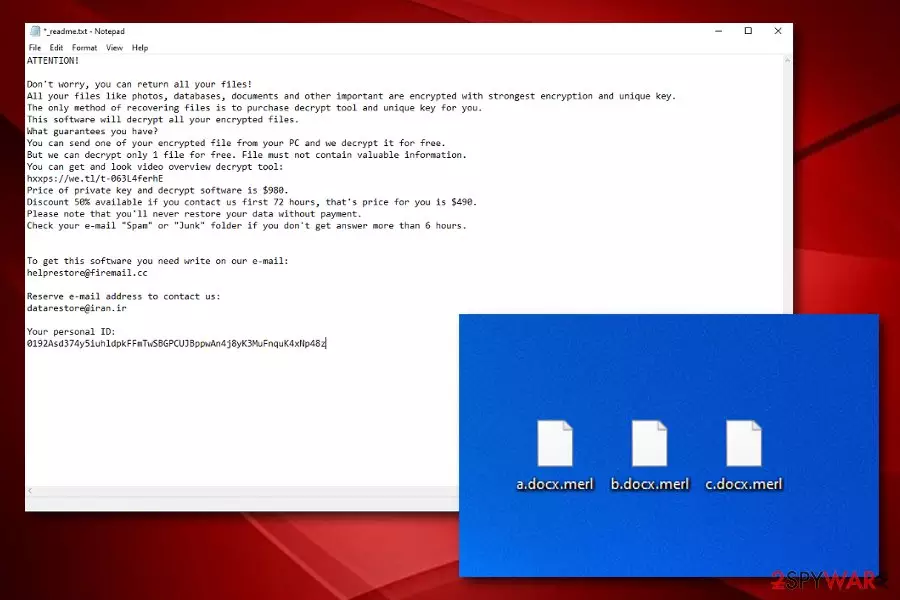
Merl ransomware appears to be a relative of the Djvu/STOP family that appends the .merl extension to locked components. Regarding its recent release date, this malware variant still remains undecryptable. It uses a unique cipher to lock various data files, documents, databases, etc. Afterward, .merl files virus provides the _readme.txt ransom note that is identical to all the other ransom messages used by Djvu ransomware variants. The criminals still remain greedy and urge for a $490 ransom price if the conditions are met in 3 days, otherwise, the amount will double up to $980. The crooks provide helprestore@firemail.cc and datarestore@iran.ir email addresses as a way to make communication.
| Name | Merl ransomware |
|---|---|
| Category | Ransomware virus/malware |
| Family | Djvu ransomware/STOP ransomware |
| Appendix | Once files are locked with a unique cipher, the .merl extension is added to each file name |
| Ransom note | The ransomware virus provides the same _readme.txt ransom message as other Djvu virus variants |
| Price | The criminals urge for $490 if the ransom demands are met within 72 hours. However, if the victims are late, they will have to pay a 50% higher price |
| Spreading | Ransomware includes multiple distribution locations. Most commonly, these threats are spread via software cracks, email spam campaigns, infectious attachments and hyperlinks |
| Removal | Employ reliable software to get rid of the malware. Malware elimination is not a good choice for this case as you might make more damage to the computer or miss some crucial components |
| Repair tip | If you have discovered that the ransomware virus has touched some system components that need repairing, you can try fixing them by employing automatical system repair software such as FortectIntego |
| File recovery | DO NOT pay the demanded ransom in order to recover your files as there is a big chance that you will get scammed and provided with no decryption key at all. As an alternative, go to the end of this article and check out the data recovery possibilities that are added there |
Merl virus threatens users that the only way to unlock encrypted files is by paying the demanded ransom price. Furthermore, the hackers offer to provide evidence of the decryption software's existence by freely decrypting one small file sent by the victim. However, we do not recommend making any contact with these people or delivering them money and risking to empty your bank account for nothing. Do not get threatened by this message:
ATTENTION!
Don't worry, you can return all your files!
All your files like photos, databases, documents and other important are encrypted with strongest encryption and unique key.
The only method of recovering files is to purchase decrypt tool and unique key for you.
This software will decrypt all your encrypted files.
What guarantees you have?
You can send one of your encrypted file from your PC and we decrypt it for free.
But we can decrypt only 1 file for free. File must not contain valuable information.
You can get and look video overview decrypt tool:
hxxps://we.tl/t-063L4ferhE
Price of private key and decrypt software is $980.
Discount 50% available if you contact us first 72 hours, that's price for you is $490.
Please note that you'll never restore your data without payment.
Check your e-mail “Spam” or “Junk” folder if you don't get answer more than 6 hours.To get this software you need write on our e-mail:
helprestore@firemail.ccReserve e-mail address to contact us:
datarestore@iran.irYour personal ID:
0192Asd374y5iuhldpkFFmTwSBGPCUJBppwAn4j8yK3MuFnquK4xNp48z
However, encryption is just one thing out of many others that Merl ransomware is capable of. This virtual parasite is likely to delete or permanently damage Shadow Volume Copies[1] by executing specific PowerShell commands. This way the victims will have a harder time while trying to recover the files on their own.
Continuously, Merl ransomware might damage the Windows hosts file to prevent you from accessing security-related forums where you might be able to get valuable information on the virus's removal process or data recovery. However, this still is not all that the ransomware virus is capable of performing.

Merl ransomware can add suspicious entries to the Windows Registry[2] and include bogus processes in the Task Manager. These tasks can allow the malware to boot up every time the computer is turned on, to repeatedly scan the system for decryptable components, and to avoid getting detected by some types of antivirus programs.
Furthermore, Merl ransomware might be able to bring other malware to the system, including AZORult trojan that is spread by STOP ransomware variants. This cyber threat might steal private data that is stored on your computer system, wipe out your bank accounts, destroy your programs and computer system.
The only way to avoid such risks is by performing Merl ransomware removal on your Windows computer. For this task, you should use only reliable antivirus products as manual elimination is not the best option here. Besides, you can try repairing damaged objects with a specific system repair program such as FortectIntego.
Once you remove Merl ransomware from your computer system, you can start thinking about data recovery possibilities. Note that almost anything is better than letting the criminals benefit from you and leaving you with nothing. At the end of this article, you will find three data recovery techniques some of which might be helpful.
Another alternative that you can try for .merl files virus is DrWeb's Rescue Pack. These security researchers have released a specific software package that includes data recovery software and 2 years of computer protection for $150. Some users have found this product useful for decrypting files, so you can give it a try too.

The distribution methods of ransomware infections
Security experts from LosVirus.es[3] claim that ransomware viruses are one of the most dangerous and sneakiest threats across the cybersphere. These notorious threats are distributed by various techniques but the most popular ones are:
- Email spam.[4] The criminals camouflage as reliable organizations (shipping, healthcare) and pretend to be delivering an official message that includes some type of link or attachment where the malware is included.
- Software cracks. If you like downloading software, video clips, and films from sources such as The Pirate Bay, you risk receiving ransomware or other malware through the downloading links.
- Fake software updates. Some crooks provide fake JavaScript or Adobe Flash Player updates which truly hide malware inside the downloading process.
- Infectious ads. If you are visiting third-party websites that include many sponsored ads, you might receive malware by clicking on some of the advertisements.
Since you have learned about the most popular ways of how ransomware infections are distributed, it is time to learn how to protect yourself and your valuable data from such attacks. To know more, continue reading the next paragraph.
What you can do to avoid malware attacks
There definitely are some things that you can do to avoid malware infiltration and data encryption. First of all, make sure that you are employing a reliable antimalware tool that includes many protective features. Then, keep this software always updated, otherwise, it might not function properly. Continuously, purchase a USB drive (or a couple of them) and keep copies of important data there. Also, you can use iCloud or Dropbox servers for saving important files too.
Talking about manual malware prevention, you will need to follow some steps. First, always manage your receive email. This means not opening any concerning letters, hyperlinks, and attachments. If the message travels to the Spam section, you should delete it automatically without even considering to view its content.
Continuously, download your products and services only from reliable sources. We recommend skipping p2p networks as your destination point. Malware developers are very likely to use these types of sources for their own benefit. Furthermore, get all required software updates only from the original developer and avoid clicking on random advertisements that intrude you will performing browsing activities.
Removal possibilities for Merl ransomware
Merl ransomware removal is a responsible process to perform. You cannot miss any crucial components that have been added by the malware, otherwise, the infection has a tendency to return. For the elimination, we suggest that you employ antimalware software.
You can try detecting malicious components with the help of SpyHunterCombo Cleaner or MalwarebytesMalwarebytes software. This way you will know which types of locations were touched by Merl ransomware and need fixing. Afterward, you can try repairing your system components with a specific tool such as FortectIntego.
Once you remove Merl ransomware and repair its damage, you can continue with data recovery possibilities. Remember that anything is better than paying the inadequate ransom price. Below you will find some file restoring techniques that might help you with the process.
Did this guide help?
Be the first to comment