

Rapid V1 is a ransomware which evolved from the relatively new cyber threat
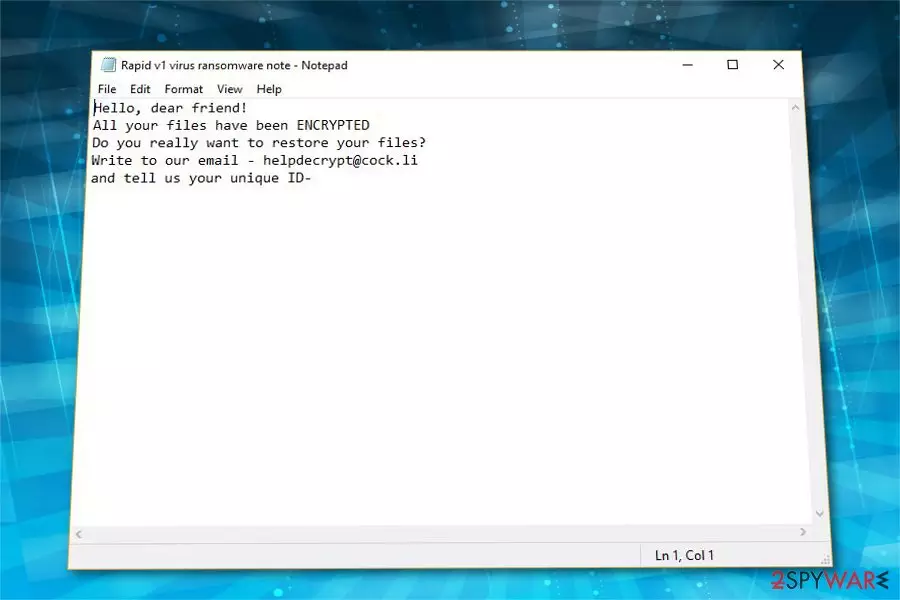
Rapid V1 ransomware is a malicious program which is considered to be the new variant of its predecessor — Rapid ransomware. This file-encrypting virus is relatively new to the cyber community as it has merely appeared at the beginning of 2018. However, hackers have updated the malware more than four times, and now it uses .no_more_ransom extension after encrypting data with AES[1] algorithms. Victims receive a ransom note asking whether they would like some help when trying to decrypt the files. If so, they are provided with helpdecrypt@cock.li email address for further information.
| Name | Rapid V1 |
|---|---|
| Type | Ransomware |
| Danger level | High. Compromises data on the computer |
| Alternative versions | |
| Extension | .no_more_ransom |
| Cryptography | Advanced Encryption Standard (AES) |
| Email address | helpdecrypt@cock.li |
| Amount of the ransom | Unspecified |
| Distribution | Malicious email attachments |
| Removal | Only professional tools as FortectIntego can help you uninstall Rapid V1 after infection |
Experts indicate that a vast of malicious programs, including Rapid V1 virus, spread inside the attachments of spam emails. Once they are opened, the computer gets infected files are encrypted by Rapid V1 ransomware shortly after. Note that people can no longer open or use the encoded data as it becomes unreadable. Later, the malware leaves a ransom note which informs about its activity on the targeted PC:
Hello, dear friend!
All your files have been ENCRYPTED
Do you really want to restore your files?
Write to our email – helpdecrypt@cock.li
and tell us your unique ID-
If you have been infected with Rapid V1 file-encrypting virus, be aware that contacting the criminals is not the greatest idea. Security researchers warn that there are numerous cases recorded where people were tricked to pay the ransom and never received Rapid V1 decryptor. Likewise, it is evident that hackers are not the people you should trust.

In fact, we would recommend you to remove Rapid V1 as soon as you receive the ransom note or notice files with .no_more_ransom extension. Even though it might seem that this way you will never recover encrypted data, we can assure you that there are alternative decryption solutions which are way more reliable.
For Rapid V1 removal, the best option would be to use robust and professional antivirus software. Our IT experts suggest using FortectIntego or any other similar tool to scan your computer files thoroughly. Since ransomware can lock your screen or infiltrate the system with more malicious programs, we do not recommend trying to uninstall Rapid V1 by yourself under any circumstances.
Spam email attachments carry ransomware inside
Most people say that they haven't let the ransomware to enter their system. However, criminals employ social engineering techniques which are highly effective when trying to trick people into installing file-encrypting viruses manually. One of the most successful distribution methods is placing malware inside the attachment of spam email.
Usually, the electronic letter supposedly comes from a particular service provider and contains an invoice, shopping receipt or informs about some changes which require you to update specific details. Either way, the email is intentionally designed to look legitimate while the attachment disguises the malware[2].
Be aware that if you are deceived and open the spam email attachment, it will lead to ransomware attach. Thus, never click on any suspicious content online or in your inbox. Monitor all emails attentively and refrain from opening ones from unknown senders.
Only professional tools can help you get rid of Rapid V1 virus
Ransomware-type infections are one of the most dangerous ones, so manual Rapid V1 removal is not an option. In fact, only professional security tools or IT technicians can help you uninstall this cyber threat without damaging the computer or other essential system files.
Researchers[3] say that file-encrypting viruses might reappear and start data encryption once again if they are not appropriately eliminated. Likewise, you should use FortectIntego, SpyHunterCombo Cleaner, or MalwarebytesMalwarebytes to remove Rapid V1 completely and protect your data. Any similar security tools are eligible as well.
After you uninstall Rapid V1 ransomware, you can start thinking about data recovery. If you do not have backups, we have prepared a list of alternative ways how you can retrieve compromised files. They are presented at the end of this article with detailed explanations and step-by-step guides.
Did this guide help?
Be the first to comment