

Zaps virus is the ransomware that is controlled by remote attackers that wait for the payment from you
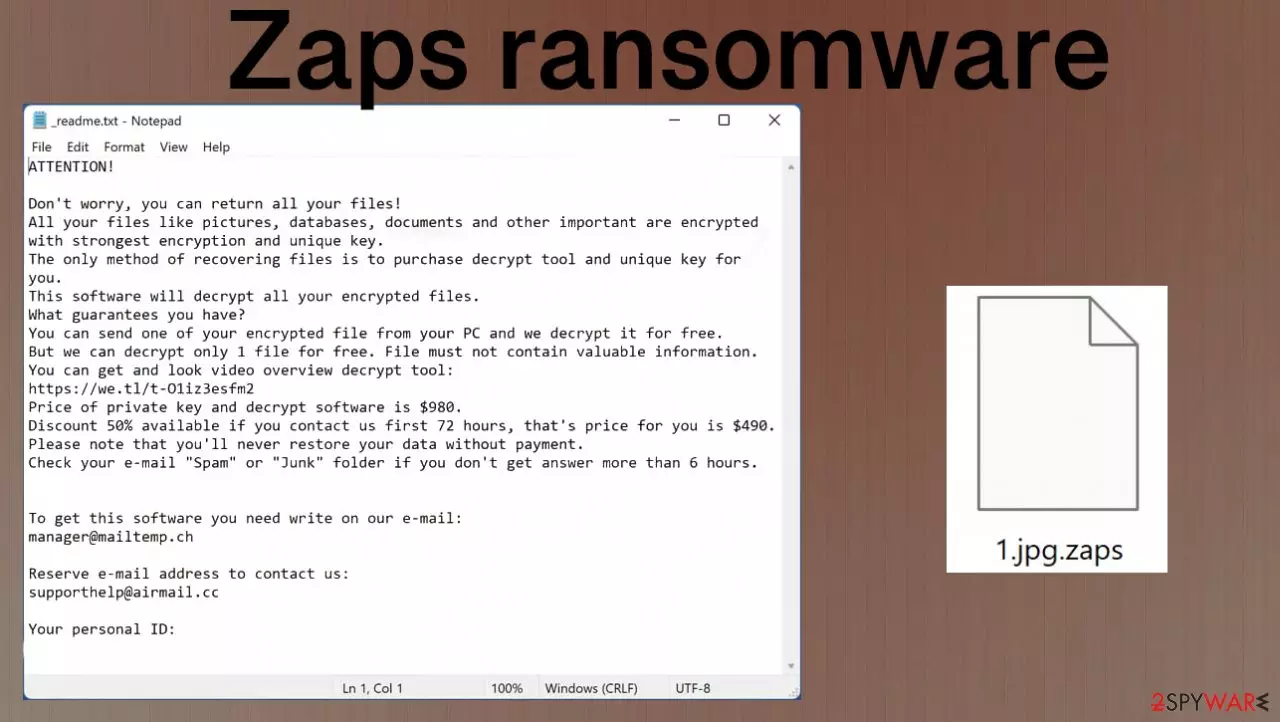
Zaps virus is the particular infection that is considered one of the most dangerous pieces across all cyber virus categories. It is because the particular virus includes blackmail and data damage. Ransomware is a highly malicious virus made by financially motivated cybercriminals. It's known to be an addition to many versions of the STOP/DJVU ransomware family. The threat, which was created in order to gain profit through hostage-taking on people's personal files- specifically those important documents or photographs. Files that can potentially hurt you if they are compromised during this process are more valuable, so more suitable for encryption.
The signature for attacks comes from appending all infected data with unique .zaps file extension that consists of four characters. This marker indicates what threat managed to affect your machine. Also, once the encryption process is complete, the threat delivers a ransom note named _readme.txt. This is the way to inform victims about further actions. Criminals encourage people to pay the ransom, but that can create more issues. If you decide to transfer the payment, you might get nothing in return or receive another malware payload instead of the decryption tool.
Cybercriminals are always looking for ways to get money, and if they can find a way that is both easy and quick, then so much the better. One common technique in using malware-infected emails comes with mass mailing counterfeit correspondence pretending as legitimate brands or companies. It is simply just fooling people into thinking this email was sent by someone trustworthy when really it isn't.
This gives cybercriminals access rights on your computer because once you open an attachment from one of these specious messages without knowing its contents. Hackers might be able to sneak install several malicious codes besides theZaps virus onto the system. Additional payload ensures the persistence of this threat and provides the infection more time on the computer. This is the identical version to known threats like Nqsq, Irjg, Vtua, and many more.
| Name | Zaps ransomware |
|---|---|
| Type | Cryptovirus, file-locker |
| Family | Djvu ransomware virus |
| File marker | .zaps |
| Distribution | Files get distributed via spam email campaigns, with the help of cracks and game cheats that can be distributed via pirating services |
| Ransom note | _readme.txt |
| Ransom amount | $980/ $490 |
| Decryption | Partially possible for some of the versions and for particular files like media |
| Removal | The particular tool that could help – antivirus. SpyHunterCombo Cleaner or MalwarebytesMalwarebytes can help with the general security of the system because these are the program capable of detecting[1] the threat |
| Repair | You should take care of the performance by running an app like FortectIntego that finds and fixes virus damage |
Paying the ransom is not an option unless you want to give attackers even more profit. They can use this money for future fraudulent activities, and there's no guarantee that your files will be fully recovered with decryption software. The newest versions of the strain including the Zaps versions are not just more advanced than previous ones, but also provide an impossible opportunity for recovery. As for now.
Offline keys allow victims to decrypt their files, while online ID's can be used with each unique version created by this threat group. Unfortunately, it is too difficult to obtain such pieces with new creations because they require more advanced decryption tools. Virus creators connect to the C&C server[2] every time the machine is infected, and the online ID gets formed. Such tactics prevent them from being terminated without help from law enforcement or reversing engineering professionals.
Decryption options for the money-focused threat
Zaps virus is the variant of the DJVU family that was decryptable for a long time because researchers managed to obtain keys and crack the code on the encryption techniques. But a while after the discovery, malware creators improved their methods, and this decryption possibility is very limited to some of the versions only. Experts[3] still recommend trying the decryption tool instead of the ransom payment.
If the versions use the offline IDs, researchers only need to obtain one decryption key, and other victims of the same version can get their files back. Zaps ransomware is, however, not doing so. The instructions below contain the possible decryption option for versions when offline keys get used. The guide might initially seem overwhelming and complicated, but it's not difficult to understand as long as you follow each step in order – this comprehensive free tool will help you through malware removal and data recovery correctly!
If you have infected your computer with one of the Djvu variants, you should try using Emsisoft decryptor for Djvu/STOP. It is important to mention that this tool will not work for everyone – it only works if data was locked with an offline ID due to malware failing to communicate with its remote servers.
Even if your case meets this condition, somebody from the victims has to pay criminals, retrieve an offline key, and then share it with security researchers at Emsisoft. As a result, you might not be able to restore the encrypted files immediately. Thus, if the decryptor says your data was locked with an offline ID but cannot be recovered currently, you should try later. You also need to upload a set of files – one encrypted and a healthy one to the company's servers before you proceed.
- Download the app from the official Emsisoft website.
- After pressing Download button, a small pop-up at the bottom, titled decrypt_STOPDjvu.exe should show up – click it.
- If User Account Control (UAC) message shows up, press Yes.
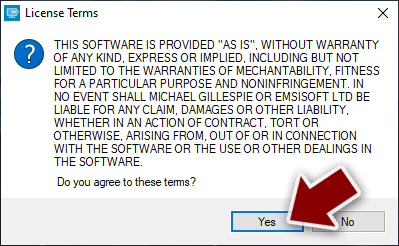
- Agree to License Terms by pressing Yes.
- After Disclaimer shows up, press OK.
- The tool should automatically populate the affected folders, although you can also do it by pressing Add folder at the bottom.

- Press Decrypt.



From here, there are three available outcomes:
- “Decrypted!” will be shown under files that were decrypted successfully – they are now usable again.
- “Error: Unable to decrypt file with ID:” means that the keys for this version of the virus have not yet been retrieved, so you should try later.
- “This ID appears to be an online ID, decryption is impossible” – you are unable to decrypt files with this tool.
Zaps ransomware in-depth and other functions of the virus
Any malware like trojans, worms, or ransomware like this Zaps virus can silently affect the machine and cause many issues with the machine. The payload file that gets dropped on the machine can trigger a few processes at once, so the persistence of the threat is ensured. If the virus damages functions and disables AV tools, you cannot notice the infection until it is too late.
This is the most common outcome. People do not know that machine is infected by the ransomware until all those commonly used files get locked during the encryption process and Zaps ransomware reigns on the computer. It can mask some procedures with false Windows Update messages and pop-ups. Nevertheless, you need to react as soon as possible – once files get encoded. This way, you can save as much as possible and move straight to file recovery.

The message that virus creators try to use to scare people is not changed for years now. Nor the file name nor the content of the ransom note itself. The discount is offered, so victims are more likely to decide to pay. However, criminals are never trustworthy because all the lies can be based on previous techniques, and file recovery is not even possible with their decryption key.
The particular tactics to fake legitimate and trust are not new but can trick some people into believing that Zaps virus creators care about victims' files. Do not fall for such tricks and ignore the message, delete the virus, repair files yourself. This _readme.txt file shows this deceptive message:
ATTENTION!
Don't worry, you can return all your files!
All your files like pictures, databases, documents and other important are encrypted with
strongest encryption and unique key.
The only method of recovering files is to purchase decrypt tool and unique key for you.
This software will decrypt all your encrypted files.
What guarantees you have?
You can send one of your encrypted file from your PC and we decrypt it for free.
But we can decrypt only 1 file for free. File must not contain valuable information.
You can get and look video overview decrypt tool:
hxxps://we.tl/t-pk3SGFlmek
Price of private key and decrypt software is $980.
Discount 50% available if you contact us first 72 hours, that's price for you is $490.
Please note that you'll never restore your data without payment.
Check your e-mail “Spam” or “Junk” folder if you don't get answer more than 6 hours.To get this software you need write on our e-mail:
manager@mailtemp.chReserve e-mail address to contact us:
supporthelp@airmail.ccYour personal ID: –
The best way to stop such Zaps ransomware is to run the anti-malware tool on the system. Programs like SpyHunterCombo Cleaner or MalwarebytesMalwarebytes can check the machine for any malicious programs and files, so the virus and its pieces get terminated properly. This is the best way to ensure that ransomware is no longer active. This is not the same as system file repair or decryption! This is the method for virus removal.
Once a computer is infected with any malware, its system is changed to operate differently. For example, an infection can alter the Windows registry database, damage vital bootup, and other sections, delete or corrupt DLL files, etc. However, an infection like the Zaps virus can damage the machine even more since there are many layers to this threat.
Once a system file is damaged by malware, antivirus software is not capable of doing anything about it, leaving it just the way it is. Consequently, users might experience performance, stability, and usability issues, to the point where a full Windows reinstallation is required.
Therefore, we highly recommend using a one-of-a-kind, patented technology of FortectIntego repair. Not only can it fix virus damage after the infection, but it is also capable of removing malware that has already broken into the system thanks to several engines used by the program. Besides, the application is also capable of fixing various Windows-related issues that are not caused by malware infections, for example, Blue Screen errors, freezes, registry errors, damaged DLLs, etc.
- Download the application by clicking on the link above
- Click on the ReimageRepair.exe
- If User Account Control (UAC) shows up, select Yes
- Press Install and wait till the program finishes the installation process

- The analysis of your machine will begin immediately

- Once complete, check the results – they will be listed in the Summary
- You can now click on each of the issues and fix them manually
- If you see many problems that you find difficult to fix, we recommend you purchase the license and fix them automatically.


By employing such a tool, you would not have to worry about future computer issues, as most of them could be fixed quickly by performing a full system scan at any time. Most importantly, you could avoid the tedious process of Windows reinstallation in case things go very wrong due to one reason or another.
If you still are concerned about the virus leftovers or the issues that Zaps ransomware can create, you need to rely on security or system software. Double-checking cannot hurt, especially when the threat can cause many issues if not treated in time. Clear any suspicions and traces of the virus, repair the proper functions, so you can use the system features and recover the data. Some additional tips are listed and make sure to follow those guides below for alternate data recovery solutions.
Did this guide help?
Be the first to comment