

Gandcrab 5.3 ransomware – crypto malware that continues encrypting users' files and demanding ransom for the decryptor
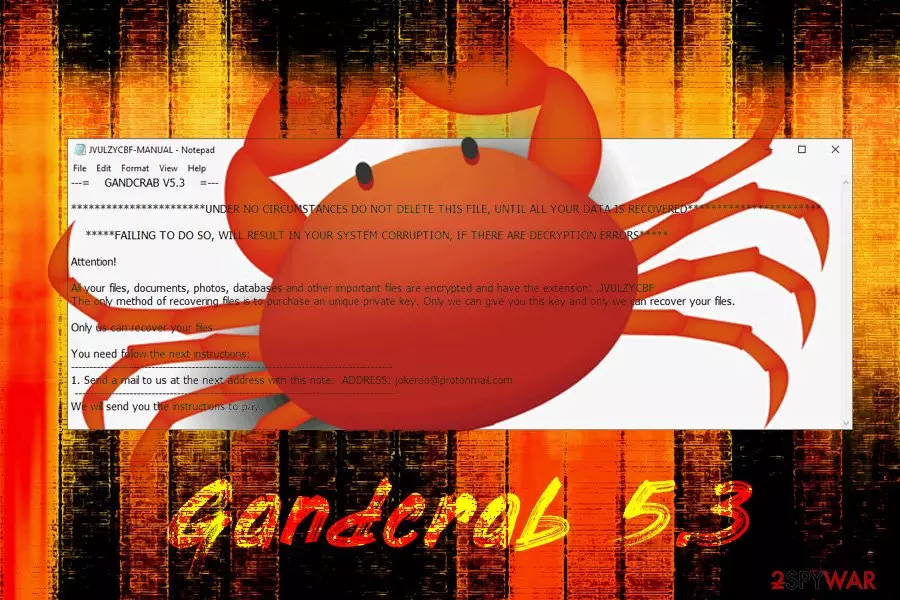
Gandcrab 5.3 ransomware is a file locking virus that was first spotted just before Easter in 2019 by independent security researcher Jakub Kroustek.[1] Just as its predecessors, the malware uses a sophisticated encryption algorithm to lock up data, and appends a random file extension to each file, for example, .JVULZYCBF. Once the procedure is complete, Gandcrab 5.3 changes the wallpaper and drops a ransom note [File extension]-MANUAL.txt or [File extension]-DECRYPT.txt. It explains to users that their computers were infected with ransomware and that allegedly the only way to retrieve access to personal pictures, documents, databases, and other files is by contacting cybercriminals via the jokeroo@protonmain.com email and consequently pay a ransom in Bitcoin or another cryptocurrency.
However, when the email is not the only hint to Jokeroo ransomware-as-service. According to researchers, when they tried to debug Gandcrab 5.3 ransomware, they spotted a few messages, such as “Jokeroo, new ransom,” “We rulez!!”. Due to different types of ransom notes delivered, there is a chance that there are a few hacker groups that are distributing the virus.
| Name | Gandcrab 5.3 |
| Type | Ransomware |
| Family | GandCrab ransomware |
| File extension | [random characters], for example .wwfew |
| Ransom note | [File extension]-MANUAL.txt, [File extension]-DECRYPT.txt, [File extension]-DECRYPT.html |
| Contact | jokeroo@protonmain.com |
| Decryption tool | Not available |
| Alternative decryption methods | Backups, third-party software |
| Detected as |
|
| Termination | Use security software that can recognize the threat, we suggest FortectIntego or SpyHunterCombo Cleaner |
There are many ways to get infected with Gandcrab 5.3 ransomware, so precautionary measures should be used at all times. Here are some main distribution methods of the virus:
- Spam email attachments or hyperlinks;
- Exploit kits;[2]
- Unprotected RDP;
- Fake updates;
- Infected or repacked installers;
- Torrent files;
- Steganography;[3]
- Malicious ads, etc.
As soon as Gandcrab 5.3 virus enters the PC, it performs a variety of system changes: modifies Windows registry, shuts down particular services, executes shell commands, deletes shadow volume copies, etc. The latter is the reason why file recovery might be extremely complicated after Gandcrab 5.3 ransomware removal. As of now, there is no official decryptor for this version created yet, although users can always rely on backups or attempt the recovery using third-party tools.
After file encryption, Gandcrab 5.3 ransomware drops the following message:
—= GANDCRAB V5.3 =—
***********************UNDER NO CIRCUMSTANCES DO NOT DELETE THIS FILE, UNTIL ALL YOUR DATA IS RECOVERED***********************
*****FAILING TO DO SO, WILL RESULT IN YOUR SYSTEM CORRUPTION, IF THERE ARE DECRYPTION ERRORS*****
Attention!
All your files, documents, photos, databases and other important files are encrypted and have the extension: .JVULZYCBF
The only method of recovering files is to purchase an unique private key. Only we can give you this key and only we can recover your files.
Only us can recover your files
You need follow the next instructions:
—————————————————————————————-
1. Send a mail to us at the next address with this note: ADDRESS: jokeroo@protonmail.com —————————————————————————————-
We will send you the instructions to pay.
It is yet unknown how much Gandcrab 5.3 ransomware distributors might ask for the decryptor, but previous versions demanded anywhere between $500 to $4000 in Bitcoin or Dash. Nevertheless, regardless of the price, you should not pay criminals, as, chances are, you will get scammed and lose your money too.

To avoid that, remove Gandcrab 5.3 ransomware from your machine using reliable anti-virus software (be aware that not all AV engines can detect and terminate the infection, but we suggest using FortectIntego or SpyHunterCombo Cleaner) and use alternative file recovery solutions we provide below. Additionally, Bitdefender researchers already released three decryptors for the notorious virus,[4] so it is most likely a matter of time until a new tool is released.
Hackers use sophisticated ransomware distribution methods – don't be a victim
Some ransomware viruses are low scale, and affect only a few people worldwide, making almost no impact. Nevertheless, some of the ransomware families, such as SamSam, STOP, and GandCrab dominate the cybercriminal world, earning millions for the illegally run business. In some cases, such as WannaCry attack, the malware is even connected to international espionage groups and even political hacking groups (Lazarus).
Thus, while one of the most common ways of getting infected with ransomware is by opening a malicious spam email attachment or a link, there are other methods too, and some of them do not even require user interaction whatsoever. Even then, there are ways to prevent silent infection.
The first rule of defending yourself from malware is installing reputable anti-malware software and running it at all times. This will protect you from most already known viruses. Nevertheless, new infections might be a problem, and no security software would protect you 100%, although it's a good start.
Once you secure your PC with anti-virus, make sure you avoid downloading suspicious executables from third-party websites (especially torrents), set up automatic updates, use two-factor authentication, use ad-block for potentially dangerous sites, enable Firewall and, also, back up your files! The latter will send you from all the troubles ransomware can cause.
Terminate Gandcrab 5.3 ransomware using anti-malware software
Gandcrab 5.3 ransomware removal should not cause many troubles usually. Nevertheless, if that is the case, you should enter Safe Mode with Networking and perform a full system scan using security software from there. As we previously mentioned, not all AV engines can detect and delete the infection. Hackers often update the malicious code to include additional evasion and persistence techniques.
As soon as you remove Gandcrab 5.3 virus from your machine, you can proceed with file recovery. Connect your backup device to your computer and copy all the data over. If you had no backups prepared, the only way to restore files currently is trying third-party recovery software – check all the download links below. If not successful, make a copy of all your data and wait for the official decryptor to be released.
Did this guide help?
Be the first to comment