

Mmpa ransomware is controlling files by locking them with the help of an encryption algorithm

The main goal of the threat is to encrypt files[1] to have a reason to demand money from victims by delivering ransom messages in _readme.txt file that includes an offer for a 50% discount. Hackers behind the threat mark encoded data using the .mmpa file appendix and then demands a payment of $980 in Bitcoin cryptocurrency. To fake the trust with the victim, criminals offer to lower the amount by half in the first 72 hours. However, paying these people is never a recommended option.
Besides all these issues with images, documents, archives, and other data that gets locked during the encryption, Mmpa ransomware virus can delete files or turn off features useful for data recovery. Unfortunately, previous decryption tools do not work on the new versions in this family. You can rely on Emsisofts' Djvu decrypter only, but this tool works for variants based on offline IDs. It means that cryptovirus is not making a remote connection to the server when forming the unique victims' ID, so there are many identical ones. The latest versions like Vari, Lyli, Moss, Foqe are not decryptable. When it comes to file repairing, removing the threat, and relying on your data backups is the best solution.
| Name | Mmpa ransomware |
|---|---|
| Family | Djvu ransomware/ STOP virus |
| File extension | .mmpa |
| Ransom note | _readme.txt |
| Contact emails | Criminals offer to contact them via helpmanager@mail.ch or helpmanager@mail.ch |
| Distribution | The virus can spread using various methods that include malicious files or scripts on the page, website. The more common way of spreading Djvu versions – pirating sites and files found there. It mainly comes from game cheats, pirated Adobe packages, cracks[2] |
| Elimination | You should remove the ransomware right away before any file recovering options get considered. This ensures that you cannot damage files permanently |
| File recovery | You have limited options for file recovery because there are a few tools that can work for these newer versions of the ransomware. Media files can get restored with a particular file repair tool. Also, you might check the Djvu decryption tool developed for versions that rely on offline IDs |
| Repair | As for the system damage that threats like this can cause – you need a proper repairing tool like FortectIntego. The program might indicate altered files or corrupted pieces and fix them automatically |
Mmpa ransomware is a virus that attacks Windows computers by using various infiltration methods. The more common one for this family is a malicious file technique that drops the virus's payload once pirated software, cracks, and cheats get downloaded.
Once inside, it uses an encryption algorithm right away to lock up all documents, archives, videos, music, and other files. After that, the ransomware virus delivers a ransom note _readme.txt text file, which includes instructions on how to recover the encrypted data:
ATTENTION!
Don’t worry, you can return all your files!
All your files like photos, databases, documents and other important are encrypted with strongest encryption and unique key.
The only method of recovering files is to purchase decrypt tool and unique key for you.
This software will decrypt all your encrypted files.
What guarantees you have?
You can send one of your encrypted file from your PC and we decrypt it for free.
But we can decrypt only 1 file for free. File must not contain valuable information.
You can get and look video overview decrypt tool:
https://we.tl/t-gSEEREZ5tS
Price of private key and decrypt software is $980.
Discount 50% available if you contact us first 72 hours, that’s price for you is $490.
Please note that you’ll never restore your data without payment.
Check your e-mail “Spam” or “Junk” folder if you don’t get answer more than 6 hours.To get this software you need write on our e-mail:
helpmanager@mail.chReserve e-mail address to contact us:
restoremanager@firemail.ccYour personal ID:
According to Mmpa file virus authors, victims need to contact them via helpmanager@mail.ch or helpmanager@mail.ch email and provide their personal ID included in the ransom note and indicate each encoded device. Once that is done, users should receive further instructions to proceed with the payment, provided in Bitcoin cryptocurrency. Nonetheless, we do not recommend contacting the attackers because they might not deliver the required decryption tool.
The threat removal should be performed instead because the proper cleaning procedure can ensure that the machine is prepared for data recovery. SpyHunterCombo Cleaner or MalwarebytesMalwarebytes should work great for the best results of eliminating malicious programs, malware, and other possible intruders. You need to double-check before other steps, so you are not risking losing your data permanently.

Limited solutions for .mmpa file recovery
Unfortunately, it is not easy to remove the ransomware, especially when you do not know when the threat managed to get on the system and when it achieves the needed goals of altering the system settings. Experts[3] note that there are issues with the recovery because the virus can disable security tools and damage files on the machine directly.
When you catch the file-locking virus, it can add a startup task and alter registry entries, so processes get launched continuously. It masks the process of encryption with the Windows Update procedure window, so you overlook the issue until those files get .mmpa extension.
From there, you have a few options only. Since the threat is related to money extortion, you shouldn't think about paying them at all. It is too risky, so we do not encourage to do so. You can expect decryption tools in the future, so saving some of the virus-related files, payload, encoded data, and storing that on the external drive can help later on. But it is not that easy to decrypt such threats as the Mmpa ransomware virus.
Third-party tools for file recovery might also work, but we cannot stress this enough – it is crucial to remove Mmpa virus fully before adding any backups, file copies, or recovered files on the machine. Clean virus damage with FortectIntego and repair those functions like ShadowExplorer before you try to get your files back to a normal state.

Use Emsisoft decryption tool for .Mmpa file recovery
Keep in mind that the notorious file virus might not be decryptable even for those who have their data encrypted with an offline ID for quite some time. One of the users who got encrypted with this variant needs to retrieve the offline key from the attackers and then share it with Emsisoft security researchers. Thus, if the tool does not work for you yet, you should wait some time and try it later.
Here's how to use it:
- Download Emsisoft's decryptor for Djvu [download link].
- Click on the decrypt_STOPDjvu.exe file at the bottom-left of your browser tab.
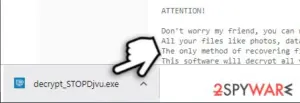
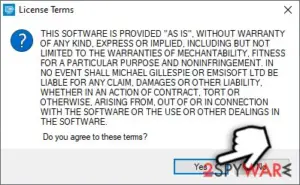
- Agree to License Terms.
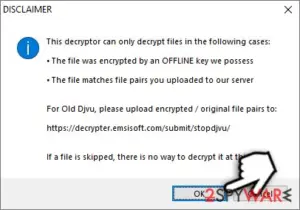
- Click OK when Disclaimer window shows up.
- The Decryptor should automatically populate the encrypted file folders, although you can add them manually as well by pressing Add folder.
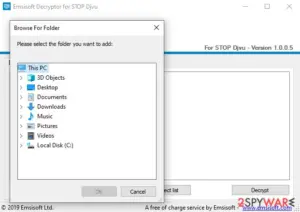
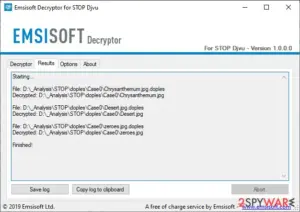
- The tool will run for some time and report whether your files can be decrypted.


From here, there are three outcomes that are available:
- “Decrypted!” will be shown under files that were decrypted successfully – they are now usable again.
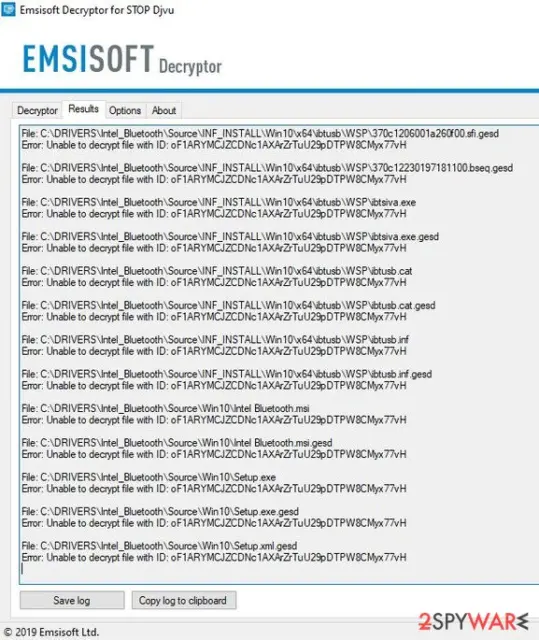
- “Error: Unable to decrypt file with ID:” – this means that the offline keys for this version of Djvu has not been recovered yet (should try later).
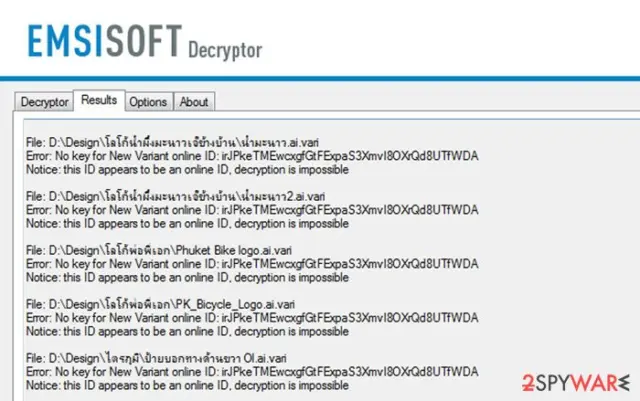
- “This ID appears to be an online ID, decryption is impossible” – as description explains, decryption is not possible with the decryptor.


Mmpa ransomware virus termination and file restoring tips
The file virus – a threat that most likely got dropped on your machine when you downloaded a pirated program, crack of the licensed version software, game cheat. Torrent sites and other services like this are unsafe because criminals take advantage of such user behavior and plant malware.
It becomes difficult to remove Mmpa ransomware when it manages to plant other background processes, release trojans, or malware that records data. Decryption options are limited, so rely on SpyHunterCombo Cleaner or MalwarebytesMalwarebytes and clear the infection yourself. Then you can search for additional help in the file restoring process.
Mmpa ransomware removal is not the same as file recovery. Anti-malware tools only clear intruders and cyber threats, but virus damage and other issues remain there. When you are sure that the virus got eliminated, you can enter the data backup device or find copies of files in the cloud. Of course, do not forget about virus damage and issues that can get fixed with FortectIntego full system check.
Did this guide help?
Be the first to comment