

21btc ransomware – a file-locking cyberthreat that appends a complex triple extension to encrypted data
21btc ransomware is a cyberthreat to Windows computers that encrypts files on an infected device and then tries to extort cryptocurrency for a decryption tool. This cryptovirus belongs to one of the most prevalent file-locking viruses families – Dharma ransomware.
While encrypting data, 21btc virus appends an intricate three-part extension that looks like this – appointed unique user ID, criminals' contact email address in brackets [21btc@cock.li], and .21btc extension. All personal files are rendered useless until decrypted.
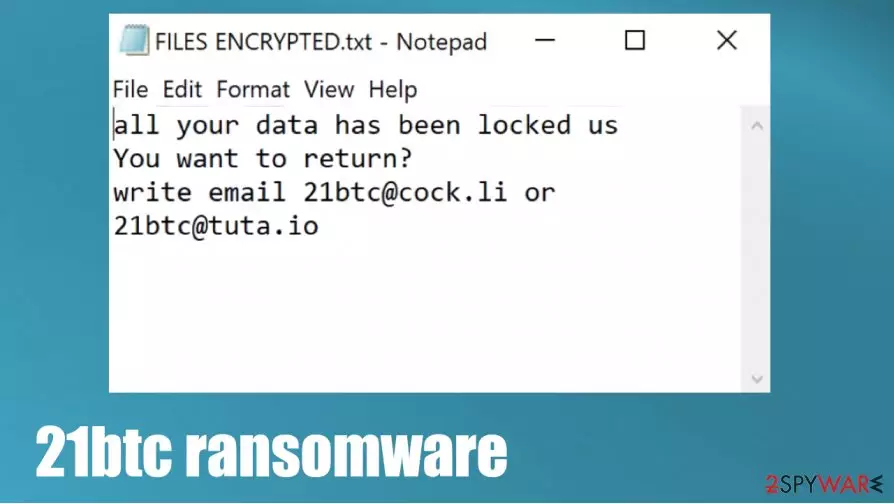
As all cryptoviruses from this lineage, when .21btc file virus is finished with file locking, it creates two kinds of ransom notes – a pop-up window and loads of text files named FILES ENCRYPTED.txt. These messages contain instructions and threats to the victims.
| name | 21btc ransomware |
|---|---|
| type | Ransomware |
| Family | Dharma ransomware |
| ransom note | FILES ENCRYPTED.txt and a pop-up window |
| Appointed file extension | victim ID.[21btc@cock.li].21btc |
| criminal contact details | 21btc@cock.li and 21btc@tuta.io |
| Virus removal | Cyber infections should be removed with reliable anti-malware software that would eliminate them correctly |
| System fix | System repair tools such as the FortectIntego app should be used to undo any damage that the 21btc ransomware virus might cause to system files and settings |
As we've mentioned before, this virus belongs to the Dharma ransomware family, which releases new versions practically every week. Here's a list of a few of the latest variants from this descent:
Ransom notes from this family's ransomware are almost identical. The text files contain mainly two email addresses to contact the criminals – 21btc@cock.li and 21btc@tuta.io. The pop-up window contains the same contact info and some threats to the victims, not to try to rename or decrypt the locked files with any third-party software as that could lead to permanent data loss.
A short message from the FILES ENCRYPTED.txt ransom note:
all your data has been locked us
You want to return?
write email 21btc@cock.li or 21btc@tuta.io
A bit longer note from the creators of 21btc virus in the pop-up window:
YOUR FILES ARE ENCRYPTED
Don't worry,you can return all your files!
If you want to restore them, follow this link:email 21btc@cock.li YOUR ID –
If you have not been answered via the link within 12 hours, write to us by e-mail:21btc@tuta.io
Attention!
Do not rename encrypted files.
Do not try to decrypt your data using third party software, it may cause permanent data loss.
Decryption of your files with the help of third parties may cause increased price (they add their fee to our) or you can become a victim of a scam.
Victims of cyberattacks should never pay the ransom to the cybercriminals for numerous reasons. First of all, the promised 21btc ransomware decryption key could never be delivered, or the tool could be not operational, as the criminals can never be trusted. Second, the forwarded payment motivates the hackers to expand their operations.

Third, the ransom money could be used to improve ransomware distribution methods. And last but not least, the ransom payments could finance the research of new, more sophisticated malware that would be more stealthy, more invasive, and more hazardous.
Victims shouldn't think for a second to contact the criminals or, even worse – meet the extortion demands. Instead, remove 21btc ransomware from all infected devices with trustworthy anti-malware software like SpyHunterCombo Cleaner or MalwarebytesMalwarebytes that would do it automatically.
Once 21btc ransomware removal is finished, users should perform a system tune-up. Experts[1] recommend scanning the whole system with a powerful system repair tool such as the FortectIntego to fix any system issues that the file-locking computer threat might have caused.
Learn how to recognize phishing emails to evade one of the most common ransomware spreading techniques
Ransomware can be distributed in many ways, such as remote desktop protocol (RDP) attacks,[2] drive-by downloads, file-sharing platforms, and so on. But our research shows that one of the most common ways cyber criminals use to infect victims' computers with ransomware is phishing emails.

These emails can be carefully and thoroughly constructed to trick their recipients into believing that they're sent from legitimate companies, institutions, or people. But we're here to help, so we've compiled a list of irregularities that could identify a phishing email. If you spot any of these indications then, please don't open any links or download any attachments:
- If you're addressed generally, without your full name
- If you spot grammatical mistakes
- If you detect a bit different companies logos or any other inconsistencies
- If the sender is forcing you to visit their site
- If the sender is pushing you to download some unsolicited attachment
- If the sender is asking for personal information
Tutorial on 21btc virus removal and a quick system fix
There are many types of malware,[3] but all of it should be dealt with accordingly – eliminated with the help of professional anti-malware software like SpyHunterCombo Cleaner or MalwarebytesMalwarebytes. A reliable anti-virus tool is a must these days because cyberthreats are lurking hidden in many places around the world wide web.
Before 21btc ransomware removal, victims should copy all their encrypted files to removable, offline storage. That is if you didn't keep backups. At the moment, there's no decryption tool available, but law enforcement and private companies are always working on that.
After you remove 21btc ransomware, you should consider performing system repair with powerful system tune-up tools like the FortectIntego app or similar to restore any possible system irregularities that the cryptovirus caused to help it thrive in the infected device.
Did this guide help?
Be the first to comment