

Critical Firefox Update is a browser-based scan that can be used to spread malware around
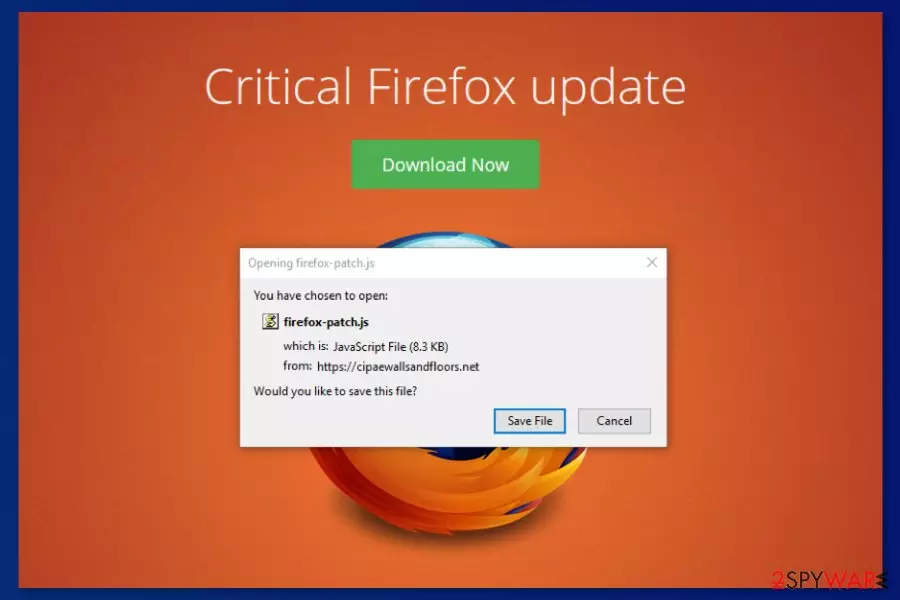
Critical Firefox Update is a scam, similar to Urgent Firefox Update, which is a fake alert that typically pop-ups on the screen when users are visiting adult-themed websites. The fake update is delivered by the compromised Traffic Junky ads that distribute the hazardous Kovter.C Trojan. This virus is one of the main components of the huge malvertising campaign created by the KovCoreG group. Criminals compromised a Traffic Junky ad network that places ads on the Pornhub website. According to the Proofpoint research,[1] the campaign may have been actively working for years. The whole malvertising campaign is also known as the Firefox virus which is aimed at Firefox, Chrome, Explorer, and Microsoft Edge web browsers. While Mozilla Firefox users have been interrupted by the Critical Firefox Update virus, Chrome users have been dealing with Critical Chrome Update and Adobe Flash Player’s update.[2]
| Name | Critical Firefox Update |
|---|---|
| Type | Malware/scam/adware/fake alert |
| Family | Firefox virus |
| USED TO Spread | Kovter.C.Trojan |
| Similar scams | |
| Symptoms | Delivers fake alerts about needed software, redirected to fake update sites |
| Distribution | Deceptive ads, software bundles |
| Main danger | Associated with a data-collecting trojan, installs dubious software |
| Elimination | Use anti-malware tools to find out if there is any virus and remove it |
| Recovery | try the tool with the system scan functions like FortectIntego to find any serious virus damage and fix it |
The fake alert reporting about the needed update for Firefox has been bothering millions of computer users in the United Kingdom,[3] the United States, Canada, and Australia. Victims of the Critical Firefox Update were redirected to a fake update website as soon they visited the adult-themed website.
Later on, the fake Firefox update website includes an active download button that drops firefox-patch.js file which has nothing in common with updating the browser. This javascript file belongs to the Kovter trojan and executes it on the system. This virus might also inject malicious code into various Windows OS processes, alter Registry and execute PowerShell commands.
The malicious program might also let cybercriminals launch click-fraud activities or install other malicious programs on the device. Furthermore, if Critical Firefox Update pop-up brings the Trojan horse[4] to your computer system, the malware will supposedly give remote access to the developers and allow the crook to carry out malware-laden activities, inject infected executables, and other malware forms.

Even though this malvertising campaign has stopped, users are advised to stay vigilant and avoid downloading fake updates. Bad actors are discovering more and more ways how to trick users via fake updates and this type of activity does not seem to stop in the nearest future. However, if you suspect that you may have installed Critical Firefox Update, you have to run a full system scan with SpyHunterCombo Cleaner, MalwarebytesMalwarebytes, or another security software to see if there is any malware on the system.
Some trojan-related files can be detected by your antivirus, so you should remove the infection with the anti-malware of your choice. This method of virus elimination also improves the performance of your device since it scans the system thoroughly. Be aware that if you do not get rid of the cyber threat ASAP, you might have to face severe system damage, high CPU work, and other losses that we have already mentioned (money/data theft).[5]
Automatic Critical Firefox Update removal is necessary because you need to wipe out all malicious components from the system, including the Kovter.C trojan which might be responsible for stealing sensitive information or installing other malware on the device. Theft of personal data and various banking details might relate to monetary losses or criminals might decide to sell the collected information about you on the dark web.

Furthermore, Critical Firefox Update has a very similar version, known as Urgent Firefox Update. This suspicious message is almost exactly the same as the previous one. It claims that Firefox needs to be updated urgently and displays a small window with the same firefox-patch file that is urged to be saved on the machine.
Additionally, Urgent Firefox Update window announces that such information is coming from faedijapanesepod101.net, eehacitysocialising.net, or similar rogue websites. Note that, no reliable updates or warning messaged will be provided to you via such unrecognizable sources, so you should close the fake update window before hackers manage to trick you and inject malicious software in your computer system.
Misleading, deceptive, promotional content can lead to issues with virus installations
Various malware spreads in the form of a pop-up that pretends to be a legit browser’s update. The trojan can be installed on the system as soon as a person clicks the “Download” button and lets the malicious Javascript file is downloaded. Therefore, users are advised to be careful with update alerts. Before agreeing to install any content from the web, you have to make sure that it’s actually safe.
Even though this malvertising campaign is already stopped, similar cyber threats can be installed on your system this way. While browsing the internet, you might notice various software promoting ads or update alerts which might also be capable of spreading malicious programs. Keep in mind that legit software updates do not pop up in the browser’s new tab. Usually, they arrive in the form of a program window.
However, you have always to check available updates on the publisher’s website to avoid fatal mistakes. Remember to get your software from reputable sources so you can avoid getting additional programs or tools that might affect the performance or security of your device. Additionally, make sure that you perform all recommended updates, otherwise, your programs might start crashing and become vulnerable to infections.

Delete the program that triggers scammy messages to fight the trojan and other threats
If you have downloaded a malicious file offered by the scam, you have to run a full system scan with reputable anti-malware software to remove Critical Firefox Update virus and Kovter malware from the device. We highly recommend scanning the system with your preferred security tool. You can use FortectIntego or SpyHunterCombo Cleaner, MalwarebytesMalwarebytes for the system repair and additional double-checking because there is a chance that the trojan horse caused secret system changes on your computer.
It’s important to complete the virus elimination task immediately because the trojan might steal sensitive and banking-related information. If you are not trusting your IT skills try automatic Critical Firefox Update removal. However, you can also follow the instructions below. They will show you how to disable the virus first. It is important to stop malicious activities from being continued, otherwise, you will possibly encounter difficulties during the cyber threat elimination process.
Did this guide help?
Be the first to comment