

Wallet ransomware is a crypto-virus that can be decrypted for free
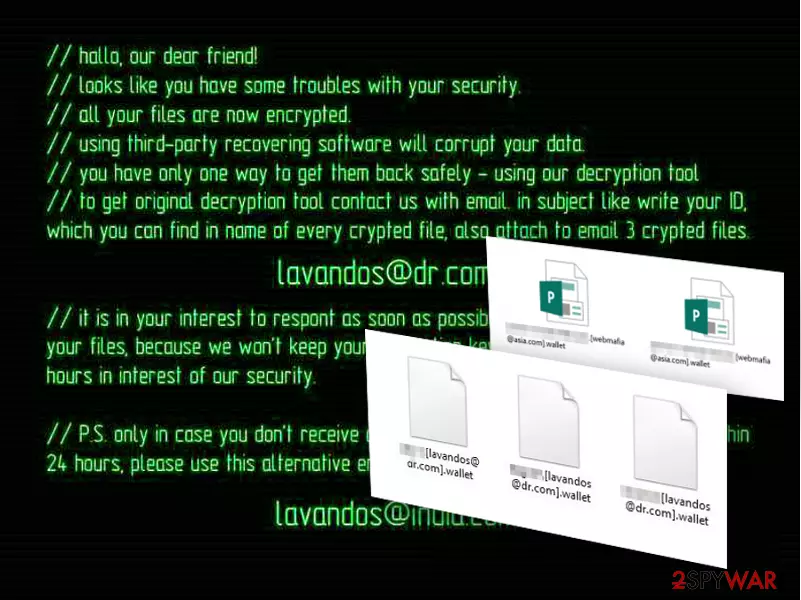
Wallet virus is among all the other ransomware infections which lock up files and demand a ransom to be paid for their release. This file-encrypting[1] cyberthreat belongs to the group of Dharma and Crysis ransomware. It uses AES and RSA[2] cryptography and appends either .wallet or .wallet.lock extension to targeted data. Fortunately, victims can restore their files using free decryption software. If you are dealing with this virus, note that not all locked files can be decrypted. Developers of BTCWare decided to use the same extension in December 2017.
| Summary | |
| Name | .Wallet ransomware |
|---|---|
| Type | Crypto-virus |
| Connections | Dharma and Crysis ransomware |
| Cipher used | AES and RSA |
| Extension | .wallet, .wallet.lock |
| Decryptable | Yes |
| Distribution | Spam emails, unprotected RDP, malicious links, and sites, etc. |
| Elimination | Employ anti-malware software such as SpyHunterCombo Cleaner |
| System fix | After ransomware is eliminated, use FortectIntego to fix virus damage automatically |
Once inside the system, the virus initiates changes in the computer's registry and adds numerous processes which disrupt the whole system. Additionally, the ransomware starts encrypting the victim's files and then drops the ransom note asking to pay from $500 to $1500 as a ransom. Besides, the virus changes the desktop image with a ransom note presenting file recovery instructions. The full ransom note reads the following:
All your files have been encrypted!
All your files have been encrypted due to a security problem with your PC. If you want to restore them, write us to the e-mail
You have to pay for decryption in Bitcoins. The price depends on how fast you write to us. After payment we will send you the decryption tool that will decrypt all your files.
Free decryption as guarantee
Before paying you can send us up to 3 files for free decryption. The total size of files must be less than 1Mb (non archived), and files should not contain valuable information. (databases,backups, large excel sheets, etc.)
How to obtain Bitcoins
The easiest way to buy bitcoins is LocalBitcoins site. You have to register, click 'Buy bitcoins', and select the seller by payment method and price.
Also you can find other places to buy Bitcoins and beginners guide here:
Attention!
Do not rename encrypted files.
Do not try to decrypt your data using third party software, it may cause permanent data loss.
Decryption of your files with the help of third parties may cause increased price (they add their fee to our) or you can become a victim of a scam.
Another type of the ransom note states:
“//hallo, our dear friend!
//looks like you have some troubles with your security.
//all your files are now encrypted.
//using third-party recovering software will corrupt your data.
//you have only one way to get them back safely – using our decryption tool.
//to get original decryption tool contact us with email. in subject like write your ID, which you can find in name of every crypted file, also attach to email 3 crypted files.
lavandos@dr.com
//it is in your interest to respond as soon as possible to ensure the restoration of your files, because we won’t keep your decryption keys at our servers more than 72 hours in interest of our security.
//P.S. only in case you don’t receive a response from the first email address within 24 hours, please use this alternative email address.
amagnus@india.com
Because of the clumsy syntactic constructions and spelling mistakes, it becomes obvious that the hackers behind the virus are non-native English speakers[3]. Nevertheless, their targets are users who speak the language and can understand the situation.
Note that hackers standing behind Crysis and Dharma ransomware families are known for releasing decryption keys for old variants of the malware, especially when they start using a new file extension to distort users’ data. Thus, there’s no surprise that 198 master decryption keys were published[4] as soon as the ransomware family started using .onion file extension, which is known as a previous version of the Crysis.
However, victims can restore files with the help of a free decryptor created by Avast, Eset or TrendMicro. However, before trying to decrypt the ransomware, you should remove Wallet ransomware from the device using SpyHunterCombo Cleaner or another malware elimination program. Also, using FortectIntego will ensure that malware damage done to Windows system files is reverted.
BTCWare uses the same extension
Security researchers reported that a new version of BTCWare ransomware started using .[paydayz@cock.li]-id-11B0.wallet file extension to encrypt files on the targeted computer. However, the free Avast or similar decryptor won’t help to restore files corrupted by this virus.
It’s not the first time when authors of the malware use this file extension too. GlobeImposter and CryptoMix viruses were also using the same extension. However, these ransomware families use different filename patterns.
However, if you ever find this extension appended to your files, you have to check which malware family attacked your device by checking provided contact email address and reading provided ransom note.

Ransomware operation
Once this virus is deployed on the system, it activates its malicious executable, which then initiates a system scan of the entire computer. During the scan, the virus searches for specific file extensions that are mainly related to the user’s documents, media files, archives, etc.[5]
When located, these files are encrypted right away and marked with [email address].wallet or [email address].wallet.lock file extensions. Usually, they feature extortionists' email addresses that should be used to contact them. They are known for using 358 different email addresses, including:
- Mmk.scorpion@aol.com,
- orlegionfromheaven@india.com,
- destroed_total@aol.com,
- stopper@india.com,
- bitcoin143@india.com,
- mkgoro@india.com,
- mkliukang@india.com,
- lavandos@dr.com.
Further instructions on data recovery are given only after contacting the criminals directly. We can presume that criminals demand the victims to pay a ransom amount in Bitcoins and make the transaction via the anonymous Tor network.
However, doing it is not needed because the virus is decryptable, and you can get back access to your files for free after the ransomware removal. However, once your files are decrypted, you should also make backups in order to protect your data from other crypto-malware that might hijack your device anytime.
Malware versions listed
Joker_lucker@aol.com ransomware is one of many versions of this ransomware virus that relies on AES and RSA encryption algorithms. These algorithms have been used to encrypt word, pdf, excel, and similar files and make them inaccessible. You can separate files encrypted by Joker_lucker@aol.com virus or other ransomware by looking at their extensions.
This email address has been used by hackers to mark the target files and warn the victims that they won't be capable of using them. If infected, you can restore your files from backup. According to hackers, you should buy a special decryption key sent to them via Command & Control servers as soon as they finish the encryption process. Please, do NOT act according to hackers' needs as they can leave you with nothing!
Mk.scorpion@aol.com ransomware virus can encrypt most of your files that are saved on your computer. It acts just like its previous versions that start asking for the ransom right after finishing the encryption process. Typically, this ransomware leaves the .[Mk.scorpion@aol.com].wallet file extension to the corrupted files and also drops README.txt file, which is supposed to inform the victim about files' recovery.
However, the recovery steps given by Mk.scorpion@aol.com ransomware are not as detailed as the ones provided by other ransomware authors. However, you should not consider the idea of making a payment to cybercriminals.

Developers rely on malicious spam emails to spread ransomware
Just like the original virus version, Wallet ransomware uses phishing [6] to enter computers. Mostly, scammers rely on spam campaigns to deliver infected files to the potential victims directly into their inboxes. All that the user has to do is download a file attached to a convincing-looking email, and the virus is let loose.
Today, there are still numerous computer users who fall into such traps. It is hard to blame them because hackers always apply advanced social engineering skills to make victims believe they must download supposed plane tickets, invoices, or billing documents.
This only teaches us that we should not take every email for granted, even if it is received from some reputable organization or government institution. You should always check your mail before opening it and prevent ransomware from encrypting your files.
Wallet ransomware removal instructions
Ransomware is one of the leading viruses considering its complexity and impact on the system. Having this in mind, it would be naïve to expect easy ransomware removal either. Of course, there are tools using which ransomware elimination may be incomparably less difficult.
A thorough system scan with professional anti-malware utilities (e.g. SpyHunterCombo Cleaner or MalwarebytesMalwarebytes) will not take you longer than10 minutes, and after it is done, you will be able to use your computer normally again. Don’t worry if you will fail to remove Wallet virus in the first go. Nobody said the virus wouldn’t fight back when you try to exterminate it. Just go to the end of the article, where we provide decontamination instructions and follow them carefully.
Did this guide help?
Be the first to comment