
Globe Imposter ransomware virus: what it is and how to remove it
Globe Imposter is a crypto-ransomware that mimics an infamous Globe ransomware. Since it features similar characteristics, it is often referred to as Fake Globe.
Facts checked October 7, 2026. Removal steps tested on Windows 11 (26H2) and checked against Microsoft's and the browser makers' current documentation. Sections marked as our earlier report are the original text: they describe the threat as it was then and have not been reviewed since. The 2026 status, the removal steps and the questions are current.
Automatic
Get a free scan and check if your PC is infected.
Fortect finds malware, unwanted programs and the Windows damage they leave behind, and repairs it in one pass.
Make sure nothing will rename more files to .keepcalm: an automatic scan checks the PC first.
Do it yourself · free Remove Globe Imposter ransomware virus yourself 6 steps, about 18 minutes, no software needed.
Start the steps
Globe Imposter ransomware virus: summary
| Detection names | No Microsoft detection name is known |
|---|---|
| Ransom note | Read___ME.html; the text is quoted in full below |
| Contact | emilysupp@outlook.com, supp7@india.com, byd@india.com |
| Encrypted file extension | .keepcalm |
| Decryptor | No free decryptor is known for this variant; check No More Ransom (nomoreransom.org) for updates |
| Distribution | Not recorded in the old report |
| Removal | Scan the PC with security software to find and remove the malware and anything installed with it. Fortect scans Windows for malware and repairs the system files and settings it damaged. Remove it nowTo use the full-featured product, you have to purchase a license for Fortect. The scan is free. |
Show 11 more facts
| Damage | Not recorded in the old report |
|---|---|
| Name | Globe Imposter ransomware virus |
| Type | File-encrypting ransomware |
| Symptoms | Files renamed with a new extension, a ransom note left in folders and a Windows Security "Threats found" notification |
| Evidence | 17 write-ups by security sites; no sample analysed yet |
| Encrypted files | .keepcalm |
| Attacker contacts | emilysupp@outlook.com |
| Free decryptor | No free decryptor is known (checked 7 October 2026) |
| First seen | 15 May 2020 |
| Microsoft Defender name | Ransom:Win32/Ergop.A |
| Facts checked | 7 October 2026 |
- File extension:
.keepcalm - Note file:
Read___ME.html - Contact:
emilysupp@outlook.com
From our report of May 2020 · not reviewed since
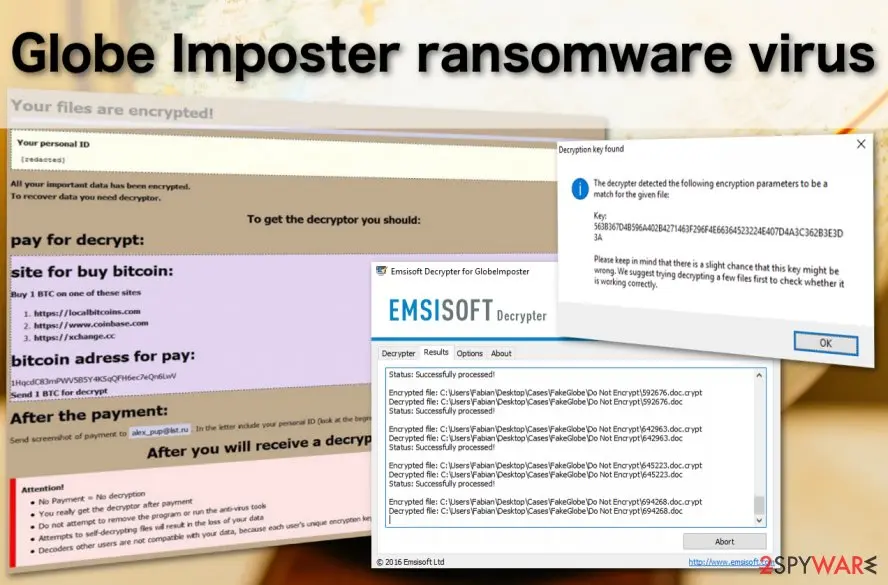
GlobeImposter is a ransomware virus that has been updated over 100 times: the latest version spotted in spring 2020
Globe Imposter is a crypto-ransomware that mimics an infamous Globe ransomware.
Since it features similar characteristics, it is often referred to as Fake Globe. It has been infecting multiple machines since 2017 and keeps coming back with new versions. Since the release, the ransomware has been updated more than a hundred times, each version switching to a different file extension.
The latest version of the GlobeImposter before EMSISOFT released its decryptor showed up in early June 2018 and is dubbed as .emilysupp file extension virus. Since then, the virus went through a period of silence and returned in May 2020 with a version named C4H ransomware. The latter does not differ much from is ancestors, except that it uses a .C4H file extension and has no decryption software available.
Since its appearance, GlobeImposter has been appending new file extensions using AES / RSA cipher, and and been providing new email address (currently, victims are urged to contact the criminals via emilysupp@outlook.com or supp7@india.com). In response to the number of new versions flooding the cyberspace, EMSISOFT specialists created a free decryption tool. You can find it at the end of the article. However, not all versions are decryptable.
Currently, malware spreads using a misleading email attachment which is called "Emailing: IMG_20171221_". Once it infects the system, it encrypts files by appending one of the numerous different file extensions, such as :
The purpose of the GlobeImposter is to encrypt files and demand to pay the ransom by using scare tactics. As soon as it finishes data encryption, malware delivers a ransom note where extortionists sell the decryption key for the victims. The instructions on how to get back access to the files might be provided in one of these files:
Different versions of the Fake Globe include a different email or BitMessage addresses in order to communicate with victims. Criminals asked victims to contact them using these email addresses. However, the list might expand because new variants keep emerging:
Fake Globe virus can encrypt files just as successfully as any other ransomware that has been developed from scratch. Considering that there are numerous variants of this ransomware, we can only say that certain viruses tend to use RSA and AES ciphers which most ransomware use in their attacks . While some versions GlobeImposter can be decrypted, the rest remain extremely dangerous.
The security experts from Emsisoft have succeeded in creating a decryption tool the ransomware – a free Globe Imposter decrypter which helps ransomware victims recover their files and restore order on their computers . At the moment of writing, this rescue tool has already been downloaded over 11844 times which only proves that the parasite is spreading rapidly and everyone should take action to protect their devices against it.
We suggest scanning the system with or to eradicate the infection.
- Read___ME.html;
- HOW_OPEN_FILES.hta;
- how_to_back_files.html;
- RECOVER-FILES.html;
- !back_files!.html;
- !free_files!.html;
- #HOW_DECRYPT_FILES#.html;
- here_your_files!.html)
- !SOS!.html
- Note Filename: support.html;
- READ_IT;
- #HOW_DECRYPT_ALL#.html;
- Read_ME.txt;
- Read_Me.html;
- Decryption INFO.html;
- Dream_dealer@aol.com
- Dream_dealer@india.com
- write_me_[btc2017@india.com]
- 511_made@cyber-wizard.com
- btc.me@india.com
- chines34@protonmail.ch
- decryptmyfiles@inbox.ru
- garryweber@protonmail.ch
- keepcalmpls@india.com
- happydaayz@aol.com
- strongman@india.com
- support24@india.com
- support24_02@india.com
- oceannew_vb@protonmail.com
- asnaeb7@india.com
- asnaeb7@yahoo.com
- i-absolutus@bigmir.net
- laborotoria@protonmail.ch
- filesopen@yahoo.com
- openingfill@hotmail.com
- crypt@troysecure.me
- troysecure@yandex.by
- troysecure@yahoo.com
- _master@india.com
- Bill_Clinton@derpymail.org
- saruman@india.com
- Donald_Trump@derpymail.org
- happydaayz@aol.com
- crazyfoot_granny@aol.com
- crazyfoot_granny@india.com;
- greenpeace_28@india.com;
- greenpeace_wtf@aol.com;
- .colin_farel@aol.com;
- bigbig_booty@aol.com;
- sexy_chief@aol.com;
- sexy_chief11@aol.com;
- sexy_chief18@tindia.com;
- sezy_chief18@india.com;
- lxgivy1@india.com;
- lxgivy17@yahoo.com;
- fileredeemer@protonmail.com;
- fileredeemer@tuta.io;
- emilysupp@outlook.com;
- supp7@india.com;
- chinarecoverycompany@cock.li;
- chinarecoverycompany@airmail.cc;
From our report of May 2020 · not reviewed since
More from our earlier report on Globe Imposter ransomware virus
- Each appends the different file extension
- .emilysupp - discovered in May 2018.
- drops Read_Me.html note and urges users to contact hackers via emilysupp@outlook.com or supp7@india.com .C4H file extension virus - revealed in May 2020.
- It generates a ransom note Decryption INFO.html and demands victims to contact them via chinarecoverycompany@cock.li or chinarecoverycompany@airmail.cc email.
- For that, an official EMSISOFT GlobeImposter decryptor can be used.
- Do not attempt manual recovery as it may lead to a permanent file loss.
- Upon GlobeImposter removal, it's recommended to scan PC with the utility to recover corrupted Registry Keys, processes, and system files.
- .DREAM, ..doc, ..txt, .0402, .BONUM, .ACTUM, .JEEP, .GRAFF, .trump, .rumblegoodboy, .goro, .au1crypt, .s1crypt, .nCrypt, .hNcrypt, .legally, .keepcalm, .plin, .fix, .515, .crypt, .paycyka, .pizdec, .wallet, .vdulm, .2cXpCihgsVxB3, .medal, .3ncrypt3d .[byd@india.com]SON, .troy, .Virginprotection, .BRT92, .725, .ocean, .rose, .GOTHAM, .HAPP, .write_me_[btc2017@india.com], .VAPE, .726, .490, .coded, .skunk, .492, .astra, .apk, .doc, .4035, .clinTON, .D2550A49BF52DFC23F2C013C5, .zuzya, .LEGO, .UNLIS, .GRANNY, .911,.reaGAN, .YAYA .needkeys, .[d7516@ya.ru], .foSTE, .490, .ILLNEST, .SKUNK, .nWcrypt, .f41o1, .panda, .BIG1, .sexy, .sexy2, .sexy3, .kimchenyn, .colin_farrel@aol.com, .WORK, .crypted_uridzu@aaathats3as_com, .bensmit@tutanota.com, .TRUE, .omnoomnoomf@aol.com, .[proof3200@tutanota.com], .btc, .[kps228@yandex.com], .mixfight@india.com, .black, .[program3200@tutanota.com], .rrr, .{lxgiwyl@india.com}.AK47, .LIN, .apk, .decoder, .[i-absolutus@bigmir.net].rose, .fuck, .restorefile, .CHAK, .Chartogy, .POHU, .crypt_fereangos@airmail_cc, .jeepdayz@aol.com, .crypted_monkserenen@tvstar_com, .crypt_sorayaclarkyo@mail_com, .STN, .VYA, .crypt_damarles@airmail_cc, .pliNGY, .ñ1crypt, .suddentax, .Nutella, .gif., .emilysupp, .C4H
- For data recovery needs decryptor.
- How to buy decryptor: 1.
- Open this link In the "Tor Browser" hxxp://djfl3vltmo36vure.onion/sdlskglkehhr Note!
- This link is available via "Tor Browser" only.
How Globe Imposter ransomware virus behaves
From our report of May 2020 · not reviewed since
Necurs botnet was used by hackers to contaminate as many PCs as possible
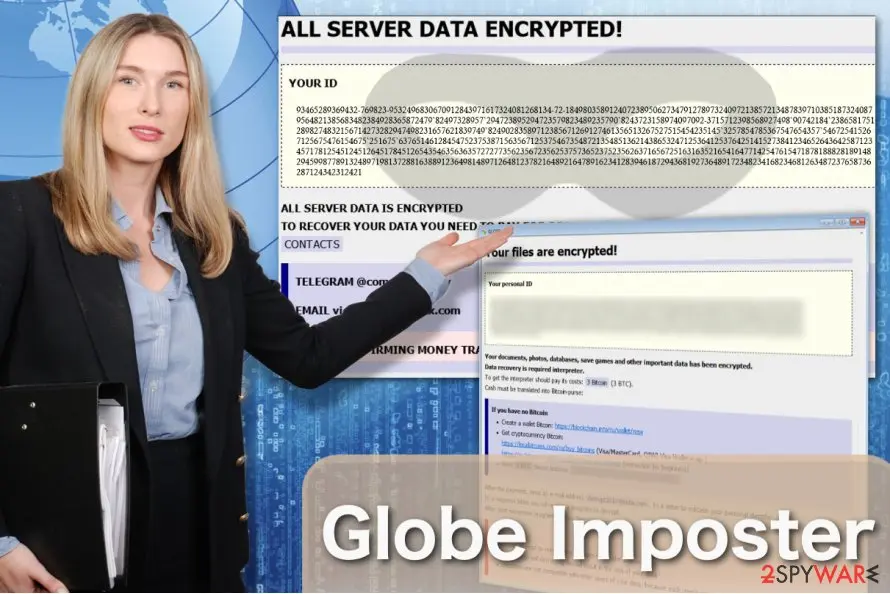
Criminals have significantly increased the rate of infections with GlobeImposter since they used Necurs botnet to create a massive malspam campaign at the end of 2017.
The spam emails were distributing this file-encrypting virus in the form of 7zip attachments. According to the analysis, they contained VBS files that install the ransomware once opened.
Researchers detected two variants of malicious emails:
This version of malware appends .doc file extension to targeted file types on the affected computer. Following data encryption, it drops a ransom note in HTML file where victims are offered to buy a decryption software for $1000 in Bitcoins in two days. After the deadline, the size of the ransom will increase.
- The first campaign pushes emails with a subject line that includes the word "Emailing" and a random string of numbers, for instance, "Emailing - 10006004318". The body of the message informs about the "strictly confidential" email.
- The second campaign spreads emails with a subject line "FL- [day.month.year.]. However, these emails are empty and do not contain any text. However, it includes a 7zip attachment that matches the name of the subject line.
From our report of May 2020 · not reviewed since
GlobeImposter has multiple variants
GlobeImposter 2.0 virus can be recognized by the .FIX extension which is appended at the end of the filenames following data encryption.
Since this crypto-malware employs a complex encryption technique, it is impossible to recover corrupted information and this variant of Globe Imposter is undecryptable.
However, its victims should still follow the removal guidelines to get rid of GlobeImposter 2.0 and fix their computers. Note that regular computer users are not advised to perform the elimination without the help of an IT technician or professional anti-malware software.
Since you cannot retrieve files encrypted by GlobeImposter 2.0, it is always a good idea to keep backups of your most important files somewhere, where the malicious ransomware script could not reach and encrypt them. This way, you will always have the backup recovery plan in case your data gets corrupted.
GlobeImposter German version. To reach more victims, ransomware developers often adapt their malicious creations to target specific countries and speak to the users in their native language.
The German ransomware version is a perfect example of such a strategy: the ransom note with explanations on how to recover the encrypted files is presented in German. The criminals demand 0.5 Bitcoin for the data recovery key. After the money is transferred, the victims are required to send a screenshot of the transaction to an indicated email address - decryptmyfiles@inbox.ru.
But even the completion of all the criminal's demands does not guarantee files will be recovered. The extortionists are unpredictable and can simply vanish with the money.
KeepCalm virus. The virus encrypts and appends them with .keepcalm extensions which are where this virus gets its name from. The parasite runs a strong encryption script to render the victim's files unreadable and then offers to decrypt the files if only the victim is willing to pay a considerable amount of money.
The extortionists give a more detailed description of data recovery in the ransom note called HOW_TO_BACK_FILES.html. Essentially, the victims must contact the criminals via keepcalmpls@india.com email address. The ransom payment snapshot along with the personal ID must be sent to this email to receive the decryption tool. Unfortunately, this is not what normally happens.
On the opposite the criminals tend to vanish as soon as they have the money in their pockets, leaving victims stranded with a bunch of undecryptable information. In such a case, all you can do is remove KeepCalm from the infected device and to bypass the encryption in some other, safer ways.
Wallet GlobeImposter virus. At the beginning of May 2017, a version of the fake Globe virus was detected. This time, it uses .wallet file extensions in order to spoof Dharma ransomware, which is known to be using .wallet file extension to mark encrypted files.
The ransomware drops how_to_back_files.html ransom note on the desktop, which contains the victim's ID and criminals' BitMessage address in case the victim wants to reach out to them - BM-2cXpCihgsVxB31uLjALsCzAwt5xyxr467U[@]bitmessage.ch.
The virus deletes Volume Shadow Copies to prevent the victim from restoring files without paying the ransom.
.s1crypt file extension virus. This parasite serves as another variation of the ransomware. It presents the demands in how_to_back_files.html ransom note. It also informs users that all their documents and data have been encrypted.
In order to decrypt files, victims should purchase the specific decoder which supposedly costs 2 bitcoins. Needless to say that the tool does not boost the chances of data recovery.
In addition, the developers also provide three additional links for users who are not aware of how to purchase bitcoins. In case of technical difficulties, they may contact the perpetrator via laboratoria@protonmail.ch.
The ending of the email may suggest that the cybercriminal may have registered domain in the territory of Switzerland. Yet again, it may be only a diversion. Antivirus tools may identify the malware as Trojan.Generic.DB75052.
.au1crypt file extension virus. The malware functions as the counterpart of the former version. Its GUI also differs. The ID seems to be the result of AES and RSA cryptography.
The ransom note, how_to_back_files.html, explains that users' files have been encrypted due to "a security problem with your PC."
Unlike the former version, which indicated the bitcoin address, this version instructs users to contact cyber criminals via summerteam@tuta.io and summerteam@india.com. Though it seems that the malware is rather a "summer entertainment" for the hackers, members of the virtual community should be vigilant.
At the moment, its Trojan is identifiable as Variant.Adware.Graftor.lXzx.
.goro file extension virus. This virus specifically targets victims via weak Remote Desktop Protocols (RDP). Since the version is still brand new, there is no decrypter released yet. The developers also used a similar .html ransom note for instructions.
You may terminate the goro.exe task on your Task Manager to interrupt the malware process. This version is also associated with the Wallet virus version of the Dharma ransomware family.
At the moment, this variation is detectable as Trojan /Win32.Purgen, Arcabit Trojan.Ransom.GlobeImposter.1 by majority security applications. Mk.goro@aol.com email address is another indicator of this version.
.{email}.BRT92 file extension virus. This virus does what its name suggests - adds .{email}.BRT92 extensions to the encrypted files. In addition to the new extension, this Globe virus follow-up displays its ransom note via #HOW_DECRYPT_FILES#.html file.
On this html page, victims are provided with a personal ID number which is basically a code that helps perpetrators differentiate between their victims.
Hackers indicate two email addresses asnaeb7@india.com and asnaeb7@yahoo.com for communication with the victim.
.ocean file extension virus. This one of the Globe Virus versions that showed up in 2017. The virus adds .ocean extensions and drops a note called !back_files!.html to demand payment. In order to retrieve their files, victims must contact the criminals via oceannew_vb@protonmail.com email address.
The hackers claim that the price of the file decryption will depend on how quickly the victim manages to contact them. Nevertheless, collaborating with the criminals is never a good option as you might end up scammed.
A1Lock virus. A1Lock is one of the more successful versions of the GlobeImposter virus. There are several versions of this parasite and each of them appends files with different extensions. We currently know about variants that use .rose, .troy and .707 extensions.
Ransom demands are typically listed in the documents labeled How_to_back_files.html and RECOVER-FILES.html. For communication with the victims, criminals indicate the following addresses:
- i-absolutus@bigmir.net
- crypt@troysecure.me
- troysecure@yandex.by
- troysecure@yahoo.com
.Write_me_[btc2017@india.com] file extension virus. Looking at its design, this version of the Fake Globe differs from most of the virus versions. Nevertheless, it works exactly the same: encrypts files and offers to obtain a paid decoder. Victims who are willing to pay for their files must contact the criminals via btc2017@india.com email address.
The risk here is huge because the criminals are free to vanish after the victims pay for the decryptor. This way, files that the parasite marks with .Write_me_[btc2017@india.com] extensions may remain this way forever.
.725 file extension virus. This ransomware version creates RECOVER-FILES.HTML with a ransom-demanding note. The virus, just like its previous versions, encodes files to demand ransom from the victimized computer user.
The ransomware is recognized from file extensions that it adds to corrupted files - .725. Some of the spotted versions demand 0.19 Bitcoin as a ransom. So far, no 725 ransomware decryption tools were created.
.726 file extension virus. A little later after the discovery of .725 version, .726 file extension virus emerged. It is clear that GlobeImposter developers are rapidly changing the extensions they use, probably to confuse the victims and prevent them from finding help online.
The ransomware saves RECOVER-FILES-726.html as a ransom note on the victim's PC. Victims report that the virus asks for 0.37 Bitcoin in exchange for the data decryption tool.
.490 file extension virus. .490 file extension virus is considered to be a version of A1Lock (GlobeImposter) that uses .490 to mark encoded files and creates !free_files!.html as ransom note for the victim. At the moment, no decryption tools are known to be effective against this virus.
.492 file extension virus. Yet another shady GlobeImposter remake uses .492 file extensions to stamp encrypted files. The design of the ransom note remained the same, but the name of the ransom note changed - now it is called here_your_files.html.
The ransom note opens via default web browser and says that files were encrypted due to a security problem with the victim's PC. According to the note, files can be recovered, but the victim has to write to file_free@protonmail.com or koreajoin69@tutanota.com.
.crypt file extension virus. Globe Imposter Crypt ransomware virus has been spotted being distributed by BlankSlate malspam. The mail spam campaign, which was recently used to distribute BTCWare Aleta virus, now switched to this new version of GlobeImposter. The ransomware comes in an email that contains no message - just a ZIP file attachment.
The attachment is usually named in this way: EMAIL_ _[Recipient's Name].zip. This ZIP file contains another ZIP file, also named with a random set of digits. The final ZIP contains a JavaScript file dubbed with a random set of characters.
Once executed, the JS file connects to a certain domain and downloads 1.dat file, which is ransomware's executable. It immediately encrypts all files on the system, adding .crypt file extension on its way. The virus then drops !back_files!.html ransom note, which instructs the victim to mail to oceannew_vb@protonmail.com for instructions on how to decrypt files.
At the moment, none of the available ransomware decrypters can decrypt these files, so data backup is the only tool that can recover your files.
.coded file extension virus. Not surprisingly, the virus emerges with another file extension, this time - .coded. Traditionally, after changing the file extension used, the malware creator changes the contact email address as well. This CODED GlobeImposter version uses decoder_master@aol.com and decoder_master@india.com email accounts for communication with ransomware victims.
.astra file extension virus. Clearly enough, there are no exceptional features in this virus. It simply uses different file extensions to mark encrypted records, therefore it sometimes is called Astra ransomware virus.
To provide the victim with data recovery guidance, it creates and saves a message in here_your_files!.html file (known as the ransom note). No decryption tools are available at the moment of writing. The only way to restore files is to rely on a data backup.
.f41o1 file extension after completing the encryption process. What is more, this version also presents a graphic user interface – READ_IT.html. It does not indicate a specific email address but instead provides a specific .onion address for victims to proceed with data recovery.
The perpetrators also offer to purchase their Decrypter. Victims are supposed to receive further instructions within 48 hours. Let us remind you once again that even if the software will decrypt the files, it may system with spyware which might facilitate future hijack.
Interestingly, GlobeImposter developers are shifting to boost malware distribution via malspam. One of the samples function via the VBS script and hide under INV-000913.vbs or similarly named fake invoice file. Another virus edition fishes users via corrupted hosts, such as errorkpoalsf.top/(...). Furthermore, developers also added Nemucod trojan to the distribution campaign.
Decoder ransomware virus. Hackers inform that the files were encrypted due to the "Security problems" detected on the PC. They indicate decoder@keemail.me and decoder@expressmail.dk email addresses to pay and ransom and receive a decryptor for .decoder files. The ransom note is named as Instructions.txt and dropped on the desktop shortly after Decoder ransomware infiltration.
ABC ransomware virus. While developing this variant of the Globe Imposter virus crooks employed AES and RSA ciphers to perform data encryption.
Afterward, it leaves Read_IT.txt which serves as a ransom note. You should note this version is still under development. Thus, it might drop README.txt or HOW_TO_DECRYPT.txt files.
According to the research, ABC virus spreads via exploit kits, spam emails or other common distribution techniques. Victims report that they are demanded to pay from 0.3 to 0.5 BTC in return to data recovery.
.Ipcrestore file extension virus. The victims are provided with how_to_back_files.html file which has a common name of a ransom note. They are asked to make a digital currency transaction in a specific Bitcoin account to get a decryption tool for files with .Ipcrestore extension.
While this offspring of FakeGlobe is still in development, the PC users are advised to take precautionary measures and be aware of all possible extensions and ransom note names.
.suddentax file extension virus. The latest GlobeImposter ransomware variant appends .suddentax file extension to all locked files and demands to pay 2 Bitcoins for a decryptor. The victim is asked to contact extortionists as soon as possible via fileredeemer@protonmail.com or fileredeemer@tuta.io emails and send them a screenshot of the payment.
According to cybersecurity experts, this version targets business networks. It's not clear yet if the ransomware is decryptable. However, it seems that it is capable of evading detection by many AV engines. According to VirusTotal, only 31 out of 67 AV engines are capable of recognizing and immunizing it.
Update May 23, 2017. The ransomware keeps changing its attack techniques and according to the latest reports, this malicious virus is being pushed by Blank Slate malspam which was and is responsible for Cerber's distribution .
It turns out that malicious files came packed in .zip archives named with a random set of chars, for instance, 8064355.zip. When unpacked and executed, the .js or .jse file inside connects to a certain domain and downloads ransomware from it.
Criminals tend to regularly switch the domains that host ransomware, but currently known domains are newfornz[.]top, pichdollard[.]top and 37kddsserrt[.]pw.
Update August 1, 2017: New Globe Imposter malspam campaign (most likely based on the Necurs botnet) with new subject names have been spotted.
According to malware-traffic-analysis.net website which compiled this list, the zip files contain vbs files which carry the malicious payload.
Besides, new subject titles have been added to the spam campaign distributing FakeGlobe as .js file. Be careful with emails that read "Voice Message Attached, or "Scanned Image".
Update August 14, 2017. Different GlobeImposter ransomware versions emerge and disappear rapidly. In less than a week (starting from August 8th) malware developers introduced new ransomware versions that append either ..txt, .BONUM, .trump, .rumblegoodboy, .0402, .JEEP, .GRAFF, .MIXI or .ACTUM file extensions to encrypted files. As always, no outstanding improvements or updates come with these versions.
Some of the versions call the ransom note differently - for example, the 0402 virus uses !SOS!.html and the ..txt file extension virus uses Read_ME.html name for the note. So far, no decryption tools for these versions were discovered.
Update September 15, 2017. As usual, every month introduces a couple of new GlobeImposter variations. Most recent are:
- .YAYA .needkeys
- .[d7516@ya.ru]
- .foSTE
- .490
- .ILLNEST
- .SKUNK
- .nWcrypt
Though appended extensions differ, there are no crucial modifications of the malware.
The developers continue the theme of US presidents as well. One of the recent editions mark encrypted files with .reaGAN extension and present Ronald_Reagan@derpymail.org email address for contact purposes. Additionally, another version does not only add a different extension – .911 – but also displays the demands in the !SOS!.html page.
Luckily, the current versions are detectable as Ransom:Win32/Ergop.A, Trojan.Purgen.ba, Generic.Ransom.GlobeImposter.56A888, etc. However, perpetrators act more insidiously. These versions disguise under cmd.exe (a referrer to Command Prompt executable), btm1.exe, encv.exe, and similar executables which are used by legitimate apps. After the infection, the malware launches additional commands:
- ADVAPI32.dll
- KERNEL32.dll,SHLWAPI.dll,USER32.dll
- ole32.dll
Update September 20th, 2017. At the beginning of autumn 2017, GlobeImposter was noticed proliferating via massive ransomware campaign that was mostly associated with the infamous Locky ransomware.
Experts from TrendMicro have specified that the malicious domains used to download the ransomware on victim's computers serve FakeGlobe and Locky ransomware in a rotation. Therefore, it means that the compromised domain can serve Globe Imposter for several hours and then switch to pushing Locky and vice versa.
Spam campaigns delivering the malware to victims are providing malicious links in the message body, suggesting to view an invoice online. Clicking on the link downloaded a .7z file which was also attached to the email. The file inside the archive is set to connect to remote domains and download Locky or GlobeImposter virus.
According to NoVirus.uk experts , this isn't the only type of malicious emails that scammers are using to push ransomware. They are also sending thousands of emails without any information in the message body and an attached .doc file instead of an archive.
The doc file contains a macros code set to download the ransomware from a remote server. As soon as the victim closes the file, the script will activate itself via Auto Close VBA Macro.
Update November 17, 2017. A month has passed – new versions GlobeImposter virus sprung to life. Finally, the developers decided to introduce more changes rather than simply altering the name of appended extensions and email addresses.
Now they slightly changed the encryption way of the configuration. Now the encryption key is more complex. It was done supposedly to bother the decryption tool creation process. The authors also changed the ransom note – now the demands are delivered in #HOW_DECRYPT_ALL#.html .
Except for these slight modifications, no other significant changes are visible. Globe Imposter crypto-malware continue amusing themselves and IT experts with random file extensions. While some of the older file extensions are used, there are new ones.
One of them, .kimchenyn, mockingly relates to the leader of North Korea Kim Jong-un. Another extension, .panda, possibly refers to the latest version of Zeus Panda banking trojan appeared. Another Globe Imposter version refers to popular Hollywood actor – Colin Farrel – as it appends .colin_farrel@aol.com extension.
- donotreply@jennieturnerconsulting.co.uk -- Payment Receipt_72537 -- P72537.zip
- donotreply@ritson.globalnet.co.uk -- Payment 0451 -- P0451.zip
- donotreply@vintageplanters.co.uk -- Payment Receipt#039 -- P039.zip
- donotreply@bowker61.fastmail.co.uk -- Receipt 78522 -- P78522.zip
- donotreply@satorieurope.co.uk -- Receipt#6011 -- P6011.zip
- donotreply@npphotography.co.uk -- Payment-59559 -- P59559.zip
- donotreply@anytackle.co.uk -- Receipt-70724 -- P70724.zip
- donotreply@gecko-accountancy.co.uk -- Receipt#374 -- P374.zip
- donotreply@corbypress.co.uk -- Payment Receipt#03836 -- P03836.zip
- donotreply@everythingcctv.co.uk -- Payment_1479 -- P1479.zip
From our report of May 2020 · not reviewed since
The most recent versions of file-encrypting virus
.DREAM file extension virus.
Currently, experts have detected a new offspring of GlobeImposter ransomware which uses .DREAM extension after encrypting the information. Malware researchers still cannot tell whether it is possible to recover encoded files. Thus, victims are advised to try all alternative recovery methods for the best results.
Note that the criminals try to intimidate the owners of victimized computers and insist on contacting them via dream_dealer@aol.com and dream_dealer@india.com email addresses which are provided in the ransom note — how_to_back_files.html.
The fraction of the ransom-demanding message:
However, like in any other ransomware attack, we encourage you to get rid of the version of GlobeImposter and NEVER agree on paying the ransom. There is a high-risk that the criminals will leave you empty handed after the transaction or demand even more money. For that reason, check the elimination guide below.
.GRANNY file extension virus was first discovered in August, 2017. Users get infected via malicious torrent files which hold the Trojan inside. Unlike some of the latest GlobeImposter variations, the malware presents its independent interface.
Victims are instructed to contact the perpetrators via crazyfoot_granny@aol.com or crazyfoot_granny@india.com. The cyber criminals offer decryption of one file to earn users' trust.
.Trump file extension virus is another worth mentioning recently appeared sample. The malware launches a quite plain interface with an unusually long victim's identification address. Additionally, the crooks offer users to contact them via Donald_Trump@derpymail.org and happydaayz@aol.com. As in previous cases, the felons did not indicate the specific amount of money but instead encourage users to contact them directly.
{saruman7@india.com}.BRT92 file extension virus strikes again with slight modification in its email domains. Perpetrators now deliver the demands in #DECRYPT_FILES#.html file. As in other variants, the racketeers urge to purchase their decoder and offer one file decryption service for free.
Though the very extension has been exploited before, now crooks switched to saruman@india.com address. The tendency to take inspiration from fiction, pop culture or just random daily life implies that the crooks might not be an organized gang of cyber villains. However, the rate of new malware variations certainly suggests their persistence.
Other August GlobeImposter editions include variants which append .D2550A49BF52DFC23F2C013C5, .zuzya, .LEGO, .UNLIS file extensions. No significant changes in the operation peculiarities nor in the distribution methods are detected.
With the beginning of academic year, GlobeImposter malware developers bombard users again with a series of new samples. The cyber criminals do not seem to lose a sense of humor as well. One of the variations appends .clinTON file extension and indicates Bill_Clinton@derpymail.org for contact purposes.
On the 18th of October, 2017, the Rig exploit kit (RIGEK) was spotted spreading Globe Imposter version via hacked websites. that appends .4035 file extension. Following data encryption, it delivers a ransom note in READ_IT.html file were victims are asked to pay the ransom in order to get back access to their files.
Later researchers detected another version of ransomware appending .doc file extensions to the targeted files. The malicious program locks data with strong encryption cipher and provides ransom note in Read___ME.html file. This version of malware spreads via two malspam campaigns that are pushed by Necurs botnet. Malware asks to pay $1000 in two days; otherwise, the payment will double.
At the end of October, the version of the GlobeImposter has been noticed appending .apk file extension. Malware payload spreads as an apkcrypt.exe file. As soon as this file is executed on the system, the virus starts data encryption procedure. Following successful encryption, it delivers a ransom note in Note Filename: support.html file where victims are asked to transfer Bitcoins for data recovery.
On 9th of March 2018, security expert Michael Gillespie noted, that the newest version of GlobeImposter crypto-virus is using .Nutella extension. Just as its predecessors, this type of the virus encrypts all personal files and demands the ransom to be paid for data release.
Let us remind you that free GlobeImposter Decrypter might help you decode the files if this cyber misfortune seized control of your files.
.gif file extension virus. Yet another variant of the infamous Globe Imposter ransomware has been detected at the end of March 2018. Cybersecurity experts spotted a new way of spam emails spreading via Necurs botnet.
Once the payload is executed, the ransomware targets the most popular file types and appends .gif file extension to each of them. Upon successful application of AES cipher, the ransomware creates a Read_ME.txt file on the desktop. The ransom note contains the following information:
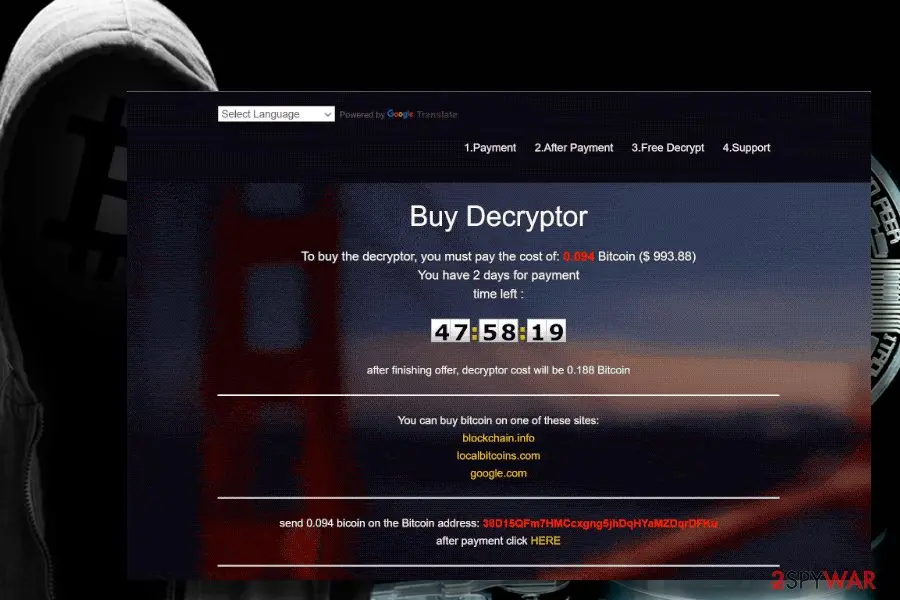
Additionally, the .gif file extension virus generates a GIF window on the web browser, which instructs the victim on how to make the payment. At the moment of writing, the sum of the ransom demanded by Globe Imposter .gif version is 0.094 Bitcoin, which is approximately $1000 USD.
The GIF page contains a countdown clock, which will end in 48 hours. After that, the ransomware is supposed to duplicate the sum of the ransom.
Warning: Do not pay the ransom.
Although the virus tries to intimidate victims claiming that all encrypted data will be deleted if he or she downloads a third-party data recovery tool, do not fall for believing that. You should immediately download or another powerful security tool and then try to retrieve locked data with the help of free GlobeImposter decrypter or third-party data recovery software.
We would not recommend paying the money for cybercriminals. Although they claim to recover one file for free before you pay the ransom, that does not guarantee that a Globe Imposter decryptor will be able to retrieve all your data. Instead, you should remove .gif file extension ransomware and try alternative data recovery methods. You can find a tutorial down below.
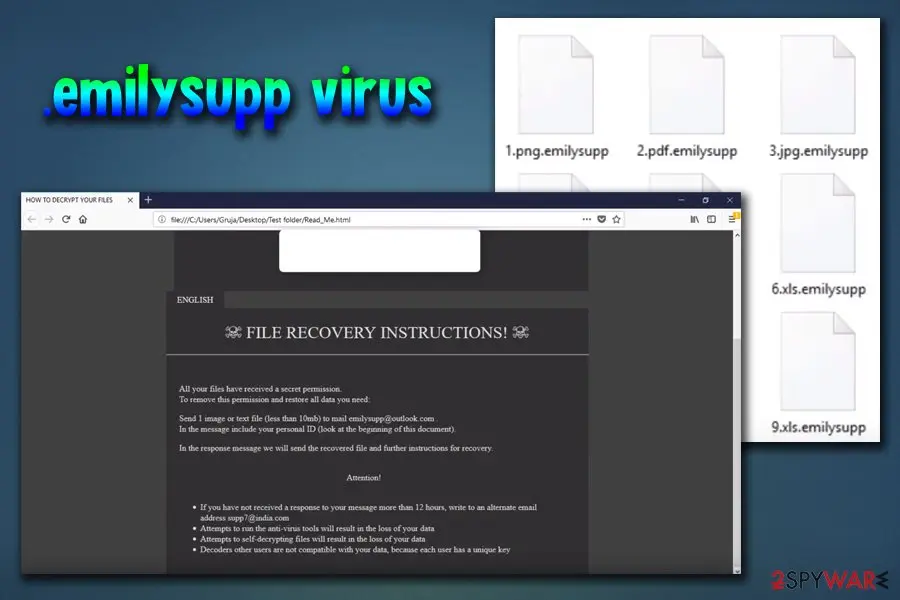
.emilysupp file extension virus. This version of GlobeImposter was spotted by security experts in early June 2018. The malware appends .exilysupp file extension. As usual, hackers made sure the target knows what happened to his or her files, and dropped ransom note (which is written in a .html format) in each of the affected folders.
I the note, victims are informed that their personal files just have been encrypted and are prompted to contact cybercriminals via emilysupp@outlook.com, or via supp7@india.com if no answer is received within 12 hours after the attack. Hackers also urge users to attach an encrypted file, so that they can make sure that the decoding is possible.
Additionally, victims are warned not to use any anti-malware tools as it will result in loss of the data, as well as decryption keys sent to other users will not work. Unfortunately, this variant of Globe Imposter is not decryptable.
Merely remove the .emilysupp virus using or and then recover your data from a back-up. If you do not have one - try third-party software that may be able to recover at least some of your files.
From our report of May 2020 · not reviewed since
C4H ransomware
Since May 2018 the virus has been idle.
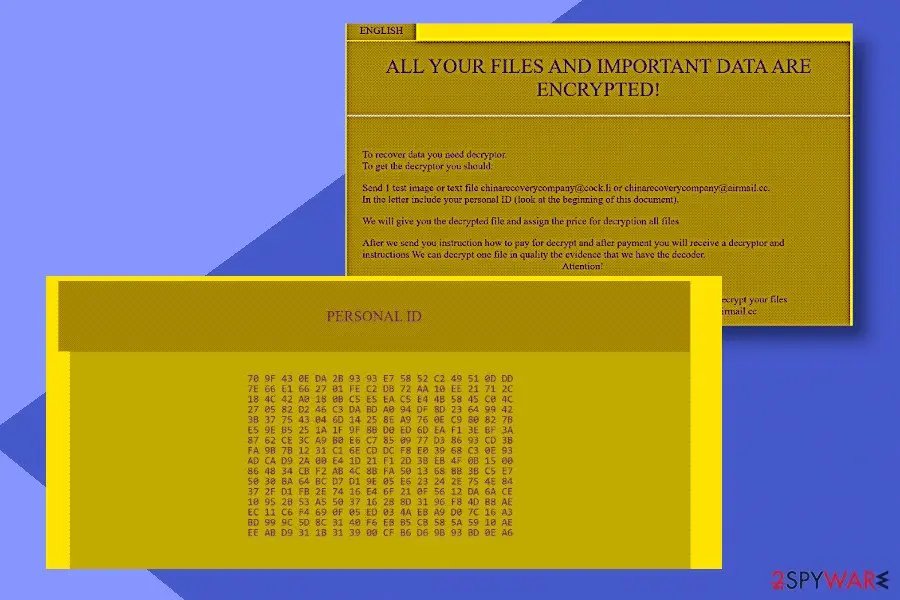
However, it has revived in spring 2020 with a variant dubbed C4H. The malware appends the .C4H file extension, which prevents people from accessing personal data stored on the D: drive. For the file encryption process, it uses AES and RSA ciphers.
The ransom note named as Decryption INFO.html shows up in the victim's PC screen upon the phase of encryption and instruct to establish contact via chinarecoverycompany@cock.li or chinarecoverycompany@airmail.cc email addresses. The size of the redemption demanded is currently unknown.
Crooks strictly prohibits the usage of AV engines for C4H removal, as well as the usage of third-party data recovery tools because of a permanent data loss. Nevertheless, paying the ransom is not recommended due to various risks of disclosing any personal details to criminals.
Experts recommend people to remove .C4H file extension virus immediately by rebooting the system into Safe Mode and running a scan with a professional AV engine. After that, you may give a try for Emsisoft's decryption software or other third-party data recovery tools for returning your files and documents.
From our report of May 2020 · not reviewed since
Hackers try out various ways to distribute the virus payload
Since Globe Imposter is not a new threat to the cyber community, its developers have tried more than one distribution method to spread this file-encrypting virus.
Employing different techniques allows criminals to make sure that it will take time for security experts to detect the new source of the ransomware and inform people about the threat.
GlobeImposter virus has already used Rig exploit kit to detect system vulnerabilities and infiltrate computers easier. Additionally, malware researchers have detected malicious ads that automatically install the ransomware once clicked and there have been several cases when the malware has entered the targeted system via drive-by downloads .
Another recently discovered way how GlobeImposter reaches its victims is malspam campaigns pushed via Necurs botnet. Hackers employed deceptive email letters to trick users into opening them and activating bogus scripts that infiltrate the ransomware.
Therefore, be aware that this malicious program might take advantage of outdated software and security vulnerabilities. However, most of the time crooks want to trick users into the opening or downloading infected content, such as ads or email attachments. For this reason, you should be careful and click content only if you are 100% sure that it's safe.
You may use thumb drives, external HDDs or any other device you prefer. Just don't forget to keep it unplugged from your computer!
The Globe Imposter ransomware virus ransom note
YOUR FILES ARE ENCRYPTED!
TO DECRYPT, FOLLOW THE INSTRUCTIONS BELOW
To recover data you need decryptor. To get the decryptor you should:
Send 1 crypted test image or text file or documents to dream_dealer@aol.com (Or alternate mail dread_dealer@india.com)
In the letter include your personal ID (look at the beginning of document).
We will give you the decrypted file and assign the price for decryption all files. After we send you instruction how to pay for decrypt and after payment you will receive a decryptor and instructions. We can decrypt one file in quality the evidence that we have the decoder.
How to remove Globe Imposter ransomware virus
Tools you'll need
All of these are free except where noted. Download them on a clean device if the infected PC is offline.
- A USB stick: to keep the ransom note, two or three encrypted files and screenshots off the infected PC.
- Microsoft Defender Offline: built into Windows 11 and Windows 10; scans before Windows starts, so running malware cannot hide.
- Microsoft Safety Scanner: a second, portable scanner with current signatures; each download works for 10 days.
- ID Ransomware: identifies the family from the note and one encrypted file and says whether a decryptor exists.
- No More Ransom: the free decryptors from police and security companies; check it again every few months.
- Fortect (optional): scans Windows for malware and repairs the system files and settings it damaged. The free scan is in the box above.
How to remove Globe Imposter ransomware virus and get your files back
Work in this order.
Disconnecting comes first, removal comes before any restore, and nothing here asks you to contact the attackers.
Step 1: Disconnect the PC and unplug backup drives
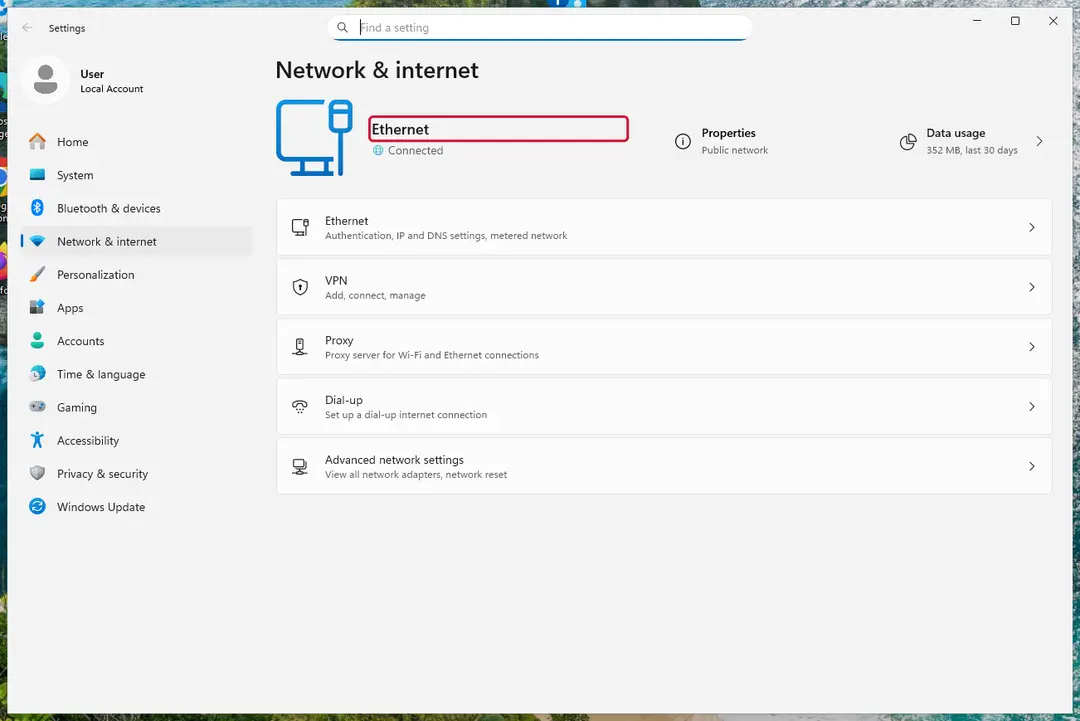
Globe Imposter ransomware virus encrypts everything it can reach, including drives and shares you connect later. Cut the network first: cable out, or Wi-Fi off from the taskbar.
Then unplug every USB stick and backup disk and pause cloud sync, so the encrypted versions do not replace your online copies. Do not reconnect any of them until the ransomware is removed from the Windows 11 or Windows 10 PC.
Windows 11: turn off Wi-Fi to take the PC offline. Full procedure with screenshots: Ransomware: first steps, finding a decryptor and recovering files
Step 2: Save the ransom note and confirm the family
Copy
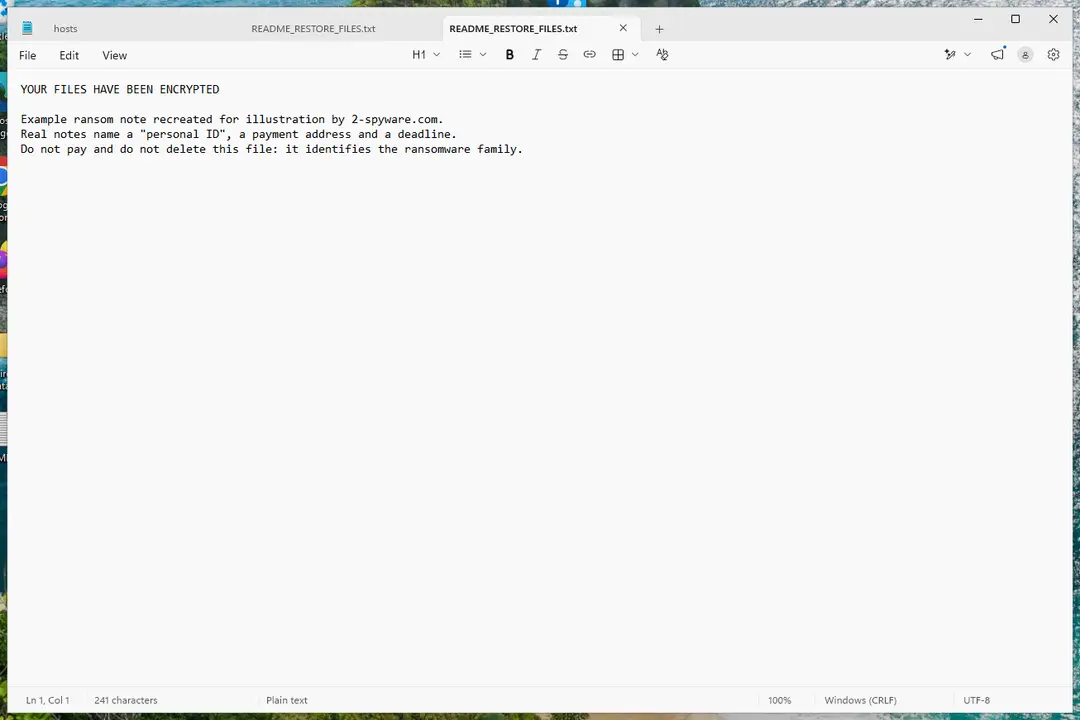
Read___ME.htmland one or two files ending in.keepcalmto a USB stick, and leave the originals where they are.From another device, upload the note and a sample file to ID Ransomware or No More Ransom's Crypto Sheriff, which name the family from the note, the extension and the file structure.
Write down the contact address and your personal ID from the note, because a decryptor or the police may ask for them.
Warning: Never contact the attackers from the infected Windows 11 or Windows 10 PC.
Windows 11: the ransom note and encrypted files to copy for identification. Full procedure with screenshots: Ransomware: first steps, finding a decryptor and recovering files
Step 3: Check for a free decryptor
For Globe Imposter ransomware virus, no free decryptor is known (checked 7 October 2026). Search the family name in the No More Ransom decryption tools list and in the free decryptors of Emsisoft, Avast and Kaspersky, because new tools appear years after an attack.
Important: Keep the encrypted files even if nothing works today, and do not pay before every free option is ruled out: payment does not guarantee a working key.
Decryptors run on Windows 11 and Windows 10, but only after the ransomware itself is removed.
Full procedure with screenshots: Ransomware: first steps, finding a decryptor and recovering files
Step 4: Remove the ransomware before you restore or decrypt
Restoring or decrypting files while Globe Imposter ransomware virus still runs lets it encrypt them again. Run a Full scan in Windows Security > Virus & threat protection > Scan options, then the Microsoft Defender Antivirus (offline scan).
If the ransomware blocks Windows Security, start Safe Mode with Networking and scan from there. Some families install a password stealer as well, so let both scans finish on Windows 11 or Windows 10.

Windows 11: Windows Security > Virus & threat protection > Scan options. Full procedure with screenshots: Run a Microsoft Defender Offline scan
Step 5: Look for shadow copies of the files
Open Command Prompt as administrator and run
vssadmin list shadows. If it lists copies dated before the attack, right-click a folder with encrypted files in File Explorer, choose Properties > Previous Versions, and open or restore a version from before that date.ShadowExplorer, a free tool, shows the same copies when the tab is empty or hidden. Most current families delete shadow copies, so an empty list is normal, but the check takes two minutes on Windows 11 or Windows 10.
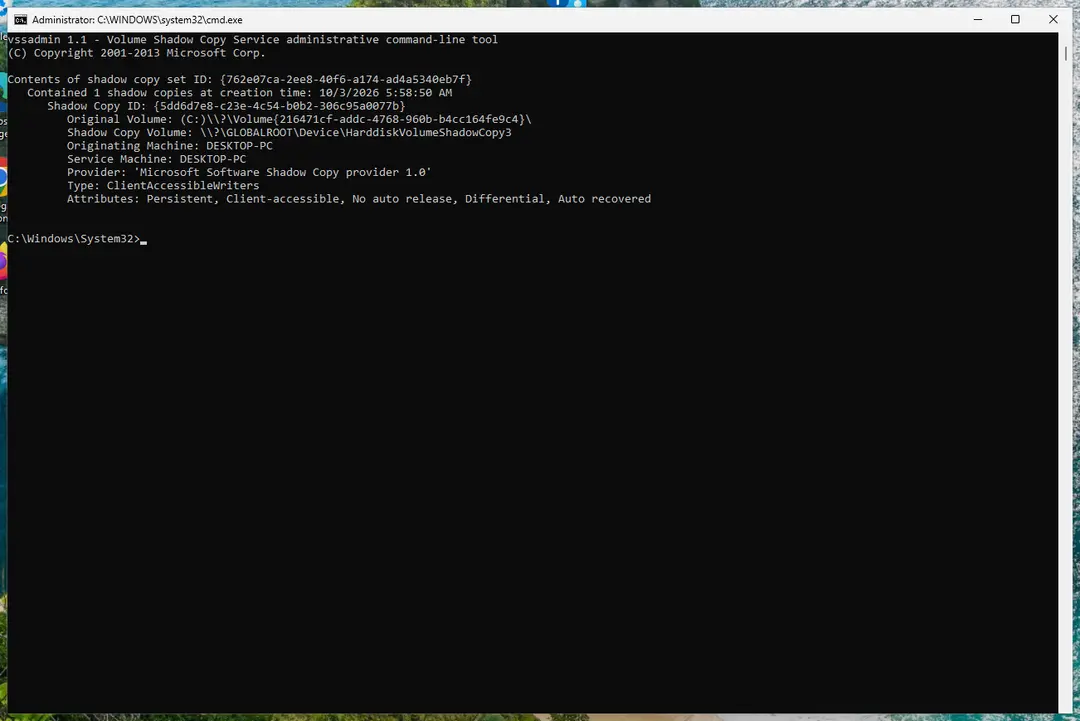
Windows 11: vssadmin list shadows shows whether shadow copies exist. Full procedure with screenshots: Ransomware: first steps, finding a decryptor and recovering files
Step 6: Restore the files from a backup or recover deleted originals
Restore from an external backup, File History or OneDrive's version history, choosing a date before the attack. Connect the backup drive only after the scans are clean, or the ransomware encrypts it too.
If there is no backup, file recovery software can sometimes find the deleted originals, because some ransomware writes an encrypted copy and deletes the original file.
Stop writing to the drive and try recovery on Windows 11 or Windows 10 before new files overwrite the space.
Full procedure with screenshots: Recover deleted files (Recycle Bin, backups, OneDrive) On uGetFix
Instructions for each browser and system
The detailed steps for every browser and system this guide covers. Open the one you use.
Manual removal using Safe Mode
Important! →
Manual removal guide might be too complicated for regular computer users. It requires advanced IT knowledge to be performed correctly (if vital system files are removed or damaged, it might result in full Windows compromise), and it also might take hours to complete. Therefore, we highly advise using the automatic method provided above instead.
Step 1. Access Safe Mode with Networking
Manual malware removal should be best performed in the Safe Mode environment.
Windows 7 / Vista / XP
- Click Start > Shutdown > Restart > OK.
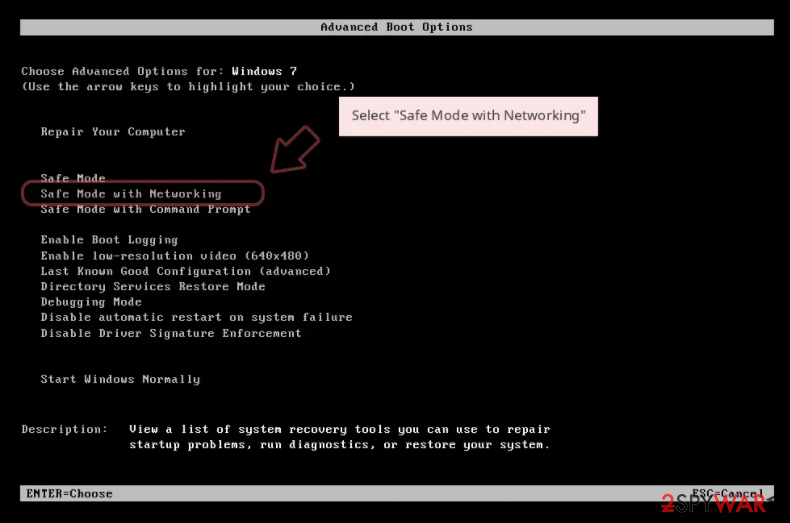
- When your computer becomes active, start pressing F8 button (if that does not work, try F2, F12, Del, etc. - it all depends on your motherboard model) multiple times until you see the Advanced Boot Options window.
- Select Safe Mode with Networking from the list.
Windows 10 / Windows 8
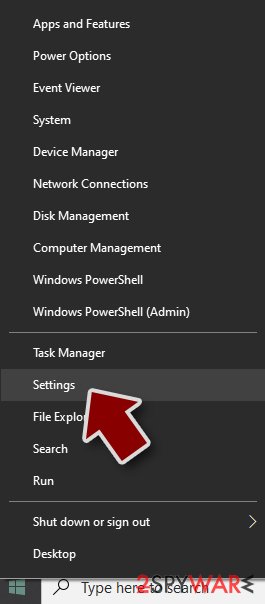
- Right-click on Start button and select Settings.
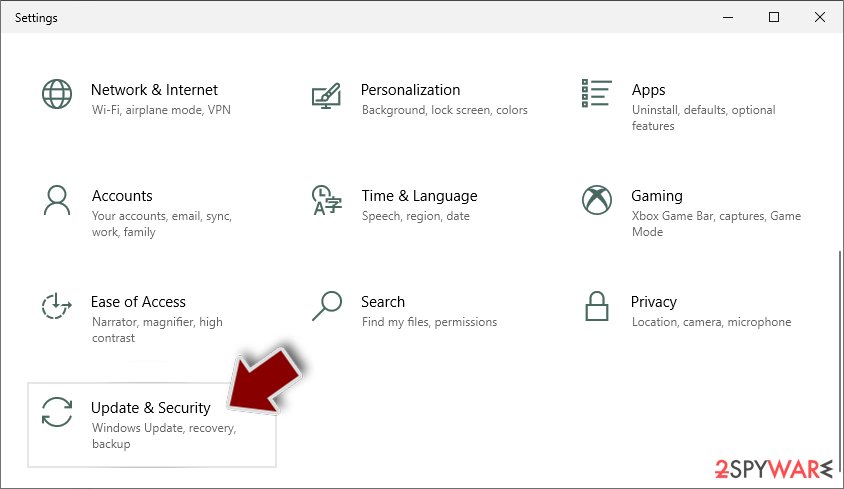
- Scroll down to pick Update & Security.
- On the left side of the window, pick Recovery.
- Now scroll down to find Advanced Startup section.
- Click Restart now.
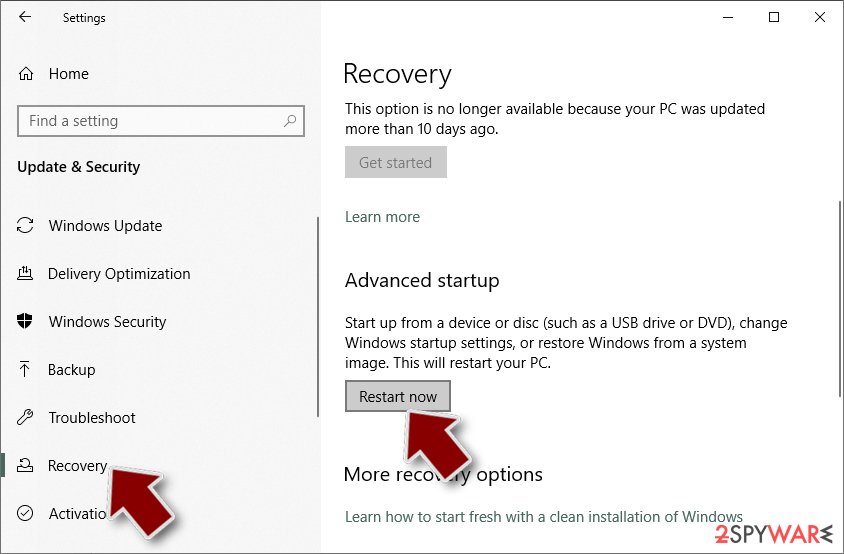
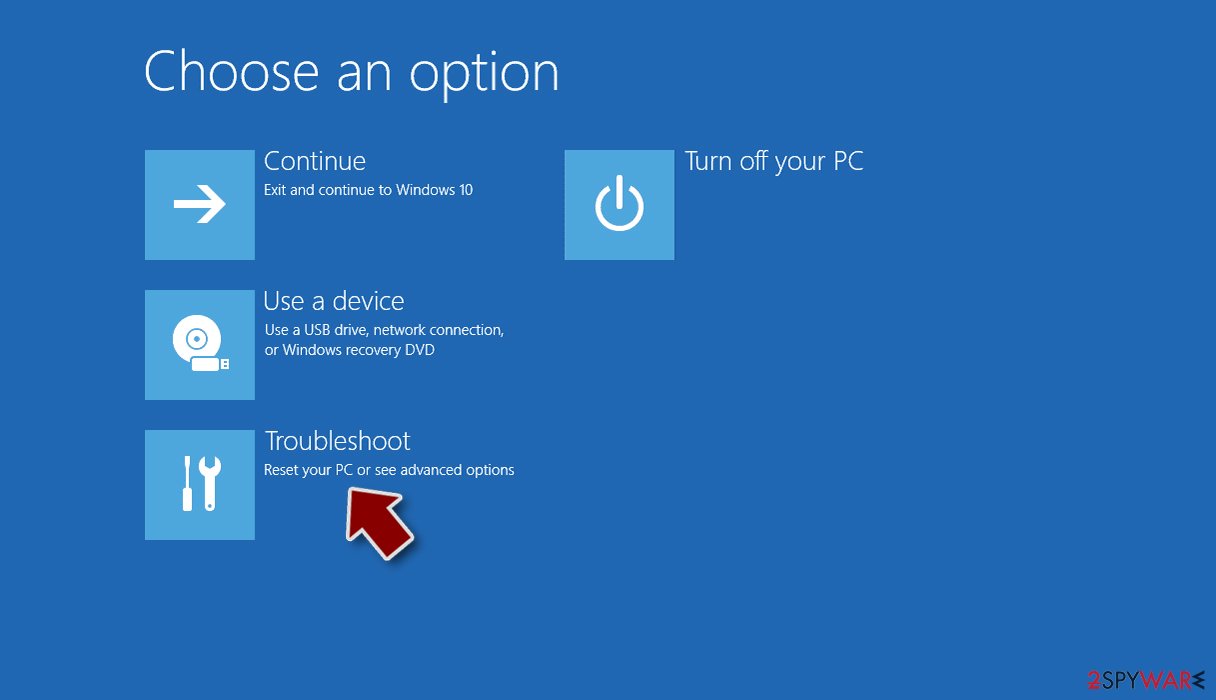
- Select Troubleshoot.
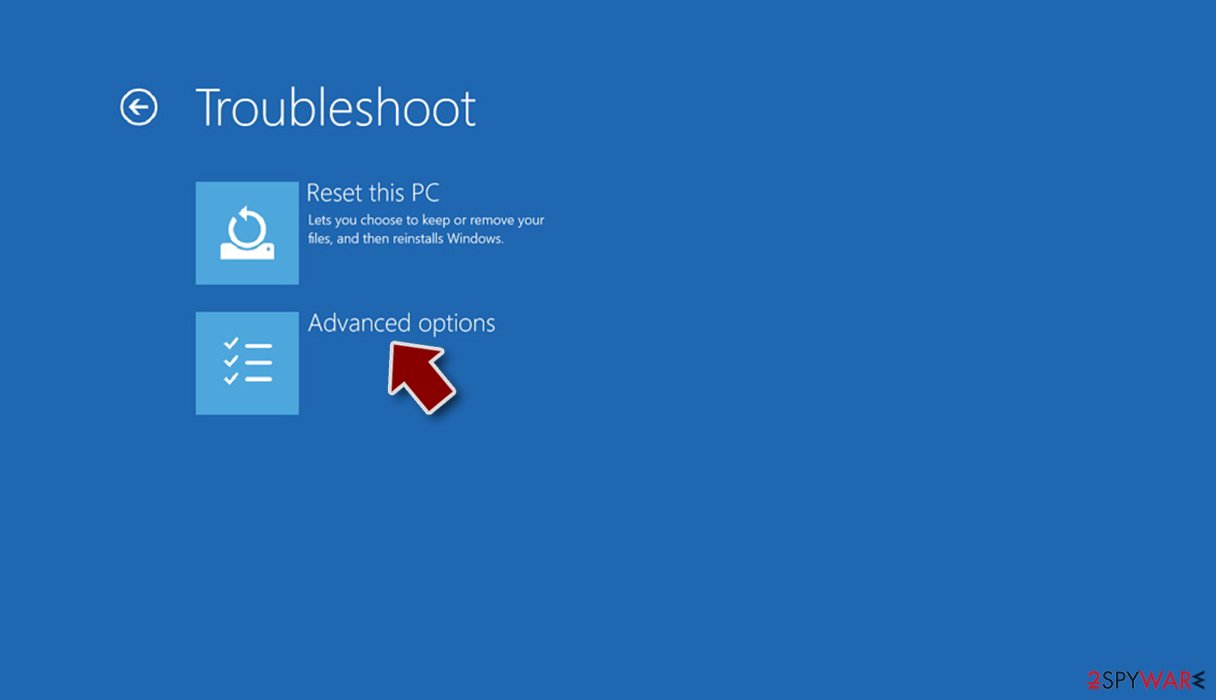
- Go to Advanced options.
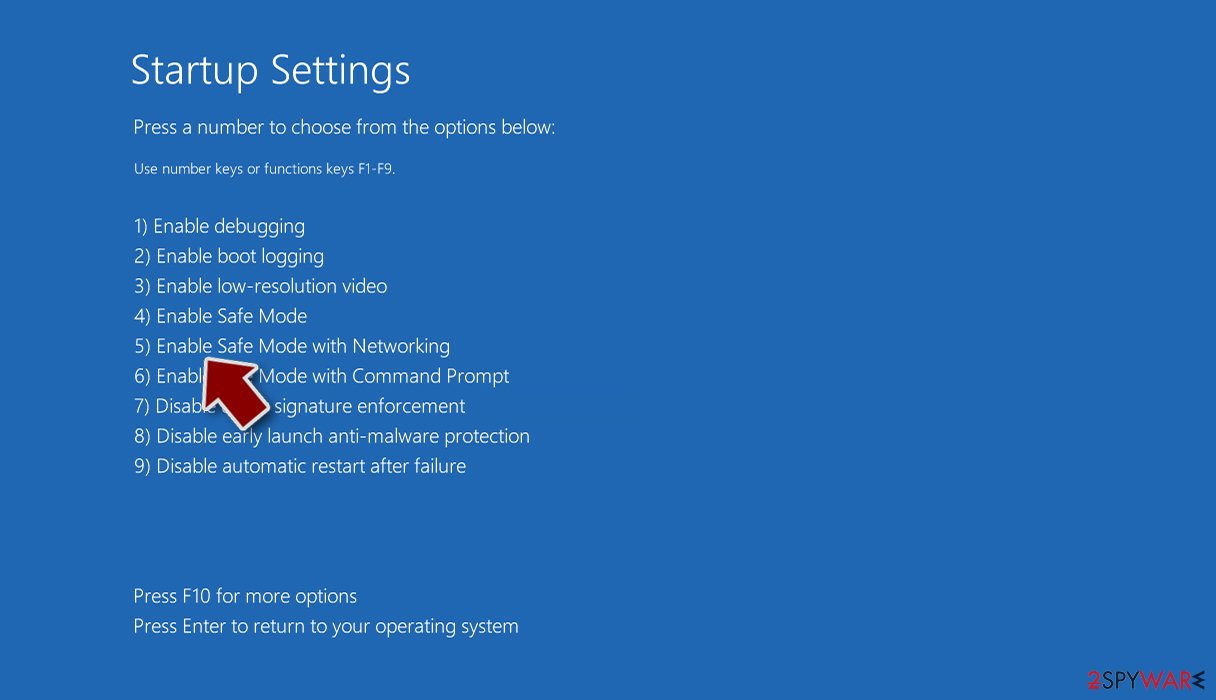
- Select Startup Settings.
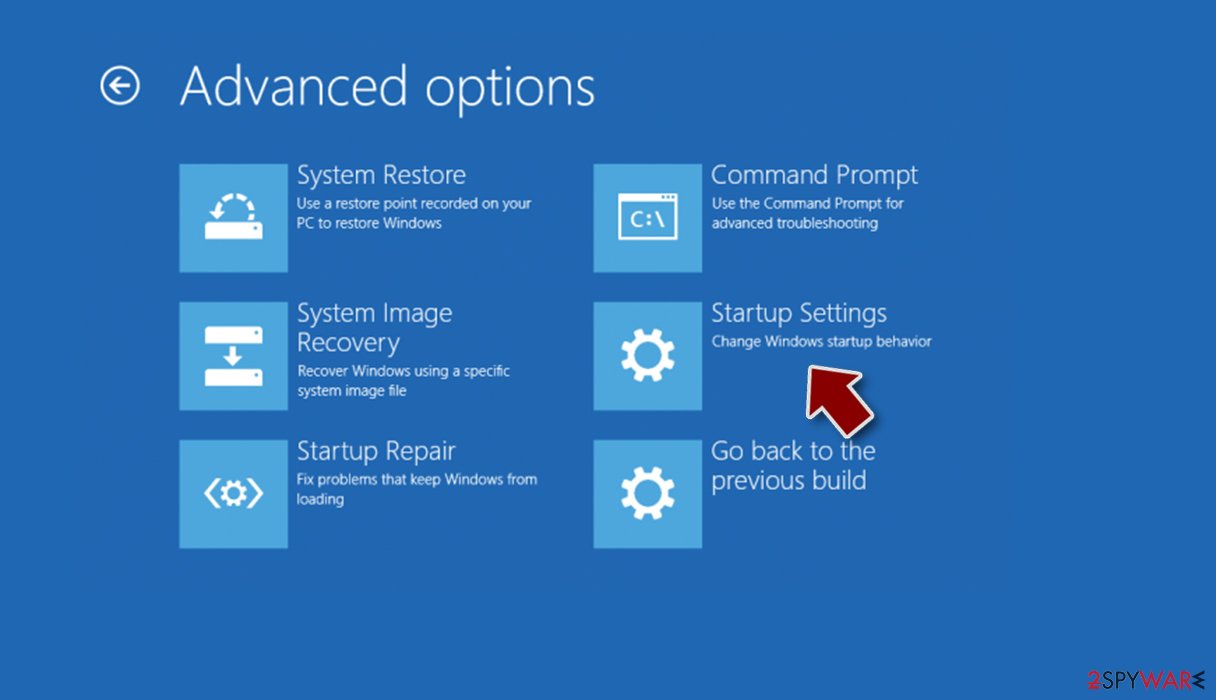
- Press Restart.
- Now press 5 or click 5) Enable Safe Mode with Networking.
Step 2. Shut down suspicious processes
Windows Task Manager is a useful tool that shows all the processes running in the background. If malware is running a process, you need to shut it down:
- Press Ctrl + Shift + Esc on your keyboard to open Windows Task Manager.
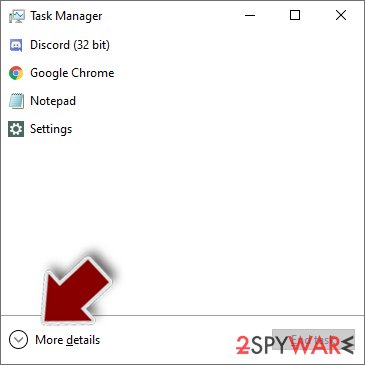
- Click on More details.
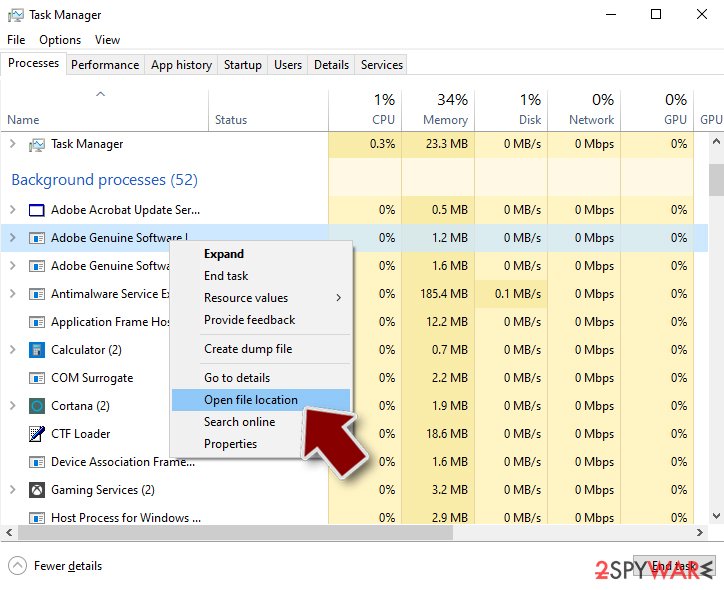
- Scroll down to Background processes section, and look for anything suspicious.
- Right-click and select Open file location.
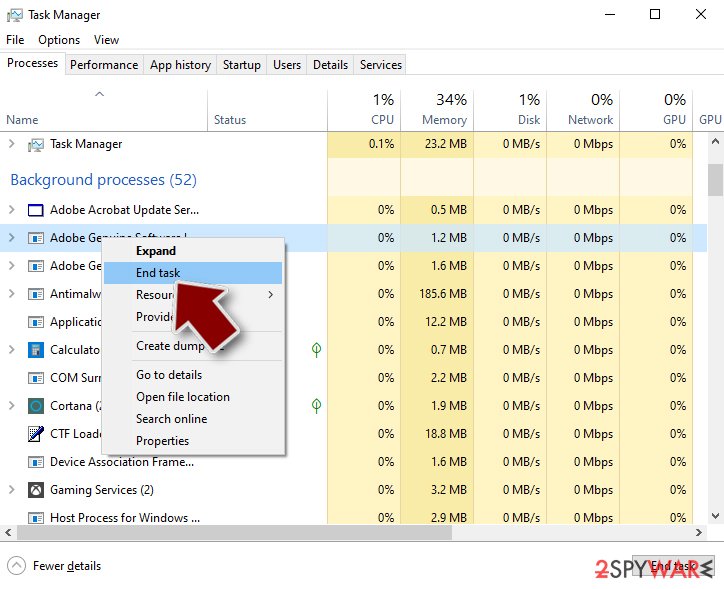
- Go back to the process, right-click and pick End Task.
- Delete the contents of the malicious folder.
Step 3. Check program Startup
- Press Ctrl + Shift + Esc on your keyboard to open Windows Task Manager.
- Go to Startup tab.
- Right-click on the suspicious program and pick Disable.
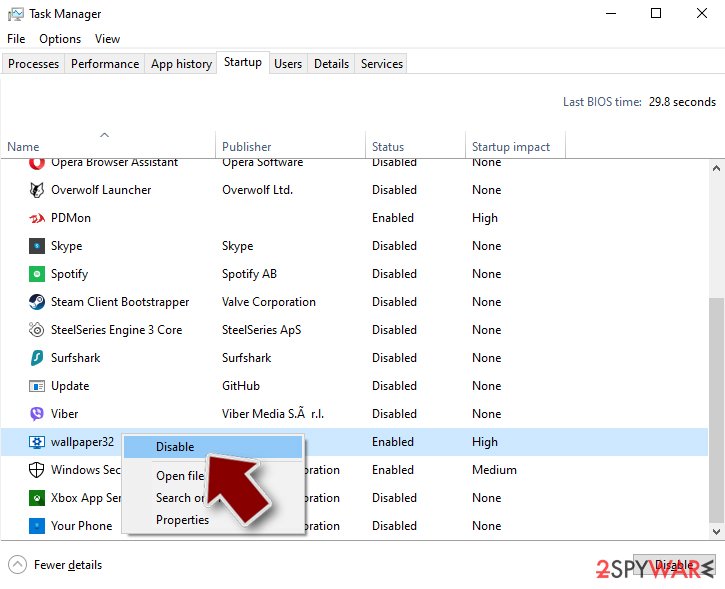
Step 4. Delete virus files
Malware-related files can be found in various places within your computer. Here are instructions that could help you find them:
- Type in Disk Cleanup in Windows search and press Enter.
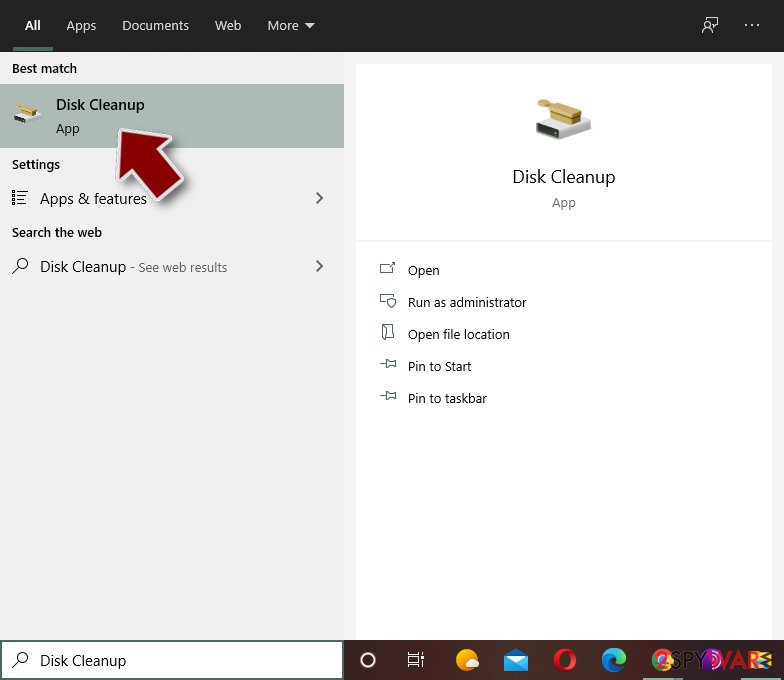
- Select the drive you want to clean (C: is your main drive by default and is likely to be the one that has malicious files in).
- Scroll through the Files to delete list and select the following:
Temporary Internet Files
Downloads
Recycle Bin
Temporary files - Pick Clean up system files.
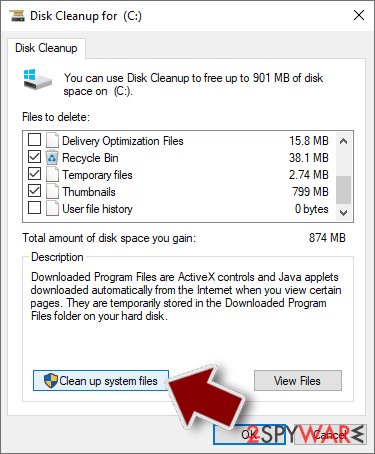
- You can also look for other malicious files hidden in the following folders (type these entries in Windows Search and press Enter):
%AppData%
%LocalAppData%
%ProgramData%
%WinDir%
After you are finished, reboot the PC in normal mode.
From our report of May 2020 · not reviewed since
Delete Globe Imposter ransomware using reputable security software
Ransomware-type infections are more complex than those related to browser hijacking or displaying ads on your frequently visited websites.
It is because file-encrypting viruses have the ability to infiltrate other dangerous programs which might complicate the elimination procedure even more. For this reason, we suggest only automatic GlobeImposter removal.
, , and will remove GlobeImposter and other related malicious software for you. Shortly after, you should be able to use ransomware-free computer again.
Also, in case you cannot get rid of Globe Imposter, you might need to boot your computer into Safe Mode first. However, we kindly ask you to follow the attentively to succeed in the elimination.
Reboot your computer to Safe Mode with Networking:
[GI=method-2]Sometimes the system of the ransomware might be more resistant and you will need to boot your system into Safe Mode with Command Prompt:
IT professionals have developed a tool which helps to recover files if computer users have accidentally wrecked or deleted them. It might also be useful in case you are attacked by ransomware.
Get help from ShadowExplorer
This software is a great way to recover files which have been damaged by ransomware. However, its operating system requires Shadow Volume Copies which are targeted by Globe Imposter. If the malware fails to delete them, you can try using this tool:
Get a free Globe Imposter decryptor
Users are now able to use a free tool to get back the access to the files which are encrypted by GlobeImposter.
Report it and recover your files
Report it
Report the attack even if you do not expect the files back: insurers and banks ask for the report number, and police use the contacts in the note to link cases.
- United States
- FBI IC3 · FTC ReportFraud
- United Kingdom
- Report Fraud (formerly Action Fraud) · NCSC
- Australia
- ReportCyber (ASD)
- EU countries
- Europol: national reporting sites
Give the victim ID, the note and the date the files were encrypted. A business that holds personal data may also have to notify its data protection authority, in the EU within 72 hours.
Protect the files you restore
Restore only after the scans are clean and the PC no longer shows files that end in .keepcalm and no longer open; otherwise the restored copies can be damaged again.
Then build a backup that survives the next infection:
- one copy in the cloud with version history
- one on an external drive that is disconnected between backups
- the working copy on the PC
Version history matters because a backup that syncs damaged files overwrites the good ones.
How to do this with the tools built into Windows: the 3-2-1 backup rule on Windows.
Do not let government spy on you
The government has many issues in regards to tracking users' data and spying on citizens, so you should take this into consideration and learn more about shady information gathering practices.
Avoid any unwanted government tracking or spying by going totally anonymous on the internet.
You can choose a different location when you go online and access any material you want without particular content restrictions. You can easily enjoy internet connection without any risks of being hacked by using VPN.
Control the information that can be accessed by government any other unwanted party and surf online without being spied on. Even if you are not involved in illegal activities or trust your selection of services, platforms, be suspicious for your own security and take precautionary measures by using the VPN service.
Backup files for the later use, in case of the malware attack
Computer users can suffer from data losses due to cyber infections or their own faulty doings.
Ransomware can encrypt and hold files hostage, while unforeseen power cuts might cause a loss of important documents. If you have proper up-to-date backups, you can easily recover after such an incident and get back to work. It is also equally important to update backups on a regular basis so that the newest information remains intact - you can set this process to be performed automatically.
When you have the previous version of every important document or project you can avoid frustration and breakdowns. It comes in handy when malware strikes out of nowhere. Use for the data restoration process.
Questions about Globe Imposter ransomware virus
How do I open .keepcalm files?
You cannot open them by renaming or with another program, because the content of files ending in .keepcalm has been encrypted. The only ways back are a working decryptor for the family, or clean copies from elsewhere:
- OneDrive versions
- File History
- an offline backup drive
- Previous Versions if the ransomware did not delete them
Identify the family first by uploading the ransom note and one encrypted file to ID Ransomware or No More Ransom. Avoid websites and programs that promise to open any encrypted file; they do not work and some are scams.
Should I pay the ransom in Read___ME.html?
Not before you have tried everything else. Identify the family from Read___ME.html and one encrypted file, check No More Ransom for a free decryptor, and look for clean copies in OneDrive, backups and Previous Versions.
Paying funds further attacks, may be illegal if the group is sanctioned, and is no promise of a working key: many victims get partial or broken decryption. If you consider paying for business-critical data, involve the police and a professional incident responder first, and never pay through intermediaries who promise their own decryption.
Can a data-recovery company decrypt my files for a fee?
Only if a decryptor already exists or the company pays the attackers for you. Some "ransomware recovery" services advertise that they can decrypt families with no known flaw; in practice they negotiate with the attackers and add their own fee. Others use the same free tools listed on No More Ransom.
Before you hire anyone, ask in writing how they will recover the files, whether they will contact the attackers and what happens if they fail. A legitimate service answers clearly. If a free decryptor exists for your family, you can run it yourself.
Is there a free Globe Imposter ransomware virus decryptor?
We last checked on 7 October 2026, and for Globe Imposter ransomware virus no free decryptor is known. We check No More Ransom, which collects free tools from police and security companies, and the decryptor pages of the major antivirus vendors. A working decryptor exists only when the encryption has a flaw or the keys were leaked or seized.
Ignore sites and videos that offer a "Globe Imposter ransomware virus decryptor" for download or for a fee: these are usually scams or malware. Real decryptors are free and come from known security companies or law enforcement. Keep the encrypted files in case a tool appears later.
How did Globe Imposter ransomware virus get on my computer?
The way Globe Imposter ransomware virus spreads has not been documented yet, so look at your own recent activity. On home PCs, ransomware most often comes with cracked programs, game cheats, key generators and fake updates, or with an e-mail attachment that was opened.
On business networks, attackers usually log in through Remote Desktop with a stolen or guessed password. Think back to what was downloaded or installed in the days before files that end in .keepcalm and no longer open, and check the Downloads folder and Installed apps sorted by date. Keep anything suspicious for your report, but do not run it again.
Did Globe Imposter ransomware virus steal my files or passwords?
We do not know yet. Nothing published so far shows data theft by Globe Imposter ransomware virus, but the only confirmed sign is files that end in .keepcalm and no longer open, which says nothing about what happened before.
Many current ransomware attacks copy files or run a password stealer first, so it is wise to act as if they did.
From a clean device, change the passwords that were saved in the browsers on this PC, starting with e-mail and banking, sign out of all sessions and turn on two-step verification. Watch bank statements and account activity for the next few weeks.
Is Globe Imposter ransomware virus the same as other ransomware with a similar name?
Not necessarily. Ransomware names come from the file extension, the note or a word in the code, so unrelated families often end up with similar names, and one family can appear under several names. The difference matters: a decryptor or advice for one family does not fit another and can damage files.
Compare the ending added to your files and the exact name of the note with the summary table at the top of this guide, then upload the note and one encrypted file to ID Ransomware from a clean device. If the result names another family, follow the guide for that family instead.
Will Fortect remove Globe Imposter ransomware virus?
Fortect scans Windows for malware and unwanted programs and repairs the system files and settings they change, and its free scan shows what it finds on your PC before you decide anything.
For Globe Imposter ransomware virus, follow the plan above as well: the browser steps take back permissions and settings that no scanner treats as a threat, and uninstalling the program that brought it removes the source.
Run Microsoft Defender's full scan and, if anything was found, its offline scan as a second opinion. If the symptoms are gone after the plan and both scans are clean, there is nothing more to do.
Sources
- VirusTotal: Globe Imposter submissions (read October 7, 2026)
- Emsisoft antimalware blog: Emsisoft Decrypter for GlobeImposter (read October 7, 2026)
- My Online Security: Necurs botnet malspamming globeimposter ransomware via fake invoices (read October 7, 2026)
- VirusTotal: 2B.EXE (read October 7, 2026)
- ThreatPost: Blank Slate Spam Campaign Spreads Cerber Ransomware (read October 7, 2026)
- Twiiter: Newer GlobeImposter #Ransomware switched up how they encrypt their configs (read October 7, 2026)
- Twitter: GlobeImposter Ransomware using ".Nutella" extension! (read October 7, 2026)
- Twitter: GlobeImposter Ransomware .emilysupp extension (read October 7, 2026)