

STOP virus is one of the mote popular ransomware because it is active and constantly evolving
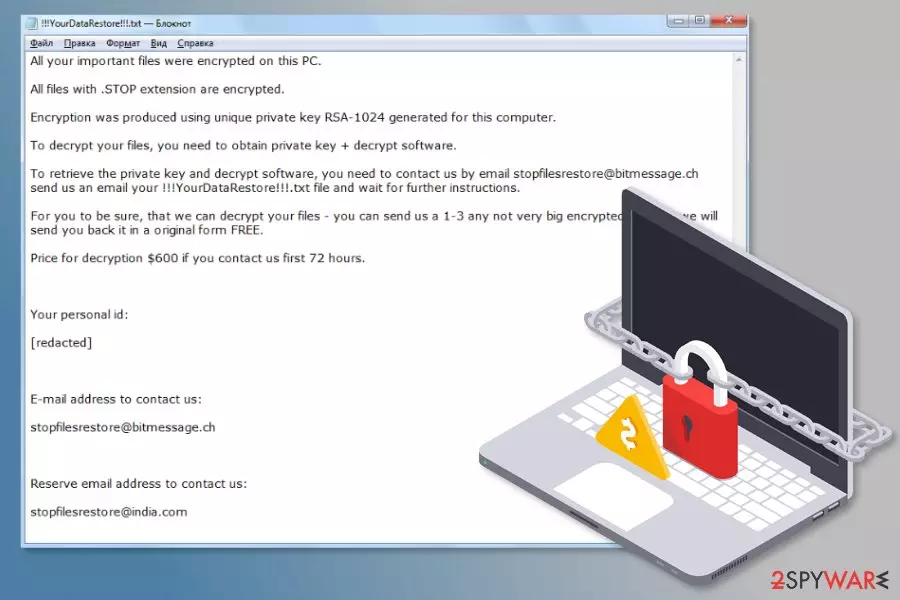
.STOP ransomware is a data locker that first made its appearance in December 2017. The malware uses a combination of AES and RSA algorithms to encrypt data and add .STOP file extension. However, new versions have been emerging almost every month and at the moment the virus is appending the following extensions: .shadow, .keypass, .tocue, .daris, .gusau, .madek, .lapoi, .todar, .dodoc, .novasof, .bopador, .ntuseg, .ndarod, and many others.
The most active variants are Keypass ransomware and Djvu ransomware that made headlines[1] when they targeted victims from over 20 countries. Viruses have been demanding a ransom of $300 – $600 for data decryptor, and using _openme.txt, !readme.txt or similar ransom notes that urge users to contact crooks via restoredjvu@firemail.cc, stopfilesrestore@bitmessage.ch, helpshadow@india.com or similar email addresses.
| Summary of the cyber threat | |
|---|---|
| Name | .STOP ransomware |
| Type | Cryptovirus |
| Encryption algorithm | AES and RSA-1024 |
| Appended file extensions | .STOP, .SUSPENDED , .WAITING, .CONTACTUS, .DATASTOP, .PAUSA, .KEYPASS, .WHY, .SAVEfiles, .DATAWAIT, .INFOWAIT, .puma, .pumax, .pumas, .shadow, .djvu. .djvuu. .djvus, .udjvu, .uudjvu, .kroput1, .charck, .kropun, .doples, .luces, .luceq, .chech, .pulsar1, .proden, .tocue, .daris, .gusau, .madek, .lapoi, .todar, .dodoc, .novasof, .bopador, .ntuseg, .ndarod |
| Ransom notes |
!!! YourDataRestore !!! txt, |
| The size of the ransom | $300 – $600 |
| Contact email addresses |
stopfilesrestore@bitmessage.ch |
| Distribution methods | Malicious spam emails, hacked websites, exploits, brute-force attacks, etc. |
| Decryptor | Download from here. Note that it does not work for all versions of this ransomware |
| To get rid of the ransomware, use anti-spyware software and run a full system scan using FortectIntego to repair damaged files | |
STOP ransomware was initially discovered in December 2017. However, new variants appeared in August 2018 and some previous months. All of them behave similarly but append new file extensions to the targeted data, provide slightly different ransom notes, and use new contact email addresses. That being said, malware has significantly evolved over the years – for example, creators changed the encryption algorithm from AES to a more secure RSA.
The original version of malware[2] adds .STOP file extension to make files inaccessible on the affected Windows computer. As soon as the virus finishes the encryption procedure, it delivers a ransom note in the “!!! YourDataRestore !!! txt” file. Inside lies the information about the attack, and it becomes clear that they want payment in Bitcoin within 72 hours.
Initially, cybercriminals demanded $600 as a fee for a decryption tool that can be used to unlock personal files. In order to provide proof that they are capable of decrypting data, hackers allow sending 1-3 “not very big” files for free test decryption to stopfilesrestore@bitmessage.ch or stopfilesrestore@india.com. However, even if you receive working files back, there is no guarantee that they will deliver the tool to recover the rest of your pictures, videos, documents, etc.
We want to stress out that paying the demanded ransom to cybercriminals is a very risky process that may lead to a huge money loss. Once you pay the money, you might be asked to pay for more. If you disagree or be left without promised decryption option, no one will help you trace the criminals and get your money. So better avoid any contact with the crooks and check out the official decryptor you can find below this article. Note that it only works for older malware versions.

Therefore, we highly recommend forgetting about data recovery at the moment. The most important task is to remove the ransomware from the computer in order to make the system safe. However, after using anti-malware software, ensure no corrupted files on the affected machine using repair software like FortectIntego.
It's crucial to use professional security tools because this cyber threat might alter Windows Registry,[3] create new keys, install malicious files or affect legitimate system processes. It means that manual termination is nearly impossible. If you try to located and delete these entries yourself, you might cause damage to your machine. Hence, do not risk!
Once you take care of the proper ransomware removal, you can safely plug in an external storage drive with backups or export needed files from cloud storage. If you haven't backed up your files yet and cannot perform full data recovery, you should try the third-party tools that we mentioned at the end of the article. Hopefully, some of the files will be rescued. Furthermore, experts recently released an original decryptor for this ransomware that can recover some data, and we have provided it below the article.

New variants of ransomware have been appearing almost every month in 2020
Suspended ransomware
At the beginning of the year, in February, malware researchers reported about STOP variant that uses .SUSPENDED file extension to lock documents, multimedia, databases, archives, and many other files. The behavior of ransomware is similar to the previous version, but it downloads a different ransom note after file encryption.
Suspended ransomware provides recovery instructions in ”!!RestoreProcess!!!.txt file and asks to send unique victim's ID and preferred sample files for the decryption to suspendedfiles@bitmessage.ch or suspendedfiles@india.com email addresses. The size of the ransom and deadline remain the same.

CONTACTUS ransomware
At the end of May, another variant of .STOP ransomware virus hit the surface. This version is using .CONTACTUS file extension to lock targeted files. Not only the appended suffix was changed. Crooks also renamed data recovery instructions, and now the document where all recovery options are provided is called !!!RESTORE_FILES!!!.txt. The contact email addresses were changed to decryption@bitmessage.ch and decryption@india.com:
All your important files were encrypted on this PC.
All files with .CONTACTUS extension are encrypted.
Encryption was produced using unique private key RSA-1024 generated for this computer.To decrypt your files, you need to obtain private key + decrypt software.
To retrieve the private key and decrypt software, you need to CONTACTUS us by email decryption@bitmessage.ch send us an email your !!!RESTORE_FILES!!!.txt file and wait for further instructions.
For you to be sure, that we can decrypt your files – you can send us a 1-3 any not very big encrypted files and we will send you back it in a original form FREE.
Price for decryption $600 if you contact us first 72 hours.Your personal id:
[redacted 40 characters]E-mail address to contact us:
decryption@bitmessage.chReserve e-mail address to contact us:
decryption@india.com
SaveFiles ransomware
SaveFiles is a variant that showed up in September 2018. After using urpress.exe file as the main executable, this ransomware encrypts your data and marks locked files with .SAVEfiles appendix. Like other versions, this threat does this with the help of AES and RSA encryption methods. After the file modification, ransomware places a ransom note called !!!SAVE_FILES_INFO!!!.txt on every file that contains encrypted data.
The ransom note contains the following text:
WARNING!
Your files, photos, documents, databases and other important files are encrypted and have the extension: .SAVEfiles
The only method of recovering files is to purchase an decrypt software and unique private key.After purchase you will start decrypt software, enter your unique private key and it will decrypt all your data.
Only we can give you this key and only we can recover your files.You need to contact us by e-mail BM-2cXonzj9ovn5qdX2MrwMK4j3qCquXBKo4h@bitmessage.ch send us your personal ID and wait for further instructions.
For you to be sure, that we can decrypt your files – you can send us a 1-3 any not very big encrypted files and we will send you back it in a original form FREE.
Price for decryption $500.
This price avaliable if you contact us first 72 hours.E-mail address to contact us:
BM-2cXonzj9ovn5qdX2MrwMK4j3qCquXBKo4h@bitmessage.chReserve e-mail address to contact us:
savefiles@india.comYour personal id:
As you can see, virus developers claim they have the tool for file recovery and decryption and encourage people to contact them via savefiles@india.com email. You shouldn't do that because criminals are not worthy of your trust. Better follow a provided guide to remove STOP ransomware. For that, you can use programs like FortectIntego or SpyHunterCombo Cleaner. Perform a full system scan to clean your system further. Then, try data recovery tools or programs and restore your files.
Puma ransomware
Puma ransomware is a decryptable virus. If you got infected, you can call yourself luckier than other victims because you have a chance to recover your encrypted files. However, only data having the .puma, .pumas, and .pumax appendixes can be unclocked by using a special decrypter (direct link provided) from virus experts. However, make sure you try this decrypter only after you remove malware from the system at first. Otherwise, the encryption procedure can be launched once again.
When inside the system, the virus drops !readme.txt ransom note to inform its victim about the current situation. Before that, the malware launches the encryption procedure (for that, it uses AES and RSA algorithm) to make all files installed on the system useless. The victim is given 72 hours to contact hackers. However, you should never do that to prevent further problems with your computer.

Shadow ransomware
At the beginning of December 2018, researchers discovered a variant that appends .shadow extension to the infected files. This file extension was firstly used by the BTCWare ransomware virus back in 2017, and now it seems like malware authors adopted it as well.
Shadow ransomware virus is using a ransom note !readme.txt that explains how to proceed with the payment in Bitcoin. Crooks offer to decrypt one file for free to prove that the decryptor is actually working. The contact emails helpshadow@india.com or helpshadow@firemail.cc should help with the communication. Allegedly, the 50% discount on the ransom price is valid within the first 72 hours of the infection.
As usual, we recommend avoiding any contact with threat actors. While this .shadow file virus is not decryptable at the time of the writing, you should wait till a free decryptor is released, just as it happened with Puma ransomware.
Djvu ransomware
The latest major virus version is Djvu ransomware which has been appending several extensions: .djvu, .djvus, .djvuu, .udjvu, .uudjvu, .djvuq, .djvur, and many others. Currently, this version of malware is considered to be the most prevalent ransomware targeting home computer users.
The virus has already affected thousands of users worldwide by using the of the most popular schemes used by ransomware to sneak into the target system – software cracks and websites that host them. Users get infected after they launch an executable of what they believe to be a cracked application but instead get their data encrypted almost instantaneously.
Djvu ransomware is not decryptable, so the only way to recover encrypted data is to remove the virus first and then try third-party tools. Of course, if you have been backing your files before they got encrypted, you should find no worries. Just remove encrypted files from the system and install the good ones.
Crypto-virus might get into the system as soon as you open a malicious spam email
The executable of a file-encrypting virus typically spreads via malicious spam emails[4] that include attachments. With the help of social engineering, criminals trick victims into opening obfuscated attachments and letting malware into the system. You can spot a dangerous email from these signs:
- You did not expect to get this email (e.g., you haven't ordered anything from Amazon, and you do not expect a FedEx courier to bring any parcel).
- The letter lacks credentials, such as company logo or signature.
- The email is full of mistakes or weirdly structured sentences.
- The letter does not have a subject line, the body is empty and it includes only an attachment.
- The content of the email urges to check the information in the attachment.
- Sender's email address seems suspicious.

However, specialists from NoVirus.uk[5] tell that malware can also sneak into the system when a user clicks on a malicious ad, downloads a corrupted program or its update, and applying any other techniques.
For this reason, internet users should learn to identify potential risks that might be lurking on the web. We want to remind you that no security software[6] can fully protect you from a ransomware attack. For this reason, watching your clicks and downloads, as well as creating and regularly updating backups, are a must!
Make sure to remove the STOP ransomware virus to restore the machine to a previous state
First of all, we want to discourage you from removing ransomware manually. This cyber threat includes numerous files and components that might look like legitimate system processes. Therefore, you can easily delete wrong entries and cause more damage. For this reason, you have to opt for automatic STOP ransomware removal.
The virus might block access to security software which is needed for the removal, so you should disable the virus first by booting to Safe Mode with Networking. The instructions below will explain to you how it's done. It doesn't matter which version of malware affected your PC, the removal guide remains the same.
When in Safe Mode, download, install and update MalwarebytesMalwarebytes or SpyHunterCombo Cleaner. Then, run a full system scan with FortectIntego and wait until the program finishes repairing the system and helps you to restore Windows into its working state. Later you can plug in backups to recover your files or try alternative methods presented below.
Did this guide help?
Be the first to comment