

Leto ransomware is crypto-extortionist that belongs to the prominent Djvu virus family
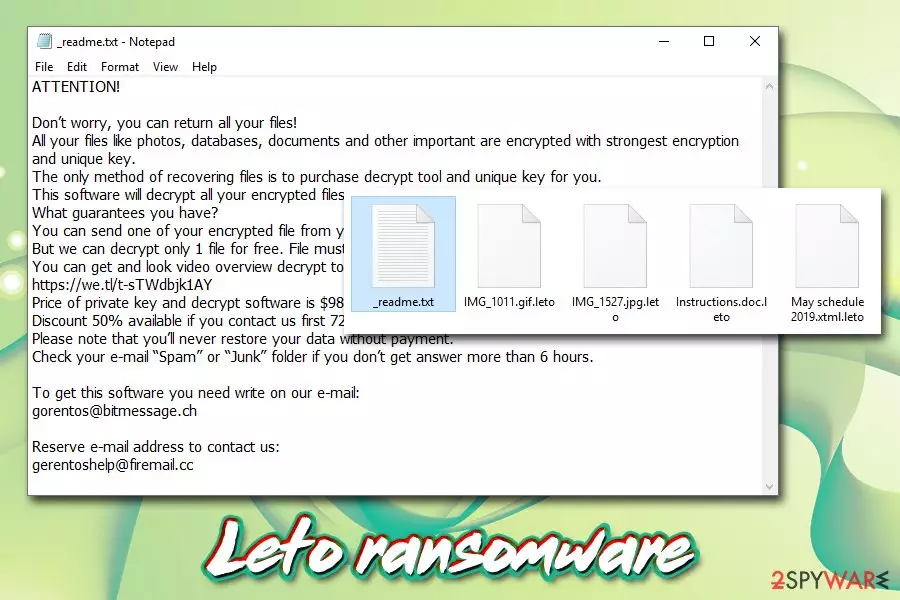
Leto ransomware is the new variant of Djvu/STOP crypto-malware and was first spotted in the wild by Michael Gillespie on October 14, 2019.[1] The goal of this virus is encrypting pictures, documents, databases, videos, and other data on the target machine and then asking for a ransom of $980 or $490 to be paid in _readme.txt ransom note. Hackers behind Leto ransomware are abusing the fact that the generated key for the locked files resides on their remote servers, so they can blackmail users while keeping data hostage. It is easy to spot all the affected files, as each of them is marked with .leto marking, and none of them can be opened.
Besides encrypting files on the host machine, Leto virus also performs other tasks, such as modification of Windows hosts file (prevents users from visiting security-related websites), and implementation of secondary modules that steal personal information from victims. Therefore, Leto ransomware removal should be the top priority after the infection, as personal data safety is at risk while affected.
While Leto ransomware is not decryptable, users should refrain from contacting hackers at gorentos@bitmessahe.ch or gorentoshelp@firemail.cc, as it is possible that all the paid money will be lost. Additional methods that may help you with data restore can be found in the recovery section below this post.
| Name | Leto |
| Type | Ransomware, crypto-virus |
| Malware family | Leto ransomware belongs to one of the most prolific malware families in the wild – STOP/Djvu ransomware |
| File extension | The affected files are all appended with .leto extension and can no longer be opened. The virus targets most popular file types, such as .jpg, .7z, .wmv, .psd, .xlsx, .pdf, .zip, etc., although it will spare executables and other vital system files |
| Ransom note | _readme.txt is dropped into each of the affected files' folders to make sure that users get all the information provided inside of it |
| Contact details | Crooks urge users to contact them via emails gorentos@bitmessahe.ch or gorentoshelp@firemail.cc |
| Ransom size | To retrieve access to the locked data, users need to obtain a key that is stored on a remote server run by hackers. They typically demand a ransom of $980 in Bitcoin, although they also offer a 50% discount ($490) if the contact is made within 72 hours of the infection |
| Additional features | Besides encrypting files on the target system, the virus may also install secondary payloads or modules that perform malicious activities, such as personal information extraction. Previously, Djvu ransomware was spotted being distributed along with AZORult banking trojan |
| File decryption | It is difficult to recover data without paying criminals; however, the decrypter_2 [download link] by ADC Soft may work in some cases, and contacting Dr.Web (paid service) may also be helpful sometimes; additionally, victims can try using third-party recovery software |
| Malware removal | You should try using anti-malware programs like FortectIntego, SpyHunterCombo Cleaner, MalwarebytesMalwarebytes to get rid of Leto ransomware, along with all its components. However, be aware that the detection rate may be low due to the infection being relatively new (you might need to scan your machine with multiple AV engines in order to identify and delete the payload) |
Leto ransomware is almost identical to previous STOP/Djvu variants, such as .reco, .bora,.noos, .kuub, and many others and is already 172nd version. It also belongs to the new influx of releases that hackers improved the encryption on, meaning that the sophisticated algorithm does not allow for STOPDecrypter to work anymore (it was sometimes effective if the locking process was performed while offline).
While recovering data encrypted by this malware is relatively slim, you should remove Leto ransomware without hesitation. For that, you employ anti-malware software that is capable of recognizing and eliminating the main payload along with any secondary ones – we advise trying FortectIntego or SpyHunterCombo Cleaner for the process. Due to this virus is being relatively new in the wild, many AV engines might not recognize the infection. However, users may encounter Leto ransomware under the following names:[2]
- Trojan.Win32.Generic.4!c
- Trojan.GenericKD.41896992
- Artemis!42ECE8B07BE3
- W32/GenKryptik.DVJM!tr
- Packed.Generic.525
- Trojan:Win32/Bomitag.D!ml
- A Variant Of Win32/Kryptik.GXHV
- FileRepMalware. etc.

Ways you could get infected with Leto ransomware
Ransomware is possibly one of the most devastating cyber infections that you could potentially infect your computer with – the locked files do not acquire the normal, accessible form even after you delete the malware entirely. Therefore, the consequences of such a virus could be disastrous for both regular users and high-profile corporations. Precisely for that reason, ransomware is gaining popularity in the cybercriminal world,[3], and new strings like Sodinokibi, Nemty, RobbinHood, and others, emerge relatively often, aiming to cash on innocent users' misfortune.
Therefore, seeing how popular ransomware is nowadays and how many users get infected every day, it is worth starting to take cybersecurity seriously. For that, you should be aware that hackers use multiple infection vectors, including:
- Exploit kits[4]
- Spam emails
- Brute-force attacks
- Software cracks
- Fake updates
- Adware bundles,[5] etc.
Thus, you need to arm yourself with comprehensive anti-malware software with real-time protection feature, enable Firewall, patch the operating systems on time, never download pirated software, install anti-phishing and ad-block add-ons, use strong passwords and practice safe browsing habits that would not put your online safety and computer security at risk.
Leto ransomware: main functions and the encryption process
Leto ransomware is designed for Windows operating systems and affects all versions of the OS. Unlike most deceptive malware that performs malicious activities behind users' backs, crypto-extortionists aim to make sure that they are aware of what happened to their machine and files. However, before that, a set of changes are initiated, including:
- An executable, which is usually acquires a randomly-generated name, is created after particular malicious URLs are contacted and placed to %AppData%, %Temp%, %LocalAppData% or another folder;
- The dropper is then launched to perform further changes;
- Windows registry keys are opened and set to ensure the malware launches with every system boot;
- Shadow Copies[6] are deleted with the “vssadmin.exe Delete Shadows /All /Quiet” command;
- Services Sens and MQSQL opened;
- Network communications established via HTTP requests;
- Shell Commands executed;
- Windows “hosts” file (located in C:\Windows\System32\drivers\etc\) modified in order to prevent users from visiting security-orientated sites, etc.

Additionally, Leto virus may drop secondary payloads like AZORult banking trojan or other malware. Some variants of STOP/Djvu are also known to insert additional modules into the system to perform spying operations or install additional payloads.
Once the system is prepared, and all the relevant changes are performed, Leto ransomware will begin to look for files to encrypt. It targets the most commonly-used files, as it causes maximum damage to victims. Once the encryption is completed, each of the affected data is appended with an extension: a file “picture.jpg” is turned into “picture.jpg.leto” and the access to it will be denied.
Malware also drops the following ransom note:
ATTENTION!
Don’t worry, you can return all your files!
All your files like photos, databases, documents and other important are encrypted with strongest encryption and unique key.
The only method of recovering files is to purchase decrypt tool and unique key for you.
This software will decrypt all your encrypted files.
What guarantees you have?
You can send one of your encrypted file from your PC and we decrypt it for free.
But we can decrypt only 1 file for free. File must not contain valuable information.
You can get and look video overview decrypt tool:
https://we.tl/t-sTWdbjk1AY
Price of private key and decrypt software is $980.
Discount 50% available if you contact us first 72 hours, that’s price for you is $490.
Please note that you’ll never restore your data without payment.
Check your e-mail “Spam” or “Junk” folder if you don’t get answer more than 6 hours.To get this software you need write on our e-mail:
gorentos@bitmessage.chReserve e-mail address to contact us:
gerentoshelp@firemail.cc
Leto ransomware authors are interested in users paying the ransom as soon as possible, hence the 50% discount offer. However, you should think twice before contacting crooks and agreeing to their demands, as there is a chance that you may get scammed. As a general rule, security experts do not recommend paying the ransom, although some desperate users may do it as a last resort.

Leto ransomware is a threat to your safety – get rid of it as soon as you can
To remove Leto ransomware, you should trust powerful security programs, as manual termination might prove to be impossible for regular users (malware drops and changes too many files to be able to get a grip of everything). Therefore, automated tools can ensure that the termination process is successful, and any secondary payloads are deleted as well.
If Leto ransomware removal fails after using security software, you should try entering Safe Mode with Networking and performing a full system scan from there. If also unsuccessful, employ a different anti-malware and scan your machine once again. Only after you are sure your system is clean, you can attempt to recover your data.
Before you do that, however, you should enter the following location, and delete the “hosts” file:
C:\Windows\System32\drivers\etc\
Once that is done, you can look for .leto file recovery procedures. Be warned that file recovery is highly unlikely without paying cybercriminals (although it is not recommended!), but there are a few things you could try before you give up. Please refer to the bottom section of the article for full details.
For updates on the newest decryptors, regularly check the following sites:
Did this guide help?
Be the first to comment