

Osiris ransomware is a still active malware that comes from the notorious Locky family
Osiris virus is a ransomware that operates as a new version of the prevalent Locky ransomware. It seems that the authors of the virus have been especially interested in ancient mythology since they have been naming every ransomware version after a certain Norse god, for instance, Odin, Thor, or Aesir.[1]
The first outbreak of the virus was observed on December 5, 2016. The new version of this ransomware appears to be significantly improved and bypasses the detection of many antivirus programs (currently, the detection ratio is 31/56).
The virus acts like traditional – it invades the system using spam technique or exploiting detected system vulnerabilities. Once it gets into the victim’s computer, it starts snooping the entire system for a list of target file types. Each file that meets the list of the targeted file extensions gets strongly encrypted using RSA-2048 and AES-128 encryption ciphers.
| Name | Osiris ransomware |
|---|---|
| Type | Crypto virus, file-locker |
| File marker | .osiris |
| Encryption method | AES-128 |
| Ransom note | OSIRIS-9b28.html |
| Related | Locky virus family |
| Distribution | Malicious file attachments from emails, dangerous sites, torrent, and pirated platforms |
| Elimination | You can use the anti-malware tool and detect the threat to stop malicious activities |
| Repair | Additionally to cleaning the machine with AV tools, you should rely on FortectIntego and fix possible virus damage |
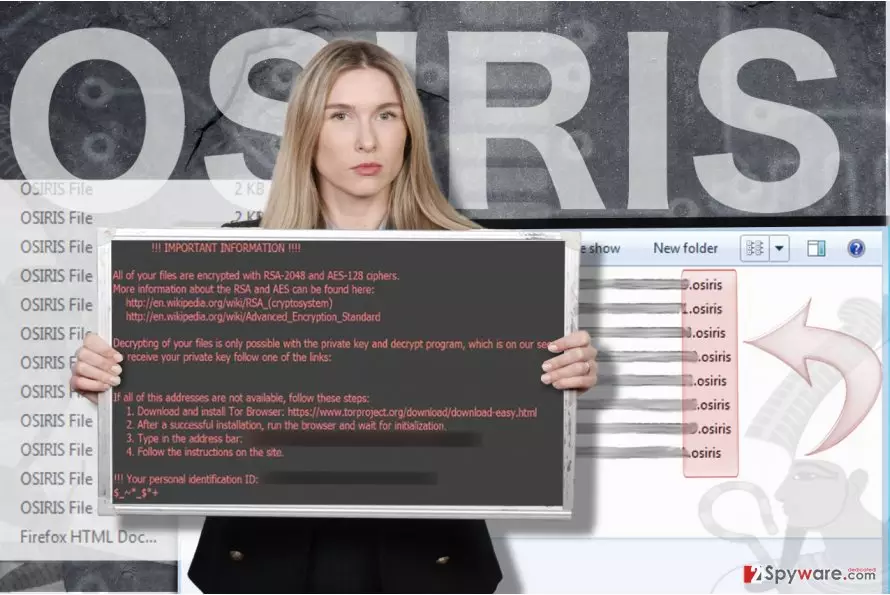
As a result, each file then gets .osiris file extension and loses the original file name because the ransomware replaces it with a set of symbols [8 symbols] – [4 symbols] – [4 symbols] – [8 random symbols] – [12 random symbols]. The first 16 symbols represent the victim’s ID. If you can see such changes in your file names, make sure you run FortectIntego to double-check your computer and, in case it detects this ransomware, remove the ransomware from it.
Once the encryption procedure is finished, the virus adds a ransom note OSIRIS-9b28.html to every folder, including the desktop. The ransom note contains Wikipedia links to articles about RSA-2048 and AES-128 encryption ciphers to help the victim understand what the virus has done to the personal data.
The note explains that the decryption is possible only with a special decryption key which is known only to authors of this virus. To buy it, the victim has to install a Tor browser and visit a unique payment website (each victim gets their own one).
Finally, the ransomware changes the desktop picture with the traditional Locky wallpaper (black background with a red text). Ransomware, just like the previous versions of Locky, suggests buying Locky Decryptor[2], which sells for 0.5-4 Bitcoins. BTC is a virtual currency that almost all ransomware virus demands. Paying in Bitcoins helps criminals stay anonymous. The victim is asked to buy Bitcoins online and then transfer them to provided Bitcoin wallet.
All victims are advised to take care of the virus elimination as soon as it locks their files. The computer needs to be cleaned professionally because the latest versions of Locky are delivering additional malware to systems and also enrolling infected computers into botnets. Please do not try to remove Osiris ransomware manually, as you can do more harm than good to your PC.
Why should you NEVER pay the ransom
If your records have been compromised by the latest Locky ransomware variant, you might start thinking about whether to pay the ransom or not. We understand that personal files are extremely important and that no one wishes to lose them in half an hour or less.
However, organizations like hospitals or governments cannot allow themselves to lose all data because they just cannot function without it, so there are lots of cases when certain institutions paid an enormous ransom to decrypt encrypted data (for example, the Hollywood Presbyterian Medical Center paid $17,000[3]).
There were some cases when victims paid the ransom but never received an answer from perpetrators. Therefore, we suggest you make ransomware removal a top-priority task. If you are a home user, you can restore some of your files from data storage devices like USB or CD, or even better – from a hard disk that you’ve kept your backup in. Sadly, without a backup, data recovery is impossible.
We strongly recommend all victims read the FBI’s announcement[4] about ransomware viruses to learn how to protect their files from data-encrypting malware.
The distribution methods used by ransomware developers
Recent news shows that current Locky versions are currently distributed via obfuscated emails with the “Photo/Scan/Document from office” line in the Subject line. Such emails contain a malicious attachment (.zip file), which, once extracted, drops the .vbs file on the system.
If the victim lets the curiosity win and opens this file, one simply activates the destructive ransomware payload. The .vbs file rapidly connects to online servers and, without the user’s permission, downloads Locky to the system. The virus activates itself without displaying any setups or notifications and encrypts all records in minutes.
Besides, a new distribution technique was spotted recently. It appears that currently, Locky spreads via Facebook messages in the form of a photo_9166.svg file[5]. Similar to the previous versions, the Osiris ransomware also asks you to enable macro settings.
Besides, a new distribution technique was spotted recently. It appears that currently, Locky spreads via Facebook messages in the form of a photo_9166.svg file. Similar to previous versions, the file virus also asks you to enable macro settings. Later on, the payload is delivered via the Rundll32.exe file. Then, a DLL installer will be downloaded and placed in the %Temp% folder. You might notice these files as they bear .spe extension. In addition, beware of the spam email named “New(910).”
From: Savannah [Savannah807@victimdomain.tld]
Reply-To: Savannah [Savannah807@victimdomain.tld]
Date: 12 December 2016 at 09:50
Subject: New(910)Scanned by CamScanner
Sent from Yahoo Mail on Android
Beware of the scams which claim “unsuccessfully delivered emails.” There has been a tendency to inject malware in such messages[6]. However, Osiris is also delivered in more sophisticated ways, for example, with the help of exploit kits and Trojans.
Reportedly, this ransomware can be delivered with the help of Pony Trojan, Nemucod, and other malicious software. To learn more about Locky's dissemination peculiarities, navigate to this page: Locky virus: modus operandi, distribution, and removal methods.
Remove Osiris ransomware virus immediately
The virus must be eliminated properly because it is a very dangerous crypto-malware that belongs to the Locky family. It can damage your files or remove them from your computer without leaving you a chance to recover them. Once it infiltrates the system, ransomware compromises it and can use additional tools to carry out illegal activities. Therefore, to delete it and avoid problems related to this procedure, we suggest using reliable security software.
To start Osiris removal, you may need to restart your PC as instructed below because sometimes this virus tends to block its victims. Lastly, keep in mind that your personal cautiousness is significant while trying to prevent ransomware viruses[7], even if security specialists initiate constant automatic updates of your software and the operating system in general to lower the risk of ransomware.
Did this guide help?
5 comments
Tafeaz
another locky variant... insane...
Lydia
Oh, let me guess. The next variants probably gonna be titles Horus ransomware, Abydus ransomware and Isis ransomware?
Elaine_1980
Stupid virus. I have a backup, but this virus wastes my time. How annoying is that...
ou tai
cant decrypt - does anybody know how to do it?
Osher
FK osiris grrrrrrrrrrr