

Nacro ransomware is a file locking virus that is spread via malicious torrent files
Nacro ransomware is crypto-malware that was fist spotted in mid-August 2019. Just as dozens of other STOP/Djvu ransomware variants, it enters the computer and encrypts all documents, pictures, databases, videos and other personal files with the help of AES or another encryption algorithm. From that point, victims cannot access their files that are marked by .nacro extension and begin to look for solutions for a rather difficult situation.
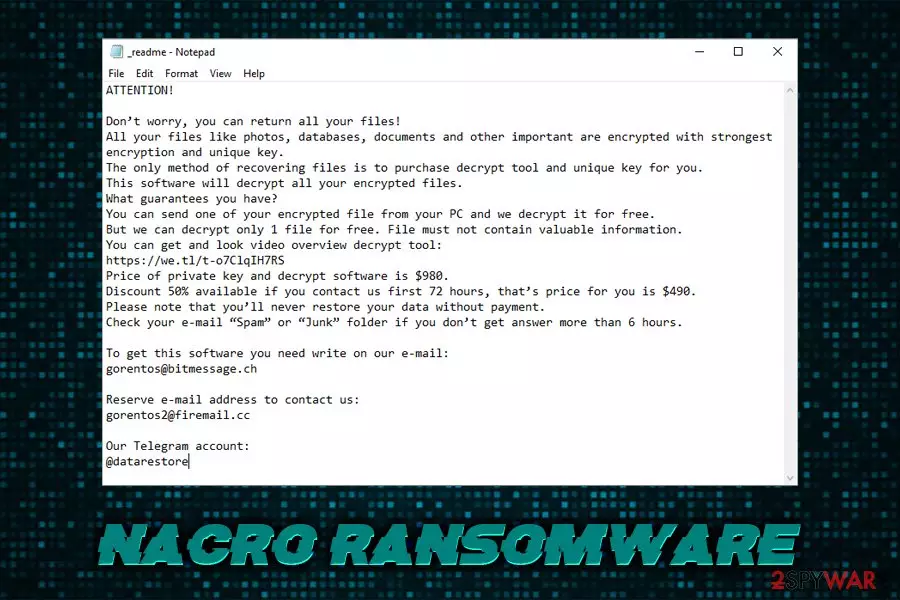
After file encryption, Nacro ransomware drops a ransom note _readme.txt, contents of which are almost identical to previous versions of the same family – Cosakos, Besub, Bopador, and others. The message from the threat actors states that victims have to contact them via gorentos@bitmessage.ch, gorentos2@firemail.cc, or @datarestore (Telegram) and pay $980 ransom in Bitcoin in order to receive the decryption tool.
While there are little chances of recovering data without the promised key, paying the ransom is highly discouraged by security experts,[1] as the possibility of getting scammed is still there. Instead, users are encouraged to proceed with Nacro ransomware removal and using alternative tools and the provided STOPDecrypter to retrieve the locked data.
| Name | Nacro ransomware |
| Type | File locking malware |
| Infection means | Malicious torrent files, spam emails, exploits, etc. |
| File extension | .nacro |
| Ransom note | _readme.txr |
| Contact | gorentos@bitmessage.ch, gorentos2@firemail.cc, or @datarestore (Telegram) |
| Ransom size | $980/$490 |
| Decryptable? | Users can try STOPDecrypter [download link] or third-party software. Otherwise only available via backups |
| Removal | Get rid of the ransomware infection by using anti-malware software |
| Recovery | To fix malware damage caused to the system, scan it with FortectIntego |
Nacro ransomware was spotted being spread via malicious torrent files from KickAssTorrents, namely KMS which is used to activate the illegal versions of Windows OS and MS Office suite. Nevertheless, it is known that STOP ransomware authors use multiple other delivery methods, including:
- Exploit kits[2]
- Software vulnerabilities
- Unprotected RDP
- Web injects
- Fake updates
- Spam emails, etc.
Besides encrypting all personal data, Nacro virus changes crucial Windows functions to be able to run on the system without interruptions. For example, it deletes Shadow Volume Copies[3] in order to make the recovery process much more complicated. Additionally, it modifies Windows Registry to be able to run as soon as the host machine is booted.
The ransom note that Nacro ransomware drops states the following:
ATTENTION!
Don’t worry, you can return all your files!
All your files like photos, databases, documents and other important are encrypted with strongest encryption and unique key.
The only method of recovering files is to purchase decrypt tool and unique key for you.
This software will decrypt all your encrypted files.
What guarantees you have?
You can send one of your encrypted file from your PC and we decrypt it for free.
But we can decrypt only 1 file for free. File must not contain valuable information.
You can get and look video overview decrypt tool:
https://we.tl/t-o7ClqIH7RS
Price of private key and decrypt software is $980.
Discount 50% available if you contact us first 72 hours, that’s price for you is $490.
Please note that you’ll never restore your data without payment.
Check your e-mail “Spam” or “Junk” folder if you don’t get answer more than 6 hours.To get this software you need write on our e-mail:
gorentos@bitmessage.chReserve e-mail address to contact us:
gorentos2@firemail.ccOur Telegram account:
@datarestore
As we previously mentioned, paying people behind Nacro virus is highly risky, as they might simply ignore you and never send you the decryption key that is required for file recovery. Additionally, they might send you a malicious file that would infect your machine with other malware, such as a trojan, rootkit, or other.

Thus, if you were unlucky and got infected, should remove Nacro ransomware first and then explore the file recovery options. While they are quire minuscule if no backups are available, it might still be possible to decode the data in other ways.
For Nacro ransomware termination, use reputable anti-malware software and then scan your system with FortectIntego to fix the virus damage.
Do not download pirated software or its cracks – ransomware will immediately lock your files as soon as you open the malicious executable
Pirated software and cracks have been extremely popular over the years, as it allows users using software that would otherwise be paid for. However, not only is this behavior illegal, but it can also compromise personal safety. Nevertheless, tools like KMSpico and similar have seen tremendous popularity over the years, as they are used for most popular software cracking.
Crack tools are often flagged by anti-malware software by default, because of the activity that it performs. It initiates modifications that are typical to malware – changing the way the software operates. For that reason, checking if the crack is actually harmful and carries malicious payload is almost impossible.
Therefore, refrain from downloading pirated programs, as well as cracks/keygens. Additionally, install anti-malware software, regularly update your OS, avoid spam email attachments, use secure passwords, and always back up your data!
Remove Nacro ransomware to protect your incoming files from being locked
Nacro ransomware removal should not be very complicated, as long as you employ reputable anti-malware software. There are plenty to choose from, although be aware that all the AV vendors might not recognize new virus variants. Thus, you might need several security tools before you can get rid of Nacro virus. Note that the malware possesses various capabilities, and might sometimes block your security application. In such a case, enter Safe Mode with networking as explained below and perform a full system scan from there.

Once you remove Nacro ransomware, you can attempt to recover your files. With backups, there should be no problems – simply connect your external device or access virtual storage and copy the data over. However, with no backups, things get a little more complicated, and the chance of recovery slims down. You can try STOPDecryptor or use alternative solutions instructions of which we provide below.
Did this guide help?
Be the first to comment