

Yahoo redirect virus is a type of browser hijacker that seeks to control users' browsing habits
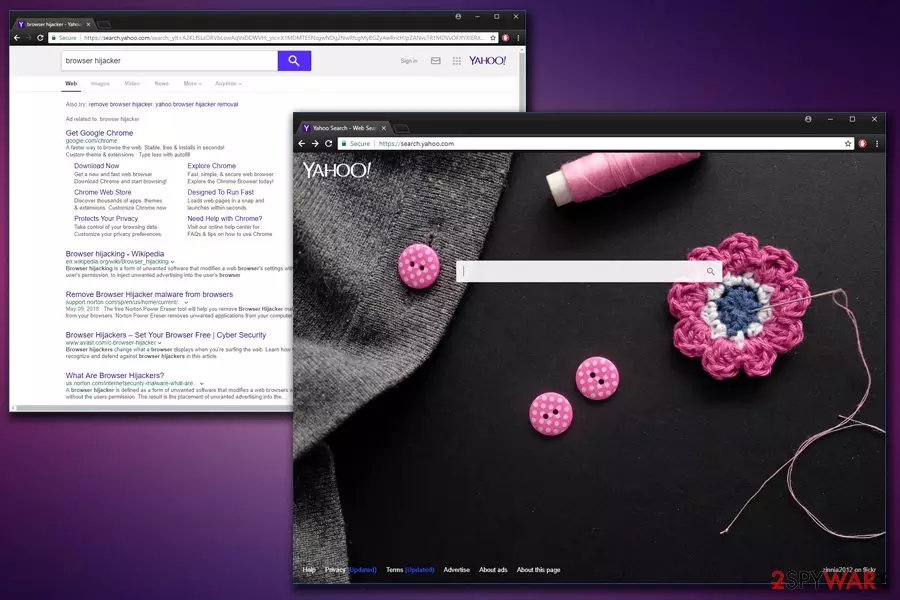
Yahoo redirect virus is a set of infections relying on this tech giant to increase their popularity. However, these browser hijackers have nothing to do with Yahoo. Unlike genuine search engines, these unwanted programs[1] enter computers without the user's consent and initiate changes to Google Chrome, Internet Explorer, Mozilla Firefox, Safari, or other browsers. This way, the PUP ensures its persistence, and, in some cases, leads its victims to serious struggle while trying to get rid of the virus. Overall, hijackers do not provide any benefits to regular users and may harm their machines, as well as put virtual safety at risk, instead.
Unwanted redirects to rogue sites and unfiltered content can lead to browser-based threat infections and virus infiltration. There are various promotional pop-ups and banners that can fill your screen up to keep the browser hijacker running on the machine. You may need to clean the machine properly since the PUP is the one that affects the computer when such unwanted browser activities start. We have thorough guides below that show how to clear browsers and how to solve other issues with your device. The most important thing to note – this is not the piece directly related to the legitimate search engine from the Yahoo! web service provider. These intrusive symptoms are caused by rogue software.
| SUMMARY | |
| Name | Yahoo redirect virus |
|---|---|
| Type | Browser hijacker |
| Versions | |
| Compatible browsers | Google Chrome, Internet Explorer, Mozilla Firefox, Safari, Opera, etc. |
| Main dangers | Malware infiltration, personal data leak, stolen money |
| Distribution | Software bundling, official stores, suspicious ads |
| Elimination | Download and install anti-malware tools. Alternatively, you can check the manual instructions below |
| System repair | You can help to repair functions of the system with tools like FortectIntego that find and fix affected files or corrupted pieces |
The main aim of hijack is to modify search results that the user receives and push sponsored content via them[2]. For this reason, potentially unwanted programs (PUPs) such as Delta-Homes.com[3] or Default-Search.net hijack all web browsers installed on the compromised computer and change default home, new tab, and search settings.
Usually, redirect viruses replace the homepage with a site that has a search engine on it. When attempting to use that search engine, the victim receives altered search results that are full of sponsored content. By clicking it, you may find yourself on an infected website seeking to sell you something or even infect you with malware.
The browser hijacker targets both Windows and Mac operating systems. This virus on mac causes the same issues just like it does on Windows operating systems. Instead of providing useful search services, it fills the real Yahoo search results with ads. Therefore, users should take care of the redirect virus removal without any hesitation.
An easy way to identify the search redirect virus
To identify the redirect virus, you have to check what's written on the tab name as soon as you receive the search results. When exploring results brought by the genuine search engine, the browser displays “Yahoo Search Results” as the tab name. When dealing with the redirect virus, the tab name might have an additional word added to it, for instance, “Aztec Media Yahoo Search Results” or “Saferbrowser Yahoo Search results.”
Exploring these modified search results can lead to sad consequences because such results can contain deceptive links pointing to dangerous external websites. The aim of changing user's default homepage and search settings is to insert paid links next to organic search results and trick people into clicking on them.
It would be right to say that such browser hijackers try to smokescreen their aims behind the reputable image of Yahoo. If you suspect that your browser was infected with a similar hijacker, better remove the redirect virus as soon as possible. Anti-malware software like SpyHunterCombo Cleaner or MalwarebytesMalwarebytes can eliminate such threats with ease.
Users who decide to eliminate the threat manually should know that some of these redirect viruses are extremely hard to remove. In case you are dealing with the Yahoo redirect virus, you will need to perform more actions in order to complete the removal. This involves modification of Registry Keys, browser shortcuts, and other settings.

Ways to get infected with Yahoo redirect virus
The described browser parasite belongs to the “browser hijacker” and a “potentially unwanted program” category. Programs that belong to this group are distributed using three different techniques:
- Traditional installation method. You can install browser redirect malware with a help of a typical spyware installation technique, which requires going to the official program's website, selecting the program, and downloading it to the system. This is a clear example of how attentive and careful you have to be while browsing on the Internet and looking for the software that you need.
- Bundling[4]. The redirect problem can also start interrupting you out of nowhere. In this case, you should know that you were tricked into installing a dangerous program on your computer in a bundle with other software. Programs that are most frequently involved in the distribution of browser hijackers are various download managers, PDF creators, video streaming software, video recording software, and similar free applications.
- Malvertising[5]. There are lots of illegal and legitimate websites that were affected by malvertising. This term means that they were filled with malicious code that causes the appearance of misleading pop-up ads on these websites. Typically, they offer to download “needed” updates or promote surveys and contests.
The easiest way to avoid infiltration of the PUP and protect yourself from the redirecting problem is to install reliable anti-spyware. If you need a tool that could warn you about the possible infiltration of potentially unwanted programs and viruses, we suggest looking at the look of recommended anti-spyware programs below this article or on the “Software” page.
Search redirect viruses keep bothering computer users
This virus is similar to Google Redirect virus and Bing Redirect virus that have been bothering PC users for almost four years. As soon as any of these threats gets inside the system, it implements changes on each web browser. Settings that are mostly altered by the described browser hijacker are the homepage, the default search engine, the new tab page, and the bookmarks list.
In most cases, hijackers are capable of altering these settings without being noticed, so you can notice Yahoo redirects at the worst time. Also, this threat starts generating income for its developers by causing altered search results on people's search engines and redirecting them to predetermined websites.
Here, we should warn you that, after clicking on such ads, you can be redirected to a truly malicious website[6] that is used for spreading serious malware.
If you have been looking for a quick solution to the problem, you should know that the URL redirect parasite may hide in your system under different names. Yahoo Redirect fix can be done only when you know the name of your virus. In this case, you should find the intruder that is hiding in your computer.
To prevent all possible dangers, like eliminating useful components from your computer, we recommend you to select the automatic removal option. For more information about programs that cause URL redirections and tips on how to remove them, proceed reading further.
Most infamous versions of Yahoo redirect virus
Search.yahoo.com virus
Search.yahoo.com virus. While technically Yahoo! Search search engine is completely virus-free and safe to use, there are many browser hijackers who keep redirecting users to this website without asking their permission. These browser-based threats can corrupt search results and redirect miserable computer users to high-risk Internet sites, which provide infectious downloads. If you notice that you are constantly redirected to Search.yahoo.com even if you haven't set this search engine as a default one, you should check if your computer is not infected with an unwanted program.

Yahoo Toolbar
Yahoo Toolbar. This is a safe browser add-on that provides shortcuts to user's favorite websites. However, if after installing this toolbar you start to experience browser redirects or see pushy ads which appear on your screen frequently, you should check if your computer is virus-free. It might be that you have installed adware or browser hijacker at the same time you installed the aforementioned Toolbar. This can happen only if you have downloaded this toolbar from an untrustworthy web source.
Yahoo Community SmartBar virus
Yahoo Community SmartBar virus. The potentially unwanted program is not related to a reputable technology company. It was created by Linkury Inc, which spreads this shady application using the software bundling technique. You might end up with a cyber infection on your computer if you tend to download free apps from high-risk Internet sites. The computer that gets infected with the Yahoo Community SmartBar browser hijacker runs slowly; moreover, the PC user starts experiencing browser redirects.
InstallX Search Protect for Yahoo virus
InstallX Search Protect for Yahoo virus. This is a hideous intruder which adjusts browser’s homepage, new tab page, or default search engine settings and sends “InstallX Search Protect for Yahoo – ALERT” pop-up to computer user whenever he or she attempts to change these settings. Successful removal of the virus fixes this problem and allows to change browser settings again.
Yahoo Mail redirect virus
Yahoo Mail redirect virus. Yahoo! Mail redirects can occur if the computer is infected with a PUP. When the user attempts to log in to a Yahoo account, this browser hijacker redirects the user to websites that present doubtfully reliable web search engines. When infected with the Mail redirect virus, the user might notice that the browser homepage and default new tab page were changed without his/her knowledge.
Yahoo mail login redirect
People report about the problem regarding the mail account login redirects to I forgot my ID or password page. This is an issue that occurs when people try to log in to their email account through the mobile application or the Yahoo page. Users get redirected to the webpage stating about forgotten login or password as if they clicked on “Forgot my password”. Due to this redirect, people cannot access their email accounts. It often happens when some accounts get merged, but users who tried a few fixes state that the AT&T page also causes such redirects. Some issues can get fixed by logging in to your account via the ATT site. Cleaning your cache and cookies may help or try to login to your email account via other browsers.
At.yhs4.searc.yahoo.com virus
At.yhs4.search.yahoo.com virus. If you suffer from At.yhs4.search.yahoo.com redirects to websites that you do not want to visit, you should not waste any time and remove the intruder from your computer. Such potentially unwanted programs are created with the intention to advertise third-party services and products, so they inject hyperlinks into safe-looking search results. Therefore, when the user clicks on them, At.yhs4.search.yahoo.com redirects occur.

Us.yhs4.search.yahoo.com virus
Us.yhs4.search.yahoo.com virus. This redirect virus functions the same way the At.yhs4.search.yahoo.com does – it corrupts regular search results and forces computer users to visit doubtfully reliable third-party web pages. If you would like to avoid Us.yhs4.search.yahoo.com redirects, you should uninstall this application from your computer system.
Yahoo Startnow virus
Yahoo Startnow virus. It is a dubious browser hijacker, which replaces the homepage and new tab page with yahoo.startnow.com and also sets the StartNow search engine as a primary one. Although after entering search query it delivers safe-looking search results, you should not rely on these outcomes nor click them because Yahoo Startnow may open untrustworthy third-party websites instead of ones that you expect to be opened. Continuous redirects can make you visit dangerous web pages, so we recommend you remove the infection as soon as you notice that yahoo.startnow.com has taken the place of the homepage.
Safer Browser virus
Safer Browser virus. When such a virus infiltrates the victim's computer, it alters each web browser to load a particular search engine as a default start page. For example, the browser might start launching such web pages instantly – Search.yourpackagesnow.com, Search.searchlcl.com, and similar. Although search results presented by such search tools look almost identical to genuine Yahoo's findings, they're not trustworthy because clicking on them can trigger redirects to highly untrustworthy external websites. If you noticed that your homepage was changed and the results you receive are powered by SaferBrowser, check your system for spyware programs because it is likely to be infected with one.
Settings Manager by Aztec Media Inc pop-up virus
Settings Manager by Aztec Media Inc pop-up virus. Settings Manager is a highly untrustworthy and dangerous program that typically switches user's homepage to Default-Search.net. This web page provides a bogus search engine that delivers modified results that are presented as Aztec Media Yahoo Search Results. Once infected with such a program, the user finds it hard to identify and remove the browser hijacker. The app is known to be changing the names of its components, therefore experts typically advise removing this intruder using powerful and up-to-date anti-malware software. The hijacker also tends to sneak into the system along with Linkey adware, which displays pop-up ads and slows down the computer. On top of that, the potentially unwanted programs might start causing redirects to Linkeyproject.com.
Beap.gemini.yahoo.com adware app
Beap.gemini.yahoo.com is another version of the Yahoo redirect virus. This application is categorized as an adware program that pushes suspicious ads to the user's computer screen and causes redirects to affiliate pages some of which might be malware-laden. The main goal of adware applications is to collect income from produced advertising posts and also share information about the user's browsing history with other parties for even bigger monetary benefits.

Remove Yahoo redirect virus from Safari, Chrome, and other web browsers
To remove the redirect virus from Chrome, Safari, or other web browsers both on Windows or Mac operating systems, you need to delete certain files and roll back changes made to computer settings. With a help of professional anti-spyware removal software, you can complete this task in no time, although you can also try to stop these redirects manually.
Use the instructions provided below the article to find components of the unwanted program and delete them. Please, do NOT postpone this because the hijacker can deceptively lure you into malicious websites.

If you think that the redirect virus has infiltrated your Windows OS, use one of these tools that are given below or follow a manual removal guide. Below, you can also find the virus removal guide for Mac users. If you decided to use anti-malware software, make sure you install its latest updates before scanning the computer.
A video guide that helps you to remove Yahoo Redirect Virus from the system step-by-step
The cyber intruder – Yahoo Redirect virus is the infection that may remain persistent due to additional content installed without your permission or system changes made in the background. You don't need to be an advanced PC user or IT professional to follow this video guide that shows all the needed steps and gives additional tips.
Uninstall from Windows
Uninstall from Windows 10/8:
- Type Control Panel into the Windows search box and open the result.
- Under Programs, select Uninstall a program.


Uninstall from Windows 7/XP:
- Click on Windows Start > Control Panel (Windows XP users should click on Add/Remove Programs).
- In Control Panel, select Programs > Uninstall a program.


Remove the unwanted program:
- In the Programs and Features window, look for any recently installed suspicious entries, select them, and click Uninstall.
- If User Account Control appears, click Yes to confirm, then complete the removal.


Delete from macOS
Remove the unwanted application:
- From the menu bar, select Go > Applications.
- In the Applications folder, look for any suspicious entries, then drag them to Trash (or right-click and pick Move to Trash).
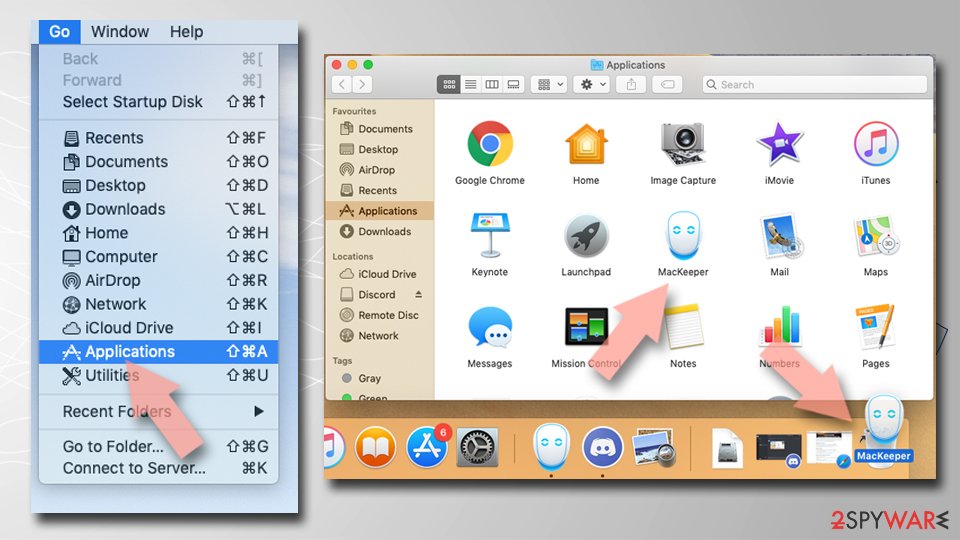

Delete leftover files and folders:
- Select Go > Go to Folder.
- Enter /Library/Application Support and remove any suspicious folders related to the unwanted program.
- Repeat the same check in the /Library/LaunchAgents and /Library/LaunchDaemons folders, deleting any suspicious entries.

- Finally, empty the Trash to permanently remove the leftovers.

Remove from Microsoft Edge
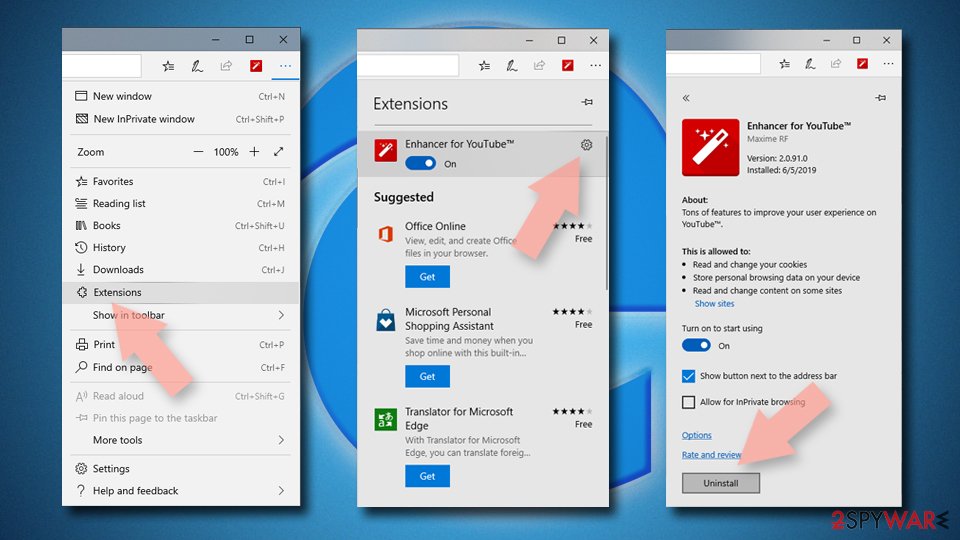
Delete unwanted extensions from MS Edge:
- Select Menu (three horizontal dots at the top-right of the browser window) and pick Extensions.
- From the list, pick the extension and click on the Gear icon.
- Click Remove.

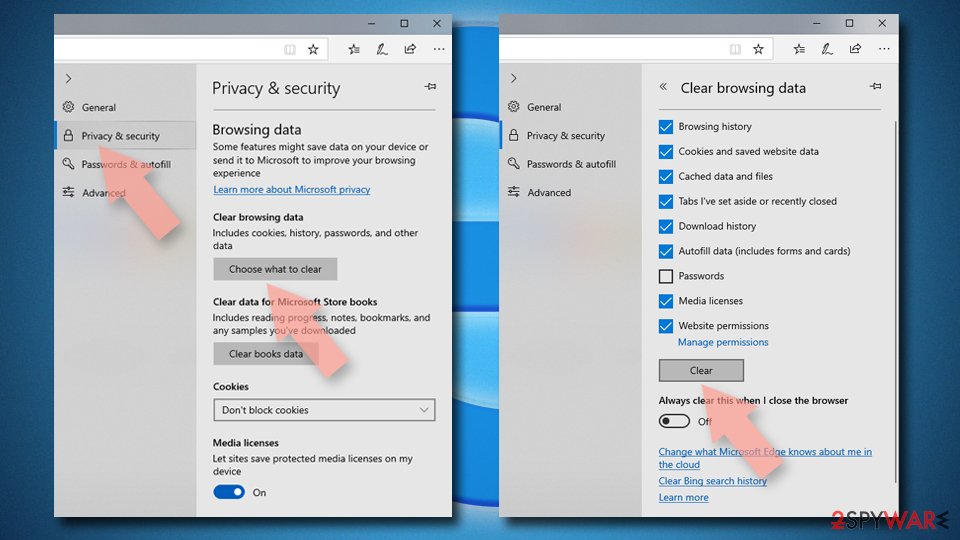
Clear cookies and other browser data:
- Click on the Menu (three horizontal dots at the top-right of the browser window) and select Settings > Privacy, search, and services..
- Under Clear browsing data, pick Choose what to clear.
- Select Cookies and other site data and Cached images and files. (apart from passwords, although you might want to include Media licenses as well, if applicable) and click on Clear.

Restore new tab and homepage settings:
- Click the menu icon and choose Settings.
- Then find On startup section.
- Click Remove next to any suspicious startup page.
Reset MS Edge if the above steps did not work:
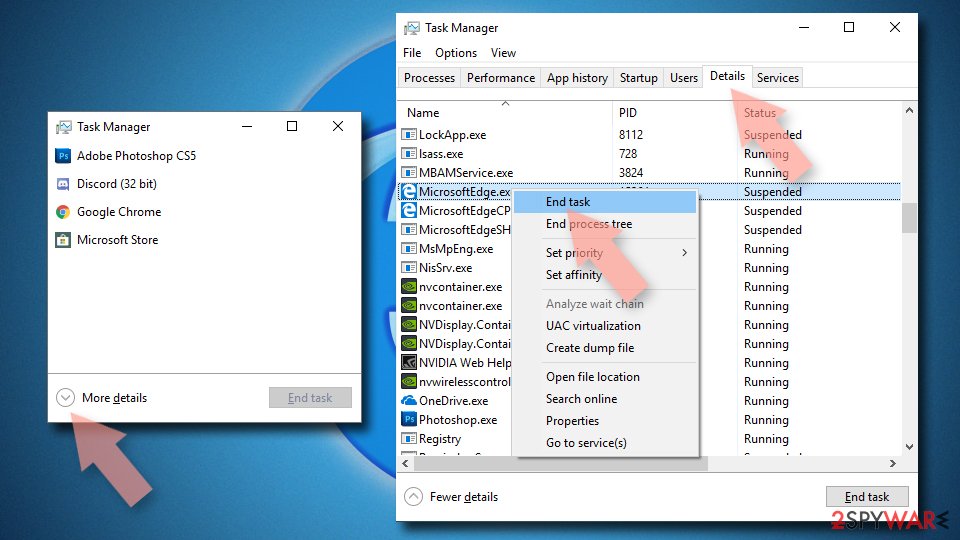
- Press on Ctrl + Shift + Esc to open Task Manager.
- Click on More details arrow at the bottom of the window.
- Select Details tab.
- Now scroll down and locate every entry with Microsoft Edge name in it. Right-click on each of them and select End Task to stop MS Edge from running.

Instructions for Chromium-based Edge
Delete extensions from MS Edge (Chromium):
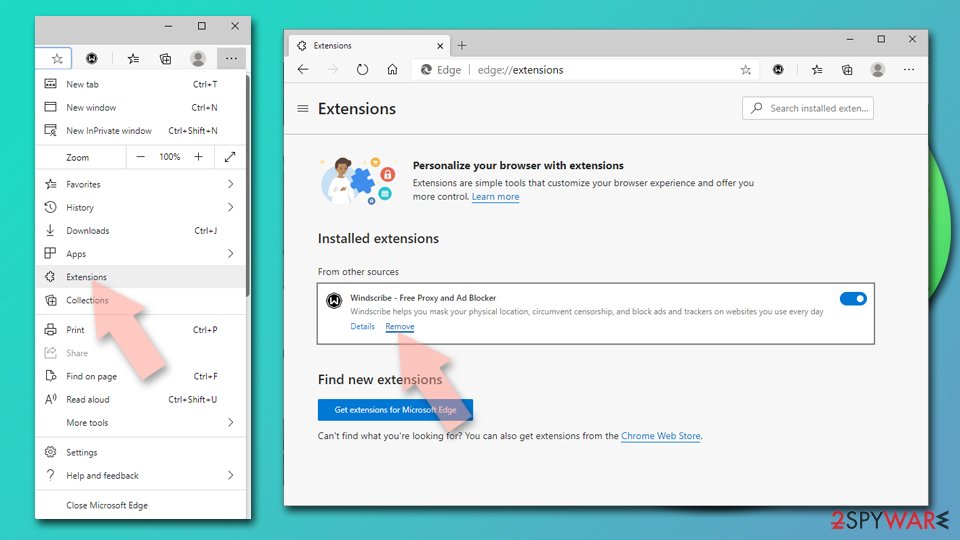
- Open Edge and click select Settings > Extensions.
- Delete unwanted extensions by clicking Remove.

Clear cache and site data:
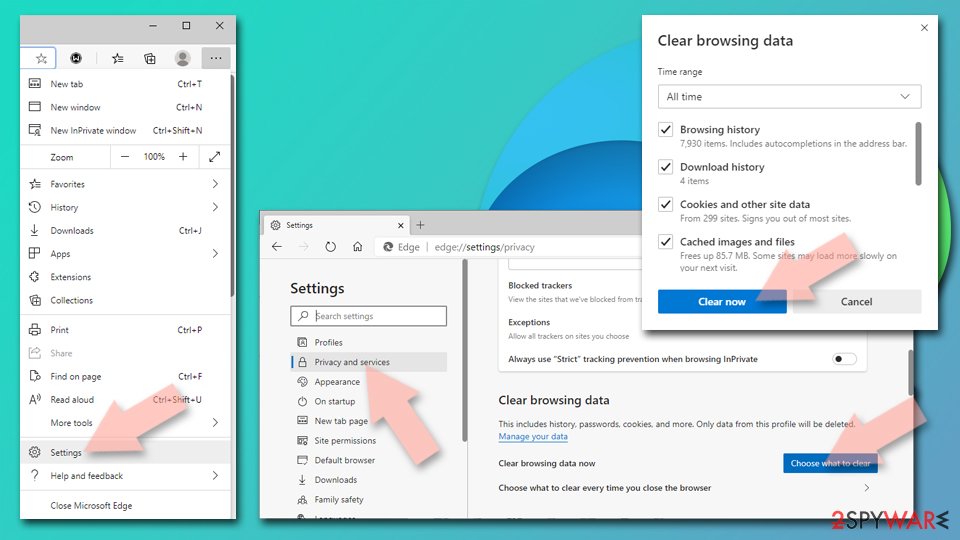
- Click on Menu and go to Settings.
- Select Privacy, search and services.
- Under Clear browsing data, pick Choose what to clear.
- Under Time range, pick All time.
- Select Clear now.

Reset Chromium-based MS Edge:
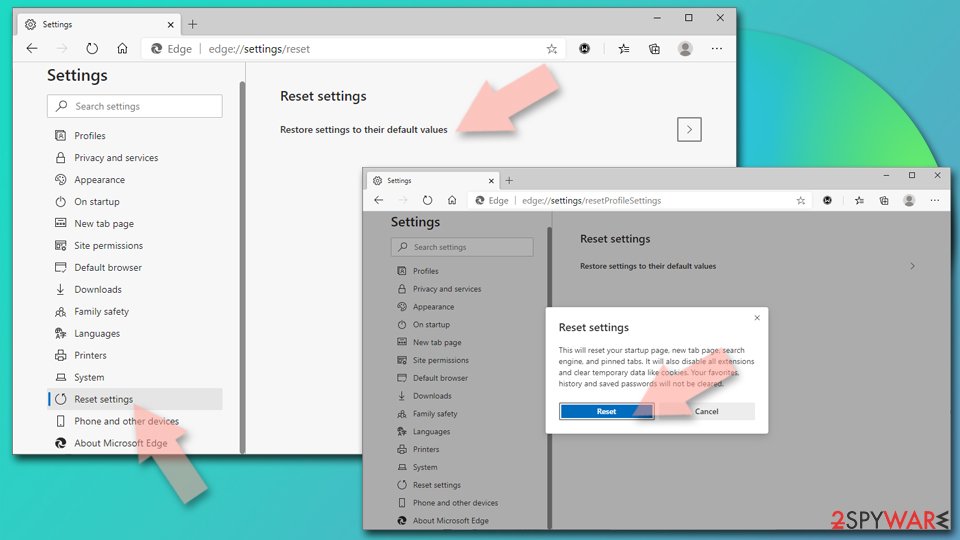
- Click on Menu and select Settings.
- On the left side, pick Reset settings.
- Select Restore settings to their default values.
- Confirm with Reset.
- This will disable extensions and reset startup pages but will not delete bookmarks, saved passwords, or browsing history.

Remove from Mozilla Firefox (FF)
Remove dangerous extensions:
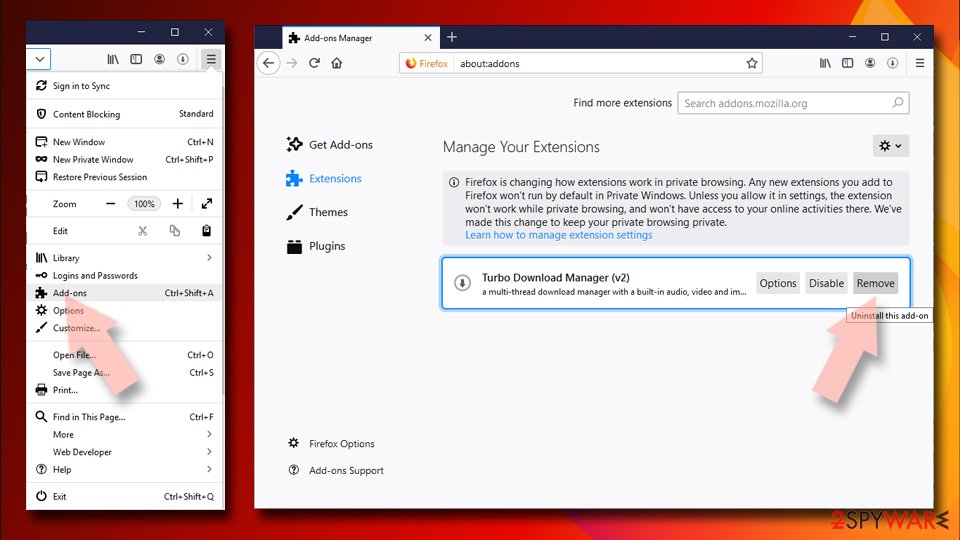
- Open Mozilla Firefox browser and click on the Menu (three horizontal lines at the top-right of the window).
- Select Add-ons.
- In here, select the unwanted extension and click Remove.

Reset the homepage:
- Click three horizontal lines at the top right corner to open the menu.
- Choose Settings.
- Under Home, set your preferred homepage and new tab settings.
Clear cookies and site data:
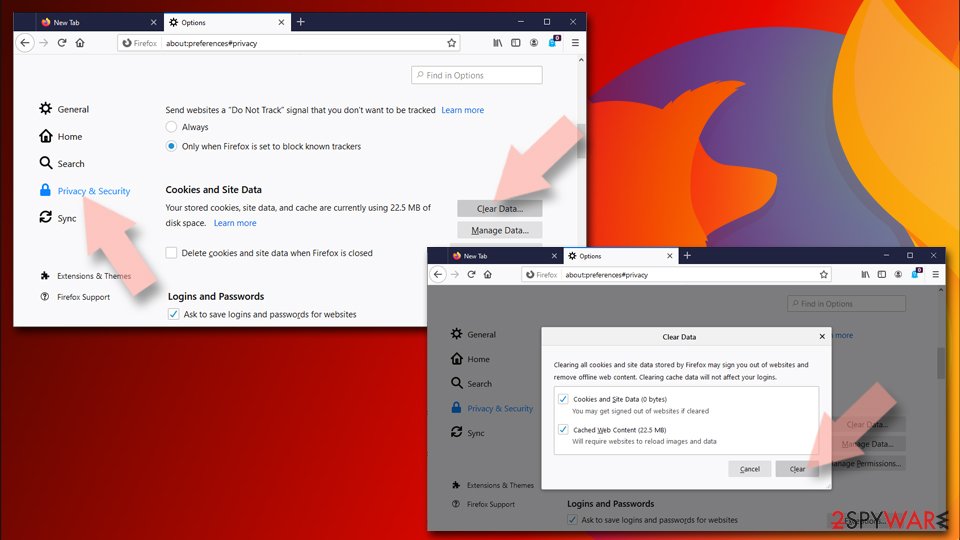
- Click Menu and pick Settings.
- Go to Privacy & Security section.
- Scroll down to locate Cookies and Site Data.
- Click on Clear Data...
- Select Cookies and Site Data and Temporary cached files and pages, then click Clear.

Reset Mozilla Firefox
If clearing the browser as explained above did not help, reset Mozilla Firefox:
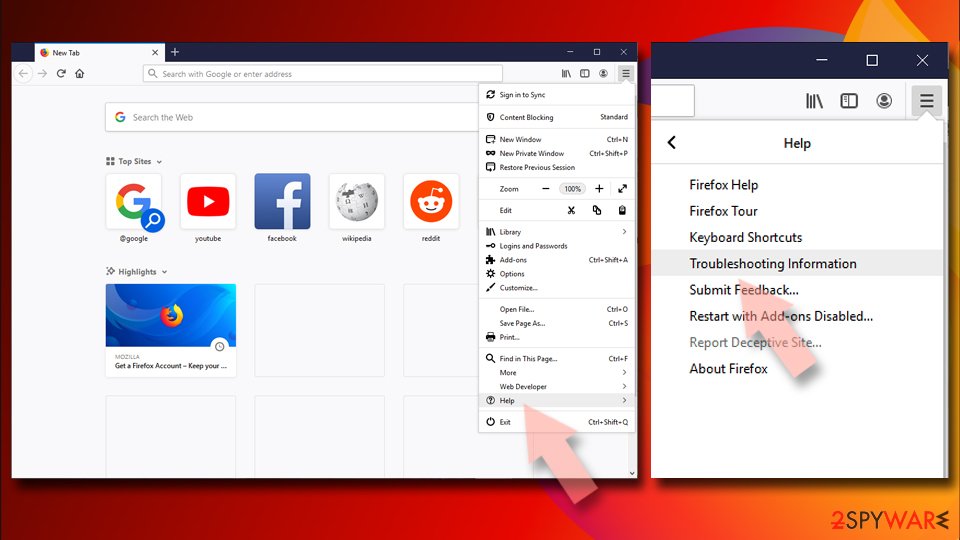
- Open Mozilla Firefox browser and click the Menu.
- Go to Help and then choose Troubleshooting Information.
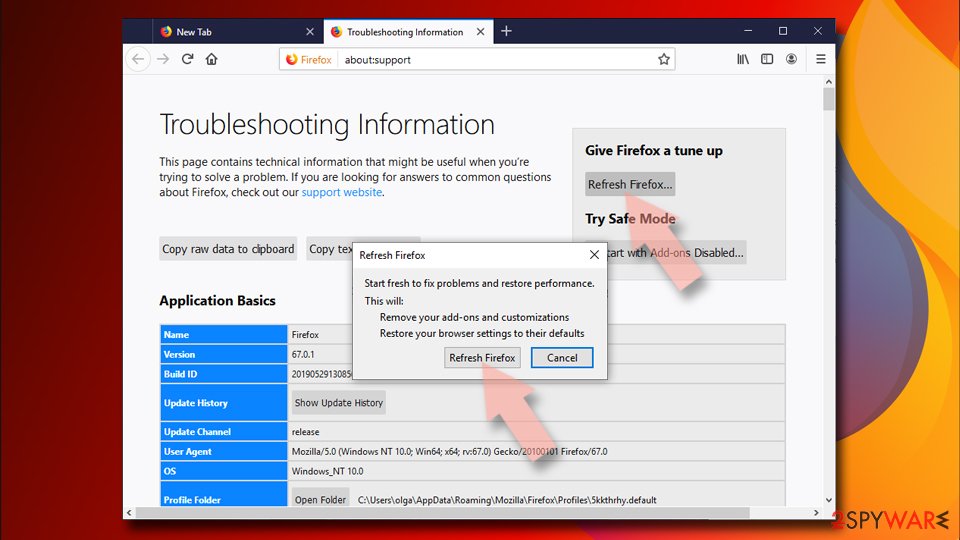
- Under Give Firefox a tune up section, click on Refresh Firefox...
- Once the pop-up shows up, confirm the action by pressing on Refresh Firefox.


Remove from Google Chrome
Delete malicious extensions from Google Chrome:
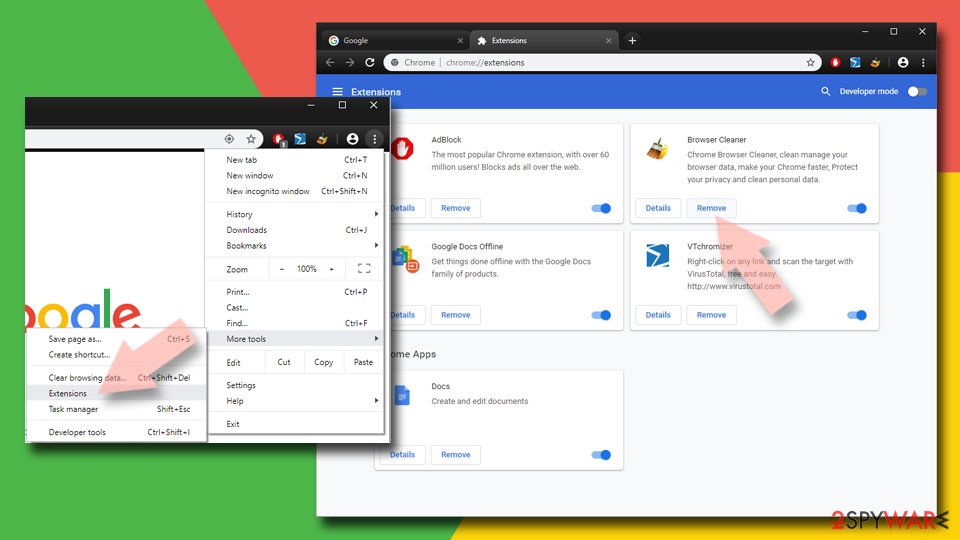
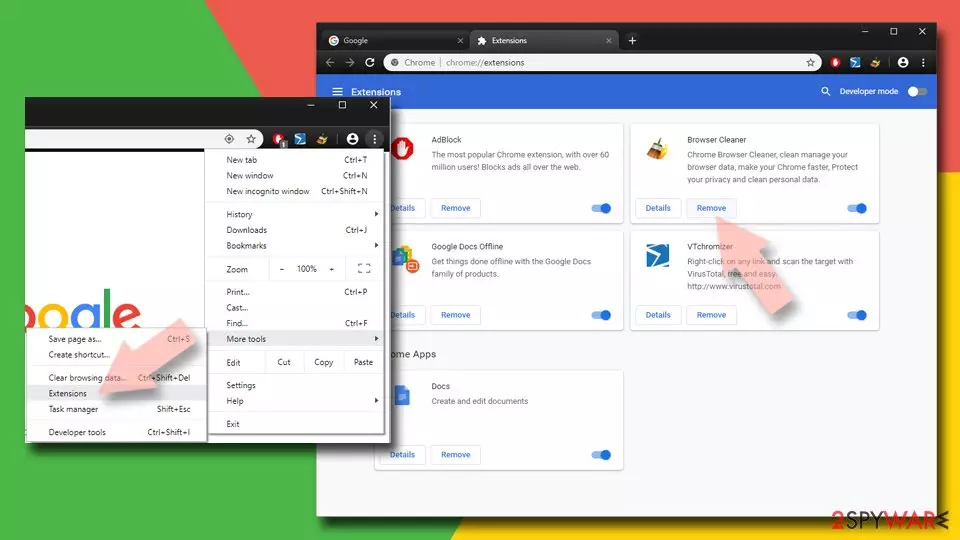
- Open Google Chrome, click on the Menu (three vertical dots at the top-right corner) and select More tools > Extensions.
- In the newly opened window, you will see all the installed extensions. Uninstall all suspicious extensions related to the unwanted program by clicking Remove.
Clear cache and web data from Chrome:
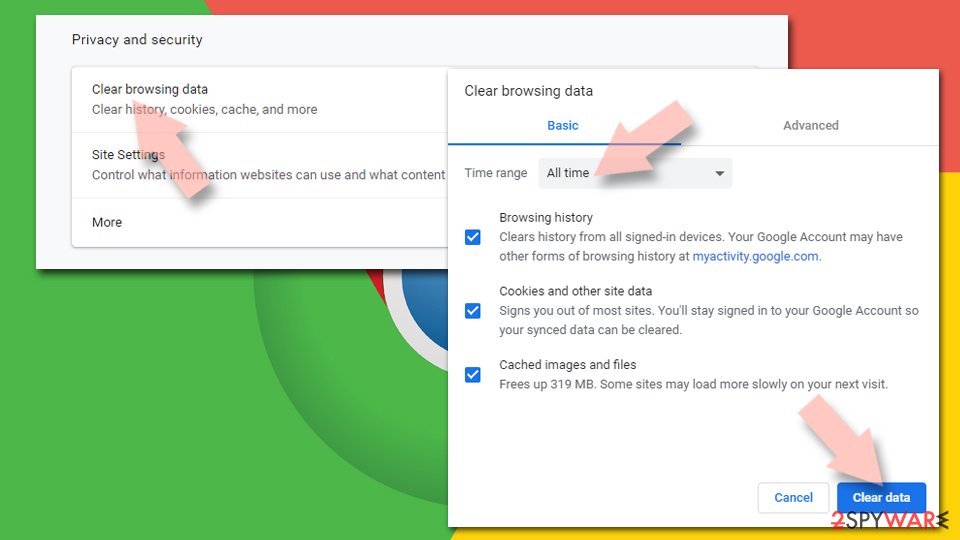
- Click on Menu and pick Settings.
- Under Privacy and security, select Clear browsing data.
- Select Browsing history, Cookies and other site data, as well as Cached images and files.
- Click Clear data.

Change your homepage:
- Click menu and choose Settings.
- Look for a suspicious site in the On startup section.
- Click on Open a specific or set of pages and click on three dots to find the Remove option.
Reset Google Chrome:
If the previous methods did not help you, reset Google Chrome to eliminate all the unwanted components:
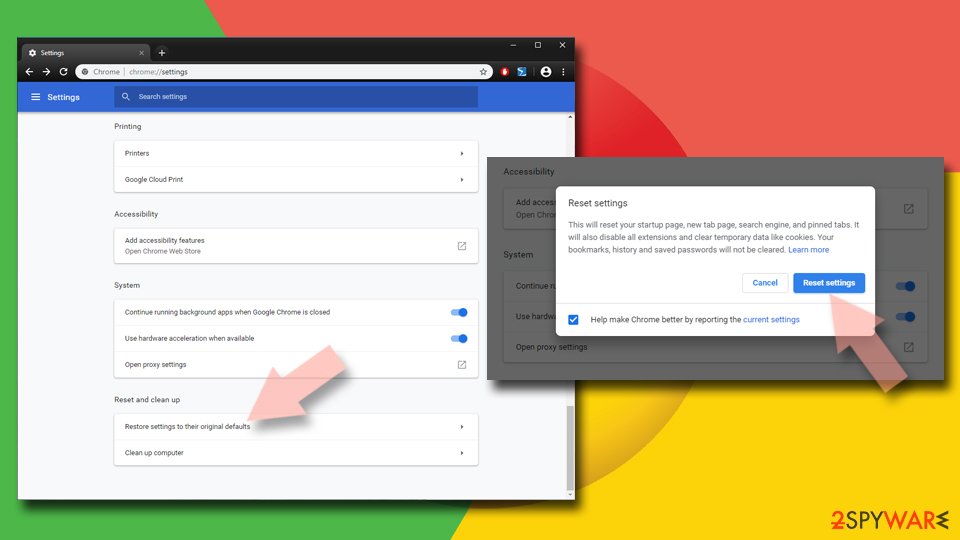
- Click on Menu and select Settings.
- In the Settings, scroll down and click Advanced.
- Scroll down and locate Reset and clean up section.
- Now click Restore settings to their original defaults.
- Confirm with Reset settings.

Delete from Safari
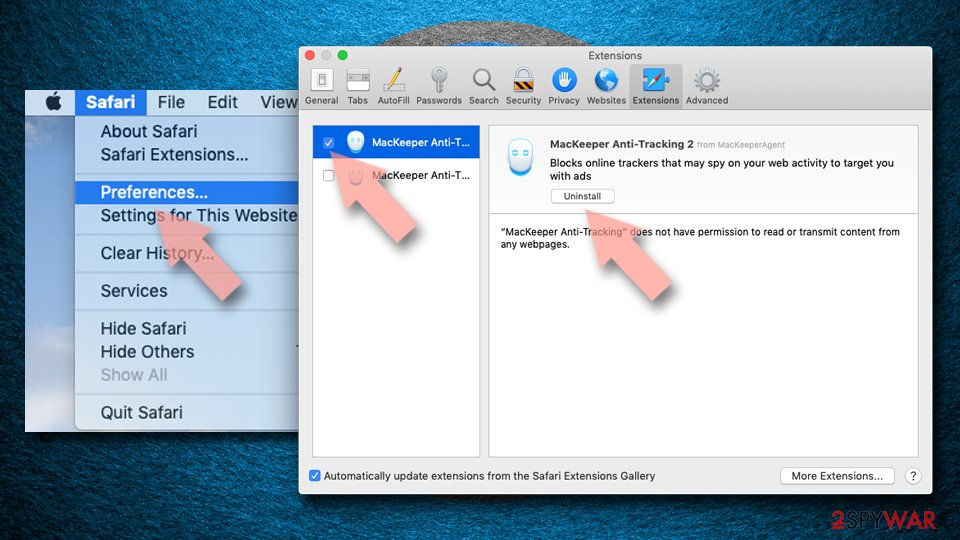
Remove dangerous extensions:
- Open Safari, click Safari in the menu at the top-left of the screen, and select Preferences.
- Go to the Extensions tab, look for any suspicious entries, and click Uninstall to remove them.

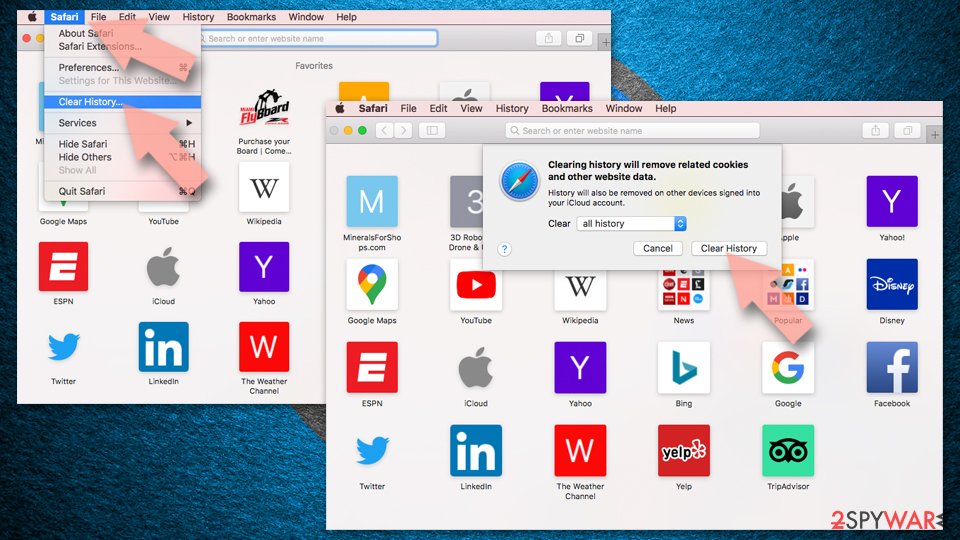
Clear history and website data:
- Click Safari in the menu and pick Clear History.
- Set Clear to all history and confirm with Clear History.

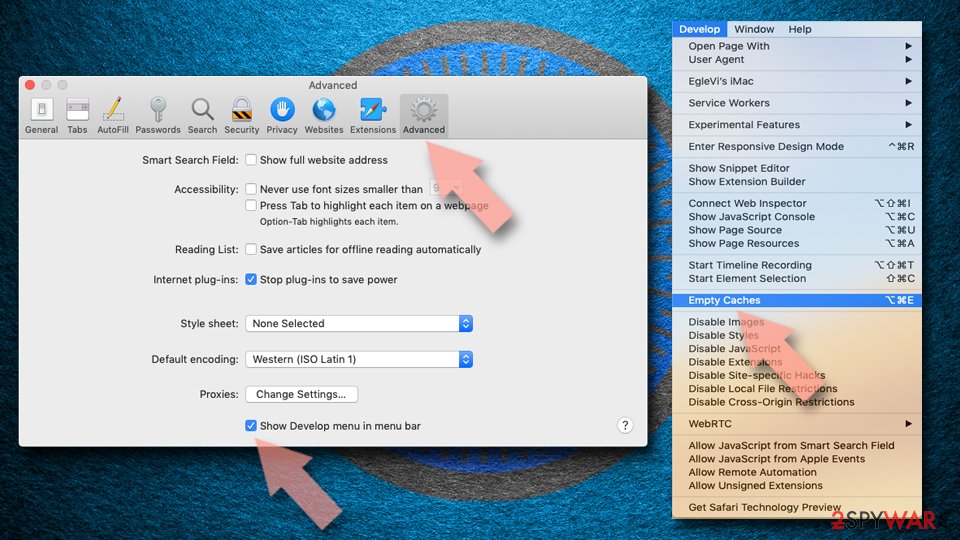
Reset Safari:
- Click Safari in the menu and select Preferences > Advanced.
- Enable Show Develop menu in menu bar.
- From the menu bar, click Develop and select Empty Caches.

Did this guide help?
4 comments
Leon
Thanks! I was wondering why these strange websites kept coming up when I was just trying to search for the information I needed. thanks, thanks
n4RS
useful information :)
NatLiv29
I didnt know how to uninstall that toolbar, thanks for helping me out :)
Katy
filthy viruses! why they always hide their presence behind well-known company names?! I almost started thinking that Yahoo are frauds! I was wrong, though, but it was misled, and I dont like that...