

FBI virus is a screen-locking malware that tries to extort money out of victims for the alleged illegal activities
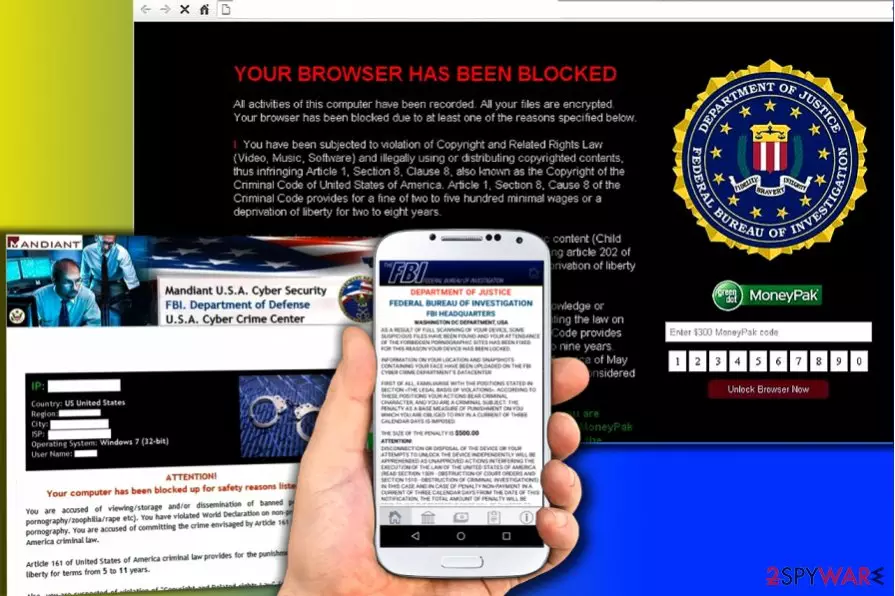
FBI virus is a cyber-threat which belongs to ransomware[1] category. However, it does not encrypt personal data as Locky or other malware does. Instead, it locks up the screen and displays a bogus message which explains, that the user has been violating the law in one way or another. Hackers threaten victims that the computer has been locked by the FBI or CIA, and the only way to recover the control of the machine is by paying between $100 and $500 using MoneyPak or similar service. There are several versions of this cyber threat, and the various AV engines recognize if under different names.
| Summary | |
| Name | FBI virus |
| Type | Ransomware / screen-locker |
| Versions |
|
| Systems affected | Windows computers, Android devices, iOS devices |
| AVs detect under these names |
|
| Demanded payment | $100-$500 |
| Distribution | Spam emails, malicious websites, torrent sites, etc. |
| Symptoms | Locked screen or browser, demands of paying “fine,” etc. |
| Elimination | Download and install FortectIntego; check other instructions below |
FBI Warning Virus was firstly noticed in 2012.[2] Six years later, it keeps spreading around and poses a serious danger to PC users as well as Android and iOS users.
Just like its first versions, this sneaky malware gets into the target computer with the help of Trojan.LockScreen. As soon as it gets inside, Screen Locker locks the desktop and presents a screen with the “FBI Federal Bureau Investigation”, “CIA Special Agent”, and similar badges.
This aggressively-designed alert claims that the computer was blocked due to the Copyright and Related Rights Law violation or other reason that seems convincing. Below you can see a list of crimes that victims of the FBI Warning virus are typically accused of:
- Attempts to access prohibited pornographic content;
- Neglectful use of personal computer;
- Attempts to download MP3s, movies, and software illegally;
- Bulk-spamming.
Unfortunately, if you found yourself blocked by a program which claims that you have been illegally using or distributing copyrighted content, viewing or distributing pornographic content and spreading malware, you are infected with ransomware.
Beware that it can infect Windows, iOS and Android operating systems (this version is known as Android ransomware). No matter what was declared by the FBI several years ago,[3], you must ignore the alert caused by FBI ransomware and do NOT even think about paying the fine.
Keep in mind that this program belongs to hackers who are seeking just to swindle your and other people's money. If infected, remove FBI virus immediately after detection! Otherwise, you can run into further problems. Since the virus actively rampages in Germany, we invite German-speaking users to check guidelines provided on Dieviren.de[4] page.
UPDATE: Beware of the new versions of FBI virus known as FBI Green Dot Moneypak virus, FBI Virus Black Screen and FBI Department of Defense virus! They are designed to extort money from computer users, so they are asking to pay a fine while accusing the PC user of illegal activities.

If you become a victim, keep in mind that these malicious programs only seek to scare you and that they display the same text for every user who accidentally installs malware on their computers.
Close the common infiltration paths to keep malware away
This infection has been using various methods to infiltrate target PC systems. As we have already mentioned, it spreads with the help of Trojan.LockScreen which can get into the system using various techniques. Of course, spam is considered one of the main methods used by this Trojan horse[5] for infiltrating computers.
However, it can also infect you after downloading the illegal program (illegal game, crack, etc.) or after clicking the infected popup. Beware that most of such popups claim that the victim needs to update the Adobe Flash Player or similar program. Make sure you ignore such offers for your own good. Otherwise, you will be forced to think about FBI virus removal.
To avoid FBI virus infiltration, you need to take care of your computer's security. If you don't use any security software or if you fail to update such software, you can increase the chances of getting infected with this.[6] Of course, you must always think about safe browsing practices.[7]
The biggest issue, which is caused by this ransomware, is that it has an ability to block the system and locks down all your programs, including anti-virus software. In order to launch it, you should try rebooting your computer to Safe Mode with Networking or try System Restore feature that could help you disable FBI virus.
According to hackers, you should pay the fine through MoneyPak or other pre-payment systems. Of course, you should never do that if you don't want to support those scammers who are collecting these fines. Instead, you should try to eliminate the virus using the instructions added at the end of this article or using special malware removal software such as FortectIntego, SpyHunterCombo Cleaner or MalwarebytesMalwarebytes.

Malicious software using FBI theme to frighten users
FBI Moneypak
FBI Moneypak ransomware uses a huge alert filled with FBI and Moneypak logos, a webcam and a list of crimes victim is allegedly blamed for. User is informed that he has been viewing/distributing pornographic or copyrighted content, spreading malware or doing other illegal activities. For that, he has to pay a $100 fine and enter a Moneypak code on the right side of the fake alert. This threat locks the system down completely.
FBI Green Dot Moneypak virus
FBI Green Dot Moneypak virus locks the whole system down and displays a fake alert with FBI, Moneypak, and McAfee logos. A misleading message, which belongs to this threat, claims that the Federal Bureau of Investigation has blocked you for downloading illegal/copyrighted material and similar crimes. It requires to pay $200 fine and includes the steps explaining how you should do that.
FBI virus Black screen
FBI Virus Black Screen is hailing from the same FBI group of viruses uses the same technique as its predecessors and seeks to make users pay a $200 fine. However, it also applies an audio warning, black screen, and locks down the whole system. Additionally, it claims that you have been caught for law violations and will accuse you of visiting pornographic websites, viewing files containing zoophilia, child pornography and similar.
FBI Online agent
FBI Online Agent is ransomware which is also using the name of the Federal Bureau of Investigation, but it has a newly-designed alert, which tends to accuse the victim of committing various crimes and asks to pay $200 using MoneyPak. The new thing about FBI Online Agent is that it doesn't show your IP address or location but gives the name of the responsible agent, case number and other details that are clearly invented. Besides, scammers have included the promotion of terrorism into the list of the crimes that are reported into this misleading warning.

FBI Cybercrime Division virus
FBI Cybercrime Division virus is a dangerous ransomware, which pretends to belong to the FBI's Cybercrime Division. This virus uses identical scheme while trying to steal users' money. However, this time it asks to pay $300 using Moneypak prepayment system. Be sure that its alert is not legitimte and can be safely ignored. The new version applies a newly designed alert, which is filled with more than ten different logos.
FBI PayPal virus
FBI PayPal virus is not related to the Federal Bureau of Investigation in any way. As soon as it gets inside the system, this ransomware blocks the entire desktop and disables Internet connection on its target PC.
In addition, it asks paying the fine of $100 for invented online crimes, such as the use of copyrighted content or distribution of malware. Differently from earlier parasites, that use identical scheme for stealing the money, the FBI PayPal virus uses PayPal for its money transactions. Please, stay away from this threat.
FBI Department of Defense virus
FBI Department of Defense virus is a dangerous ransomware virus, which, similarly to its predecessors, seeks to swindle $300 by convincing its victims that they have violated several laws of the USA. This virus has the same ability to lock down the PC and hide every file, which is kept on the computer.
The new thing about this version of FBI virus, is that it offers using MoneyGram prepayment system for paying the fine. Please, never follow its recommendations!

White Screen virus
White Screen FBI virus is a cyber infection, which is categorized as ransomware and belongs to the same group of FBI virus. If you see a white screen and a mouse cursor on your computer's desktop, that means this virus failed to load properly.
However, you may also receive a huge warning from the FBI, which reports about the illegal use of videos related to child pornography or other e-crimes. Please, ignore the warning that belongs to the White Screen FBI virus and never pay the money required by hackers or provide any of your personal information.
FBI Computer Crime and Intellectual Property Section virus
FBI Computer Crime and Intellectual Property Section virus is a dangerous ransomware that occupies the entire computer as soon as it infects it. Instead of the desktop, it shows a huge alert stating that 'computer is locked by Internet Service Provider' for several different reasons.
Just like previous versions, it claims that the computer's owner was noticed watching and spreading copyrighted content and doing other activities that clearly violate some laws of the USA. This FBI virus version asks to pay a fine of $200. Please, never follow this requirement.
FBI System Failure virus
FBI System Failure virus is a serious ransomware threat, which blocks computers with its fake warning saying: 'All Activities of this computer has been recorded. All your files are encrypted. Don’t try to unlock your computer!'. Just like previous its versions, this virus seeks to make its victims pay an invented fine.
This version is used to swindle $300, for that it asks using REloadit prepayment system. If you see such a warning, you must ignore it and use anti-malware software to remove malicious files from the system.
Fake Pornhub App ransomware virus
Fake Pornhub App ransomware virus is a malicious software was first discovered by a researcher Michael Gillespie. The screen-locking virus disguised itself as a fake Pornhub app, and as a consequence, people looking for erotic visual content were tricked into installing malware instead of the popular adult-content app. Once installed, this version of Android ransomware quickly locks the device, preventing the user from using it.
Considering that the victim just installed an app for adults, the message displayed on the screen might appear more scary and realistic than it actually is. The message states that “Federal Bureau of Investigation, Department of Justice” scanned the device and detected suspicious files as well as attempts to enter forbidden websites. As a consequence, the user has to pay $500 fine within three days.
Clearly, it is a scam. You should remove pornhub.apk as soon as possible. The researcher who discovered the virus suggests that the victim might have to reset the device entirely and restore it from a backup in order to continue using it.
Remove FBI virus from a compromised computer
In order to remove FBI virus from your computer, you should firstly unlock it. Depending on the type of your virus (you can be infected with Crypto-malware, ScreenLocker, ransomware, etc.), you should try methods that are provided below. Almost in all cases, it is required to reboot the device into Safe Mode with Networking. Of course, the first step that you should make is trying to launch your security software. If you don't have such, we highly recommend installing FortectIntego, SpyHunterCombo Cleaner or MalwarebytesMalwarebytes for FBI virus removal.
If you want to remove FBI Warning virus without entering Safe Mode, you can use System Restore function instead (as explained below).
Remove FBI virus from Android, iPhone or iPad
FBI virus has been updated – several years ago it started blocking Android devices and has already attacked LG Smart TV.[8] It acts just like Windows version: FBI android virus locks the screen of the device and displays a fake warning message asking people to pay a fine for their illegal online activities. Please, do NOT pay this fine!
In addition, scammers started to release versions for iPhone users, so we have also prepared a guide on how to remove the virus from iOS devices.
If your Android phone was blocked, you should follow these steps. The following directions also explain how to get rid of FBI virus on the tablet.
Instructions on how to remove FBI virus from Android
1. Reboot your Android device into Safe Mode:
- Find the power button and press it for a couple of seconds until you see a menu. Tap the Power off.
- Once you see a dialog window that offers you to reboot your Android to Safe Mode, select this option and OK.
If this failed to work for you, just turn off your device and then turn it on. Once it becomes active, try pressing and holding Menu, Volume Down, Volume Up or Volume Down and Volume Up together to see Safe Mode.
2. Uninstall malicious app (FBI Android virus may hide under BaDoink, Video Player, Network Driver System, Video Render, ScarePakage and other suspicious names):
- When in Safe Mode, go to Settings. Once there, click on Apps or Application manager (this may differ depending on your device).
- Here, look for the previously mentioned malicious app(s) and uninstall all of them.
If this failed, enter a random, 15 digit length, code of imaginary MoneyPak express Packed voucher that is asked by FBI android virus or follow these steps:
- Go to Settings -> Security. Here, select Device administrators.
- Here, look for the previously mentioned malicious app(s) and uncheck it
- In order to finish the removal of FBI Android virus, select Deactivate and OK.
Remove FBI virus from iPhone or iPad
FBI virus on iPhone? Not a problem. If you encountered a fake police warning on iPhone, follow these instructions to clean your device:
- Go to Settings. Here, find Safari app and tap on it.
- Scroll to the bottom of Safari settings panel and tap Advanced.
- Select Website Data, then scroll to the bottom again and select Remove All Website Data.
- Tap again to confirm the removal of website data. Your iPhone or tablet should be FBI virus-free.
Did this guide help?
203 comments
Jim
I had this and found it in the start menu. I WENT INTO SAFE MODE ANF REMOVED. Now its booting up and working fine.
Greg
After rebooting my computer, I constantly clicked my Monzilla Firefox icon and got it to open ahead of the FBI malware. I did a system restore to a date that preceded the attack and everything has been operating fine since then. Nasty little virus go-go away.
Rick
I downloaded the trial version of malwarebytes. It scanned my comp, and removed the virus successfully.
Strange but works
just throwing this out their. I downloaded pinnaclegamerprofile or something for game controllers on pc...point is it somehow intersects it. you must logoff and then cancel the logoff because the pinnaclegamerprofile gets stuck; and it actually gets rid of it, well for now until you take action. point is if you cant get rid of it, download that program it helps, but youll still see it upon every boot up
GS
Free version of malwarebytes did it for me too.
Jack
Whats it called?
michael Walling
It has changed....now unable to bypass it in safe mode. Also the comouter infected did not have and admin password on it before infection...now it does and therefore cannot use somfunctions needed to delete virus
Jeanne
Malwarebytes worked for me
scott
ctrl+alt+delete, log off, wait until it closes the "Virus" then scaned with my anti-virus, took it off.
maureen
So, this happened while my husbad was on the computer and they did a visus scan and a reboot scan and the virus is still on the computer and completely locked up. I cannot access SafeMode so now not sure what to do! I can load that SpyHunter onto a CD or USB, but I cannot get to the program to run it. The computer only shows icons, cannot open Start, cannot go into an icon, cannot go onto the web....nothing! Help!!
harry
it really work in less than 15 min.
Chuck
An updated version of Malwarebytes running in Safe Mode will find, isolate and destroy the FBI virus. It has to be run in the "Full Scan" mode though. Then reboot as normal and you should be okay.
Chrism
Rick,
I did the same thing, but I did NOT buy the software, and guess what? Its back, I will be buying the program this time you can bet.
Alexandre
I just boot and after entering on windows press Ctrl ...Alt...Del comes up the task manager window, 2 our 3 second s later the FBI warning starts and you will see on the task manager the ename of the file...after that press the power button till power off, start and boot again press F8 and boot from command prompt, search for the file ..........windows dir *.exe ,you will see all the execs files ....search for yours and delete.
Meme
I downloaded the trial version of malwarebytes, updated it. started in safe mode, It scanned my comp. Did not remove virus -Help
Dominic
Just fixed my dads laptop after he got infected wit his virus.
Use the free version of Malwarebytes, update the virus definitions and do a full scan.
Also make sure you run the scan while the computer is in safe mode.
Hope this helps.
Anthony
Hi, recently been affected by the virus. I tried Malware did not work! What did was pressing F8 during startup of system so i can see the Safe Mode Options, click Repair the system, and do a system restore well before the attack happened. Been fine since....
sanju
safemode with networking and download malwarebites and then run the files deleate the virus issue fixed..
Joe
Ctrl Alt Del to switch users to someone else on that computer who has admin. rights. Google ComboFix.exe and download it. Run it and if it asks for an update let it update, so you have the most recent version. Let it run, sometimes is doesnt seem like it is doing anything, but it will pop up a few windows. It will then run a scan, which takes about 10 to 15 mins, it will pop up a log of information for you, which it will also save for you. It will need to reboot your system, and then you should be fine.
Adam
Got it yesterday and downloaded the malwarebytes and it couldnt find the virus.... I think its changed names... I had to do a system restore to a previous point...
pissedatmalware
Thanks Greg!!! I ran a Staten recover add it is working fine! Im now downloading spyhunter as I type, I dont need any future isses.
yafet
i really need help i went into safe-mode downloaded malware-bytes and it scaneed my computer it said their was 2 viruses i removed them but now when i get out of safe mode then the fbi warning virus still pops up. i called a fix ur computer place and they told me that the virus was in my network files so their is nothing i can do. is he right or is he just trying to take my money. also he said that if i restore my computer nothing will happen i really need help ASAP!!!!!!!!!!!!
Sharon
I downloaded multiple programs in safe mode to try to remove this virus - Norton, AVG, Lavasoft, Windows Defender... The one that worked is Malwarebytes!!!
nick
I nad malewarebytes trial already on my computer. I updated it and ran it in safe mode. It found 3 infections and i figured my computer was cleaned. When I rebooted the system the FBI screen locked up the computer again. What should I do now?
Opcode
Try rolling back with System Restore to some time prior to infection.
Asu
Hi Nick,
Try a system restore or run the Norton Power Eraser tool in safe mode with networking. Also please try to disable unknown start-up items from msconfig.
lisa
i just had this happen to me. i restored my computer to an early date...which happened to be this morning when i was running virus scans..and it got rid of it. thank you all the people here you helped me and im very grateful. glad to know we are all smart people also.
lisa
i got it when i was on spotify i dont know if that means anything
Frank
This thing seems to have my keyboard locked up until windows opens. I cant open in safe mode. So FBI comes in and locks up in about a minute. If I try to open my virus protection to scan it will not allow it to open. Any iodeas on that?
Mike
This guy just copied botcrawls website pretty much to the tee. Funny.
Mike
Point of inormation.
1) When you try to access the computer, DO NOT CONNECT TO THE INTERNET.
2) If you are connected, do a contol alt delete to bring up the option menu- You cannot start taskmanager so hit the logout key.
3)When you get back to a non-connected computer, do a search for all files with the date that you think the system was infected i.e. 10/01/2012
4) On my compuer, it brought up 2 items
programs: ctfmon
files: 12986228.dll
5) Right click and open properties----go to security settings and click on the edit key--- change "allow" to "deny" for all boxes. Then press "Apply"
There should also be a file that comes up when you search for the date in step 4---- repeat step 5 for this file also. If you go to details on the dll, the language is Russian and the A*Holes actually show a copyright.
Then Restart your computer. and reconnect to the web.
For me, this gave me access and now Im going to run the malware programs that are listed above.
Point of information- I was running 2012 TrendMicro Titanium and it failed. It even said it stoped an attack on 10/01/2012 (which is how I knew the date to search fo)
Last time I use trendMicro
Mike
See my comment for Maureen 8/10/12 above for a workaround. It gave me back control to go back on the web and download the malware removal programs. My computer was not accessed for a week, hence it was easy to see that some Russian Aholes loaded a program on 10/01/2012. Hope this helps
Anonymous
Whoa this website is a rip off I just looked
Shawn
If the account that is infected and not a member of the Administrators group, youre in luck. Log in with an account that is a member of the Administrators group. With this account you can backup your My Documents, Favorites, Desktop and so on. Do not backup the entire profile because this virus hides in the registery and in the hidden Applications Settings folder of the infected profile. Next, go to control panel and users. Delete the account and select delete account files as well. Then recreate the account and log into the newly created account. You can restore the files that were backed up and have your account working perfectly again. No need to play in the registery or run a long virus scan. This process should take only minutes. After this, you should have learned your lesson and tell your husband to stay off of the porn sites.
Constance
Hey my desk top has the FBI virus. However my laptop is working just fine. How do the virus get into your computer? I mean is there something I can NOT do in order fo rmy computer to stay safe? I dont wont nor need this. PLEASE HELP!!
Ace
I removed this for a friend last night. I used Malwarebytes trial version too. However, his OS would lock up seconds after booting up. I removed the hard drive from his PC, then I attached it to my PC with a USB to SATA adapter. (It attaches to my PC like an external drive). I then did a full scan and found 4 infected files on that drive. I removed them and replaced the hard drive. I was then able to boot his PC and everything is running normal again. For users still infected, after running Malwarebytes. Make sure you are running the latest version. Also, if you can access your OS, run Windows it in diagnostics mode. (This will prevent a network connection and scan all your files). Sometimes infected files can be in restore points too. Hope this may help someone.
Dennis
I got the fbi block, turned off pc turned back on into safe mode. Then turned off. then back on without internet on and ran AdvancedSystemCare2013 virus scan and then system restore. Been fine since.
Christian
The FBI virurs claims that I was watching porn.....witch I was not...........at first I was scared.Then I saw that the FBI symble was wrong.
Paul G
So, I got hit with this piece of crap virus. BEST WAY to get rid of it...TRUST ME...First, hopefully you have a second user on your PC . Always set up a back door sign in as ADMIN. Dont use it unless you really need to....LIKE NOW !!!! Go to the web and bring down MALWARE BYTES. Its free but it is a TRIAL VERSION. Activate it through your alternate sign on, not the user that you contracted the virus under - you wont be able to anyway because of the "FBI LOCKOUT" Run the clean up twice. I bought the ultimate for $39.00 and boy was it worth it. Once you have run the complete application you can sign on as normally do. THEN RUN IT UNDER THE USER THAT ORIGINALLY GOT STUCK UP THE BUT WITH THE VIRUS. It will clean the files that are not shared as the user that was infected. Total time to fix this once you down load Malwarebytes is about 30 minutes. SO....SCREW FBI-$200.00 By the way, I didnt mention that I have Norton 360 and Windows invader running. This virus has an awfully long and thin needle.
Lucas
It worked, thank you
chris
notice everyone with a thumbs up downloaded malwarebytes lol
dont download the BS
JOe
I run Spybot and like it BUT it does not find the FBI virus! Im not sure why since its been around for so long!
MINDY
I CANT GET TO THE DESK TOP AT ALL SO HOW CAN I EVEN SWITCH USERS ?
qusaimodo jones
i got the fbi "pay me $200 thing from an abandonware site a week ago. I unpluged my laptop immediately. restarted in safe mode, ran superantispyware, and afterward used system restore. virus is gone, may have been just dumb luck, but that worked for me
Steve-O
The easiest way to get rid of this crap is to start in Safe Mode with Networking. Once there, launch your internet browser, google search for the malwarebytes anti malware. Download the FREE antivirus. It takes a bit to get downloaded. Launch the Malwarebytes program and let it run, this will kill the sucker. then restart your computer. Once in normal mode, do the malwarebytes scan again, it might well find one more bug that got missed in safe mode. No idea why that is. After that, you should be golden.
DougB
I have malwarebytes Anti-Malware. I disconected from the internet, ran the program, and it found the three viruses. I deleted them, and that was it.
If you dont have Malwarebytes, try what you have. Just make sure you are off the internet, or you wont be able to get to it.
You might be able to downlaod Malwarebytes to a disc, then use on your computer offline, but, I dont know for sure. Good luck.
2spyware
If you visited this website you did so by mistake. 2-spyware has only negative reviews, links may lead to malware on this site so dont click anything. report this website if you accidentally visited it.
rajesh
Hi,
Its worked.. thanks a lot..
Marty
So how do I get to safe mode
EWJ
Press F8 while windows is starting up!
2-shittysite
What a shitty site. This site is so spammy and shitty even Google dropped them in search results.
jimmyg
I was able to get my computer back from FBI by booting up in a safe mode and going through the system restore procedure, choosing a date prior to the infection. I still need to remove the virus.
bochiecole
google COMBOFIX, run it in safe mode and you should be good.
A.
This virus was a joke. What i did was went into my configuration at the loading scrren and disabled all remote use of this computer, then went in safemode and ran malware bytes. It seems to be gone now, it was imbedded in my adobe acrobat files, and everytime it tried to update it would freeze my comp wit the fbi warning, but anyway its gone, its a scam and it is mildly easy to get rid of it so dont fear, it took me all night to figure it out, what without any internet
Lisa
I dont know if I just got lucky here or what. My computer was locked up with the FBI warning screen so I simply rebooted with ctrl-alt-del and opened Malwarebytes as fast as I could. It then locked up on me right after clicking it but when I hit ctrl-alt-del again I had a warning that I could not shut down yet due to Malwarebytes. So I went back to the desktop and lo and behold I was able to update Malwarebytes, run a scan, and obliterate 4 little buggers. Ive had to combat much harder trojans and virus so to me this one is just like the post above mine describes "a joke". *One word of caution is dont always believe solutions you google because they are often instructions to root the virus/trojan even further.*
Of course you would need to have Malwarebytes installed already so Im sorry for the piss poor solution. I just hope my time spent here leaving this comment can help someone in the future. For good measure Id always keep Malwarebytes on any computer I owned or worked with just for when the day comes you need it to save your ass. It has served me greatly many times and Id recommend it 100 times over.
Kate
This thing is really tricky and I ended up having to do a system re-set since malwarebytes and AVG did not do the trick.
Debbie
I had the FBI virus, removed it with malware but all my files have been changed to a block extension. I downloaded two different file extension "fixes" but they didnt work. Any suggestions?
Patrick
Running safemode, tried delete commands, etc. through cmd prompt ... "This command is not recognized as an internal or external command, operable program or batch file." White screened. These files are the newest on my PC: MRT.exe, perfc009.dat, perfh009.dat, PerfStringBackup.INI
The dates on several directories are also using current dates: . .. Config ... Tasks
I downloaded Malwarebytes onto a flash drive but cannot access the USB port. It has disabled DOS commands to change directories.
What now?
Not PC Savy But...
I tried Malwarebytes and, after a full scan of 90 mins. and a reboot, I found it to worketh not! Arrrggghhh. I got rid of the beast, however, by doing something remarkably simple. I booted in safe mode with internet and then went to Guest user. From there, I simply used the system restore to a couple of days ago. Voila! No money spent, no code, no nothing. Back in the saddle I am.
Not PC Savy But...
Dont spend the money unnecessarily. Use system restore. See the comments above. It works perfectly and its free.
Old Man John
No go with scan with malwarebytes. Tried to load Spy Bot from flash drive as well as ccleaner but got ERROR sending request message. The server name or address could not be resolved. Tried in both SAFE MODE and SAFE MODE with networking. Whats with that? Also tried back dating to earlier time.
Eddie
I wasnt (and may still not be able to) boot into SAFE MODE - BSOD popped up and it went to reboot. I WAS able to reboot normally, although I had not desktop or menu bar, and starting explorer from the Task Manager seemed to triggered the virus. Task Manager itself showed nothing untoward until the virus took over. However, I WAS able to see a flashing Task Manager by holding down Ctl+Alt+Del, and I copied the name of the offending task - it had characters in it that are only available using Charmap, so I had to reboot, run it, and do a copy/paste to get it right. Another reboot and I got into RegEdit, searched for the task, and deleted it from HKEY_LOCAL_MACHINE/SOFTWARE/Microsoft/Windows/CurrentVersion/Run. That also gave me the name and location of the virus itself (in my profile under Local Settings/Temp) so I could delete it, as well. Nasty reinstaller (not the worst Ive seen) that I got around by disconnecting from the internet, but as soon as Id plug in, the virus, although now crippled, still popped up. I finally downloaded Malwarebytes on another computer, put it on an SD card, and ran it. IT needed internet access, but only requested it after it had been initialized, so, although the virus popped up once I was back online, Malwarebytes was running and so located and killed the virus. No sign of it so far, but I may have to rebuild the MBR in order to get into SAFE MODE should I ever need it.
Caitlin
I got infected with this today, just a few hours ago. I disconnected from the internet and was able to log on to another admin account on the computer that did not seem to be affected by the virus. I transferred some important documents onto the secondary account and then deleted the infected one. It looks like the virus is completely gone, but is it really? I never ran antivirus software to remove it or booted in safe mode. This seems too easy.
Henry
this malware requires you to pay in order for it to remove the virus
Jackie
I thought it was real!! I got rid of it 10min ago But I googled "FBI on computer" on my phone and watched a YouTube video on it it was pretty easy Any could get rid of it (Im 14)
Kelz
You need the full version of spyhunter, the free version will tease you letting you know it found it but you have to pay for a license.
Malwarebytes pro trial version is your best bet or combofix. Use either one in safe mode.
Hermes
My computer got infested recently with this nasty FBI ransom malware, I managed to run Malwarebytes when I rebooted my computer for 2nd o 3rd dont really know how many times , It was impossible to restart in Safe Mode with internet or any other Mode, it kept looping back to "start computer normally" so before the virus took over I hit the Malwarebytes launch Icon, it gives you a time window of about a 2 to 3 secs. Iam not a computer expert, maybe lucky, I was so piss off that I was doing any thing. But guess what, it worked, wooohooo. I clicked yes on the update window, Malwarebytes updated itself, and full scan of my computer, detected 3 ransom or fake FBI virus and GONE, FINITO, BYE.
Danielle
I am trying but my computer does not even reboot in safe mode with networking nor safe mode with prompt command. What other choices do I have?
DEE HUTCH
F8 to enter Safe Mode with Networking and ran Malwarebytes Anti-Malware software which was already on my infected computer. Seemed to have worked
David
do the following steps:
1. do system restore form the safe mode.
2. use spy hunter in safe mode.
3. use malwarebyte in safe mode.
4. reboot your system in normal mode.
you will never get back again this fbi virus.....
Christina
I have found a way to get to the internet through the "favorites" page. It allows me to use the computer but the problem still exists. Toshiba support wants me to wipe it clean to factory new. I am considering it.
Michael
I tried to start up in safe mode and it changed something in my bios that wouldnt allow me to do so. So I disabled my wireless and it stopped it from launching. Then I downloaded a couple of programs that took it off.
Terry
Heres what fixed mine (no anti-spyware involved):
1. Go to HKLUSoftwareMicrosoftWindowsCurrentVersionRun and look for the [random}.exe
2. Delete value in key
3. Go to location that the [random].exe was pointing to (mine was in the root of C:UsersInfectedProfile)
4. Delete File(s)
5. Reboot
After login back in, I did run CrapCleaner and MalwareBytes and found the usual suspects of Malware, but the FBI virus has disappeared.
Terry
FYI, that was all done in Safe Mode
5150
I removed the virus with combofix in safe mode but it left a .block extension and now I cant open any files. HELP!!
ron
how do i open the computer in safe mode? this is such a mess.
BMW
U can open your pc in safe mode by powering down, then when powering back up, constantly tap the F8 key untiil the safe black safe mode screen is visible. Use the up and down arrow keys to place a highlight on "safe mode and networking"
Mauricio
I used malwarebytes to remove it , and is for free..
bob
I did got rid of it the easy way. I paid $ 200 and its gone.
VirusVictim007
Hi,
Sharing with you my successful removal of the FBI virus.
While out of town my daughter informed that while playing fairies her computer went blank screen with sound.
It turned out to be the FBI virus.
Her computer is a Dell Windows 7 laptop running Norton Antivirus 360.
To my surprise Norton did not catch it.
This is one nasty virus.
I tried all the techniques related to navigating and deleting files in the roaming or local folders.
Also, tried the restore method several times, but the virus was preventing the restore to complete successfully.
Next, I downloaded the Norton.com/NPE. It found two infections. I thought I was done but it did not work, the virus figured how to survive without those files.
Next, I downloaded Malware bytes. It found another two infections. But then again, the virus found a way to survive without those files.
I called Norton, GeekSquad etc. they wanted $100 to $200 to guide me over the phone on how to remove the virus.
At this point, I had spent more than 8 hours loading and rebooting and wondering what else to do.
A long time ago, I downloaded Avira Antivirus. It detected viruses Norton and McAffee could not detect.
Currently paying for Norton. We use it at work and I use it at home.
On another computer, I downloaded the Avira bootable rescue product for FREE.
http://www.avira.com/en/download/product/avira-antivir-rescue-system/product/avira-antivir-rescue-system/product/avira-antivir-rescue-system
In addition, I downloaded Unetbooth.
http://unetbootin.sourceforge.net/
Unetbooth is used to “burn” a USB memory Stick as a DVD bootable drive.
You download the ISO image onto your desktop and use Unetbooth to select the avira ISO file and the location where you inserted a USB Memory stick.
It will format the USB Memory Stick with the Avira ISO bootable image.
I inserted the Memory stick into the infected Laptop and restarted it. The laptop had already the booth sequence checking he USB drive first.
It loads Linux and runs the antivirus. I clicked update to get the latest signatures and clicked on configuration to select delete file when unable to repair.
After over two hours, the Avira rescue system found 14 infected files! Ranging from java, gif, exe. Just wondering why the other antivirus could not detect them!
It could not delete some of the files. Indicating “archive scan abort”.
I restarted my laptop in Safe mode and delete those files manually (3 of them).
Then I restarted the laptop normally.
It worked!
I am switching to Avira. Those German guys make some good stuff.
Jim
I tried Dell, they took over my computer and it got worse. now F2 or F8 gets me options, but get a blue screen that says windows not usable, dell is sending a new disk and will talk me through install and try to backup my current files. anybody else have such problems? cost me $129 so far...
macq
how do you restore your computer to a previous date using windows 7?
landon
if you can get the task manager up and running, kill the explorer.exe process tree and then re-run explorer.exe and you should be able to work your computer to find what the virus has renamed itself to
Jim
i get nothing. restart and hit F2 or F8 and I get the options of safe mode, etc., but when selecting anything it just locks up with an error message. tried disconnecting from the internet, just cant get anything at all to work. thanks though
PORNHUB =
can any one tell to me.... what does person write in 2 min and 6 sec in vidio ( in run) ??????????? plzzz
Jay
If it helps anyone I removed the virus doing the following:
1. I shut down the computer
2. disconected the internet connection
3. downloaded Malwarebytes on another CPU to a thumb drive
4. Re-booted the infected CPU
5. downloaded Malwarebytes from thumb drive (warning voice was still playing in the background)
6. install Malwarebytes
7. run Malwarebytes (quick scan)
8. prompted by Malwarebytes to re-boot
9. virus gone.
Hope this helps someone.
Elaine
Thank you so much, this was the best answer. I would suggest to everyone.
xslice
Download combofix. It will get rid of the virus. Has worked twice for me on XP.
H B
shutdown the infected machine, go to a different clean PC, download malwarebytes on a flash drive. disconnect the internet connection from the back of the infected machine. insert the flash drive with malwarebytes then power up the infected machine without a internet connection. the FBI virus depends on a connection to take control of the computer. once infected machine boots up in normal mode, save the malwarebytes to the desktop from the flashdrive.
once on desktop, right click and intall and run a full scan of the machine. Malewarebytes will find 3 files, one file shuts down automatic updates the the 2 other files run the FBI screen block. once malwarebytes is done, delete the 3 trojan viruses and restart the computer. upon restart connect the internet and get a full update of malwarebytes and run full scan again. this should eliminate the virus. has worked for me on a XP machine and have used to maintaine many other computers. Once a computer has malware you have to disconnect the internet connection and download malwarebytes to flash drive from a different computer and run on disconnect PC to get rid of all maleware, then determine if there is registrey damage. If registrey is damaged you will need to reload the operating system. Best of luck to all, Best Regards, The PC Guru
JWPCPlusMore
Hello I am a PC Tech and encountered a new strain of this FBI virus, has white screen with FBI logo demanding $200 to unlock. As stated above as soon as PC boots into windows pop-up comes up with no access to any programs as TASKMAN.exe is blocked and window will not close via alt-f4 or tab either. This new variation however also infected and disabled ALL SAFE MODES with or without networking including MS-DOS prompt upon attempting to use f8 and selecting any choice PC loads about 20 files and Blue Screens and restarts no matter which option is selected. So upon learning this new info any attempt fails for safe mode so I pulled hard drive and ran via usb adapter on another PC and had full access to files. First tried Malwarebytes in regular OS found 2 trojans removed and restarted rebooted in original pc and still infected. Next I tried several more times with malwarebytes in safe mode and then avast, and finally avast boot scan. Scanners always find new Trojans and cannot remove. Finally I tried to manually remove registry settings above as well as manually deleting file libraries listed above and anything looking suspect. Upon rebooting still infected. Ultimately had to use customer restore cd and re-format PC after exhausting any and all alternative avenues, After system restore computer is functioning normal and scans come back clean. Beware this new variation completely locks the infected PC down including access to safe modes and obviously has new core directories and registry keys so watch out.
John
JWPCPlusMore
Also to those simply re-stating that virus does not open without internet connection, you are wrong virus is still active and at least in my case the page still opens just says cannot be displayed like a webpage trying to be accessed without connection. empty page still does not go away and when crtl+alt+del are pressed no dialog box or options of any kind come up including anyway to logoff or get to that function. All you get the entire time the infected machine is on is either the FBI page when connected to internet or a blank page without connection. Any and all keystrokes do not pull up anything nor does it make the page go away. Maybe a new variant either way Its nasty and all above indications do not work. When PC shuts down FBI page disappears and you can see a bunch of boxes saying taskman.exe is blocked right before it shuts down. I could not find any way to interrupt the shutdown process as this is only possible when power button is pressed on front of case.
John
Monica
The virus also creates scheduled tasks to reinstall itself. The process used to close regedit, taskman, etc. was running under svchost and the local account.
Monica
I used process hacker 2.8 to close the offending svchost process.
freddy
try this .. its using your web cam right ?
go into device manager and disable your web cam .. you can always enable it later if you want to use it . and in the future his little program wont work will it .
Ryan
I had it and fixed it by doing a system restore
I fixed it by force shut down of my laptop (held the power button) then when it prompted me for either loading windows normally or opening in safe mode. I clicked safe mode and let my computer load. The virus did not pop up and so i went into the start menu and in the bar that says "Search Programs and Files" i typed in "System Restore" and pressed enter. It then opened up the system restore and after i clicked the Inital "Next" I had 4 for backup dates. I picked the one from the 27th and let the system restore do its job. I am now virus free and i double checked to make sure all files were removed and none could be found or located.
Bentley
Why has the real FBI not gone after these parasites? This is extortion and these b**tards should be arrested. I fixed this by going to safe mode and using system restore. Disconnecting the internet was the only way I could access safe mode. Good luck to anyone unfortunate to be attacked by these idiots.
david
i was able to get back to a previous date with system restore, but dies anyone know if the virus is still there?
LLP
I saw the virus download to my computer and was unable to stop it. It was the one asking for $200. Since then, I have tried booting my computer up with both Safe Mode with Networking and Safe Mode with Command Prompt but I received a screen dump that showed an entire screen of directory folders on my hard drive and then a blue screen stating the computer must be shut down. When I start up the computer in normal mode, I am unable to access the internet. Not sure what my options are at this point? Is there any software that can be purchased that would allow me to fix this without having access to the Internet?
Timmy
Same here, its the latest version of the virus that counters every single comment that said that they removed it.
Marc R
Having another login account will help in that type issues. You can run the antivirus save.
Nick C
How To Remove The FBI Virus In Ten Minutes -- Five Easy Steps (This works with any variant or version of the FBI Virus or FBI Moneypak Virus) --
Step One (1) -- UNPLUG YOUR NETWORK CABLE FROM YOUR PC (or temporarily disable your wireless connection) after powering down your PC. THIS IS THE KEY STEP, since the FBI popup window the virus uses to lock up your PC cannot activate without an online connection.
Step Two (2) -- Power up your PC with the network still disabled, and boot to Windows as usual. Ignore any warnings about loss of internet/network connection.
Step Three (3) -- Go to the "System Restore" utility that comes with every Windows PC (In my Win XP system, it was under "Start", then "Programs", then "Accessories", then "System Tools", then "System Restore").
Step Four (4) -- In the "System Restore" utility, select "Restore My Computer To An Earlier Time", then click "Next". On the next screen, select the "System Checkpoint" for the day before the virus showed up on your PC. If you are not sure when the virus first showed up, select a date that is several days before you first noticed the virus. (NOTE: The PC automatically creates at least one "System Checkpoint" per calendar day.) Click Next, then click next again to confirm your selected "Restore Point". This will delete anything that was added or altered on your PC after the selected "Restore Point", INCLUDING ANY TRACE OF THE VIRUS!!
Step Five (5) -- As the System Restore utility reboots your PC, plug your network cable back into your PC (or restore your wireless connection). Your PC should then reboot and begin functioning as usual.
Tommy
Got the virus yesterday. Computer was locked so I went to safe mode and ran Malewarebytes, Superantispyware and Mcafee scans. The virus still remained so I did a system restore and the problem was solved. Sometimes these viruses lock the safe mode and I use Iyogi techs to get them out.
Hope this helps.
Robert
My neighbor has gotten infected by this virus. But my question, is how can you download the program, if the virus wont let you connect to the interenet. I downloaded your app, to a floppy drive to usb port. Since his cd rom drive is malfunctioning. I tried the floppy for him, and it recognized the spyhunter app download, but again, how can you download the program if the virus wont let you connect to the internet. You need to create a disk, or floppy that can remove the virus. He has a Windows XP.
eesparky
System restore works just fine.
genius
yes it all sounds nice and well, but what would everyone of you do if fbi virus would block your computer in the safe mode and you wouldnt be able to run anything. then what?
chris
This doesnt work. I went back to a restore point and its still there.
Jeff
Went to windows menu and typed files in the search bar. then clicked on restore system files and settings from a restore point. did it that way and found it to LITERALLY be the EASIEST and QUICKEST way to remove this nasty mofo. working great so far!
dude
FBI virus. No1 has explained to us that cant safe mode our systems. My system just keeps rebooting. It goes it the f8 screen after trying to enter any safe mode. Please help.
saved!
everyone who said anything about system restore, T H A N K Y O U!!!!! worked like a charm!
Tyler
Tryed unhooking the network, tryed each safe mode and no matter what i try it, the damn thing pops up before the desktop is able to load fully, control alt delete never worked.
Please help :(
ems
Turn on my cmputer n press f8... went to system security n did a system restore and was able to remove the virus. :)
Mike
If I attempt a system restore will everything that is currently on my pc be deleted?
Chris
this is the third time I have gotten it, I pay the 200 dollars because I think the FBI will use the money to help us avoid the financial cliff.
Bibhu
Well, Its easy how everybody mentioned that system restore and it got fixed. But my dear friends system restore is a temporary fix, what about program data, app data, registry, who is going to take care of those?
Easy way to remove FBI or so as to any Malwares (When you havent done anything stupid)
1. Shutdown the PC
2. F8 - Advance windows Options- Choose Safe mode with networking
3. Ignore anything pops up... launch IE or go to ftp to download mozilla firefox (ftp.mozilla.org)
4. Download Malwarebytes, Super antispyware, trojan remover, hitman pro
5. Install and run the scans
6. Launch msconfig look for alphanumeric entry or anything which looks weird, now launch registry (regedit) as could get the entry, right click on the entry and delete it.
7. By now all the applications downloaded and installed should have detected the infections, delete.
8. Boot your PC to normal mode.
9. All Above the rest.... It may happen that integrity and attributes of the windows files are changed.
10. You may try to do perform to do repair install getting into recovery console if you have the OS disc or you may contact your respective manufacturer.
Its foolish to pay the scammers... innocent people open your eyes.
Tomo
System restore did it for me. Safe Mode>Control Panel>Security>Restore Computer to a previous time
neqbaby
Im in safe mode i need help with thereboot
neqbaby
Some one please help
Jaguar
This is what I have done twice.
Switch user to other account (if you have one, needs to be admin) and system restore.
Gabe
Used malwarebytes and works great computer back to normal
Bryan
What a bitch…. Took up 4 hours of my day! Finally loaded SpyHunter 4 and it got rid of it. Hopefully for good.
I always wonder if people are actually stupid enough to pay people on these scams though….
Mike
System restore works perfectly. I have not notice anything differant from before
andy
I paid the money and the stupid FBI didnt unlock my computer.!! Im going to write my congressman and give him a piece of my mind.
General Drake
***FOR THOSE WHO CANNOT GET INTO SAFE MODE READ THIS*** Boot in safe mode WITH COMMAND PROMPT. Type rstrui.exe which will do a system Restore. Then repeat the process into safe with command prompt---Then type exit and the command prompt will exit. Immediately hit ctrl-alt-del to bring up task manager. From there you can hit file- New task run- and then BROWSE for Malwarebytes...then check the box that says Create this task with Administer privileges. This will allow you to boot in to SAFE MODE as you could not before. Run Microsoft Security Essentials and SpyHunter to finish.
Gregory
I would not have been able to fix without another computer to get helpful info. If you are reading this off another computer, these are the steps I took to fix the problem. Be patient and do all the steps.
1. First, copy and print these instructions into a Word document and print out, or make sure you stay on this page and dont leave until finished.
2. Disconnect your internet connection. Very important.
3. Turn off infected computer and boot up. While booting up, continue hitting F8 key to get to Safe mode. Choose Repair Computer option.
4. You are then going to do a System Restore at previous point. Go back to a previous point that you feel the computer was fine. I had to do this a couple of times to earlier dates, because it said it wasnt able to do it. IMPORTANT: It said that it wasnt able to do it, but continue on. It will still work.
5. Re-start computer and you should be in Safe Mode. Remember, you are still not connected to the internet.
6. VERY IMPORTANT!!! Now go to My Computer and open up System Properties, and then Remote Settings and then un-check the Remote Assistance, hit Apply, OK This is why you are unable to get online, because this box is checked.
7. Now plug your internet connection back in after you unchecked the Remote Assistance from the previous step.
8. Reboot and you should now be able to get online. You are not done yet because the Trojan virus is still on your computer.
9. Go to Control Panel, Uninstall programs, highlight Java if you have it and uninstall. Get Java off your computer. This can be a problem.
10. I used to use AVG Security but that started giving me problems. I went online and installed the free version of Microsoft Security Essentials (free download). Make sure you uninstall any prior virus protection before installing new virus protection.
11. Whatever virus protection you are using, run a quick scan. There is a good chance it will pick up the virus. Get rid of any quarrantined viruses that your scan picks up.
12. This is also VERY IMPORTANT! Next, go to Malwarebytes.org and download the free version of this. This picked up one more of the Trojan virus that was left on my computer. I did some research before I downloaded Malwarebytes software and felt comfortable with doing this. I am not trying to have anyone download anything bad or any viruses. I am unemployed and could not afford to pay someone like Geek Squad to fix this. This worked for me and I hope it will help others. This took me about an hour and a half doing the downloads and figuring how to get to Safe mode. My computer is now fixed and running well. I will now be using Malwarebytes to help prevent this form of bad virusus from infecting my computer in the future. Good luck!
stephen
I got the virus from a site called "Find A death"
Rick
So its a virus I got that, but is it true about the whole charging yours with criminal charges and what not ? Ive best seen this virus before and Im freaking out! Someone please help
dOOM
You can get away from the FBI virus by disconnecting your cable modem from the wall. Then use F8 to enter safe mode , F-Lock key if you need to swich so keyboards use it . Then run system restore . Fit it fast and free. Had the virus twice works everytime Cheers mate dOOm.
n0rdz
Thank you Spotify for sending me this virus!
charlse
all you need to do is higt f8 as soon as you turn your computer on keep hitting it tell you see a black screen saying boot in safe mode ect. use your arrow keys to higlight repare system it will load into it and then pick system restore to a recovery point of your choise :)
mike
Yes mike it did change. When i go into safe mode the computer reboots itself and goes into back into regular mode were the virious takes over. It doesnt give me a chance to run malewarebytes before it reboots. Any suggestions?
Khan
Way of u cant get past the FBI virus
im annoyed
this is my second time i had it same version too the first time i just went to safe mode and took the battery out now it just wont go away
Hef
You can try all the cleaners you want the only way to get rid of it is to reload it but if you do not have it online or just unplug the Ethernet cord you can still use your computer so you can save pictures and such just DO NOT save your reg file or temp files just save what you need then reload it I have had 3 computers tried everything manual clean is a waste of time just do the save and reload save a lot of time in the end and the customer will be happy if theres not a lot to save but to save more time go to offline updates theres a time saver for sure so Have A Nice Day!
Hef
P.S. system restore is a joke if you use this your just asking for more trouble dont use it never will unless your in it for the money its a waste of time.
Rick
I use Malwarebytes Anti-Malware its free just have to update all the time
Don
I think the scammers must be reading all the "fix-it" posts and modifing the virus on the fly. I got the virus yesterday (03-20-2013) on an HP Pavilion a262n desktop. When I try to boot, the HP splash screen is disabled so there is no way to get to safe mode or to the BIOS utility. Even with the Internet disconnected, I cannot gain control of my computer. When I do the Ctrl-Alt-Delete on the virus page, it wont allow the Task Manager to run and it I click Logoff, it goes to the Adinistrator Login box and asks for a Password (which, of course, I dont have) and then proceeds to shutdown or go back to the virus screen.
Has anyone else had this happen to them and, if so, were you able to get a fix?
Thanks
Monkeydog
I have a computer say that it cant restore when in Safe Mode.
Monkeydog
Some of these people commenting on this webpage cant write a sentence if they tried. Is this pure laziness or are they iliterate? Also if you are going give directions on how to do something please give the exact steps on how to do something. Dont just say to put Malwarebytes on a USB stick, tell us how to put an updated version on the stick. When you download Malwarebytes it goes from the Internet to your C drive, it opens, you can update it but it is not on a USB drive. How do you get it there?
PennGuy
General Drake,
A HUGE thanks for your solution. I could not enter Safe Mode until I read your post.
After system restore ran the computer rebooted itself and Wiindows started properly. I was then able to run Malewarebytes which detected and removed the remaining virus.
Thanks again!
Johnny reb
Hey this deal just happend to me im in in the middle a massive essay and i cant get to it how do i get it to a flash drive
Sandra
I just had this virus removed by a technician who said he hadt seen the FBI virus as sophisticated as this one on my computer. It had the green dot moneypak attached, requring $300 and a few photos in its window of porno. My screen shortly went white and only through safe mode (with another account), could I even see anything but was totally kicked out of any internet connection. The technician removed it the first time, susppecting it was gone only to have everything he removed, suddenly reappear through an arbitrary system restore that removed all fixes and brought the computer back to it being overtaken by the virus. After a second fix, he deleted all restore points and more in-depth removals and so far, so good......but who knows? He told me to never go on to any coupon sites, that theyre notorious for storing this virus in their backgrounds. Also, a lot of music and gaming sites are popular for this virus. I thought I considered myself a safe surfter and always keep my Norton Antivirus current which was another thing he told me...that Norton is far less superior to other programs and told me to consider the pay version of AVG which Ill get when my subscription with Norton is done. And one other suggestion he couldnt say enough times to me was to never download the other free malware, antispyware free programs that are notoriously imbedded with this virus?
Shiruba
A friend of mine got infected with the just yesterday, It would automatically shut down if you booted it into safe mode..... I removed his HDD and externally connected it to my computer scanned it with malwarebytes took it right off, of course upon replacing his HDD I recommended he do another scan himself.
Javier
Thanks everybody!!! Did a reboot and restore system to a previous date and....Boom........Gone!!!!
albert123
I could get my XP notebook PC into Save Mode or Save Mode with Internet.
Upon clicking , an error message appears.
Following is lost or damaged, can not start Window
WINDOWSSYSTEM32CONFIGSYSTEM
It also prompted me to "reload" the original OS CD.
please help since I lost the original OS CD. Thanks
Bob
Running Windows 8? search google for a "Windows 8 booy-up Password forgotten" It will help creat a CD or USB that you plug in and run during bootup. Fixed mine by resetting the password to NOT be needed. Wondering what else may be wrong though.
Rog
You want us to believe YOU ARE STUPID but we think you need to brush up your english skills.
Raf
my safe mode doesnt work what should i do
Max
Thanks for the advice on system restore, especially from General Drake and Gregory! I couldnt get into safe mode no matter how many times I tried. Even restoring the computer to one single point didnt work. I had to do a system restore 4 times before I could go back to a point without this annoying virus, and the last time that worked was when I went into safe mode with command prompt and typed in "rstrui.exe". After that, windows started up normally. Thanks for the advice everyone, this saved my time!!!
Sam
Same here reboots to the normal and I only have one account. Weird though i had chrome running in the back ground so when I hurried to log off it said this application is still running would you like to force quite. I said no and my comp was back to normal so I ran Microsoft security essentials and nervously went to bed. But my computer went to sleep which basically reset the virus and here I am. Will this actually do anything to my files by the way?
SSN
I was simply working on a paper for a college class, logged in to my distance learning, and used a reference site that infected me, I guess my antivirus was weak. Fortunately I didnt lose much as I didnt have pictures or anything stored on my laptop, but I ended up having to completely start from scratch, losing anything unsaved this past month, bookmarks, etc...as no other options let me access my computer after it became infected. I tried EVERYTHING, I couldnt go to previous date fix, lets just say I tried everything, everything to outsmart the virus and I was stuck. I dont have the option of taking it in to be fixed as I dont have the cash for that. The virus took a pic of me via my webcam and added it to the warning information, ironically the same day a bot call was sent to my parents landline number requesting me by name and I dont think its coincidence. This is annoying and frustrating...if they got my pic via webcam, I am wondering if they got my personal info off my school profile as well and thats how they have my name and parents number. Stupid ransomware sucks!! The accusations were insulting!! The whole scam is insulting, these people who do this are small minded lazy people who dont want to work for an honest dollar. I am a single mother putting myself through college to make a life for me and my kids and these people live off scamming others, its criminal is what it is!!
Adrian
After trying several removal techniques with no succes I finally found something that worked. Here are the steps:
When confronted with the FBI locked screen press cntrl, alt, and delete simultaneously and hold until the screen turns blue with a short list.
Click on the little red button in the corner and select restart
Keep pressing F8 button repeatedly until you see the windows advanced option menu
Click on repair computer
Choose your preferred language
Choose your administrator account and password and press "ok" to continue
For Windows Vista or 7 click on system restore option
At the next screen click next
At the next screen choose a restore point before your computer was infected and choose next
At the next screen confirm, then click finish
Wait for system restore process to finish
Click restart computer
Update antivirus and run a FULL scan immediately
Done
Bill
Its work for me. Thanks!!!
Geokajo
After removing the FBI virus manually delete all restore points and manually create a new restore point.
eddie
Thanks adrian your method worked perfect
Jeezus
None of the methods above work for me...seems as though I got an "upgraded" version of this...any other suggestions? :(
Jeezus
Put Windows install/repair disk in a USB connected DVD drive. Chose to repair, restore from previous settings. Picked a point about a month before. Worked like a charm. Running HitmanPro now. Found 7 threats so far... :/ was working on finishing an action plan for teaching about anti-bullying at the community center tomorrow. Spent all night trying to fix the computer. Sigh
Mata
I never but never trust FbI or CIA
And I did not do nothing wrong
Only The Rats does
trevor
so i did a system restore and it didnt work any other opions?
Ashley - 13 year old
My computer has an different virus yet the same words... this didnt really help me :(. It said I had child pornography and abuse.... all I had was pictures of me and my family and my friends! How did I get this virus? Im not paying no 200 dollars for something I didnt do. Please help me...
Ashley - 13 year old
oh my goodness! I went on my laptop ( with virus on it ) and it deleted my internet explorer, firefox, and google chrome! I HAAAAAATE this! what do I do? Now it just made things worse.
SAM
Since FBI virus is account specific. I have a better fix which needs no involvement of changing values in registry .
1st attempt it goes to safe mode and runs scans > in a few days the issue reoccurs and will not allow booting to safe mode ,as in safe mode the system will have either the popup or the system will shut down
What I am suggesting is:
1. To go to safe mode with command prompt
2. Type explorer .exe in the command prompt
3. Click start > go to control panel > user accounts > create a admin account
4. Restart computer and enter the new account
5.Copy the data over and delete the new account first using the option under manage account
6. Delete the physical folder under C:users
Issue will be fixed
jrfrye1
ctrl alt del, Run Task manager. New process. windows system32control.exe control panel run system restore from control panel
Mikecorky
Ive had this virus and also a friend of mine had it too. Both times logging into Safe Mode then doing a system restore a few days earlier fixed the problem. My friend got it again and now it doesnt allow Safe Mode. Her pc will boot to Safe Mode but then immediately shut down.
Cheriann
So when this happened to me, my fiancee just restarted the comp with no internet, made a new user with admin, deleted the old user, and now I can use my computer again. Does this mean the virus is fixed or...?
jAMIE
Hi, my laptop is exactly how you described its totally locked out. Thats all i can do is restart it, safe modes are not making no difference. im no computer expert what is the best thing for me to do please?
Blue
I am doing it right now exactly what you said. It is restoring files. Wow! It worked! My computer can restore completely. Thanks so much.
Blue
Thanks, Andrian. My computer is restored successfully.
Goldie
My niece has gotten this in the past week on her laptop. I hit ctl alt del but when i click on task manager it goes back to virus....
Deb G
This virus is a pain--after 4 days finally deleted it--Went to safe mode, bought Spyhunter 4 & registered it, ran scan--fixed 620 issues, including this FBI virus--money well spent. Important, because if you get it again--have this program to delete it again. I got this 3 times over the weekend--now, finally gone with this program..nothing else worked.. What a relief....
Hunterdon
Going in the safe mode (by pressing F8 key at the startup in Windows 7) and using restore, I was able to get my computer working again.
Scott
I got this screen lock FBI which locked up my Acer C7 Chromebook. It wouldnt let me close out the page so I used my mouse to shut the computer down. Stated it backup with another account had no problem. Signed out of that Identity and used my regular Icon everything was fine. I guess the OS residing on the cloud offered me extra protection.
dragon
so i got the fbi virus pop up. i use pale moon as my web browser. it let me close the pop up and it didnt freeze up? im confused. is the virus on my computer or not? everything is working fine it seems. so whats going on???
Jake
I had the FBI virus I was really concerned and scared that I never would get my computer to work again. So I took it down to best buy and I payed the $200 and I never seen it again. it was all worth it.
Chris
1) Downloaded this ---> http://www.2-spyware.com/download/mbam-setup.exe (Malwarebytes Anti Malware) on a different computer
2) Saved it on my Flash drive
3) Restarted my computer into safe mode
4) Launched the Malwarebytes Anti Malware program
5) Restarted computer again and the Virus was Removed
IT WORKED FOR ME..I WISH YOU GUYS THE BEST OF LUCK
VIRUSSLAYER
EASY FBI VIRUS REMOVAL STEPS , TAKES ABOUT 1 MIN AND YOUR DONE...
AT FIRST POPUP OF THE FBI SCREEN , STOP WHAT YOU ARE DOING AND FOLLOW THESE STEPS
1. OPEN CONTROL PANEL , AND OPEN THE REMOVE WINDOWS PROGRAMS FEATURE ( ADD REMOVE PROGRAMS OR PRGRAMS AND FEATURES)
2. CLICK ON THE BROWSER WITH THE PROBLEM , THEN CLICK REMOVE , REMOVE ANY USER FEATURES OR SETTINGS IF OFFERED .. YOU WILL
PROBABLLY GET A CANT COMPLETE REMOVAL DUE TO BROWSER WINDOW BEING OPEN... GO TO CNTL ALT DEL AND TASK MGR.. END TASK ON BROWSER , WHEN ITS GONE...
CLICK PROCEED , OR TRY AGIAN ON THE REMOVE THE BROWSER BUTTON ON YOUR SCREEN
IT WILL UN INSTALL THE BROWSER AND YOU WILL HAVE NO ISSUES...
pavan
Hi.
fbi.gov.id65754656-3999456674.n8649.com is this a new virus link i got it....please help me
Anouymous
Listen to this Guy! Helped out sooo much! THANK YOU!!!!!!!!!!!!!! But instead of deleting the account and making a new one just make a new one and scan the computer with MalwareBytes Anti-Malware.
ajapierce
Hi,
Here is the technique that i have been successful with, without having to re-install windows.
Im not sure what version of Windows, but it seems to work better on the slower operating systems like Vista, Windows 7 and Windows 8.
If you Ctrl-Alt-Delete to get the home screen, use the "Logoff" function. As it is trying to logoff, hit cancel (to cancel the logoff process) once the FBI virus screen is gone.
After you do this, you should be able to get back to your desktop and work like normal, however this is the time that you should be using Malwarebytes (the free version) to find and remove the files. There are file components and registry entries, sometimes the "explorer:run" key will have the virus there as well.
Another program that is also useful is "TDSKiller.exe", it is only for RootKit viruss, but sometimes the FBI virus comes with one.
I have had a lot of success using this tactic, but please download Malwarebytes to a USB memory stick from another computer and run it on your machine, the FBI virus will block downloads of programs that will help remove it.
BILL BOBOB
YOU CAN STILL GET TO SAFE MODE BY GOING TO SAFE MODE COMMAND C\
THEN YOU CAN TYPE IN C:WINDOWSSYSTEM32RESTORERSTRUI.EXE
AND THIS CAN GET YOU BACK TO A RESTORE POINT IN THE PAST. THEN YOU CAN USE YOUR
ANTI MALWARE SOFTWARE.
Oj
I am unable to get past the FBI screen and to my desktop in safe mode. is there a workaround?
awesome
loging off and then cancelling is working so far on windows 7 , hopefully it all comes out.
brandi
This just happened to me. Its a pain in the butt and I couldnt use safe mode networking or safe mode with command prompt. Heres what I did. When you computer shows the safe mode options, at the top there is another option and it is repair computer or repair system. Click on it and follow the directions. Pretty easy and takes maybe three minutes.
sujit
Hey check this fix for FBI virus.
itech-softblog.blogspot.com
It helped 1000s.
will help you too.
Like, Share, Comment and help your friends also.
tyler
hi just want to thank you very much for this info when i saw that website i freaked out knowing that i havent pirated anything.
I though i was being blamed but to discover it is a scam!!!
some people are just horrible low down pieces of ****
so thank you once again
Derrick
Thank you for the help. My virus quit when I restarted my computer. It said I had a $500 fine.
BigJohnson
Here is how you prevent this from happening again. If you run your browser Incognito mode files are not saved to your computer. So if the window pops up with the FBI warning, simply hit- cntr alt del and bring up the task manager, then force shut down of browser window. End of problem, restart the browser and reopen incognito window.
Mike Hawk
How do you get the virus off your cell phone.
jeff
I have a Samsung 10.1 notebook infected by the fbi virus, what can I do
blastwave7
Thanks Romeo. Super simple. Gotta try on XP the same way thru command prompt and remove from parents computer. What we have to do is develop a counter-malware that infects the infector at installation. Were working on that but could always use input. Thanks again.
nissa
Anyone have easy steps to remove off galaxy 3..im in safe mode to delete the program but its not allowing me to uninstall or force stop. Help
Dustin
I literally just had this happen to me. I had to pull the sd card then reset my phone. Hope this helps.
Dustin
I literally had this happen to me about an hour ago. I pulled my sd card, and reset my phone. U have to be quick about resetting it also otherwise you have to pull the battery and try again. When you get to the reset screen keep hitting the reset button. Itll still take you to the "FBI" screen but then will start the reset process.
Dustin
I had to reset my phone. This happened to me an hour ago.
syed
Please can anyone help me.. My HTC616 is affected with FBI virus and ask me to pay $500. I have restarted my time with and without memorycard. Please give solution or drop me an email at syed097@yahoo.co.in
aaliyah
thank you the unstalling worked
cc
How can I get it out of a Kindle
rowdg
how to unlock rca tabletwth fbi virus on it
ce
This happend to my android tablet but it didnt log me off what does this mean...plz help im so scared
ce
If i reset my tablet and do a new account will it go away. Plz reply
william newton Lee
why would my neibors want to hack my book reader or my posts on line? in douglas arizona
denise
Hi I have a samsung galaxy s6 and an FBI virus scam is on my screen demanding 500$ or they will notify my contacts. I have contacted the FBI and they assured me that this is a scam. However, I am unable to get this off my screen. I am only able to turn off my phone. When it reboots it asks for a code. I dont have that unlock code. And I pray that ... thaT is all that is needed to remove this darn thing. PLEASE HELP ME
Look
If this happens turnoff your phone and turn it back on. As soon as it opens unlock it go to your administrator drive or your storage whatever you want to call it immediately. There delete the apk. That has a suspicious name as said above.
Adrian
FBI Whitescreen... Completely locked out while my daughter was on facebook. Already corrupted startup and I cant go into safemode. Is my laptop trash now?