
Program file
api-ms-win-core-path-l1-1-0.dll: a Microsoft API set name, or a file someone else made?
api-ms-win-core-path-l1-1-0.dll is the name of a Microsoft API set for Windows path functions that arrived with Windows 8. Newer Windows answers the name inside the system, and any genuine stub sits in the Windows folders. Because Windows 7 users search for it after Python and other programs refuse to start, many copies offered under this name are not Microsoft's at all.
Prefer to check it yourself? The manual checks follow.
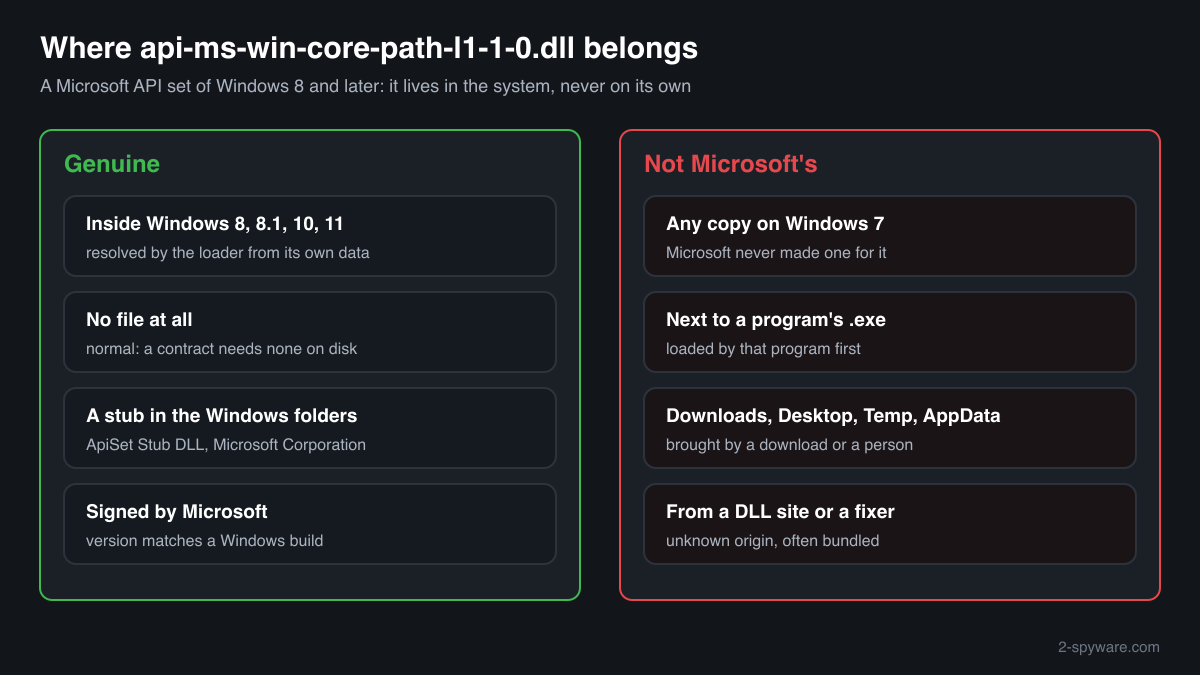
On Windows 8, 8.1, 10 and 11 the name belongs to the system. A stub file with this name in the Windows folders, describing itself as ApiSet Stub DLL from Microsoft Corporation and signed by Microsoft, is part of Windows and safe. Often there is no file at all, and that is normal too: the loader resolves the name from its own data.
Microsoft never shipped this name for Windows 7 and never puts it into program folders. A copy on a Windows 7 PC, next to a program's .exe, in Downloads or bundled with a "DLL fixer" was made or moved there by someone else. Programs load DLLs from their own folder first, so such a file runs inside them.
- Description in the file
- ApiSet Stub DLL, company Microsoft Corporation
- What it is
- An API set contract name for the PathCch path functions, such as PathCchCombineEx. Microsoft lists Windows 8 and Windows Server 2012 as the minimum and KernelBase.dll as the library that implements them
- Genuine place
- Inside Windows 8, 8.1, 10 and 11 only: resolved by the loader, with any stub file in the Windows system folders. Never in a program folder or a user folder
- Windows 7
- Has no such API set and no genuine file with this name. Any copy found there came from somewhere other than Microsoft's Windows 7
- Known catalogue copies
- Two 32-bit copies, versions 6.2.9200.16384 and 6.3.9600.16384, the build numbers of Windows 8 and Windows 8.1
- Why people search it
- Programs built for Windows 8 and later, Python 3.9 and later among them, stop on Windows 7 with a missing-file error naming it
- Is it a process
- No. It is a library name that programs import, so it never appears on its own in Task Manager
What api-ms-win-core-path-l1-1-0.dll is, and why copies of it turn up where they should not
Since Windows 8, Microsoft groups Windows functions into API sets: contract names that start with api- or ext- and end in a version such as l1-1-0. A program imports the contract name, and the Windows loader looks it up in the API set schema and routes the call to the library that holds the code. Microsoft states plainly that an API set name identifies a contract, not a file, and that there is not necessarily a file with that name anywhere on the PC. The .dll ending is there only because import tables spell module names that way.
api-ms-win-core-path-l1-1-0 is the contract for the PathCch functions, which combine and canonicalize paths and handle long paths with the \\?\ prefix. Microsoft lists Windows 8 and Windows Server 2012 as their minimum and KernelBase.dll as their home. Where Windows keeps a stub file under the contract name, it describes itself as ApiSet Stub DLL and carries the Windows build number, which is why the copies collected in a public DLL catalogue report 6.2.9200 and 6.3.9600, the builds of Windows 8 and Windows 8.1.
The trouble comes from Windows 7. Python 3.9 and later, programs packaged with them and other software built for Windows 8 and later import this name, and on Windows 7 they stop with a message that the file is missing. People search for it, and the results offer single files for download, "fixer" programs and replacement DLLs that imitate the path functions. None of these is Microsoft's file for Windows 7, because no such file exists. Some are honest workarounds written by others, some are of unknown origin, and every one placed next to a program's .exe is loaded by that program with your account's rights.
About .dll files. A .dll file is a library: it cannot run on its own and is loaded into a program's process. It does not appear in Task Manager under its own name; Process Explorer shows which process loaded it.
How to tell a genuine api-ms-win-core-path-l1-1-0.dll from one you should not trust
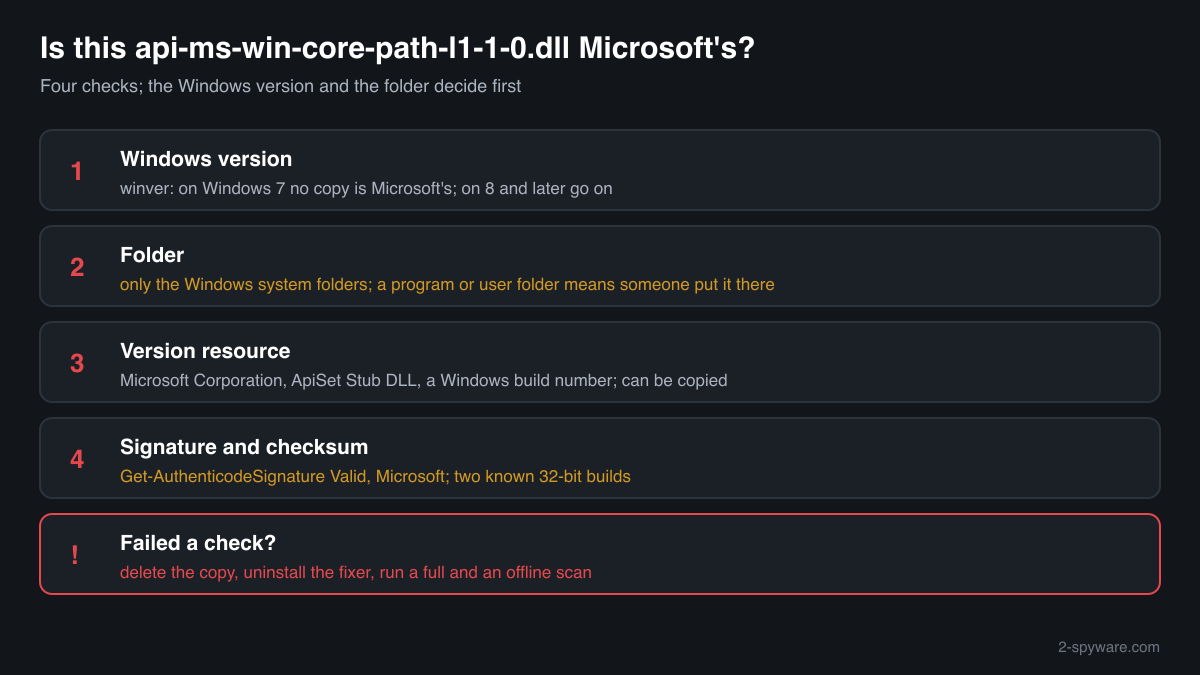
A DLL is not listed in Task Manager as a process, so use the Windows version, the folder, the signature and the version resource.
- Which Windows the PC runs. Run winver. On Windows 7 any file with this name is not a Microsoft file for that system, so the only question is where it came from. On Windows 8 and later, go on with the next checks.
Get-CimInstance Win32_OperatingSystem | Select-Object Caption, Version, BuildNumber - Where every copy is. List all copies. One in the Windows system folders on Windows 8 or later can be Windows' own stub. A copy in a program folder, Downloads, Desktop, Temp or AppData was put there by an installer, a fixer or a person, never by Windows.
Get-ChildItem C:\ -Recurse -Filter api-ms-win-core-path-l1-1-0.dll -ErrorAction SilentlyContinue | Select-Object FullName, Length, LastWriteTime - Read the version resource. Microsoft's stub reports Microsoft Corporation as the company and ApiSet Stub DLL as the description, with a version that matches a Windows build. Empty fields, another company or a description such as a project name point to a replacement. Text fields can be copied, so this alone does not clear a file.
(Get-Item "C:\path\to\api-ms-win-core-path-l1-1-0.dll").VersionInfo | Format-List CompanyName, FileDescription, FileVersion - Check the digital signature. Status Valid with a Microsoft signer means an unmodified Microsoft file. NotSigned, HashMismatch or another signer means it is not Microsoft's as shipped, whatever its text fields say. Windows files can also be signed through a catalog, so check a copy in the Windows folders with sfc if the signature shows NotSigned.
Get-AuthenticodeSignature "C:\path\to\api-ms-win-core-path-l1-1-0.dll" | Format-List Status, SignerCertificate - Compare the checksum. The public catalogue knows two Microsoft builds, both 32-bit. A match identifies one of them. No match is not proof of a fake for a copy inside Windows 8 or later, because other genuine builds exist; for a copy outside the Windows folders, the folder already tells you it was not put there by Windows.
A valid Microsoft signature clears that one file. It does not clear the fixer program, archive or installer that brought a copy to a program folder or a Windows 7 PC, which is where unwanted software from such downloads usually sits.
Check your api-ms-win-core-path-l1-1-0.dll
Choose the api-ms-win-core-path-l1-1-0.dll you are unsure about. Its SHA-256 and SHA-1 checksums are calculated in your browser and compared with the 2 versions of the file known from a public DLL catalogue.
The file stays on your computer. Nothing is uploaded: the checksum is computed locally.
Do you need api-ms-win-core-path-l1-1-0.dll?
On Windows 8 and later, leave what Windows keeps in its own folders alone: the system resolves the name and needs nothing else. A copy anywhere else is not needed by Windows, and on Windows 7 a copy does not make programs built for newer Windows truly supported.
- Leave the Windows folders alone on Windows 8 and later. A stub in the Windows system folders is part of the system. If you suspect it is damaged, let Windows check it with sfc /scannow from an administrator Command Prompt rather than deleting or replacing it by hand.
- Delete copies you or a fixer added. Remove api-ms-win-core-path-l1-1-0.dll from program folders, Downloads, Desktop and Temp, and from System32 or SysWOW64 on Windows 7. Windows does not use them there, and an unknown copy next to a program runs inside it.
- Uninstall any DLL fixer program. Open Settings, Apps, Installed apps (Control Panel, Programs and Features on Windows 7), find the fixer or the download tool that offered the file and uninstall it. Such programs often bring other software along.
- Run a full scan with Windows Security. Open Windows Security, Virus and threat protection, Scan options, Full scan. Quarantine what it finds and look at Protection history for items in Downloads, Temp or AppData. On Windows 7 use the security program you have installed.
- Run the offline scan on Windows 10 or 11. Some unwanted software hides while Windows runs. The offline scan restarts the PC and scans before Windows starts, in about 15 minutes.
Start-MpWDOScan - Check what starts with Windows. Open Task Manager, Startup apps, and Task Scheduler. Disable and remove entries that run a program from AppData, ProgramData or Temp that you do not recognise.
Warning signs
| What you see | What it means |
|---|---|
| An api-ms-win-core-path-l1-1-0.dll on a Windows 7 PC | Not a Microsoft file for that system. Find out what brought it. |
| A copy next to a program's .exe | Windows never puts it there. Programs load it from their own folder first, so check it. |
| The file came with a "DLL fixer" or from a DLL download site | Unknown origin. Delete it and uninstall the fixer. |
| The signature check shows NotSigned or another signer, outside the Windows folders | Not Microsoft's file as shipped. |
| Company or description other than Microsoft Corporation and ApiSet Stub DLL | A replacement written by someone else. |
| A stub in the Windows system folders on Windows 8 or later, signed by Microsoft | Normal. Part of the system. |
Known versions of api-ms-win-core-path-l1-1-0.dll
A public DLL catalogue lists 2 versions of api-ms-win-core-path-l1-1-0.dll, from 6.2.9200.16384 to 6.3.9600.16384, by Microsoft Corporation. Its copies are uploaded by users and not verified, so a checksum match identifies the version, while the digital signature tells you whether the file is genuine. Even a genuine file clears only the file, not the folder: attackers ship genuine libraries next to a program they abuse, so where the copy sits still decides whether it is safe.
Every version with its checksums, and how to fix api-ms-win-core-path-l1-1-0.dll errors on uGetFix
Questions people ask
Is api-ms-win-core-path-l1-1-0.dll a virus?
The name is Microsoft's: it is an API set of Windows 8 and later, and a signed stub in the Windows folders of those systems is part of Windows. The name gets attention because Windows 7 users look for it after programs refuse to start, so copies offered for download or bundled with fixer programs are common. Such copies are not Microsoft's and need the checks on this page.
Is it safe to download api-ms-win-core-path-l1-1-0.dll for Windows 7?
There is no Microsoft file with this name for Windows 7, so any download is someone else's file. Some are replacements that imitate the path functions, others are of unknown origin. Once placed next to a program, the file runs inside it with your rights. A program release that supports Windows 7, or a newer Windows, avoids the file entirely.
Why is there no api-ms-win-core-path-l1-1-0.dll on my Windows 10 PC?
Because Windows does not need one. Microsoft explains that an API set name identifies a contract, not a file, and that the loader resolves it through the API set schema. There is not necessarily a file with that name anywhere on the PC. A missing file on Windows 8 or later is therefore not a problem in itself.
I found api-ms-win-core-path-l1-1-0.dll in a program folder. Should I delete it?
Check it first: read its company and description and its signature. Windows never puts this file into program folders, so the program's installer, a fixer or a person put it there. On Windows 8 and later it is not needed, because the system resolves the name first. If it is unsigned or not Microsoft's, delete it and scan the PC.
Can a fake api-ms-win-core-path-l1-1-0.dll harm my PC?
Yes, in the same way any DLL can. Windows loads a DLL from the program's own folder before other places, and code in a DLL runs inside the program that loads it, with that program's rights. A file of unknown origin under a trusted Microsoft name is an easy way to get code into a program you start every day.
What do the versions 6.2.9200 and 6.3.9600 mean?
They are the build numbers of Windows 8 and Windows 8.1, and the two copies of this stub in a public DLL catalogue carry them. A genuine stub takes its version from the Windows build it belongs to. A copy with a version that matches no Windows build, or one that claims to be Microsoft's on Windows 7, deserves a closer look.
Sources
- Microsoft Learn: Windows API sets (contract names, no file needed on disk)
- Microsoft Learn: PathCchCombineEx function (pathcch.h), requirements and API set
- Microsoft Learn: Dynamic-link library search order
- Microsoft Learn: Get-AuthenticodeSignature
Version data read on Oct 17, 2026.
Questions and experiences
Ask about this page: members and our editors answer. Reading is open; writing needs a free account.
…