
Program file
binkw32.dll: RAD's Bink Video library, a mod's proxy, or malware?
binkw32.dll is the 32-bit Bink Video library from RAD Game Tools, the code a game uses to play its intro movies and cutscenes. A copy inside a game's install folder is normal, and many games each have their own. Because a game loads it at start-up, mods, cracks and malware sometimes put their own file under this name, so a copy anywhere else needs checking.
Prefer to check it yourself? The manual checks follow.
A binkw32.dll in a game's install folder, describing itself as Bink Video or RAD Video Tools from RAD Game Tools, Inc., is the genuine file. It is not a process: the game loads it to decode its .bik videos. Every 32-bit game that uses Bink ships its own copy in its own version, so finding several of them is expected.
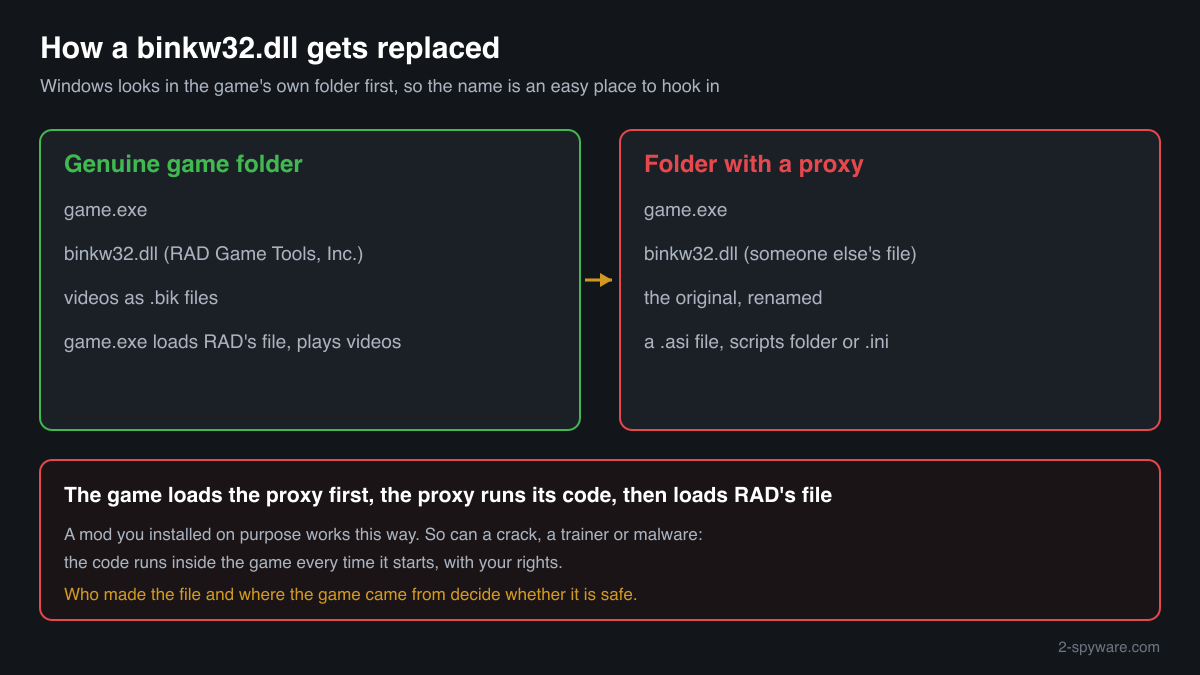
A game loads binkw32.dll from its own folder before anything else, which makes the name a convenient place to hook in. A binkw32.dll next to a renamed copy of itself, a .asi file or a scripts folder is a mod or crack loader, and one outside any game folder belongs to no game at all.
- Publisher
- RAD Game Tools, Inc. (its website carries the copyright of Epic Games, Inc.)
- Description in the file
- Bink Video in early builds, RAD Video Tools in later ones
- Shipped by
- Each 32-bit game that plays Bink videos, in the game's own folder, licensed to the developer through the Bink SDK. Not part of Windows, DirectX or any codec pack
- Genuine folder
- The game's install folder, such as a folder under a Steam, GOG or EA library or under C:\Program Files (x86), next to the .exe or in a subfolder. Never in C:\Windows
- Size
- Small: about 160 KB to 340 KB across the RAD copies collected in a public DLL catalogue, all of them 32-bit builds
- Signed by
- Many genuine builds, older ones above all, carry no digital signature, so a missing signature alone does not mean a fake
- Runs as a process
- No. It is a library loaded into the game that uses it
- Replaced by
- Proxy DLLs of mods and ASI loaders, cracks and trainers, and in some downloads by malware using the name
What binkw32.dll does
binkw32.dll is the Windows library of Bink Video, the video codec RAD Game Tools makes for games. A developer licenses the Bink SDK and puts the DLL next to the game's executable. When the game plays a publisher logo, the intro or a cutscene, it opens the .bik file through this library, which decodes the picture and sound frame by frame. RAD states that Bink DLLs are not replaceable: each game is built for its own version, and RAD's free RAD Video Tools for viewing Bink files do not contain the DLL.
The same design makes the file a target. Windows looks for a DLL in the program's own folder first, and a game loads binkw32.dll early and without question. Mod tools use this as a proxy: they rename the original and put their own binkw32.dll in its place, which loads the original and then their code. That is legitimate when you installed the mod on purpose. The same trick, known as DLL search order hijacking, lets a crack, a trainer or malware run code inside the game, and a planted copy can do anything the game is allowed to do.
About .dll files. A .dll file is a library: it cannot run on its own and is loaded into a program's process. It does not appear in Task Manager under its own name; Process Explorer shows which process loaded it.
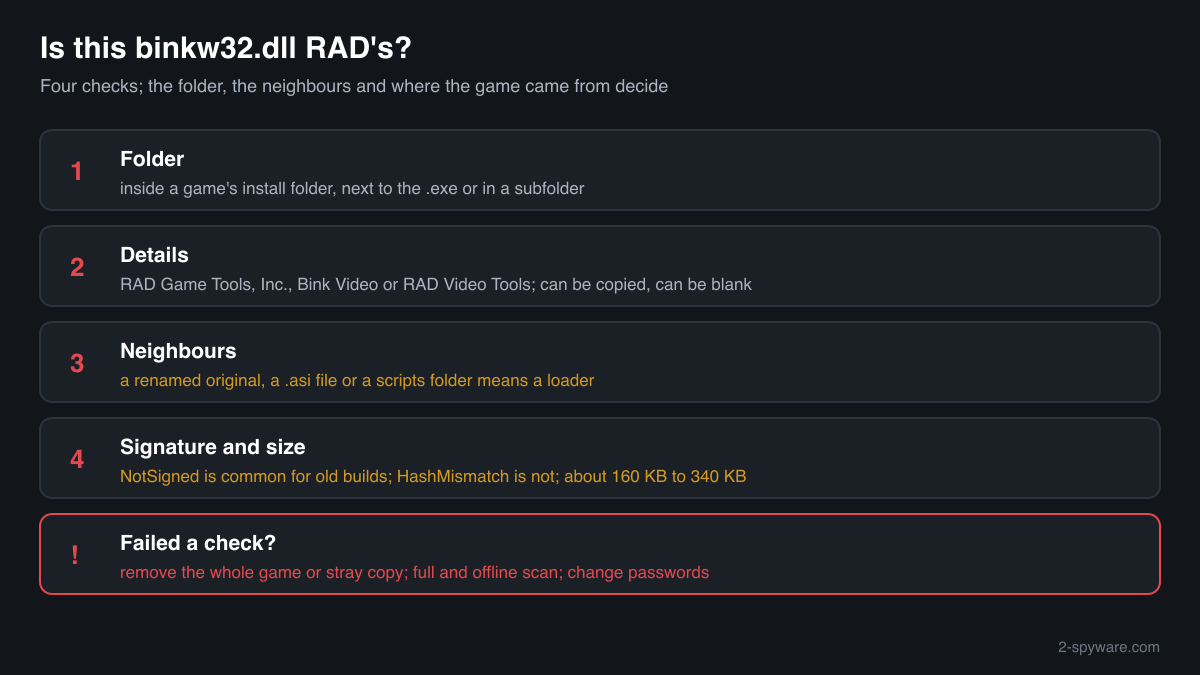
How to check a copy of binkw32.dll
Four questions decide it: where the file is, what it says about itself, what sits next to it, and where the game came from. A library never shows in Task Manager under its own name, so use these checks.
- List every copy and where it sits. Copies inside game install folders are normal, one per game that uses Bink. Look closer at copies in Downloads, Desktop, Temp, AppData, ProgramData or the Windows folders, where no game loads them.
Get-ChildItem -Path C:\ -Filter binkw32.dll -Recurse -ErrorAction SilentlyContinue | Select-Object FullName, Length, LastWriteTime - Read the version resource. RAD's file reports RAD Game Tools, Inc. as the company and Bink Video or RAD Video Tools as the description, with a version such as 1.8 or 1.9 in RAD's own numbering. Blank fields or another company point to a replacement, though a careful one copies the text, so this check alone does not clear a file.
(Get-Item "C:\path\to\binkw32.dll").VersionInfo | Format-List CompanyName, FileDescription, FileVersion - Look at what sits next to it. A proxy setup leaves traces: the original under a similar name, a .asi file, a scripts or plugins folder, or a .ini that the loader reads. If you did not install a mod for that game, any of these means someone else modified the folder.
- Check the digital signature, and read it correctly. A Valid status with RAD or the game's publisher as the signer clears that file. NotSigned is common for genuine older builds and decides nothing alone. HashMismatch means a signed file was changed after signing and is not genuine.
Get-AuthenticodeSignature "C:\path\to\binkw32.dll" | Format-List Status, SignerCertificate - Compare the size and checksum. Use the file check on this page. RAD's copies in the catalogue are about 160 KB to 340 KB. A match identifies a known RAD build; no match is not proof of a fake, because many genuine builds are not listed. A file of several megabytes under this name deserves a scan.
A clean binkw32.dll clears that one file. It says nothing about the .exe, the installer or the other files of a game that came from a repack or a free download, which is where malware from such downloads is usually found.
Check your binkw32.dll
Choose the binkw32.dll you are unsure about. Its SHA-256 and SHA-1 checksums are calculated in your browser and compared with the 43 versions of the file known from a public DLL catalogue.
The file stays on your computer. Nothing is uploaded: the checksum is computed locally.
Do you need binkw32.dll?
Keep every copy inside the games you installed from a store or a disc: without it those games stop at start-up or at the first video. A copy that failed the checks above came with something you did not choose, and the safe way out is to remove that game or download, not only the DLL.
- Leave genuine game copies alone. A binkw32.dll in a bought game's folder belongs to that game. Deleting it gains nothing and only stops the game from playing its videos or starting at all.
- Uninstall a game that came from a repack or a free download. Open Settings, Apps, Installed apps, find the game and uninstall it. Repacks often have no uninstaller: then delete the game's whole folder, not only binkw32.dll, because the risky files are usually elsewhere in it.
- Delete stray copies outside game folders. A binkw32.dll in Downloads, Temp, AppData or System32 is loaded by no game. Note its path, run the scan below first, and delete the file if the scan leaves it in place.
- Run a Microsoft Defender full scan. Open Windows Security, Virus and threat protection, Scan options, Full scan. Quarantine what it finds. Look at Protection history afterwards for anything found in Downloads, Temp or AppData.
- Run the offline scan. Some malware bundled with game downloads hides while Windows runs. The offline scan restarts the PC and scans before Windows starts. It takes about 15 minutes.
Start-MpWDOScan - Change passwords if the download ran an installer you did not trust. Malware bundled with free game downloads is often an information stealer that takes saved browser passwords and session cookies, game store and chat logins included. Change passwords from a clean device and sign out of other sessions.
Warning signs
| What you see | What it means |
|---|---|
| binkw32.dll next to a renamed copy of itself | A proxy setup: the original was renamed and another file took its name. Fine for a mod you installed, a warning sign otherwise. |
| A .asi file, a scripts folder or an unknown .ini beside it | A mod or crack loader that runs its own code inside the game. |
| A binkw32.dll in Downloads, Temp, AppData or System32 | No game loads it there. Find out where it came from and scan. |
| Company field blank or not RAD Game Tools, Inc. | Not RAD's file as shipped, or a copy that hides what it is. |
| The signature check shows HashMismatch | A signed file was changed after signing. It is not the genuine build. |
| The game came as a free download that asked you to turn off protection | The usual lure for malware bundled with cracked games. Remove the game and scan. |
| Several copies, each in a different game's folder | Normal. Every 32-bit game that uses Bink ships its own copy. |
Known versions of binkw32.dll
A public DLL catalogue lists 43 versions of binkw32.dll, from 1.6a to 1.9.99.0, by RAD Game Tools, Inc.. Its copies are uploaded by users and not verified, so a checksum match identifies the version, while the digital signature tells you whether the file is genuine. Even a genuine file clears only the file, not the folder: attackers ship genuine libraries next to a program they abuse, so where the copy sits still decides whether it is safe.
Every version with its checksums, and how to fix binkw32.dll errors on uGetFix
Questions people ask
Is binkw32.dll a virus?
No, RAD's binkw32.dll is a harmless video library that games ship in their own folders. Security programs sometimes flag the name because mods, cracks and trainers put their own file under it, and the downloads that carry cracked games often bring malware too. A copy in a game you bought, in that game's folder, is normally the genuine file. A copy from any other source needs the checks on this page.
Why is binkw32.dll not digitally signed?
Many genuine builds were shipped without a signature, especially in older games, so NotSigned alone does not mean a fake. Use the other checks instead: the folder, the company and description fields, the files next to it and where the game came from. A HashMismatch result is different: it means a signed file was changed.
Is a modded binkw32.dll dangerous?
Not by itself. Many mods and widescreen fixes use the name as a proxy, loading the original file and then their own code. The question is who made it. A mod you chose from its author's page is a known risk you accepted; a proxy you never installed, or one that came with a cracked game or a trainer from a free site, runs unknown code every time the game starts.
How can I tell RAD's binkw32.dll from a planted copy?
Check four things. The folder: a game's install folder is where RAD's copy belongs. The version resource: company RAD Game Tools, Inc., description Bink Video or RAD Video Tools. The neighbours: a renamed original, a .asi file or a scripts folder means a loader. And the source of the game: a store or disc install is expected, a repack calls for a full scan.
Can I delete binkw32.dll?
You can, but the game it belongs to then fails at start-up or when a video plays, because it loads the library for every Bink movie. Deleting it from a bought game gains nothing. If you found it in a game you no longer trust, uninstall the whole game and run a Microsoft Defender full scan rather than deleting only the DLL.
Why are there several copies of binkw32.dll on my PC?
Each game that uses Bink ships its own copy, in the version it was built with, and RAD states that these versions are not interchangeable. Five installed games with Bink videos can mean five copies of different sizes and versions. That is by design. What matters is that each copy sits in a game folder and passes the checks, not how many there are.
Do the RAD Video Tools install binkw32.dll?
No. RAD says in its Bink FAQ that the RAD Video Tools do not contain the Bink DLL that games use. They are RAD's free player and converter for Bink and Smacker videos. A binkw32.dll that appeared after you installed something else did not come from them, and is worth checking with the steps above.
Sources
- RAD Game Tools: Bink FAQ (Bink DLLs are not replaceable; the RAD Video Tools do not contain the DLL)
- MITRE ATT&CK T1574.001: Hijack Execution Flow: DLL
- Microsoft Learn: Dynamic-link library search order
- Microsoft Learn: Get-AuthenticodeSignature
Version data read on Oct 17, 2026.
Questions and experiences
Ask about this page: members and our editors answer. Reading is open; writing needs a free account.
…