
Windows file
d3d11.dll: genuine Windows Direct3D 11 file, or a copy planted next to a program?
d3d11.dll is the Direct3D 11 Runtime, the Windows library that games, browsers and parts of Windows use to draw with the graphics card. The copies in System32 and SysWOW64 are genuine and safe. A d3d11.dll next to a game's or program's .exe is never Windows' copy: a graphics mod, a cheat or an attacker put it there, and it runs inside that program.
Prefer to do it yourself? The manual steps follow.
d3d11.dll in C:\Windows\System32 (and C:\Windows\SysWOW64 on 64-bit Windows) is a genuine Microsoft file and is safe. Windows uses it for Direct3D 11 graphics in games, browsers, video players and its own tools. Do not delete or replace it: those programs, and parts of the desktop, would stop working.
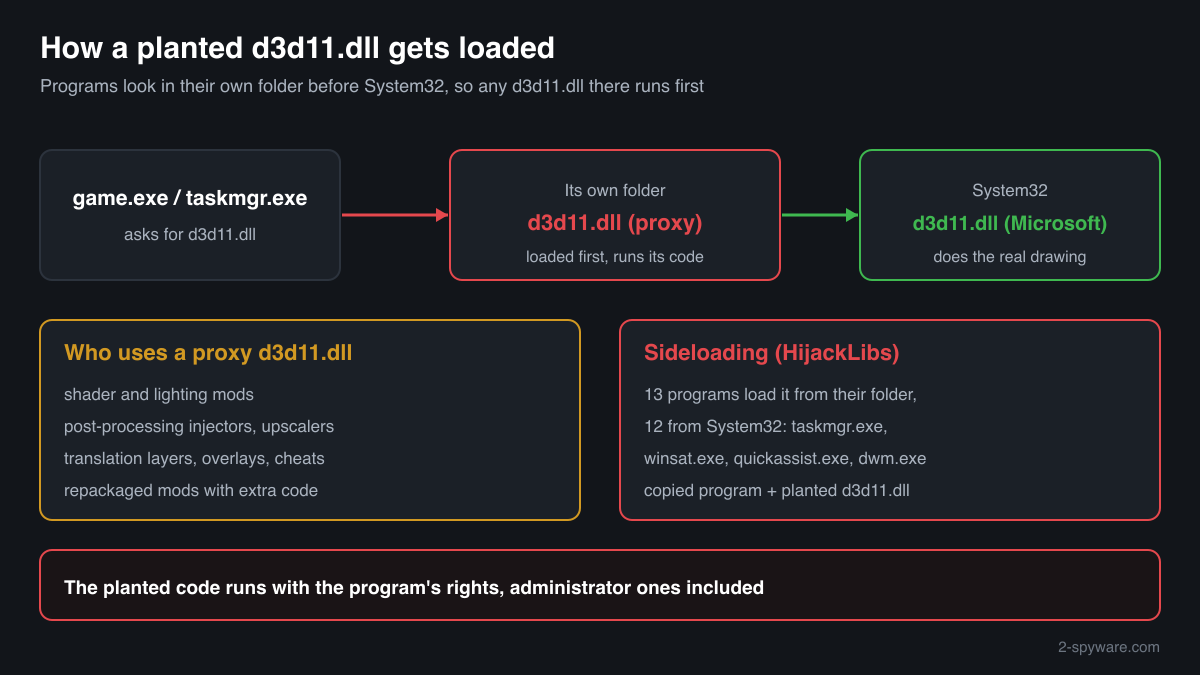
Programs look for d3d11.dll in their own folder before System32, so any file with this name next to an .exe is loaded and run by that program. Graphics mods use this on purpose. Security research lists Windows programs such as Task Manager and WinSAT that load a planted d3d11.dll the same way when they are copied to another folder. Check the folder, the signature and the hash.
- Description in the file
- Direct3D 11 Runtime
- What it is
- The Direct3D 11 graphics library: it creates the Direct3D 11 device a program draws with and passes its work to the graphics driver
- Genuine folders
- C:\Windows\System32\d3d11.dll and, on 64-bit Windows, C:\Windows\SysWOW64\d3d11.dll for 32-bit programs
- Not genuine by location
- Any d3d11.dll in a game or program folder, next to an .exe, in Downloads, Temp, AppData or ProgramData. Windows never puts it there
- Size of the genuine file
- Windows 11 24H2 and 25H2: 2,537,488 bytes (64-bit), 2,038,640 bytes (32-bit). Windows 10 22H2: 2,504,176 bytes (64-bit), 1,963,376 bytes (32-bit)
- Newest indexed build
- Windows 11 26H1: 10.0.28000.2605, delivered by KB5121000 on 11 August 2026
- Known Microsoft builds
- 289 builds across 20 Windows releases in Winbindex
- Signature
- Signed by Microsoft Windows through a Windows catalog, so the file's own Properties window may show no Digital Signatures tab
- Is it a process
- No. It is a library loaded into the programs that draw with Direct3D 11, so it never appears on its own in Task Manager
What d3d11.dll does, and why programs load other copies of it
d3d11.dll is the Direct3D 11 Runtime. A game or program creates a Direct3D 11 device through it, sends it textures, shaders and draw calls, and the runtime hands that work to the graphics driver. Direct3D 11 is one of the most used graphics interfaces on Windows, so the file is loaded not only by games but also by browsers, video players, and Windows tools such as Task Manager and the Desktop Window Manager.
d3d11.dll is not one of the libraries Windows always takes from System32, so a program looks in its own folder first. That makes the name popular for proxy DLLs. A graphics mod builds a library with the same name and the same exported functions, puts it next to the game's .exe, and the game loads it at start. The proxy forwards the real calls to the Windows copy and in the same moment runs its own code inside the game: shader effects, upscaling, a translation of Direct3D 11 to another graphics interface, or, in the case of cheats, reading and changing the game's memory.
The same rule is a known attack technique, DLL search order hijacking. HijackLibs, a public list of DLL hijacking research, records 13 programs that load d3d11.dll in a way that can be abused: 12 Windows programs from System32, among them Task Manager (taskmgr.exe), WinSAT (winsat.exe), Quick Assist (quickassist.exe) and the Desktop Window Manager (dwm.exe), and one third-party desktop wallpaper program. An attacker copies a signed program like these into a writable folder, puts a malicious d3d11.dll beside it, and the trusted program runs the attacker's code. HijackLibs notes that Task Manager, WinSAT and systemreset.exe can start with administrator rights without a prompt, which makes such a pair more dangerous.
So the question is never whether d3d11.dll is a virus, but which d3d11.dll you are looking at. The two copies in the Windows folders are Microsoft's. A copy anywhere else is whatever the person who made it put into it.
About .dll files. A .dll file is a library: it cannot run on its own and is loaded into a program's process. It does not appear in Task Manager under its own name; Process Explorer shows which process loaded it.
How to tell a planted d3d11.dll from Windows' copy
A DLL is not listed in Task Manager as a process, so use the folder, the file properties, PowerShell or Process Explorer.
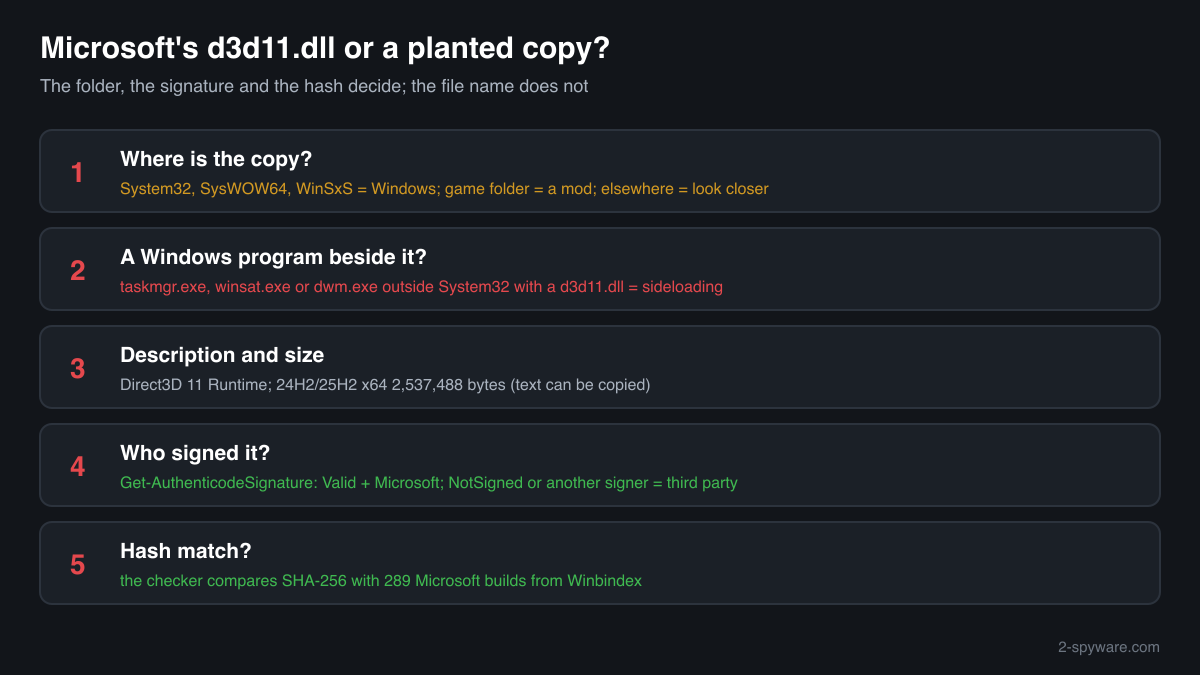
- Where the file is. List every copy with the command below. C:\Windows\System32 and C:\Windows\SysWOW64 are Windows' copies, and copies inside C:\Windows\WinSxS are Windows' stored originals. A copy in a game folder is usually a graphics mod. A copy in AppData, Temp, ProgramData or Downloads, especially next to a Windows program such as taskmgr.exe or winsat.exe, has no normal reason to exist.
Get-ChildItem C:\ -Recurse -Filter d3d11.dll -ErrorAction SilentlyContinue | Select-Object FullName, Length, @{n='Description';e={$_.VersionInfo.FileDescription}} - The Description field and the size. Right-click the file, Properties, Details. The genuine file says Direct3D 11 Runtime, with Microsoft Corporation as the company and a Windows version number such as 10.0.26100. It is about 2.5 MB. A mod's copy usually shows another description, no company or a version that is not a Windows build, and a size that matches no Windows release in the facts table. A planted file can copy these fields, so this check only rules files out.
- The digital signature. Windows' copy is signed by Microsoft through a catalog rather than inside the file, so the Properties window may show no Digital Signatures tab. PowerShell reads both kinds. Valid with a Microsoft signer means genuine; NotSigned or another signer means a third-party file.
Get-AuthenticodeSignature 'C:\path\to\folder\d3d11.dll' | Format-List Status, SignatureType, SignerCertificate - What the program loads. Start the program, then open Process Explorer from Microsoft Sysinternals, choose Find > Find Handle or DLL, type d3d11.dll and press Search. The path column shows which copy each program really loaded. Any path outside the Windows folders means a proxy or a planted file is running inside that program.
- Compare the hash with Microsoft's builds. Use the checker on this page: it computes the SHA-256 in your browser and compares it with the known Microsoft builds. A copy that matches is an unneeded Windows copy; one that does not match is a third-party file.
- Scan before you trust or delete. Run Microsoft Defender's full scan, and the offline scan if a detection keeps coming back. A detection on a game folder d3d11.dll is not proof either way, because graphics injectors are flagged for how they work, so weigh it with where the mod came from.
A match to a Microsoft build proves the file is Microsoft's. A file that does not match is not automatically malicious: most game folder copies are graphics mods that do what their authors say. What decides is where the file sits, whether you chose to install it, and from where.
Check your d3d11.dll
Choose the d3d11.dll you are unsure about. Its SHA-256 checksum is calculated in your browser and compared with the 323 Microsoft builds indexed from Windows releases and updates.
The file stays on your computer. Nothing is uploaded: the checksum is computed locally.
Warning signs and what they mean
| What you see | What it means |
|---|---|
| d3d11.dll next to taskmgr.exe, winsat.exe, quickassist.exe or another Windows program outside C:\Windows | The pattern HijackLibs describes: a signed Windows program copied to another folder with a planted library beside it. Treat both files as malicious and scan. |
| d3d11.dll in AppData, Temp, ProgramData or Downloads | No game or Windows component installs it there. A copy outside a game folder and outside the Windows folders has no normal reason to exist. |
| d3d11.dll in a game folder although you never installed a mod, injector or tool for that game | Something else put it there: a repackaged game, a bundled installer, or malware that uses the game as a launcher. Treat it as not genuine and scan. |
| The file claims Direct3D 11 Runtime and Microsoft Corporation, but has no valid Microsoft signature | A file that pretends to be Windows' copy. Legitimate mods do not need to hide; one that imitates Microsoft's details deserves a close look. |
| A scheduled task or Run key starts a Windows program from an unusual folder | The way a planted DLL is kept running after a restart. Check the task's path in Task Scheduler and the startup entries, then remove the folder after a scan. |
| The game is blocked by its anti-cheat or refuses to start online with the file present | Anti-cheat software watches for proxy DLLs in game folders. Remove the file before playing online, or your account can be restricted. |
| Microsoft Defender names d3d11.dll in System32 or SysWOW64 | Rare. Check the hash with the checker on this page and run the offline scan before anything else; repair the file with sfc /scannow if it does not match. |
Programs that have been made to load a fake d3d11.dll
Each program below is genuine and signed, and security researchers have documented that it can be made to load a planted d3d11.dll. Usually the attacker copies the program into another folder and puts a fake d3d11.dll next to it: Windows looks in the program's own folder first. A d3d11.dll next to one of these programs, outside the folders below, is the copy to check.
Where the genuine d3d11.dll belongs: C:\Windows\System32C:\Windows\SysWOW64
The genuine d3d11.dll is signed by: Microsoft Windows, a Windows catalog signature (Properties shows no Digital Signatures tab; check it with Get-AuthenticodeSignature)
| Program | How |
|---|---|
C:\Program Files\Steam\steamapps\common\wallpaper_engine\wallpaper32.exesigned by "Skutta SHA-256 of the genuine program: 1b0d67730ad59a49715e39f904f4f59ea9e81a54ea51ab20e6ec473546708aa7 | Side-loading |
C:\Windows\System32\dataexchangehost.exesigned by Microsoft Windows | Side-loading |
C:\Windows\System32\dwm.exesigned by Microsoft Windows | Side-loading |
C:\Windows\System32\dxcap.exe | Side-loading |
C:\Windows\System32\dxgiadaptercache.exesigned by Microsoft Windows | Side-loading |
C:\Windows\System32\gamepanel.exesigned by Microsoft Windows | Side-loading |
C:\Windows\System32\mdeserver.exesigned by Microsoft Windows | Side-loading |
C:\Windows\System32\quickassist.exesigned by Microsoft Windows | Side-loading |
C:\Windows\System32\systemreset.exesigned by Microsoft Windows | Side-loading runs as administrator |
C:\Windows\System32\taskmgr.exesigned by Microsoft Windows | Side-loading runs as administrator |
and 3 more programs. Source: the HijackLibs entry for d3d11.dll, 4 public reports.
Everyday problems with d3d11.dll
My security software flagged d3d11.dll in a game folder
A detection on a graphics injector is common, because a proxy DLL that runs code inside another program behaves the way malware does. It is not automatically a false alarm either: cheats and malicious mod packages use the same file name.
Decide by origin. If you installed a known graphics mod from its author's own release page and the file matches what was published there, the detection is about the technique. If you do not know where the file came from, leave it quarantined.
Removing the game folder copy never harms Windows: the game falls back to the genuine copy in System32 and only the mod stops loading.
I found Windows programs and a d3d11.dll in a folder under AppData
Do not run anything from that folder. Note its path, run a Microsoft Defender full scan and then the offline scan, and look in Task Scheduler and in Settings, Apps, Startup for entries that point into that folder.
After the scan, delete the folder. The genuine Windows programs stay in System32, so removing a copy elsewhere breaks nothing. If you use the same PC for banking or work accounts, change those passwords from another device.
Two d3d11.dll files are in the Windows folders
That is normal on 64-bit Windows: System32 holds the 64-bit library and SysWOW64 the 32-bit one. Both are genuine Microsoft files with different sizes and hashes. More copies under C:\Windows\WinSxS are Windows' stored originals.
If one of them is damaged or replaced, repair it with Windows' own tools, run as administrator one after the other:
sfc /scannowDISM /Online /Cleanup-Image /RestoreHealthd3d11.dll versions by Windows release
The newest build indexed for each release, and the update that delivered it. 289 Microsoft builds in total are known.
| Windows release | File version | Delivered by | Size, 64-bit |
|---|---|---|---|
| Windows 11 26H1 | 10.0.28000.2605 | KB5121000, Aug 11, 2026 | 2,522,088 bytes |
| Windows 11 25H2 | 10.0.26100.9711 | KB5127648, Oct 13, 2026 | 2,537,488 bytes |
| Windows 11 24H2 | 10.0.26100.9711 | KB5127648, Oct 13, 2026 | 2,537,488 bytes |
| Windows 11 23H2 | 10.0.22621.5415 | KB5066793, Oct 14, 2025 | 2,476,552 bytes |
| Windows 11 22H2 | 10.0.22621.5415 | KB5066793, Oct 14, 2025 | 2,476,552 bytes |
| Windows 11 21H2 | 10.0.22000.2600 | KB5044280, Oct 8, 2024 | 2,641,912 bytes |
| Windows 10 22H2 | 10.0.19041.7663 | KB5126657, Oct 13, 2026 | 2,504,176 bytes |
| Windows 10 21H2 | 10.0.19041.7663 | KB5126657, Oct 13, 2026 | 2,504,176 bytes |
| Windows 10 21H1 | 10.0.19041.7663 | KB5126657, Oct 13, 2026 | 2,504,176 bytes |
| Windows 10 20H2 | 10.0.19041.7663 | KB5126657, Oct 13, 2026 | 2,504,176 bytes |
Known versions of d3d11.dll
A public DLL catalogue lists 34 versions of d3d11.dll, from 6.1.7600.16385 to 10.0.19041.1, by Microsoft Corporation. Its copies are uploaded by users and not verified, so a checksum match identifies the version, while the digital signature tells you whether the file is genuine. Even a genuine file clears only the file, not the folder: attackers ship genuine libraries next to a program they abuse, so where the copy sits still decides whether it is safe.
Every version with its checksums, and how to fix d3d11.dll errors on uGetFix
Questions people ask
Is d3d11.dll a virus?
No, not the Windows copy. d3d11.dll is the Direct3D 11 Runtime, and the files in System32 and SysWOW64 are genuine Windows libraries. A d3d11.dll in a game folder is a different file with the same name, usually a graphics mod. A d3d11.dll beside a copied Windows program in AppData or Temp is a classic sign of DLL hijacking, so check where yours sits and compare its hash.
Why is there a d3d11.dll in my game folder?
Because a graphics mod, shader injector, upscaler, translation layer, trainer or cheat put it there. Games load d3d11.dll from their own folder before the Windows copy, so tools use the name to get their code running inside the game. Games almost never ship their own copy of this Windows file. If you did not install anything like that, treat the file as suspicious and scan the PC.
Can I delete d3d11.dll?
Delete or rename a copy in a game folder whenever you like: the game falls back to Windows' own copy, and only the mod that needs it stops working. Do not delete the copies in System32 or SysWOW64. Every Direct3D 11 program, browsers and parts of Windows need them, and Windows treats them as protected system files.
What can a malicious d3d11.dll do?
Anything the program that loads it can do. A planted copy runs inside that program with its rights, so it can read and write your files, read browser data and saved passwords, open network connections and start other programs. When the program is a Windows tool that starts with administrator rights, the planted code gets those rights too. That is why the folder matters more than the name.
Why would malware use the name of a Windows graphics file?
Because signed Windows programs load it from their own folder. Security software and people tend to trust a process like taskmgr.exe signed by Microsoft, so an attacker copies it to another folder, places a malicious d3d11.dll beside it and lets the trusted program run the code. HijackLibs lists 13 programs known to load d3d11.dll this way.
How do I check if my d3d11.dll is genuine?
Check three things. The folder: only System32, SysWOW64 and WinSxS hold Windows' copies. The signature: Get-AuthenticodeSignature in PowerShell shows Valid with a Microsoft signer for the genuine file. The hash: the checker on this page compares the SHA-256 with 289 known Microsoft builds. A file that fails these checks is a third-party file, not Windows' copy.
Is it safe to use a graphics mod that installs as d3d11.dll?
It is as safe as its source. A widely used mod downloaded from its author's own release page is a normal tool. The same file name from a repack, a video description link or a chat message can contain anything. Keep mods updated, never use them in online games with anti-cheat, and remove them when you stop using them.
Sources
- HijackLibs: d3d11.dll
- Microsoft Learn: Dynamic-link library search order
- Microsoft Learn: D3D11On12CreateDevice function (DLL: D3D11.dll)
- Microsoft Sysinternals: Process Explorer
- MITRE ATT&CK T1574.001: DLL Search Order Hijacking
- Winbindex, the Windows binaries index (m417z)
- Winbindex, the Windows binaries index (m417z)
Version data read on Oct 18, 2026.
Questions and experiences
Ask about this page: members and our editors answer. Reading is open; writing needs a free account.
…