
Windows file
d3dcompiler_47.dll: genuine Microsoft shader compiler, or a copy planted beside a trusted program?
d3dcompiler_47.dll is the Direct3D HLSL Compiler. Windows 10 and Windows 11 keep it in System32 and SysWOW64, and browsers, Electron and Qt apps and games carry signed copies of it in their own folders. Those copies are normal. A copy in AppData, Temp or Downloads, next to a Windows program copied out of the Windows folder, or without Microsoft's signature, is the one to examine.
Prefer to do it yourself? The manual steps follow.
d3dcompiler_47.dll in C:\Windows\System32 and C:\Windows\SysWOW64 is a protected Windows file, signed by Microsoft through a Windows catalog. Signed copies inside the versioned folders of Microsoft Edge, Edge WebView2 and Google Chrome, and in the folders of apps such as Visual Studio Code, Microsoft Teams, Zoom and Wireshark, are Microsoft's compiler shipped with those programs. None of them runs on its own: a program loads the file when it needs to compile graphics code.
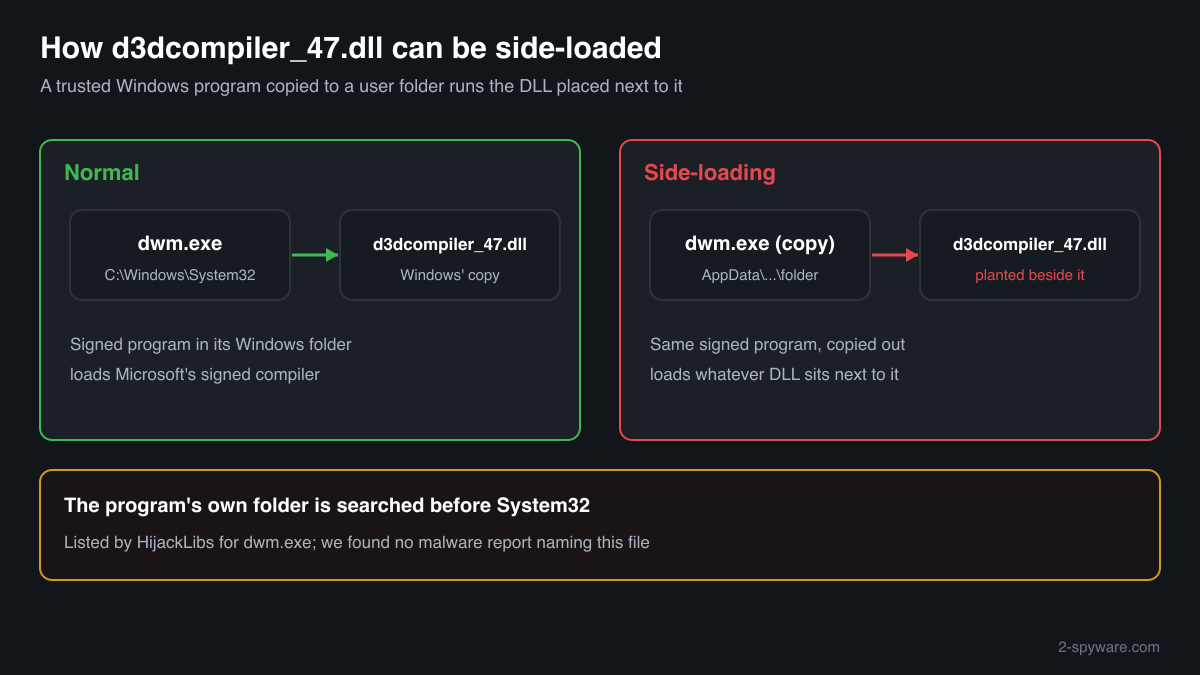
A program looks for d3dcompiler_47.dll in its own folder before System32. HijackLibs lists the file as one that a copy of the Windows program dwm.exe will load from whatever folder it is copied into, so an attacker can pair a trusted, Microsoft-signed program with a planted DLL of this name. The name and the description prove nothing; the folder, the signature and the hash do.
- Description in the file
- Direct3D HLSL Compiler
- Publisher
- Microsoft Corporation
- What it is
- Microsoft's HLSL shader compiler: programs pass it shader source code and receive bytecode that Direct3D can run
- Windows folders
- C:\Windows\System32 (64-bit) and C:\Windows\SysWOW64 (32-bit copy on 64-bit Windows)
- Other expected folders
- Versioned folders of Microsoft Edge, Edge WebView2 and Google Chrome; the folders of VS Code, Teams, Zoom, Wireshark, Logi Options+ and Cisco Jabber; Windows Kits\10 in the Windows SDK
- Size of the Windows file
- Windows 11 24H2: 4,669,440 bytes (64-bit), version 10.0.26100.9711. Windows 10 22H2: 4,517,376 bytes (64-bit), version 10.0.19041.7663
- Windows 7
- Not included at release. Microsoft's update KB4019990 adds version 6.3.9600.18611: 4,296,704 bytes (x64) and 3,550,208 bytes (x86)
- Known Microsoft builds
- 431 builds across 20 Windows 10 and Windows 11 releases in Winbindex
- Signature
- Windows' copy is catalog-signed by Microsoft Windows, so the file itself may show no Digital Signatures tab
- Is it a process
- No. It is a library loaded into the programs that compile shaders and never appears in Task Manager by its own name
What d3dcompiler_47.dll does, and why so many copies exist
Graphics code that runs on the video card is written as small programs called shaders, in Microsoft's HLSL language. d3dcompiler_47.dll turns that source into bytecode for Direct3D. Windows 10 and Windows 11 include it as a system file and update it with their cumulative updates. Chromium-based browsers use it to draw web pages on the graphics card, Qt and Electron apps use it for their interfaces, and games use it to build or inspect shaders while they run.
Microsoft also gives developers a redistributable copy in the Windows 10 SDK, under Windows Kits\10\Redist\D3D, so that a program can carry the exact compiler it was tested with. That is why one PC can hold dozens of genuine copies: Edge and Chrome keep one in every versioned application folder, and video call, chat and developer tools keep one beside their .exe. Each copy belongs to its program, is signed by Microsoft and is updated by that program's installer, not by Windows.
The same search order makes the name useful to attackers. HijackLibs, a public list of DLLs that Windows programs can be tricked into loading, records d3dcompiler_47.dll as a side-loading target of dwm.exe, the Desktop Window Manager. Copied out of System32 into a folder an attacker controls, the signed dwm.exe loads a d3dcompiler_47.dll that sits next to it, and whatever code that file holds runs inside a trusted Microsoft process. We found no published malware report that names this file, so this is a known possibility rather than a documented campaign.
So the useful question is not whether d3dcompiler_47.dll is dangerous, but which copy you are looking at and which program sits beside it.
About .dll files. A .dll file is a library: it cannot run on its own and is loaded into a program's process. It does not appear in Task Manager under its own name; Process Explorer shows which process loaded it.
How to tell a genuine d3dcompiler_47.dll from a planted one
A DLL has no entry in Task Manager, so judge each copy by where it is, who signed it, what it matches and which program loads it.
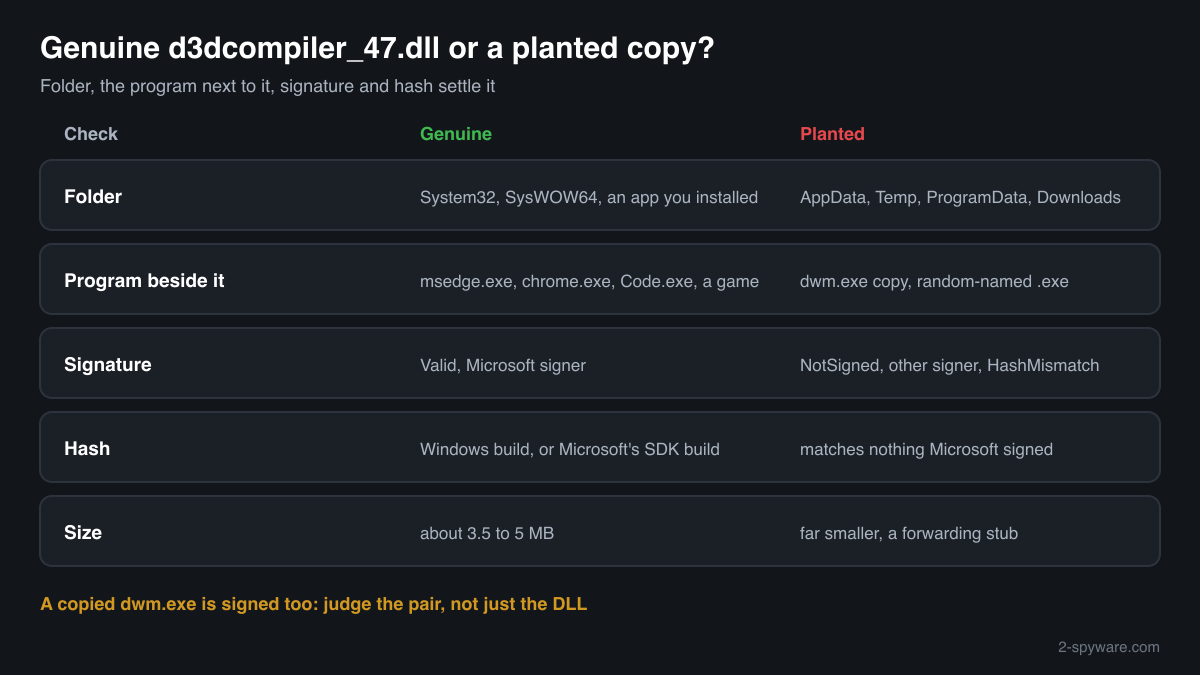
- List every copy and its folder. Run this in PowerShell. System32, SysWOW64, WinSxS and the folders of programs you installed are expected. A copy in AppData\Roaming, AppData\Local\Temp, ProgramData, Downloads or the Public folder, beside an .exe you do not recognise, is the one to check.
Get-ChildItem C:\ -Recurse -Filter d3dcompiler_47.dll -ErrorAction SilentlyContinue | Select-Object FullName, Length, @{n='Version';e={$_.VersionInfo.FileVersion}} - Look at the program next to it. A genuine copy sits beside the program that uses it: msedge.exe, chrome.exe, Code.exe, Zoom.exe, a game. A copy next to dwm.exe, or next to any other Windows program outside C:\Windows, is a warning sign on its own: Windows never runs its programs from user folders, and copying them out is how side-loading starts.
- Check the digital signature. Windows' copy is signed through a catalog, the copies in program folders usually inside the file. PowerShell reads both. Valid with a Microsoft signer means Microsoft published the file. NotSigned, another signer or HashMismatch means it is not the compiler Microsoft built, whatever its description says.
Get-AuthenticodeSignature 'C:\path\to\d3dcompiler_47.dll' | Format-List Status, SignatureType, SignerCertificate - Compare the hash with Microsoft's builds. The checker on this page computes the SHA-256 in your browser and compares it with the 431 Windows builds Winbindex knows. A Windows-folder copy should match. A program-folder copy may not, because programs often ship the SDK build rather than a Windows one, and then the signature decides.
- See which process loaded it. In Process Explorer from Microsoft Sysinternals choose Find, Find Handle or DLL and type d3dcompiler_47.dll. The results show each process and the path of the copy it loaded. A browser or game loading its own copy is expected; dwm.exe loading anything but C:\Windows\System32\d3dcompiler_47.dll, or any process loading a copy from a user folder, is not.
- Scan before you delete. Run a Microsoft Defender full scan, then the offline scan if something keeps coming back. A full scan also examines the program that loads the DLL and its startup entries, which deleting the DLL by hand leaves in place.
A valid Microsoft signature proves the DLL is Microsoft's, not that the folder or the program next to it is legitimate. A copied dwm.exe is signed too. Judge the pair: a genuine program in its own install folder with a signed compiler beside it is normal; a Windows program in a user folder is not, whatever DLL sits next to it.
Check your d3dcompiler_47.dll
Choose the d3dcompiler_47.dll you are unsure about. Its SHA-256 checksum is calculated in your browser and compared with the 491 Microsoft builds indexed from Windows releases and updates.
The file stays on your computer. Nothing is uploaded: the checksum is computed locally.
Warning signs and what they mean
| What you see | What it means |
|---|---|
| dwm.exe and d3dcompiler_47.dll together in AppData, Temp, ProgramData or Downloads | The side-loading pattern HijackLibs describes. Windows runs dwm.exe only from System32. Scan the PC and find what put the pair there. |
| d3dcompiler_47.dll beside an .exe with a random name or no program you installed | No known program explains it. Check the signature and which process loads it. |
| A copy whose signature status is NotSigned, another signer or HashMismatch | Microsoft did not publish that file, or it was changed after signing. Treat it as not genuine. |
| The Description says Direct3D HLSL Compiler but the size is far below 3 MB | Microsoft's builds are about 3.5 MB or more. Text fields can be copied onto a much smaller file that only forwards the name. |
| A scheduled task or Run key that starts an .exe from the folder holding the copy | Something makes sure the pair starts with Windows. Note the path, then scan before removing it. |
| Signed copies in System32, SysWOW64 and the folders of Edge, Chrome, VS Code, Teams, Zoom or a game | Normal. Windows and those programs ship Microsoft's compiler; leave them in place. |
Programs that have been made to load a fake d3dcompiler_47.dll
Each program below is genuine and signed, and security researchers have documented that it can be made to load a planted d3dcompiler_47.dll. Usually the attacker copies the program into another folder and puts a fake d3dcompiler_47.dll next to it: Windows looks in the program's own folder first. A d3dcompiler_47.dll next to one of these programs, outside the folders below, is the copy to check.
Where the genuine d3dcompiler_47.dll belongs: C:\Program Files\windows kits\10\bin\<version>\x64C:\Program Files\windows kits\10\bin\<version>\x86C:\Program Files\windows kits\10\redist\d3d\x64C:\Program Files\windows kits\10\redist\d3d\x86C:\Program Files\wiresharkC:\Program Files\LogiOptionsPlusC:\Program Files\cisco systems\cisco jabberC:\Program Files\microsoft\edge\application\<version>C:\Program Files\microsoft\edgewebview\application\<version>C:\Program Files\microsoft\edgecore\application\<version>C:\Program Files\Google\Chrome\Application\<version>C:\Program Files\Island\Island\Application\<version>C:\Program Files\Zoom\binC:\Users\<you>\AppData\Roaming\Zoom\binC:\Users\<you>\AppData\Local\microsoft\teams\stageC:\Users\<you>\AppData\Local\Programs\Microsoft VS CodeC:\Windows\System32C:\Windows\SysWOW64
The genuine d3dcompiler_47.dll is signed by: Microsoft Windows, a Windows catalog signature (Properties shows no Digital Signatures tab; check it with Get-AuthenticodeSignature)
| Program | How |
|---|---|
C:\Windows\System32\dwm.exesigned by Microsoft Windows | Side-loading |
Source: the HijackLibs entry for d3dcompiler_47.dll, 1 public report.
Everyday problems with d3dcompiler_47.dll
My security software flagged a d3dcompiler_47.dll
Look at the exact path in the detection. A copy inside a program you installed, signed by Microsoft, is very likely a false alarm; report it to the vendor of the security tool and reinstall the program so its copy is restored.
A copy in a user or temporary folder, next to a renamed or copied Windows program, should stay quarantined. Run Defender's offline scan to catch what loaded it.
I found dozens of copies on my PC
Usually harmless. Edge and Chrome keep one copy in each versioned folder until an update cleans old versions up, and many apps carry their own. Compare the folders with the list of programs you installed.
Delete none of the signed program copies by hand: the program that owns a copy may not start without it.
The copy in System32 does not match any Microsoft build
First install the pending Windows updates, because the index may not know a build that arrived after it was read. If it still does not match, let Windows put back its own copy, running these one after the other in an administrator Command Prompt:
sfc /scannowDISM /Online /Cleanup-Image /RestoreHealthd3dcompiler_47.dll versions by Windows release
The newest build indexed for each release, and the update that delivered it. 431 Microsoft builds in total are known.
| Windows release | File version | Delivered by | Size, 64-bit |
|---|---|---|---|
| Windows 11 26H1 | 10.0.26100.9711 | KB5127648, Oct 13, 2026 | 4,669,440 bytes |
| Windows 11 25H2 | 10.0.26100.9711 | KB5127648, Oct 13, 2026 | 4,669,440 bytes |
| Windows 11 24H2 | 10.0.26100.9711 | KB5127648, Oct 13, 2026 | 4,669,440 bytes |
| Windows 11 23H2 | 10.0.26100.9711 | KB5127648, Oct 13, 2026 | 4,669,440 bytes |
| Windows 11 22H2 | 10.0.22621.3233 | KB5066793, Oct 14, 2025 | 4,927,144 bytes |
| Windows 11 21H2 | 10.0.22000.2600 | KB5044280, Oct 8, 2024 | 4,575,232 bytes |
| Windows 10 22H2 | 10.0.19041.7663 | KB5126657, Oct 13, 2026 | 4,517,376 bytes |
| Windows 10 21H2 | 10.0.19041.7663 | KB5126657, Oct 13, 2026 | 4,517,376 bytes |
| Windows 10 21H1 | 10.0.19041.7663 | KB5126657, Oct 13, 2026 | 4,517,376 bytes |
| Windows 10 20H2 | 10.0.19041.7663 | KB5126657, Oct 13, 2026 | 4,517,376 bytes |
Known versions of d3dcompiler_47.dll
A public DLL catalogue lists 60 versions of d3dcompiler_47.dll, from 6.3.9600.16384 to 10.0.18362.1, by Microsoft Corporation. Its copies are uploaded by users and not verified, so a checksum match identifies the version, while the digital signature tells you whether the file is genuine. Even a genuine file clears only the file, not the folder: attackers ship genuine libraries next to a program they abuse, so where the copy sits still decides whether it is safe.
Every version with its checksums, and how to fix d3dcompiler_47.dll errors on uGetFix
Questions people ask
Is d3dcompiler_47.dll a virus?
No. The copies in System32 and SysWOW64 belong to Windows, and the signed copies in Edge, Chrome and other installed programs are Microsoft's compiler shipped with them. The name can be borrowed, though: HijackLibs lists it as a DLL that a copied dwm.exe will load from any folder. A copy outside Windows and outside your programs, or one without Microsoft's signature, deserves a scan.
Why is d3dcompiler_47.dll in my browser's folder?
Chromium-based browsers draw web pages with the graphics card and compile their shaders with this file. Edge, Edge WebView2 and Chrome keep a copy in each versioned application folder, signed by Microsoft. Old versioned folders remain until the browser removes them after an update, so several copies with different version numbers are normal there.
What does it mean if dwm.exe loads a d3dcompiler_47.dll from another folder?
The real Desktop Window Manager runs from C:\Windows\System32 and loads the compiler from there. A dwm.exe running from a user folder is a copy, and a d3dcompiler_47.dll next to it is the side-loading pattern HijackLibs records for this file. Note both paths, end the process, and run Microsoft Defender's full and offline scans.
Can I delete d3dcompiler_47.dll?
Not the copies in System32 or SysWOW64: they are protected Windows files and many programs need them. Program-folder copies go away when you uninstall the program they belong to. A copy you cannot connect to any program should be scanned first, then removed together with whatever placed it, after a Defender full and offline scan.
How do I check if my d3dcompiler_47.dll is genuine?
Check the folder, the signature and the hash. The folder should be a Windows folder or the folder of a program you installed. Get-AuthenticodeSignature in PowerShell should report Valid with a Microsoft signer. The checker on this page compares the SHA-256 with 431 Windows builds; a program-folder copy can be Microsoft's SDK build and still not match.
Is it safe to download d3dcompiler_47.dll from a DLL website?
It is a needless risk. Such sites rarely show where a file came from, and this is a library that programs load into themselves, so a changed copy runs with your rights. Windows 10 and Windows 11 repair their own copy with sfc /scannow and DISM, Windows 7 gets it from Microsoft's update KB4019990, and programs restore theirs when you reinstall them.
Sources
- HijackLibs: d3dcompiler_47.dll
- Wietze Beukema: Hijacking DLLs in Windows
- Microsoft Support: Update for the d3dcompiler_47.dll component on Windows Server 2012, Windows 7, and Windows Server 2008 R2 (KB4019990)
- Microsoft Learn: Dynamic-link library search order
- Microsoft Sysinternals: Process Explorer
- Winbindex, the Windows binaries index (m417z)
- Winbindex, the Windows binaries index (m417z)
Version data read on Oct 17, 2026.
Questions and experiences
Ask about this page: members and our editors answer. Reading is open; writing needs a free account.
…