
Program file
Is d3dx9_43.dll safe? Telling Microsoft's D3DX9 file from a fake that uses its name
d3dx9_43.dll is Direct3D 9 Extensions, a Microsoft graphics helper library that older games load. Signed copies in System32 and SysWOW64 come from the DirectX June 2010 runtime and are harmless. Malware loaders have shipped their own file under this name, next to a legitimate program that loads it, so a copy outside those folders deserves a signature check.
Prefer to check it yourself? The manual checks follow.
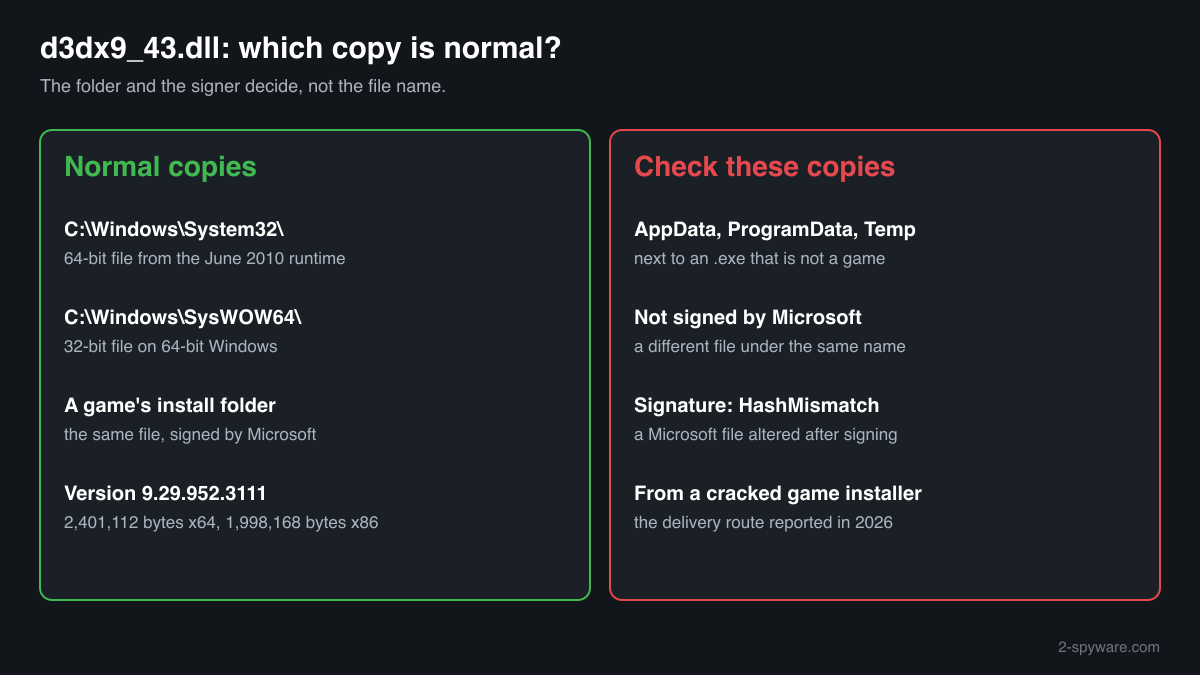
A d3dx9_43.dll in C:\Windows\System32 or C:\Windows\SysWOW64, signed by Microsoft Corporation and with version 9.29.952.3111, is the genuine D3DX9 library installed by the DirectX End-User Runtimes (June 2010). It is not a process and does nothing until a game loads it. Windows does not ship it, so its presence only shows that a game or that installer put it there.
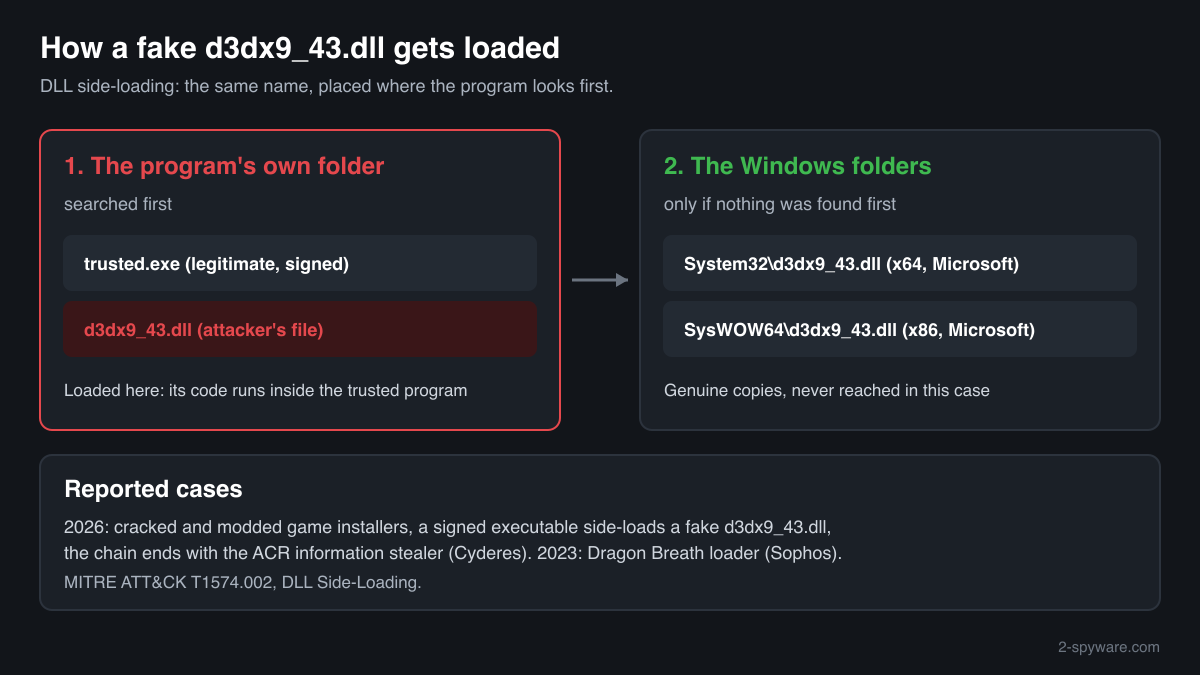
Programs look for d3dx9_43.dll in their own folder before the Windows folders. Malware authors have used that: they placed a malicious d3dx9_43.dll beside a legitimate executable so the trusted program would run it. In a 2026 case the bundle came inside cracked and modded game installers. An unsigned copy outside a known game folder is the one to examine.
- Publisher
- Microsoft Corporation
- Description in the file
- Direct3D 9 Extensions
- Installed by
- Microsoft DirectX End-User Runtimes (June 2010), directx_Jun2010_redist.exe, also run by many games from their own DirectX or _CommonRedist folder
- Official version
- 9.29.952.3111, the last D3DX9 release, read from Microsoft's installer on 14 October 2026
- Size of the genuine file
- 2,401,112 bytes (x64) and 1,998,168 bytes (x86)
- Exported functions
- 329 in both builds
- Genuine folders
- C:\Windows\System32 (64-bit copy), C:\Windows\SysWOW64 (32-bit copy on 64-bit Windows). A game folder may hold the same signed file
- Signed by
- Microsoft Corporation
- Part of Windows
- No. D3DX was distributed only with the DirectX SDK and its end-user runtime
- Runs as a process
- No. It is a library loaded by games built with the June 2010 DirectX SDK
What d3dx9_43.dll does
Direct3D 9 is the part of Windows that draws 3D graphics for older games. D3DX9 is Microsoft's helper library on top of it: functions for matrix and vector math, loading textures and 3D models from files, compiling shaders, and drawing text and sprites. Microsoft released a new D3DX9 file with each DirectX SDK update, from d3dx9_24.dll to d3dx9_43.dll. The 43 marks the final one, from June 2010.
The genuine file imports only four core Windows libraries and contains nothing that starts on its own. Its risk is the name. Many games and some other programs load d3dx9_43.dll from their own folder, so whoever controls that folder can put a different file there under the same name. The trusted program then runs that file's code with its own reputation and signature. Security researchers call this DLL side-loading.
About .dll files. A .dll file is a library: it cannot run on its own and is loaded into a program's process. It does not appear in Task Manager under its own name; Process Explorer shows which process loaded it.
How to check a copy of d3dx9_43.dll
Three things decide it: where the copy is, who signed it, and which program loads it. A DLL never appears in Task Manager by its own name, so use these steps.
- Find every copy on the drive. Run this in PowerShell. Copies in System32 and SysWOW64 belong to the runtime. A copy inside a game's install folder is common. A copy in AppData, ProgramData, Temp or Downloads, or next to an .exe that is not a game, is the one to look at closely.
Get-ChildItem -Path C:\ -Filter d3dx9_43.dll -Recurse -ErrorAction SilentlyContinue | Select-Object FullName, Length, LastWriteTime - Read the digital signature. A genuine file shows Status Valid and Microsoft Corporation as signer. NotSigned or any other signer means the file is not Microsoft's. HashMismatch means a Microsoft file was altered after it was signed.
Get-AuthenticodeSignature "C:\path\to\d3dx9_43.dll" | Format-List Status, SignerCertificate - Compare size and version. Microsoft's file is version 9.29.952.3111 and 2,401,112 bytes (x64) or 1,998,168 bytes (x86). A file of very different size under this name is not the June 2010 library. Open Properties, Details to see the version and description.
- See which program has it loaded. In Process Explorer (Microsoft Sysinternals) choose Find, Find Handle or DLL, and type d3dx9_43.dll. The result shows each process and the path of the copy it loaded. A non-game program loading d3dx9_43.dll from a user or ProgramData folder is a strong sign of side-loading.
- Look at the files around it. In the reported cases the fake d3dx9_43.dll sat beside a renamed or unfamiliar executable and data files with meaningless names. A copy that arrived with a cracked or repacked game installer deserves a scan, even if the game itself runs.
A valid Microsoft signature proves the file is genuine, but not that the program loading it is. An unsigned copy is not always malware, yet nothing explains it except the program that placed it.
Check your d3dx9_43.dll
Choose the d3dx9_43.dll you are unsure about. Its SHA-256 and SHA-1 checksums are calculated in your browser and compared with the 5 versions of the file known from a public DLL catalogue.
The file stays on your computer. Nothing is uploaded: the checksum is computed locally.
Do you need d3dx9_43.dll?
Keep the signed copies in the Windows folders: older games stop starting without them. Remove an unexplained copy only together with the program that brought it.
- Keep the System32 and SysWOW64 copies. When they are signed by Microsoft they belong to the DirectX runtime and harm nothing. Deleting them breaks games that need D3DX9.
- Set aside a suspicious copy before deleting it. Move an unsigned copy from a non-game folder to a quarantine folder of your own, so you can restore it if a legitimate tool turns out to need it.
- Run a Microsoft Defender full scan. Windows Security, Virus and threat protection, Scan options, Full scan. Let Defender quarantine what it finds before removing files by hand.
- Run the offline scan. Loaders that inject into other processes can hide while Windows runs. The offline scan restarts the PC and scans before Windows starts, in about 15 minutes.
Start-MpWDOScan - Remove what came with it. Uninstall the program or cracked game from Settings, Apps, Installed apps, delete its folder, and look in Settings, Apps, Startup, in Task Scheduler and on the Desktop for shortcuts or tasks that start a file from the same folder.
- Change passwords if it was a stealer loader. The 2026 chain ended in an information stealer that targets saved browser data. From a clean device, change e-mail, banking and game account passwords and sign out of other sessions.
Warning signs
| What you see | What it means |
|---|---|
| d3dx9_43.dll in AppData, ProgramData or Temp, next to an .exe that is not a game | No program outside a game has a reason to carry D3DX9 there. This matches the side-loading pattern. Check the signature and scan. |
| A copy that is not signed by Microsoft | Not the genuine library. Find out which program installed it. |
| The signature check shows HashMismatch | A Microsoft file changed after signing. Treat it as malicious. |
| It arrived with a cracked, modded or repacked game installer | This is the delivery route reported in 2026. Scan before you keep the game. |
| A Desktop shortcut or scheduled task starts an unfamiliar .exe from the folder that holds d3dx9_43.dll | Persistence for the program that loads the DLL. Remove the task and the folder after a scan. |
| Signed Microsoft copies in System32, SysWOW64 and game folders | Normal. Games bring the genuine file and its installer with them. |
How attackers have used the name d3dx9_43.dll
Two published reports name a malicious d3dx9_43.dll. In both, the genuine Microsoft file was not involved: the attackers shipped their own DLL under this name for a legitimate program to load.
| Malware | How it used the file | Source |
|---|---|---|
| HijackLoader and ACR Stealer (2026) | Cracked or modded game installers spread through piracy platforms started a loader chain. A legitimate signed executable, W8CPbGQI.exe, side-loaded a malicious d3dx9_43.dll, and the chain copied that DLL with other modules to establish persistence through a Desktop shortcut. It ended with the ACR information stealer. | Cyderes, February 2026 |
| Dragon Breath loader (2023) | A doubled DLL side-loading chain: a second-stage loader depended on d3dx9_43.dll, and the attackers replaced that dependency with a malicious loader DLL so the next stage ran inside a trusted process. | Sophos X-Ops, May 2023 |
MITRE ATT&CK lists this as Hijack Execution Flow: DLL Side-Loading (T1574.002). The useful test on a home PC is the folder and the signer, not the name: a malicious d3dx9_43.dll keeps the genuine file name.
Programs that have been made to load a fake d3dx9_43.dll
Each program below is genuine and signed, and security researchers have documented that it can be made to load a planted d3dx9_43.dll. Usually the attacker copies the program into another folder and puts a fake d3dx9_43.dll next to it: Windows looks in the program's own folder first. A d3dx9_43.dll next to one of these programs, outside the folders below, is the copy to check.
Where the genuine d3dx9_43.dll belongs: C:\Windows\System32C:\Windows\SysWOW64
The genuine d3dx9_43.dll is signed by: Microsoft Windows, a Windows catalog signature (Properties shows no Digital Signatures tab; check it with Get-AuthenticodeSignature)
| Program | How |
|---|---|
C:\Users\<you>\AppData\Local\Temp\HPDIAGS\0699814c-9c5f-46ad-8c9d-a1c61a163f2b\d3dim9.exesigned by HP Inc. SHA-256 of the genuine program: a8a09d4e1ddbe4de188100b285a53b53b10677e4fbc93014e07211cdaf532e7b | Side-loading |
Source: the HijackLibs entry for d3dx9_43.dll, 1 public report.
Known versions of d3dx9_43.dll
A public DLL catalogue lists 5 versions of d3dx9_43.dll, from 9.29.952.3111 to 9.29.952.3111, by Microsoft Corporation. Its copies are uploaded by users and not verified, so a checksum match identifies the version, while the digital signature tells you whether the file is genuine. Even a genuine file clears only the file, not the folder: attackers ship genuine libraries next to a program they abuse, so where the copy sits still decides whether it is safe.
Every version with its checksums, and how to fix d3dx9_43.dll errors on uGetFix
Questions people ask
Is d3dx9_43.dll a virus?
No, the genuine d3dx9_43.dll is Microsoft's Direct3D 9 Extensions library, signed by Microsoft Corporation and installed by the DirectX June 2010 runtime. Security reports from 2023 and 2026 describe malicious files that used the same name to be loaded by a trusted program. So the name alone tells you nothing: check the signature and the folder of the copy you found.
Why do I have d3dx9_43.dll when Windows does not include it?
A game put it there. Games built with the June 2010 DirectX SDK need this file, and most of them run Microsoft's DirectX installer on first start from a DirectX or _CommonRedist folder. That installer writes signed copies to System32 and SysWOW64. A copy in a folder that belongs to no game was placed by some other program, and that program is what you need to identify.
My antivirus detected d3dx9_43.dll. Is it a false positive?
Check the file it named before deciding. If the detected file is signed by Microsoft Corporation and sits in System32, SysWOW64 or a game folder, a false alarm is possible and worth reporting to the antivirus vendor. If it is unsigned, sits in AppData, ProgramData or Temp, or came with a cracked game installer, trust the detection: that matches the side-loading cases reported in 2023 and 2026.
Can I delete d3dx9_43.dll?
Do not delete the signed copies in System32 or SysWOW64, because older games will stop starting. An unsigned copy outside any game folder can go after a Microsoft Defender full and offline scan, together with the program that placed it. If a game later reports the file missing, reinstall it from Microsoft's DirectX June 2010 runtime rather than from a download site.
Is it safe to download d3dx9_43.dll from a DLL website?
It is an avoidable risk. A single-DLL site rarely proves where its file came from, and a d3dx9_43.dll is exactly the kind of file attackers have imitated. Microsoft's DirectX End-User Runtimes (June 2010) contains the genuine file, version 9.29.952.3111, signed by Microsoft. Its size, 2,401,112 bytes for x64 and 1,998,168 for x86, lets you compare any copy you already have.
Why would malware choose the name d3dx9_43.dll?
Because many legitimate programs, especially games, look for it in their own folder first and are trusted by security software. A malicious file with that name, placed beside such a program, gets loaded without any visible prompt. The name also looks harmless to a user browsing the folder, since millions of PCs have a genuine copy for older games.
Sources
- Microsoft Download Center: DirectX End-User Runtimes (June 2010)
- Cyderes: RenEngine Loader and HijackLoader attack chain (February 2026)
- Sophos: A doubled Dragon Breath adds new air to DLL sideloading attacks
- MITRE ATT&CK T1574.002: Hijack Execution Flow: DLL Side-Loading
- Microsoft Learn: Get-AuthenticodeSignature
Version data read on Oct 14, 2026.
Questions and experiences
Ask about this page: members and our editors answer. Reading is open; writing needs a free account.
…