
Windows file
dbghelp.dll: genuine Windows Image Helper, a program's own copy, or a planted fake?
dbghelp.dll is the Windows Image Helper, Microsoft's debugging library for crash dumps and symbols. The copies in System32 and SysWOW64 are genuine and safe. Many programs keep their own signed copy in their folder, which is normal. A dbghelp.dll next to a copied Windows tool, or in Temp, AppData or Downloads, is a known way to run code inside a trusted program.
Prefer to do it yourself? The manual steps follow.
dbghelp.dll in C:\Windows\System32 (and C:\Windows\SysWOW64 on 64-bit Windows) is a genuine Microsoft file and is safe. Windows Error Reporting, debuggers and the crash reporters of many programs use it. Do not delete or replace it.
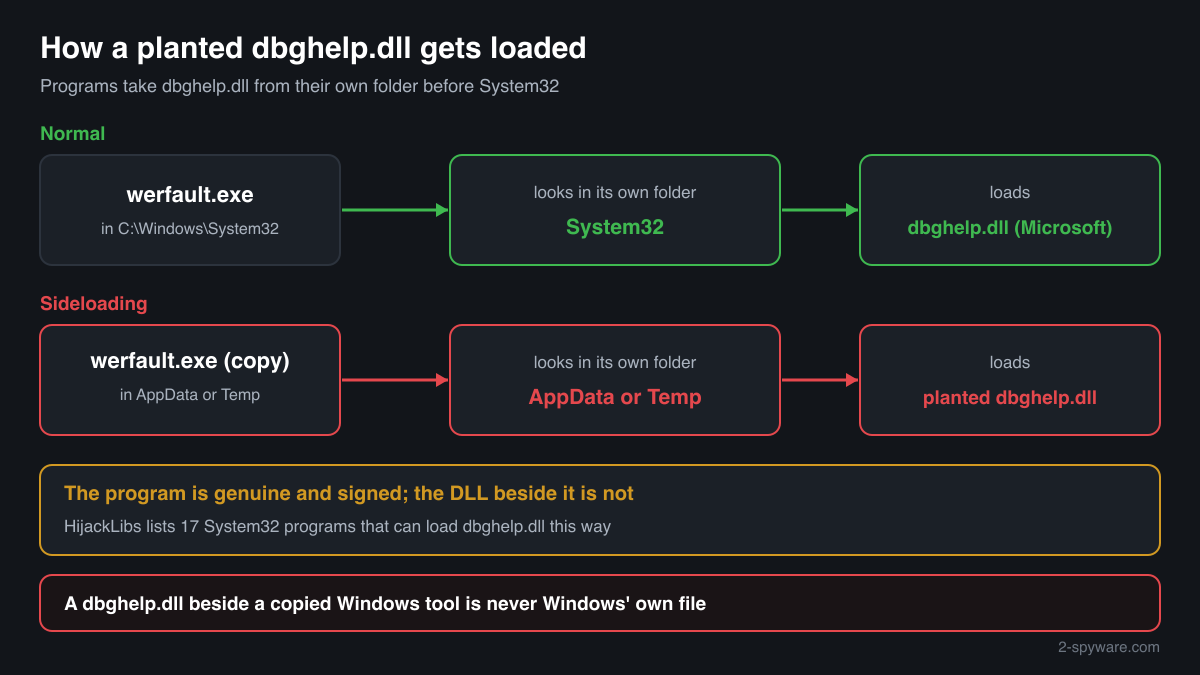
Programs load dbghelp.dll from their own folder before System32. Debuggers, Microsoft Office and many games ship a copy there on purpose, but the same rule lets a fake dbghelp.dll placed next to a program run inside it. Check the folder, the signature and the hash, not the name.
- Description in the file
- Windows Image Helper
- What it is
- Microsoft's DbgHelp library: writes minidump crash files, walks call stacks and turns addresses into function names using debug symbols
- Genuine folders
- C:\Windows\System32\dbghelp.dll and, on 64-bit Windows, C:\Windows\SysWOW64\dbghelp.dll for 32-bit programs
- Normal copies outside Windows
- Inside the folder of an installed program that ships its own build: the Debugging Tools for Windows under Windows Kits, Microsoft Office, many games and their crash reporters
- Not genuine by location
- Downloads, Temp, the root of AppData, or a folder that holds a copied Windows program such as werfault.exe or taskkill.exe. Windows never puts it there
- Size of the genuine file
- Windows 11 24H2 and 25H2: 2,317,640 bytes (64-bit), 1,894,776 bytes (32-bit). Windows 10 22H2: 2,026,496 bytes (64-bit), 1,659,392 bytes (32-bit)
- Newest indexed build
- Windows 11 26H1: 10.0.28000.2605, delivered by KB5121000 on 11 August 2026
- Known Microsoft builds
- 132 builds across 20 Windows releases in Winbindex
- Is it a process
- No. It is a library loaded into the programs that use it, so it never appears on its own in Task Manager
What dbghelp.dll does, and why there are so many copies of it
dbghelp.dll is the DbgHelp library. A program calls it when something has gone wrong: to save a minidump file of its memory, to walk the call stack of a thread and to translate raw addresses into function names and source lines with the help of debug symbols. Windows Error Reporting uses it, and so do debuggers, profilers and the crash reporters built into games and applications.
Microsoft documents that the copy in Windows is rarely the newest DbgHelp and lacks Symbol Server and Source Server support, and that this copy is not redistributable. Developers who need more ship the version from the Debugging Tools for Windows inside their own program folder. That is why a signed Microsoft dbghelp.dll with a version that matches no Windows release is often perfectly normal in a program folder.
The same habit makes the name useful to attackers. A program that loads dbghelp.dll looks in its own folder first. The HijackLibs project lists 17 programs from System32, among them werfault.exe, taskkill.exe, tasklist.exe and tracerpt.exe, that load a dbghelp.dll placed beside them when they are copied to another folder, or when the WINDIR environment variable is pointed elsewhere. The program is genuine and signed by Microsoft; the DLL it loads is not, and its code runs with the program's rights and under its trusted name.
So the question is not whether dbghelp.dll is a virus, but which dbghelp.dll you are looking at and which program sits next to it. Windows' own copies and the copies inside programs you installed are expected. A copy in a folder that holds only a lone Windows executable, or no program at all, is not.
About .dll files. A .dll file is a library: it cannot run on its own and is loaded into a program's process. It does not appear in Task Manager under its own name; Process Explorer shows which process loaded it.
How to tell a genuine dbghelp.dll from a planted one
A DLL is not listed in Task Manager as a process, so use the folder, the file properties, PowerShell or Process Explorer.
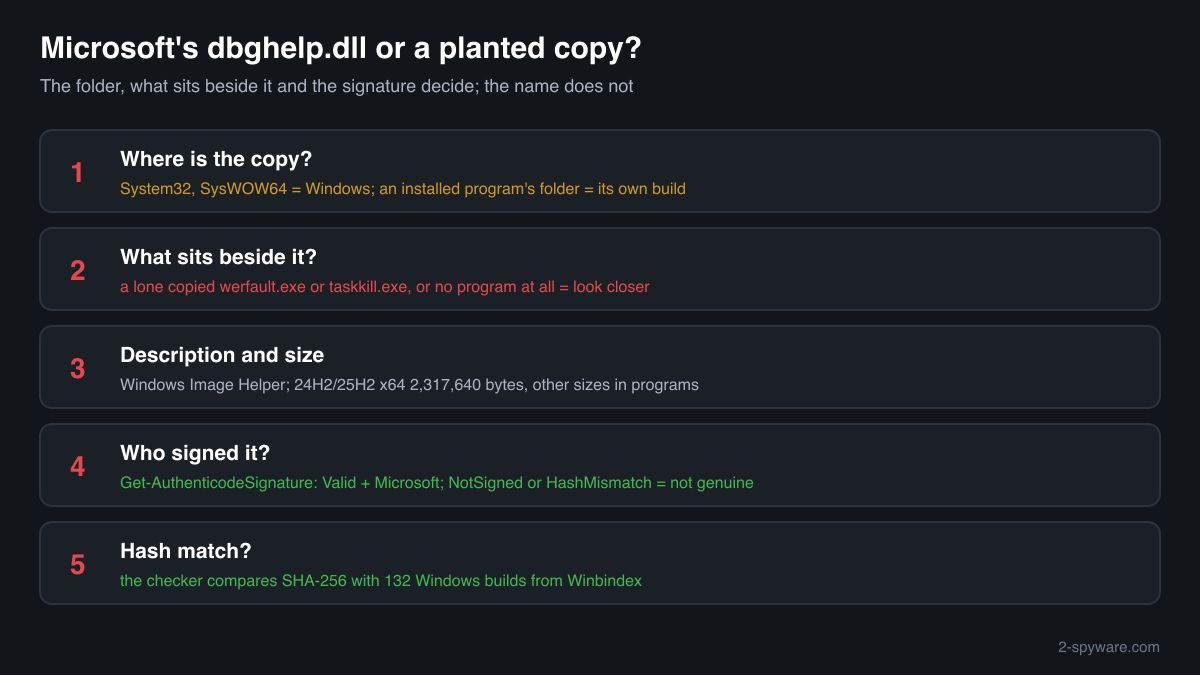
- Where the file is, and what sits next to it. List every copy with the command below. System32 and SysWOW64 are Windows' copies. A copy inside the folder of a program you installed, such as Windows Kits, Microsoft Office or a game, is that program's own build. A copy next to a copied Windows tool such as werfault.exe, in Temp, Downloads or the root of AppData, is the pattern that sideloading uses.
Get-ChildItem C:\ -Recurse -Filter dbghelp.dll -ErrorAction SilentlyContinue | Select-Object FullName, Length, @{n='Version';e={$_.VersionInfo.FileVersion}} - The Description field and the size. Right-click the file, Properties, Details. Microsoft's copies say Windows Image Helper, with Microsoft Corporation as the company. Windows' own copy has a version such as 10.0.26100 and a size from the facts table; a Debugging Tools copy has another version and size and is still genuine. A fake can copy these fields, so this check only rules files out.
- The digital signature. Windows' copy is signed by Microsoft, often through a catalog rather than inside the file, so the Properties window may show no Digital Signatures tab. Copies that programs ship are usually signed inside the file. PowerShell reads both kinds. Valid with a Microsoft signer means Microsoft built it; NotSigned or an unknown signer means a third-party file.
Get-AuthenticodeSignature 'C:\path\to\dbghelp.dll' | Format-List Status, SignatureType, SignerCertificate - Which program loads it. Open Process Explorer from Microsoft Sysinternals, choose Find > Find Handle or DLL, type dbghelp.dll and press Search. The list shows every running process that has the file loaded and from which path. A Windows program such as werfault.exe or taskkill.exe running from a folder outside System32 with a dbghelp.dll beside it deserves a close look.
- Compare the hash with Microsoft's builds. Use the checker on this page: it computes the SHA-256 in your browser and compares it with 132 known Windows builds of the file. A match is Windows' own file. A program folder copy that does not match can still be a genuine Debugging Tools build, so read its signature too.
- Scan before you trust or delete. Run Microsoft Defender's full scan, and the offline scan if a detection keeps coming back. Keep in mind that a copy inside a known program is part of that program and that removing it breaks the program's crash reporting, not Windows.
A match to a Windows build proves the file is Microsoft's, and a valid Microsoft signature proves Microsoft built a program folder copy. A file that has neither is not automatically malicious, but in a folder with no program you installed, or beside a lone copied Windows tool, it has no normal reason to exist.
Check your dbghelp.dll
Choose the dbghelp.dll you are unsure about. Its SHA-256 checksum is calculated in your browser and compared with the 186 Microsoft builds indexed from Windows releases and updates.
The file stays on your computer. Nothing is uploaded: the checksum is computed locally.
Warning signs and what they mean
| What you see | What it means |
|---|---|
| dbghelp.dll in the same folder as werfault.exe, taskkill.exe, tasklist.exe, tracerpt.exe or another Windows program, outside System32 | The sideloading pattern listed by HijackLibs: a genuine Microsoft program copied to another folder so that it loads the DLL beside it. Treat the DLL as not genuine and scan. |
| dbghelp.dll in Downloads, Temp, the root of AppData or ProgramData, with no program it belongs to | No installed program keeps its copy there. A dbghelp.dll with no program of its own around it has no normal reason to exist. |
| The file says Windows Image Helper and Microsoft Corporation, but Get-AuthenticodeSignature shows NotSigned or HashMismatch | A file that imitates Microsoft's details without Microsoft's signature, or a signed file that was changed afterwards. Neither is a genuine copy. |
| A scheduled task or startup entry starts a Windows program from a folder in AppData or Temp | Windows runs its own tools from System32. A copy started from a user folder is a common way to load a planted DLL at every sign-in. |
| The WINDIR environment variable of your account points somewhere other than C:\Windows | HijackLibs lists 11 Windows programs that build the path to dbghelp.dll from WINDIR. A changed value can make them load a copy from another folder. |
| Microsoft Defender names dbghelp.dll in System32 or SysWOW64 | Rare. Check the hash with the checker on this page and run the offline scan before anything else; Windows' own copy should match a known build. |
Programs that have been made to load a fake dbghelp.dll
Each program below is genuine and signed, and security researchers have documented that it can be made to load a planted dbghelp.dll. Usually the attacker copies the program into another folder and puts a fake dbghelp.dll next to it: Windows looks in the program's own folder first. A dbghelp.dll next to one of these programs, outside the folders below, is the copy to check.
Where the genuine dbghelp.dll belongs: C:\Program Files\windows kits\10\debuggers\armC:\Program Files\windows kits\10\debuggers\arm\srcsrvC:\Program Files\windows kits\10\debuggers\arm64C:\Program Files\windows kits\10\debuggers\arm64\srcsrvC:\Program Files\windows kits\10\debuggers\x64C:\Program Files\windows kits\10\debuggers\x64\srcsrvC:\Program Files\windows kits\10\debuggers\x86C:\Program Files\windows kits\10\debuggers\x86\srcsrvC:\Program Files\cisco systems\cisco jabberC:\Program Files\microsoft office\root\office<version>C:\Program Files\microsoft office\root\vfs\programfilesx86\microsoft analysis services\as oledb\140C:\Windows\System32C:\Windows\SysWOW64
The genuine dbghelp.dll is signed by: Microsoft Windows, a Windows catalog signature (Properties shows no Digital Signatures tab; check it with Get-AuthenticodeSignature)
| Program | How |
|---|---|
C:\Windows\System32\bdehdcfg.exesigned by Microsoft Windows | Environment variable |
C:\Windows\System32\deploymentcsphelper.exesigned by Microsoft Windows | Environment variable |
C:\Windows\System32\djoin.exesigned by Microsoft Windows | Environment variable |
C:\Windows\System32\dnscacheugc.exesigned by Microsoft Windows | Environment variable |
C:\Windows\System32\ieunatt.exesigned by Microsoft Windows | Environment variable |
C:\Windows\System32\muiunattend.exesigned by Microsoft Windows | Environment variable |
C:\Windows\System32\netbtugc.exesigned by Microsoft Windows | Environment variable |
C:\Windows\System32\netiougc.exesigned by Microsoft Windows | Environment variable |
C:\Windows\System32\pnpunattend.exesigned by Microsoft Windows | Environment variable |
C:\Windows\System32\reagentc.exesigned by Microsoft Windows | Environment variable |
and 7 more programs. Source: the HijackLibs entry for dbghelp.dll, 4 public reports.
Everyday questions about dbghelp.dll copies
My security software flagged a dbghelp.dll in a program folder
Look at the program the folder belongs to and at the file's signature. A copy with a valid Microsoft signature inside a program you installed from its publisher is that program's crash reporting library.
If the folder holds no program you know, or only a copied Windows tool, leave the file in quarantine. Removing a planted copy never harms Windows, which uses its own copy in System32.
I found dozens of dbghelp.dll files on my PC
That is common. Windows keeps two, one in System32 and one in SysWOW64, plus copies in the WinSxS component store. Debuggers, Office, development tools and games each add their own.
Sort the list from the PowerShell command above by folder. Every copy should sit inside Windows or inside a program you can name.
dbghelp.dll versions by Windows release
The newest build indexed for each release, and the update that delivered it. 132 Microsoft builds in total are known.
| Windows release | File version | Delivered by | Size, 64-bit |
|---|---|---|---|
| Windows 11 26H1 | 10.0.28000.2605 | KB5121000, Aug 11, 2026 | 2,856,432 bytes |
| Windows 11 25H2 | 10.0.26100.9549 | KB5127648, Oct 13, 2026 | 2,317,640 bytes |
| Windows 11 24H2 | 10.0.26100.9549 | KB5127648, Oct 13, 2026 | 2,317,640 bytes |
| Windows 11 23H2 | 10.0.22621.5471 | KB5066793, Oct 14, 2025 | 2,205,112 bytes |
| Windows 11 22H2 | 10.0.22621.5471 | KB5066793, Oct 14, 2025 | 2,205,112 bytes |
| Windows 11 21H2 | 10.0.22000.1 | original release | 2,121,728 bytes |
| Windows 10 22H2 | 10.0.19041.7725 | KB5126657, Oct 13, 2026 | 2,026,496 bytes |
| Windows 10 21H2 | 10.0.19041.7725 | KB5126657, Oct 13, 2026 | 2,026,496 bytes |
| Windows 10 21H1 | 10.0.19041.7725 | KB5126657, Oct 13, 2026 | 2,026,496 bytes |
| Windows 10 20H2 | 10.0.19041.7725 | KB5126657, Oct 13, 2026 | 2,026,496 bytes |
Known versions of dbghelp.dll
A public DLL catalogue lists 54 versions of dbghelp.dll, from 5.1.2600.0 to 10.0.18362.1, by Microsoft Corporation. Its copies are uploaded by users and not verified, so a checksum match identifies the version, while the digital signature tells you whether the file is genuine. Even a genuine file clears only the file, not the folder: attackers ship genuine libraries next to a program they abuse, so where the copy sits still decides whether it is safe.
Every version with its checksums, and how to fix dbghelp.dll errors on uGetFix
Questions people ask
Is dbghelp.dll a virus?
No, not the Windows copy. dbghelp.dll is the Windows Image Helper, and the files in System32 and SysWOW64 are genuine Windows libraries. Copies inside installed programs are usually Microsoft's own Debugging Tools builds. A dbghelp.dll beside a copied Windows tool or in Temp, Downloads or AppData is a different matter: that is how sideloading runs code inside a trusted program.
Why do so many programs have their own dbghelp.dll?
Because the copy in Windows is not the newest version of the library, lacks Symbol Server and Source Server support and may not be redistributed. Developers who need crash dumps and symbol lookup on every Windows version ship the version from Microsoft's Debugging Tools for Windows in their own folder, as Microsoft's documentation describes.
What is DLL sideloading with dbghelp.dll?
A genuine program loads dbghelp.dll from its own folder before System32. An attacker copies such a program, for example werfault.exe or taskkill.exe from System32, into another folder together with a fake dbghelp.dll. When the program runs, it loads the fake, whose code then runs under the name of a signed Microsoft program.
Can I delete dbghelp.dll?
Do not delete the copies in System32 or SysWOW64: Windows Error Reporting and many programs need them, and Windows treats them as protected system files. A copy inside a program folder belongs to that program; deleting it only breaks its crash reporting or its start. A planted copy with no program of its own can go after a scan.
How do I check if my dbghelp.dll is genuine?
Check three things. The folder: System32 and SysWOW64 hold Windows' copy, and an installed program's folder holds its own. The signature: Get-AuthenticodeSignature in PowerShell shows Valid with a Microsoft signer for Microsoft's builds. The hash: the checker on this page compares the SHA-256 with 132 known Windows builds.
Why is dbghelp.dll loaded in a program I did not expect?
Any program that writes a crash dump or reads its own call stack can load it, and Windows Error Reporting loads it when a program crashes. Seeing it inside a browser, a game or a tool is normal. What matters is the path it was loaded from, which Process Explorer shows: System32 or the program's own folder is expected, Temp or AppData is not.
Does a different version number mean the file is fake?
No. Windows' copy has a Windows build number, while copies from the Debugging Tools for Windows and from programs carry their own version numbers and sizes. A different version inside a known program with a valid Microsoft signature is normal. A missing or invalid signature is the warning sign, not the version.
Sources
- Microsoft Learn: DbgHelp Versions
- Microsoft Learn: Dynamic-link library search order
- HijackLibs: dbghelp.dll
- Wietze Beukema: Hijacking DLLs in Windows
- Wietze Beukema: Save the Environment (Variable)
- Microsoft Sysinternals: Process Explorer
- MITRE ATT&CK T1574.001: DLL Search Order Hijacking
- Winbindex, the Windows binaries index (m417z)
- Winbindex, the Windows binaries index (m417z)
Version data read on Oct 18, 2026.
Questions and experiences
Ask about this page: members and our editors answer. Reading is open; writing needs a free account.
…