
Windows file
KernelBase.dll: genuine Windows core library, or a copy that does not belong?
KernelBase.dll is the Windows NT BASE API Client DLL, the library every program loads for files, memory, processes and errors. The copies in System32 and SysWOW64 are genuine and safe. A KernelBase.dll anywhere else is not Windows' file, and malware that targets this library changes it in memory rather than on disk.
Prefer to do it yourself? The manual steps follow.
KernelBase.dll in C:\Windows\System32 (and C:\Windows\SysWOW64 on 64-bit Windows) is a genuine Microsoft file and is safe. Windows cannot start without it: every process, Windows' own included, loads it. Do not delete, replace or rename it.
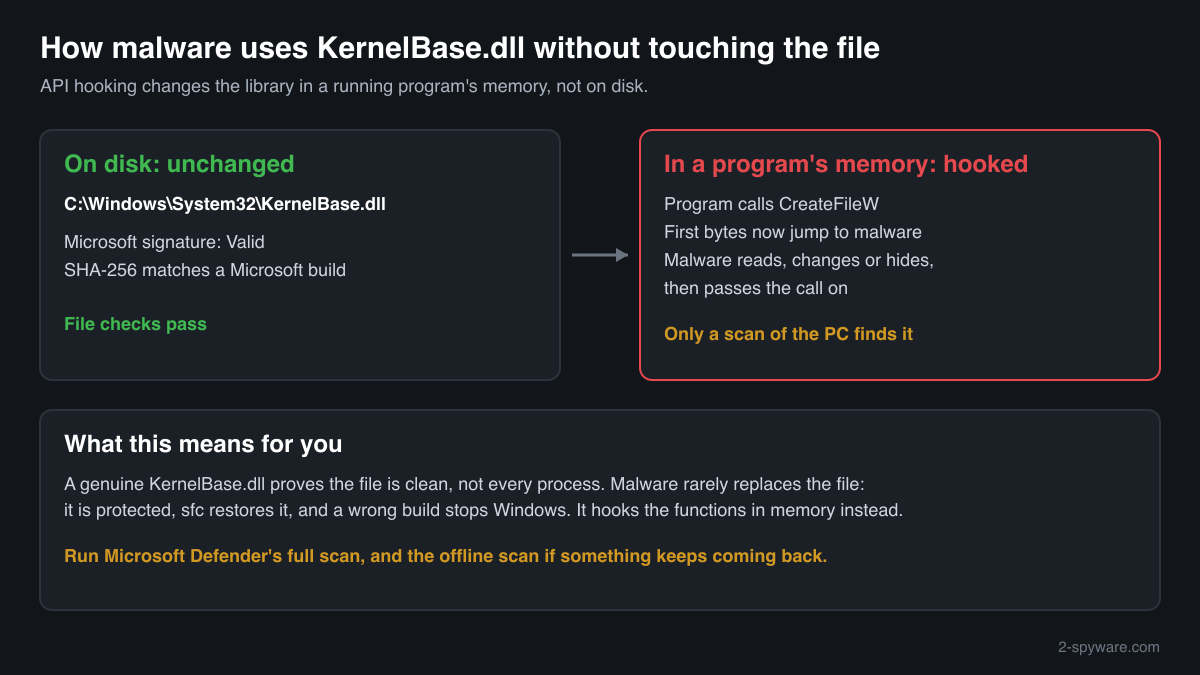
Windows never keeps KernelBase.dll in Downloads, Temp, AppData or a program folder, so a copy there is suspicious. And a genuine file on disk proves less than it seems: malware that wants this library's functions hooks them inside a running program's memory, where the file on disk stays untouched.
- Description in the file
- Windows NT BASE API Client DLL, company Microsoft Corporation
- What it is
- The core Windows library for files, memory, processes, threads, the registry and error handling. Since Windows 7 it holds much of the code that kernel32.dll and advapi32.dll pass calls on to
- Genuine folders
- C:\Windows\System32\KernelBase.dll and, on 64-bit Windows, C:\Windows\SysWOW64\KernelBase.dll for 32-bit programs
- Not genuine by location
- Any KernelBase.dll in Downloads, Temp, AppData, ProgramData, a program or game folder, or the root of a drive. Windows never puts it there
- Size of the genuine file
- About 4 MB in Windows 11 and about 3 MB in Windows 10 (64-bit), changing with almost every monthly update. Windows 11 24H2, update KB5127648: 4,254,784 bytes (64-bit)
- Newest indexed build
- Windows 11 26H1, delivered by KB5127646 on 13 October 2026, 4,308,960 bytes (64-bit)
- Known Microsoft builds
- 1,300 builds across 20 Windows releases in Winbindex
- Is it a process
- No. It is a library loaded into every running program, so it never appears on its own in Task Manager
What KernelBase.dll does, and why malware is interested in it
KernelBase.dll holds the basic functions that Windows programs call to open and write files, reserve memory, start processes and threads, read the registry and report errors. Microsoft split this code out of kernel32.dll and advapi32.dll in Windows 7; programs still call the older libraries, which pass many requests on to KernelBase.dll. Because of that, Windows loads it into every process from the moment the process starts.
The file is often named in crash reports as the faulting module. That is not a sign of infection: KernelBase.dll is where Windows raises the error a program threw, so any crashing program can point at it. The exception code in the report says what really failed.
For malware, the interesting part is not the file but what passes through it. Functions that create files, open processes or read memory sit in KernelBase.dll, so code that hooks them inside a running program can watch, change or hide what that program does. MITRE ATT&CK describes this as API hooking: the malware rewrites the first instructions of a function in the program's memory so that calls jump to its own code first. The file on disk stays exactly as Microsoft signed it, which is why a matching hash proves the file is genuine but not that every process on the PC is clean.
Replacing the file itself is rare and noisy. KernelBase.dll is a protected system file, System File Checker restores it, and a wrong build stops Windows from starting. A copy with this name in another folder is a different matter: it is not loaded by Windows, but it can be a disguise, a leftover of a cracked program or part of a package that uses a Windows name to look harmless.
About .dll files. A .dll file is a library: it cannot run on its own and is loaded into a program's process. It does not appear in Task Manager under its own name; Process Explorer shows which process loaded it.
How to tell the genuine KernelBase.dll from a copy
A DLL is not listed in Task Manager as a process, so use the folder, the file properties, PowerShell and Process Explorer.
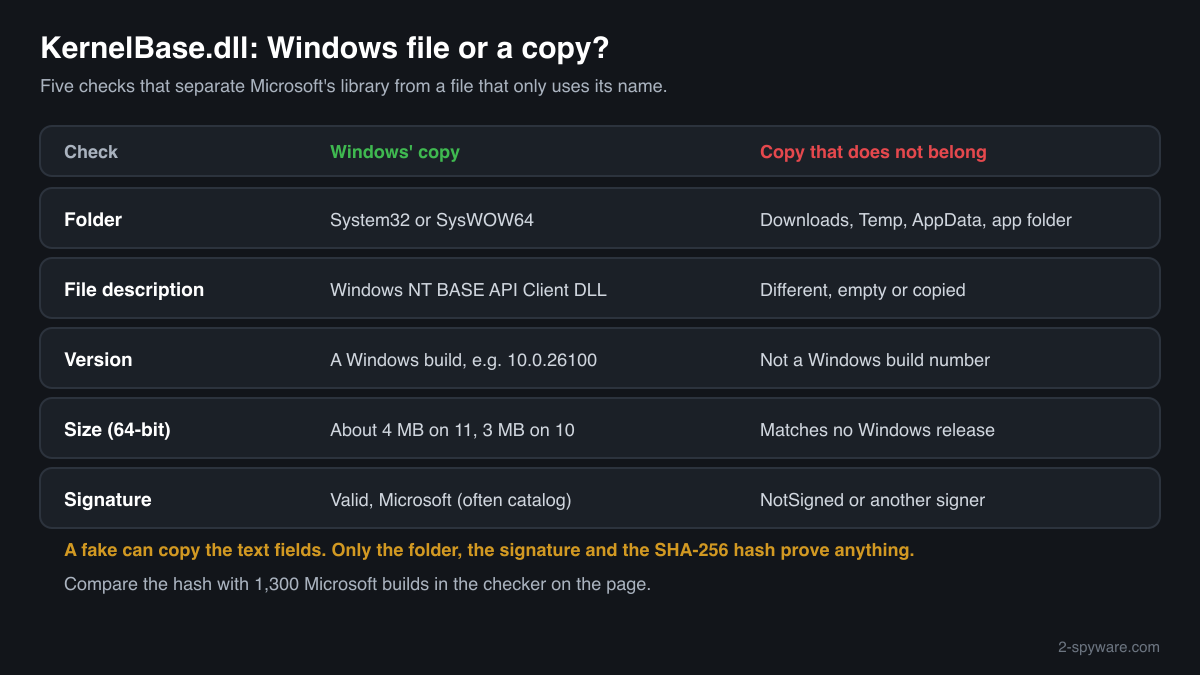
- Where the file is. List every copy with the command below. C:\Windows\System32 and C:\Windows\SysWOW64 are Windows' copies. Copies inside C:\Windows\WinSxS and servicing folders are Windows' own stored versions. Any other path deserves a closer look, especially Downloads, Temp, AppData and program folders.
Get-ChildItem C:\ -Recurse -Filter KernelBase.dll -ErrorAction SilentlyContinue | Select-Object FullName, Length, @{n='Description';e={$_.VersionInfo.FileDescription}} - The Description field, the version and the size. Right-click the file, Properties, Details. The genuine file says Windows NT BASE API Client DLL, Microsoft Corporation, and a Windows version such as 10.0.26100 or 10.0.19041, at about 3 to 4 MB. A fake can copy these fields, so this check only rules files out.
- The digital signature. Windows' copy is signed by Microsoft, often through a catalog rather than inside the file, so the Properties window may show no Digital Signatures tab. PowerShell reads both kinds. Valid with a Microsoft signer means genuine; NotSigned or another signer means the file is not Microsoft's.
Get-AuthenticodeSignature 'C:\path\to\KernelBase.dll' | Format-List Status, SignatureType, SignerCertificate - Which copy programs load. Open Process Explorer from Microsoft Sysinternals, choose Find > Find Handle or DLL, type kernelbase.dll and press Search. Every process should show the copy in System32, or SysWOW64 for 32-bit programs. A process that loads KernelBase.dll from any other folder is a serious warning sign.
- Compare the hash with Microsoft's builds. Use the checker on this page: it computes the SHA-256 in your browser and compares it with the known Microsoft builds. Windows updates this file almost every month, so a genuine build can be newer than the index; then the signature decides.
- Scan the memory, not only the file. Because hooks live in memory, run Microsoft Defender's full scan, and the Microsoft Defender Offline scan if something keeps coming back or Defender cannot finish. The offline scan starts outside Windows, where malware that hides by hooking cannot interfere.
A match to a Microsoft build proves the file on disk is Microsoft's. It says nothing about hooks that malware places in a running program's copy of the library in memory, so pair the file checks with a full or offline scan when the PC behaves oddly.
Check your kernelbase.dll
Choose the kernelbase.dll you are unsure about. Its SHA-256 checksum is calculated in your browser and compared with the 1328 Microsoft builds indexed from Windows releases and updates.
The file stays on your computer. Nothing is uploaded: the checksum is computed locally.
Warning signs and what they mean
| What you see | What it means |
|---|---|
| KernelBase.dll in Downloads, Temp, AppData, ProgramData or the root of a drive | Windows never stores it there. Treat the file as not genuine, check its signature and scan the PC. |
| KernelBase.dll next to a program's .exe that came from a crack, a keygen or a repack | Legitimate programs do not ship their own copy of this Windows file. A copy bundled this way is a disguise or a leftover; remove the package and scan. |
| Process Explorer shows a process loading KernelBase.dll from outside System32 or SysWOW64 | That process is not using Windows' library. Note the process, end it if you can, and run the Microsoft Defender Offline scan. |
| The file claims to be Windows NT BASE API Client DLL but has no valid Microsoft signature | A file that imitates Microsoft's details. Genuine copies are always Microsoft-signed. |
| Security software, browser or task manager tools crash or close as soon as they start | Possible malware that hooks system functions to block tools. Run the Microsoft Defender Offline scan, which works outside Windows. |
| Microsoft Defender names KernelBase.dll in System32 or SysWOW64 | Rare. Check the hash with the checker on this page and run the offline scan, then repair the file with sfc /scannow and DISM if it does not match. |
Everyday problems with KernelBase.dll
A crash report says Faulting module name: KERNELBASE.dll
This is the most common reason people look the file up, and it is not a sign of malware. KernelBase.dll is where Windows raises the error a program threw; when the program does not handle it, Windows names KernelBase.dll as the place of the crash.
The exception code in the same report tells the cause: 0xe0434352 is an unhandled .NET exception, 0xe06d7363 an uncaught C++ exception, 0xc0000409 a program that stopped itself after finding its memory in a broken state. Update or reinstall the program that crashed and repair its .NET or Visual C++ runtime. Replacing KernelBase.dll does not help.
Two KernelBase.dll files are in the Windows folders
That is normal on 64-bit Windows: System32 holds the 64-bit library and SysWOW64 the 32-bit one. Both are genuine Microsoft files with different sizes and hashes. More copies under C:\Windows\WinSxS are Windows' own stored versions for updates and repair.
If one of the copies in System32 or SysWOW64 is damaged or replaced, repair it with Windows' own tools, run as administrator one after the other:
sfc /scannowDISM /Online /Cleanup-Image /RestoreHealthI want to delete a KernelBase.dll I found in another folder
A copy outside System32, SysWOW64 and WinSxS is not used by Windows, so removing it never harms Windows. First check its signature and note where it came from, then delete it, uninstall the program it came with from Settings, Apps, and run a Microsoft Defender full scan.
kernelbase.dll versions by Windows release
The newest build indexed for each release, and the update that delivered it. 1300 Microsoft builds in total are known.
| Windows release | File version | Delivered by | Size, 64-bit |
|---|---|---|---|
| Windows 11 26H1 | 10.0.28000.2704 | KB5121000, Aug 11, 2026 | 4,241,008 bytes |
| Windows 11 25H2 | 10.0.26100.9549 | KB5124010, Sep 22, 2026 | 4,254,808 bytes |
| Windows 11 24H2 | 10.0.26100.9549 | KB5124010, Sep 22, 2026 | 4,254,808 bytes |
| Windows 11 23H2 | 10.0.22621.7376 | KB5099414, Jul 14, 2026 | 3,997,184 bytes |
| Windows 11 22H2 | 10.0.22621.7376 | KB5099414, Jul 14, 2026 | 3,997,184 bytes |
| Windows 11 21H2 | 10.0.22000.3260 | KB5044280, Oct 8, 2024 | 3,720,392 bytes |
| Windows 10 22H2 | 10.0.19041.7725 | KB5129236, Sep 14, 2026 | 3,115,200 bytes |
| Windows 10 21H2 | 10.0.19041.7725 | KB5129236, Sep 14, 2026 | 3,115,200 bytes |
| Windows 10 21H1 | 10.0.19041.7725 | KB5129236, Sep 14, 2026 | 3,115,200 bytes |
| Windows 10 20H2 | 10.0.19041.7725 | KB5129236, Sep 14, 2026 | 3,115,200 bytes |
Known versions of kernelbase.dll
A public DLL catalogue lists 28 versions of kernelbase.dll, from 6.1.7600.16385 to 10.0.19041.804, by Microsoft Corporation. Its copies are uploaded by users and not verified, so a checksum match identifies the version, while the digital signature tells you whether the file is genuine. Even a genuine file clears only the file, not the folder: attackers ship genuine libraries next to a program they abuse, so where the copy sits still decides whether it is safe.
Every version with its checksums, and how to fix kernelbase.dll errors on uGetFix
Questions people ask
Is KernelBase.dll a virus?
No, not the Windows copy. KernelBase.dll is the Windows NT BASE API Client DLL, and the files in System32 and SysWOW64 are genuine Microsoft libraries that every program uses. A KernelBase.dll in another folder is not Windows' file and should be checked. Malware that targets this library usually hooks its functions in memory instead of replacing the file.
Why is KernelBase.dll named in so many crash reports?
Because it is where Windows raises exceptions. When a program throws an error and nothing in the program handles it, Windows ends the program and records KernelBase.dll as the faulting module. The faulting application and the exception code in the report show what really failed, usually the program itself or its .NET or Visual C++ runtime, not the file.
Can I delete KernelBase.dll?
Not the copies in System32 or SysWOW64: Windows cannot start without them, and Windows protects them as system files. A KernelBase.dll in Downloads, Temp, AppData or a program folder is not used by Windows and can be deleted after you check its signature and note where it came from. Scan the PC with Microsoft Defender afterwards.
Can malware change KernelBase.dll without changing the file?
Yes. Malware that runs inside a process can rewrite the start of a KernelBase.dll function in that process's memory so that calls go to its own code first. MITRE ATT&CK lists this as API hooking. The file on disk keeps Microsoft's signature and hash, so the file checks pass. A Microsoft Defender full scan and the offline scan look for the malware that does it.
How do I check if my KernelBase.dll is genuine?
Check three things. The folder: only System32 and SysWOW64 hold the copies Windows uses. The signature: Get-AuthenticodeSignature in PowerShell shows Valid with a Microsoft signer for the genuine file. The hash: the checker on this page compares the SHA-256 with 1,300 known Microsoft builds. Because Windows updates the file almost every month, a valid Microsoft signature decides when the hash is newer than the index.
Should I download KernelBase.dll to fix an error?
No. Crashes that name KernelBase.dll are raised in it, not caused by it, so a new copy changes nothing. A file from a DLL download site cannot be traced to a Windows release and may have been altered, and a wrong build in System32 can stop Windows from starting. Repair a damaged copy with sfc /scannow and DISM.
Sources
- Microsoft Learn: New low-level binaries (KernelBase.dll in Windows 7)
- MITRE ATT&CK T1056.004: Credential API Hooking
- Microsoft Sysinternals: Process Explorer
- Microsoft Learn: CLR Exception E0434352
- The Old New Thing (Microsoft): Decoding the parameters of a thrown C++ exception (0xE06D7363)
- Winbindex, the Windows binaries index (m417z)
- Winbindex, the Windows binaries index (m417z)
Version data read on Oct 14, 2026.
Questions and experiences
Ask about this page: members and our editors answer. Reading is open; writing needs a free account.
…