
Program file
libcurl.dll: the curl network library, or a file planted next to a signed program?
libcurl.dll is the Windows build of libcurl, the free network transfer library of the curl project. Programs such as the Notepad++ updater ship it in their own folders to download updates and talk to web servers. A copy in a program you installed is normal. Because signed programs load it by name from their own folder, a copy in any other place needs checking.
Prefer to check it yourself? The manual checks follow.
A libcurl.dll in the install folder of a program you chose, such as Notepad++\updater, describing itself as libcurl Shared Library and sitting next to that program's .exe, is the genuine curl library. It is not a process: the program loads it when it fetches something from the internet. Several programs can each have their own copy, in different versions.
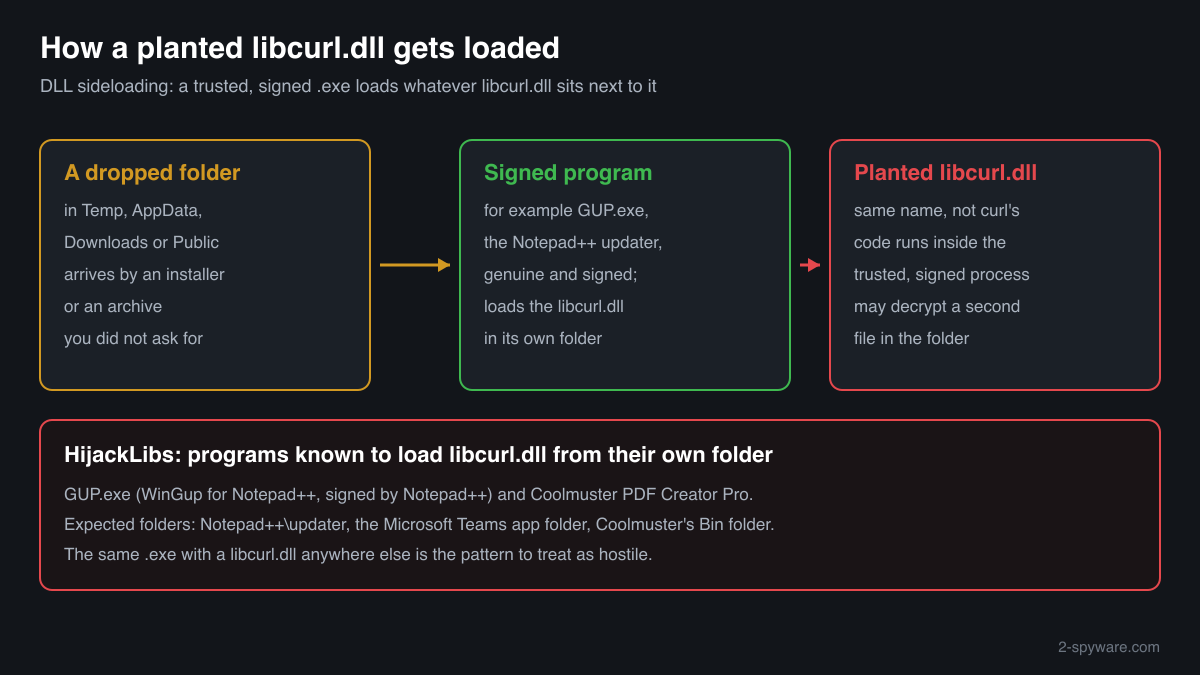
HijackLibs lists libcurl.dll as a DLL that signed programs, among them the Notepad++ updater GUP.exe, load from whatever folder they run in. A libcurl.dll beside a lone copy of such an .exe in Downloads, Temp, AppData or C:\Users\Public is the pattern of DLL sideloading and should be treated as hostile.
- Project
- libcurl, the free client-side URL transfer library of the curl project (curl.se)
- Description in the file
- libcurl Shared Library; some Apple builds say Open Source libcurl ver: 7.16.2
- Company in the file
- The cURL library, http://curl.haxx.se/ or The curl library, https://curl.haxx.se/ in older builds; Apple Inc. in Apple's builds
- Shipped by
- Each program that uses libcurl, in its own folder. HijackLibs names the Notepad++ updater, Microsoft Teams and Coolmuster PDF Creator Pro
- Genuine folder
- The program's install folder or a subfolder of it, such as %PROGRAMFILES%\Notepad++\updater. Not part of Windows, never needed in C:\Windows
- Size
- About 215 KB to 614 KB across the 32-bit copies collected in a public DLL catalogue; other builds differ with the features compiled in
- Runs as a process
- No. It is a library loaded into the program that uses it
- Abused for
- DLL sideloading: HijackLibs records signed programs that load libcurl.dll from their own folder, so a planted copy runs inside a trusted process
What libcurl.dll does
The curl project describes libcurl as a free and easy-to-use client-side URL transfer library. It speaks HTTP, HTTPS, FTP, SFTP, SMTP, IMAP and many other protocols, handles proxies, cookies, certificates and logins, and is the library behind the curl command-line tool. Developers build it into their programs, and on Windows the result is often a libcurl.dll in the program's folder. The program calls it for update checks, downloads, uploads and sign-ins. Windows includes the curl tool, but programs that need libcurl.dll bring their own.
Because a program loads libcurl.dll from its own folder by name, the file is a target for DLL sideloading. An attacker copies a legitimate, signed program that uses libcurl into a folder of their choice and puts a malicious libcurl.dll beside it. Windows starts the signed program, and the program loads the attacker's file with its trusted name. HijackLibs lists two such programs with their hashes: GUP.exe, the WinGup updater for Notepad++ signed by Notepad++, and the FileProcessManager module of Coolmuster PDF Creator Pro.
About .dll files. A .dll file is a library: it cannot run on its own and is loaded into a program's process. It does not appear in Task Manager under its own name; Process Explorer shows which process loaded it.
How to check a copy of libcurl.dll
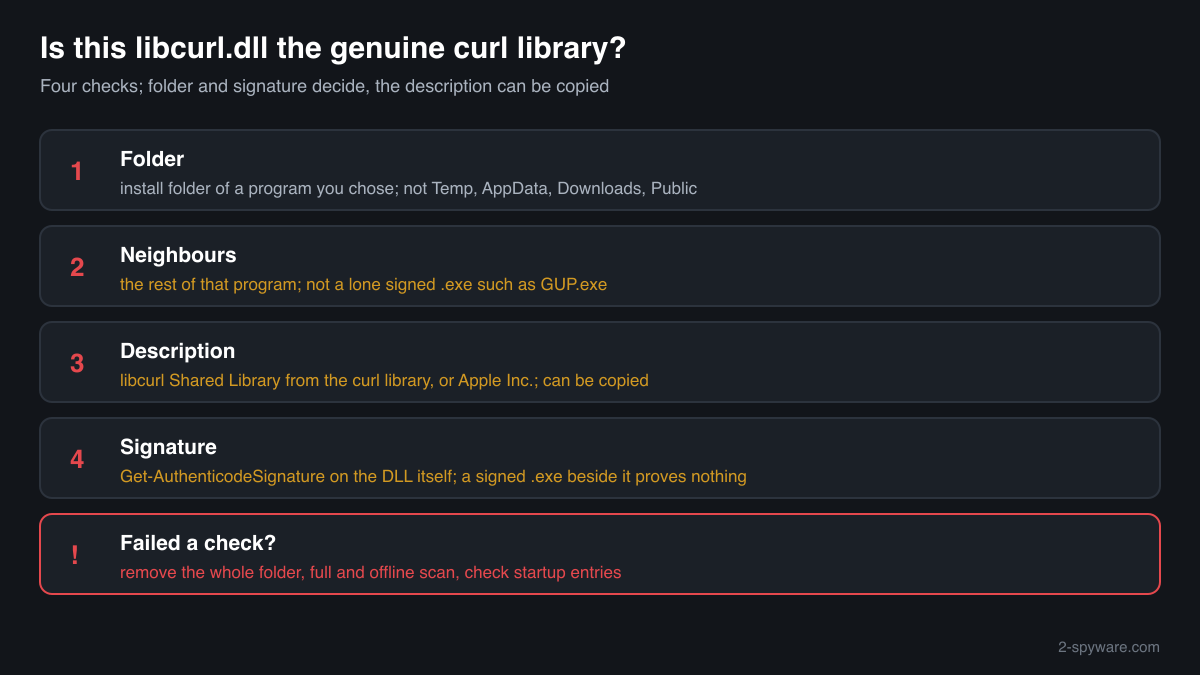
Five questions decide it: where the file is, what sits next to it, what it says about itself, who signed it and how large it is. A library never shows in Task Manager under its own name, so use these checks.
- List every copy and where it sits. Copies under Program Files, Program Files (x86), WindowsApps or a program's folder in AppData\Local are normal, one per program that uses libcurl. Look closer at copies in Downloads, Desktop, Temp, C:\Users\Public, ProgramData or a folder with a random name.
Get-ChildItem -Path C:\ -Filter libcurl.dll -Recurse -ErrorAction SilentlyContinue | Select-Object FullName, Length, LastWriteTime - Look at what sits next to it. A genuine copy shares its folder with the rest of a program: its .exe, settings files and often other libraries. A libcurl.dll beside a single signed .exe such as GUP.exe, far from the Notepad++ folder, with nothing else or with one unknown data file, is the pattern of a planted loader.
- Read the version resource. A curl build usually describes itself as libcurl Shared Library and names the curl library as the company, while Apple's builds name Apple Inc. A planted file can copy these text fields, so this check alone does not clear a file, but an empty or unrelated description is a warning.
(Get-Item "C:\path\to\libcurl.dll").VersionInfo | Format-List CompanyName, FileDescription, FileVersion - Check the digital signature. A program's maker may sign the libcurl.dll it ships. Status Valid with that maker's name is a good sign. NotSigned is common for open-source builds inside a program folder, but on a copy outside any program you installed, NotSigned or HashMismatch means you should treat it as hostile. A signed .exe next to it proves nothing about the DLL.
Get-AuthenticodeSignature "C:\path\to\libcurl.dll" | Format-List Status, SignerCertificate - Compare the size and checksum. Use the file check on the uGetFix page for libcurl.dll. The 32-bit copies in the public catalogue range from about 215 KB to 614 KB. A match identifies a known build; no match is not proof of a fake, because most genuine builds are not listed. Folder and signature decide.
A valid signature clears that one file. It says nothing about the other files in the folder: in a sideloading attack the malicious code is often in a second, encrypted file that the fake DLL only decrypts and starts.
Check your libcurl.dll
Choose the libcurl.dll you are unsure about. Its SHA-256 and SHA-1 checksums are calculated in your browser and compared with the 8 versions of the file known from a public DLL catalogue.
The file stays on your computer. Nothing is uploaded: the checksum is computed locally.
Do you need libcurl.dll?
Keep every copy inside the programs you installed: without it those programs cannot check for updates or download anything, and some do not start at all. A copy that failed the checks above belongs to no program you use, and the safe way out is to remove the whole folder it came with and scan the PC.
- Leave the copies of installed programs alone. A copy in a program's install folder belongs to that program. If it is damaged, flagged or reported as outdated, the program's update, repair or reinstall replaces its own copy; deleting it only breaks the program.
- Uninstall a program you do not recognise. Open Settings, Apps, Installed apps, look for a program you did not install around the date the file appeared, and uninstall it. If the libcurl.dll sits in a folder no installed program uses, end any process started from that folder in Task Manager and delete the whole folder, not only the DLL.
- Run a Microsoft Defender full scan. Open Windows Security, Virus and threat protection, Scan options, Full scan. Quarantine what it finds. Look at Protection history afterwards for anything found in Downloads, Temp, AppData or ProgramData.
- Run the offline scan. Loaders started through sideloading often install further malware that hides while Windows runs. The offline scan restarts the PC and scans before Windows starts. It takes about 15 minutes.
Start-MpWDOScan - Check what starts with Windows. Open Task Manager, Startup apps, and Task Scheduler. After the scan, disable and remove entries that start a program such as GUP.exe from AppData, ProgramData, Temp or C:\Users\Public, or any entry you do not recognise.
- Change passwords if a planted copy ran. Code that runs inside a trusted process can read what your account can read, including saved browser passwords and session cookies. Change your important passwords from a clean device and sign out of other sessions.
Warning signs
| What you see | What it means |
|---|---|
| GUP.exe and libcurl.dll together outside the Notepad++ folder | HijackLibs records GUP.exe as loading libcurl.dll from its own folder. A pair in Temp, AppData or Downloads is the sideloading pattern. |
| libcurl.dll in Temp, AppData\Roaming, Downloads or C:\Users\Public with a lone .exe | No installed program keeps its updater library there. Find out where it came from and scan. |
| libcurl.dll in C:\Windows\System32 or SysWOW64 | Windows does not install it there. Either an old fix guide put it there, or something else did; check its signature and remove it. |
| An unknown data file next to it | Planted loaders often decrypt their payload from a second file in the same folder. |
| NotSigned or HashMismatch on a copy outside a program you installed | The file is not an unmodified build from a program maker. |
| It arrived with an installer you did not ask for, or one posing as an update | Sideloading kits are delivered as installers or archives that drop the signed .exe and the DLL together. |
| Several copies, each in the folder of an installed program | Normal. Every program that uses libcurl ships its own copy. |
Programs that have been made to load a fake libcurl.dll
Each program below is genuine and signed, and security researchers have documented that it can be made to load a planted libcurl.dll. Usually the attacker copies the program into another folder and puts a fake libcurl.dll next to it: Windows looks in the program's own folder first. A libcurl.dll next to one of these programs, outside the folders below, is the copy to check.
Where the genuine libcurl.dll belongs: C:\Program Files\Notepad++\updaterC:\Program Files\WindowsApps\MSTeams_<version>C:\Program Files\Coolmuster\Coolmuster PDF Creator Pro\<version>\Bin
| Program | How |
|---|---|
C:\Program Files\Coolmuster\Coolmuster PDF Creator Pro\<version>\Bin\Coolmuster PDF Creator Pro.exeFileProcessManager Module SHA-256 of the genuine program: 777989570e14510d504debc657a24ccd995abb88fe30c5fa71911789b9a47f50 | Side-loading |
C:\Program Files\Notepad++\updater\GUP.exeWinGup for Notepad++ · signed by "Notepad++" SHA-256 of the genuine program: e5bbbf34414426f63e6cd1354c306405e54bf31279829c7542dccfb7d85af0ec | Side-loading |
Source: the HijackLibs entry for libcurl.dll, 2 public reports.
Known versions of libcurl.dll
A public DLL catalogue lists 8 versions of libcurl.dll, from 7.13.0.0 to 10.2.0.232, by Apple Inc.. Its copies are uploaded by users and not verified, so a checksum match identifies the version, while the digital signature tells you whether the file is genuine. Even a genuine file clears only the file, not the folder: attackers ship genuine libraries next to a program they abuse, so where the copy sits still decides whether it is safe.
Every version with its checksums, and how to fix libcurl.dll errors on uGetFix
Questions people ask
Is libcurl.dll a virus?
No, the genuine libcurl.dll is the open-source curl network library, shipped by ordinary programs to download and upload data. The name appears in security data because HijackLibs lists signed programs that load it from their own folder, which an attacker can use to run a planted file. A copy in a program you installed is genuine; a copy beside a lone .exe in Temp, AppData or Downloads needs the checks on this page.
What is DLL sideloading with libcurl.dll?
A program that uses libcurl loads libcurl.dll from its own folder by name. An attacker copies that signed program, such as the Notepad++ updater GUP.exe, into another folder and puts a malicious libcurl.dll beside it. When the program starts, it loads the attacker's code inside a trusted process with a valid signature on the .exe. MITRE ATT&CK describes this as hijacking the DLL search order.
Is the libcurl.dll in my Notepad++ folder safe?
A libcurl.dll in %PROGRAMFILES%\Notepad++\updater next to GUP.exe is where HijackLibs expects it, and it belongs to the Notepad++ updater. Install Notepad++ from its official site to be sure every file there is the one the project ships. A GUP.exe with a libcurl.dll anywhere else is not part of a normal Notepad++ install.
How can I tell a genuine libcurl.dll from a planted one?
Check four things. The folder: the install folder of a program you chose. The neighbours: the rest of that program, not a lone .exe. The description: libcurl Shared Library from the curl library, or Apple Inc. for Apple's builds. And the signature: Get-AuthenticodeSignature on the DLL itself, because a signed .exe beside it proves nothing about the DLL.
Can I delete libcurl.dll?
You can, but the program it belongs to then cannot check for updates or download anything, and some programs do not start at all. Deleting it from an installed program gains nothing. If the copy failed the checks and belongs to no program you use, delete its whole folder, then run a Microsoft Defender full scan and the offline scan.
Is libcurl.dll part of Windows?
No. Windows 10 and 11 include the curl command-line tool, which the curl project lists as shipped by Microsoft, but programs that need libcurl.dll bring their own copy in their own folder. A libcurl.dll in C:\Windows or System32 was put there by a program or by hand and does not belong to Windows.
Why are there several libcurl.dll files on my PC?
Every program that uses libcurl ships its own copy, usually of a different version and size, in its own folder. An editor's updater, a chat app and a game launcher can mean three copies. That is by design. What matters is that each copy sits in a program you installed and passes the folder and signature checks.
Sources
- curl: libcurl, the network transfer library
- curl: official curl builds for Windows (curl shipped by Microsoft)
- HijackLibs: libcurl.dll
- MITRE ATT&CK T1574.001: Hijack Execution Flow: DLL
- Microsoft Learn: Get-AuthenticodeSignature
Version data read on Oct 18, 2026.
Questions and experiences
Ask about this page: members and our editors answer. Reading is open; writing needs a free account.
…