
Program file
LogiLDA.dll: Logitech's Download Assistant or a file using its name?
LogiLDA.dll is the Logitech Download Assistant, a Logitech, Inc. library that Logitech mouse and keyboard software places in C:\Windows\System32 and starts at sign-in through rundll32.exe. A signed copy there is normal. Because it runs at every sign-in and few people know what it is, a copy in any other folder, or one without Logitech's signature, deserves a closer look.
Prefer to check it yourself? The manual checks follow.
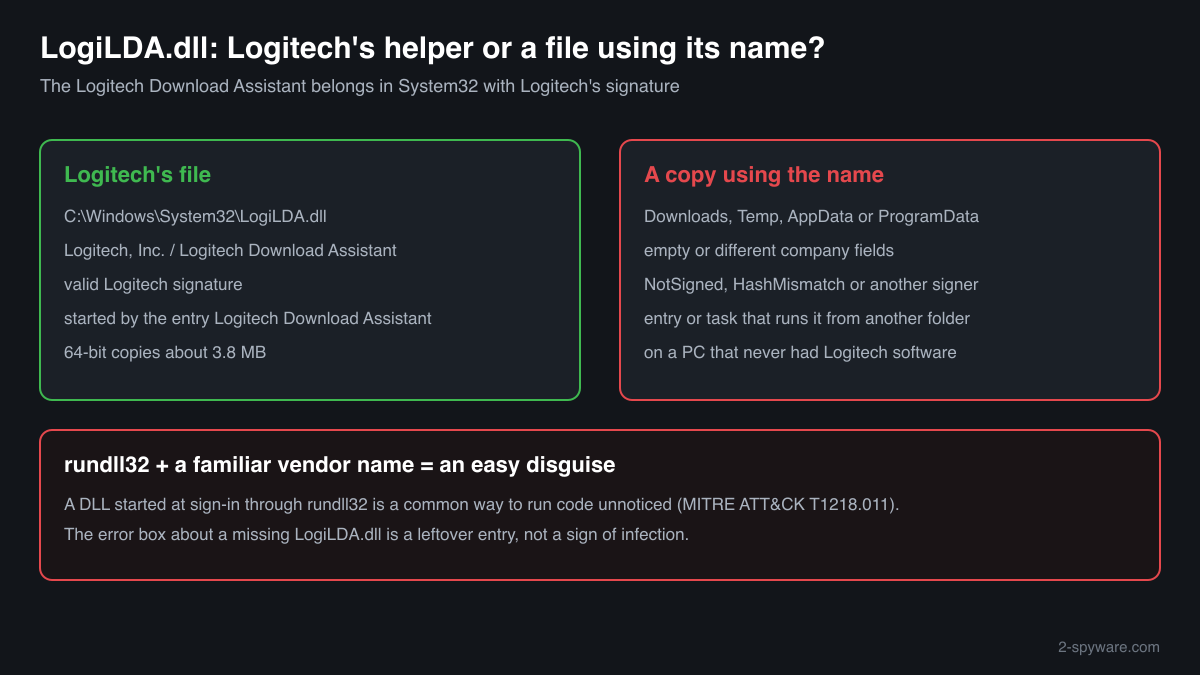
A LogiLDA.dll in C:\Windows\System32 that describes itself as Logitech Download Assistant from Logitech, Inc. and carries a valid Logitech signature is the genuine file. It does not make your device work; it checks for newer Logitech software, started by a Startup entry named Logitech Download Assistant.
A Startup entry that runs a DLL through rundll32 is an easy place to hide something, and a familiar vendor name lowers suspicion. A LogiLDA.dll outside System32, unsigned, or on a PC that never had Logitech software is not Logitech's file in its usual place and needs the checks below.
- Publisher
- Logitech, Inc.
- Description in the file
- Logitech Download Assistant
- Shipped by
- Logitech mouse and keyboard software, which also adds the Startup entry that runs it
- Genuine folder
- C:\Windows\System32, the path the Startup entry and every error box name
- Size
- About 3.8 MB for the 64-bit Logitech copies collected in a public DLL catalogue, all version 1.10.77.0. One 32-bit copy of about 1.4 MB there carries no company name
- Started by
- rundll32.exe, from a Startup entry named Logitech Download Assistant
- Runs as a process
- Not under its own name. Task Manager shows rundll32.exe or the Startup entry
- Needed for the device
- No. The mouse or keyboard keeps working without it
What LogiLDA.dll does
LogiLDA.dll is the Logitech Download Assistant. Logitech's device software installs it in C:\Windows\System32 and adds a Startup entry that starts it at every sign-in through rundll32.exe, the Windows tool that runs code stored in a DLL. Its job is to look for newer Logitech software. Your mouse, keyboard and their settings do not depend on it.
Most people meet the file through a box at sign-in that says Windows had a problem starting it, usually after a Windows update or after Logitech software was removed while its Startup entry stayed behind. That box is a leftover, not a sign of infection. The security question is a different one: whether a LogiLDA.dll on your PC is Logitech's file at all, since a DLL that starts with Windows from a familiar vendor name is something malware authors like to imitate.
About .dll files. A .dll file is a library: it cannot run on its own and is loaded into a program's process. It does not appear in Task Manager under its own name; Process Explorer shows which process loaded it.
How to check a copy of LogiLDA.dll
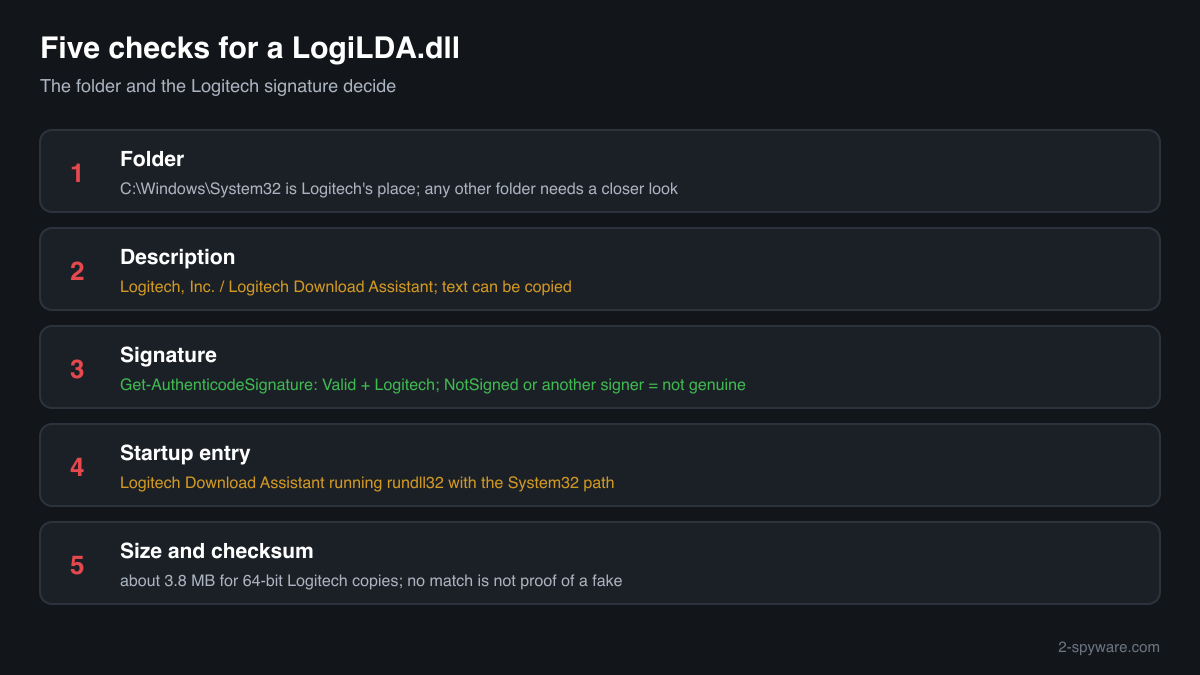
Four things decide it: where the file is, what it says about itself, who signed it, and what starts it. A library run by rundll32 never appears in Task Manager under its own name, so use these checks.
- List every copy and where it sits. One copy in C:\Windows\System32 is normal on a PC with Logitech software. A LogiLDA.dll in Downloads, Temp, AppData, ProgramData or a program folder is not where Logitech's installer puts it.
Get-ChildItem -Path C:\ -Filter LogiLDA.dll -Recurse -ErrorAction SilentlyContinue | Select-Object FullName, Length, LastWriteTime - Read the version resource. Logitech's file reports Logitech, Inc. as the company and Logitech Download Assistant as the description. Empty fields or another company point away from Logitech, though a careful fake can copy the text, so this check alone does not clear a file.
(Get-Item "C:\Windows\System32\LogiLDA.dll").VersionInfo | Format-List CompanyName, FileDescription, FileVersion - Check the digital signature. Status Valid with a Logitech signer means an unmodified Logitech file. NotSigned, HashMismatch or another signer means it is not Logitech's file as shipped. Text fields can be copied; a valid signature cannot.
Get-AuthenticodeSignature "C:\Windows\System32\LogiLDA.dll" | Format-List Status, SignerCertificate - See what starts it. The genuine Startup entry is named Logitech Download Assistant and runs rundll32 with C:\Windows\System32\LogiLDA.dll. Any entry or scheduled task that runs a LogiLDA.dll from another folder, or under another name, was not made by Logitech's installer.
Get-CimInstance Win32_StartupCommand | Where-Object Command -match 'LogiLDA' | Format-List Name, Command, Location - Compare the size and checksum. Use the file check on this page. The Logitech copies in the catalogue are about 3.8 MB. A match identifies a known copy; no match is not proof of a fake, because not every Logitech build is listed. The signature check above is the deciding one.
A valid Logitech signature clears that one file. It does not clear other entries in Startup apps or Task Scheduler, so look at those too if the PC behaves oddly.
Check your logilda.dll
Choose the logilda.dll you are unsure about. Its SHA-256 and SHA-1 checksums are calculated in your browser and compared with the 3 versions of the file known from a public DLL catalogue.
The file stays on your computer. Nothing is uploaded: the checksum is computed locally.
Do you need LogiLDA.dll?
No program needs it except its own Startup entry. Keep it if you use Logitech software and want automatic update checks; otherwise you can turn it off. A copy that failed the checks above is a different matter: remove it and scan.
- Turn off the Startup entry if you do not want it. Open Task Manager, Startup apps, right-click Logitech Download Assistant and choose Disable. The device keeps working, and you can turn it back on at any time.
- Uninstall Logitech software you no longer use. Open Settings, Apps, Installed apps, find the Logitech entries and uninstall them. That removes the software that put LogiLDA.dll in System32.
- Run a Microsoft Defender full scan for a copy that failed the checks. Open Windows Security, Virus and threat protection, Scan options, Full scan. Quarantine what it finds and look at Protection history for anything found in Downloads, Temp or AppData.
- Run the offline scan. Some malware hides while Windows runs. The offline scan restarts the PC and scans before Windows starts. It takes about 15 minutes.
Start-MpWDOScan - Clean up what starts with Windows. After the scan, open Task Manager, Startup apps, and Task Scheduler. Disable and remove entries that run a program or DLL from AppData, ProgramData or Temp that you do not recognise.
Warning signs
| What you see | What it means |
|---|---|
| LogiLDA.dll in Downloads, Temp, AppData or ProgramData | Not where Logitech's installer puts it. Find out where it came from and scan. |
| The signature check shows NotSigned or HashMismatch | The file is not an unmodified Logitech file. |
| A Startup entry or scheduled task runs LogiLDA.dll from a folder other than System32 | Not Logitech's entry. Something is borrowing the name. |
| LogiLDA.dll on a PC that never had Logitech software | Check the signature and folder; a leftover from preinstalled software is possible, a planted file too. |
| A box at sign-in saying Windows had a problem starting LogiLDA.dll | A leftover Startup entry pointing to a missing file. Annoying, not a sign of infection. |
Known versions of logilda.dll
A public DLL catalogue lists 3 versions of logilda.dll, from 1.10.77.0 to 1.10.77.0, by Logitech, Inc.. Its copies are uploaded by users and not verified, so a checksum match identifies the version, while the digital signature tells you whether the file is genuine. Even a genuine file clears only the file, not the folder: attackers ship genuine libraries next to a program they abuse, so where the copy sits still decides whether it is safe.
Every version with its checksums, and how to fix logilda.dll errors on uGetFix
Questions people ask
Is LogiLDA.dll a virus?
No, Logitech's LogiLDA.dll is the Logitech Download Assistant, a helper that checks for Logitech software updates. A copy in C:\Windows\System32 that describes itself as Logitech Download Assistant from Logitech, Inc. and carries a valid Logitech signature is the genuine file. A copy in another folder, or one without that signature, needs the checks on this page.
Why does rundll32.exe run LogiLDA.dll at sign-in?
A DLL cannot start on its own, so Logitech's Startup entry asks rundll32.exe, a Windows tool, to load LogiLDA.dll and run its code. That is why Task Manager shows rundll32 or Logitech Download Assistant and never LogiLDA.dll itself. The same mechanism is used by malware, which is why the folder and the signature matter.
Can I delete LogiLDA.dll?
You can, but it is better to disable the Logitech Download Assistant Startup entry first, or to uninstall the Logitech software that installed it. Deleting only the file leaves the entry behind, and Windows then shows an error box at every sign-in. Your mouse or keyboard keeps working either way.
Why is LogiLDA.dll on my PC if I have no Logitech device?
A Logitech device was used on the PC before, or its software came preinstalled, and the file or its Startup entry stayed when the device was gone. Check the folder and signature. If it is a signed Logitech file in System32, uninstall the Logitech software; if not, treat it as unknown and scan.
Does the LogiLDA.dll error box mean my PC is infected?
No. The box that says Windows had a problem starting LogiLDA.dll means the Startup entry points to a file that is no longer there, usually after a Windows update or after Logitech software was removed. It is a leftover setting, not malware. Disabling the entry in Task Manager makes it go away.
Sources
- Dartmouth College Knowledge Base: There was a problem starting C:\Windows\System32\LogiLDA.dll
- Microsoft Learn: rundll32
- MITRE ATT&CK T1218.011: System Binary Proxy Execution: Rundll32
- Microsoft Learn: Get-AuthenticodeSignature
Version data read on Oct 17, 2026.
Questions and experiences
Ask about this page: members and our editors answer. Reading is open; writing needs a free account.
…