
Program file
mdnsnsp.dll: Apple's Bonjour file, an LSA warning, or something to worry about?
mdnsnsp.dll is the Bonjour Namespace Provider, an Apple library that Bonjour for Windows installs to find devices on the local network. A Windows 11 warning that it was blocked from loading into the Local Security Authority is a signing rule at work, not a malware detection. A copy outside the Bonjour folder or without Apple's signature is the one to check.
Prefer to check it yourself? The manual checks follow.
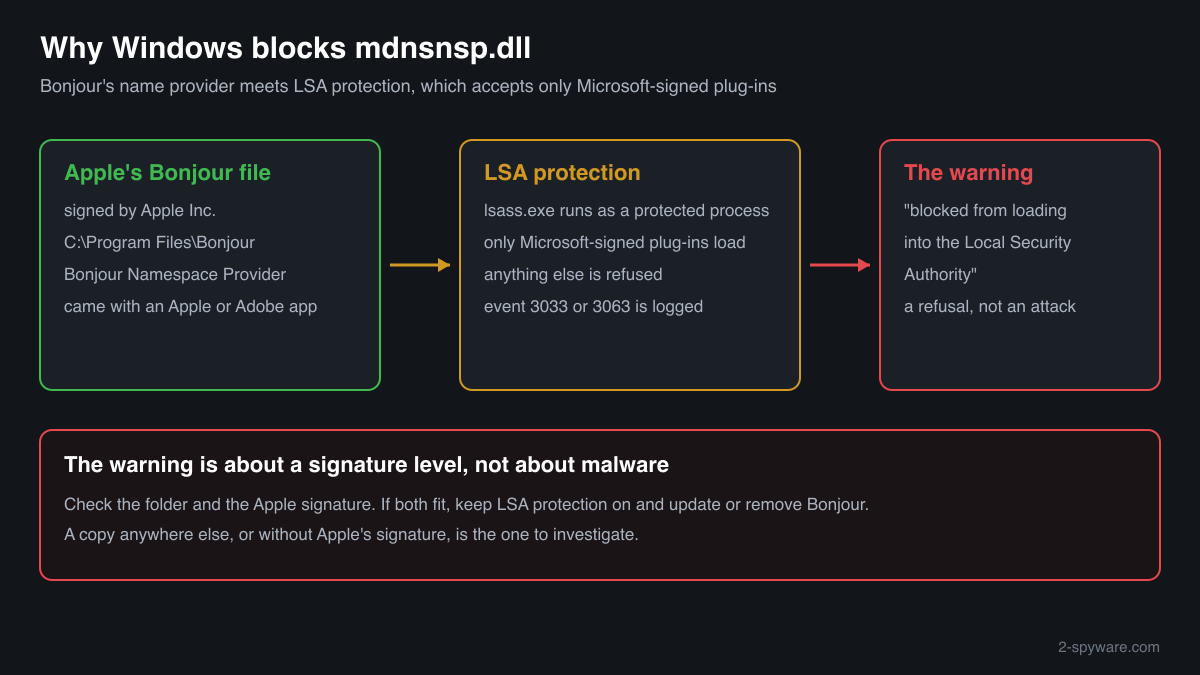
An mdnsnsp.dll in C:\Program Files\Bonjour or C:\Program Files (x86)\Bonjour, describing itself as Bonjour Namespace Provider from Apple Inc. and signed by Apple, is the genuine file. It is not a process: Windows loads it into programs that look up names on the network. The LSA block warning about it means only that Microsoft did not sign it, which is true of every genuine Apple copy.
The warning names the file, so a fake with the same name would draw the same attention and the same false reassurance. A copy in System32, Downloads, Temp or AppData, or one without a valid Apple signature, did not come from Bonjour and needs the checks below.
- Publisher
- Apple Inc.
- Description in the file
- Bonjour Namespace Provider
- Installed by
- Bonjour for Windows, which comes with iTunes, Bonjour Print Services and some other Apple and third-party programs
- Genuine folder
- C:\Program Files\Bonjour, and a 32-bit copy in C:\Program Files (x86)\Bonjour on many 64-bit PCs. Never in C:\Windows
- Size
- Small: about 120 KB to 145 KB across the 4 Apple copies collected in a public DLL catalogue
- Signed by
- Apple Inc. Not by Microsoft, which is why LSA protection refuses it
- Runs as a process
- No. It is a Winsock name provider loaded into programs that resolve names; the Bonjour Service runs as mDNSResponder.exe
What mdnsnsp.dll does and why Windows blocks it
Bonjour is Apple's network discovery service. Printers, speakers and other devices announce themselves on the local network under names that end in .local, and the Bonjour Service, mDNSResponder.exe, listens for them. mdnsnsp.dll is the piece that plugs this into Windows: Bonjour registers it as a namespace provider in Winsock, the Windows networking layer, so that any program asking for a .local name gets an answer from Bonjour.
Because the provider sits in the name lookup path, Windows can load it into many processes, the Local Security Authority among them. On PCs where LSA protection is on, the Local Security Authority runs as a protected process and accepts only plug-ins signed by Microsoft. Apple signs Bonjour with its own certificate, so the protected process refuses mdnsnsp.dll and Windows reports it. Microsoft documents this behaviour and the Code Integrity events it writes: 3033 for a file below the Microsoft signing level, 3063 for one that fails the shared section rules.
So the warning tells you something about a signature, not about intent. It does not say the file is harmful, and it does not say the file is Apple's. That second question is what the checks on this page answer.
About .dll files. A .dll file is a library: it cannot run on its own and is loaded into a program's process. It does not appear in Task Manager under its own name; Process Explorer shows which process loaded it.
How to check a copy of mdnsnsp.dll
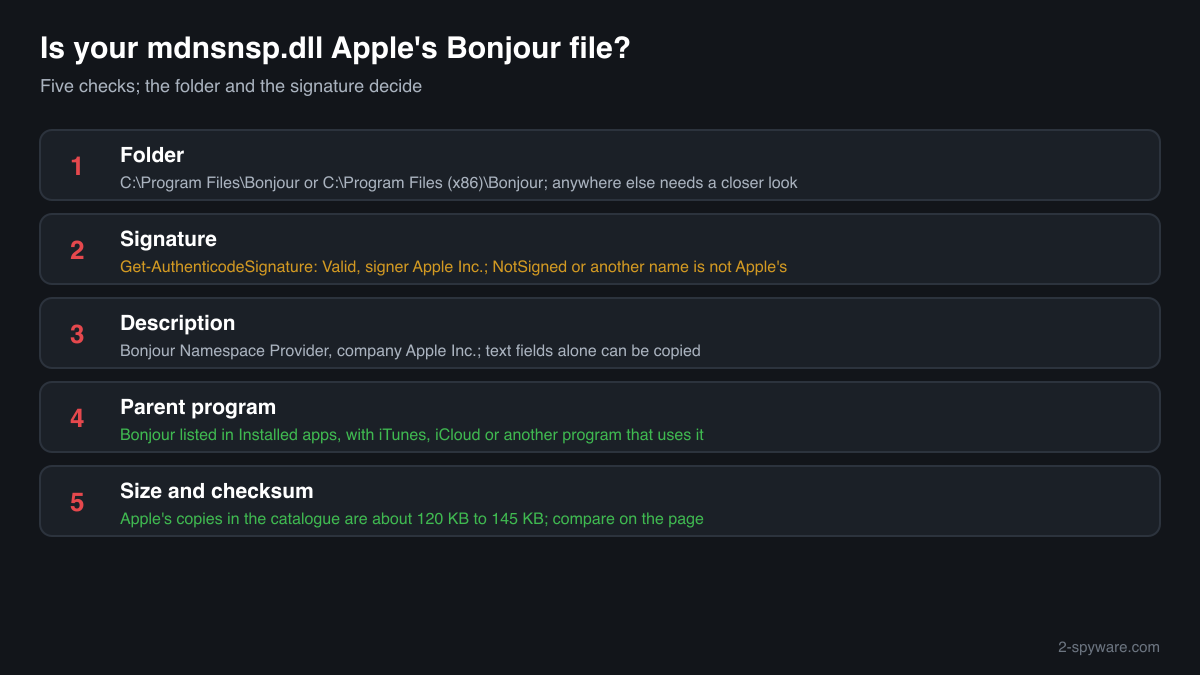
Four questions decide it: where the file is, who signed it, what it says about itself, and whether Bonjour is installed at all. A library never shows in Task Manager under its own name, so use these checks.
- List every copy and where it sits. Copies under Program Files\Bonjour and Program Files (x86)\Bonjour are normal. Look closer at any copy in System32, SysWOW64, Downloads, Temp, AppData or ProgramData.
Get-ChildItem -Path C:\ -Filter mdnsnsp.dll -Recurse -ErrorAction SilentlyContinue | Select-Object FullName, Length, LastWriteTime - Check the digital signature. Status Valid with an Apple Inc. signer means an unmodified Apple build. NotSigned, HashMismatch or another signer means the file is not Apple's as shipped. Text fields can be copied; a valid signature cannot.
Get-AuthenticodeSignature "C:\Program Files\Bonjour\mdnsNSP.dll" | Format-List Status, SignerCertificate - Read the version resource. Apple's file reports Apple Inc. as the company and Bonjour Namespace Provider as the description. A fake may leave these empty or copy them, so this check alone does not clear a file.
(Get-Item "C:\Program Files\Bonjour\mdnsNSP.dll").VersionInfo | Format-List CompanyName, FileDescription, FileVersion - Confirm that Bonjour is installed. Open Settings, Apps, Installed apps and search for Bonjour. The genuine file comes with that entry and with the Bonjour Service in the Services console. An mdnsnsp.dll on a PC with neither has no installer behind it.
Get-Service -Name 'Bonjour Service' -ErrorAction SilentlyContinue | Format-List Name, Status, StartType - Compare the size and checksum. Use the file check on this page. Apple's copies in the catalogue are about 120 KB to 145 KB. A match identifies a known Apple build; no match is not proof of a fake, because many Bonjour releases are not listed.
A valid Apple signature clears that one file. It does not explain a warning about another module, and it says nothing about other files in unusual folders, which deserve their own checks.
Check your mdnsnsp.dll
Choose the mdnsnsp.dll you are unsure about. Its SHA-256 and SHA-1 checksums are calculated in your browser and compared with the 4 versions of the file known from a public DLL catalogue.
The file stays on your computer. Nothing is uploaded: the checksum is computed locally.
Do you need mdnsnsp.dll?
Windows does not need it. Bonjour needs it, and you need Bonjour only for network discovery: AirPlay speakers, shared iTunes libraries and printers that announce themselves with Bonjour. If you use none of these, removing Bonjour as a whole is supported and ends the LSA warning too.
- Keep a genuine copy if you use Bonjour's features. A signed Apple copy in the Bonjour folder is fine. The LSA warning does not mean Bonjour stopped working for your normal programs; it only cannot load into the protected Local Security Authority.
- Uninstall Bonjour, not the DLL. Open Settings, Apps, Installed apps, select Bonjour and choose Uninstall, then restart. Deleting only mdnsnsp.dll can leave Windows networking pointing at a missing file.
- Leave LSA protection on. Do not switch off Local Security Authority protection in Windows Security to quiet the warning. It guards your sign-in credentials against code injection, and that protection matters more than one Apple plug-in.
- Scan if a copy failed the checks. Open Windows Security, Virus and threat protection, Scan options, Full scan, and quarantine what it finds. Then run the offline scan, which checks the PC before Windows starts.
Start-MpWDOScan - Check what starts with Windows. After the scan, open Task Manager, Startup apps, and Task Scheduler. Disable entries that run a program from AppData, ProgramData or Temp that you do not recognise.
Warning signs
| What you see | What it means |
|---|---|
| The LSA warning names C:\Program Files\Bonjour\mdnsNSP.dll | Normal for Apple's file under LSA protection. Not a detection. |
| mdnsnsp.dll in System32, SysWOW64, Downloads, Temp or AppData | No Bonjour installer puts it there. Find out where it came from and scan. |
| The signature check shows NotSigned, HashMismatch or a signer other than Apple | The file is not an unmodified Apple build. |
| mdnsnsp.dll present, but no Bonjour in Installed apps and no Bonjour Service | A leftover from a removed install, or a file with no installer behind it. Check the signature before anything else. |
| A message asking you to turn off LSA protection or security software to fix it | No genuine fix needs that. Treat the source of that advice as untrusted. |
Known versions of mdnsnsp.dll
A public DLL catalogue lists 4 versions of mdnsnsp.dll, from 1.0.5.11 to 3.1.0.1, by Apple Inc.. Its copies are uploaded by users and not verified, so a checksum match identifies the version, while the digital signature tells you whether the file is genuine. Even a genuine file clears only the file, not the folder: attackers ship genuine libraries next to a program they abuse, so where the copy sits still decides whether it is safe.
Every version with its checksums, and how to fix mdnsnsp.dll errors on uGetFix
Questions people ask
Is mdnsnsp.dll a virus?
No, Apple's mdnsnsp.dll is the Bonjour Namespace Provider, a harmless library that lets Windows find devices on your local network. The Windows warning about it is a signing rule: LSA protection refuses every plug-in that Microsoft did not sign. A copy in the Bonjour folder with a valid Apple signature is genuine. A copy elsewhere, or without that signature, needs the checks on this page.
Why does Windows say mdnsNSP.dll is blocked from loading into the Local Security Authority?
Because LSA protection is on and the file is signed by Apple, not Microsoft. With the protection on, the Local Security Authority runs as a protected process that loads only Microsoft-signed plug-ins. Bonjour's name provider tries to load there as part of normal name lookups and is refused. The warning is Windows doing what it was designed to do.
Does the LSA warning mean someone tried to steal my password?
Not when the blocked file is Apple's mdnsnsp.dll in the Bonjour folder. LSA protection blocks code injection into the process that holds credentials, and it reports every refused plug-in, harmful or not. Bonjour is refused for its signature, not for its behaviour. Confirm the folder and the Apple signature; if both fit, nothing tried to take your credentials.
Why is Bonjour on my PC when I never installed anything from Apple?
Other programs bundle it. Besides iTunes and Bonjour Print Services, some design, printing, audio and media software installed Bonjour for device discovery, and it stays after those programs are removed. That explains a genuine copy in the Bonjour folder. It does not explain a copy in System32, Temp or AppData, which no installer puts there.
Can I delete mdnsnsp.dll?
Do not delete the file alone. Bonjour registers it in Windows networking, and removing only the DLL can leave that registration pointing at nothing, which can disturb name resolution. Uninstall Bonjour through Installed apps instead. If you found a copy outside the Bonjour folder that failed the signature check, run a full and an offline Microsoft Defender scan.
How can I tell Apple's mdnsnsp.dll from a fake?
Check four things. The folder: Program Files\Bonjour or Program Files (x86)\Bonjour. The signature: Get-AuthenticodeSignature should show Valid and Apple Inc. The version resource: Apple Inc. and Bonjour Namespace Provider. And the context: Bonjour in Installed apps and a Bonjour Service on the PC. A file that fails the folder or signature check is not Apple's as shipped.
Why are there two copies of mdnsnsp.dll?
On many 64-bit PCs Bonjour installs a 64-bit copy in C:\Program Files\Bonjour and a 32-bit copy in C:\Program Files (x86)\Bonjour, so that both 64-bit and 32-bit programs can resolve .local names. Two copies, one in each folder and both signed by Apple, are normal. The LSA warning usually names the 64-bit one.
Sources
- Microsoft Learn: Configure added LSA protection (signing requirements, Code Integrity events 3033, 3063, 3065, 3066)
- Apple Support: Download Bonjour Print Services for Windows v2.0.2
- Microsoft Learn: Get-AuthenticodeSignature
Version data read on Oct 17, 2026.
Questions and experiences
Ask about this page: members and our editors answer. Reading is open; writing needs a free account.
…