
Program file
mfc140.dll: how to tell Microsoft's MFC library from a copy that does not belong
mfc140.dll is the ANSI, or multibyte, build of Microsoft Foundation Classes version 14, used by desktop programs that still handle text in code pages. The Visual C++ Redistributable installs it, and many programs keep their own copy. No published campaign has relied on a fake file with this name, so what you check is the folder, the size and the signature.
Prefer to check it yourself? The manual checks follow.
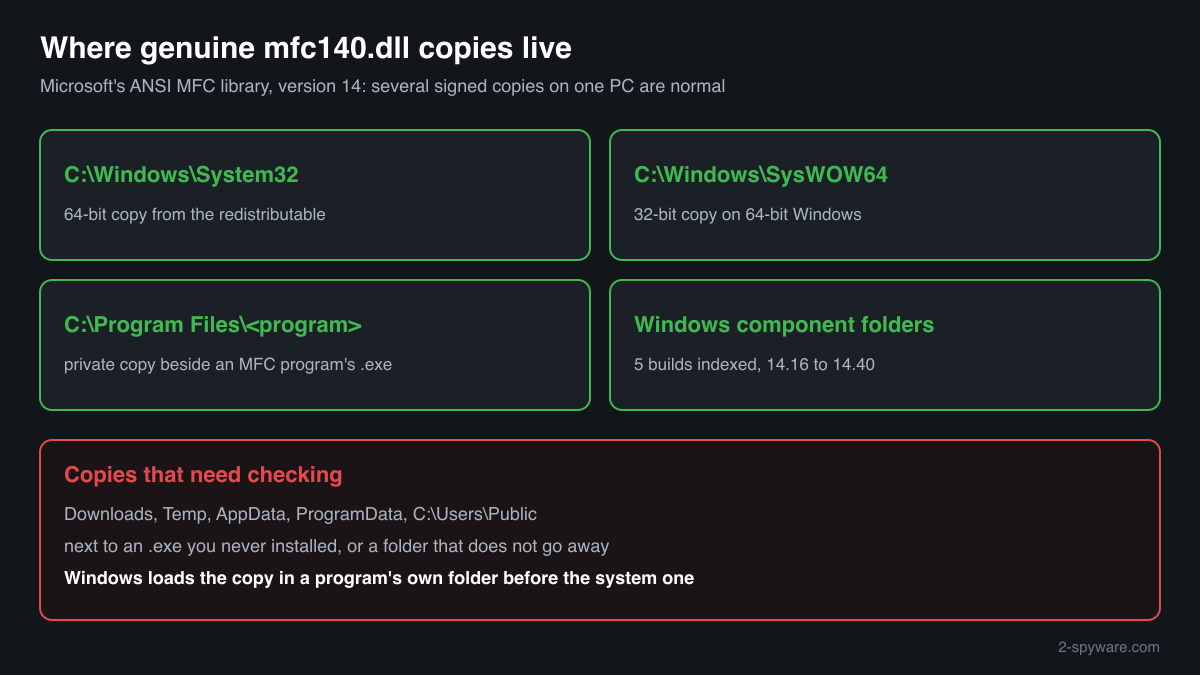
A Microsoft-signed mfc140.dll in C:\Windows\System32, C:\Windows\SysWOW64 or the installation folder of a program you chose to install is the real library. It has no process of its own, never starts by itself and only works while an MFC program is running. Several copies on one PC are expected, because programs bring their own.
Windows looks for mfc140.dll in a program's folder before the system folders, so any file given this name and placed beside an MFC program runs inside it. That is the case worth checking: a copy in a user folder such as Downloads, Temp or AppData, next to an .exe you do not recognise, or a copy that is not signed by Microsoft.
- Publisher
- Microsoft Corporation
- Description in the file
- MFCDLL Shared Library - Retail Version (the same text as mfc140u.dll; only the file name differs)
- Installed by
- Microsoft Visual C++ 2015-2022 Redistributable (version 14), and by programs that ship a private MFC copy
- Current official version
- 14.51.36247.0, read from Microsoft's x64, x86 and ARM64 installers on 17 October 2026
- Size of the genuine file
- 5,563,320 bytes (x64), 4,855,744 bytes (x86) and 12,066,144 bytes (ARM64) for version 14.51.36247.0
- Genuine folders
- C:\Windows\System32 (64-bit copy), C:\Windows\SysWOW64 (32-bit copy on 64-bit Windows), and the folders of installed programs that carry their own
- Signed by
- Microsoft Windows Software Compatibility Publisher (x64 and x86 builds), Microsoft Corporation (ARM64 build)
- Inside Windows images
- Five Microsoft builds, from version 14.16.26905.0 to 14.40.33728.0, indexed in images from Windows 10 version 1903 to Windows 11 version 25H2
- Runs as a process
- No. It is a library that MFC programs load
What mfc140.dll does
Microsoft Foundation Classes is a C++ framework that turns the raw Windows interface into ready parts: main windows, dialog boxes, buttons and lists, documents with views, printing. A program built with MFC either carries that code inside its .exe or loads it from a DLL. mfc140.dll is the shared DLL for programs compiled with the multibyte (ANSI) character set. Microsoft's naming table for MFC gives MFCversion.DLL as the ANSI or MBCS release build and MFCversionU.DLL as the Unicode one, so mfc140u.dll is its Unicode twin.
The 140 stands for MFC version 14, shared by Visual Studio 2015 through 2022. Each genuine build exports more than 9,200 functions and imports only Windows libraries plus vcruntime140.dll. Because programs search their own folder first, installers often put mfc140.dll next to the .exe, which explains copies in Program Files. The same search order is also why a file with this name in an odd folder deserves a second look.
About .dll files. A .dll file is a library: it cannot run on its own and is loaded into a program's process. It does not appear in Task Manager under its own name; Process Explorer shows which process loaded it.
How to check a copy of mfc140.dll
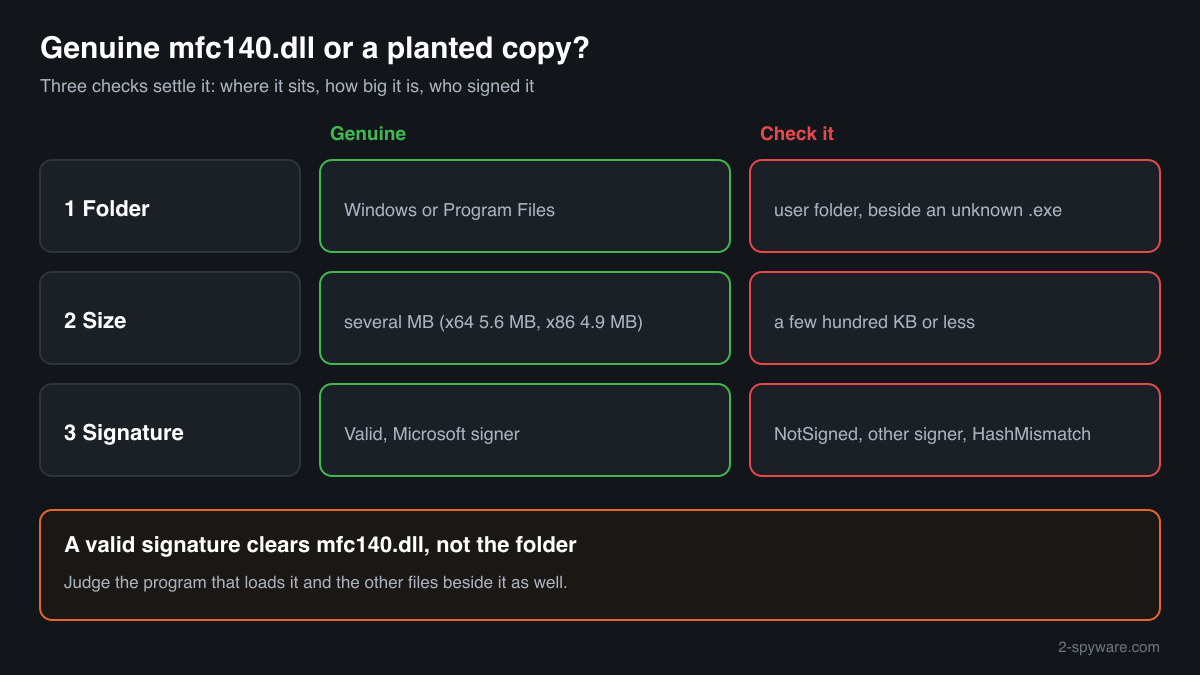
Where the copy sits, how large it is and who signed it answer the question for almost every case. A DLL never appears in Task Manager under its own name, so these checks replace it.
- Find every copy on the system drive. Paste this into PowerShell. Copies under C:\Windows and C:\Program Files are expected. Write down any copy in Downloads, Temp, AppData, ProgramData or C:\Users\Public and run the next checks on it.
Get-ChildItem -Path C:\ -Filter mfc140.dll -Recurse -ErrorAction SilentlyContinue | Select-Object FullName, Length, LastWriteTime - Verify the digital signature. A genuine copy returns Status Valid, with Microsoft Windows Software Compatibility Publisher or Microsoft Corporation as the signer. NotSigned, or any other company, means the file is not Microsoft's MFC. HashMismatch means a Microsoft file that someone modified after it was signed.
Get-AuthenticodeSignature "C:\path\to\mfc140.dll" | Format-List Status, SignerCertificate - Check that the size makes sense. Genuine builds are several megabytes: the current one is 5,563,320 bytes for x64 and 4,855,744 bytes for x86, and the older builds people have on their PCs fall in the same range. A file of a few hundred kilobytes or less with this name is not MFC. The file check on this page compares the SHA-256 checksum with the builds we know.
- See which process loaded it. In Process Explorer (Microsoft Sysinternals) choose Find, Find Handle or DLL and enter mfc140.dll. Each hit shows the process and the exact path of the copy it loaded. A design, engineering or hardware tool you use, loading a copy from its own Program Files folder, is normal. An unfamiliar process running from a user folder is not.
- Look at the company it keeps. Open the folder of a suspicious copy. A program folder normally holds the program's .exe, its own DLLs and data files with readable names. A short-lived folder in Temp that one installer creates and removes is harmless too. A folder that stays, with one signed .exe, mfc140.dll and a file with a meaningless name or extension, is the layout side-loading uses.
A valid Microsoft signature shows that mfc140.dll itself is genuine. It does not vouch for the program that loaded it or for other files in the same folder.
Check your mfc140.dll
Choose the mfc140.dll you are unsure about. Its SHA-256 and SHA-1 checksums are calculated in your browser and compared with the 10 versions of the file known from a public DLL catalogue.
The file stays on your computer. Nothing is uploaded: the checksum is computed locally.
Do you need mfc140.dll?
Yes, if any program on the PC uses the ANSI MFC library: without the file it stops at startup. Keep the signed copies in the Windows folders and in program folders, and remove a copy only together with the program it belongs to.
- Keep System32 and SysWOW64 as they are. Those copies come from the redistributable and are shared by every MFC program. Deleting them breaks programs and protects you from nothing.
- Remove an unwanted program the normal way. If a private copy belongs to a program you no longer use, open Settings, Apps, Installed apps, select the program and choose Uninstall. Its own mfc140.dll leaves with it.
- Set aside a copy you cannot explain. For a copy that failed the signature check, or sits beside an unknown .exe in a user folder, move that whole folder into a new folder you create for quarantine, rather than deleting it at once. You can restore it if a program you need stops working.
- Run a Microsoft Defender full scan. In Windows Security choose Virus and threat protection, Scan options, Full scan. Let Defender quarantine what it finds before you remove anything by hand.
- Add an offline scan for an unsigned copy. The offline scan restarts the PC and runs before Windows loads, so code running inside another program cannot hide from it. Expect about 15 minutes.
Start-MpWDOScan - Clear what would start it again. Check Settings, Apps, Startup and Task Scheduler for entries that run a program from the folder where the suspicious copy was, and delete those entries after the scan.
Warning signs
| What you see | What it means |
|---|---|
| mfc140.dll in Downloads, Temp, AppData or ProgramData beside an .exe you did not install | A program running from a user folder with its own MFC copy. Check the signature of both files and scan that folder. |
| The signature status reads NotSigned, or the signer is not Microsoft | Whatever the name, this is not Microsoft's MFC library. Keep it away from programs until you know its origin. |
| The signature status reads HashMismatch | A Microsoft file changed after signing. Legitimate software never needs that. Treat it as malicious. |
| A file named mfc140.dll far smaller than a megabyte | Every genuine build is several megabytes. A small file under this name is a stand-in that does something else. |
| A folder that holds only one signed .exe, mfc140.dll and a data file with a random name | The typical layout of DLL side-loading: a trusted program, a swapped library and a hidden payload together. Scan before anything else. |
| Microsoft-signed copies in System32, SysWOW64 and several Program Files folders | Normal. The redistributable and individual programs each keep their own MFC. |
Known versions of mfc140.dll
A public DLL catalogue lists 10 versions of mfc140.dll, from 14.0.23026.0 to 14.25.28508.3, by Microsoft Corporation. Its copies are uploaded by users and not verified, so a checksum match identifies the version, while the digital signature tells you whether the file is genuine. Even a genuine file clears only the file, not the folder: attackers ship genuine libraries next to a program they abuse, so where the copy sits still decides whether it is safe.
Every version with its checksums, and how to fix mfc140.dll errors on uGetFix
Questions people ask
Is mfc140.dll a virus?
No. The genuine mfc140.dll is Microsoft's ANSI MFC library, signed by Microsoft and installed by the Visual C++ Redistributable or by the programs that use it. We found no published report, as of October 2026, of malware spread as a fake file with this name. The name still offers no proof, so judge a copy by its folder, its size and its Microsoft signature.
What is the difference between mfc140.dll and mfc140u.dll?
They are two builds of the same MFC version 14. mfc140.dll is for programs compiled with the multibyte (ANSI) character set, and mfc140u.dll for Unicode programs. Both files carry the same description, MFCDLL Shared Library - Retail Version, and the same Microsoft signers, so you check them the same way. A program needs exactly the one it was built for.
Can malware use a genuine mfc140.dll?
Yes, in two ways that leave the file itself unchanged. A side-loading kit can ship the real, signed library because the borrowed program needs it, with the malicious code in another file. And an analysis of APT29 malware listed mfc140.dll among Windows DLLs the malware considered for hiding injected code in memory. In both cases the signature on disk stays valid, so look at the folder and the program around it.
Why do I have several copies of mfc140.dll?
The redistributable puts one in System32 and one in SysWOW64, and every program that uses ANSI MFC may also install its own copy beside its .exe. Windows images carry private builds for some components as well; five such builds are indexed, from version 14.16 to 14.40. Signed copies inside Windows and Program Files folders are all normal.
A scanner flagged a folder that contains mfc140.dll. Is the DLL infected?
Usually it is not. Detections often name a whole folder or archive, and a program that uses MFC keeps the genuine library in the same place as its other files. Run the signature check on mfc140.dll alone. If it is Valid and Microsoft's, the problem is another file in that folder; if it is NotSigned or HashMismatch, the DLL is part of it.
Can I delete mfc140.dll?
Not the signed copies in System32, SysWOW64 or the folders of programs you use: the ANSI MFC programs that load them would fail at startup. A private copy that belongs to a program you no longer want goes away when you uninstall that program from Settings, Apps. Remove a copy outside every program folder only after a Microsoft Defender full scan.
Sources
- Microsoft Learn: Latest supported Visual C++ Redistributable downloads
- Microsoft Learn: MFC Library Versions (DLL naming table)
- Winbindex, the Windows binaries index: mfc140.dll
- MITRE ATT&CK T1574.001: Hijack Execution Flow: DLL
- Lab52: New tricks of APT29, update on the CERT.PL report (candidate system DLLs for injection)
- Microsoft Learn: Get-AuthenticodeSignature
Version data read on Oct 17, 2026.
Questions and experiences
Ask about this page: members and our editors answer. Reading is open; writing needs a free account.
…