
Windows file
mfplat.dll: genuine Windows Media Foundation file, or a planted copy?
mfplat.dll is the Media Foundation Platform, the Windows library that programs use for audio and video. The copies in System32 and SysWOW64 are genuine Microsoft files and safe. An mfplat.dll anywhere else, especially next to a copied Windows program in Downloads, Temp or AppData, is not Windows' copy and can run its own code inside a trusted program.
Prefer to do it yourself? The manual steps follow.
mfplat.dll in C:\Windows\System32 (and C:\Windows\SysWOW64 on 64-bit Windows) is a genuine Microsoft file and is safe. It is the core of Media Foundation, which games, video players, recording tools and the Windows media apps use to play and capture audio and video. Do not delete or replace it: those programs would stop working.
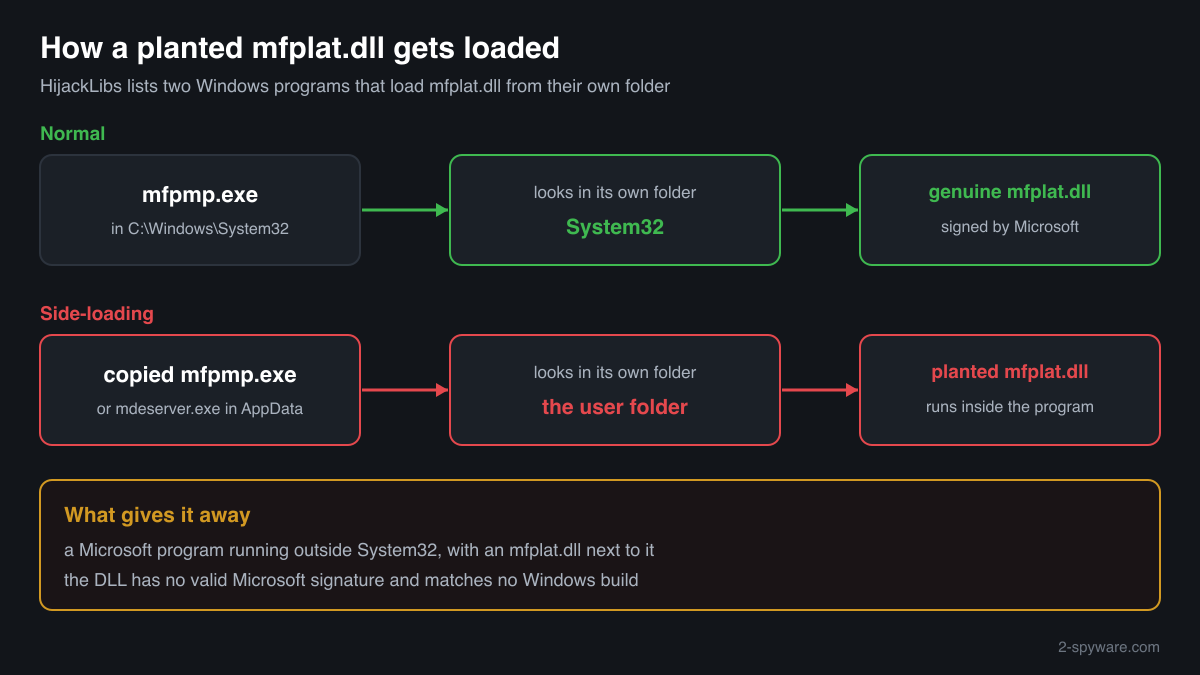
A program that loads mfplat.dll looks in its own folder before System32. Two Windows programs that use it, mfpmp.exe and mdeserver.exe, are documented as loading a planted mfplat.dll when they are copied to another folder together with it. That turns a Microsoft-signed program into a launcher for someone else's code. Check the folder, the signature and the hash.
- Description in the file
- Media Foundation Platform DLL
- What it is
- The core library of Media Foundation, the Windows platform for playing, recording, decoding and encoding audio and video
- Genuine folders
- C:\Windows\System32\mfplat.dll and, on 64-bit Windows, C:\Windows\SysWOW64\mfplat.dll for 32-bit programs
- Not genuine by location
- Any mfplat.dll in Downloads, Temp, AppData, ProgramData or a folder that also holds a copy of mfpmp.exe or mdeserver.exe. Windows never puts it there
- Signature
- Catalog signed by Microsoft Windows (issuer Microsoft Windows Production PCA 2011), so the Properties window may show no Digital Signatures tab
- Size of the genuine file
- Windows 11 24H2 and 25H2: 2,304,128 bytes (64-bit), 1,800,624 bytes (32-bit). Windows 10 22H2: 1,848,032 bytes (64-bit), 1,544,480 bytes (32-bit)
- Newest indexed build
- Windows 11 26H1: 10.0.28000.3231, delivered by KB5127646 on 13 October 2026
- Known Microsoft builds
- 308 builds across 20 Windows releases in Winbindex
- Is it a process
- No. It is a library loaded into the programs that use Media Foundation, so it never appears on its own in Task Manager
What mfplat.dll does, and how a planted copy gets loaded
mfplat.dll is the platform part of Media Foundation, the audio and video framework of Windows. A program loads it to open media files and streams, hand video to the graphics card for decoding, convert between formats and capture from cameras and microphones. Windows 10 and Windows 11 include it in every full edition. N and KN editions, sold without Windows Media Player and the media technologies, do not have it until the Media Feature Pack from Microsoft is added, which is why this file name shows up in so many missing file errors.
Because mfplat.dll is not one of the libraries Windows always takes from System32, a program that needs it looks in the program's own folder first. HijackLibs, a public list of DLLs that can be used this way, records two Windows programs from System32 that load mfplat.dll: mfpmp.exe, the Media Foundation protected pipeline host, and mdeserver.exe. Copy either one into another folder, put a file named mfplat.dll next to it, and the Microsoft program loads that file instead of the genuine one.
This technique is called DLL side-loading. The attacker's code then runs inside a program that is signed by Microsoft, which helps it pass a quick look in Task Manager and some security rules that trust Microsoft's signature. It runs with the rights of the user who started it and can read files, open network connections and start other programs.
So the useful question is not whether mfplat.dll is a virus, but which mfplat.dll you are looking at. The two copies in the Windows folders are Microsoft's. A copy in a user folder, and above all one sitting next to a copy of a Windows program, is not.
About .dll files. A .dll file is a library: it cannot run on its own and is loaded into a program's process. It does not appear in Task Manager under its own name; Process Explorer shows which process loaded it.
How to tell a planted mfplat.dll from Windows' copy
A DLL is not listed in Task Manager as a process, so use the folder, the file properties, PowerShell or Process Explorer.
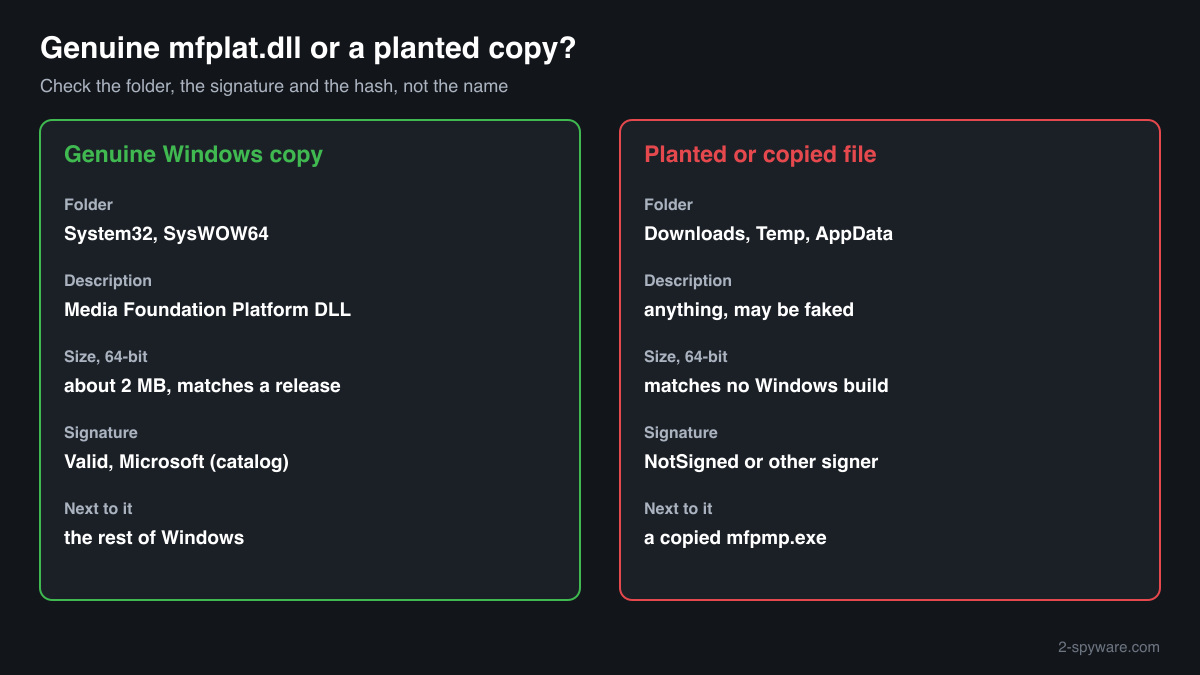
- Where the file is. List every copy with the command below. C:\Windows\System32 and C:\Windows\SysWOW64 are Windows' copies, and the WinSxS folder holds stored originals that Windows manages itself. Any other path is a copy that something placed there. If the same folder also holds mfpmp.exe or mdeserver.exe outside System32, treat the pair as a side-loading setup.
Get-ChildItem C:\ -Recurse -Filter mfplat.dll -ErrorAction SilentlyContinue | Where-Object FullName -notlike 'C:\Windows\WinSxS\*' | Select-Object FullName, Length, @{n='Description';e={$_.VersionInfo.FileDescription}} - The Description field and the size. Right-click the file, Properties, Details. The genuine file says Media Foundation Platform DLL, with Microsoft Corporation as the company and a Windows version number such as 10.0.26100. Its size matches one of the Windows releases in the facts table, about 2 MB for the 64-bit file. A planted copy can fake these fields, so this check only rules files out.
- The digital signature. Windows' copy is signed by Microsoft through a catalog rather than inside the file, so the Properties window often shows no Digital Signatures tab. PowerShell reads both kinds. Valid with a Microsoft signer means genuine; NotSigned, HashMismatch or another signer means the file is not Windows' copy.
Get-AuthenticodeSignature 'C:\path\to\mfplat.dll' | Format-List Status, SignatureType, SignerCertificate - What a running program loaded. Open Process Explorer from Microsoft Sysinternals, choose Find > Find Handle or DLL, type mfplat.dll and press Search. The path column shows which copy each program loaded. A path outside System32 and SysWOW64, or an mfpmp.exe or mdeserver.exe running from a user folder, deserves a close look.
- Compare the hash with Microsoft's builds. Use the checker on this page: it computes the SHA-256 in your browser and compares it with the known Microsoft builds. A copy that matches is Microsoft's file in the wrong place; one that does not match is a third-party file using the name.
- Scan before you trust or delete. Run Microsoft Defender's full scan, and the offline scan if a detection keeps coming back. Also look at what started the program that loaded the copy: a scheduled task, a Run key in the registry or a shortcut in the Startup folder.
A match to a Microsoft build proves the file is Microsoft's, not that it is in the right place. A file that does not match is not automatically malicious: it can be a build from a Windows update newer than the index. What decides is the folder it sits in, its signature, and whether a copied Windows program sits next to it.
Check your mfplat.dll
Choose the mfplat.dll you are unsure about. Its SHA-256 checksum is calculated in your browser and compared with the 328 Microsoft builds indexed from Windows releases and updates.
The file stays on your computer. Nothing is uploaded: the checksum is computed locally.
Warning signs and what they mean
| What you see | What it means |
|---|---|
| mfplat.dll in Downloads, Temp, AppData or ProgramData | Windows never stores it there, and no installer needs to. A copy in a user folder has no normal reason to exist. |
| mfplat.dll in the same folder as mfpmp.exe or mdeserver.exe, outside System32 | The pair HijackLibs documents for side-loading. The Microsoft program is the launcher and the DLL is the payload. Treat it as malicious and scan. |
| mfpmp.exe or mdeserver.exe running from a folder other than C:\Windows\System32 | These programs belong in System32. A copy running elsewhere is almost always someone using it to load a planted DLL. |
| The file claims to be Media Foundation Platform DLL from Microsoft but has no valid Microsoft signature | A file that pretends to be Windows' copy. Genuine Media Foundation files are always signed by Microsoft through the Windows catalog. |
| An mfplat.dll in a game or program folder that came with a download from an unofficial site | Often an old copy someone added to silence a missing file error on an N edition, sometimes a modified one. Remove it and compare its hash before you trust it. |
| Microsoft Defender names mfplat.dll in System32 or SysWOW64 | Rare. Check the hash with the checker on this page and the signature in PowerShell, and run the offline scan before anything else. |
Programs that have been made to load a fake mfplat.dll
Each program below is genuine and signed, and security researchers have documented that it can be made to load a planted mfplat.dll. Usually the attacker copies the program into another folder and puts a fake mfplat.dll next to it: Windows looks in the program's own folder first. A mfplat.dll next to one of these programs, outside the folders below, is the copy to check.
Where the genuine mfplat.dll belongs: C:\Windows\System32C:\Windows\SysWOW64
The genuine mfplat.dll is signed by: Microsoft Windows, a Windows catalog signature (Properties shows no Digital Signatures tab; check it with Get-AuthenticodeSignature)
| Program | How |
|---|---|
C:\Windows\System32\mdeserver.exesigned by Microsoft Windows | Side-loading |
C:\Windows\System32\mfpmp.exesigned by Microsoft Windows | Side-loading |
Source: the HijackLibs entry for mfplat.dll, 1 public report.
Everyday problems with mfplat.dll
A program says mfplat.dll is missing. Is my PC infected?
Almost never. The usual cause is a Windows N or KN edition, which leaves Media Foundation out until the Media Feature Pack is added, or a damaged Windows file. Neither is a security problem.
Do not answer the error by downloading mfplat.dll from a DLL site: that is how unknown files get onto a PC. The repair guide linked on this page covers the fix.
My security software flagged an mfplat.dll
Look at the path first. A detection on a copy in a user folder, especially next to mfpmp.exe or mdeserver.exe, fits the side-loading pattern: leave it quarantined and scan the whole PC.
A detection on the copy in System32 or SysWOW64 is unusual. Compare its hash with the checker on this page and check the signature in PowerShell before you restore or delete anything.
Two mfplat.dll files are in the Windows folders
That is normal on 64-bit Windows: System32 holds the 64-bit library and SysWOW64 the 32-bit one. Both are genuine Microsoft files with different sizes and hashes.
More copies under C:\Windows\WinSxS are normal too. They are the stored originals and updates that Windows keeps for its own repairs.
mfplat.dll versions by Windows release
The newest build indexed for each release, and the update that delivered it. 308 Microsoft builds in total are known.
| Windows release | File version | Delivered by | Size, 64-bit |
|---|---|---|---|
| Windows 11 26H1 | 10.0.28000.3231 | KB5127646, Oct 13, 2026 | 2,241,696 bytes |
| Windows 11 25H2 | 10.0.26100.9711 | KB5127648, Oct 13, 2026 | 2,304,128 bytes |
| Windows 11 24H2 | 10.0.26100.9711 | KB5127648, Oct 13, 2026 | 2,304,128 bytes |
| Windows 11 23H2 | 10.0.22621.6931 | KB5129242, Sep 14, 2026 | 1,906,392 bytes |
| Windows 11 22H2 | 10.0.22621.6931 | KB5129242, Sep 14, 2026 | 1,906,392 bytes |
| Windows 11 21H2 | 10.0.22000.2600 | KB5044280, Oct 8, 2024 | 1,906,288 bytes |
| Windows 10 22H2 | 10.0.19041.7802 | KB5126657, Oct 13, 2026 | 1,848,032 bytes |
| Windows 10 21H2 | 10.0.19041.7802 | KB5126657, Oct 13, 2026 | 1,848,032 bytes |
| Windows 10 21H1 | 10.0.19041.7802 | KB5126657, Oct 13, 2026 | 1,848,032 bytes |
| Windows 10 20H2 | 10.0.19041.7802 | KB5126657, Oct 13, 2026 | 1,848,032 bytes |
Known versions of mfplat.dll
A public DLL catalogue lists 20 versions of mfplat.dll, from 10.0.14393.0 to 12.0.10586.494, by Microsoft Corporation. Its copies are uploaded by users and not verified, so a checksum match identifies the version, while the digital signature tells you whether the file is genuine. Even a genuine file clears only the file, not the folder: attackers ship genuine libraries next to a program they abuse, so where the copy sits still decides whether it is safe.
Every version with its checksums, and how to fix mfplat.dll errors on uGetFix
Questions people ask
Is mfplat.dll a virus?
No, not the Windows copy. mfplat.dll is the Media Foundation Platform, and the files in System32 and SysWOW64 are genuine Windows libraries signed by Microsoft. A file with the same name in another folder is a different file. It can be an old copy someone added by hand, or a planted DLL that a copied Microsoft program loads, so check its folder, signature and hash.
Why is mfplat.dll missing on my PC?
Most often because you run a Windows N or KN edition. These editions are sold without Windows Media Player and the media technologies, and Media Foundation with mfplat.dll is one of them. Microsoft's Media Feature Pack adds them back as an optional feature. A missing file on a full edition points to a damaged Windows installation, not to malware.
Can I delete mfplat.dll?
Do not delete the copies in System32 or SysWOW64. Games, video players, recording tools and the Windows media apps need them, and Windows treats them as protected system files. A copy in a user folder or a program folder can be deleted: Windows never uses it, and programs fall back to the genuine file in System32.
What is mfpmp.exe, and why does it matter here?
mfpmp.exe is a Windows program from System32 that hosts protected media playback for Media Foundation, and it loads mfplat.dll. HijackLibs records it, together with mdeserver.exe, as a program that loads a planted mfplat.dll when it is copied to another folder. In System32 it is genuine; a copy running from a user folder is a warning sign.
What can a planted mfplat.dll do?
Anything the program that loads it can do. The code runs inside a Microsoft-signed program with the rights of your user account, so it can read and write your files, read browser data, open network connections and start other programs. Running inside a trusted program helps it avoid notice, which is the reason attackers use side-loading at all.
How do I check if my mfplat.dll is genuine?
Check three things. The folder: only System32, SysWOW64 and the Windows-managed WinSxS folder hold Windows' copies. The signature: Get-AuthenticodeSignature in PowerShell shows Valid with a Microsoft signer for the genuine file. The hash: the checker on this page compares the SHA-256 with 308 known Microsoft builds. A file that fails these checks is not Windows' file.
Is it safe to download mfplat.dll from a DLL website?
It is not a good idea. You cannot tell which Windows release the file comes from or whether it was changed, and a single file does not fix a missing Media Foundation on an N edition anyway. If you already placed such a copy in a program folder, compare its hash with the checker on this page and remove it.
Sources
- HijackLibs: mfplat.dll
- Wietze Beukema: Hijacking DLLs in Windows
- Microsoft Support: Media Feature Pack list for Windows N editions
- Microsoft Learn: Dynamic-link library search order
- Microsoft Sysinternals: Process Explorer
- MITRE ATT&CK T1574.002: DLL Side-Loading
- Winbindex, the Windows binaries index (m417z)
- Winbindex, the Windows binaries index (m417z)
Version data read on Oct 18, 2026.
Questions and experiences
Ask about this page: members and our editors answer. Reading is open; writing needs a free account.
…