
Windows file
mscoree.dll: the genuine .NET Framework loader, or a planted copy?
mscoree.dll is the Microsoft .NET Runtime Execution Engine, the Windows file that starts every program written for .NET Framework. The copies in System32 and SysWOW64 are genuine and safe. A mscoree.dll anywhere else, especially next to a copied Microsoft .NET program such as AppLaunch.exe, is not Windows' file: attackers have planted it there so a trusted program runs their code.
Prefer to do it yourself? The manual steps follow.
mscoree.dll in C:\Windows\System32 (and C:\Windows\SysWOW64 on 64-bit Windows) is a genuine Microsoft file and is safe. Every .NET Framework program on the PC goes through it at start, so do not delete, rename or quarantine it: those programs would stop opening.
A program looks in its own folder before System32 for many DLLs, mscoree.dll included. That is why a copy beside a program's .exe gets loaded and run inside that program. Malware has used this with Microsoft's own AppLaunch.exe. Check the folder, the signature and the hash of any copy outside the Windows folders.
- Description in the file
- Microsoft .NET Runtime Execution Engine
- What it is
- The shim that starts .NET Framework programs: it reads which runtime version a program targets, loads that runtime and hands the program over to it
- Genuine folders
- C:\Windows\System32\mscoree.dll and, on 64-bit Windows, C:\Windows\SysWOW64\mscoree.dll for 32-bit programs
- Not genuine by location
- Any mscoree.dll in Downloads, Temp, AppData, ProgramData, a user folder or next to a program's .exe. Windows never puts it there
- Size of the genuine file
- Windows 11 24H2 and 25H2: 430,080 bytes (64-bit), 327,168 bytes (32-bit). Windows 10 22H2: 383,488 bytes (64-bit), 314,880 bytes (32-bit)
- Newest indexed build
- Windows 11 26H1: 10.0.28000.1896, delivered by KB5127646 on 13 October 2026
- Known Microsoft builds
- 31 builds across 20 Windows releases in Winbindex
- Signature
- Signed by Microsoft Windows through a Windows catalog, so the Properties window may show no Digital Signatures tab
- Is it a process
- No. It is a library loaded into every running .NET Framework program, so it never appears on its own in Task Manager
What mscoree.dll does, and why a copy outside Windows is a warning sign
Programs written for .NET Framework do not contain ordinary machine code alone. When you start one, Windows sees that its .exe is a .NET program and passes it to mscoree.dll. The file reads which .NET Framework version the program was built for, loads the matching runtime from C:\Windows\Microsoft.NET, and from then on the program runs inside that runtime. Because one small loader serves every installed .NET Framework version, it sits in the Windows folders and not in each runtime folder.
On Windows 10 and Windows 11, mscoree.dll is part of Windows itself and is updated with Windows. On Windows XP, Vista and 7 it arrived with .NET Framework installers, which is why old copies numbered 1.x, 2.x and 4.x still turn up in program folders and on download sites. None of those belongs on a modern PC.
The file name is also useful to attackers. HijackLibs, a public list of DLL names that legitimate programs can be made to load from the wrong folder, records mscoree.dll for three Microsoft programs: aitstatic.exe and PresentationHost.exe from System32, and AppLaunch.exe from the .NET Framework folder. Copy one of those programs to another folder, put a file called mscoree.dll beside it, and the program loads that file instead of Windows' copy. The attacker's code then runs inside a program that carries a valid Microsoft signature.
So the question is not whether mscoree.dll is a virus, but which copy you are looking at. The two in System32 and SysWOW64 are Microsoft's. A copy beside a Microsoft .NET program outside C:\Windows, or in a user folder, is whatever the person who put it there made it to be.
About .dll files. A .dll file is a library: it cannot run on its own and is loaded into a program's process. It does not appear in Task Manager under its own name; Process Explorer shows which process loaded it.
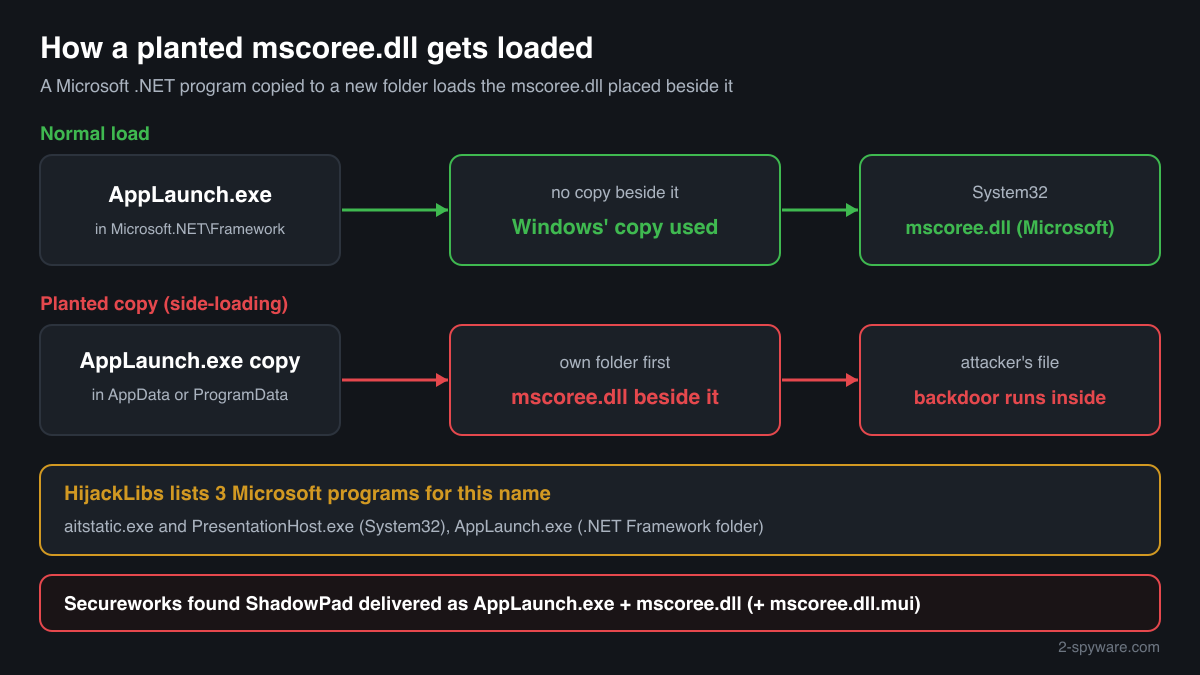
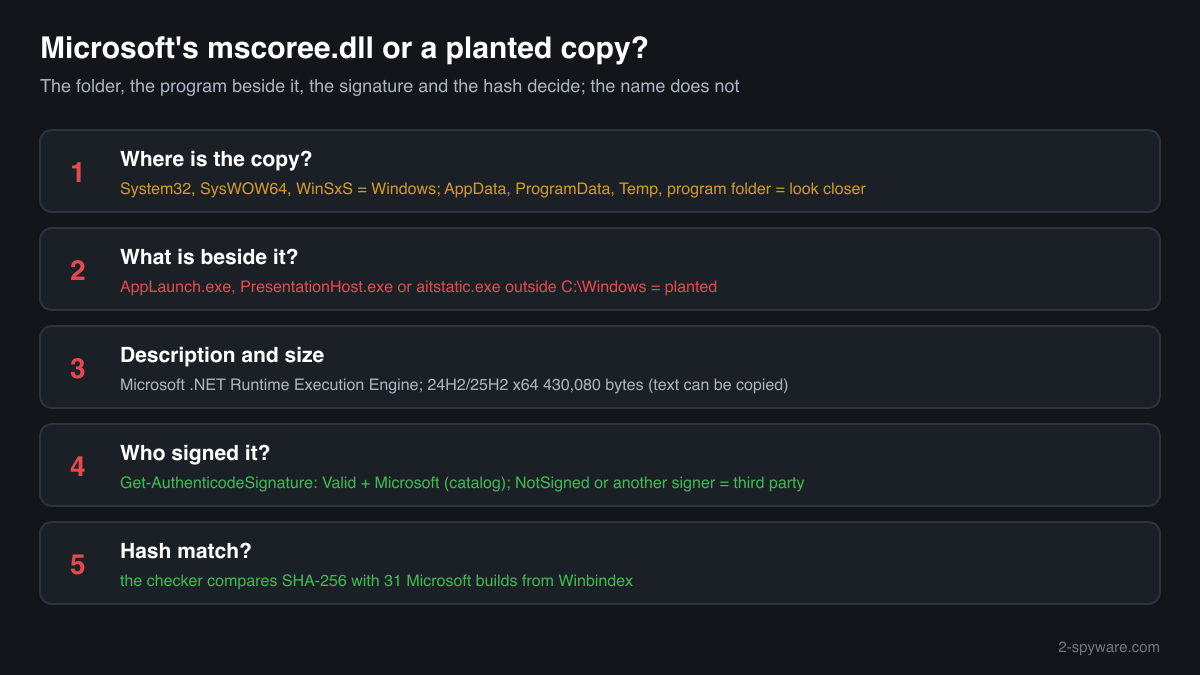
How to tell Windows' mscoree.dll from a planted copy
A DLL does not show up in Task Manager as a process, so use the folder, the file properties, PowerShell or Process Explorer.
- Where the file is. List every copy with the command below. C:\Windows\System32 and C:\Windows\SysWOW64 are Windows' copies, and files inside C:\Windows\WinSxS are Windows' stored originals. Every other path needs a closer look, and a copy with AppLaunch.exe, PresentationHost.exe or aitstatic.exe beside it outside C:\Windows is the documented abuse pattern.
Get-ChildItem C:\ -Recurse -Filter mscoree.dll -ErrorAction SilentlyContinue | Where-Object FullName -notlike 'C:\Windows\WinSxS*' | Select-Object FullName, Length, @{n='Description';e={$_.VersionInfo.FileDescription}} - The Description field and the size. Right-click the file, Properties, Details. The genuine file says Microsoft .NET Runtime Execution Engine, with Microsoft Corporation as the company and a Windows version number such as 10.0.26100. Its size matches a Windows release in the facts table. A planted copy can borrow these fields, so this check only rules files out, it never proves a file genuine.
- The digital signature. Windows signs mscoree.dll through a catalog, not inside the file, so Properties often shows no Digital Signatures tab even for the genuine copy. PowerShell reads catalog signatures too. Valid with a Microsoft signer means genuine; NotSigned or another signer on a copy outside the Windows folders means it is not Windows' file.
Get-AuthenticodeSignature 'C:\path\to\mscoree.dll' | Format-List Status, SignatureType, SignerCertificate - What is next to it. Open the folder that holds the suspicious copy. A Microsoft .NET program there, such as AppLaunch.exe, together with extra files of unclear purpose (a second mscoree.dll.mui, an encrypted data file, a random-named .dat), matches how loaders have been delivered. Note the folder and the file dates before you delete anything.
- Which copy a program really loaded. Open Process Explorer from Microsoft Sysinternals, choose Find, Find Handle or DLL, type mscoree.dll and press Search. Every .NET program lists it. A path under System32 or SysWOW64 is normal; any other path means that process loaded a copy that Windows did not provide.
- Compare the hash with Microsoft's builds. Use the checker on this page: it computes the SHA-256 in your browser and compares it with the 31 known Microsoft builds. A copy outside the Windows folders that matches is a genuine but misplaced file; one that does not match is a third-party file.
A match to a Microsoft build proves the file is Microsoft's, but not that its place is harmless: a genuine copy can be used to set up a trap for a planted one. A file that does not match is not automatically malicious, since old .NET Framework copies from download sites do not match either. What decides is where it sits and what sits beside it.
Check your mscoree.dll
Choose the mscoree.dll you are unsure about. Its SHA-256 checksum is calculated in your browser and compared with the 47 Microsoft builds indexed from Windows releases and updates.
The file stays on your computer. Nothing is uploaded: the checksum is computed locally.
Warning signs and what they mean
| What you see | What it means |
|---|---|
| mscoree.dll in a folder together with AppLaunch.exe, PresentationHost.exe or aitstatic.exe, outside C:\Windows | The pattern HijackLibs records for this name: a Microsoft program copied away from its home so it loads the mscoree.dll beside it. Treat the folder as malicious until checked. |
| mscoree.dll in AppData, ProgramData, Temp or a folder with a random name | No installer of Windows or .NET Framework puts the file there. A copy in a user writable folder has no normal reason to exist. |
| A process called AppLaunch.exe running from somewhere other than C:\Windows\Microsoft.NET | The genuine AppLaunch.exe lives in the .NET Framework folders. Running from another folder, it is likely a copy started to load a planted DLL. |
| A mscoree.dll that says Microsoft but has no valid Microsoft signature | A file that imitates Windows' copy. Legitimate tools do not need to pretend to be Microsoft. |
| Outgoing connections from a Microsoft .NET program you did not start | Side-loaded backdoors run inside the trusted program, so its name appears in the firewall log or in Resource Monitor. Check its folder. |
| Security software names mscoree.dll in System32 or SysWOW64 | Rare. Compare the hash with the checker on this page and run Microsoft Defender's offline scan before anything else; do not delete Windows' own copy. |
How attackers have used the name mscoree.dll
One published report names a malicious mscoree.dll. The genuine Microsoft file was not changed: the attackers shipped their own DLL under this name for a Microsoft program to load.
| Malware | How it used the file | Source |
|---|---|---|
| ShadowPad backdoor | Secureworks Counter Threat Unit researchers list Microsoft's AppLaunch.exe among the legitimate programs used to side-load ShadowPad, with mscoree.dll as the loader file name. One sample they analysed used AppLaunch.exe followed by mscoree.dll and a mscoree.dll.mui file. | Secureworks CTU, ShadowPad malware analysis (page dated 27 November 2025) |
MITRE ATT&CK lists this as Hijack Execution Flow: DLL Side-Loading (T1574.002). On a home PC the useful test is the folder, the program beside the file and the signer, not the name: a malicious mscoree.dll keeps the genuine file name.
Programs that have been made to load a fake mscoree.dll
Each program below is genuine and signed, and security researchers have documented that it can be made to load a planted mscoree.dll. Usually the attacker copies the program into another folder and puts a fake mscoree.dll next to it: Windows looks in the program's own folder first. A mscoree.dll next to one of these programs, outside the folders below, is the copy to check.
Where the genuine mscoree.dll belongs: C:\Windows\System32C:\Windows\SysWOW64
The genuine mscoree.dll is signed by: Microsoft Windows, a Windows catalog signature (Properties shows no Digital Signatures tab; check it with Get-AuthenticodeSignature)
| Program | How |
|---|---|
C:\Windows\System32\aitstatic.exesigned by Microsoft Windows | Side-loading |
C:\Windows\System32\presentationhost.exesigned by Microsoft Windows | Side-loading |
C:\Windows\Microsoft.NET\Framework\v<version>\applaunch.exe | Side-loading |
Source: the HijackLibs entry for mscoree.dll, 5 public reports.
Everyday questions about mscoree.dll
Two mscoree.dll files are in the Windows folders
That is normal on 64-bit Windows: System32 holds the 64-bit library and SysWOW64 the 32-bit one. Both are genuine Microsoft files with different sizes and hashes, and more copies under C:\Windows\WinSxS are Windows' stored originals.
Copies of mscoreei.dll under C:\Windows\Microsoft.NET\Framework and Framework64 are a different, related file: the version-specific part of the loader, one for each runtime.
An old program folder contains its own mscoree.dll
Some old installers dropped a copy of the .NET Framework loader into their own folder. It is not needed on Windows 10 or 11 and can only cause the program to load an outdated file.
Check it with the hash checker and the signature command above. A Microsoft copy there can be deleted; one that matches nothing and is not signed by Microsoft deserves a full scan.
A program says mscoree.dll is missing
That is a repair question, not a security one. On Windows 10 and 11 the file is part of Windows, so the error usually means .NET Framework is switched off or damaged. The repair is covered on the error page for this file; do not download a replacement from a DLL site.
mscoree.dll versions by Windows release
The newest build indexed for each release, and the update that delivered it. 31 Microsoft builds in total are known.
| Windows release | File version | Delivered by | Size, 64-bit |
|---|---|---|---|
| Windows 11 26H1 | 10.0.28000.1896 | KB5127646, Oct 13, 2026 | 434,176 bytes |
| Windows 11 25H2 | 10.0.26100.3624 | KB5127648, Oct 13, 2026 | 430,080 bytes |
| Windows 11 24H2 | 10.0.26100.3624 | KB5127648, Oct 13, 2026 | 430,080 bytes |
| Windows 11 23H2 | 10.0.22621.1 | original release | 421,888 bytes |
| Windows 11 22H2 | 10.0.22621.1 | original release | 421,888 bytes |
| Windows 11 21H2 | 10.0.22000.1 | original release | 405,504 bytes |
| Windows 10 22H2 | 10.0.19041.1 | original release | 383,488 bytes |
| Windows 10 21H2 | 10.0.19041.1 | original release | 383,488 bytes |
| Windows 10 21H1 | 10.0.19041.1 | original release | 383,488 bytes |
| Windows 10 20H2 | 10.0.19041.1 | original release | 383,488 bytes |
Known versions of mscoree.dll
A public DLL catalogue lists 16 versions of mscoree.dll, from 1.0.3705.0 to 10.0.14393.0, by Microsoft Corporation. Its copies are uploaded by users and not verified, so a checksum match identifies the version, while the digital signature tells you whether the file is genuine. Even a genuine file clears only the file, not the folder: attackers ship genuine libraries next to a program they abuse, so where the copy sits still decides whether it is safe.
Every version with its checksums, and how to fix mscoree.dll errors on uGetFix
Questions people ask
Is mscoree.dll a virus?
No, not the Windows copy. mscoree.dll is the Microsoft .NET Runtime Execution Engine, and the files in System32 and SysWOW64 are genuine Windows libraries that every .NET Framework program needs. A mscoree.dll in another folder is a different file with the same name. ShadowPad, a backdoor, has used that name with Microsoft's AppLaunch.exe, so check any copy outside the Windows folders.
Can I delete mscoree.dll?
Not the copies in System32 or SysWOW64. Without them no .NET Framework program on the PC starts, and Windows treats them as protected files that System File Checker restores. A copy outside the Windows folders is never needed by Windows: check it first, keep a note of where it was, then delete it or let Microsoft Defender remove it.
Why would malware be called mscoree.dll?
Because Microsoft's own .NET programs load it, and some of them look in their own folder first. An attacker copies such a program, for example AppLaunch.exe, to a new folder and puts a malicious mscoree.dll beside it. The signed Microsoft program then runs the attacker's code, which helps it look trustworthy to people and to some security tools.
What is AppLaunch.exe, and why does it matter here?
AppLaunch.exe is a small Microsoft program that comes with .NET Framework and lives in the Framework folders under C:\Windows\Microsoft.NET. It loads mscoree.dll like every .NET program. Researchers have found ShadowPad delivered as a copy of AppLaunch.exe with a malicious mscoree.dll beside it, so AppLaunch.exe running from any other folder is a warning sign.
How do I check if my mscoree.dll is genuine?
Check three things. The folder: only System32 and SysWOW64 hold Windows' copy, plus stored originals in WinSxS. The signature: Get-AuthenticodeSignature in PowerShell shows Valid with a Microsoft signer for the genuine file, even when Properties shows no signature tab. The hash: the checker on this page compares the SHA-256 with 31 known Microsoft builds.
Is mscoree.dll in a game or mod folder dangerous?
Games and mod tools have no need for their own copy, because Windows provides it. Some very old installers left one behind, and that copy is only outdated. A copy that does not match any Microsoft build, is not signed by Microsoft, or came with a repack or cracked game should be treated as suspicious and scanned.
What is the difference between mscoree.dll and mscoreei.dll?
mscoree.dll in System32 is the shared loader every .NET Framework program goes through. Once it knows which runtime version a program needs, it loads mscoreei.dll from that runtime's folder under C:\Windows\Microsoft.NET. Both are Microsoft files in their own places; either one outside those folders deserves the same checks.
Sources
- Secureworks Counter Threat Unit: ShadowPad malware analysis
- HijackLibs: mscoree.dll
- Microsoft Learn: Dynamic-link library search order
- Microsoft Sysinternals: Process Explorer
- MITRE ATT&CK T1574.002: DLL Side-Loading
- Winbindex, the Windows binaries index (m417z)
- Winbindex, the Windows binaries index (m417z)
Version data read on Oct 17, 2026.
Questions and experiences
Ask about this page: members and our editors answer. Reading is open; writing needs a free account.
…