
Program file
msvcp110.dll: the Microsoft C++ library, or a hidden copy that malware dropped?
msvcp110.dll is the C++ library that programs built with Visual Studio 2012 load. The genuine file is signed by Microsoft and lives in System32, SysWOW64 or an installed program's folder. In a 2025 campaign a fake free VPN tool wrote its own hidden msvcp110.dll straight into AppData\Roaming, so a copy there deserves a close look.
Prefer to check it yourself? The manual checks follow.
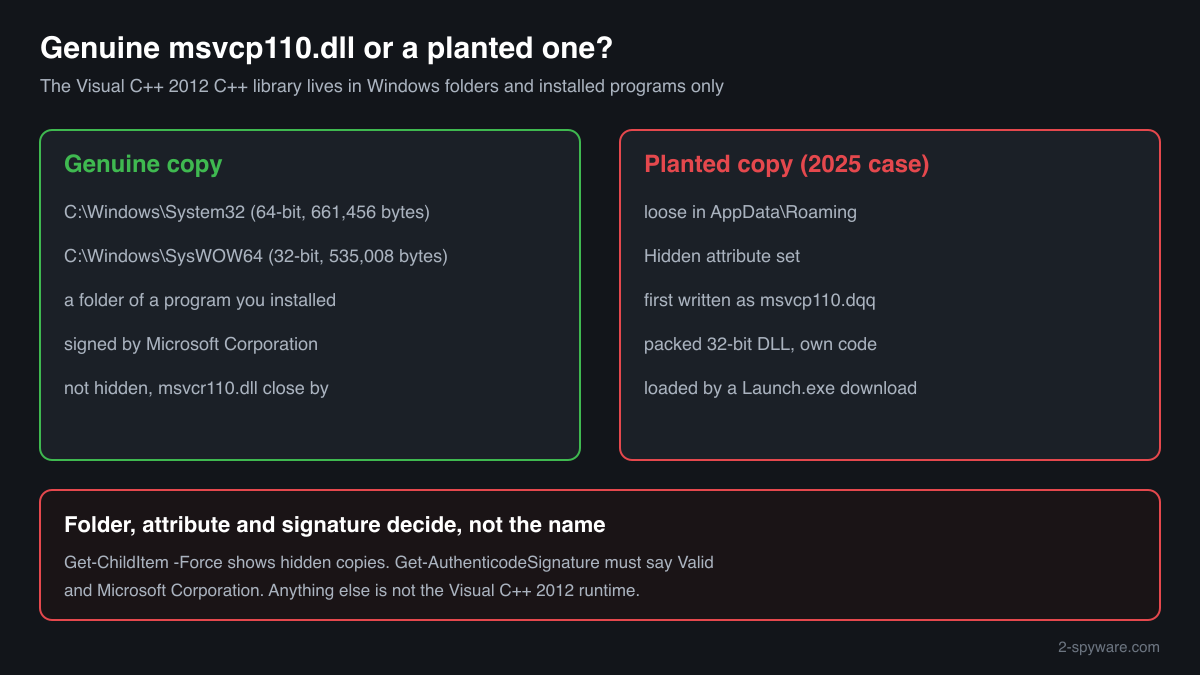
A Microsoft-signed msvcp110.dll in C:\Windows\System32, C:\Windows\SysWOW64 or a folder under Program Files comes from the Visual C++ 2012 Redistributable or from the program that brought it. It is a library, not a process, and runs only inside the programs that load it. Finding several copies on one PC is normal.
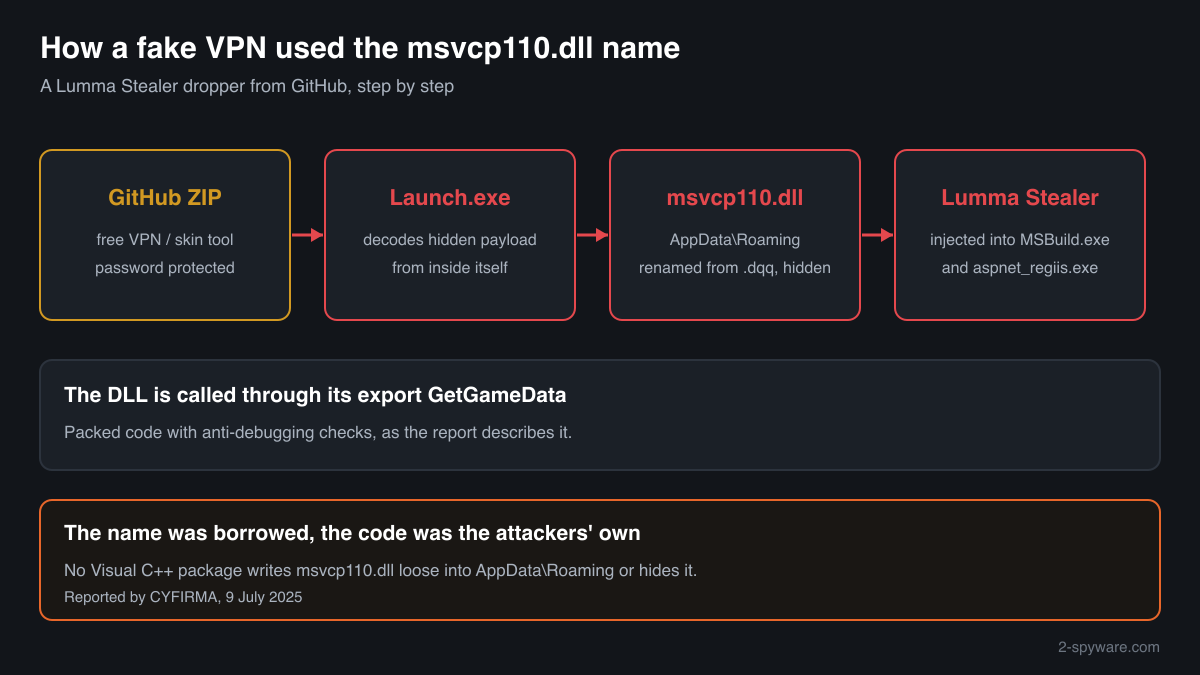
The documented abuse used the name only. The malicious msvcp110.dll was the attackers' own packed DLL, saved with the hidden attribute directly in the user's AppData\Roaming folder, a place the genuine runtime is never installed to. Folder, attribute and signature give such a copy away.
- Publisher
- Microsoft Corporation
- Description in the file
- Microsoft® C Runtime Library
- Installed by
- Microsoft Visual C++ 2012 Redistributable (version 11), and by programs that keep a private copy beside their .exe
- Last official version
- 11.0.51106.1 (Visual C++ 2012 Update 4), read from Microsoft's installers on 17 October 2026: 661,456 bytes (x64) and 535,008 bytes (x86). There is no ARM64 build
- Signed by
- Microsoft Corporation
- Needs
- MSVCR110.dll, the Visual C++ 2012 C runtime, and KERNEL32.dll. A genuine msvcp110.dll without msvcr110.dll beside it or in the Windows folders cannot load
- Genuine folders
- C:\Windows\System32 (64-bit copy), C:\Windows\SysWOW64 (32-bit copy on 64-bit Windows), and the folders of installed programs
- In Windows images
- Winbindex indexes one Microsoft build, 11.00.60605.1 (661,584 bytes), in Windows 10 images 1809 to 20H2 and in Windows 11 24H2
- Runs as a process
- No. It is loaded as a library by the programs that need it
- Seen in attacks as
- A hidden, packed msvcp110.dll dropped in AppData\Roaming by a fake free VPN and Minecraft skin tool from GitHub, which then ran Lumma Stealer (reported in July 2025)
What msvcp110.dll does
msvcp110.dll contains the C++ Standard Library of Visual Studio 2012: strings, containers, streams, threads and exceptions. A C++ program built with that compiler loads it at start instead of carrying the code itself. The 110 is toolset version 11.0. The file in turn loads msvcr110.dll, the C runtime from the same package.
Windows does not install it for programs to use. The Visual C++ 2012 Redistributable puts it into System32 and SysWOW64, and its last release is Update 4. Microsoft lists Visual C++ 2012 as no longer supported but still links those installers. Because the runtime is old and widely needed, its file name looks familiar to most users, and that familiarity is what the 2025 campaign relied on.
About .dll files. A .dll file is a library: it cannot run on its own and is loaded into a program's process. It does not appear in Task Manager under its own name; Process Explorer shows which process loaded it.
How to check a copy of msvcp110.dll
Four facts decide it: the folder, whether the file is hidden, who signed it and which program loads it. A DLL is not listed in Task Manager by its own name, so use these checks instead.
- List every copy, hidden ones included. Run this in PowerShell. -Force makes it show hidden files too, and the Attributes column tells you which ones are hidden. Copies in Windows, Program Files and game folders are normal. A hidden copy, or one sitting directly in AppData\Roaming, needs the next checks.
Get-ChildItem -Path C:\ -Filter msvcp110.dll -Recurse -Force -ErrorAction SilentlyContinue | Select-Object FullName, Length, Attributes, LastWriteTime - Look at AppData\Roaming itself. The genuine runtime is never installed loose into the root of your Roaming folder. In the 2025 case that is exactly where the malicious copy was written. If this command returns a file, treat it as suspicious until the signature check says otherwise.
Get-Item -Force "$env:APPDATA\msvcp110.dll" -ErrorAction SilentlyContinue | Format-List FullName, Length, Attributes, CreationTime - Check the signature. Status must be Valid and the signer Microsoft Corporation. NotSigned, HashMismatch or any other signer means it is not Microsoft's file, whatever its name and version field say.
Get-AuthenticodeSignature "C:\path\to\msvcp110.dll" | Format-List Status, SignerCertificate - See which program loads it. In Process Explorer (Microsoft Sysinternals) open Find, Find Handle or DLL, and type msvcp110.dll. Each result shows the process and the exact copy it loaded. A program you do not recognise, such as a Launch.exe from a download, loading a copy from AppData is the reported pattern. In that case also look for MSBuild.exe or aspnet_regiis.exe running when you are not developing software.
- Compare the checksum. Use the file check on this page. A match with a Microsoft build means the copy is genuine. No match, no signature and an AppData location together mean you should treat it as malicious.
A valid Microsoft signature clears that msvcp110.dll. It does not clear the program that dropped or loaded it, so a genuine copy in an unexpected folder still calls for a look at the .exe beside it.
Check your msvcp110.dll
Choose the msvcp110.dll you are unsure about. Its SHA-256 and SHA-1 checksums are calculated in your browser and compared with the 11 versions of the file known from a public DLL catalogue.
The file stays on your computer. Nothing is uploaded: the checksum is computed locally.
Do you need msvcp110.dll?
Yes, the genuine copies: programs built with Visual Studio 2012 will not start without them. Act only on a copy that failed the checks above, and then on the program that put it there.
- Keep the copies in System32, SysWOW64 and program folders. They belong to the Visual C++ 2012 Redistributable or to the program itself. Deleting them breaks programs and removes no threat. To remove the runtime properly, uninstall the 2012 redistributable from Settings, Apps, Installed apps once no program needs it.
- Run a Microsoft Defender full scan. Open Windows Security, Virus and threat protection, Scan options, Full scan. Let Defender quarantine what it finds before you delete files yourself.
- Run the offline scan. The 2025 loader injected its stealer into running Windows programs. The offline scan restarts the PC and scans before Windows loads, so injected code has no chance to hide. It takes about 15 minutes.
Start-MpWDOScan - Remove the tool that dropped it. In the reported case the dropper was a Launch.exe from a password-protected ZIP posing as a free VPN or a Minecraft skin changer. Delete that download and its unpacked folder, and uninstall anything it added under Installed apps.
- Delete the hidden copy in AppData\Roaming. After the scans, if a msvcp110.dll is still in the root of AppData\Roaming and failed the signature check, delete it. It is hidden, so enable Hidden items in File Explorer's View menu, or use PowerShell.
Remove-Item -Force "$env:APPDATA\msvcp110.dll" - Change your passwords. Lumma Stealer, the payload in the reported campaign, steals saved browser passwords, cookies and wallet data. From a clean device, change the passwords of e-mail, banking and other important accounts, and sign out of all other sessions.
Warning signs
| What you see | What it means |
|---|---|
| msvcp110.dll directly in C:\Users\<you>\AppData\Roaming | The location of the 2025 Lumma Stealer dropper's DLL. The genuine runtime is not installed there. |
| The copy has the Hidden attribute | The reported malware hid its msvcp110.dll right after writing it. Genuine copies in Windows and program folders are not hidden. |
| A file named msvcp110.dqq | The dropper first wrote the DLL under this name and then renamed it. No Microsoft package uses it. |
| Signature NotSigned, HashMismatch or a signer other than Microsoft | The file is not Microsoft's runtime. Scan and remove it. |
| You ran a free VPN or a game mod tool from a GitHub ZIP with a password | That was the lure in the 2025 campaign. Password-protected archives stop browsers from scanning what is inside. |
| Signed copies in Program Files and game folders | Normal. Programs keep private copies of the 2012 runtime. |
How attackers have used msvcp110.dll
One published case, with its report. The malicious file was not Microsoft's library: it was the attackers' own DLL, given the msvcp110.dll name so that it would look like a familiar runtime file.
| Malware | How it used the file | Source |
|---|---|---|
| Lumma Stealer dropper disguised as a free VPN (2025) | A GitHub repository offered “Free VPN for PC” and “Minecraft Skin Changer” in password-protected ZIP files. The Launch.exe inside decoded a hidden payload, wrote it to the user's AppData\Roaming folder as msvcp110.dqq, renamed it to msvcp110.dll and set it hidden. It then loaded the DLL and called its GetGameData export, which injected Lumma Stealer into MSBuild.exe and aspnet_regiis.exe. The fake was a packed 32-bit DLL with anti-debugging checks. | CYFIRMA, July 2025 |
The report maps the campaign to DLL side-loading and masquerading in MITRE ATT&CK. For a home PC the lesson is the folder: a msvcp110.dll loose and hidden in AppData\Roaming is not part of any Visual C++ package.
Known versions of msvcp110.dll
A public DLL catalogue lists 11 versions of msvcp110.dll, from 11.0.40825.2 to 11.0.61135.400, by Microsoft Corporation. Its copies are uploaded by users and not verified, so a checksum match identifies the version, while the digital signature tells you whether the file is genuine. Even a genuine file clears only the file, not the folder: attackers ship genuine libraries next to a program they abuse, so where the copy sits still decides whether it is safe.
Every version with its checksums, and how to fix msvcp110.dll errors on uGetFix
Questions people ask
Is msvcp110.dll a virus?
No, the genuine msvcp110.dll is Microsoft's Visual C++ 2012 C++ library and is harmless. Malware has borrowed the name: in a campaign reported in July 2025, a fake free VPN tool dropped its own hidden msvcp110.dll into AppData\Roaming and used it to run Lumma Stealer. A Microsoft-signed copy in System32, SysWOW64 or an installed program's folder is the real file.
Why is there a hidden msvcp110.dll in my AppData\Roaming folder?
No Visual C++ package installs it there, and genuine copies are not hidden. A hidden msvcp110.dll in the root of Roaming matches the 2025 Lumma Stealer dropper. Check its signature with Get-AuthenticodeSignature, run a Microsoft Defender full scan and an offline scan, delete the file and the tool that dropped it, then change your passwords from a clean device.
What is msvcp110.dqq?
It is not a Microsoft file. In the reported campaign the dropper Launch.exe first wrote its malicious DLL as msvcp110.dqq in AppData\Roaming and then renamed it to msvcp110.dll. If you find either name there, treat the PC as infected: scan with Microsoft Defender, including the offline scan, and change passwords afterwards.
How do I tell the real msvcp110.dll from a fake?
Check the folder, the signature and the size. The genuine file sits in System32, SysWOW64 or an installed program's folder, is signed by Microsoft Corporation, and the last official builds are 661,456 bytes for x64 and 535,008 bytes for x86. A copy that is unsigned, hidden or loose in AppData\Roaming is not genuine, whatever version number it shows.
Can I delete msvcp110.dll?
Not the signed copies in System32, SysWOW64 or the folders of programs you use: programs built with Visual Studio 2012 would stop opening. A copy that failed the checks on this page, especially a hidden one in AppData\Roaming, can go after Microsoft Defender has scanned the PC, together with the program that dropped it.
Which versions of msvcp110.dll are genuine?
The final release is 11.0.51106.1 from Visual C++ 2012 Update 4, signed by Microsoft Corporation. Winbindex also indexes build 11.00.60605.1 in Windows 10 and Windows 11 images, and older 2012 packages installed earlier builds. A fake can copy any version number into its properties, so rely on the signature and the checksum check, not on the version field.
Does Microsoft Defender detect a fake msvcp110.dll?
Defender judges files by their content, so a known malicious DLL is detected whatever it is called. A freshly packed variant may go unrecognised for a while, which is why the manual checks help: a hidden, unsigned msvcp110.dll in AppData\Roaming is suspicious before any scanner has a signature for it.
Sources
- Microsoft Learn: Latest supported Visual C++ Redistributable downloads (Visual C++ 2012 listed as unsupported)
- Winbindex, the Windows binaries index: msvcp110.dll
- CYFIRMA: GitHub abused to spread malware disguised as free VPN (9 July 2025)
- MITRE ATT&CK T1574.001: Hijack Execution Flow: DLL
- Microsoft Learn: Get-AuthenticodeSignature
Version data read on Oct 17, 2026.
Questions and experiences
Ask about this page: members and our editors answer. Reading is open; writing needs a free account.
…