
Program file
Is msvcp120.dll safe? The Visual C++ 2013 library and the kits that carry it
msvcp120.dll is Microsoft's C++ library for programs built with Visual Studio 2013. Copies in System32, SysWOW64 and installed programs are normal. Attackers have packed the real, signed file into side-loading kits so that a trusted program would start and load their DLL beside it. A copy in a user folder means checking the whole folder.
Prefer to check it yourself? The manual checks follow.
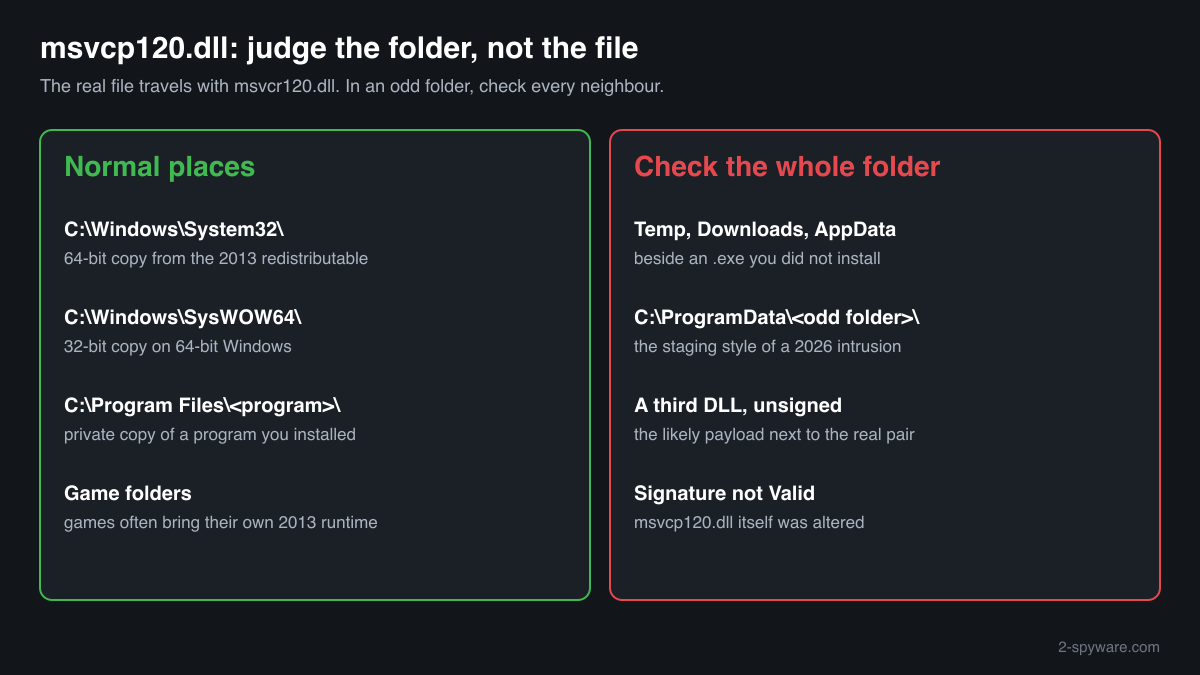
A msvcp120.dll signed by Microsoft Corporation in C:\Windows\System32, C:\Windows\SysWOW64 or the folder of a program or game you installed belongs to the Visual C++ 2013 runtime. It is a library, not a process, so it never runs on its own and does not appear in Task Manager. Several copies on one PC are normal.
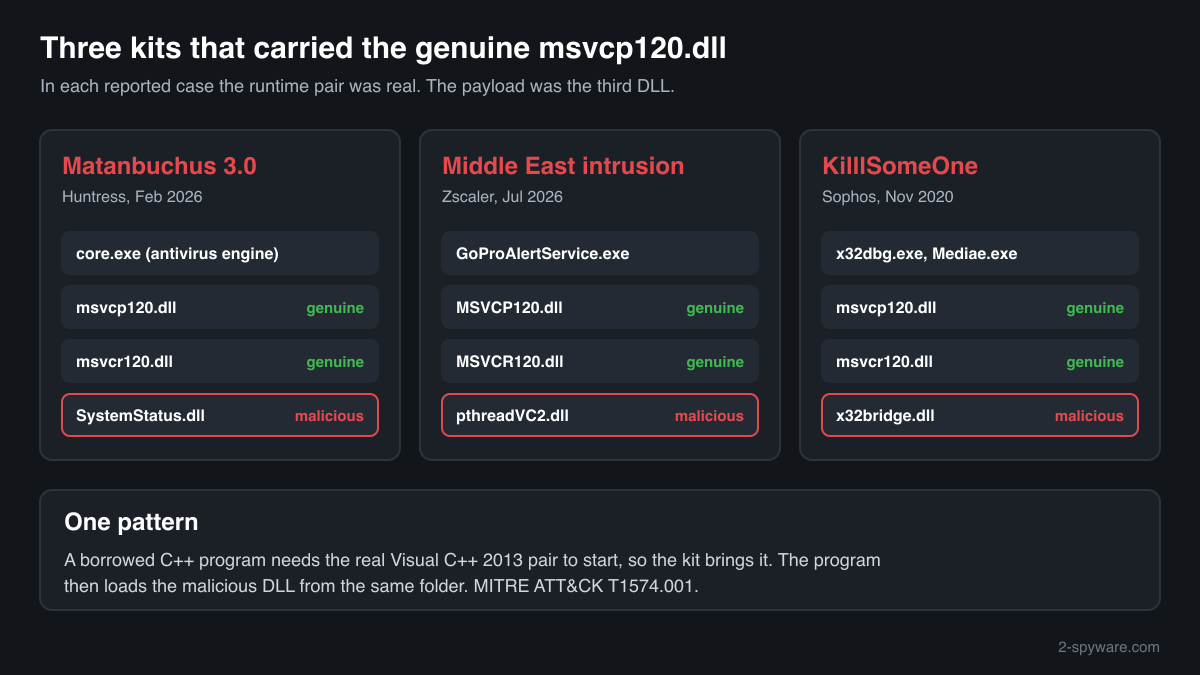
In every published case we found, the msvcp120.dll inside an attack kit was the authentic Microsoft file. It came along because the legitimate program in the kit is written in C++ and will not start without it. The malicious code lived in a third DLL. A valid signature on msvcp120.dll proves nothing about its folder.
- Publisher
- Microsoft Corporation
- Description in the file
- Microsoft® C Runtime Library (the same text as msvcr120.dll, although this file is the C++ library)
- Installed by
- Microsoft Visual C++ 2013 Redistributable (version 12), and by programs and games that keep a private copy
- Last official version
- 12.0.40664.0, read from Microsoft's x64 and x86 installers on 14 October 2026: 659,624 bytes (x64) and 454,976 bytes (x86), 1,569 exported functions. No ARM64 build exists
- Depends on
- KERNEL32.dll and MSVCR120.dll, so it always travels with msvcr120.dll
- Genuine folders
- C:\Windows\System32 (64-bit copy), C:\Windows\SysWOW64 (32-bit copy on 64-bit Windows), and the folders of programs that bring their own
- Signed by
- Microsoft Corporation
- Also inside Windows images
- Winbindex indexes 7 Microsoft builds in Windows 10 images from release 1703 to 22H2, versions 12.00.21005.1, 12.00.30501.0 and 12.00.30519.0
- Runs as a process
- No. Programs load it into their own memory
- Seen in attacks as
- A genuine dependency of the legitimate program in DLL side-loading kits (Matanbuchus 3.0 in 2026, a Middle East government intrusion in 2026, KilllSomeOne in 2020)
What msvcp120.dll does
msvcp120.dll is the C++ Standard Library compiled by Microsoft for Visual Studio 2013. It holds the ready-made C++ parts that programs use for text strings, streams, containers, locales and threads. A program written in C++ with that compiler can load this one shared file instead of carrying the code itself. The 120 stands for toolset version 12.0, and the p sets it apart from msvcr120.dll, the C runtime it is built on.
The file arrives with the Visual C++ 2013 Redistributable, not with Windows. Microsoft lists that runtime as no longer supported but still links its final installers. Because so many C++ programs depend on it, developers often place msvcp120.dll and msvcr120.dll in the program's own folder, and Windows checks that folder first. Attackers who reuse such a program have to bring the same pair, which is why both names show up in malware reports.
About .dll files. A .dll file is a library: it cannot run on its own and is loaded into a program's process. It does not appear in Task Manager under its own name; Process Explorer shows which process loaded it.
How to check a copy of msvcp120.dll
Four things decide whether a copy is fine: the folder, the signature, the program that loads it and the other files beside it. These checks work for a library, which Task Manager does not list by name.
- Find every copy on the PC. Run this in PowerShell and read the folder of each result. Windows, Program Files and game folders are expected. Copies under AppData, Temp, Downloads or a ProgramData folder with an odd name, especially dated in the last few days, are the ones to look at.
Get-ChildItem -Path C:\ -Filter msvcp120.dll -Recurse -ErrorAction SilentlyContinue | Select-Object FullName, Length, LastWriteTime - Check the signature. A genuine copy reports Status Valid and Microsoft Corporation as the signer. NotSigned or HashMismatch means the file was altered or never came from Microsoft, so treat it as malicious.
Get-AuthenticodeSignature "C:\path\to\msvcp120.dll" | Format-List Status, SignerCertificate - Look at the rest of the folder. In the reported kits msvcp120.dll was the honest file, and the danger was a DLL beside it: SystemStatus.dll, pthreadVC2.dll and x32bridge.dll in the three cases below. Check every DLL in the folder at once. One unsigned DLL next to a signed .exe and the two Microsoft runtime files is the pattern to look for.
Get-ChildItem "C:\path\to\folder" -Filter *.dll | Get-AuthenticodeSignature | Format-Table Status, Path -AutoSize - Find the program that loads it. In Process Explorer (Microsoft Sysinternals), open Find, Find Handle or DLL, and search for msvcp120.dll. The result shows each process and the exact copy it loaded. A process that runs from ProgramData, AppData or Temp and uses a private msvcp120.dll deserves a closer look, especially if its name imitates a known product.
- Compare the checksum. The file check on this page tells you whether the copy is a known Microsoft build. A match clears this one file only, because the kits described below carried unmodified Microsoft runtime files on purpose.
A Microsoft signature shows that msvcp120.dll is unmodified. It does not tell you whether the .exe that loads it, or the DLLs around it, are what they claim to be.
Check your msvcp120.dll
Choose the msvcp120.dll you are unsure about. Its SHA-256 and SHA-1 checksums are calculated in your browser and compared with the 12 versions of the file known from a public DLL catalogue.
The file stays on your computer. Nothing is uploaded: the checksum is computed locally.
Do you need msvcp120.dll?
Yes, wherever Windows or an installed program put it: C++ programs built with Visual Studio 2013 fail at start without it. Remove nothing from those folders. Act only on a folder that failed the checks above, and then remove the whole kit rather than the runtime file.
- Keep the copies in System32, SysWOW64 and program folders. They belong to the Visual C++ 2013 Redistributable or to the program that installed them. Deleting them does not remove malware; it only stops programs from starting.
- Run a Microsoft Defender full scan. Open Windows Security, Virus and threat protection, Scan options, choose Full scan and start it. Let Defender quarantine what it finds before you delete files yourself.
- Follow with an offline scan. Code running inside a trusted program can hide while Windows is up. The offline scan restarts the PC and checks the disk before Windows loads, in about 15 minutes.
Start-MpWDOScan - Delete the kit folder, not the runtime file. If a folder in Temp, AppData, Downloads or ProgramData holds an .exe you did not install, msvcp120.dll, msvcr120.dll and an unsigned DLL, delete the folder as a whole. Removing msvcp120.dll alone would leave the launcher and the malicious DLL ready to be fixed and run again.
- Remove whatever starts it. Look in Task Scheduler for tasks that start a program from ProgramData, AppData or Temp, and in Settings, Apps, Startup for unknown entries. Check Installed apps too: the 2026 Matanbuchus kit was installed as an MSI package.
- Change passwords after a remote access tool. Two of the reported cases ended with remote access to the PC. If a kit was there, change passwords from a different, clean device, starting with e-mail and banking, and sign out of sessions you do not recognise.
Warning signs
| What you see | What it means |
|---|---|
| msvcp120.dll with msvcr120.dll in Temp, Downloads, AppData or a new ProgramData folder, beside an .exe you never installed | The layout of the reported side-loading kits. Check every DLL's signature in that folder and run a scan. |
| A third DLL in that folder has no signature, or a signer unrelated to the .exe | That DLL is the likely payload. The Microsoft runtime pair is only there so the borrowed program can start. |
| A well-known program's .exe, such as a vendor service or debugger, running from a user or ProgramData folder | Kits rename or reuse signed programs to blend in. A legitimate program normally runs from Program Files. |
| msvcp120.dll itself shows NotSigned or HashMismatch | Not an unmodified Microsoft file. Treat it as malicious and scan. |
| You ran a command a web page told you to paste, to verify or fix something | This ClickFix trick started the 2026 Matanbuchus intrusion. Scan right away and check Installed apps. |
| Several msvcp120.dll copies under Program Files and in game folders | Normal. Programs and games often keep their own copy of the 2013 runtime. |
How attackers have used msvcp120.dll
Three published cases, each with its report. None used a fake msvcp120.dll: each kit carried Microsoft's own file, because the legitimate C++ program the attackers borrowed needs it to start. The malicious code was always a separate DLL in the same folder.
| Malware | How it used the file | Source |
|---|---|---|
| Matanbuchus 3.0 loader and AstarionRAT (2026) | After a ClickFix lure, an MSI package fetched from a remote address unpacked a protected archive. Inside were a legitimate antivirus core engine (core.exe), the genuine msvcp120.dll and msvcr120.dll it relies on, and SystemStatus.dll, the malicious Matanbuchus 3.0 loader that core.exe loaded. The intrusion later delivered a remote access tool named AstarionRAT. | Huntress, February 2026 |
| Targeted attack on Middle East government entities (2026) | During post-compromise activity the attackers placed a legitimate GoPro binary, GoProAlertService.exe, renamed on each machine to suit its staging folder (for example C:\ProgramData\Crypto\DSS\), together with the legitimate MSVCP120.dll and MSVCR120.dll and a malicious pthreadVC2.dll that the binary side-loaded. ThreatLabz named the new tooling in this attack TELESHIM and MIXEDKEY. | Zscaler ThreatLabz, July 2026 |
| KilllSomeOne side-loading attacks (2020) | One component set in these targeted attacks paired the clean executables Mediae.exe and x32dbg.exe with clean copies of msvcp120.dll and msvcr120.dll, listed in the report as dependencies of x32dbg. The malicious part was x32bridge.dll, which took its payload from x32bridge.dat in the same folder. | Sophos, November 2020 |
MITRE ATT&CK files this under Hijack Execution Flow: DLL (T1574.001). For msvcp120.dll the point is simple: the file passes every check because it is real, so judge the folder by the .exe and the other DLLs beside it.
Known versions of msvcp120.dll
A public DLL catalogue lists 12 versions of msvcp120.dll, from 12.0.21005.1 to 12.0.40664.0, by Microsoft Corporation. Its copies are uploaded by users and not verified, so a checksum match identifies the version, while the digital signature tells you whether the file is genuine. Even a genuine file clears only the file, not the folder: attackers ship genuine libraries next to a program they abuse, so where the copy sits still decides whether it is safe.
Every version with its checksums, and how to fix msvcp120.dll errors on uGetFix
Questions people ask
Is msvcp120.dll a virus?
No. The genuine msvcp120.dll is the C++ Standard Library of Microsoft Visual C++ 2013, signed by Microsoft Corporation, and it cannot harm a PC by itself. Attackers have still carried it in their kits in 2020 and 2026, because the legitimate C++ programs they abused need it. A clean msvcp120.dll in a strange folder is therefore a reason to check the files next to it.
Why do msvcp120.dll and msvcr120.dll always appear together?
Because msvcp120.dll imports msvcr120.dll: the C++ library is built on the C runtime of the same package and cannot load without it. Any program written in C++ with Visual Studio 2013 needs both. That is also why the malware reports list them as a pair: a kit that borrows such a program must bring both files or the program will not start.
I found msvcp120.dll in a ProgramData folder with a strange name. What should I do?
Do not delete only that file. List everything in the folder, check the signature of each DLL and the .exe, and see in Process Explorer which process loads the copy. In a reported 2026 attack the kit sat in a ProgramData subfolder with a harmless-sounding name. If any DLL is unsigned, run a Microsoft Defender full scan and an offline scan, then remove the whole folder.
My copy is signed by Microsoft. Is the folder safe?
Not necessarily. The signature clears msvcp120.dll alone. In all three published cases the runtime file was authentic and signed, while the harmful code sat in another DLL that the borrowed program loaded from the same folder: SystemStatus.dll, pthreadVC2.dll or x32bridge.dll. Check the signatures of the other DLLs and of the .exe before you decide.
Why does the description of msvcp120.dll say “C Runtime Library”?
That is how Microsoft labelled the file: the version information of msvcp120.dll reads “Microsoft® C Runtime Library”, the same as msvcr120.dll. It is not a sign of tampering. What matters for authenticity is the Microsoft Corporation signature with status Valid and a checksum that matches a known Microsoft build, which the file check on this page compares for you.
Can I delete msvcp120.dll?
Not from System32, SysWOW64 or the folders of programs you installed. Every C++ program built with Visual Studio 2013 that relies on those copies would stop starting. Removing a copy also removes no threat, because in the reported kits the danger was a different DLL. Delete a folder only when it failed the checks on this page, and delete all of it after a scan.
Would Microsoft Defender flag msvcp120.dll in such a kit?
Usually not, and that is correct: the file is genuine. Defender identifies malicious files by content, so its target is the side-loaded DLL beside msvcp120.dll. A new loader can go undetected for a while, which is why the folder and signature checks matter: an unsigned DLL next to a signed program in a user or ProgramData folder is suspicious before any scanner names it.
Sources
- Microsoft Learn: Latest supported Visual C++ Redistributable downloads (Visual C++ 2013 listed as unsupported)
- Winbindex, the Windows binaries index: msvcp120.dll
- MITRE ATT&CK T1574.001: Hijack Execution Flow: DLL
- Huntress: A New RAT and a Hands-on-Keyboard Intrusion, Matanbuchus 3.0 and AstarionRAT (16 February 2026)
- Zscaler ThreatLabz: Targeted Attack on Middle East Govts, Part 1 (20 July 2026)
- Sophos: A new APT uses DLL side-loads to “KilllSomeOne” (4 November 2020)
- Microsoft Learn: Get-AuthenticodeSignature
Version data read on Oct 14, 2026.
Questions and experiences
Ask about this page: members and our editors answer. Reading is open; writing needs a free account.
…