
Program file
msvcp140_atomic_wait.dll: a genuine Visual C++ library, or a file only using its name?
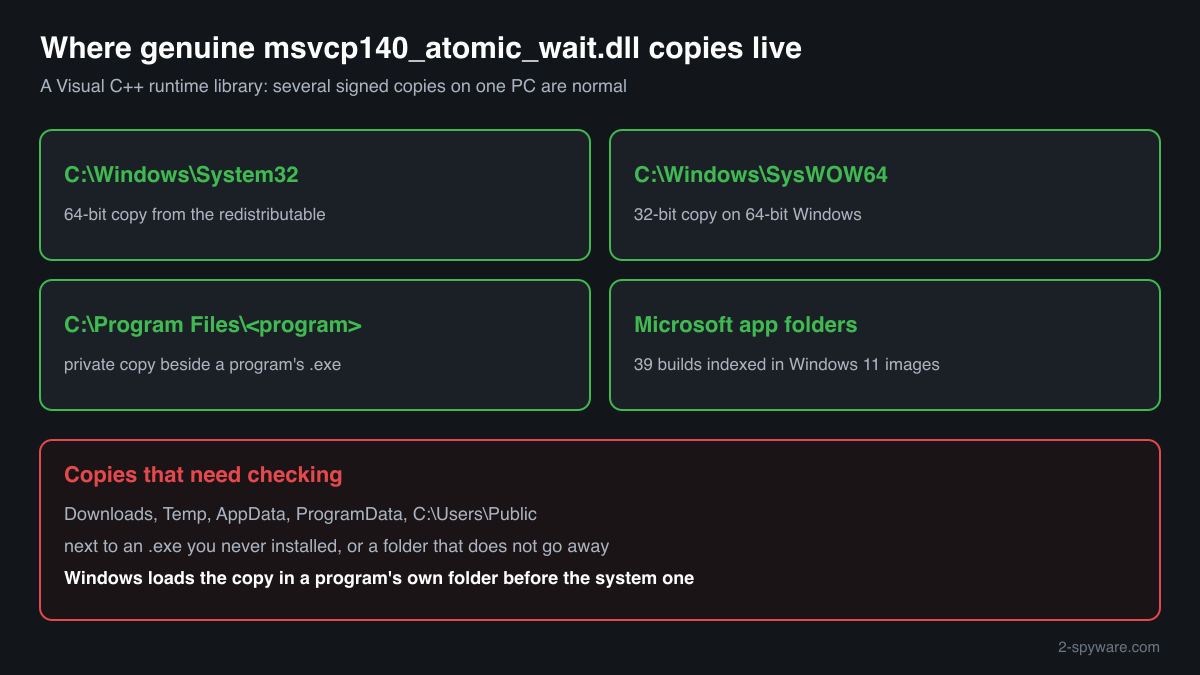
msvcp140_atomic_wait.dll is a Microsoft C++ runtime library, installed by the Visual C++ 2015-2022 Redistributable and carried by many programs. Copies in System32, SysWOW64 and the folders of programs you installed are normal. A copy in Temp, Downloads or AppData, next to a program you do not know, is the one to check.
Prefer to check it yourself? The manual checks follow.
A msvcp140_atomic_wait.dll signed by Microsoft, in C:\Windows\System32, C:\Windows\SysWOW64 or the folder of a program you installed, is a normal part of the Visual C++ runtime. It is not a process and does nothing by itself: it runs only inside programs that load it. Several copies on one PC are expected, because programs and Microsoft apps carry their own.
No published report we found describes malware using this name, and the public community list of DLLs abused for side-loading has no entry for it. The name still proves nothing on its own. Windows loads a DLL from a program's own folder first, so judge an unexpected copy by its folder and signature.
- Publisher
- Microsoft Corporation
- Description in the file
- Microsoft® C Runtime Library _atomic_wait
- Installed by
- Microsoft Visual C++ 2015-2022 Redistributable (version 14), and by programs that keep their own copy of the runtime
- Current official version
- 14.51.36247.0, read from Microsoft's x64, x86 and ARM64 installers on 18 October 2026
- Size of the official file
- 57,792 bytes (x64), 57,272 bytes (x86), 89,952 bytes (ARM64)
- Genuine folders
- C:\Windows\System32 (64-bit copy), C:\Windows\SysWOW64 (32-bit copy on 64-bit Windows), and the installation folders of programs that bring their own
- Signed by
- Microsoft: Microsoft Windows Software Compatibility Publisher on the x64 and x86 builds, Microsoft Corporation on the ARM64 build
- Runs as a process
- No. It is a library loaded into the programs that need it, always together with msvcp140.dll
What msvcp140_atomic_wait.dll does
msvcp140_atomic_wait.dll extends msvcp140.dll, Microsoft's C++ Standard Library runtime. It holds 32 functions that were added after msvcp140.dll had to stay frozen for older programs: waiting and waking on atomic variables, a thread pool for parallel algorithms, and the C++ time zone database. A program built with a recent Visual Studio loads it whenever it uses one of those features.
The file does not open network connections or start at sign-in. Its import table lists only other Visual C++ runtime files and Windows libraries, and at run time it loads Windows' own icu.dll to read time zones and reads the leap second list from the registry key SYSTEM\CurrentControlSet\Control\LeapSecondInformation. Anything a copy does beyond that comes from a different file with the same name.
About .dll files. A .dll file is a library: it cannot run on its own and is loaded into a program's process. It does not appear in Task Manager under its own name; Process Explorer shows which process loaded it.
How to check a copy of msvcp140_atomic_wait.dll
Three questions settle it: where the file is, who signed it and which program loads it. A library never appears in Task Manager under its own name, so use these checks.
- List every copy and where it sits. Run this in PowerShell. Copies in Windows, Program Files, WindowsApps and a game's folder are normal. Look closer at copies under AppData, Temp, Downloads or ProgramData, especially recent ones beside an .exe you do not recognise.
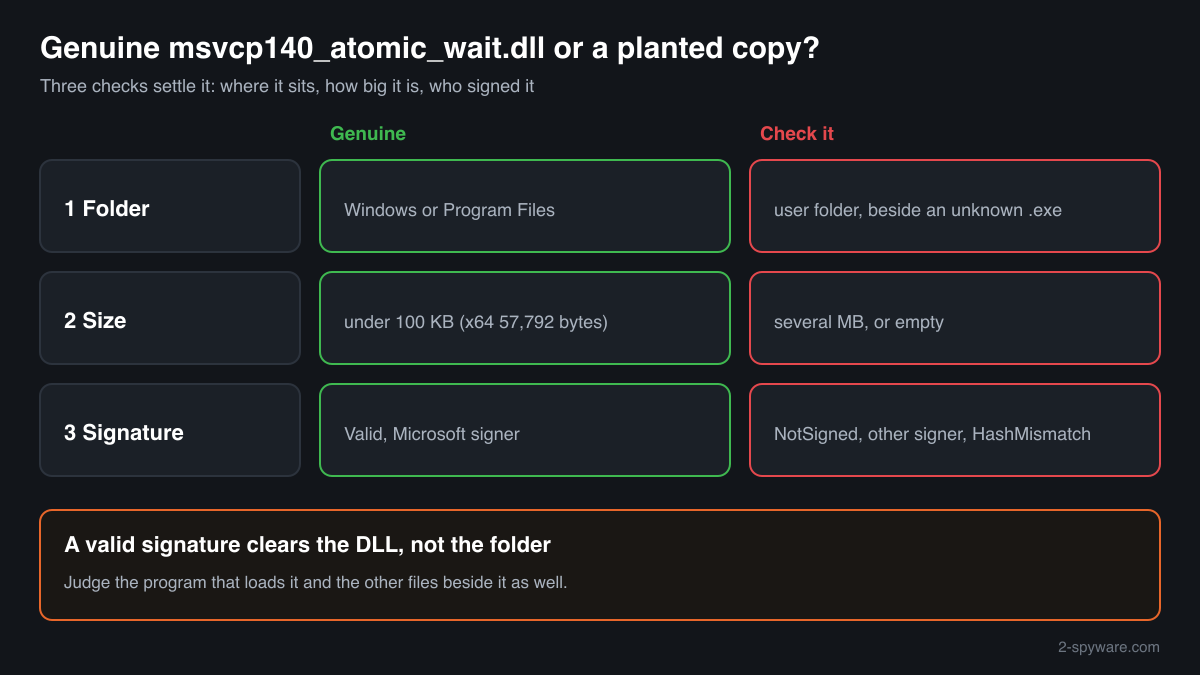
Get-ChildItem -Path C:\ -Filter msvcp140_atomic_wait.dll -Recurse -ErrorAction SilentlyContinue | Select-Object FullName, Length, LastWriteTime - Check the signature of a copy you are unsure about. Status must be Valid and the signer must be Microsoft. NotSigned, HashMismatch or another company's name means the file is not an unmodified Microsoft build.
Get-AuthenticodeSignature "C:\path\to\msvcp140_atomic_wait.dll" | Format-List Status, SignerCertificate - Look at the size. Genuine builds are small: the current official files are 57,792 bytes (x64), 57,272 bytes (x86) and 89,952 bytes (ARM64), and the older builds indexed from Windows images are around 40 to 57 KB. A copy of several megabytes is not this library, whatever its name.
- See which program loads it. In Process Explorer (Microsoft Sysinternals) open Find, Find Handle or DLL, and type msvcp140_atomic_wait.dll. Each result shows the process and the full path of the copy it loaded. A program running from Temp or AppData that loads its own copy deserves a look at what that program is.
- Compare the checksum. Use the file check on this page. A match tells you which build you have; the signature check above tells you whether the file is genuine. Neither one says anything about the program sitting next to the file.
A valid Microsoft signature proves the DLL is genuine. It does not clear the folder or the other files in it.
Check your msvcp140_atomic_wait.dll
Choose the msvcp140_atomic_wait.dll you are unsure about. Its SHA-256 and SHA-1 checksums are calculated in your browser and compared with the 2 versions of the file known from a public DLL catalogue.
The file stays on your computer. Nothing is uploaded: the checksum is computed locally.
Do you need msvcp140_atomic_wait.dll?
Keep the copies in Windows folders and in programs you installed: without them those programs stop starting. Remove only a copy that failed the checks above, together with what came with it.
- Leave System32, SysWOW64 and program folders alone. These copies belong to the Visual C++ Redistributable or to the program that brought them. Deleting one breaks every program that loads it, and the file starts no process you could stop anyway.
- To remove the runtime, uninstall the package, not the file. Open Settings, Apps, Installed apps and type “Visual C++”. Uninstalling “Microsoft Visual C++ 2015-2022 Redistributable” removes msvcp140_atomic_wait.dll with the rest of the runtime, but programs that need it will then fail to start.
- Run a Microsoft Defender full scan on a suspicious copy. Open Windows Security, Virus and threat protection, Scan options, Full scan. Quarantine what it finds before deleting anything by hand.
- Run the offline scan if something was found. Code loaded into a running program can hide while Windows runs. The offline scan restarts the PC and scans before Windows starts.
Start-MpWDOScan - Delete the suspicious folder, not only the DLL. If a copy failed the signature check and sits next to an unknown .exe in Temp, AppData, Downloads or ProgramData, remove the whole folder and any scheduled task or startup entry that runs a program from it.
Warning signs
| What you see | What it means |
|---|---|
| Signature status NotSigned or HashMismatch, or a signer that is not Microsoft | The file is not an unmodified Microsoft build. Scan it and remove it with its folder. |
| A copy several megabytes in size | Genuine builds are well under 100 KB. A file that large is something else using the name. |
| A copy in Temp, Downloads, AppData or ProgramData next to an .exe you did not install | The layout DLL side-loading relies on. Check the signature and the program beside it. |
| A site offers msvcp140_atomic_wait.dll as a single download with no source or checksum | You cannot know what such a file contains. Take it from Microsoft's installer and compare the checksum. |
| Several signed copies in Program Files, WindowsApps or game folders | Normal. Programs and Microsoft apps carry private copies of the runtime. |
Known versions of msvcp140_atomic_wait.dll
A public DLL catalogue lists 2 versions of msvcp140_atomic_wait.dll, from 14.29.30037.0 to 14.29.30037.0, by Microsoft Corporation. Its copies are uploaded by users and not verified, so a checksum match identifies the version, while the digital signature tells you whether the file is genuine. Even a genuine file clears only the file, not the folder: attackers ship genuine libraries next to a program they abuse, so where the copy sits still decides whether it is safe.
Every version with its checksums, and how to fix msvcp140_atomic_wait.dll errors on uGetFix
Questions people ask
Is msvcp140_atomic_wait.dll a virus?
No, the genuine msvcp140_atomic_wait.dll is a Microsoft C++ runtime library and is harmless. It comes with the Visual C++ 2015-2022 Redistributable and with programs that carry their own runtime. We found no published report of malware using this name. A file can still be given any name, so check the folder and the digital signature of a copy you are worried about.
Why do I have several copies of msvcp140_atomic_wait.dll?
Because programs bring their own. The redistributable puts one copy in System32 and, on 64-bit Windows, one in SysWOW64. Games, development tools and Microsoft apps often keep another beside their .exe. The public index of Windows binaries lists 39 distinct builds of the file inside Windows 11 images and updates alone. Signed copies in program folders are normal and belong to those programs.
Can I delete msvcp140_atomic_wait.dll?
Not the copies in System32, SysWOW64 or the folders of programs you installed: programs built with a recent Visual Studio that use them would stop starting. The file does not run by itself, so deleting it frees nothing. Delete only a copy that fails the signature check or sits next to an unknown program in a user folder, and remove that whole folder after a Microsoft Defender scan.
Does msvcp140_atomic_wait.dll connect to the internet?
No. Its import table names only Visual C++ runtime files and Windows libraries for memory, threads and the registry, with no network library among them. At run time it loads Windows' icu.dll for time zone data and reads leap seconds from the registry. If you see network activity, it comes from the program that loaded the file, not from the library.
Is it part of Windows?
Not of Windows itself. The System32 copy is put there by the Microsoft Visual C++ Redistributable, which programs install or ask you to install. Some Windows 11 apps and components carry their own copy, which is why builds of the file turn up in Windows images. In both cases the genuine file is signed by Microsoft.
My copy matches a known version. Is it safe?
A match tells you which build you have. Older entries in the list come from copies users uploaded, so confirm the Microsoft signature as well. Then look at where the file was: in System32, SysWOW64 or a program you installed, it is safe. In Temp, Downloads, AppData or ProgramData, beside a program you do not know, check that program too.
Sources
- Microsoft Learn: Latest supported Visual C++ Redistributable downloads
- Winbindex, the Windows binaries index: msvcp140_atomic_wait.dll
- MITRE ATT&CK T1574.001: Hijack Execution Flow: DLL
- Microsoft Learn: Get-AuthenticodeSignature
Version data read on Oct 18, 2026.
Questions and experiences
Ask about this page: members and our editors answer. Reading is open; writing needs a free account.
…