
Program file
msvcr100.dll: the Visual C++ 2010 runtime, or malware hiding behind its name?
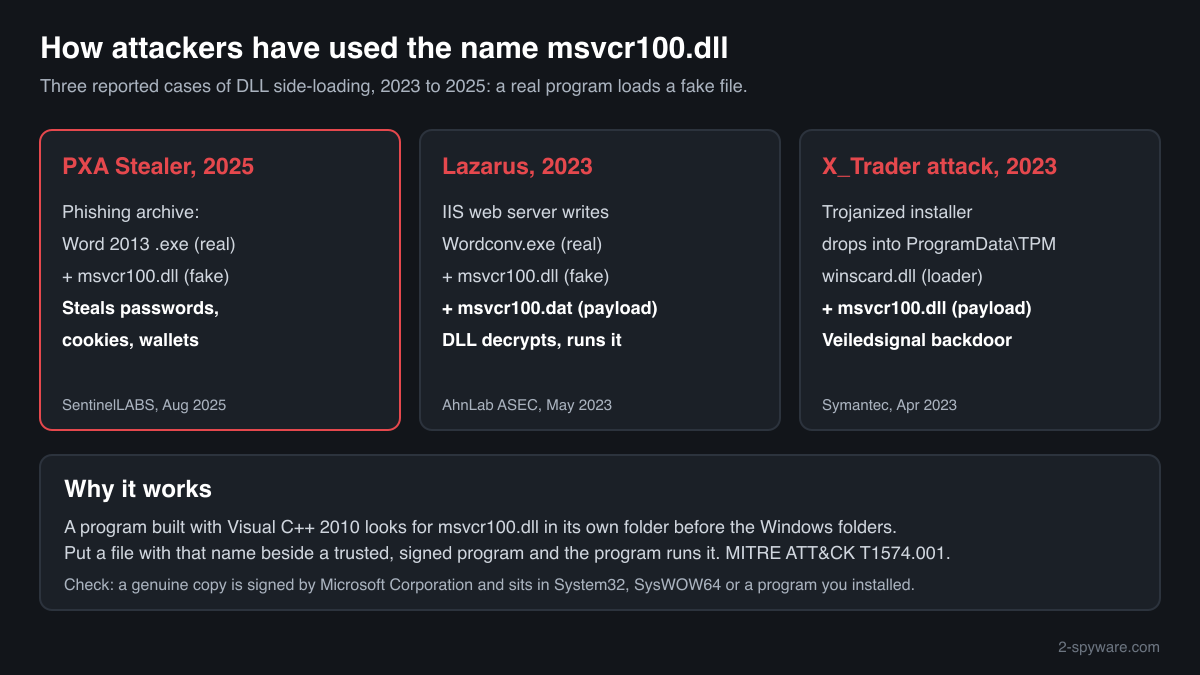
msvcr100.dll is the C runtime library of Microsoft Visual C++ 2010, installed with the 2010 redistributable and by older games and programs. Signed copies in the Windows folders and in installed programs are normal. Between 2023 and 2025 attackers placed their own msvcr100.dll next to legitimate programs so that those programs would run it.
Prefer to check it yourself? The manual checks follow.
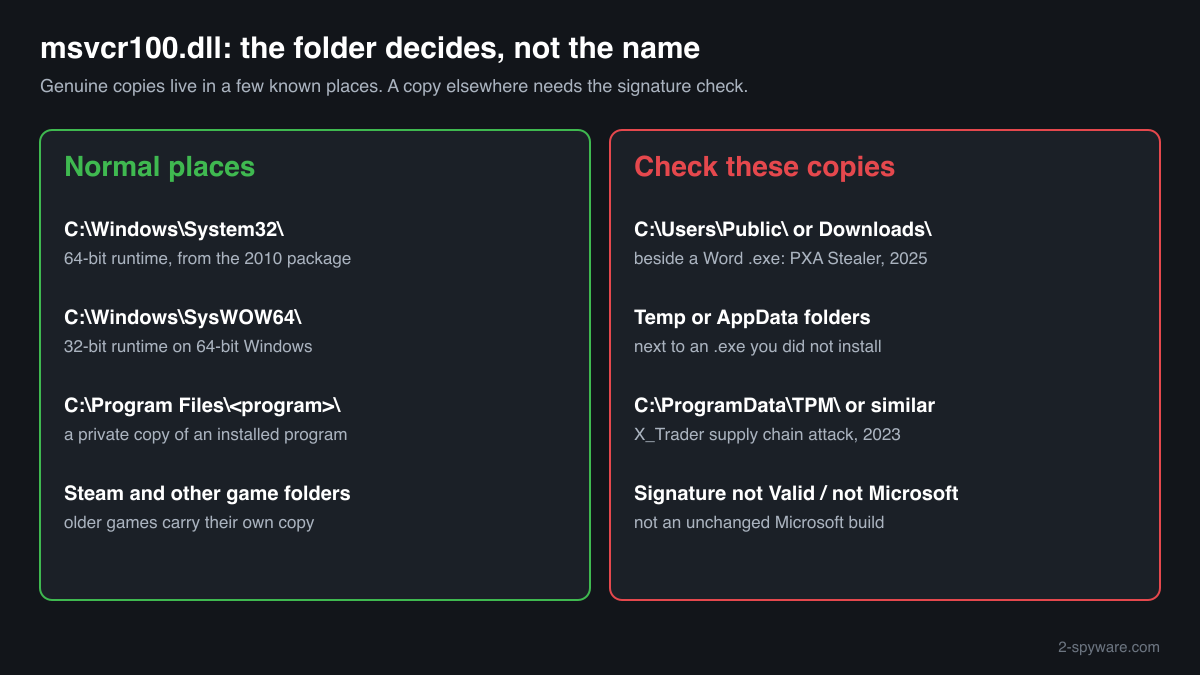
A msvcr100.dll signed by Microsoft Corporation, in C:\Windows\System32, C:\Windows\SysWOW64 or the folder of a program you installed, is a normal Visual C++ 2010 library. It is not a process and does nothing until a program loads it. Older games often carry a private copy, so several copies on one disk are expected.
The name is old, familiar and harmless-looking, which is why attackers chose it. In the reported cases a legitimate program, such as a Microsoft Word executable, was put in one folder with a malicious msvcr100.dll and loaded it at start. A copy in C:\Users\Public, Temp, Downloads or ProgramData needs the checks below.
- Publisher
- Microsoft Corporation
- Description in the file
- Microsoft® C Runtime Library
- Installed by
- Microsoft Visual C++ 2010 Redistributable (x86 and x64 editions), and by programs that carry their own copy
- Last official version
- 10.0.40219.325, the Visual C++ 2010 SP1 MFC security update; Microsoft lists the 2010 package as no longer supported
- Size of the last official build
- 829,264 bytes (x64) and 773,968 bytes (x86), read from Microsoft's installers on 14 October 2026
- Genuine folders
- C:\Windows\System32 (64-bit copy), C:\Windows\SysWOW64 (32-bit copy on 64-bit Windows), and the installation folders of programs that bring their own
- Signed by
- Microsoft Corporation
- Original file name in its properties
- msvcr100_clr0400.dll, on genuine Microsoft builds too; the difference from the file name is normal
- Runs as a process
- No. It is a library loaded into the programs that need it
- Seen in attacks as
- A side-loaded loader or payload container next to a legitimate program: Lazarus on web servers (2023), the X_Trader supply chain attack (2023), PXA Stealer (2025)
What msvcr100.dll is, and why attackers like the name
msvcr100.dll holds the C runtime of Visual C++ 10.0, the compiler of Visual Studio 2010: memory management, file input and output, string and maths functions. A program built with that compiler does not carry this code itself; it loads msvcr100.dll when it starts. Its only own dependency is KERNEL32.dll, a core part of Windows.
Because so many programs from that period load msvcr100.dll, and because they look for it in their own folder before the Windows folders, a file with this name placed next to such a program is loaded without any warning. Attackers pick a signed, trusted program that imports msvcr100.dll, drop their own file with that name beside it, and let the trusted program start their code. Security tools then see a known, signed process doing the work.
About .dll files. A .dll file is a library: it cannot run on its own and is loaded into a program's process. It does not appear in Task Manager under its own name; Process Explorer shows which process loaded it.
How to check a copy of msvcr100.dll
Three things decide: the folder, the signature and the program that loads the file. A DLL never shows in Task Manager under its own name, so use these checks instead.
- List every copy, with size and date. Run this in PowerShell. Copies in Windows, Program Files and game folders are normal. Look closely at copies in C:\Users\Public, AppData, Temp, Downloads or a new ProgramData folder, especially recent ones.
Get-ChildItem -Path C:\ -Filter msvcr100.dll -Recurse -Force -ErrorAction SilentlyContinue | Select-Object FullName, Length, LastWriteTime - Check the signature of each copy you are unsure about. Status must be Valid and the signer Microsoft Corporation. NotSigned, HashMismatch or another name means the file is not an unchanged Microsoft build. The malicious copies in the reported cases were the attackers' own files, not signed by Microsoft.
Get-ChildItem -Path C:\ -Filter msvcr100.dll -Recurse -Force -ErrorAction SilentlyContinue | Get-AuthenticodeSignature | Select-Object Path, Status, @{n='Signer';e={$_.SignerCertificate.Subject}} - See which program has it loaded. In Process Explorer (Microsoft Sysinternals) open Find, Find Handle or DLL, and type msvcr100.dll. Each result shows the process and the full path of the copy it loaded. A Microsoft Office or other signed program running from a user or ProgramData folder and loading msvcr100.dll from that same folder is the side-loading pattern.
- Look at the files beside it. In the reported cases the malicious msvcr100.dll sat with a legitimate .exe and often a data file: Wordconv.exe with msvcr100.dat (2023), a Word 2013 executable with a folder named “_” (2025). A Microsoft program you never installed, in a folder it does not belong to, together with msvcr100.dll, is a strong sign.
- Compare size and checksum. The last Microsoft builds are 829,264 bytes (x64) and 773,968 bytes (x86); older genuine builds differ. The file check on this page compares the SHA-256 with the builds we know. A match identifies the version; the signature check above decides whether the file is genuine.
A valid Microsoft signature clears that one file. It says nothing about the program next to it or the other files in the folder, which are the parts an attacker controls.
Check your msvcr100.dll
Choose the msvcr100.dll you are unsure about. Its SHA-256 and SHA-1 checksums are calculated in your browser and compared with the 28 versions of the file known from a public DLL catalogue.
The file stays on your computer. Nothing is uploaded: the checksum is computed locally.
Do you need msvcr100.dll?
Keep the copies in Windows and in the programs you installed: older games and tools stop starting without them. Remove only a copy that failed the checks above, together with what came with it.
- Leave System32, SysWOW64 and program folders alone. These copies belong to the Visual C++ 2010 package or to the program itself. A copy there that is signed by Microsoft is not a threat, even if a cleaner tool calls it old.
- Run a Microsoft Defender full scan. Open Windows Security, Virus and threat protection, Scan options, Full scan. Quarantine what it finds before you delete anything by hand.
- Run the offline scan. A malicious DLL that runs inside a trusted program can stay hidden while Windows runs. The offline scan restarts the PC and scans before Windows loads.
Start-MpWDOScan - Delete the whole suspicious folder. If a copy failed the signature check and sits with an .exe in C:\Users\Public, Temp, AppData, Downloads or ProgramData, delete that folder, not just the DLL. The launcher left behind can load a new copy.
- Remove what starts it again. Check Settings, Apps, Startup, Task Scheduler and the Run keys below for entries that start a program from a user or ProgramData folder. The 2025 PXA Stealer chain added a Run key so that its payload started at every boot.
Get-ItemProperty 'HKCU:\Software\Microsoft\Windows\CurrentVersion\Run', 'HKLM:\Software\Microsoft\Windows\CurrentVersion\Run' - Change passwords if a stealer may have run. PXA Stealer took saved browser passwords, cookies, autofill data and cryptocurrency wallet files. From a clean device, change the passwords stored in your browsers, starting with e-mail and banking, sign out other sessions and move funds out of any wallet that was on the PC.
Warning signs
| What you see | What it means |
|---|---|
| msvcr100.dll in C:\Users\Public, Temp, Downloads or AppData next to an .exe you did not install | The side-loading layout of the reported cases. Check the signature, then scan. |
| A Microsoft Word or Office executable outside Program Files, beside msvcr100.dll | The 2025 PXA Stealer chain used a genuine Word 2013 executable this way. Office never installs itself into a download or user folder. |
| The signature shows NotSigned, HashMismatch or a signer other than Microsoft | Not an unchanged Microsoft build. Treat it as malicious. |
| msvcr100.dll together with an unknown data file such as msvcr100.dat | A loader that decrypts a payload from the file beside it, as in the 2023 Lazarus case. Scan and remove the folder. |
| A new msvcr100.dll in C:\ProgramData under a folder named after a Windows feature | The X_Trader attack in 2023 used C:\ProgramData\TPM. Windows does not keep runtime libraries there. |
| You opened an archive from an e-mail or a job or copyright message that contained a program and many files | The delivery route of the 2025 PXA Stealer campaign. Scan at once and check saved passwords. |
| The properties show the original name msvcr100_clr0400.dll | Normal. Microsoft's own builds carry that name in their version information. |
| Several signed copies in game and program folders | Normal. Programs from the Visual Studio 2010 years carry private copies of the runtime. |
How attackers have used msvcr100.dll
Three published cases, each with the report it comes from. In all three a legitimate program loaded a malicious file named msvcr100.dll from its own folder.
| Malware | How it used the file | Source |
|---|---|---|
| PXA Stealer (2025) | A phishing lure delivered a large archive with a legitimate, signed Microsoft Word 2013 executable, a malicious msvcr100.dll and a folder named “_”. When the victim opened the Word executable, Windows loaded the fake msvcr100.dll from the same folder. It started a hidden Command Prompt, set a Registry Run key and ran PXA Stealer, which took browser passwords, cookies, autofill data and cryptocurrency wallet files. | SentinelLABS and Beazley Security, August 2025 |
| Lazarus Group on Windows IIS web servers (2023) | Through the IIS web server process (w3wp.exe) the attackers wrote Wordconv.exe, a legitimate Office component, a malicious msvcr100.dll and an encrypted msvcr100.dat into one folder, then started Wordconv.exe. The DLL ran inside it, decrypted msvcr100.dat with a key passed on the command line, ran the result in memory and deleted itself. | AhnLab ASEC, May 2023 |
| X_Trader supply chain attack, Veiledsignal backdoor (2023) | A trojanized installer of the X_Trader trading software, the same one behind the 3CX breach, dropped C:\Programdata\TPM\winscard.dll and C:\Programdata\TPM\msvcr100.dll. The legitimate program side-loaded both: winscard.dll was the loader, and msvcr100.dll carried an encrypted blob appended to the file, from which the Veiledsignal backdoor was extracted. | Symantec Threat Hunter Team, April 2023 |
MITRE ATT&CK lists this as Hijack Execution Flow: DLL (T1574.001). For a home PC the folder matters more than the name: a genuine msvcr100.dll lives in the Windows folders or in programs you installed, while a fake one keeps the same name and shows up in a user or ProgramData folder beside a borrowed program.
Programs that have been made to load a fake msvcr100.dll
Each program below is genuine and signed, and security researchers have documented that it can be made to load a planted msvcr100.dll. Usually the attacker copies the program into another folder and puts a fake msvcr100.dll next to it: Windows looks in the program's own folder first. A msvcr100.dll next to one of these programs, outside the folders below, is the copy to check.
Where the genuine msvcr100.dll belongs: C:\Windows\System32C:\Windows\SysWOW64
| Program | How |
|---|---|
cleanospp_64.exesigned by Microsoft Code Signing PCA SHA-256 of the genuine program: edf85f4e2ef1a427b34265a22f261d664ec78de90c3b5da4174ef28558c8522a | Search order |
C:\Program Files\Java\jre<version>\bin\javacpl.exe | Side-loading |
C:\Program Files\Microsoft Office\root\Office<version>\winword.exeSHA-256 of the genuine program: 16f099aaff99f981741e299be6aff43f2e53b189481a08582e3b2a04e934aa0a | Side-loading |
Source: the HijackLibs entry for msvcr100.dll, 3 public reports.
Known versions of msvcr100.dll
A public DLL catalogue lists 28 versions of msvcr100.dll, from 10.0.20327.1 to 10.0.40219.473, by Microsoft Corporation. Its copies are uploaded by users and not verified, so a checksum match identifies the version, while the digital signature tells you whether the file is genuine. Even a genuine file clears only the file, not the folder: attackers ship genuine libraries next to a program they abuse, so where the copy sits still decides whether it is safe.
Every version with its checksums, and how to fix msvcr100.dll errors on uGetFix
Questions people ask
Is msvcr100.dll a virus?
No, the genuine msvcr100.dll is Microsoft's Visual C++ 2010 C runtime and is harmless. It sits in System32, SysWOW64 and the folders of programs that use it, signed by Microsoft Corporation. Malicious files have used the same name: PXA Stealer in 2025, the Lazarus Group and the X_Trader supply chain attack in 2023. The name proves nothing either way, so check the folder and the signature of the copy you are worried about.
Why is there a msvcr100.dll in C:\Users\Public or my Temp folder?
An installer can briefly unpack a program with its runtime into Temp and remove it afterwards, so a short-lived copy may be harmless. A copy that stays, especially in C:\Users\Public or next to a Word or other program that was never installed there, matches the side-loading layout of the 2025 PXA Stealer campaign. Check its signature, see in Process Explorer which program loads it, and run a Microsoft Defender full scan.
Why do the properties of my msvcr100.dll say msvcr100_clr0400.dll?
That is normal for Microsoft's own builds. The version information inside the genuine Visual C++ 2010 file gives msvcr100_clr0400.dll as its original file name, a leftover of how Microsoft built it. It is not a sign of tampering. What matters is the Digital Signatures tab: a genuine copy shows a valid signature from Microsoft Corporation.
I found a Word executable next to msvcr100.dll in a download folder. Is that safe?
Treat it as unsafe. Microsoft Office installs into Program Files, never into a download, Temp or C:\Users\Public folder, and it does not come with a loose msvcr100.dll. In 2025 attackers shipped exactly this pair, a genuine Word 2013 executable with a malicious msvcr100.dll, so that opening the Word file ran PXA Stealer. Do not start it; scan the folder with Microsoft Defender and delete it.
Does Microsoft Defender detect a fake msvcr100.dll?
Defender recognises known malicious files by their content, whatever they are called, so naming a loader msvcr100.dll does not hide a known one. A new variant can go unrecognised for a while, and the program that loads it is genuine and signed. That is why the folder and signature checks on this page matter: they catch a suspicious copy before any scanner has a name for it.
Can I delete msvcr100.dll?
Not the signed copies in System32, SysWOW64 or the folders of programs you installed: older games and tools built with Visual Studio 2010 would stop starting. Delete only a copy that fails the signature check or sits beside a program in a user, Temp or ProgramData folder, and then delete that whole folder after a Microsoft Defender scan, not just the DLL.
I run a Windows web server. What should I look for?
In the 2023 Lazarus case the IIS worker process w3wp.exe wrote Wordconv.exe, msvcr100.dll and msvcr100.dat into one folder and started Wordconv.exe. Look for w3wp.exe creating .exe or .dll files, and for msvcr100.dll in web or user folders next to an Office component. A web server has no reason to unpack Office programs; isolate the server and investigate if you find this.
Sources
- Microsoft Learn: Latest supported Visual C++ Redistributable downloads
- MITRE ATT&CK T1574.001: Hijack Execution Flow: DLL
- SentinelLABS: Ghost in the Zip, new PXA Stealer and its Telegram-powered ecosystem (4 August 2025)
- AhnLab ASEC: Lazarus Group targeting Windows IIS web servers (16 May 2023)
- Symantec Threat Hunter Team: X_Trader supply chain attack affects critical infrastructure organizations (April 2023)
- Microsoft Learn: Get-AuthenticodeSignature
Version data read on Oct 14, 2026.
Questions and experiences
Ask about this page: members and our editors answer. Reading is open; writing needs a free account.
…