
Program file
Is your msvcr110.dll the real Microsoft file or a planted fake?
msvcr110.dll is the C runtime that programs built with Visual Studio 2012 load at start. The genuine file is signed by Microsoft and sits in System32, SysWOW64 or an installed program's folder. In the attacks published so far, the msvcr110.dll itself was the fake: a small DLL placed next to a signed program so that the program would run it.
Prefer to check it yourself? The manual checks follow.
A Microsoft-signed msvcr110.dll in C:\Windows\System32, C:\Windows\SysWOW64 or the folder of a program you installed comes from the Visual C++ 2012 Redistributable or from that program. It is a library, not a process, and does nothing until a program loads it. Several copies on one PC are normal.
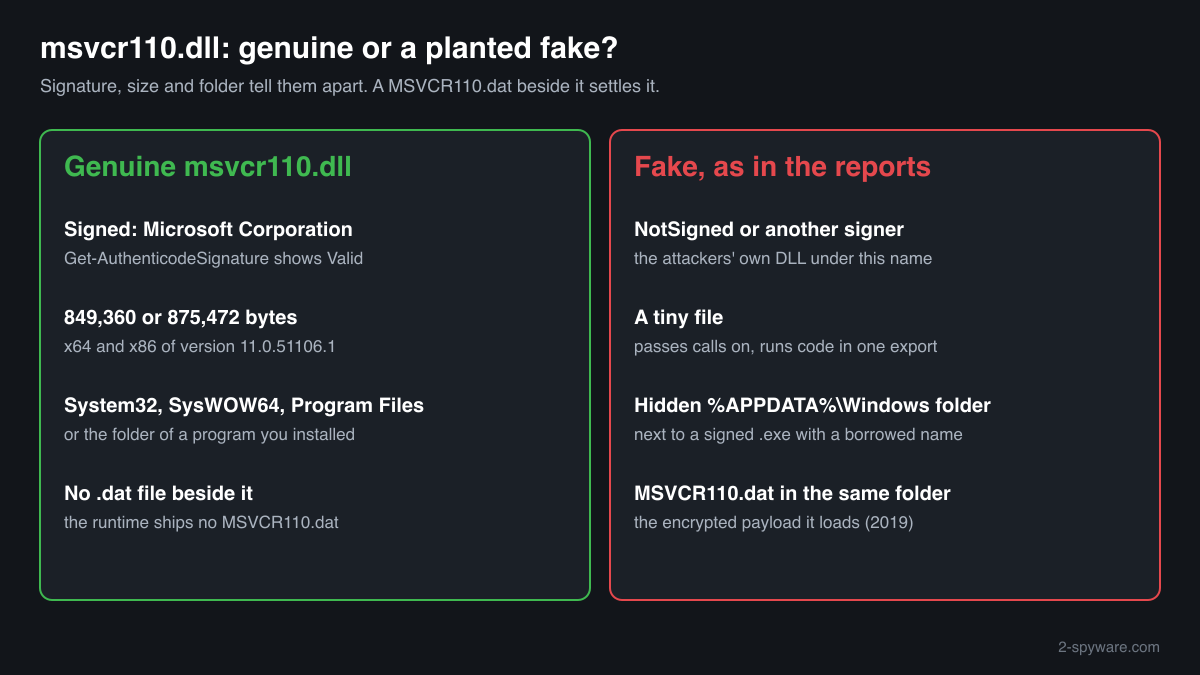
The reported attacks used a fake msvcr110.dll, not the genuine one. The fake kept the expected function names so the program could start, and one of those functions ran the malicious code. Here the signature and size of msvcr110.dll itself are the decisive checks.
- Publisher
- Microsoft Corporation
- Description in the file
- Microsoft® C Runtime Library
- Installed by
- Microsoft Visual C++ 2012 Redistributable (version 11), and by programs that keep a private copy in their folder
- Last official version
- 11.0.51106.1 (Visual C++ 2012 Update 4), read from Microsoft's installers on 14 October 2026: 849,360 bytes (x64) and 875,472 bytes (x86). No ARM64 build exists
- Signed by
- Microsoft Corporation
- Genuine folders
- C:\Windows\System32 (64-bit copy), C:\Windows\SysWOW64 (32-bit copy on 64-bit Windows), and the folders of installed programs
- In Windows images
- Winbindex indexes one Microsoft build, 11.00.60605.1 (849,488 bytes), in Windows 10 images from release 1607 to 20H2 and in Windows 11 24H2
- Runs as a process
- No. Programs load it as a library
- Seen in attacks as
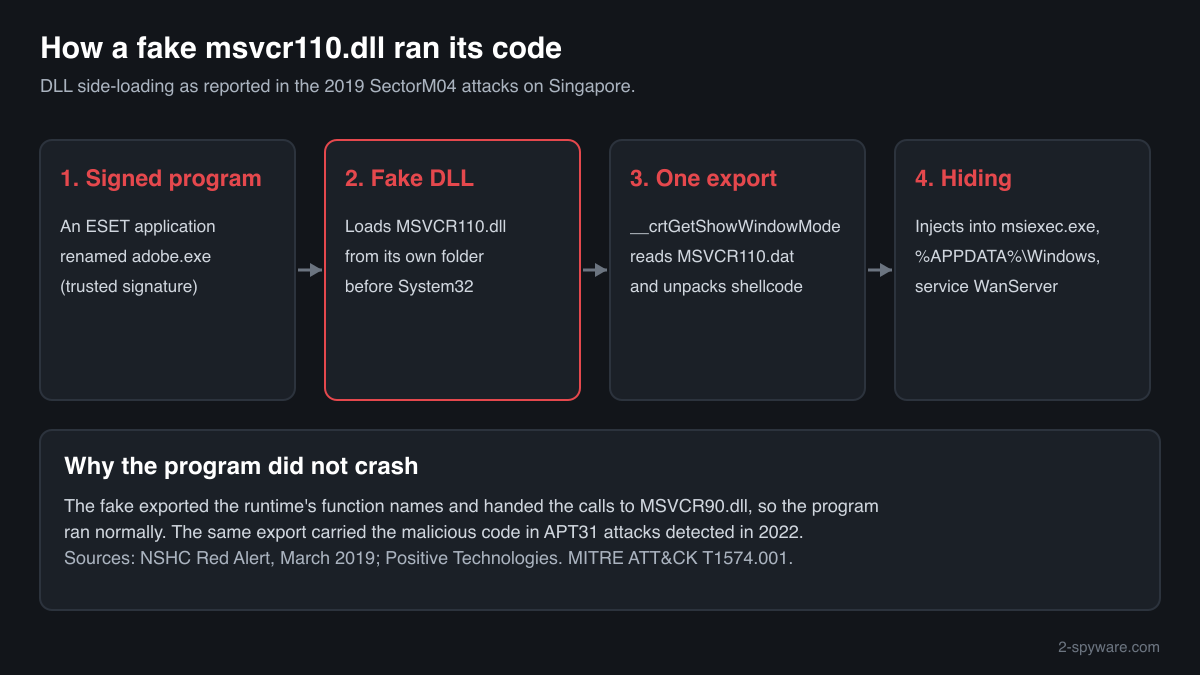
- A fake msvcr110.dll side-loaded by a renamed, signed program, with its payload in a file named MSVCR110.dat (SectorM04, 2019), and a malicious msvcr110.dll loaded by dot1xtray.exe in APT31 attacks detected in 2022
What msvcr110.dll does
msvcr110.dll contains the C runtime of Visual Studio 2012: the code for memory, files, text and maths that a program would otherwise have to carry itself. The 110 stands for toolset version 11.0. Programs written in C++ also load msvcp110.dll, the C++ library from the same package.
The file arrives with the Visual C++ 2012 Redistributable, whose last release is Update 4. Microsoft lists Visual C++ 2012 as no longer supported but still links those installers. Because the runtime is old, some programs ship their own copy next to their .exe, and Windows looks in a program's folder before it looks in System32. Attackers use exactly that search order.
About .dll files. A .dll file is a library: it cannot run on its own and is loaded into a program's process. It does not appear in Task Manager under its own name; Process Explorer shows which process loaded it.
How to check a copy of msvcr110.dll
Four questions settle it: where the copy is, who signed it, how big it is and which program loads it. A DLL never appears in Task Manager under its own name, so use these checks.
- Find every copy with its size. Run this in PowerShell. The official files are 849,360 bytes (x64) and 875,472 bytes (x86), and the Windows image build is 849,488 bytes. A copy much smaller than that, or one under AppData, Temp, Downloads or ProgramData, needs the next check.
Get-ChildItem -Path C:\ -Filter msvcr110.dll -Recurse -ErrorAction SilentlyContinue | Select-Object FullName, Length, LastWriteTime - Check the signature. Status must be Valid and the signer Microsoft Corporation. The fakes described in the reports were the attackers' own DLLs, so NotSigned, HashMismatch or any other signer means the copy is not Microsoft's file.
Get-AuthenticodeSignature "C:\path\to\msvcr110.dll" | Format-List Status, SignerCertificate - Look for a file called MSVCR110.dat next to it. The genuine runtime never comes with a .dat file of the same name. In the 2019 case the fake DLL read its encrypted payload from MSVCR110.dat in the same folder. Finding the pair is a strong sign of the attack.
Get-ChildItem -Path C:\Users -Filter msvcr110.dat -Recurse -Force -ErrorAction SilentlyContinue | Select-Object FullName - See which program loads it. In Process Explorer (Microsoft Sysinternals) choose Find, Find Handle or DLL, and type msvcr110.dll. The results show each process and the path of the copy it uses. A signed program from a security or network vendor, running from AppData or with an unexpected name, loading a msvcr110.dll from its own folder is the reported pattern.
- Compare the checksum. Use the file check on this page. A match with a Microsoft build means the file is genuine. No match on a copy outside the Windows folders, together with a missing signature, means you should treat it as malicious.
A valid Microsoft signature clears that msvcr110.dll. It does not vouch for the program that loads it or for other files in the same folder, so a copy in a user folder is still worth one look at its neighbours.
Check your msvcr110.dll
Choose the msvcr110.dll you are unsure about. Its SHA-256 and SHA-1 checksums are calculated in your browser and compared with the 7 versions of the file known from a public DLL catalogue.
The file stays on your computer. Nothing is uploaded: the checksum is computed locally.
Do you need msvcr110.dll?
Yes, the genuine copies: programs built with Visual Studio 2012 will not open without them. Act only on a copy that failed the checks above, and then deal with the whole folder and whatever starts it.
- Keep the copies in System32, SysWOW64 and program folders. They come from the Visual C++ 2012 Redistributable or from the program itself. Removing them breaks those programs and removes no threat.
- Run a Microsoft Defender full scan. Open Windows Security, Virus and threat protection, Scan options, Full scan. Let Defender quarantine what it finds before you delete anything by hand.
- Run the offline scan as well. In the 2019 case the malware injected itself into msiexec.exe and kept running inside it. The offline scan restarts Windows and scans before such code can start. It takes about 15 minutes.
Start-MpWDOScan - Remove the service or task that starts it. The 2019 malware installed a service named WanServer that ran its copy from a hidden %APPDATA%\Windows folder. Open Services and Task Scheduler and look for entries that start a program from AppData, ProgramData or Temp.
Get-CimInstance Win32_Service | Where-Object { $_.PathName -match 'AppData|ProgramData|Temp' } | Select-Object Name, PathName - Delete the folder, not only the DLL. A fake msvcr110.dll comes with the signed program that loads it and often a payload file. Delete the whole folder once the scans are done, so nothing is left to load another copy.
- If a program needs the runtime afterwards, reinstall it from Microsoft. Install the Visual C++ 2012 Update 4 Redistributable, x64 and x86, from Microsoft's download links. Do not take a replacement msvcr110.dll from a file download site.
Warning signs
| What you see | What it means |
|---|---|
| msvcr110.dll and MSVCR110.dat in the same folder | The layout of the 2019 side-loading kit: the fake DLL reads its payload from the .dat file. Scan and remove the folder. |
| msvcr110.dll is NotSigned, or signed by a company other than Microsoft | It is not Microsoft's runtime. The reported fakes were the attackers' own code under this name. |
| A copy far smaller than 849 KB | The genuine builds are 849,360 to 875,472 bytes. The 2019 fake was described as a tiny DLL that passed most calls to another runtime. |
| A hidden folder %APPDATA%\Windows holding an .exe and msvcr110.dll | That is where the 2019 malware moved its files, together with a service named WanServer. |
| A signed program with an unrelated name, such as adobe.exe, next to msvcr110.dll in a user folder | Side-loading uses a trusted, signed program under a borrowed name. Check what the program really is in its Properties. |
| Several signed copies in Program Files and game folders | Normal. Programs carry private copies of the 2012 runtime. |
How attackers have used msvcr110.dll
Two published cases, each with its report. In both, the msvcr110.dll was not Microsoft's file: it was a malicious DLL given this name so that a legitimate program would load it from its own folder.
| Malware | How it used the file | Source |
|---|---|---|
| SectorM04 custom malware, targeting Singapore (2019) | A signed security program renamed adobe.exe loaded the attackers' MSVCR110.dll from its own folder. The fake exported the functions of the real runtime and passed them to MSVCR90.dll, except __crtGetShowWindowMode, which read and decompressed shellcode from MSVCR110.dat. The malware injected itself into msiexec.exe, hid its files in %APPDATA%\Windows and started through a service named WanServer. | NSHC Red Alert, March 2019 |
| APT31 attacks on Russian media and energy companies (detected April 2022) | The legitimate dot1xtray.exe loaded a malicious msvcr110.dll, and the malicious code sat in its __crtGetShowWindowMode export, the same export as in the 2019 case. The toolset used cloud storage as its command server. | Positive Technologies, Expert Security Center report on APT31 tools |
MITRE ATT&CK lists this as Hijack Execution Flow: DLL (T1574.001). For msvcr110.dll the lesson is the opposite of the genuine-dependency cases: here the file carrying the name was the fake, so its signature and size give it away.
Known versions of msvcr110.dll
A public DLL catalogue lists 7 versions of msvcr110.dll, from 11.0.50214.1 to 11.0.51106.1, by Microsoft Corporation. Its copies are uploaded by users and not verified, so a checksum match identifies the version, while the digital signature tells you whether the file is genuine. Even a genuine file clears only the file, not the folder: attackers ship genuine libraries next to a program they abuse, so where the copy sits still decides whether it is safe.
Every version with its checksums, and how to fix msvcr110.dll errors on uGetFix
Questions people ask
Is msvcr110.dll a virus?
No, the genuine msvcr110.dll is Microsoft's Visual C++ 2012 C runtime and is harmless. Attackers have used the name, though: in 2019 and in attacks detected in 2022 a malicious DLL called msvcr110.dll was placed next to a signed program so that the program loaded it. A copy signed by Microsoft in System32, SysWOW64 or an installed program's folder is the real one.
How do I tell a fake msvcr110.dll from the real one?
Check three things. The signature must be Valid and from Microsoft Corporation. The size should be close to the official builds, 849,360 bytes for x64 and 875,472 bytes for x86. And the folder should be System32, SysWOW64 or an installed program's folder. The reported fakes failed on signature and size and sat in user folders, in one case next to a file named MSVCR110.dat.
What is MSVCR110.dat?
It is not part of Microsoft's runtime. The Visual C++ 2012 package installs no .dat file of that name. In the 2019 SectorM04 case the fake msvcr110.dll read encrypted shellcode from MSVCR110.dat in the same folder and ran it. If you find the pair, run a Microsoft Defender full scan and an offline scan, then delete the folder.
Why is there a msvcr110.dll in my AppData folder?
A program installed for your account only can keep its runtime there, and that copy is signed by Microsoft. A copy in a hidden AppData folder, unsigned, beside an .exe with a borrowed name, matches the reported attacks: the 2019 malware used %APPDATA%\Windows. Check the signature, see in Process Explorer which program loads it, and scan.
Can I delete msvcr110.dll?
Not the signed copies in System32, SysWOW64 or the folders of programs you installed: programs built with Visual Studio 2012 would no longer open. An unsigned copy in a user folder that failed the checks on this page can go, together with its folder and the service or task that starts it, after Microsoft Defender has scanned the PC.
Which versions of msvcr110.dll are genuine?
The last version Microsoft published for Visual C++ 2012 is 11.0.51106.1, from Update 4, signed by Microsoft Corporation. Winbindex also indexes build 11.00.60605.1 inside Windows 10 and Windows 11 images, and older 2012 packages installed earlier builds. A fake can copy any version number, so the signature and the checksum check on this page are what prove a file genuine.
Does Microsoft Defender detect a fake msvcr110.dll?
Defender judges a file by its content, so a known malicious DLL is detected whatever it is called. A new variant may not be recognised at first. That is why the manual checks matter: an unsigned msvcr110.dll beside a signed program in a user folder is suspicious even before any scanner knows the file.
Sources
- Microsoft Learn: Latest supported Visual C++ Redistributable downloads (Visual C++ 2012 listed as unsupported)
- Winbindex, the Windows binaries index: msvcr110.dll
- NSHC Red Alert: SectorM04 Targeting Singapore, an analysis (19 March 2019)
- Positive Technologies: Flying in the clouds, APT31 renews its attacks on Russian companies through cloud storage
- MITRE ATT&CK T1574.001: Hijack Execution Flow: DLL
- Microsoft Learn: Get-AuthenticodeSignature
Version data read on Oct 14, 2026.
Questions and experiences
Ask about this page: members and our editors answer. Reading is open; writing needs a free account.
…