
Windows file
ntdll.dll: the genuine NT Layer DLL, and how malware abuses it without replacing it
ntdll.dll is the NT Layer DLL, the core Windows library that sits between every program and the Windows kernel. The copies in System32 and SysWOW64 are genuine and must stay. Malware does not replace this file on disk: it calls it, patches it in memory or injects code through it. A file named ntdll.dll anywhere else is suspicious.
Prefer to do it yourself? The manual steps follow.
ntdll.dll in C:\Windows\System32 (and C:\Windows\SysWOW64 on 64-bit Windows) is a genuine Microsoft file and is safe. Every process on the PC, Windows included, loads it at start. Do not delete, rename or replace it: Windows cannot run a single program without it.
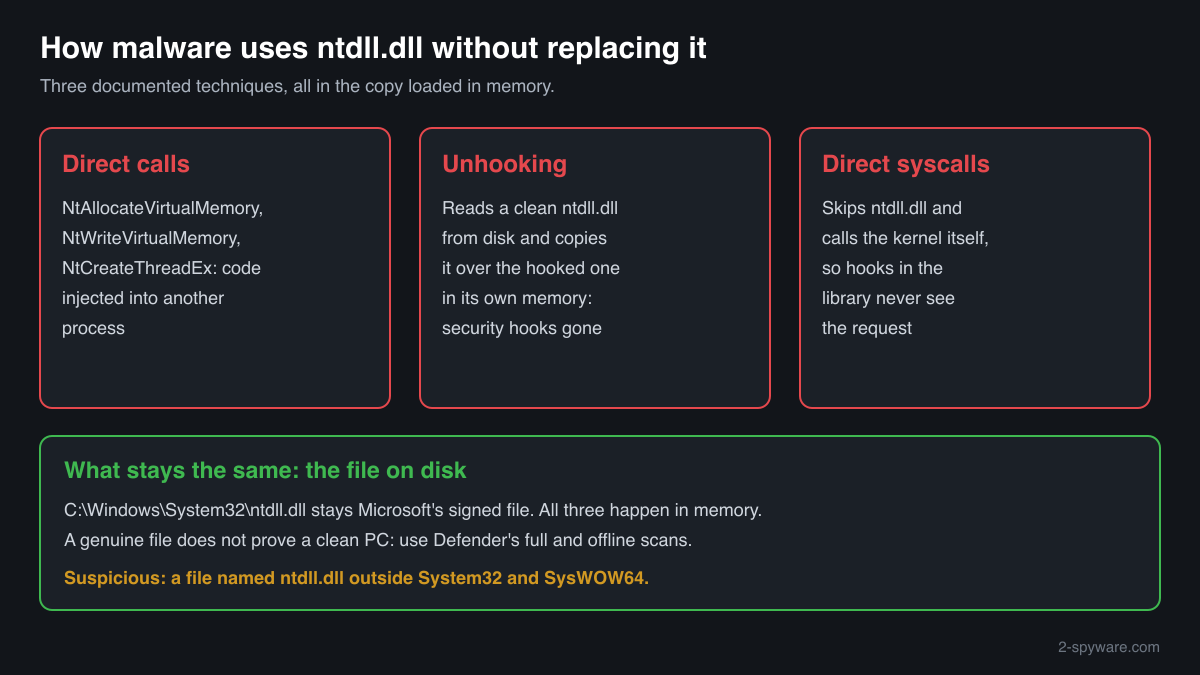
Because every process loads ntdll.dll, malware works with it rather than against it: it calls its functions directly to inject code, or overwrites security hooks in the copy loaded in memory. Neither changes the file on disk. A file named ntdll.dll outside the Windows folders, or one without a valid Microsoft signature, is not Windows' copy.
- Description in the file
- NT Layer DLL
- What it is
- The lowest user-mode layer of Windows: the system call interface to the kernel, the process and DLL loader, the heap manager and exception dispatch
- Genuine folders
- C:\Windows\System32\ntdll.dll and, on 64-bit Windows, C:\Windows\SysWOW64\ntdll.dll for 32-bit programs
- Not genuine by location
- Any ntdll.dll in Downloads, Temp, AppData, ProgramData, a program folder or the root of a drive. Windows never puts it there and never loads it from there
- Size of the genuine file
- Windows 11 24H2: 2,558,392 bytes (64-bit). Windows 10 21H2: 2,063,408 bytes (64-bit). The size changes with almost every monthly update
- Newest indexed build
- Windows 11 24H2: 10.0.26100.9711, delivered by KB5127648 on 13 October 2026
- Known Microsoft builds
- 823 builds across 20 Windows releases in Winbindex
- Is it a process
- No. It is a library loaded into every process, so it never appears on its own in Task Manager
What ntdll.dll does, and why attackers care about it
ntdll.dll is the NT Layer DLL. When a program opens a file, reserves memory, creates a thread or starts another process, the request goes through the familiar Windows libraries such as kernel32.dll and ends in ntdll.dll, whose Nt and Zw functions make the actual system call into the kernel. The file also contains the loader that sets up every new process and loads its DLLs, the heap manager and the code that dispatches exceptions. Windows maps it into each process from System32 (or SysWOW64 for 32-bit programs) before the program's own code runs.
That position makes ntdll.dll the last stop before the kernel, and so the place where security software watches. Many endpoint protection products place hooks on ntdll.dll functions inside each process, so they see when a program writes into another process's memory or starts a thread in it. Attackers know this, which is why ntdll.dll appears in so many malware reports.
Malware uses it in three ways, none of which touches the file on disk. It calls the native functions directly, for example NtAllocateVirtualMemory, NtWriteVirtualMemory and NtCreateThreadEx, to inject code into another process. It removes the security hooks by loading a clean copy of ntdll.dll from disk and overwriting the hooked code in its own memory, or skips the library entirely with direct system calls. And it reads function addresses straight from the loaded ntdll.dll to hide which functions it uses.
Replacing ntdll.dll on disk would gain an attacker nothing and would risk an unbootable PC: the file is protected by Windows, signed by Microsoft and checked by System File Checker. So a genuine ntdll.dll on your PC is the normal case even when the PC is infected, and a second file with this name somewhere else is the real warning sign.
About .dll files. A .dll file is a library: it cannot run on its own and is loaded into a program's process. It does not appear in Task Manager under its own name; Process Explorer shows which process loaded it.
How to tell Windows' ntdll.dll from a fake copy
A DLL is not listed in Task Manager as a process, so use the folder, the file properties, PowerShell and Process Explorer.
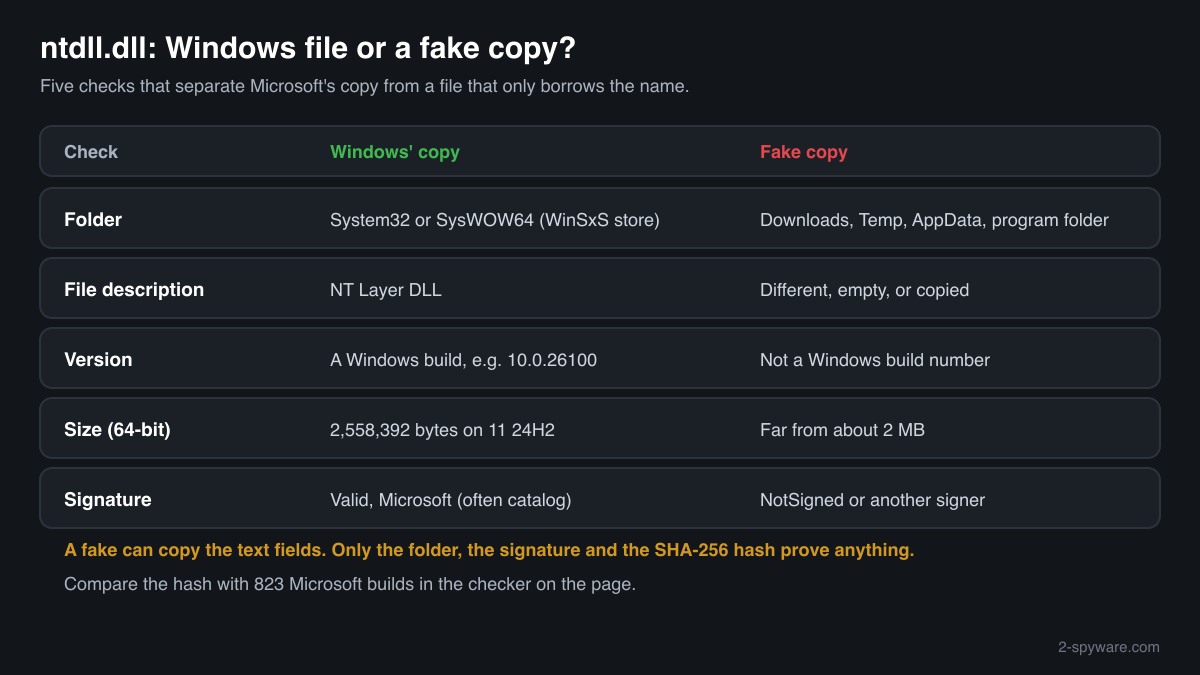
- Where the file is. List every copy with the command below. C:\Windows\System32 and C:\Windows\SysWOW64 are Windows' copies. Copies in C:\Windows\WinSxS belong to Windows' own component store and are also normal. Every other path is not Windows' ntdll.dll.
Get-ChildItem C:\ -Recurse -Filter ntdll.dll -ErrorAction SilentlyContinue | Select-Object FullName, Length, @{n='Description';e={$_.VersionInfo.FileDescription}} - The Description field and the size. Right-click the file, Properties, Details. The genuine file says NT Layer DLL, Microsoft Corporation, and a Windows version such as 10.0.26100. It is about 2 MB; a much smaller or larger file with this name is not Windows' copy. A fake can copy these fields, so this check only rules files out.
- The digital signature. Windows' copy is signed by Microsoft, often through a catalog rather than inside the file, so the Properties window may show no Digital Signatures tab. PowerShell reads both kinds. Valid with a Microsoft signer means genuine; NotSigned or another signer means it is not Microsoft's file.
Get-AuthenticodeSignature 'C:\path\to\ntdll.dll' | Format-List Status, SignatureType, SignerCertificate - Which copy a process loaded. Open Process Explorer from Microsoft Sysinternals, choose Find > Find Handle or DLL, type ntdll.dll and press Search. Every process lists it, and every path should be System32 or SysWOW64. A process that shows another path deserves a close look.
- Compare the hash with Microsoft's builds. Use the checker on this page: it computes the SHA-256 in your browser and compares it with the 823 known Microsoft builds. A match proves the file is Microsoft's, wherever it was found.
- Scan and repair. Run Microsoft Defender's full scan, then the offline scan if a detection comes back. If the copy in System32 or SysWOW64 does not match a Microsoft build, run sfc /scannow from an administrator Command Prompt to restore it.
These checks look at the file on disk. Malware that patches ntdll.dll in memory leaves the file untouched, so a genuine file does not prove the PC is clean. For that, rely on Microsoft Defender's full and offline scans, and on the warning signs below.
Check your ntdll.dll
Choose the ntdll.dll you are unsure about. Its SHA-256 checksum is calculated in your browser and compared with the 823 Microsoft builds indexed from Windows releases and updates.
The file stays on your computer. Nothing is uploaded: the checksum is computed locally.
Warning signs and what they mean
| What you see | What it means |
|---|---|
| A file named ntdll.dll in Downloads, Temp, AppData, ProgramData or next to a program's .exe | Windows never puts ntdll.dll there and never loads it from there. Malware droppers sometimes use system file names to look harmless. Check the signature and scan. |
| A look-alike name such as ntdl.dll, or ntdII.dll with capital I letters instead of l, in a Windows folder | Windows has no file with such a name. A look-alike name in System32 is a common disguise; scan with the offline scan. |
| An ntdll.dll that claims Microsoft Corporation but has no valid Microsoft signature | A file that imitates Windows' copy. A genuine ntdll.dll always verifies as Valid with a Microsoft signer. |
| Microsoft Defender or another security product reports unhooking, direct system calls or process injection | Something tried to blind security software or inject code through ntdll.dll's functions. The file is not the problem; the program that did it is. Run the offline scan. |
| Microsoft Defender names ntdll.dll in System32 or SysWOW64 | Very rare. Compare the hash with the checker on this page and run the offline scan; if the file does not match a Microsoft build, repair it with sfc /scannow. |
| sfc /scannow reports that it found and could not repair ntdll.dll | The protected copy was damaged or changed. Run DISM /Online /Cleanup-Image /RestoreHealth, then sfc again, and scan the PC offline. |
Documented malware that used ntdll.dll
MITRE ATT&CK lists ntdll.dll's native functions under Native API (T1106). The reports below describe malware that called them or read them directly. In each case the genuine file stayed in place; the malware used the copy loaded in memory.
| Malware | How it used the file | Source |
|---|---|---|
| LODEINFO (APT10) | Used NtAllocateVirtualMemory, NtWriteVirtualMemory and RtlCreateUserThread, among other functions, to inject shellcode into memory | Kaspersky report, 31 October 2022, cited in MITRE ATT&CK T1106 |
| Pikabot | Used NtQueryInformationProcess to detect debuggers; some variants built their own list of function addresses from ntdll.dll and kernel32.dll to hide which functions they called | Zscaler report, 24 May 2023, cited in MITRE ATT&CK T1106 |
| NOOPLDR (Earth Kasha) | Used NtProtectVirtualMemory, NtWriteVirtualMemory and NtCreateThreadEx to inject code into other processes | Trend Micro report, 19 November 2024, cited in MITRE ATT&CK T1106 |
None of these replaced ntdll.dll on disk. Checking the file tells you it is genuine; finding the program that misused it is a job for Microsoft Defender's full and offline scans.
Everyday problems with ntdll.dll
Programs crash and Event Viewer names ntdll.dll as the faulting module
This is the reason most people look the file up, and it is not a sign of infection. ntdll.dll manages memory and exceptions for every program, so a failure caused by the program, a plugin, an overlay, a driver or faulty RAM is often recorded there.
Update or reinstall the program that crashes, remove overlays and mods, update drivers and test memory with Windows Memory Diagnostic. If many programs crash, repair Windows:
sfc /scannowDISM /Online /Cleanup-Image /RestoreHealthSeveral ntdll.dll files are on the PC
On 64-bit Windows, System32 holds the 64-bit library and SysWOW64 the 32-bit one, and Windows keeps further copies in WinSxS for updates. All of them are genuine and have different sizes and hashes.
A copy anywhere else, in a user folder, a program folder or a temporary folder, is not used by Windows. Check its signature and hash, and remove it after a scan if it is not Microsoft's.
Security software warns about ntdll.dll unhooking
The warning is about a program, not about the file. It means a process loaded a clean copy of ntdll.dll or used direct system calls to get around the hooks the security product placed in memory.
Some legitimate low-level tools can trigger similar alerts. If the alert names a program you do not know, quarantine it and run Microsoft Defender's offline scan.
ntdll.dll versions by Windows release
The newest build indexed for each release, and the update that delivered it. 823 Microsoft builds in total are known.
| Windows release | File version | Delivered by | Size, 64-bit |
|---|---|---|---|
| Windows 11 26H1 | 10.0.28000.2952 | KB5129194, Sep 14, 2026 | 2,513,848 bytes |
| Windows 11 25H2 | 10.0.26100.9711 | KB5127648, Oct 13, 2026 | 2,558,392 bytes |
| Windows 11 24H2 | 10.0.26100.9711 | KB5127648, Oct 13, 2026 | 2,558,392 bytes |
| Windows 11 23H2 | 10.0.22621.7376 | KB5120240, Aug 11, 2026 | 2,195,648 bytes |
| Windows 11 22H2 | 10.0.22621.7376 | KB5120240, Aug 11, 2026 | 2,195,648 bytes |
| Windows 11 21H2 | 10.0.22000.3260 | KB5044280, Oct 8, 2024 | 2,133,664 bytes |
| Windows 10 22H2 | 10.0.19041.7802 | KB5126657, Oct 13, 2026 | 2,063,408 bytes |
| Windows 10 21H2 | 10.0.19041.7802 | KB5126657, Oct 13, 2026 | 2,063,408 bytes |
| Windows 10 21H1 | 10.0.19041.7802 | KB5126657, Oct 13, 2026 | 2,063,408 bytes |
| Windows 10 20H2 | 10.0.19041.7802 | KB5126657, Oct 13, 2026 | 2,063,408 bytes |
Questions people ask
Is ntdll.dll a virus?
No. ntdll.dll is the NT Layer DLL, a core Windows file in System32 and SysWOW64 that every program needs. Malware uses its functions and sometimes patches the loaded copy in memory, but it does not replace the file on disk. A file named ntdll.dll in another folder, or one without a valid Microsoft signature, is not Windows' file and should be scanned.
Can I delete ntdll.dll?
No, not the copies in System32 or SysWOW64. Every process on the PC loads them, so Windows protects them and cannot start without them. A copy outside the Windows folders is not used by Windows: check its signature, scan it, and remove it if it is not a genuine Microsoft file you put there yourself.
Can malware replace ntdll.dll?
It is very unusual. The file is protected by Windows, signed by Microsoft and restored by System File Checker, and a wrong build stops Windows from starting. Malware gains far more by using the copy already loaded in memory: calling its functions directly, overwriting security hooks in it, or bypassing it with direct system calls. That is why a genuine file on disk does not prove a clean PC.
What is ntdll.dll unhooking?
It is a way to blind security software. Many security products place hooks on ntdll.dll functions inside each process to watch for injection. Malware reads a clean copy of ntdll.dll from disk and copies its code over the hooked version in its own memory, so the hooks disappear. The file on disk stays genuine; only the malicious process changes.
Why is ntdll.dll in every process in Process Explorer?
Because Windows loads it into every process when the process is created. It is the layer that connects programs to the kernel, so even the simplest program needs it. Seeing it in every process is normal. What matters is the path: it should always be C:\Windows\System32 or, for 32-bit programs on 64-bit Windows, C:\Windows\SysWOW64.
How do I check if my ntdll.dll is genuine?
Check three things. The folder: System32 and SysWOW64 hold Windows' copies. The signature: Get-AuthenticodeSignature in PowerShell shows Valid with a Microsoft signer for the genuine file. The hash: the checker on this page compares the SHA-256 with 823 known Microsoft builds. A file that fails these checks is not Windows' ntdll.dll.
Does a crash in ntdll.dll mean my PC is infected?
Usually not. ntdll.dll appears as the faulting module in many crash reports because it handles memory and exceptions for every program, so failures caused by the program, a driver or faulty memory surface there. Fix the program, drivers and memory first. Scan with Microsoft Defender if crashes come with other warning signs, such as unknown programs or security alerts.
Sources
- MITRE ATT&CK T1106: Native API
- Kaspersky: APT10, tracking down LODEINFO 2022, part II
- Zscaler: Technical analysis of Pikabot
- Trend Micro: Earth Kasha's new LODEINFO campaign
- Microsoft Sysinternals: Process Explorer
- Winbindex, the Windows binaries index (m417z)
- Winbindex, the Windows binaries index (m417z)
Version data read on Oct 14, 2026.
Questions and experiences
Ask about this page: members and our editors answer. Reading is open; writing needs a free account.
…