
Program file
nvwgf2umx.dll: NVIDIA's DirectX driver file, or a copy that does not belong?
nvwgf2umx.dll is part of the NVIDIA graphics driver: the 64-bit user-mode driver for Direct3D 10 and 11 that every DirectX 11 game on an NVIDIA card loads. It appears in crash reports so often that many people suspect it. The genuine file lives in the NVIDIA driver's folders and carries NVIDIA's signature; a copy anywhere else needs checking.
Prefer to check it yourself? The manual checks follow.
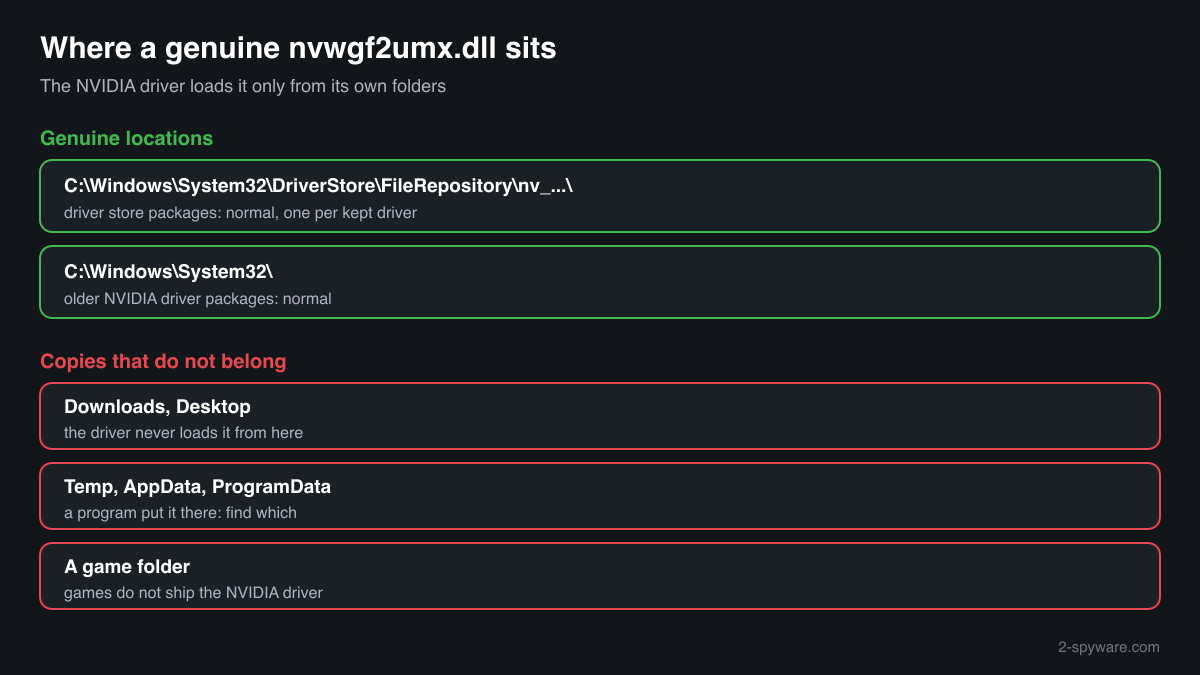
A nvwgf2umx.dll under C:\Windows\System32\DriverStore\FileRepository, in a folder whose name starts with nv_, or in C:\Windows\System32 with older drivers, describing itself as an NVIDIA D3D10 Driver from NVIDIA Corporation and signed by NVIDIA, is the genuine file. It is not a process: it loads into each 64-bit program that draws with Direct3D 10 or 11 on an NVIDIA card. Seeing it in a game's crash report does not make it suspicious.
The driver never uses a copy outside its own folders. A nvwgf2umx.dll in Downloads, Temp, AppData or a game folder, or one without a valid NVIDIA signature, came from somewhere else: a DLL download site, a bundle, or a program that hides behind a trusted driver name.
- Publisher
- NVIDIA Corporation
- Description in the file
- NVIDIA D3D10 Driver, followed by the driver release, such as Version 340.43 in the copy collected in a public DLL catalogue
- Installed by
- The NVIDIA graphics driver package, from NVIDIA, a PC maker or Windows Update. Games load it but never ship it
- Genuine folder
- C:\Windows\System32\DriverStore\FileRepository\nv_...\ with driver store packages; older driver packages also place it in C:\Windows\System32
- Size
- Many megabytes, unusual for a DLL: the 340.43 copy in the catalogue is about 17.8 MB, 64-bit
- Signed by
- NVIDIA Corporation (check the signature; text fields can be copied, a valid signature cannot)
- Runs as a process
- No. It is a library loaded into each program that uses Direct3D 10 or 11 on an NVIDIA card
- 32-bit twin
- nvwgf2um.dll, installed by the same driver for 32-bit programs
What nvwgf2umx.dll does
Microsoft's Windows Display Driver Model splits a graphics driver into two parts that the card maker supplies: a kernel-mode driver and a user-mode driver. The Direct3D runtime inside a program calls the user-mode driver, which prepares the commands for the graphics card and passes them on through the Windows graphics kernel. nvwgf2umx.dll is NVIDIA's user-mode driver for Direct3D 10 and 11 in 64-bit programs.
Because it runs inside the game, any crash that happens while the driver works on the game's request is reported under the game's name with nvwgf2umx.dll as the faulting module. That makes the file one of the most searched NVIDIA names, and a name people already trust is a convenient one for a planted file. The genuine copy is never loaded from outside the NVIDIA driver's folders, so the location tells most of the story.
About .dll files. A .dll file is a library: it cannot run on its own and is loaded into a program's process. It does not appear in Task Manager under its own name; Process Explorer shows which process loaded it.
How to check a copy of nvwgf2umx.dll
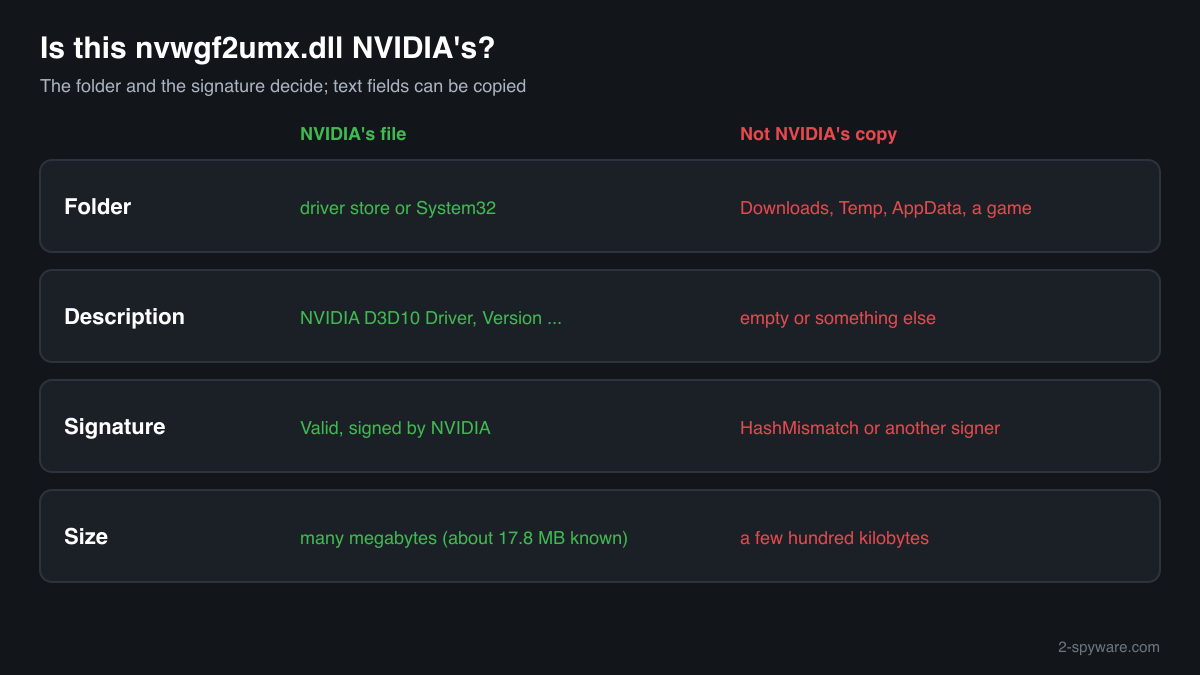
Four questions decide it: where the file is, what it says about itself, who signed it, and how large it is. A library never shows in Task Manager under its own name, so use these checks.
- List every copy and where it sits. Copies in folders under C:\Windows\System32\DriverStore\FileRepository whose names start with nv_ are normal, sometimes several when Windows keeps older driver packages. A copy in C:\Windows\System32 is normal with older drivers. Look closer at anything in Downloads, Desktop, Temp, AppData or a game folder.
Get-ChildItem -Path C:\ -Filter nvwgf2umx.dll -Recurse -ErrorAction SilentlyContinue | Select-Object FullName, Length, LastWriteTime - Read the version resource. NVIDIA's file reports NVIDIA Corporation as the company and NVIDIA D3D10 Driver with a release number as the description. Empty or different fields mean the file is not NVIDIA's; matching fields alone do not clear it, because they can be copied.
(Get-Item "C:\path\to\nvwgf2umx.dll").VersionInfo | Format-List CompanyName, FileDescription, FileVersion - Check the digital signature. Status Valid with an NVIDIA signer means an unmodified NVIDIA build. NotSigned, HashMismatch or another signer means the file is not the one NVIDIA shipped, whatever it says about itself. Driver files are sometimes signed through a catalogue file rather than inside the DLL, so test a file that shows NotSigned against a copy in the driver store as well.
Get-AuthenticodeSignature "C:\path\to\nvwgf2umx.dll" | Format-List Status, SignerCertificate - Compare the size. The genuine user-mode driver is many megabytes; the 340.43 copy in the catalogue is about 17.8 MB. A nvwgf2umx.dll of a few hundred kilobytes is not NVIDIA's driver. Use the file check on this page to compare the checksum with the known copy.
- Find out which program loads a stray copy. If a copy sits outside the driver folders, look for an .exe in the same folder and at Task Manager's Startup apps and Task Scheduler for entries that run from there. A legitimate game never needs its own nvwgf2umx.dll.
A valid NVIDIA signature clears that one file. It says nothing about other files in the same folder, and a planted copy usually comes with a program that does the real work.
Check your nvwgf2umx.dll
Choose the nvwgf2umx.dll you are unsure about. Its SHA-256 and SHA-1 checksums are calculated in your browser and compared with the 1 versions of the file known from a public DLL catalogue.
The file stays on your computer. Nothing is uploaded: the checksum is computed locally.
Do you need nvwgf2umx.dll?
Keep every copy in the NVIDIA driver's folders: without it no DirectX 10 or 11 program runs on the NVIDIA card. A copy that failed the checks above is not used by the driver, and what matters is the program that brought it.
- Leave the driver's copies alone. Never delete nvwgf2umx.dll from the driver store or System32 by hand. If the driver is damaged, the NVIDIA driver installer replaces its files; deleting one only breaks graphics in games and other programs.
- Remove the program that came with a stray copy. Open Settings, Apps, Installed apps, and uninstall the program installed around the time the copy appeared. Then delete the folder that held the stray nvwgf2umx.dll if it stays behind.
- Run a Microsoft Defender full scan. Open Windows Security, Virus and threat protection, Scan options, Full scan. Quarantine what it finds, and look at Protection history for anything found in Downloads, Temp or AppData.
- Run the offline scan. Malware that hides behind driver names can also hide while Windows runs. The offline scan restarts the PC and scans before Windows starts. It takes about 15 minutes.
Start-MpWDOScan - Check what starts with Windows. Open Task Manager, Startup apps, and Task Scheduler. Disable and remove entries that run a program from AppData, ProgramData or Temp that you do not recognise, after the scan.
- Change passwords if you ran an installer you did not trust. When the stray copy came with a free download or a bundle, assume saved browser passwords and sessions may have been read. Change passwords from a clean device and sign out of other sessions.
Warning signs
| What you see | What it means |
|---|---|
| nvwgf2umx.dll in Downloads, Temp, AppData or a game folder | The NVIDIA driver never loads it from there. Find the program that put it there and scan. |
| The signature check shows HashMismatch or a signer other than NVIDIA | The file is not an unmodified NVIDIA build. |
| A nvwgf2umx.dll of a few hundred kilobytes | Far too small for NVIDIA's user-mode driver, which is many megabytes. |
| nvwgf2umx.dll on a PC that has never had an NVIDIA graphics card | No driver installed it. Check where it came from. |
| An .exe next to the copy that starts with Windows | A program uses the trusted name as cover. Remove it and scan. |
| nvwgf2umx.dll as the faulting module in a game crash | Normal. The crash happened inside the NVIDIA driver; it says nothing about malware. |
Known versions of nvwgf2umx.dll
A public DLL catalogue lists 1 versions of nvwgf2umx.dll, from 9.18.13.4043 to 9.18.13.4043, by NVIDIA Corporation. Its copies are uploaded by users and not verified, so a checksum match identifies the version, while the digital signature tells you whether the file is genuine. Even a genuine file clears only the file, not the folder: attackers ship genuine libraries next to a program they abuse, so where the copy sits still decides whether it is safe.
Every version with its checksums, and how to fix nvwgf2umx.dll errors on uGetFix
Questions people ask
Is nvwgf2umx.dll a virus?
No, NVIDIA's nvwgf2umx.dll is a part of the graphics driver that loads into every 64-bit DirectX 10 or 11 program on an NVIDIA card. It shows up in so many crash reports because it runs inside the games that crash, not because it is harmful. A copy in the NVIDIA driver folder, signed by NVIDIA, is genuine. A copy elsewhere needs the checks on this page.
Does a crash in nvwgf2umx.dll mean my PC is infected?
No. A faulting module of nvwgf2umx.dll means the program crashed while the NVIDIA driver was working on its request. Driver versions, settings, overclocks, overlays and game bugs cause that, and malware rarely does. Check the path of the module in the crash event: inside the driver store it is NVIDIA's file and the crash is a driver or game problem.
Why are there several copies of nvwgf2umx.dll on my PC?
Windows keeps installed driver packages in the driver store, so after a few NVIDIA driver updates there can be one copy in each nv_ folder under C:\Windows\System32\DriverStore\FileRepository, and with older drivers another in System32. That is normal. Copies outside those folders are the ones to look at.
How can I tell NVIDIA's nvwgf2umx.dll from a fake?
Check four things. The folder: the driver store or System32. The signature: Get-AuthenticodeSignature should show Valid and NVIDIA. The version resource: company NVIDIA Corporation, description NVIDIA D3D10 Driver with a release number. And the size: the genuine driver is many megabytes. A file that fails any of these is not the copy the driver uses.
Can I delete nvwgf2umx.dll?
Not the copy in the NVIDIA driver folders: DirectX 10 and 11 programs would stop working on the NVIDIA card until the driver is reinstalled. A copy outside those folders is not used by the driver and can go, but remove the program that brought it and run a Microsoft Defender full scan rather than deleting only the DLL.
What is the difference between nvwgf2um.dll and nvwgf2umx.dll?
nvwgf2um.dll is the 32-bit NVIDIA user-mode driver for Direct3D 10 and 11, and nvwgf2umx.dll is the 64-bit one. The same NVIDIA driver package installs both, and each program loads the one that matches its own build. The checks on this page apply to both files in the same way.
Sources
- Microsoft Learn: WDDM Architecture (user-mode and kernel-mode display drivers)
- Microsoft Learn: Driver Store
- NVIDIA: Driver Downloads
- Microsoft Learn: Get-AuthenticodeSignature
Version data read on Oct 18, 2026.
Questions and experiences
Ask about this page: members and our editors answer. Reading is open; writing needs a free account.
…