
Windows file
shell32.dll: genuine Windows Shell file, or a copy that does not belong there?
shell32.dll is the Windows Shell Common Dll, the library behind File Explorer, the desktop, file dialogs and the right-click menu. The copies in System32 and SysWOW64 are genuine and safe. A shell32.dll in Downloads, Temp, AppData or a folder next to a program is not Windows' file, and its location alone is a reason to check it.
Prefer to do it yourself? The manual steps follow.
shell32.dll in C:\Windows\System32 (and C:\Windows\SysWOW64 on 64-bit Windows) is a genuine Microsoft file and is safe. Many Windows 10 and 11 builds also keep a small copy in C:\Windows\System32\forwarders, which is part of Windows too. Do not delete or replace these files: File Explorer, the desktop and every Open and Save dialog depend on them.
Windows never puts shell32.dll anywhere else. Attackers copy well-known Windows names because they look harmless in a folder listing, and HijackLibs documents Windows programs that can be tricked into loading a shell32.dll from another folder. A copy outside the Windows folders is not Windows' file: check its folder, signature and hash.
- Description in the file
- Windows Shell Common Dll
- What it is
- The core Windows shell library: folder views, the right-click menu, opening files with the right program, shortcuts, the common Open and Save dialogs, and the loading of shell extensions that other programs register
- Genuine folders
- C:\Windows\System32\shell32.dll, on 64-bit Windows C:\Windows\SysWOW64\shell32.dll for 32-bit programs, and on many Windows 10 and 11 builds a small C:\Windows\System32\forwarders\shell32.dll
- Not genuine by location
- Any shell32.dll in Downloads, Temp, AppData, ProgramData, a user folder or a program folder. Windows never puts it there
- Size of the genuine file
- Windows 11 24H2 and 25H2: 8,101,864 bytes (64-bit), 6,825,184 bytes (32-bit). Windows 10 22H2: 7,914,584 bytes (64-bit), 6,237,928 bytes (32-bit). The forwarders copy: about 44 to 117 KB
- Newest indexed build
- Windows 11 26H1: 10.0.28000.3231, delivered by KB5127646 on 13 October 2026
- Known Microsoft builds
- 1,727 builds across 20 Windows releases in Winbindex
- Signature
- Signed by Microsoft Windows through a catalog, so the file's Properties window may show no Digital Signatures tab
- Is it a process
- No. It is a library loaded into explorer.exe and into every program that shows a file dialog or an icon, so it never appears on its own in Task Manager
What shell32.dll does, and why a copy elsewhere is a warning sign
shell32.dll is one of the oldest Windows libraries. File Explorer runs on it to show folders and files, the desktop uses it for icons and shortcuts, and programs call it every time they show an Open or Save dialog, a folder picker or a file's icon. It also loads the shell extensions that other programs register, such as right-click menu entries and thumbnail handlers, which is why it shows up in so many crash reports that are really about someone else's add-on.
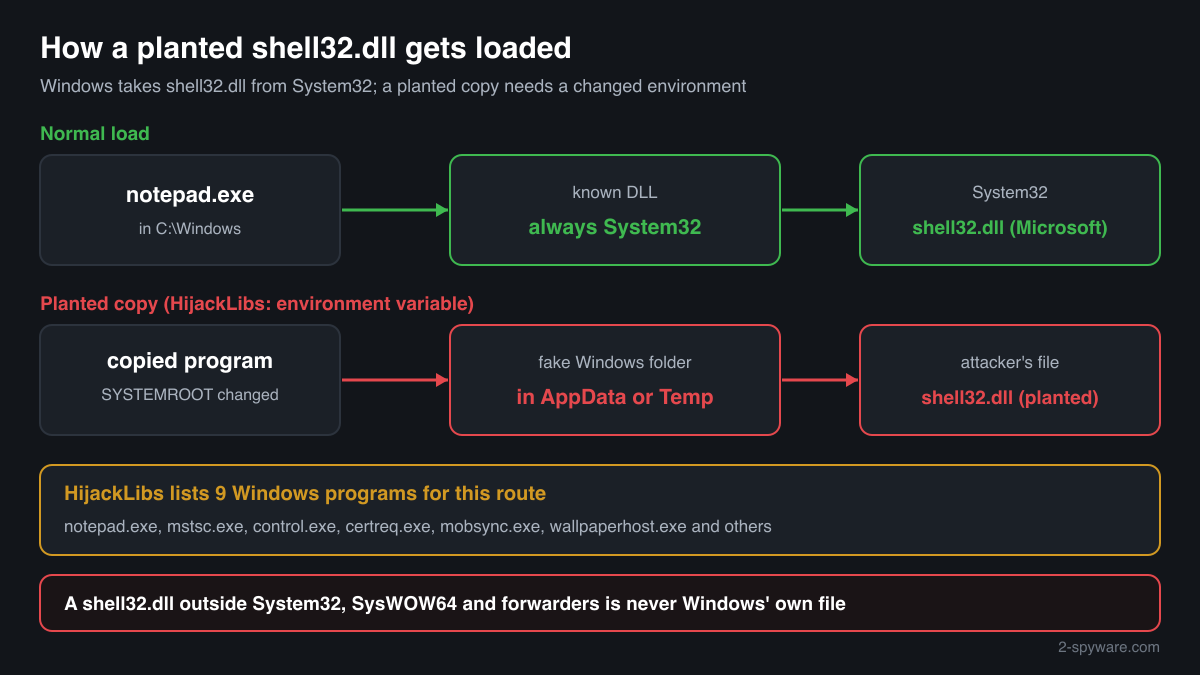
Windows treats shell32.dll as one of its known DLLs: when a program loads it in the normal way, Windows takes the copy from System32 and ignores a file with the same name in the program's folder. That protects most programs from a planted copy. It does not protect every path. HijackLibs lists nine Windows programs, among them notepad.exe, mstsc.exe, control.exe and certreq.exe, that can be made to load shell32.dll from another folder when the SYSTEMROOT environment variable of the starting process is changed, a technique described in Wietze Beukema's research on environment variables.
For an attacker, that is a way to run their own code inside a program signed by Microsoft, which looks less suspicious to a person reading a process list. The planted library usually sits in a folder the user can write to, such as AppData or Temp, together with a copy of the program or a script that starts it with the changed variable.
The name shell32.dll is also simply a good disguise. A file called shell32.dll in a Downloads or AppData folder looks like part of Windows to anyone who does not know where Windows keeps it. So the question is never whether shell32.dll is a virus, but which shell32.dll you are looking at: the copies in the Windows folders are Microsoft's, and any other copy is whatever the person who put it there made it to be.
About .dll files. A .dll file is a library: it cannot run on its own and is loaded into a program's process. It does not appear in Task Manager under its own name; Process Explorer shows which process loaded it.
How to tell Windows' shell32.dll from a copy that does not belong
A DLL is not listed in Task Manager as a process, so use the folder, the file properties, PowerShell and Process Explorer.
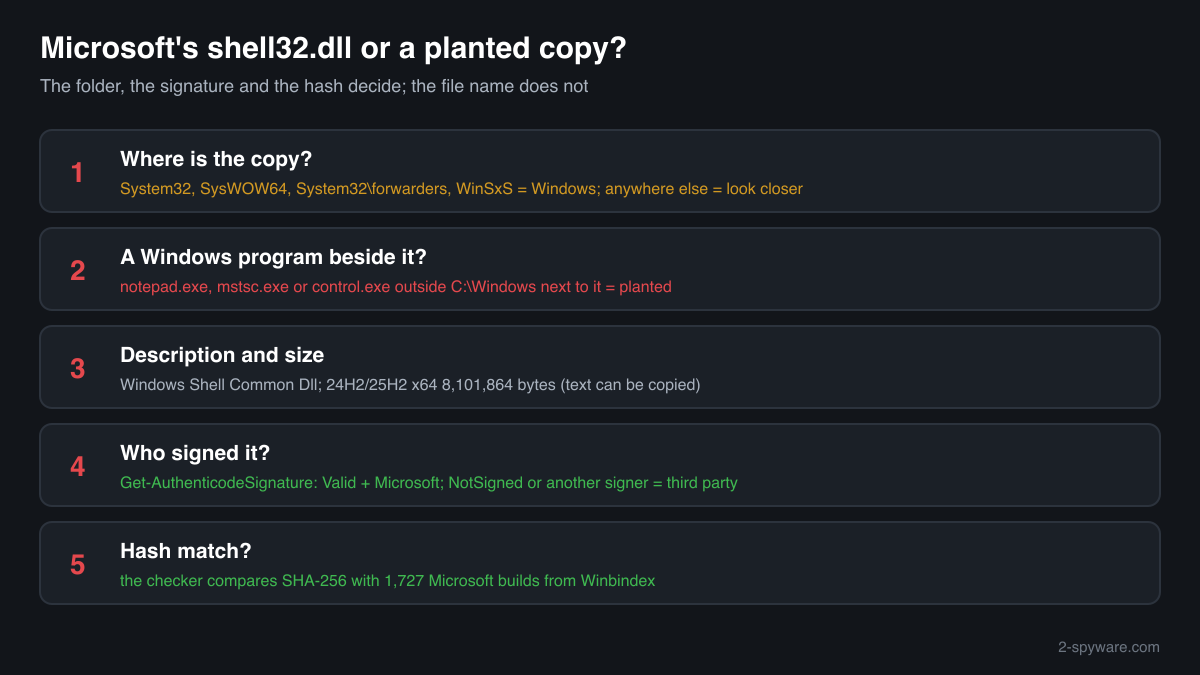
- Where the file is. List every copy with the command below. C:\Windows\System32, C:\Windows\SysWOW64 and C:\Windows\System32\forwarders are Windows' copies. Copies inside C:\Windows\WinSxS belong to Windows' component store. Every other path is a file that something else put there.
Get-ChildItem C:\ -Recurse -Filter shell32.dll -ErrorAction SilentlyContinue | Select-Object FullName, Length, @{n='Description';e={$_.VersionInfo.FileDescription}} - The Description field and the size. Right-click the file, Properties, Details. The genuine file says Windows Shell Common Dll, with Microsoft Corporation as the company and a Windows version number such as 10.0.26100. Compare the size with the facts table for your release. A planted copy can imitate these fields, so this check only rules files out.
- The digital signature. Windows' copy is signed by Microsoft through a catalog rather than inside the file, so the Properties window may show no Digital Signatures tab. PowerShell reads both kinds. Valid with a Microsoft signer means genuine; NotSigned or another signer on a copy outside the Windows folders means it is not Windows' file. The small forwarders copy is not signed on some builds, but its folder identifies it.
Get-AuthenticodeSignature 'C:\path\to\shell32.dll' | Format-List Status, SignatureType, SignerCertificate - What a program really loaded. Open Process Explorer from Microsoft Sysinternals, choose Find, Find Handle or DLL, type shell32.dll and press Search. The path column shows which copy each running process loaded. Every path should be in C:\Windows\System32 or C:\Windows\SysWOW64; a process that loaded shell32.dll from AppData, Temp or a user folder is running a planted copy.
- Compare the hash with Microsoft's builds. Use the checker on this page: it computes the SHA-256 in your browser and compares it with the known Microsoft builds. A copy outside Windows that matches is an unneeded Windows file someone copied there; one that does not match is not Microsoft's file.
- Scan before you trust or delete. Run a full scan in Windows Security, and the offline scan if a detection keeps coming back. Then look at what is next to the file: a copied Windows program, a script or a scheduled task in the same folder tells you how it was meant to start.
A match to a Microsoft build proves the file is Microsoft's, but not that it is in the right place: a genuine shell32.dll copied into AppData next to a Windows program can still be part of an attack. A copy outside the Windows folders that does not match is not Windows' file. What decides is the folder, what sits next to it, and what started it.
Check your shell32.dll
Choose the shell32.dll you are unsure about. Its SHA-256 checksum is calculated in your browser and compared with the 1765 Microsoft builds indexed from Windows releases and updates.
The file stays on your computer. Nothing is uploaded: the checksum is computed locally.
Warning signs and what they mean
| What you see | What it means |
|---|---|
| shell32.dll in AppData, Temp, ProgramData, Downloads or a user folder | Windows never puts it there. Look at the folder for a copied Windows program such as notepad.exe or control.exe, or a script, that would load it. |
| A Windows program such as notepad.exe or mstsc.exe running from a folder outside C:\Windows | A copied system program next to a planted DLL is a classic way to run code under a trusted name. Check the folder with Process Explorer and scan. |
| Process Explorer shows a process that loaded shell32.dll from a path outside System32 and SysWOW64 | That process runs a library that is not Windows' copy. Note the process and the path, end the process and scan the PC. |
| A shell32.dll that claims Microsoft Corporation but has no valid Microsoft signature | A file that imitates Windows' details. Legitimate tools have no reason to copy them. |
| A scheduled task, a Run key or a shortcut that starts a program from the same folder as a shell32.dll copy | Something set up the file to run again at every sign-in. Remove the task or entry together with the folder after a scan. |
| Windows Security names shell32.dll in System32 or SysWOW64 | Rare. Check the hash with the checker on this page and run the offline scan before anything else; repair the file with sfc /scannow if it does not match. |
Programs that have been made to load a fake shell32.dll
Each program below is genuine and signed, and security researchers have documented that it can be made to load a planted shell32.dll. Usually the attacker copies the program into another folder and puts a fake shell32.dll next to it: Windows looks in the program's own folder first. A shell32.dll next to one of these programs, outside the folders below, is the copy to check.
Where the genuine shell32.dll belongs: C:\Windows\System32C:\Windows\SysWOW64
The genuine shell32.dll is signed by: Microsoft Windows, a Windows catalog signature (Properties shows no Digital Signatures tab; check it with Get-AuthenticodeSignature)
| Program | How |
|---|---|
C:\Windows\System32\certreq.exesigned by Microsoft Windows | Environment variable |
C:\Windows\System32\control.exesigned by Microsoft Windows | Environment variable |
C:\Windows\System32\dpiscaling.exesigned by Microsoft Windows | Environment variable |
C:\Windows\System32\mobsync.exesigned by Microsoft Windows | Environment variable |
C:\Windows\System32\mstsc.exesigned by Microsoft Windows | Environment variable |
C:\Windows\System32\notepad.exesigned by Microsoft Windows | Environment variable |
C:\Windows\System32\presentationsettings.exesigned by Microsoft Windows | Environment variable |
C:\Windows\System32\shellappruntime.exesigned by Microsoft Windows | Environment variable |
C:\Windows\System32\wallpaperhost.exesigned by Microsoft Windows | Environment variable |
Source: the HijackLibs entry for shell32.dll, 1 public report.
Everyday problems with shell32.dll
I found a shell32.dll in a program or game folder
Some old installers and DLL download sites leave a copy of shell32.dll next to a program because someone tried to fix an error that way. Windows does not use such a copy for normal loads: it takes shell32.dll from System32.
Check the copy with the hash checker and the signature command above. If it is a Microsoft build, it is only an unneeded leftover and you can delete it. If it does not match and is not signed by Microsoft, treat it as not genuine and scan.
Two or three shell32.dll files are in the Windows folders
That is normal on 64-bit Windows: System32 holds the 64-bit library, SysWOW64 the 32-bit one, and many builds have a small file in System32\forwarders. All three are genuine Microsoft files with different sizes and hashes.
If one of them is damaged or replaced, repair it with Windows' own tools, run as administrator one after the other:
sfc /scannowDISM /Online /Cleanup-Image /RestoreHealthA security scan named a shell32.dll in a user folder
Leave the file quarantined. A shell32.dll outside the Windows folders has no normal reason to exist, and removing it never harms Windows, which keeps its own copies in System32 and SysWOW64.
Then check the same folder for programs, scripts or shortcuts that came with it, and look in Task Scheduler and in Settings, Apps, Startup for anything that starts from that folder.
shell32.dll versions by Windows release
The newest build indexed for each release, and the update that delivered it. 1727 Microsoft builds in total are known.
| Windows release | File version | Delivered by | Size, 64-bit |
|---|---|---|---|
| Windows 11 26H1 | 10.0.28000.3231 | KB5127646, Oct 13, 2026 | 8,122,704 bytes |
| Windows 11 25H2 | 10.0.26100.9711 | KB5127648, Oct 13, 2026 | 8,101,864 bytes |
| Windows 11 24H2 | 10.0.26100.9711 | KB5127648, Oct 13, 2026 | 8,101,864 bytes |
| Windows 11 23H2 | 10.0.22621.7649 | KB5126653, Oct 13, 2026 | 9,181,376 bytes |
| Windows 11 22H2 | 10.0.22621.7649 | KB5126653, Oct 13, 2026 | 9,181,376 bytes |
| Windows 11 21H2 | 10.0.22000.3147 | KB5044280, Oct 8, 2024 | 8,203,600 bytes |
| Windows 10 22H2 | 10.0.19041.7802 | KB5126657, Oct 13, 2026 | 7,914,584 bytes |
| Windows 10 21H2 | 10.0.19041.7802 | KB5126657, Oct 13, 2026 | 7,914,584 bytes |
| Windows 10 21H1 | 10.0.19041.7802 | KB5126657, Oct 13, 2026 | 7,914,584 bytes |
| Windows 10 20H2 | 10.0.19041.7802 | KB5126657, Oct 13, 2026 | 7,914,584 bytes |
Known versions of shell32.dll
A public DLL catalogue lists 38 versions of shell32.dll, from 4.72.3812.600 to 10.0.19041.572, by Microsoft Corporation. Its copies are uploaded by users and not verified, so a checksum match identifies the version, while the digital signature tells you whether the file is genuine. Even a genuine file clears only the file, not the folder: attackers ship genuine libraries next to a program they abuse, so where the copy sits still decides whether it is safe.
Every version with its checksums, and how to fix shell32.dll errors on uGetFix
Questions people ask
Is shell32.dll a virus?
No, not the Windows copy. shell32.dll is the Windows Shell Common Dll, and the files in System32, SysWOW64 and System32\forwarders are genuine Windows libraries. A shell32.dll in another folder is a different file with the same name. It can be a harmless leftover from an old fix attempt, or a planted library meant to run inside a Windows program, so check its signature and hash.
Can I delete shell32.dll?
Delete a copy outside the Windows folders whenever you like, after a scan: nothing in Windows uses it. Do not delete the copies in System32, SysWOW64 or System32\forwarders. File Explorer, the desktop and every program's Open and Save dialogs need them, and Windows treats them as protected system files that sfc /scannow restores.
Why would malware use the name shell32.dll?
Two reasons. The name looks like part of Windows, so a file listing or a quick look does not raise suspicion. And some Windows programs can be made to load a shell32.dll from another folder, as HijackLibs documents for nine of them, which lets the attacker's code run inside a program signed by Microsoft. Both depend on the file sitting outside the Windows folders.
Does a copy of shell32.dll in a program folder get loaded?
Not in the normal way. shell32.dll is one of Windows' known DLLs, so when a program asks for it, Windows takes the copy from System32 and ignores one in the program's folder. That is why copying shell32.dll next to a program never fixes an error. The documented exception is a program started with a changed SYSTEMROOT environment variable.
How do I check if my shell32.dll is genuine?
Check three things. The folder: only System32, SysWOW64 and System32\forwarders hold Windows' copies. The signature: Get-AuthenticodeSignature in PowerShell shows Valid with a Microsoft signer for the main files. The hash: the checker on this page compares the SHA-256 with 1,727 known Microsoft builds. A copy elsewhere that fails these checks is not Windows' file.
Why is shell32.dll so much smaller than it used to be?
Up to Windows 10 1809 the 64-bit file was over 20 MB, 22,151,888 bytes in 1809, and in 1903 it dropped to 7,275,384 bytes. The icons and other resources it used to carry are kept in a separate resource file in C:\Windows\SystemResources since then. A small size on a new Windows is therefore normal and not a sign of a replaced file.
Sources
- HijackLibs: shell32.dll
- Wietze Beukema: Save the Environment (Variable)
- Microsoft Learn: Dynamic-link library search order
- Microsoft Sysinternals: Process Explorer
- Winbindex, the Windows binaries index (m417z)
- Winbindex, the Windows binaries index (m417z)
Version data read on Oct 17, 2026.
Questions and experiences
Ask about this page: members and our editors answer. Reading is open; writing needs a free account.
…