
Windows file
ucrtbase.dll: genuine Universal C Runtime, or a copy that does not belong?
ucrtbase.dll is the Universal C Runtime, the standard C library of Windows that most modern programs load. The copies in System32, SysWOW64 and their downlevel subfolders are genuine Microsoft files and safe. On Windows 10 and Windows 11 programs never need a copy of their own, so a ucrtbase.dll anywhere else deserves a closer look.
Prefer to do it yourself? The manual steps follow.
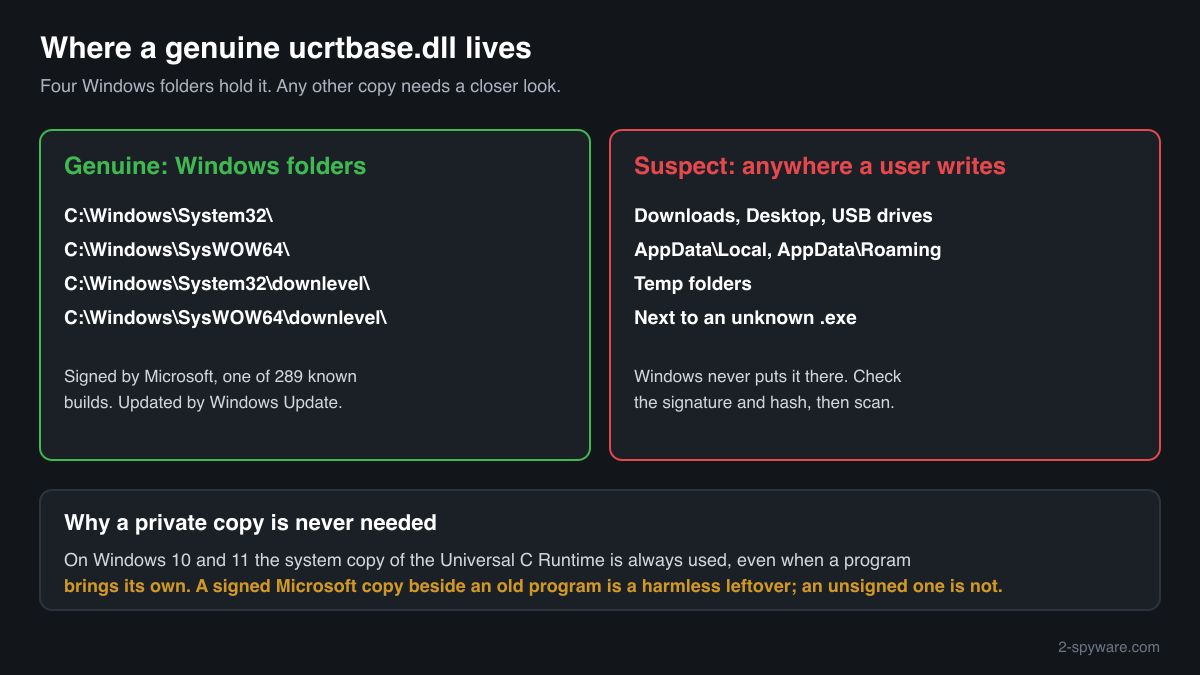
ucrtbase.dll in C:\Windows\System32 (and C:\Windows\SysWOW64 on 64-bit Windows, plus the downlevel subfolders of both) is a genuine Microsoft file and is safe. It is a core part of Windows 10 and Windows 11 and is updated through Windows Update. Do not delete or replace it: almost every program built with Visual C++ 2015 or later needs it.
Because nearly every program loads it, the name is a convenient disguise. A ucrtbase.dll in Downloads, Temp, AppData or next to an unknown program is not Windows' copy and is never needed there on Windows 10 or 11. Check the folder, the signature and the hash before you trust it.
- Description in the file
- Microsoft® C Runtime Library
- What it is
- The Universal C Runtime (UCRT): standard C functions for files, memory, strings, time and maths, shared by programs built with Visual C++ 2015, 2017, 2019 and 2022
- Genuine folders
- C:\Windows\System32, C:\Windows\SysWOW64 (32-bit, on 64-bit Windows) and the downlevel subfolder of each
- Not genuine by location
- Downloads, Temp, AppData, the Desktop, a USB drive, or next to a program you do not recognise. Windows never puts it there
- Size of the genuine file
- Between 900,136 and 1,403,856 bytes across the indexed builds. Windows 11 26H1: 1,403,856 bytes (64-bit)
- Newest indexed build
- Windows 11 26H1, delivered by KB5127646 on 13 October 2026
- Known Microsoft builds
- 289 builds across 20 Windows releases in Winbindex
- Older Windows
- Windows Vista, 7, 8 and 8.1 received it as a separate update, KB2999226 (Update for Universal C Runtime in Windows)
- Is it a process
- No. It is a library loaded into other programs, so it never appears on its own in Task Manager
What ucrtbase.dll does, and why a stray copy is a warning sign
ucrtbase.dll is the Universal C Runtime, often called the UCRT. It holds the standard C library: opening and reading files, allocating memory, handling text, dates, locales and maths. Until Visual C++ 2013 every compiler version shipped its own runtime file, such as msvcr120.dll. Since Visual C++ 2015 Microsoft keeps the C part in this one shared library and makes it a component of Windows itself, included in Windows 10, Windows 11 and Windows Server 2016 and later.
Programs also reach it under other names. Files such as api-ms-win-crt-runtime-l1-1-0.dll are small forwarders: a program asks for them, and Windows passes the calls on to ucrtbase.dll. The Visual C++ 2015-2022 Redistributable adds the compiler-specific files on top, such as vcruntime140.dll, and relies on ucrtbase.dll underneath. On Windows Vista, 7, 8 and 8.1 the runtime came as update KB2999226 through Windows Update.
Microsoft documents one rule that makes stray copies easy to judge: on Windows 10 and Windows 11 the Universal C Runtime in the system folder is always used, even if a program brings its own copy and even if that copy is newer. A ucrtbase.dll next to a program therefore does nothing useful on these releases. Some older installers still leave one behind for Windows 7 compatibility, which is harmless if it is a signed Microsoft build.
A copy that is not a Microsoft build is a different matter. Malware authors give their files the names of common Windows libraries so that a glance at a folder or a process's module list shows nothing unusual. A ucrtbase.dll that sits outside the Windows folders, matches no Microsoft hash and carries no Microsoft signature is not the C runtime, whatever its Properties say.
ucrtbased.dll, with a d at the end, is a different file: the debug build that comes with Visual Studio. It is not part of Windows and Microsoft does not allow it to be redistributed, so it belongs only on developers' PCs.
About .dll files. A .dll file is a library: it cannot run on its own and is loaded into a program's process. It does not appear in Task Manager under its own name; Process Explorer shows which process loaded it.
How to tell the genuine ucrtbase.dll from a fake
A DLL is not listed in Task Manager as a process, so use the folder, the file properties, PowerShell or Process Explorer.
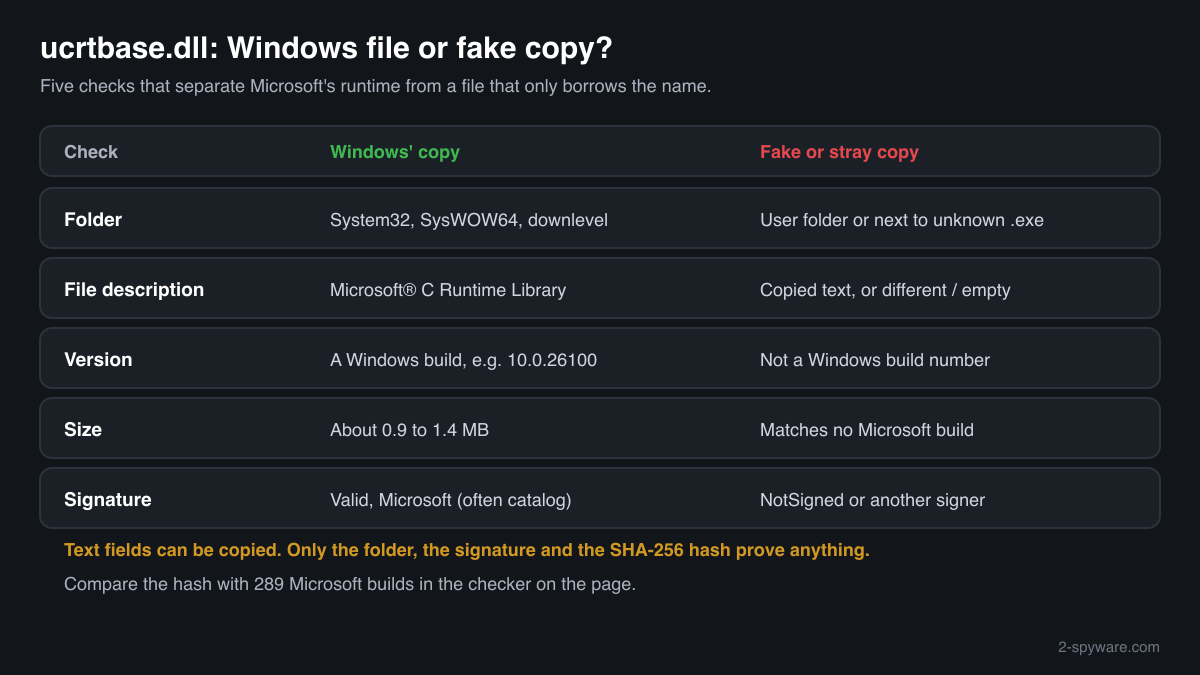
- Where the file is. List every copy with the command below. C:\Windows\System32, C:\Windows\SysWOW64 and their downlevel subfolders are Windows' copies, as are the copies Windows keeps in C:\Windows\WinSxS. A copy next to an installed program can be a leftover from an older installer. A copy in Downloads, Temp, AppData or another user folder has no normal reason to exist.
Get-ChildItem C:\ -Recurse -Filter ucrtbase.dll -ErrorAction SilentlyContinue | Select-Object FullName, Length, @{n='Description';e={$_.VersionInfo.FileDescription}} - The Description field, version and size. Right-click the file, Properties, Details. The genuine file says Microsoft® C Runtime Library, with Microsoft Corporation as the company and a Windows version number such as 10.0.26100. Genuine builds are about 0.9 to 1.4 MB. A fake can copy the text fields, so these only rule a file out, never in.
- The digital signature. Windows' copy is signed by Microsoft, often through a catalog rather than inside the file, so the Properties window may show no Digital Signatures tab. PowerShell reads both kinds. Valid with a Microsoft signer means genuine; NotSigned, HashMismatch or another signer means it is not Microsoft's file.
Get-AuthenticodeSignature 'C:\path\to\ucrtbase.dll' | Format-List Status, SignatureType, SignerCertificate - Which copy a program loads. Open Process Explorer from Microsoft Sysinternals, choose Find > Find Handle or DLL, type ucrtbase.dll and press Search. Almost every running program appears. The path column should read System32 or SysWOW64 for each; a process that loads ucrtbase.dll from a user folder is the one to investigate.
- Compare the hash with Microsoft's builds. Use the checker on this page: it computes the SHA-256 in your browser and compares it with the 289 known Microsoft builds. A match proves a Microsoft file. A file in a user folder that does not match is not the Universal C Runtime.
- Scan the PC. Run Microsoft Defender's full scan, and the offline scan if a detection keeps coming back. Scan especially when a non-matching copy sits in AppData or Temp, or when a program you do not recognise loads it.
A match to a Microsoft build proves the file is Microsoft's, wherever it sits. A non-matching file in System32 can also be a genuine build from an update newer than the index, so check its signature before drawing conclusions. A non-matching, unsigned copy outside the Windows folders is the case that needs action.
Check your ucrtbase.dll
Choose the ucrtbase.dll you are unsure about. Its SHA-256 checksum is calculated in your browser and compared with the 323 Microsoft builds indexed from Windows releases and updates.
The file stays on your computer. Nothing is uploaded: the checksum is computed locally.
Warning signs and what they mean
| What you see | What it means |
|---|---|
| ucrtbase.dll in Downloads, Temp, AppData\Roaming, AppData\Local or on the Desktop | No program needs a private copy on Windows 10 or 11, and installers do not leave one in these folders. Check the signature and hash, then scan. |
| A copy next to an unknown .exe in a folder you did not create | A library with a familiar name beside an unfamiliar program is a common way to hide a payload. Find out what the .exe is before running it again. |
| The file says Microsoft® C Runtime Library but has no valid Microsoft signature | It imitates Windows' copy. Genuine builds are always signed by Microsoft, directly or through a catalog. |
| The size is far outside 0.9 to 1.4 MB | No indexed Microsoft build is that size. A very small file with this name is not the runtime. |
| A website offers ucrtbase.dll or ucrtbased.dll as a download to fix an error | Windows delivers ucrtbase.dll itself, and ucrtbased.dll may not be redistributed at all. A file from such a site cannot be verified and can be altered. |
| Microsoft Defender names ucrtbase.dll in System32 or SysWOW64 | Rare. Check the hash and signature with the steps above before anything else, and run the offline scan. |
Everyday questions about ucrtbase.dll
I found several ucrtbase.dll files
That is normal. On 64-bit Windows, System32 holds the 64-bit file and SysWOW64 the 32-bit one, and both have a downlevel subfolder with another copy. Windows also keeps component copies in C:\Windows\WinSxS. All of these are Microsoft files with different sizes and hashes.
Copies next to installed programs are usually leftovers from older installers that bundled the runtime for Windows 7. Check their signature: a signed Microsoft build there is harmless, and Windows ignores it on Windows 10 and 11.
Only copies in user folders, or unsigned ones, need the checks on this page.
A program crashes and ucrtbase.dll is named as the faulting module
That is not a sign of infection. The runtime is where many programs end when they hit their own error, so crash reports often name it. It is a stability problem of that program, not a security finding.
Treat it as a security question only if the faulting module path in Event Viewer points outside System32 and SysWOW64.
My security software flagged a ucrtbase.dll
Look at the path first. A detection on a copy in AppData, Temp or Downloads should be taken seriously: leave it quarantined and run a full scan.
A detection on the copy in System32 or SysWOW64 is unusual. Compare its hash with the checker on this page and read the signature before you restore or delete anything:
Get-AuthenticodeSignature C:\Windows\System32\ucrtbase.dllucrtbase.dll versions by Windows release
The newest build indexed for each release, and the update that delivered it. 289 Microsoft builds in total are known.
| Windows release | File version | Delivered by | Size, 64-bit |
|---|---|---|---|
| Windows 11 26H1 | 10.0.28000.1450 | KB5127646, Oct 13, 2026 | 1,389,840 bytes |
| Windows 11 25H2 | 10.0.26100.9444 | KB5124010, Sep 22, 2026 | 1,377,512 bytes |
| Windows 11 24H2 | 10.0.26100.9444 | KB5124010, Sep 22, 2026 | 1,377,512 bytes |
| Windows 11 23H2 | 10.0.22621.7376 | KB5120240, Aug 11, 2026 | |
| Windows 11 22H2 | 10.0.22621.7376 | KB5120240, Aug 11, 2026 | |
| Windows 11 21H2 | 10.0.22000.1 | original release | 1,132,544 bytes |
| Windows 10 22H2 | 10.0.19041.6807 | KB5126657, Oct 13, 2026 | 1,045,976 bytes |
| Windows 10 21H2 | 10.0.19041.6807 | KB5126657, Oct 13, 2026 | 1,045,976 bytes |
| Windows 10 21H1 | 10.0.19041.6807 | KB5126657, Oct 13, 2026 | 1,045,976 bytes |
| Windows 10 20H2 | 10.0.19041.6807 | KB5126657, Oct 13, 2026 | 1,045,976 bytes |
Known versions of ucrtbase.dll
A public DLL catalogue lists 34 versions of ucrtbase.dll, from 10.0.10137.0 to 10.0.18362.815, by Microsoft Corporation. Its copies are uploaded by users and not verified, so a checksum match identifies the version, while the digital signature tells you whether the file is genuine. Even a genuine file clears only the file, not the folder: attackers ship genuine libraries next to a program they abuse, so where the copy sits still decides whether it is safe.
Every version with its checksums, and how to fix ucrtbase.dll errors on uGetFix
Questions people ask
Is ucrtbase.dll a virus?
No, not the Windows copy. ucrtbase.dll is the Universal C Runtime, and the files in System32, SysWOW64 and their downlevel subfolders are genuine Microsoft libraries that most programs depend on. A file with the same name in a user folder, without a Microsoft signature and with a hash that matches no Microsoft build, is a different file that only borrows the name.
Can I delete ucrtbase.dll?
Not the copies in the Windows folders: nearly every modern program and many parts of Windows load them, and Windows treats them as protected system files. A signed Microsoft copy next to an installed program can be left alone, since Windows 10 and 11 ignore it. An unsigned copy in a user folder can be removed after a scan.
Why is there a ucrtbase.dll in a program's folder?
Most often an older installer bundled the Universal C Runtime so the program could run on Windows 7 or 8.1 without update KB2999226. On Windows 10 and Windows 11 that copy is never used, because Windows always loads the runtime from the system folder. If the copy is signed by Microsoft it is harmless; if it is not, treat it as suspect.
What is the difference between ucrtbase.dll and ucrtbased.dll?
ucrtbase.dll is the release build that is part of Windows. ucrtbased.dll is the debug build installed with Visual Studio for developers testing their own programs. Microsoft does not allow debug runtimes to be redistributed, so ucrtbased.dll belongs only on developers' PCs. A download of it from a DLL site is unverifiable and a reason for caution.
Are the api-ms-win-crt-*.dll files safe?
The genuine ones are. Files such as api-ms-win-crt-runtime-l1-1-0.dll are small Microsoft forwarders that pass a program's calls on to ucrtbase.dll, and they live in the same Windows folders. Like ucrtbase.dll, they are signed by Microsoft. The same checks apply: folder, signature and hash.
How do I check if my ucrtbase.dll is genuine?
Check three things. The folder: System32, SysWOW64 and their downlevel subfolders hold Windows' copies. The signature: Get-AuthenticodeSignature in PowerShell shows Valid with a Microsoft signer for the genuine file. The hash: the checker on this page compares the SHA-256 with 289 known Microsoft builds. A file in a user folder that fails these checks is not Windows' file.
Does ucrtbase.dll use the internet or run on its own?
No. It is a library of basic functions that runs only inside the programs that load it and starts nothing by itself. Network traffic you see comes from the program that loaded it, not from the runtime. Process Explorer shows which programs have it loaded and from which folder.
Sources
- Microsoft Learn: Universal CRT deployment
- Microsoft Support: Update for Universal C Runtime in Windows (KB2999226)
- Microsoft Learn: Determine which DLLs to redistribute
- Microsoft Sysinternals: Process Explorer
- Winbindex, the Windows binaries index (m417z)
- Winbindex, the Windows binaries index (m417z)
Version data read on Oct 14, 2026.
Questions and experiences
Ask about this page: members and our editors answer. Reading is open; writing needs a free account.
…