
Program file
ucrtbased.dll: Microsoft's debug C runtime, or a copy that should not be there?
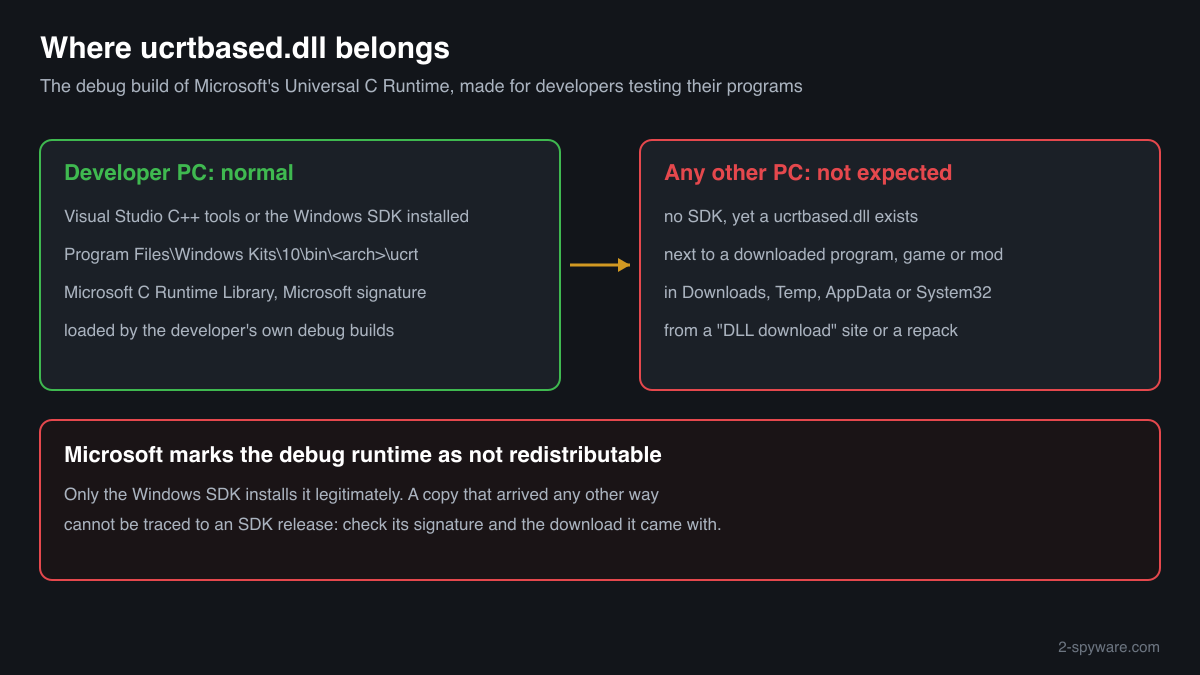
ucrtbased.dll is the debug build of Microsoft's Universal C Runtime. It comes with the Windows SDK, which Visual Studio installs for C++ developers, and Microsoft does not allow it to be redistributed. On a developer PC it is normal. On a PC without Visual Studio or the SDK, a copy came from a download site or a bundled program, and its origin needs checking.
Prefer to check it yourself? The manual checks follow.
A ucrtbased.dll under Windows Kits\10\bin in Program Files, or placed by Visual Studio on a PC where someone develops in C++, describing itself as Microsoft C Runtime Library and signed by Microsoft, is the genuine debug runtime. It is not a process: debug programs load it while their developer tests them.
Microsoft lists the file as not redistributable, so no download site and no program installer has the right to hand it out. A ucrtbased.dll next to a downloaded program, in Downloads, Temp or AppData, or on a PC that never had the SDK, came from a source that cannot be traced and deserves the checks below.
- Publisher
- Microsoft Corporation
- Description in the file
- Microsoft C Runtime Library (the same text as the release ucrtbase.dll; the d in the name is the difference)
- Installed by
- The Windows SDK, which Visual Studio's Desktop development with C++ workload includes. Not by Windows and not by the Visual C++ Redistributable
- Genuine folder
- Program Files or Program Files (x86), under Windows Kits\10\bin\<architecture>\ucrt, and the places where Visual Studio's setup puts it for debug programs
- Redistributable
- No. Microsoft marks the debug UCRT, ucrtbased.dll and its import library ucrtd.lib, as not redistributable
- Size
- About 1.6 MB (32-bit) and 1.8 MB (64-bit) for the two Microsoft copies of version 10.0.10056.0 in a public DLL catalogue
- Signed by
- Microsoft (check the signature; a copy without a valid Microsoft signature is not as Microsoft shipped it)
- Runs as a process
- No. It is a library loaded into debug programs built with the /MDd option
What ucrtbased.dll does
The Universal C Runtime is the C library that programs built with Visual Studio 2015 and later use for files, memory, text and maths. Its release build, ucrtbase.dll, is part of Windows 10 and Windows 11. Its debug build, ucrtbased.dll, carries the same functions with extra checks and assertion dialogs that help developers find mistakes, and a program uses it when it is compiled in the Debug configuration with the /MDd option.
Microsoft documents that the debug UCRT libraries are installed with the Windows SDK, separately from the retail files, and that they are not redistributable. That is why an ordinary PC has no ucrtbased.dll at all, and why a program asking for it was published by mistake as a debug build. The file itself is harmless; the question on a PC without the SDK is who put a copy there and what came with it.
About .dll files. A .dll file is a library: it cannot run on its own and is loaded into a program's process. It does not appear in Task Manager under its own name; Process Explorer shows which process loaded it.
How to check a copy of ucrtbased.dll
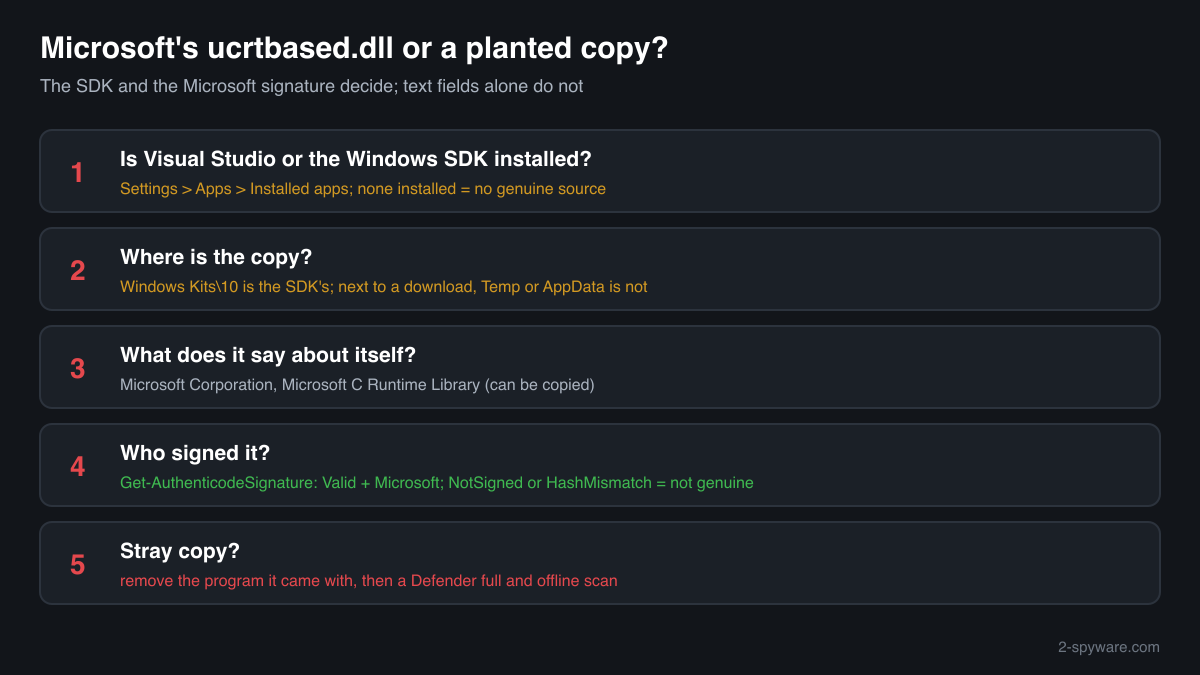
Four questions decide it: whether the PC has the Windows SDK at all, where the copy is, what it says about itself and who signed it. A library never shows in Task Manager under its own name, so use these checks.
- Find out whether the PC has Visual Studio or the Windows SDK. Open Settings, Apps, Installed apps and search for Visual Studio and Windows Software Development Kit. If neither is installed and nobody develops software on the PC, no genuine installer has put ucrtbased.dll on it.
- List every copy and where it sits. Copies under Program Files\Windows Kits\10 are the SDK's. Look closer at copies next to a downloaded program, in a game or mod folder, in Downloads, Desktop, Temp or AppData.
Get-ChildItem -Path C:\ -Filter ucrtbased.dll -Recurse -ErrorAction SilentlyContinue | Select-Object FullName, Length, LastWriteTime - Read the version resource. Microsoft's file reports Microsoft Corporation as the company and Microsoft C Runtime Library as the description, with a Windows SDK version number. Empty or different fields mean it is not Microsoft's file; matching fields can be copied, so this check alone does not clear a file.
(Get-Item "C:\path\to\ucrtbased.dll").VersionInfo | Format-List CompanyName, FileDescription, FileVersion - Check the digital signature. Status Valid with a Microsoft signer means an unmodified Microsoft build. NotSigned, HashMismatch or another signer means the file is not Microsoft's as shipped.
Get-AuthenticodeSignature "C:\path\to\ucrtbased.dll" | Format-List Status, SignerCertificate - Compare the checksum. Use the file check on this page. A match identifies one of the known Microsoft copies. No match is not proof of a fake, because each SDK release has its own build; the signature check above decides.
A valid Microsoft signature clears that one DLL. It says nothing about the program or download that brought a copy to a PC without the SDK, which is where any real risk sits.
Check your ucrtbased.dll
Choose the ucrtbased.dll you are unsure about. Its SHA-256 and SHA-1 checksums are calculated in your browser and compared with the 2 versions of the file known from a public DLL catalogue.
The file stays on your computer. Nothing is uploaded: the checksum is computed locally.
Do you need ucrtbased.dll?
On a developer PC, yes: debug builds in Visual Studio need it, and the Visual Studio Installer manages it. On any other PC nothing legitimate needs it, so a copy there is a leftover from a download and can go, together with whatever brought it.
- Leave the SDK's copies alone. Copies under Windows Kits\10 or placed by Visual Studio belong to the SDK. If one is damaged or flagged, repair Visual Studio through the Visual Studio Installer instead of deleting or replacing the file.
- Find what brought a stray copy. Look at the folder the copy sits in and at its date. A copy next to a program or game usually came with that download; a copy in System32 on a PC without the SDK was put there by hand or by a script that followed a fix-it guide.
- Uninstall the program it came with if you do not trust it. Open Settings, Apps, Installed apps, find the program and uninstall it. Portable programs and repacks often have no uninstaller: then delete the program's whole folder, not only ucrtbased.dll.
- Run a Microsoft Defender full scan. Open Windows Security, Virus and threat protection, Scan options, Full scan. Quarantine what it finds. Look at Protection history afterwards for anything found in Downloads, Temp or AppData.
- Run the offline scan if the source was a crack or a DLL site. Some malware hides while Windows runs. The offline scan restarts the PC and scans before Windows starts. It takes about 15 minutes.
Start-MpWDOScan - Check what starts with Windows. Open Task Manager, Startup apps, and Task Scheduler. After the scan, disable and remove entries that run a program from AppData, ProgramData or Temp that you do not recognise.
Warning signs
| What you see | What it means |
|---|---|
| A website offers ucrtbased.dll as a download to fix an error | Microsoft does not allow the debug runtime to be redistributed. The file cannot be traced to an SDK release and can be altered. |
| ucrtbased.dll on a PC without Visual Studio or the Windows SDK | No genuine installer put it there. Find the download it came with. |
| A program installer or repack that includes ucrtbased.dll | Someone shipped a debug build together with a file they had no right to share. Treat the whole package with caution. |
| The signature check shows NotSigned or HashMismatch | The file is not an unmodified Microsoft build. |
| ucrtbased.dll in Downloads, Temp or AppData | No debug program loads it from there. Find where it came from and scan. |
| Copies under Program Files\Windows Kits\10 on a developer PC | Normal. The Windows SDK installs the debug runtime there. |
Known versions of ucrtbased.dll
A public DLL catalogue lists 2 versions of ucrtbased.dll, from 10.0.10056.0 to 10.0.10056.0, by Microsoft Corporation. Its copies are uploaded by users and not verified, so a checksum match identifies the version, while the digital signature tells you whether the file is genuine. Even a genuine file clears only the file, not the folder: attackers ship genuine libraries next to a program they abuse, so where the copy sits still decides whether it is safe.
Every version with its checksums, and how to fix ucrtbased.dll errors on uGetFix
Questions people ask
Is ucrtbased.dll a virus?
No, Microsoft's ucrtbased.dll is the debug build of the Universal C Runtime, installed with the Windows SDK for developers. It is harmless on a developer PC. Because Microsoft does not allow it to be redistributed, a copy on any other PC came from a download site or a bundled program, and those sources are what needs checking.
Why do I have ucrtbased.dll if I never installed Visual Studio?
Something else put it there: a program or game that shipped as a debug build with the file next to it, a DLL download site you used to fix an error, or a fix-it script. Find the folder and date of the copy, check its signature, and remove the program it came with if you do not trust it.
Is it safe to download ucrtbased.dll from a DLL site?
No. The debug runtime is not redistributable, so no such site has a legitimate copy to offer, and you cannot tell whether the file was altered. A DLL in a program's folder runs with your rights whenever that program starts. The safe answer to the error is a release build of the program.
How can I tell Microsoft's ucrtbased.dll from a fake?
Check three things. The folder: Windows Kits\10 under Program Files, on a PC with the SDK, is where Microsoft's copy belongs. The signature: Get-AuthenticodeSignature should show Valid and Microsoft. The version resource: company Microsoft Corporation, description Microsoft C Runtime Library. A copy that fails any of these is not Microsoft's as shipped.
Can I delete ucrtbased.dll?
On a PC without Visual Studio or the Windows SDK, yes: nothing legitimate needs it there, and only a debug program that should not have been published stops working. On a developer PC, do not delete it by hand; Visual Studio's debug builds need it, and the Visual Studio Installer manages it.
What is the difference between ucrtbase.dll and ucrtbased.dll?
ucrtbase.dll is the release Universal C Runtime, part of Windows 10 and Windows 11 and serviced by Windows Update. ucrtbased.dll is the debug build from the Windows SDK, made for developers and not licensed for sharing. Both describe themselves as Microsoft C Runtime Library, so the name and the folder tell them apart.
Sources
- Microsoft Learn: Upgrade your code to the Universal CRT (debug UCRT libraries are not redistributable, Windows Kits\10\bin\<architecture>\ucrt)
- Microsoft Learn: C runtime (CRT) and C++ standard library (STL) lib files (ucrtd.lib, ucrtbased.dll, /MDd)
- MITRE ATT&CK T1574.001: Hijack Execution Flow: DLL
- Microsoft Learn: Get-AuthenticodeSignature
Version data read on Oct 17, 2026.
Questions and experiences
Ask about this page: members and our editors answer. Reading is open; writing needs a free account.
…