
Program file
unarc.dll: an installer's unpacking library, or a sign of a risky download?
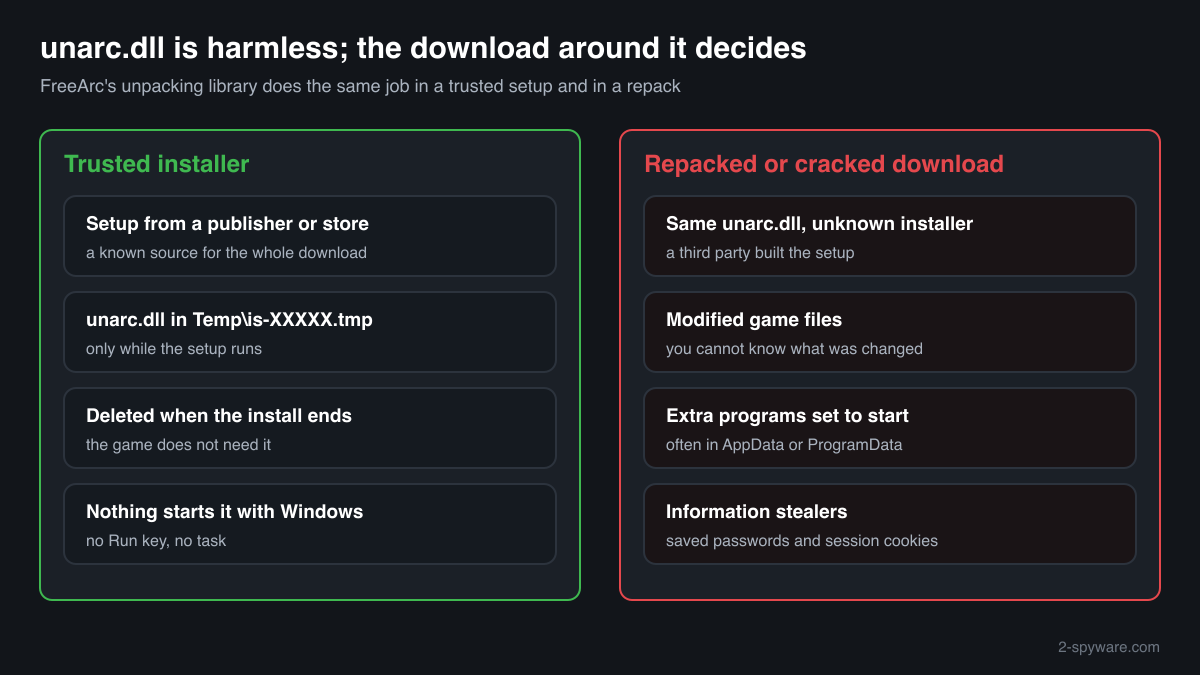
unarc.dll is the unpacking library of FreeArc, a free archiver. Setup programs that store their data in FreeArc archives extract it to a temporary folder, use it during the install and delete it. The file itself is harmless, but it is a fixture of repacked and cracked game installers, so where your copy came from matters more than the file.
Prefer to check it yourself? The manual checks follow.
A unarc.dll inside an installer's temporary folder while a setup is running, or left in the folder of a program you installed from its publisher, is FreeArc's genuine library. It is not a process and does nothing on its own: a setup program loads it to unpack files, and after the install nothing needs it.
Most copies people ask about came with repacked or cracked games. The DLL is rarely the harmful part. The installer and the other files in such a download are where malware is usually found, and a copy in System32, AppData or a startup location has no reason to be there.
- Belongs to
- FreeArc, a free archiver by Bulat Ziganshin. unarc.dll is its unpack-only library, made to be built into other programs
- Description in the file
- Often none. The one copy in a public DLL catalogue reports no company, no description and version 0.0.0.0, so a blank Details tab is not a warning sign by itself
- Used by
- Setup programs, mostly built with Inno Setup, that unpack FreeArc archives, and above all repacked game installers
- Expected folder
- An installer's temporary folder, named is- plus random letters and .tmp under the user's Temp folder, during an install; sometimes the installed program's own folder. Never C:\Windows
- Size
- About 300 KB for the 32-bit copy in the catalogue (304,087 bytes). 64-bit builds of the unpacker also exist
- Runs as a process
- No. It is a library loaded by the setup program that unpacks with it
- Needed after the install
- No. The installed game or program does not use it
What unarc.dll does
FreeArc compresses data very tightly, and unarc.dll is the part of it that only unpacks. FreeArc's source code includes an example script that shows an Inno Setup installer how to call the library: the installer carries unarc.dll inside its own .exe, extracts it to a temporary folder, hands it the archive and the target folder, and receives progress and error codes back. When the install ends, the temporary folder and the DLL are removed.
Because it makes large games much smaller to download, the same technique became the standard for repacked game installers, which recompress a game far beyond what its publisher shipped. That is why unarc.dll is so strongly linked to cracked games and why security programs flag the name often. The library does the same job in either case. What changes is the installer around it: a repack comes from an unknown third party, its contents may be modified, and such downloads are a common way to deliver malware.
About .dll files. A .dll file is a library: it cannot run on its own and is loaded into a program's process. It does not appear in Task Manager under its own name; Process Explorer shows which process loaded it.
How to check a copy of unarc.dll
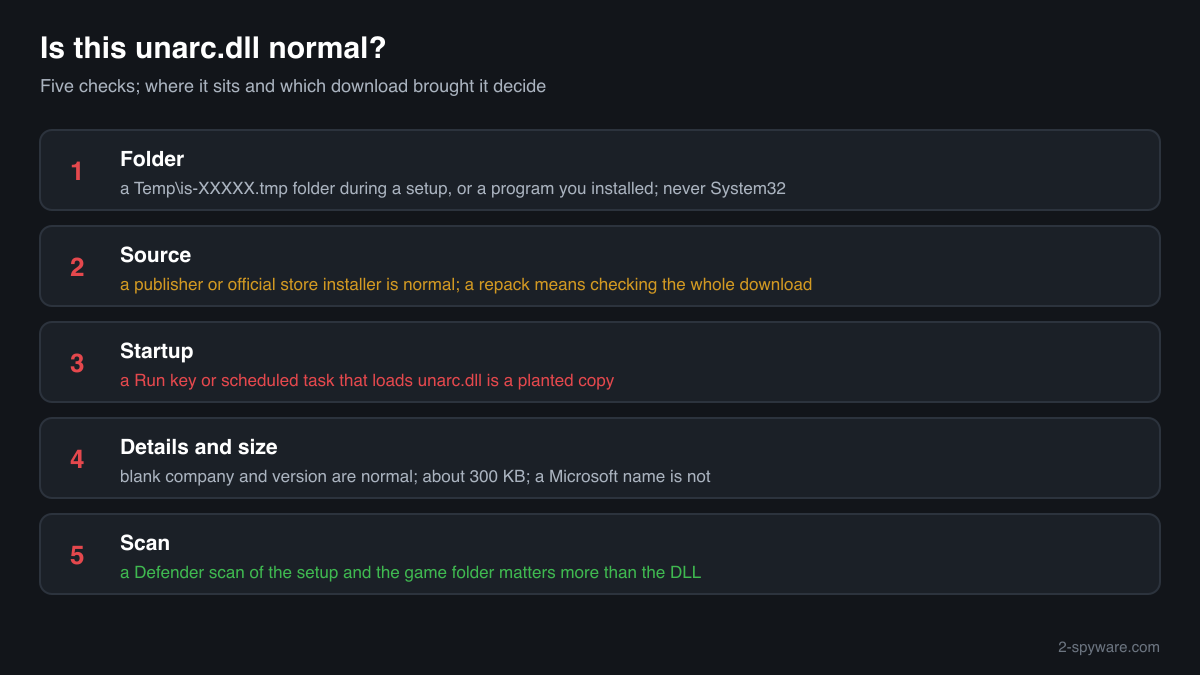
A library never shows in Task Manager under its own name, and this one usually carries no publisher details. Four questions decide it: where the file is, what came with it, whether anything starts it, and whether a scan finds something in the download.
- List every copy and where it sits. A copy in an is-....tmp folder under Temp while a setup runs, or in a program folder you installed yourself, is expected. Look closer at copies in System32, SysWOW64, AppData, ProgramData or a folder with nothing else in it.
Get-ChildItem -Path C:\ -Filter unarc.dll -Recurse -ErrorAction SilentlyContinue | Select-Object FullName, Length, LastWriteTime - Find out which download brought it. Look at the folder the copy sits in and the installer that created it. A setup from a publisher or an official store is a normal source. A repacked or cracked game installer is not, and then the whole download is the thing to check, not the DLL.
- Check that nothing starts it. unarc.dll has no reason to run when Windows starts. Search the startup entries and scheduled tasks for its name. A Run key or task that loads it through rundll32 or a script is a planted copy.
Get-CimInstance Win32_StartupCommand | Where-Object { $_.Command -match 'unarc' } | Select-Object Name, Command, Location; Get-ScheduledTask | Where-Object { ($_.Actions.Execute + ' ' + $_.Actions.Arguments) -match 'unarc' } - Read the version resource and the size. A blank company and description are normal for this library, so they neither clear nor condemn a copy. A copy far larger than a few hundred kilobytes, or one that claims to be a Microsoft file, is not FreeArc's library.
(Get-Item "C:\path\to\unarc.dll").VersionInfo | Format-List CompanyName, FileDescription, FileVersion; (Get-Item "C:\path\to\unarc.dll").Length - Scan the download folder. Run a Microsoft Defender custom scan on the installer's folder and on the installed game's folder. A detection on the setup .exe or on other files of the game matters more than one on unarc.dll.
A clean unarc.dll says nothing about the rest of a repacked download. The installer, a patched game .exe or an extra program set to start with Windows is where malware from such downloads usually sits.
Check your unarc.dll
Choose the unarc.dll you are unsure about. Its SHA-256 and SHA-1 checksums are calculated in your browser and compared with the 1 versions of the file known from a public DLL catalogue.
The file stays on your computer. Nothing is uploaded: the checksum is computed locally.
Do you need unarc.dll?
No installed game or program needs unarc.dll after its setup has finished. A copy left in a program folder you installed from its publisher is harmless and can stay or go. A copy that came with a repacked or cracked game is a reason to remove that game, not only the DLL.
- Leave a running installer alone. During a setup from a trusted source, the copy in the Temp folder is in use. The installer deletes it at the end; if it stays behind after an aborted install, empty the Temp folder after a restart.
- Uninstall a game that came as a repack or crack. Open Settings, Apps, Installed apps, find the game and uninstall it. Repacks often have no uninstaller, or leave files behind: then delete the game's whole folder and the installer you downloaded.
- Run a Microsoft Defender full scan. Open Windows Security, Virus and threat protection, Scan options, Full scan. Quarantine what it finds, and look at Protection history for anything found in Downloads, Temp or AppData.
- Run the offline scan. Some malware bundled with game downloads hides while Windows runs. The offline scan restarts the PC and scans before Windows starts. It takes about 15 minutes.
Start-MpWDOScan - Check what starts with Windows. Open Task Manager, Startup apps, and Task Scheduler. Disable and remove entries you do not recognise that run a program from AppData, ProgramData or Temp, and any that mention unarc.dll.
- Change passwords if you ran an installer you did not trust. Malware bundled with free game downloads is often an information stealer that takes saved browser passwords and session cookies, game store and chat logins included. Change passwords from a clean device and sign out of other sessions.
- Get the game from its official store. The clean way to play the game is a copy from its official store, where the launcher downloads and checks every file. It also ends the unpacking errors repacked installers are known for.
Warning signs
| What you see | What it means |
|---|---|
| unarc.dll in System32, SysWOW64 or a startup location | No installer uses it from there. Someone or something put it there; find out what and scan. |
| A Run key or scheduled task that loads unarc.dll | An unpacking library has no reason to start with Windows. Treat it as a planted copy. |
| The installer asked you to turn off protection before it ran | The usual lure for malware bundled with cracked games. Remove the game and scan. |
| A copy that claims to be a Microsoft or other well-known publisher's file | FreeArc's library carries no such details. A file dressed up as something else is not it. |
| unarc.dll in a game folder that came from a repack | The DLL is likely FreeArc's, but the download is of unknown origin. Check and scan the whole game. |
| A copy in an is-....tmp folder under Temp while a trusted setup runs | Normal. The installer deletes it when it finishes. |
Known versions of unarc.dll
A public DLL catalogue lists 1 versions of unarc.dll, from 0.0.0.0 to 0.0.0.0, by Unknown. Its copies are uploaded by users and not verified, so a checksum match identifies the version, while the digital signature tells you whether the file is genuine. Even a genuine file clears only the file, not the folder: attackers ship genuine libraries next to a program they abuse, so where the copy sits still decides whether it is safe.
Every version with its checksums, and how to fix unarc.dll errors on uGetFix
Questions people ask
Is unarc.dll a virus?
No, FreeArc's unarc.dll is an unpacking library that installers use and then delete. Security programs flag the name often because it is a fixture of repacked and cracked game installers, and those downloads frequently carry malware in other files. A copy from a trusted installer is harmless; a copy from a repack means the whole download needs checking.
Why does my security program flag unarc.dll?
Some detections hit the name because it appears in so many cracked downloads, and some are about the installer that carries it. Look at which file the detection names. If it is the setup .exe or another file of a repacked game, the detection is likely right. If it is a copy from a publisher's own installer, report it to the maker of your security program as a false detection.
Is it safe to keep a game installed from a repack if unarc.dll is clean?
The DLL being clean tells you nothing about the rest. You cannot know what a third party changed in the game, its .exe or its installer, and repacks are a common way to spread information stealers. The safe choice is to remove that game, run a full and an offline scan, and get the game from its official store.
Can I delete unarc.dll?
Yes, once the install is done. No installed game or program needs it to run, so deleting a leftover copy changes nothing. If it came with a game you no longer trust, uninstall the whole game and scan instead of deleting only the DLL, because the DLL is rarely the risky file.
Why is there no publisher or signature on unarc.dll?
FreeArc is a free archiver, and builds of its unpacking library usually come without company details: the copy in a public DLL catalogue reports no company, description or version. That makes a missing signature normal for this file, so judge a copy by where it sits and which download brought it.
What is the difference between unarc.dll and ISDone.dll?
unarc.dll is FreeArc's library that does the unpacking. ISDone.dll is a separate helper some installers use to drive the unpacking and show its progress and errors. Both belong to the installer and neither is needed after it finishes. The checks on this page apply to both files in the same way.
Sources
- FreeArc source code: example of using unarc.dll in an Inno Setup installer
- FreeArc'Next by Bulat Ziganshin on GitHub (64-bit unarc builds, issue 18)
- MITRE ATT&CK T1574.001: Hijack Execution Flow: DLL
- Microsoft Learn: Get-AuthenticodeSignature
Version data read on Oct 17, 2026.
Questions and experiences
Ask about this page: members and our editors answer. Reading is open; writing needs a free account.
…