
Windows file
user32.dll: genuine Windows file, or a fake copy outside System32?
user32.dll is the Multi-User Windows USER API Client DLL, the library behind every window, menu, dialog box, keystroke and mouse click on Windows. The copies in System32 and SysWOW64 are genuine and essential. Keyloggers and other malware call its functions like any program does, but a user32.dll in any other folder is not Windows' copy and deserves a check.
Prefer to do it yourself? The manual steps follow.
user32.dll in C:\Windows\System32 (and C:\Windows\SysWOW64 on 64-bit Windows) is a genuine Microsoft file and is safe. Every program that shows a window depends on it, so never delete, quarantine or replace it.
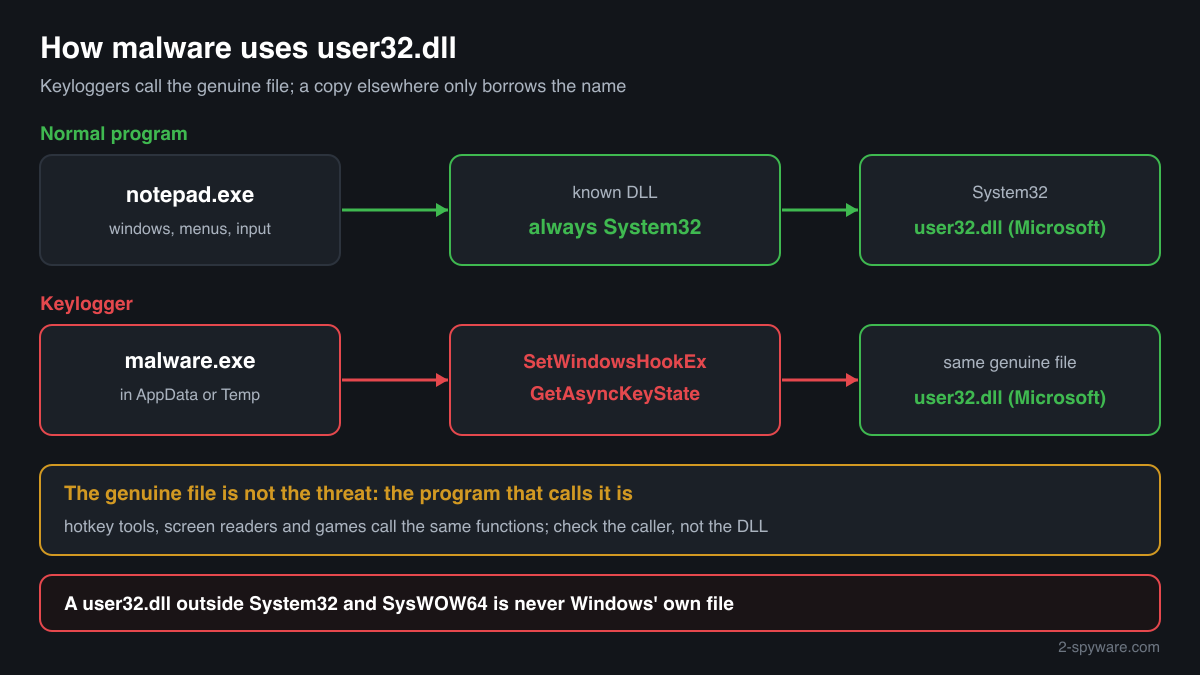
Windows always loads its own user32.dll, so malware has no reason to replace it and simply calls its functions, for example to record keystrokes or watch which window is active. A file with this name in Downloads, Temp, AppData, ProgramData or a program folder is not Windows' copy: either a stray file someone copied there to fix an error, or a file that uses a trusted name to hide.
- Description in the file
- Multi-User Windows USER API Client DLL
- What it is
- The Windows USER library: windows, menus, dialog boxes and controls, the clipboard, timers, and the keyboard and mouse messages programs receive
- Genuine folders
- C:\Windows\System32\user32.dll and, on 64-bit Windows, C:\Windows\SysWOW64\user32.dll for 32-bit programs
- Not genuine by location
- Any user32.dll in Downloads, Temp, AppData, ProgramData, a program or game folder, or on a USB drive. Windows never puts it there
- Size of the genuine file
- Windows 11 24H2 and 25H2: 1,974,768 bytes (64-bit), 2,023,488 bytes (32-bit). Windows 10 22H2: 1,693,752 bytes (64-bit), 1,690,104 bytes (32-bit)
- Newest indexed build
- Windows 11 26H1: 10.0.28000.2605, delivered by KB5121000 on 11 August 2026. Windows 11 24H2 and 25H2: 10.0.26100.9549, KB5127648, 13 October 2026
- Known Microsoft builds
- 1,085 builds across 20 Windows releases in Winbindex, including smaller Microsoft files of the same name, about 130 KB to 420 KB
- Is it a process
- No. It is a library loaded into every program with a window, so it never appears on its own in Task Manager
What user32.dll does, and why malware uses it without replacing it
user32.dll holds the USER part of the Windows API. A program calls it to create its windows, menus, buttons and dialog boxes, to move and redraw them, to use the clipboard and timers, and to receive messages: every key press, mouse movement and click reaches a program as a message delivered through user32.dll. Much of the real work is done in the Windows kernel, and user32.dll passes those calls on through win32u.dll. A program without a window can run without it, but File Explorer, browsers, games and almost every desktop app load it.
Windows treats user32.dll as a known DLL. Its name is listed in the registry key HKEY_LOCAL_MACHINE\SYSTEM\CurrentControlSet\Control\Session Manager\KnownDLLs, and for every DLL on that list Windows uses its own copy instead of searching the program's folder. That is the difference from files such as dinput8.dll, which tools replace with a proxy in a game folder. A user32.dll dropped next to an .exe is not loaded from there.
Malware therefore does not need a fake user32.dll. It uses the genuine one, as every program does. Keyloggers call functions such as SetWindowsHookEx, GetAsyncKeyState and GetForegroundWindow to record what you type and in which window, and SetWindowsHookEx can also make Windows load a DLL into other programs. The same functions serve hotkey tools, screen readers and macro software, so seeing user32.dll in a process or a crash report says nothing about infection.
One more legitimate use looks suspicious at first sight: lock shortcuts and scripts often run rundll32.exe user32.dll,LockWorkStation to lock the PC. Where a file named user32.dll does matter is outside the Windows folders. Malware authors give their files the names of system files so that a quick look in a folder does not stand out. Such a file is not Windows' library, whatever its name, and only its folder, signature and hash show what it is.
About .dll files. A .dll file is a library: it cannot run on its own and is loaded into a program's process. It does not appear in Task Manager under its own name; Process Explorer shows which process loaded it.
How to tell the genuine user32.dll from a copy
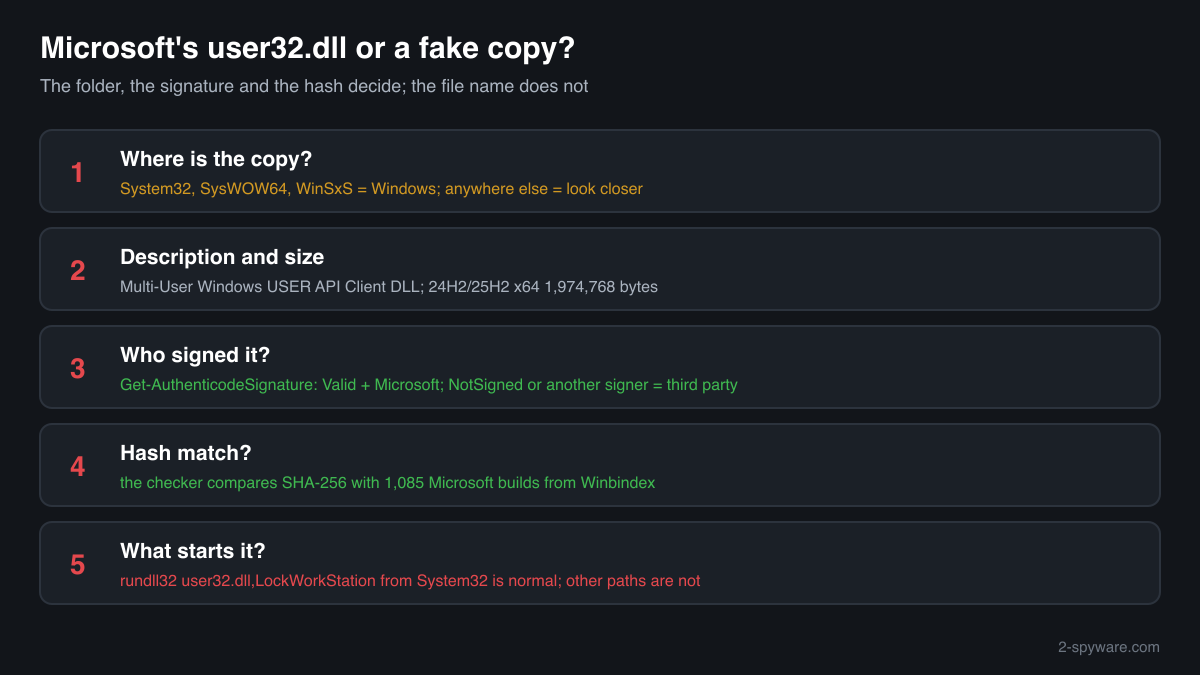
A DLL is not listed in Task Manager as a process, so use the folder, the file properties, PowerShell or Process Explorer.
- Where the file is. List every copy with the command below. C:\Windows\System32 and C:\Windows\SysWOW64 are Windows' copies, and copies inside C:\Windows\WinSxS belong to Windows updates. Every other path deserves a closer look.
Get-ChildItem C:\ -Recurse -Filter user32.dll -ErrorAction SilentlyContinue | Where-Object FullName -notlike 'C:\Windows\WinSxS\*' | Select-Object FullName, Length, @{n='Description';e={$_.VersionInfo.FileDescription}} - The Description field and the version. Right-click the file, Properties, Details. The genuine file says Multi-User Windows USER API Client DLL, with Microsoft Corporation as the company and a Windows version number such as 10.0.26100 or 10.0.19041. A copy can imitate these fields, so this check only rules files out.
- The digital signature. The genuine copies are signed by Microsoft, often through a catalog rather than inside the file, so the Properties window may show no Digital Signatures tab. PowerShell reads both kinds. Valid with a Microsoft signer means genuine; NotSigned or another signer means the file is not Microsoft's.
Get-AuthenticodeSignature 'C:\path\to\user32.dll' | Format-List Status, SignatureType, SignerCertificate - Which copy processes really load. Open Process Explorer from Microsoft Sysinternals, choose Find > Find Handle or DLL, type user32.dll and press Search. Every process should show C:\Windows\System32\user32.dll, or C:\Windows\SysWOW64\user32.dll for 32-bit programs. A loaded user32.dll from any other path is a serious warning sign.
- Compare the hash with Microsoft's builds. Use the checker on this page: it computes the SHA-256 in your browser and compares it with 1,085 known Microsoft builds. A copy outside the Windows folders that matches is a genuine file someone copied there; one that does not match is not Microsoft's file.
- Look at what starts with Windows. Open Task Manager, Startup apps, and Task Scheduler, and look for entries that run rundll32.exe with a user32.dll path. rundll32.exe user32.dll,LockWorkStation is a normal lock command; a path outside System32 or another function name deserves a scan.
A match to a Microsoft build proves the file is Microsoft's, but not that it belongs where you found it: a genuine user32.dll in Downloads is still a stray copy. A copy that matches nothing and sits outside the Windows folders is not a Windows file, whatever it is called. The genuine copies cannot tell you whether a keylogger is running, because every program with a window loads them.
Check your user32.dll
Choose the user32.dll you are unsure about. Its SHA-256 checksum is calculated in your browser and compared with the 1085 Microsoft builds indexed from Windows releases and updates.
The file stays on your computer. Nothing is uploaded: the checksum is computed locally.
Warning signs and what they mean
| What you see | What it means |
|---|---|
| user32.dll in Downloads, Temp, AppData, ProgramData or on a USB drive | Windows never stores it there. Either it was copied by hand to fix an error, or a file uses the name to hide. Check the hash and scan. |
| user32.dll next to a program's or game's .exe | Usually a leftover from a download site or an old fix guide; Windows ignores it because it always uses its own copy. If you did not put it there, scan the PC. |
| A running process shows user32.dll loaded from a path outside the Windows folders | Not normal on any Windows release. Note the process, run Microsoft Defender's offline scan, and check the file with the hash checker. |
| A file named user32.exe, user32.dll.exe or a misspelling such as usr32.dll | A name built to look like the system file. Windows has no such files. Treat it as suspicious. |
| A startup entry or scheduled task runs rundll32 with a user32.dll outside System32 | Windows' own lock command uses the genuine file in System32. An entry that points elsewhere is a persistence method; remove it and scan. |
| Accounts logged out, password resets or sign-in alerts you did not cause | Possible keylogging or stolen browser sessions, which use user32.dll functions but not a fake file. Scan, then change passwords from another device. |
| A website or pop-up says user32.dll is infected and offers a download to fix it | A scare page. The genuine file is protected by Windows, and a downloaded user32.dll or cleaner from such a page is the real risk. |
Everyday problems with user32.dll
A program says the procedure entry point could not be located in USER32.dll
This is a compatibility error, not a damaged or infected file. The program asks for a function that the user32.dll of your Windows version does not contain, because it was built for a newer Windows. GetDpiForWindow, for example, needs Windows 10, version 1607 or later.
Install a version of the program that supports your Windows, or update Windows. Copying a user32.dll from another PC does not add the function.
Event Viewer shows Faulting module name: USER32.dll after a crash
user32.dll appears in many crash reports because Windows runs the program's own window code from it, so a fault in the program or in an overlay or add-on inside it surfaces there. The program named in Faulting application name is the one to update or reinstall.
If many unrelated programs crash with the same module, check the Windows files, run as administrator one after the other:
sfc /scannowDISM /Online /Cleanup-Image /RestoreHealthTwo user32.dll files are in the Windows folders
That is normal on 64-bit Windows: System32 holds the 64-bit library and SysWOW64 the 32-bit one, and the WinSxS folder keeps further copies for Windows updates. All of them are Microsoft files with different sizes and hashes.
Copies anywhere else are not needed by Windows. Check them with the hash checker, then delete the ones you or a fix guide put there.
user32.dll versions by Windows release
The newest build indexed for each release, and the update that delivered it. 1085 Microsoft builds in total are known.
| Windows release | File version | Delivered by | Size, 64-bit |
|---|---|---|---|
| Windows 11 26H1 | 10.0.28000.2804 | KB5120996, Aug 27, 2026 | |
| Windows 11 25H2 | 10.0.26100.9549 | KB5127648, Oct 13, 2026 | 1,974,768 bytes |
| Windows 11 24H2 | 10.0.26100.9549 | KB5127648, Oct 13, 2026 | 1,974,768 bytes |
| Windows 11 23H2 | 10.0.22621.6630 | KB5129242, Sep 14, 2026 | 1,794,736 bytes |
| Windows 11 22H2 | 10.0.22621.6630 | KB5129242, Sep 14, 2026 | 1,794,736 bytes |
| Windows 11 21H2 | 10.0.22000.3079 | KB5044280, Oct 8, 2024 | 1,774,064 bytes |
| Windows 10 22H2 | 10.0.19041.7663 | KB5129236, Sep 14, 2026 | 1,693,752 bytes |
| Windows 10 21H2 | 10.0.19041.7663 | KB5129236, Sep 14, 2026 | 1,693,752 bytes |
| Windows 10 21H1 | 10.0.19041.7663 | KB5129236, Sep 14, 2026 | 1,693,752 bytes |
| Windows 10 20H2 | 10.0.19041.7663 | KB5129236, Sep 14, 2026 | 1,693,752 bytes |
Questions people ask
Is user32.dll a virus?
No, not the Windows copy. user32.dll is the Multi-User Windows USER API Client DLL, and the files in System32 and SysWOW64 are genuine Windows libraries that every program with a window uses. Malware calls their functions too, but does not need to replace them. A user32.dll in another folder is not Windows' copy: check its signature and hash before you trust it.
Do keyloggers use user32.dll?
Many do, through the genuine file. Functions such as SetWindowsHookEx and GetAsyncKeyState let a program see keystrokes, and the same functions serve hotkey tools, screen readers and games. That is why the file itself is not a sign of infection: what matters is which program calls it, so scan the PC if you suspect a keylogger.
Can I delete user32.dll?
Never delete the copies in System32 or SysWOW64: nothing with a window works without them, and they are protected system files. A copy in Downloads, a program folder or another place outside Windows can be removed after you check it, because Windows never uses it. Scan the PC first if you do not know how it got there.
Is rundll32.exe user32.dll,LockWorkStation safe?
Yes, when it points to the genuine file in System32. The command calls a user32.dll function that locks the PC, and lock shortcuts and scripts use it. A rundll32 entry that names a user32.dll in another folder, or a function you cannot identify, is not this command and deserves a scan.
How do I check if my user32.dll is genuine?
Check three things. The folder: System32 and SysWOW64 hold Windows' copies. The signature: Get-AuthenticodeSignature in PowerShell shows Valid with a Microsoft signer. The hash: the checker on this page compares the SHA-256 with 1,085 known Microsoft builds. A copy elsewhere that fails these checks is not Windows' file.
A site says my user32.dll is missing or corrupt. Should I download it?
No. A working Windows always has user32.dll, and Windows uses only its own copy. Downloaded copies match the wrong build at best and carry unknown code at worst. If Windows files are damaged, sfc /scannow and DISM repair them from Microsoft's originals, and Windows Update replaces user32.dll with its monthly updates.
Sources
- Microsoft Learn: Dynamic-link library search order (known DLLs)
- Microsoft Learn: GetDpiForWindow requirements
- Microsoft Learn: SetWindowsHookEx function
- Microsoft Learn: LockWorkStation function
- MITRE ATT&CK T1056.001: Input Capture, Keylogging
- MITRE ATT&CK T1036.005: Masquerading, Match Legitimate Name or Location
- Microsoft Sysinternals: Process Explorer
- Winbindex, the Windows binaries index (m417z)
- Winbindex, the Windows binaries index (m417z)
Version data read on Oct 17, 2026.
Questions and experiences
Ask about this page: members and our editors answer. Reading is open; writing needs a free account.
…