
Program file
vuser32.dll: a porting package's library, not a Windows file
vuser32.dll is not part of Windows, which has user32.dll instead. It comes with unofficial packages that make Windows Vista programs, such as InkBall, run on Windows XP, together with vkernel32.dll and other files named after Windows libraries with a v in front. It has no publisher, so where it sits and what came with it decide whether a copy is harmless.
Prefer to check it yourself? The manual checks follow.
A vuser32.dll in the folder of a ported program you installed on purpose, next to vkernel32.dll, vadvapi32.dll and the other v files, is part of that port. It is not a process: the patched program loads it instead of the Windows library user32.dll. No Windows release, driver or Microsoft runtime installs it.
Nobody signs or publishes this file, so no check can prove a copy is the port's own. A vuser32.dll in Temp, AppData, ProgramData or Downloads, alone, or on a PC where you never installed such a package, belongs to no program you know and needs a scan.
- Publisher
- None. The only copy in a public DLL catalogue reports company Unknown, no description and version 0.0.0.0, which means no version information
- Not to be confused with
- user32.dll, the Windows library in C:\Windows\System32, made and signed by Microsoft
- Shipped by
- Unofficial packages that port Windows Vista programs to Windows XP, with vkernel32.dll, vadvapi32.dll, vmsvcrt.dll, vntdll.dll, vshell32.dll and vslc.dll
- Expected folder
- The ported program's own folder, next to its .exe. Never C:\Windows, System32 or SysWOW64
- Build
- 32-bit, the catalogue copy
- In Windows 10 and 11
- No. Winbindex, the index of Windows 10 and 11 system files, has no entry for vuser32.dll
- Runs as a process
- No. It is a library loaded into the patched program
What vuser32.dll is
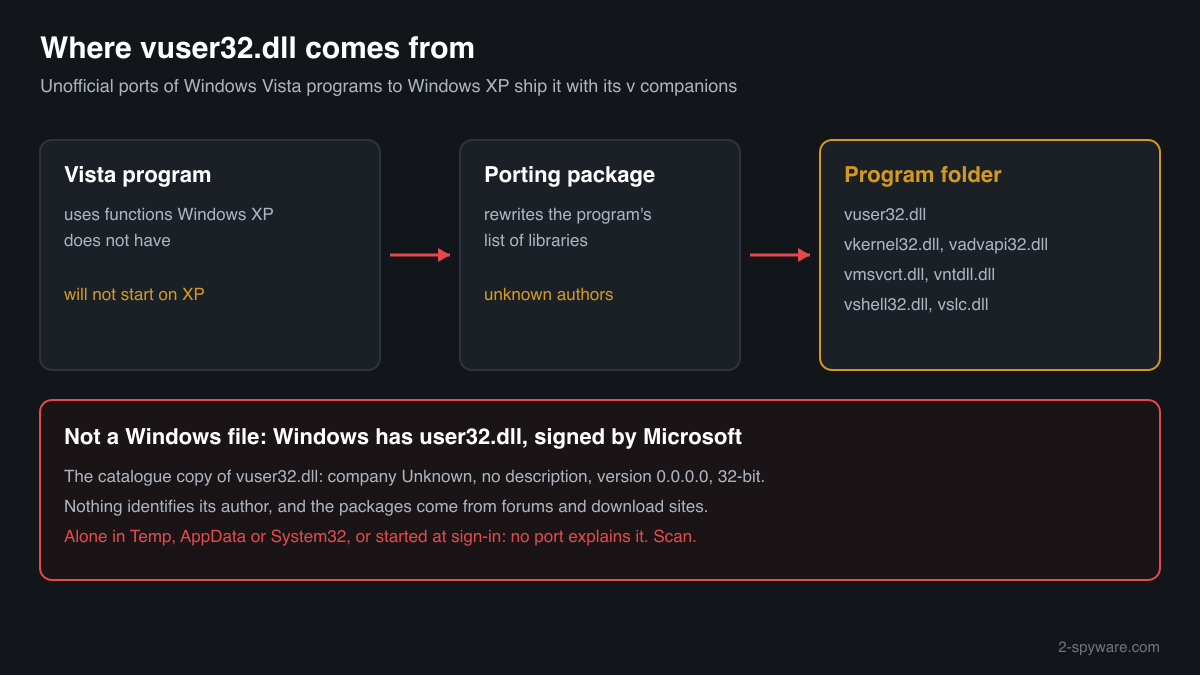
Windows programs use user32.dll, a Microsoft library, for windows, menus, the keyboard and the mouse. A program written for Windows Vista can use functions that Windows XP does not have, so it will not start there. Unofficial porting packages work around that: they rewrite the program's list of libraries so it loads vuser32.dll, vkernel32.dll and similar files from its own folder, and those stand-ins supply what XP lacks. A Microsoft Q&A thread from 2015 shows exactly this set being added to run the Vista version of InkBall on Windows XP.
That makes vuser32.dll a third-party file with no owner. The catalogue copy carries no company, no description and no version, and two of its companions, vntdll.dll and vshell32.dll, copy Windows descriptions such as NT Layer DLL with version 1.1.0.0, which is not a Windows version number. Nothing about the file is malicious by itself, but nothing identifies its author either, and the packages come from forums and download sites rather than from Microsoft.
About .dll files. A .dll file is a library: it cannot run on its own and is loaded into a program's process. It does not appear in Task Manager under its own name; Process Explorer shows which process loaded it.
How to check a copy of vuser32.dll
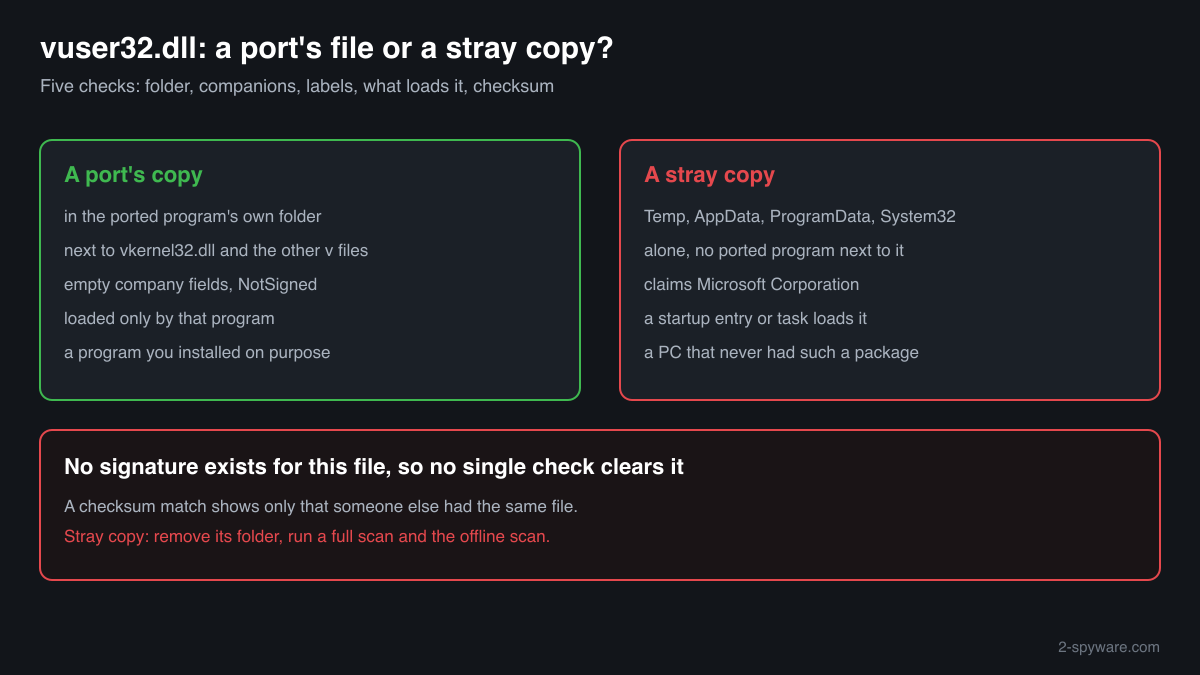
With no publisher and no signature, the usual identity checks cannot clear this file. What decides is where each copy sits, what sits next to it, and what starts it. A library never shows in Task Manager under its own name.
- List every copy and where it sits. A copy in the folder of a ported program you know, next to its .exe, is where the port puts it. Look closer at copies in Downloads, Desktop, Temp, AppData, ProgramData or any Windows folder.
Get-ChildItem -Path C:\ -Filter vuser32.dll -Recurse -ErrorAction SilentlyContinue | Select-Object FullName, Length, LastWriteTime - Look for its companions. A port ships a set: vkernel32.dll, vadvapi32.dll, vmsvcrt.dll, vntdll.dll, vshell32.dll or vslc.dll in the same folder, and a program that matches the package. A vuser32.dll alone, with no program next to it, fits no port.
Get-ChildItem -Path "C:\path\to\folder" -Filter v*.dll | Select-Object Name, Length - Read the version resource and the signature. Expect empty fields and NotSigned. If the file claims Microsoft Corporation as the company or a Windows version, it is not the port's file either: Microsoft never made a vuser32.dll, so a Microsoft label on it is borrowed.
(Get-Item "C:\path\to\vuser32.dll").VersionInfo | Format-List CompanyName, FileDescription, FileVersion; Get-AuthenticodeSignature "C:\path\to\vuser32.dll" | Format-List Status - Find what loads it. Only the patched program should. A Run entry, a scheduled task or a service that starts rundll32.exe or another program with vuser32.dll from AppData or Temp is not a port. Look in Task Manager, Startup apps, and in Task Scheduler.
- Compare the checksum. Use the file check on this page. A match with the one catalogue copy shows only that someone else had the same file. No match proves nothing either, because each package builds its own set.
A copy that passes these checks is a port's file in a port's folder. That does not vouch for the package itself or for the patched program next to it, which come from unknown authors.
Check your vuser32.dll
Choose the vuser32.dll you are unsure about. Its SHA-256 and SHA-1 checksums are calculated in your browser and compared with the 1 versions of the file known from a public DLL catalogue.
The file stays on your computer. Nothing is uploaded: the checksum is computed locally.
Do you need vuser32.dll?
Only if you use a ported program on Windows XP that came with it. Windows, drivers and Microsoft runtimes never use it. If you no longer use the program, or the copy failed the checks above, remove the program and its files, not only the DLL.
- Remove the ported program. Open Settings, Apps, Installed apps, find the program and uninstall it. Ports often come without an uninstaller: then delete the program's whole folder, which takes vuser32.dll and its v companions with it.
- Delete a stray copy only after you know nothing uses it. A vuser32.dll in Temp, Downloads or AppData that no program loads can go. If a startup entry or task points at it, remove that entry first, after the scan below.
- Run a Microsoft Defender full scan. Open Windows Security, Virus and threat protection, Scan options, Full scan. Quarantine what it finds and look at Protection history afterwards for anything found in the same folder or in Temp and AppData.
- Run the offline scan. Some malware hides while Windows runs. The offline scan restarts the PC and scans before Windows starts. It takes about 15 minutes.
Start-MpWDOScan - Check what starts with Windows. Open Task Manager, Startup apps, and Task Scheduler. Disable and remove entries that run a program from AppData, ProgramData or Temp that you do not recognise.
Warning signs
| What you see | What it means |
|---|---|
| vuser32.dll next to a ported program, with vkernel32.dll and other v files | The port's own set. Expected, if you installed that package on purpose. |
| vuser32.dll alone in Temp, AppData, ProgramData or Downloads | No port puts it there. Find out where it came from and scan. |
| vuser32.dll in C:\Windows, System32 or SysWOW64 | Windows never uses it. Something copied it there, often a manual fix gone wrong or a dropper. |
| The file claims Microsoft Corporation as its company | Microsoft never made a vuser32.dll. The label is borrowed. |
| A startup entry or task loads vuser32.dll | A port is loaded by its program, not at sign-in. Treat the entry as suspicious. |
| The package asked you to turn off protection before installing | The usual lure for bundled malware. Remove the package and scan. |
Known versions of vuser32.dll
A public DLL catalogue lists 1 versions of vuser32.dll, from 0.0.0.0 to 0.0.0.0, by Unknown. Its copies are uploaded by users and not verified, so a checksum match identifies the version, while the digital signature tells you whether the file is genuine. Even a genuine file clears only the file, not the folder: attackers ship genuine libraries next to a program they abuse, so where the copy sits still decides whether it is safe.
Every version with its checksums, and how to fix vuser32.dll errors on uGetFix
Questions people ask
Is vuser32.dll a virus?
Not by itself. It is a stand-in library from unofficial packages that port Windows Vista programs to Windows XP. It has no publisher and no signature, so no one vouches for any copy. One next to a ported program you installed on purpose is part of that port; one anywhere else, or one that starts with Windows, needs a scan.
Is vuser32.dll the same as user32.dll?
No. user32.dll is the Microsoft library in System32 that every Windows program uses for windows, menus, the keyboard and the mouse. vuser32.dll is a separate file from a porting package, which a patched program loads from its own folder instead of the Windows library. Windows itself never asks for it.
Why do I have vuser32.dll if I never ported anything?
Then it came with something else: a program or game bundle that included a ported Microsoft program, or a download whose origin you do not know. Find the folder it sits in and what else is there. If no program next to it explains it, remove that folder after a Microsoft Defender full scan.
Why does my security software flag vuser32.dll?
A file with no company, no version, no signature and a name close to a core Windows library looks like what malware does, so detections hit it easily. In a port's folder that can be a false alarm. Read the detection name: a generic one is common for such files, while a named trojan means the copy is not just a port's library.
Can I delete vuser32.dll?
Yes, if you do not use the ported program it came with: nothing in Windows needs it. Deleting only the DLL leaves the program broken and its other v files behind, so remove the program's whole folder instead. A copy outside any program folder can go once you know nothing starts it.
What are vkernel32.dll, vadvapi32.dll and the other v files?
The rest of the same set: stand-ins for kernel32.dll, advapi32.dll, msvcrt.dll, ntdll.dll, shell32.dll and slc.dll. A port ships them together and the patched program loads all of them from its folder. In the DLL catalogue, vkernel32.dll, vadvapi32.dll and vmsvcrt.dll also have no company, no description and version 0.0.0.0.
Sources
- Microsoft Q&A: InkBall not working on Windows XP (vuser32.dll and the other v files)
- Winbindex: Windows 10 and 11 system files index (no vuser32.dll; user32.dll listed)
- MITRE ATT&CK T1574.001: Hijack Execution Flow: DLL
- Microsoft Learn: Get-AuthenticodeSignature
Version data read on Oct 17, 2026.
Questions and experiences
Ask about this page: members and our editors answer. Reading is open; writing needs a free account.
…