
Program file
x3daudio1_7.dll: Microsoft's 3D audio library or another file using its name?
x3daudio1_7.dll is Microsoft's 3D Audio Library, X3DAudio 1.7, from the DirectX June 2010 runtime. The signed copies in System32 and SysWOW64 are normal. Windows does not ship the file, so a copy elsewhere came with a game or a download. A copy in a game folder or a user folder is the one worth checking.
Prefer to check it yourself? The manual checks follow.
An x3daudio1_7.dll in C:\Windows\System32 or C:\Windows\SysWOW64, signed by Microsoft Corporation, is the genuine X3DAudio 1.7 library that the DirectX End-User Runtimes (June 2010) installed. It is not a process and does nothing until a game loads it to position sounds around the player. Because Windows itself never includes it, its presence only tells you that a game or the DirectX installer put it there.
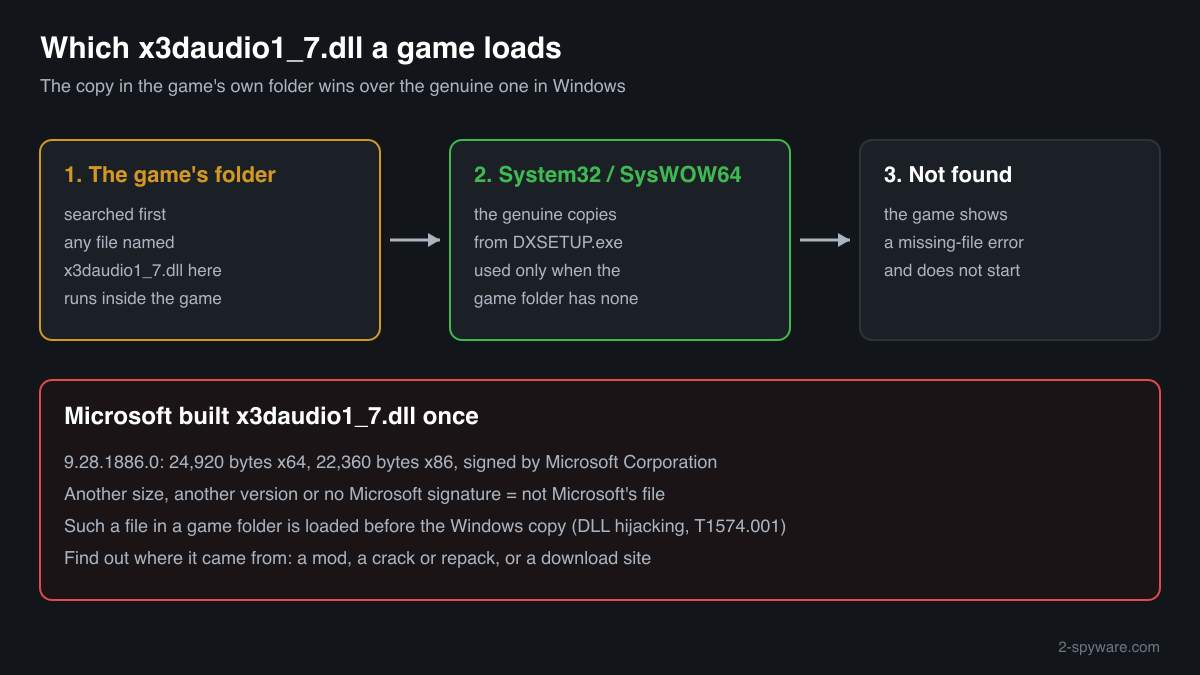
Microsoft built this file once, in February 2010, in two sizes: 24,920 bytes for x64 and 22,360 bytes for x86. A copy with another size, another version number or no Microsoft signature is not Microsoft's file. Since a game loads the copy in its own folder first, such a file runs inside the game, so find out where it came from.
- Publisher
- Microsoft Corporation
- Description in the file
- 3D Audio Library
- Installed by
- Microsoft DirectX End-User Runtimes (June 2010), directx_Jun2010_redist.exe, and by games that run that installer from their own DirectX or _CommonRedist folder
- Official version
- 9.28.1886.0, the only build of X3DAudio 1.7, read from Microsoft's installer on 17 October 2026
- Size of the genuine file
- 24,920 bytes (x64) and 22,360 bytes (x86)
- Exported functions
- Two: X3DAudioInitialize and X3DAudioCalculate
- Genuine folders
- C:\Windows\System32 (64-bit copy) and C:\Windows\SysWOW64 (32-bit copy on 64-bit Windows). A copy in a game folder is normal only if it is the same signed Microsoft file
- Signed by
- Microsoft Corporation
- Part of Windows
- No. Since Windows 8 the X3DAudio functions are built into Windows' own XAudio2 (xaudio2_8.dll, xaudio2_9.dll), so Windows has no x3daudio1_7.dll
- Runs as a process
- No. It is a library loaded into games that use 3D positional sound
What x3daudio1_7.dll does
X3DAudio is the part of Microsoft's game audio tools that turns positions into sound. A game tells it where the listener is and where each sound source is, and the library works out how loud the sound should be in each speaker, how much to delay it and how much Doppler shift to apply. The game then hands those numbers to XAudio2, the sound engine, which plays the sound. Version 1.7 belongs with XAudio2 2.7, the release in the last DirectX SDK of June 2010.
The June 2010 runtime installs every X3DAudio release from x3daudio1_2.dll to x3daudio1_7.dll side by side, because each game asks for the exact file it was built with. The file is small, has only two functions and is loaded at startup by many games from 2010 onward. That makes the name easy to imitate: a different DLL saved as x3daudio1_7.dll in a game folder is loaded in place of the Windows copy.
About .dll files. A .dll file is a library: it cannot run on its own and is loaded into a program's process. It does not appear in Task Manager under its own name; Process Explorer shows which process loaded it.
How to check a copy of x3daudio1_7.dll
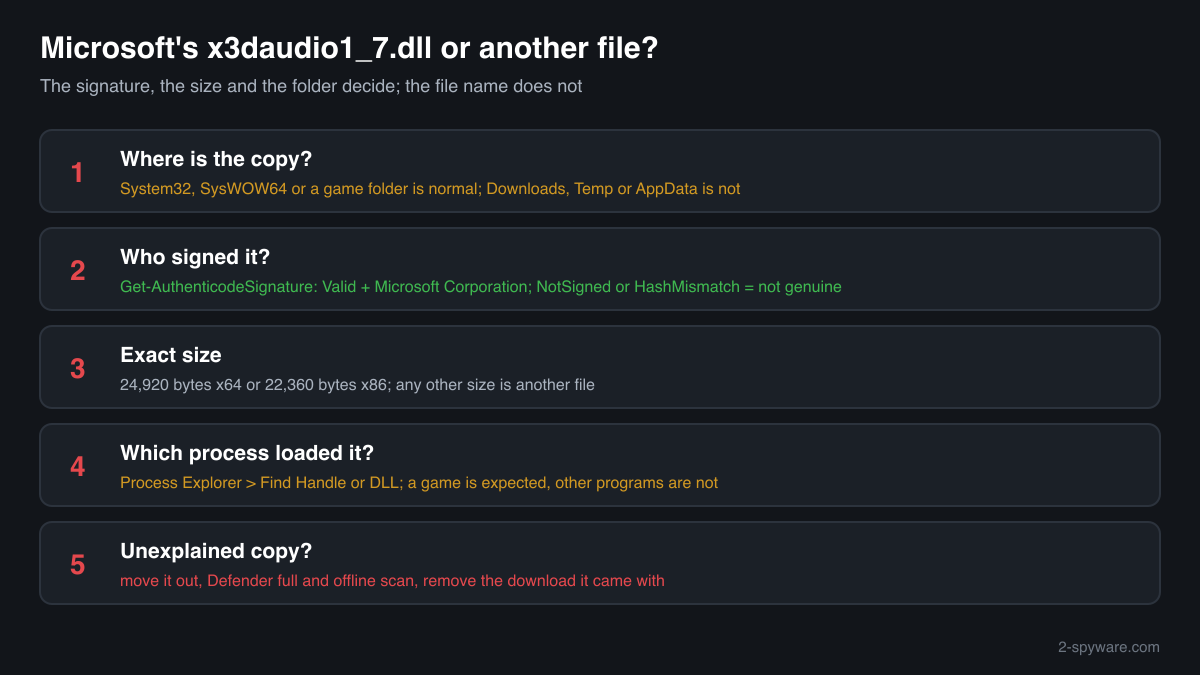
Three things decide whether a copy is genuine: the folder, the signature and the exact size. A library never appears in Task Manager under its own name, so use these checks.
- Find every copy on the drive. Run this in PowerShell. The copies in System32 and SysWOW64 are the runtime's. Copies in game folders need the signature check. A copy in Downloads, Temp or AppData, with no game around it, is the one to look at hardest.
Get-ChildItem -Path C:\ -Filter x3daudio1_7.dll -Recurse -ErrorAction SilentlyContinue | Select-Object FullName, Length, LastWriteTime - Check the digital signature. Status must read Valid and the signer Microsoft Corporation. NotSigned or a different signer means the file is not Microsoft's. HashMismatch means a Microsoft file was changed after it was signed, which no legitimate tool needs to do.
Get-AuthenticodeSignature "C:\path\to\x3daudio1_7.dll" | Format-List Status, SignerCertificate - Compare the size and the checksum. There is only one genuine build: 24,920 bytes for x64 and 22,360 bytes for x86, version 9.28.1886.0. Any other size is not Microsoft's x3daudio1_7.dll. The file check on this page compares the SHA-256 checksum with both official builds.
- See which program has it loaded. Start the game, then in Process Explorer (Microsoft Sysinternals) open Find, Find Handle or DLL, and type x3daudio1_7.dll. The result lists each process and the full path of the copy it loaded. A program that plays no game audio loading this file from a user folder is a warning sign.
- Look at what came with it. If the copy sits in a game folder, check the date it appeared and the files beside it. An unfamiliar .exe, files dated the day you unpacked a crack or repack, or a readme telling you to copy everything over the game point to a download, not to Microsoft's installer.
A valid Microsoft signature and a matching checksum prove the file is genuine. They say nothing about other files in the same folder, which a download may have added next to it.
Check your x3daudio1_7.dll
Choose the x3daudio1_7.dll you are unsure about. Its SHA-256 and SHA-1 checksums are calculated in your browser and compared with the 2 versions of the file known from a public DLL catalogue.
The file stays on your computer. Nothing is uploaded: the checksum is computed locally.
Do you need x3daudio1_7.dll?
Keep the copies in System32 and SysWOW64: games built with the June 2010 DirectX SDK stop starting without them. Remove only a copy that failed the checks, together with what it came with.
- Leave the Windows copies in place. The signed files in System32 and SysWOW64 belong to the DirectX runtime and harm nothing. Deleting them breaks games and removes no threat.
- Move a failed copy out of the game folder. If a copy in a game folder is not signed by Microsoft or has the wrong size, move it to a separate folder and keep it until the scans below are finished. The game then uses the Windows copy.
- Run a Microsoft Defender full scan. Open Windows Security, Virus and threat protection, Scan options, Full scan. Let it quarantine what it finds before you delete anything by hand.
- Run the offline scan. Code that runs inside a game process can hide while Windows is running. The offline scan restarts the PC and scans before Windows starts, in about 15 minutes.
Start-MpWDOScan - Uninstall the download it came with. If the copy arrived with a crack, repack or trainer, remove that program from Settings, Apps, Installed apps, delete its folder, and check Settings, Apps, Startup and Task Scheduler for anything that starts from the same place.
- Restore the genuine file if a game needs it. Microsoft's DirectX End-User Runtimes (June 2010) installer puts the genuine x3daudio1_7.dll back into System32 and SysWOW64. Take it only from Microsoft's download page or the game's own DirectX folder.
Warning signs
| What you see | What it means |
|---|---|
| An x3daudio1_7.dll whose size is not 24,920 or 22,360 bytes | Microsoft built only these two files. Another size means another file under this name. |
| The signature check shows NotSigned or a signer other than Microsoft Corporation | Not Microsoft's file. Find out which program put it there and scan. |
| The signature check shows HashMismatch | A Microsoft file changed after signing. Treat it as malicious. |
| x3daudio1_7.dll in Downloads, Temp or AppData next to an .exe that is not a game | No program outside a game has a reason to carry its own 3D audio library. Check the signature and scan. |
| A crack or repack told you to copy its files, x3daudio1_7.dll among them, into the game folder | That copy runs every time the game starts. Its safety depends only on the source of the download. |
| A site offers x3daudio1_7.dll on its own with no source or checksum | You cannot know what the file contains. Take it from Microsoft's installer and compare the size and checksum. |
| Signed Microsoft copies in System32, SysWOW64 and a game folder | Normal. Some games carry the genuine file next to their .exe. |
Known versions of x3daudio1_7.dll
A public DLL catalogue lists 2 versions of x3daudio1_7.dll, from 9.28.1886.0 to 9.28.1886.0, by Microsoft Corporation. Its copies are uploaded by users and not verified, so a checksum match identifies the version, while the digital signature tells you whether the file is genuine. Even a genuine file clears only the file, not the folder: attackers ship genuine libraries next to a program they abuse, so where the copy sits still decides whether it is safe.
Every version with its checksums, and how to fix x3daudio1_7.dll errors on uGetFix
Questions people ask
Is x3daudio1_7.dll a virus?
No, the genuine x3daudio1_7.dll is Microsoft's 3D Audio Library and is harmless. It is signed by Microsoft Corporation, sits in System32 and SysWOW64, and is 24,920 bytes (x64) or 22,360 bytes (x86). Any program can use the same name, so the name proves nothing. Check the signature, size and folder of the copy you are unsure about.
Why is x3daudio1_7.dll on my PC if Windows does not include it?
A game put it there. Many games run Microsoft's DirectX June 2010 installer on first start, from a DirectX or _CommonRedist folder, and that installer copies the genuine file into System32 and SysWOW64. Copies in other places were added by a game, a mod or a download, and the signature tells you whether they are Microsoft's file.
Can malware hide as x3daudio1_7.dll?
The method exists. Games load x3daudio1_7.dll from their own folder before the Windows copy, so a different DLL saved under that name in a game folder runs inside the game. MITRE ATT&CK describes this as DLL hijacking, technique T1574.001. We found no published report of malware using this particular file name, which is why the signature and size checks matter more than any list.
Can I delete x3daudio1_7.dll?
Not the signed copies in System32 or SysWOW64: games made with the June 2010 DirectX SDK would stop starting and show a missing-file error. You can delete a copy in a game folder that fails the signature or size check; the game then falls back to the Windows copy. Delete a copy outside any game folder after a Microsoft Defender scan.
Why do I have several X3DAudio files, x3daudio1_2.dll to x3daudio1_7.dll?
The DirectX June 2010 runtime installs every X3DAudio release side by side, because each game asks for the exact version it was built against. Finding x3daudio1_2.dll, x3daudio1_3.dll and the others up to x3daudio1_7.dll in System32 and SysWOW64 is normal. They are all Microsoft files and should all be signed by Microsoft Corporation.
Is it safe to download x3daudio1_7.dll from a DLL site?
It is a risk you do not need to take. Single-DLL sites rarely say where a file came from, and a changed x3daudio1_7.dll would run inside every game that loads it. Microsoft's DirectX End-User Runtimes (June 2010) installer contains the genuine file, version 9.28.1886.0, and its size and checksum can be compared with the values on this page.
Sources
- Microsoft Download Center: DirectX End-User Runtimes (June 2010)
- Microsoft Learn: XAudio2 Versions
- MITRE ATT&CK T1574.001: Hijack Execution Flow: DLL
- Microsoft Learn: Get-AuthenticodeSignature
Version data read on Oct 17, 2026.
Questions and experiences
Ask about this page: members and our editors answer. Reading is open; writing needs a free account.
…