
click.liftoff.io on iPhone and Android: what it is and how to stop Liftoff ads
click.liftoff.io is the click tracking address of Liftoff, a mobile advertising company, and it opens on iPhone and Android when an ad inside an app is tapped or opens by itself. It is not a virus. Find the app that shows the ads, remove it or calm it, and switch off ad tracking in the phone's settings.
Facts checked October 6, 2026. Steps checked against Apple's and Google's current documentation and the reports we cite. We have not run the app or the link on a phone ourselves.
Do it yourself · free Remove click.liftoff.io ads yourself 7 steps, about 21 minutes, no software needed.
Start the steps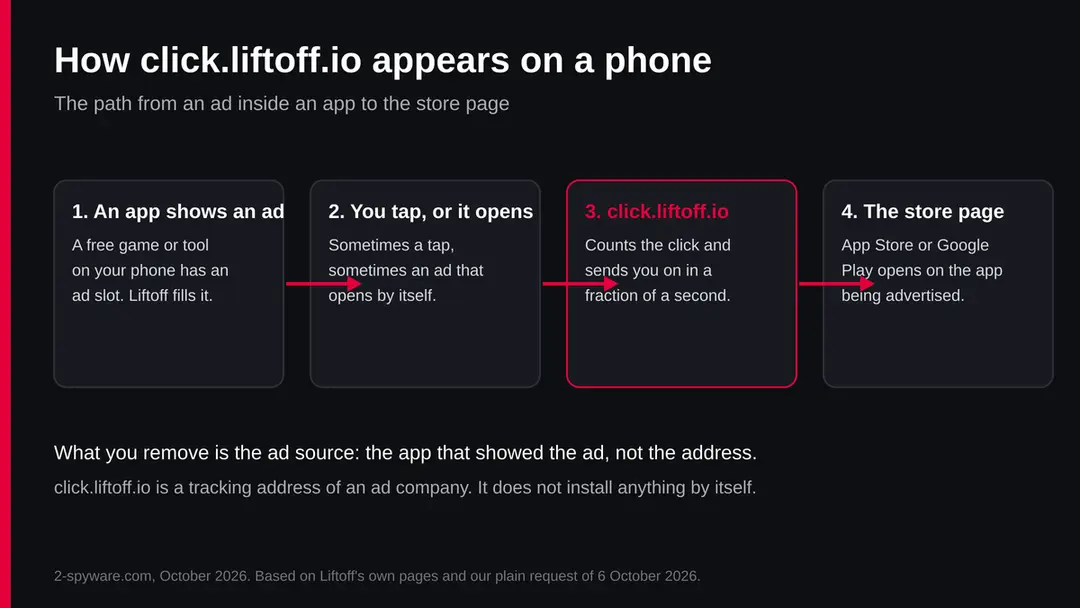
Click.liftoff.io ads: summary
| Name | click.liftoff.io (also click4.liftoff.io, privacy.liftoff.io) |
|---|---|
| Type | Click tracking address of the mobile ad company Liftoff; seen when an ad inside an app opens the App Store or Google Play |
| Risk | Low by itself: an ad company's address, not malware. Pushy ads can still lead to unwanted installs or scam pages |
| Symptoms | The App Store or Google Play opens on an app you did not choose; click.liftoff.io or privacy.liftoff.io flashes in the address bar or shows in a history or filter log |
| How to get rid of it | Find the app that shows the ads and remove it or buy its ad-free version; on Android test in safe mode and check Display over other apps; turn off ad tracking in the phone's privacy settings |
| Our check (6 October 2026) | Plain request from our server: HTTP 302 to Liftoff's privacy policy; no URLhaus entry; no app tested |
Show 11 more facts
| Owner | Liftoff Mobile, Inc. (combined with Vungle, announced 24 August 2021) |
|---|---|
| Devices | iPhone, iPad and Android phones and tablets |
| Microsoft detection | No Microsoft detection name is known: this is an ad company's address on phones, not a Windows threat |
| Evidence | 0 write-ups by security sites; details still limited |
| Domains | click.liftoff.io |
| Ads shown as | Redirects through ad pages |
| Browsers | Chrome, Edge and Firefox |
| First seen | 6 October 2026 |
| Distribution | Typically ad scripts on free streaming, file-hosting and adult sites, typo domains and hacked websites |
| Damage | Redirects to scam pages, fake updates and tech support scams |
| Facts checked | 6 October 2026 |
Facts checked on 6 October 2026 against Liftoff's privacy policy and opt-out page, the 2021 Liftoff and Vungle merger notice, and Apple's and Google's help pages, plus one plain request to click.liftoff.io from our server (no browser, no taps). We did not install any app that shows Liftoff ads.
What is click.liftoff.io
click.liftoff.io is the click tracking address of Liftoff, a mobile app advertising company. When you tap an ad that Liftoff placed inside an app, your phone passes through click.liftoff.io for a moment so the tap can be counted, and then it lands on the App Store or Google Play page of the advertised app.
Liftoff Mobile, Inc. buys ad space inside free apps and games for app makers who want new users. In August 2021 Liftoff and Vungle, a company that sells ad space inside apps, announced that they would combine, with Blackstone as the majority owner of both, and Liftoff's chief executive leading the joint company.
That is why the same ads can carry the Liftoff or the Vungle name. Liftoff's own privacy policy, effective June 2026, gives Palo Alto, California as its address; the 2021 merger notice placed Liftoff's headquarters in Redwood City.
The address itself does not live on your phone. You see it in the address bar, in a browser history, in a pop-up that flashes past, or in the list of sites a parental control or a DNS filter has logged.
It shows up because some app on the phone, usually a free game or tool, showed a Liftoff ad and either you tapped it or the ad opened by itself.
- Owner
- Liftoff Mobile, Inc., a mobile app advertising company (combined with Vungle in 2021)
- What the address does
- Counts a tap on an ad and forwards you to the store page of the advertised app
- Seen as
- click.liftoff.io, click4.liftoff.io, links with a /v1/ path, privacy.liftoff.io, cdn.liftoff-creatives.io
- Where it comes from
- An ad inside an app on your phone, most often a free game or a free tool
- Not the same as
- A virus, a hacked phone or an app named Liftoff that you installed
Is click.liftoff.io a virus?
No, click.liftoff.io is not a virus. It is a working address of a real ad company and it does not install anything by itself. It is a sign that an app on your phone shows ads, and sometimes that those ads are pushy.
People call it a virus because of how it feels. You are playing a game or reading something, the screen jumps, a web address you never typed flashes past, and the App Store or Google Play opens on an app you did not ask for.
On some phones this happens again and again. That is aggressive advertising, not an infection, but it is still worth fixing, because the same habit of forcing pages open is what scam ads use.
There is one case where you should be more careful: if the ad that went through click.liftoff.io led to a page that says your phone is infected, asks you to install a cleaner, or asks for a card number.
Liftoff's network carries ads for app makers, and we have no report that it carries scam pages, but any ad system can be misused by an advertiser. Treat such a page as a scam whatever address it came from, and close it.
We found no entry for click.liftoff.io in the URLhaus malware address list our server reads, and our plain request did not show any harmful content. A quiet test does not clear an address for every visitor and every day, so the advice on this page is about the ads you see, not a promise about the address.
Is click.liftoff.io ads dangerous?
What we checked for this guide, and what we could not
We made one plain request to click.liftoff.io from our server and read Liftoff's, Apple's and Google's own pages. We did not install any app that shows Liftoff ads, and we do not name an app as the cause on your phone.
click.liftoff.io · plain request and desk check · 6 October 2026
- Plain request to the addressOpened with no browser and no tap, click.liftoff.io answered HTTP 302 and forwarded to liftoff.io/privacy-policy, which now moves on to Liftoff's privacy policy at liftoff.ai. A real click link carries more data in its path and leads to a store page instead.
- Malware listsNo URLhaus entry for click.liftoff.io or liftoff.io in the data our server reads on 6 October 2026.
- privacy.liftoff.ioForwards to privacy.liftoff.ai, the privacy policy of Liftoff Mobile, Inc., effective June 2026.
- Registration dataOur server's RDAP look-up for liftoff.io found no record, so we cannot give a registration date for the domain here.
- Which app shows the adsNot tested. Liftoff places ads in many apps and games; we could not see your phone. The steps below show how to find the app yourself.
An ad company's tracking address, not malware click.liftoff.io belongs to a mobile advertising company and counts taps on its ads. The fix is in the app that shows the ads and in your phone's ad settings, not in a removal tool.
What is privacy.liftoff.io, and the other Liftoff addresses
privacy.liftoff.io is Liftoff's privacy page for people who see its ads. In October 2026 it forwards to privacy.liftoff.ai, the privacy policy of Liftoff Mobile, Inc., which explains what data its ads use and how to opt out.
Many ads in apps carry a small i or an AdChoices style button. On a Liftoff ad that button points to the privacy page, which is why so many people search for privacy.liftoff.io: they tapped the small icon by accident, or tried to close the ad and opened Liftoff's privacy policy instead. Nothing has been installed or changed when that page opens.
click4.liftoff.io and links that start with click.liftoff.io/v1/ are the same kind of click tracking address with another server number or path. cdn.liftoff-creatives.io serves the pictures and videos of the ads themselves. If you see any of them in a history or a filter log, the meaning is the same: an app on the device showed a Liftoff ad.
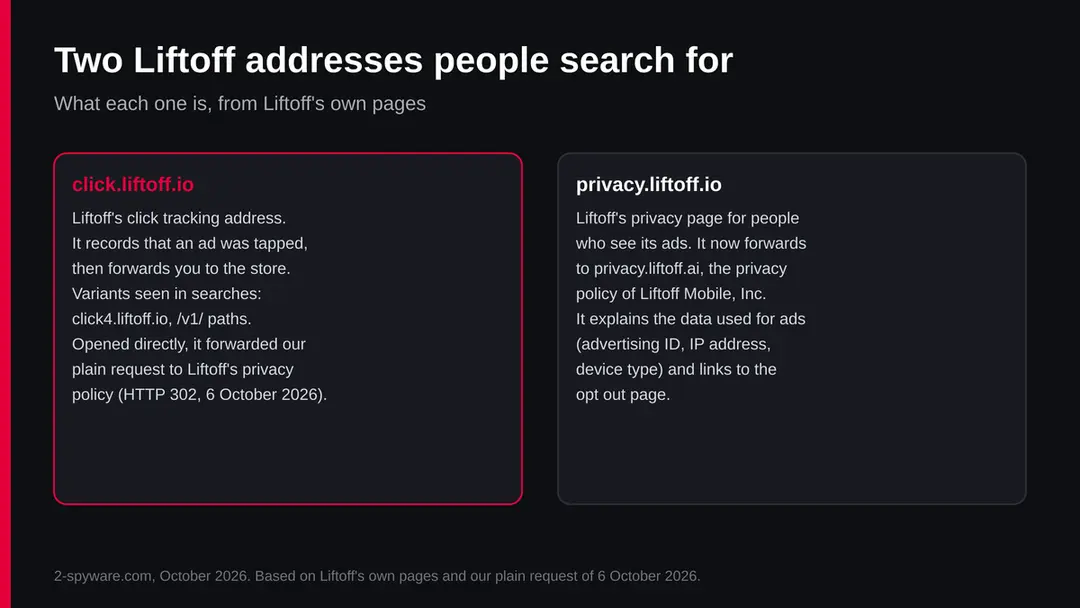
| Address | What it is | Should you worry |
|---|---|---|
| click.liftoff.io | Click tracking: counts a tap on an ad and forwards to the store | No, but find the app that shows the ads if they open by themselves |
| click4.liftoff.io, /v1/ links | The same click tracking on another server or path | No, same as above |
| privacy.liftoff.io | Liftoff's privacy page; forwards to privacy.liftoff.ai | No; it is where you read about and opt out of Liftoff's ad tracking |
| cdn.liftoff-creatives.io | Delivers the pictures and videos of Liftoff ads | No; it only shows that an ad was loaded |
| A page that says your phone is infected | Not Liftoff's page; a scam ad or a scam site | Yes: close it and install nothing it offers |
How click.liftoff.io ads got onto your phone
An app on your phone shows ads, and Liftoff is one of the ad networks filling its ad slots. Every tap on such an ad goes through click.liftoff.io first, so that the app maker and the advertiser can be paid for the tap and the install that may follow.
Free apps earn money by showing ads, and they rarely sell the space themselves. They add a code library from one or more ad networks, and the networks auction each ad slot among advertisers. When Liftoff wins, the ad you see is Liftoff's, and its click link is click.liftoff.io.
Some ads open the store page without a clear tap. A full-screen video ad may count a tap anywhere on the screen as a click, a close button may be tiny or appear late, and some ads in games appear between levels exactly where your finger already is.
Web pages have the same problem: an ad can switch the browser to the App Store or Google Play, and reports of such redirects go back many years. In each case the address you notice is the tracking link in the middle.
On Android, an app can also show ads outside itself if you gave it permission to display over other apps. If the store page opens while you are on the home screen or in a different app, an app with that permission is the most likely source.
On iPhone, apps cannot draw over other apps, so the ad nearly always comes from the app or the website you have open at that moment.
How to remove click.liftoff.io ads
How to remove Liftoff ads on iPhone and Android
You cannot remove click.liftoff.io itself, because it is not on the phone.
You remove or calm the app that shows the ads, and you switch off the phone settings that let ads follow you.
Step 1: Close the store page
Swipe away the App Store or Google Play page. Nothing is installed unless you tap Get, Install or a price, and confirm.
The tap itself was counted by the ad network and the advertiser, and that is all. You do not need to do anything else about the click.
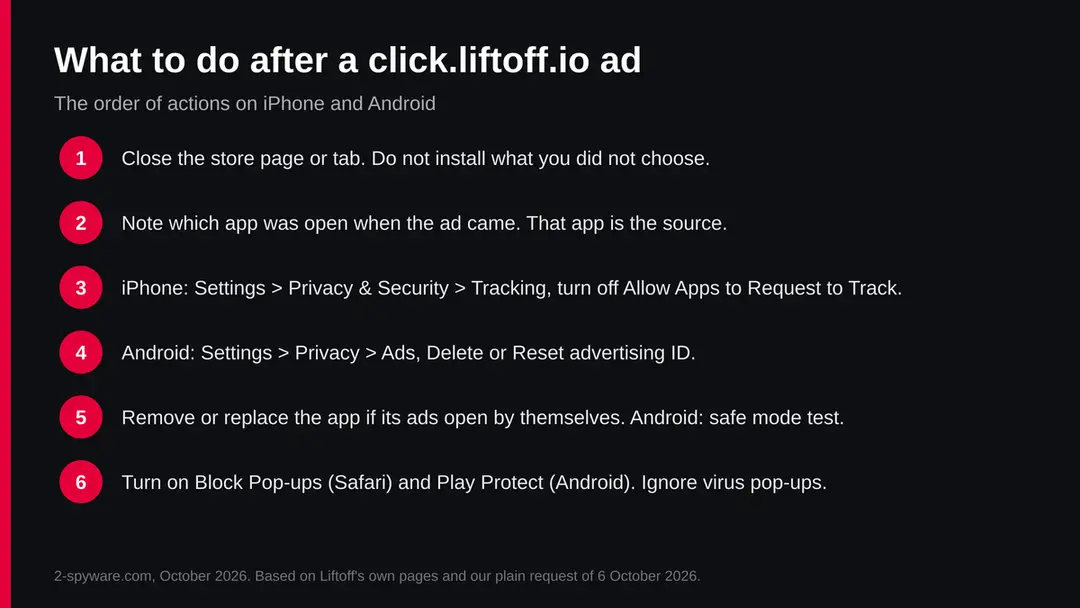
The order of actions after a click.liftoff.io ad on iPhone and Android, with the menu paths from Apple's and Google's help pages. Step 2: Decide about the app
If you like the app and its ads are only sometimes annoying, keep it: many games offer a paid version without ads. If its ads open the store by themselves or come with no app open, uninstall it.
On iPhone touch and hold the icon and choose Remove App. On Android touch and hold the icon and choose Uninstall, or use Settings > Apps.
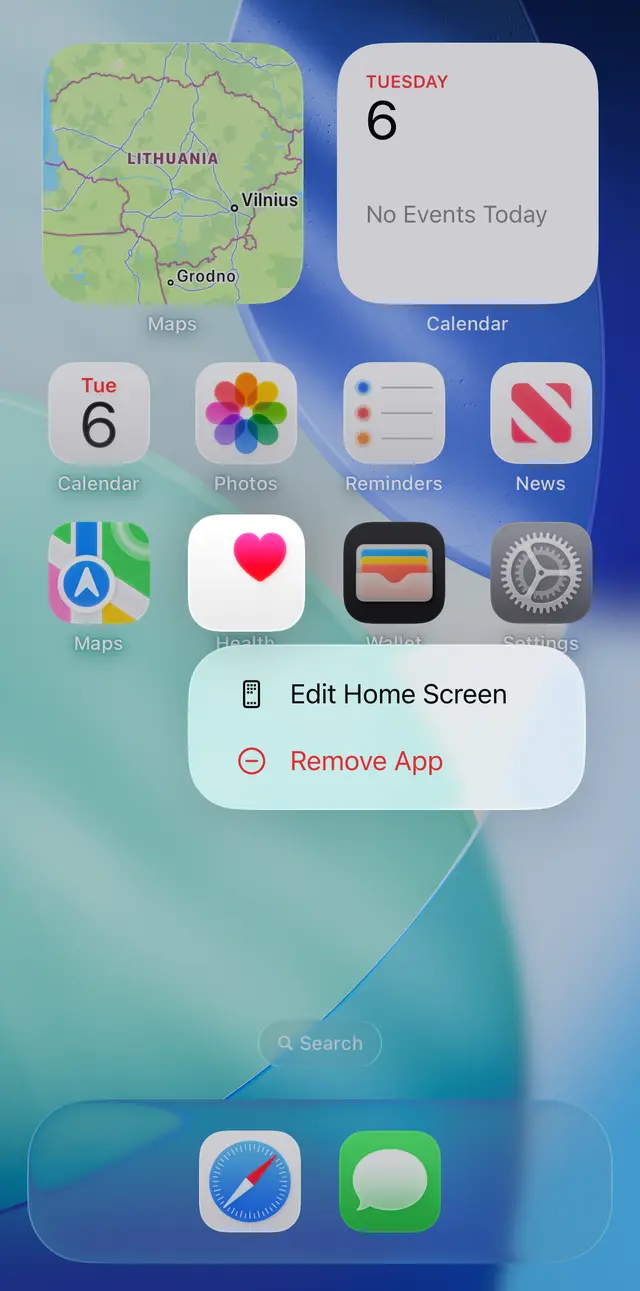
iOS 26: touch and hold an app icon on the Home Screen, then choose Remove App. Step 3: If Uninstall is greyed out on Android
Search Settings for Device admin apps and switch the app off there. Then uninstall it. An ad app has no reason to hold device admin rights, so treat that as a warning sign.
If the app is not in that list, restart in safe mode as described in the section above and try again.
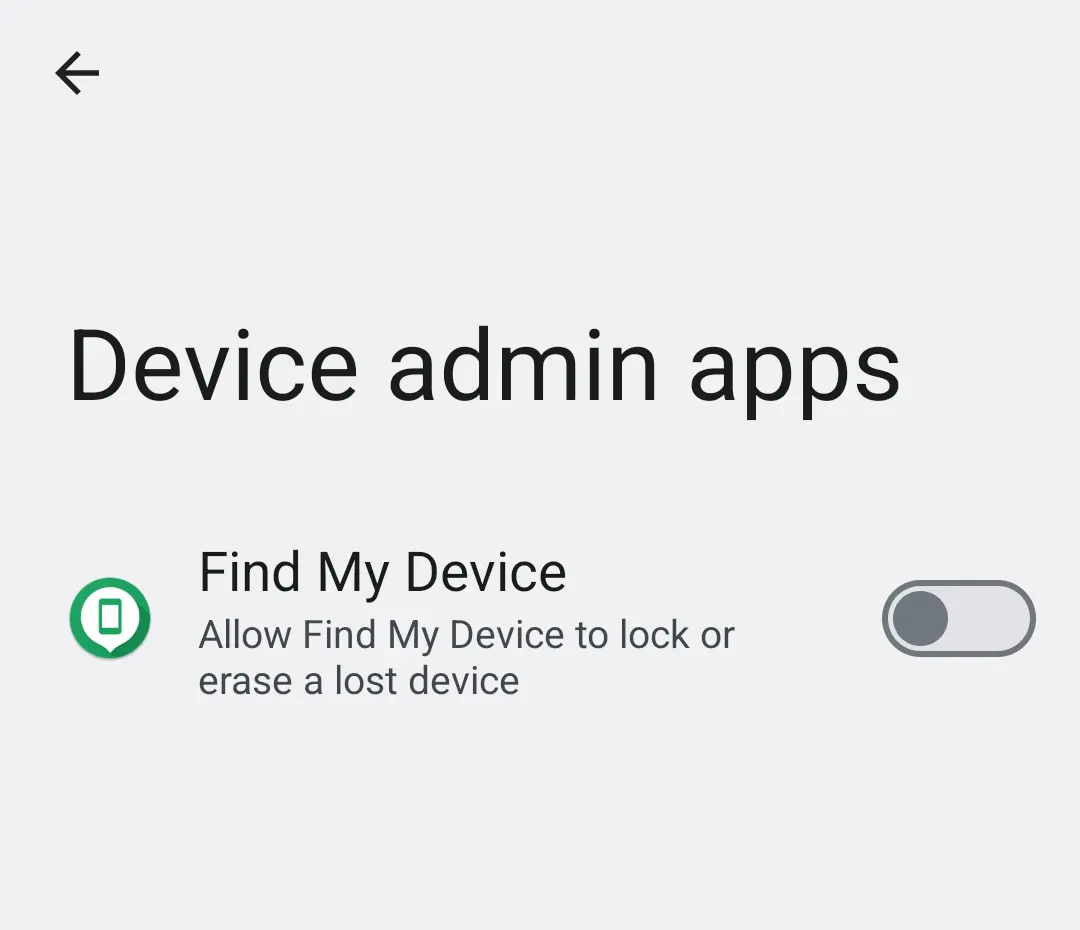
Android 14: Settings, Device admin apps. An ad app has no reason to appear here switched on. Step 4: Turn off tracking
On iPhone open Settings > Privacy & Security > Tracking and turn off Allow Apps to Request to Track.
On Android open Settings > Privacy > Ads and choose Delete advertising ID. This makes Liftoff's and other networks' ads less targeted. It does not remove the ads themselves.
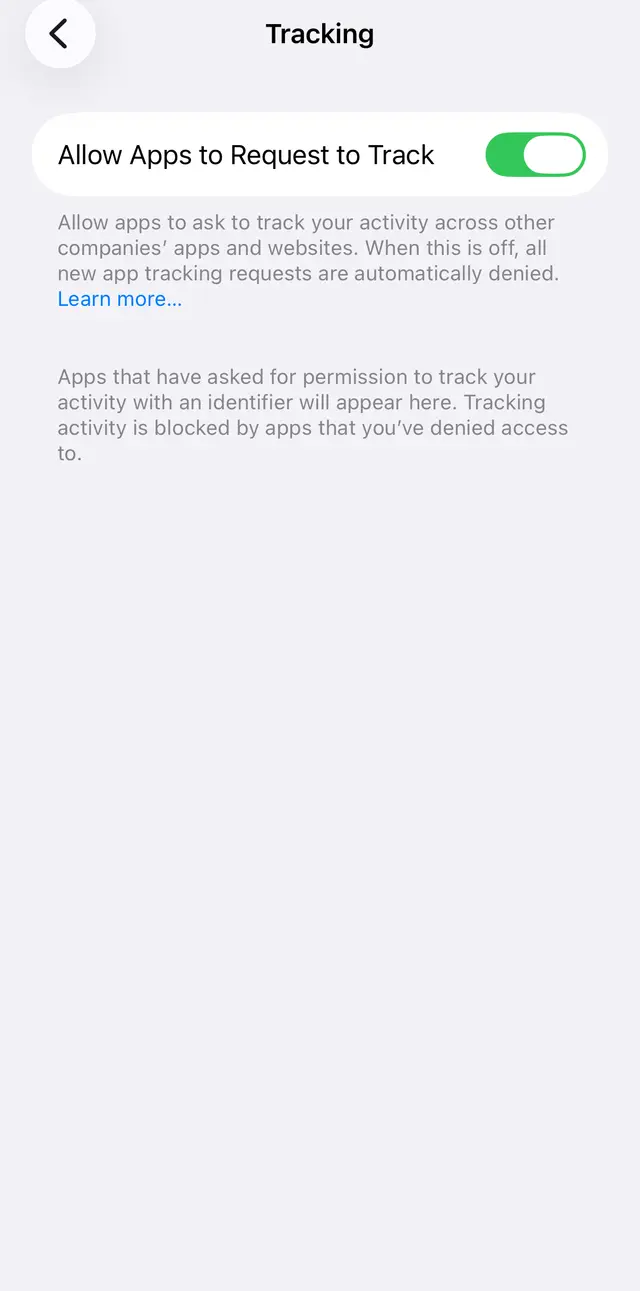
iOS 26: Settings, Privacy & Security, Tracking, then turn off Allow Apps to Request to Track. Step 5: Run Play Protect on Android
Open Google Play, tap your profile picture > Play Protect > settings and turn on Scan apps with Play Protect. It checks the apps on the device for harmful ones.
Run it after you remove an app you did not trust, so that other unwanted apps are found too.
Step 6: Limit ads in games and browsers
Turning on airplane mode while you play an offline game stops most ads loading. In the browser keep pop-up blocking on: Safari's Block Pop-ups, and Chrome's own pop-ups and redirects setting under Site settings.
These limits reduce how many ads load, but the ad network stays inside the app until you remove the app.
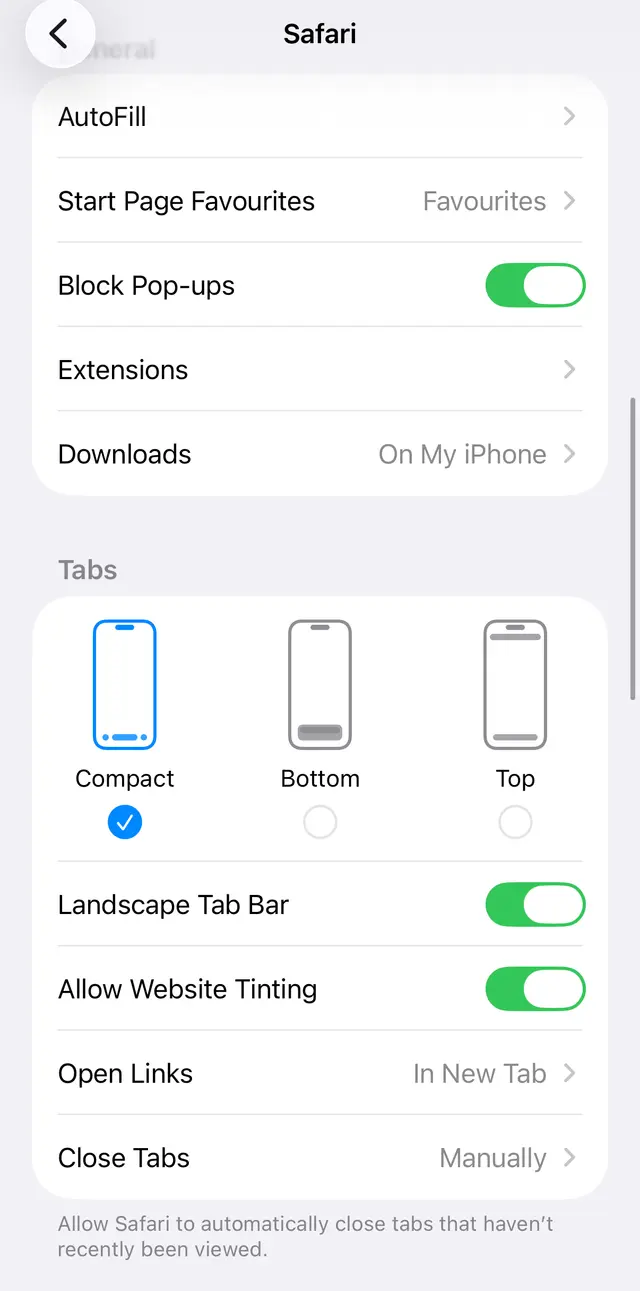
iOS 26: Settings, Apps, Safari. Keep Block Pop-ups on. Step 7: Ignore removal tools that ads offer
Nobody needs a click.liftoff.io remover. An app or page that sells one is using the name to sell you something.
The steps above are free and are all Apple and Google ask for. If a page after an ad asks you to install a remover, close it.
How to find the app that shows click.liftoff.io ads
The app that was open when the store page appeared is almost always the source. If it happens with no app open, look for an Android app with Display over other apps, or a website notification.
- 1
Note the moment it happens
Write down which app or website was on the screen the last two or three times the store page jumped open. A pattern usually shows after a day: the same game, the same free tool, the same news site.
- 2
iPhone: check the app and Safari
On iPhone an app cannot open ads on top of other apps, so the cause is the app you had open, or a page in Safari. Open Settings > Apps > Safari and make sure Block Pop-ups and Fraudulent Website Warning are on, as Apple's page describes.
- 3
Android: restart in safe mode
Press and hold the power button, touch and hold Power off, and confirm the restart in safe mode. Apps you installed do not run there. If the ads stop in safe mode, one of your apps is the cause; Google's help page then says to remove recently downloaded apps one at a time and restart after each.
- 4
Android: check Display over other apps
Search Settings for Display over other apps (often under Special app access). An app that has no reason to draw over other apps, such as a flashlight, cleaner or wallpaper app, is a prime suspect. Switch the permission off and see if the ads stop.
- 5
Android: check Chrome notifications
If ads come as notifications, open Chrome, visit the site, tap the page info icon > Permissions > Notifications and turn Show notifications off, as in Google's help page.
After removal: keep the ads from coming back
If you tapped a Liftoff ad or installed what it showed
A tap that opened a store page costs nothing and changes nothing on the phone. Only what you installed or typed afterwards matters.
- 1
You only saw the store page
Nothing to do. The tap was counted by the ad network and the advertiser, and that is all.
- 2
You installed the advertised app
Apps from the App Store and Google Play are reviewed before they are listed. If you do not want it, uninstall it like any other app, and check whether it started a subscription: on iPhone tap your name in Settings > Subscriptions; on Android open Google Play > profile picture > Payments & subscriptions > Subscriptions.
- 3
A page asked for a card or a password
If a page after the ad asked for card details, a phone number or a password, and you gave them, call your bank, change that password from another device, and watch your statements. That page was a scam, whatever ad led to it.
- 4
You installed a file from outside the store
On Android, uninstall it, then search Settings for Install unknown apps and switch it off for the browser and messengers. Run Play Protect. On iPhone, a page that asked you to install a profile is a warning sign: check Settings > General > VPN & Device Management and remove a profile you did not choose.
How to keep pushy ads away
Do
- Prefer apps from known publishers and pay for the ad-free version of a game you play every day.
- Keep Block Pop-ups and Fraudulent Website Warning on in Safari, and Play Protect on in Android.
- On iPhone leave Allow Apps to Request to Track off; on Android delete or reset the advertising ID now and then.
- Read the permissions an Android app asks for. A game or flashlight does not need Display over other apps.
- Keep iOS and Android up to date, so the latest pop-up and redirect protections apply.
Don't
- Install an app because an ad or a page says the phone is infected, slow or needs an update.
- Pay for a click.liftoff.io remover, virus cleaner or booster offered by an ad.
- Allow Install unknown apps for the browser or a messenger.
- Give an ad-supported app device admin, Accessibility or Notification access.
Questions about click.liftoff.io ads
What is click.liftoff.io?
click.liftoff.io is the click tracking address of Liftoff, a mobile app advertising company that combined with Vungle in 2021. When you tap a Liftoff ad inside an app, the phone passes through this address for a moment so the tap can be counted, then opens the App Store or Google Play page of the advertised app.
Opened directly, the address forwarded our plain request to Liftoff's privacy policy on 6 October 2026. It is not an app on your phone and nothing to uninstall.
Is click.liftoff.io a virus on Android?
No. On Android, click.liftoff.io shows up because an app on the phone shows Liftoff ads. If the Play Store opens by itself while no app is open, an app with Display over other apps is probably showing them.
Restart in safe mode: if the ads stop, remove recently installed apps one at a time, and switch off Display over other apps for apps that do not need it. Turn on Scan apps with Play Protect in Google Play. No removal tool is needed.
Is click.liftoff.io a virus on iPhone?
No. On iPhone an app cannot show ads on top of other apps, so the ad comes from the app or the Safari page you had open. The jump to the App Store is the ad's click link at work.
Keep Block Pop-ups and Fraudulent Website Warning on under Settings > Apps > Safari, turn off Allow Apps to Request to Track under Settings > Privacy & Security > Tracking, and remove the app if its ads keep opening the store by themselves.
What is privacy.liftoff.io?
privacy.liftoff.io is Liftoff's privacy page for people who see its ads, and it forwards to privacy.liftoff.ai, the privacy policy of Liftoff Mobile, Inc., effective June 2026. It opens when you tap the small information icon on a Liftoff ad, often by accident while trying to close the ad.
The page explains which data Liftoff uses, such as the advertising ID, IP address and device type, and links to its opt-out page. Opening it changes nothing on the phone.
How do I remove Liftoff ads?
Find the app that shows them and either remove it or buy its ad-free version. The app that was on the screen when the store page jumped open is almost always the one.
On Android, also test in safe mode and check Display over other apps; on iPhone, check Safari's pop-up setting. Then turn off app tracking on iPhone, or delete the advertising ID on Android under Settings > Privacy > Ads. Liftoff says opting out stops targeted ads, not all of its ads.
Do I need a click.liftoff.io remover?
No. There is nothing on the phone called click.liftoff.io to remove: it is an address on Liftoff's servers. Any app or website that sells a click.liftoff.io remover is using the name to sell you something, and some such offers are scams themselves. The real fix is free:
- find and remove the app that shows the ads
- turn on Play Protect or Safari's Block Pop-ups
- switch off ad tracking in the phone's privacy settings
How do I opt out of Liftoff tracking?
Use your phone's settings. On iPhone open Settings > Privacy & Security > Tracking and turn off Allow Apps to Request to Track. On Android open Settings > Privacy > Ads and tap Delete advertising ID.
Liftoff's own opt-out page points to the same device settings, gives a toll-free number in the United States, 1-866-904-1107, and says opting out stops ads based on your inferred interests but does not stop Liftoff ads altogether.
Why does the App Store or Google Play open by itself?
An ad inside an app or a web page sent you there through its click link, such as click.liftoff.io. Full-screen ads in games often count a tap anywhere as a click, close buttons can be tiny or late, and some web ads switch the browser to the store without a tap; such redirects have been reported for years.
If it happens with no app open on Android, an app with Display over other apps is the likely source.
What is click.liftoff.io in other languages (que es, was ist das)?
It is the same thing in every country: the click tracking address of the mobile ad company Liftoff. En español: es la dirección que cuenta los toques en un anuncio de Liftoff dentro de una aplicación, no es un virus.
Auf Deutsch: es ist die Klick-Adresse der Werbefirma Liftoff, kein Virus. In each case the fix is to find the app showing the ads and switch off ad tracking in the phone's settings.
Sources
- Liftoff Mobile, Inc.: Privacy Policy (effective June 2026), reached via privacy.liftoff.io (read October 6, 2026)
- Liftoff: Opt-out of interest-based advertising (read October 6, 2026)
- Vungle: Liftoff and Vungle Join Forces to Form Leading Independent Mobile Growth Platform (24 August 2021) (read October 6, 2026)
- Apple Support: If an app asks to track your activity (read October 6, 2026)
- Apple Support: Block pop-up ads and windows in Safari (read October 6, 2026)
- Apple Support: Recognize and avoid social engineering schemes (fraudulent pop-ups) (read October 6, 2026)
- Google Play Console Help: Advertising ID (reset or delete on Android) (no longer online) (read October 6, 2026)
- Google Chrome Help: Remove unwanted ads, pop-ups and malware (Android) (no longer online) (read October 6, 2026)
- iMore: Regarding web ads redirecting to the App Store (March 2015) (read October 6, 2026)