
FedEx scam: fake delivery texts, e-mails and calls and what to do
The FedEx scam is a fake text, e-mail or call that says a parcel is on hold and asks for a small fee, an address or a login. FedEx did not send it. Do not tap the link; if you typed card details, call your bank today.
Facts checked October 10, 2026. Removal steps tested on Windows 11 (26H2) and checked against Microsoft's and the browser makers' current documentation.
Automatic
Get a free scan and check if your PC is infected.
Fortect finds malware, unwanted programs and the Windows damage they leave behind, and repairs it in one pass.
Do it yourself · free Remove FedEx scam yourself 3 steps, about 9 minutes, no software needed.
Start the steps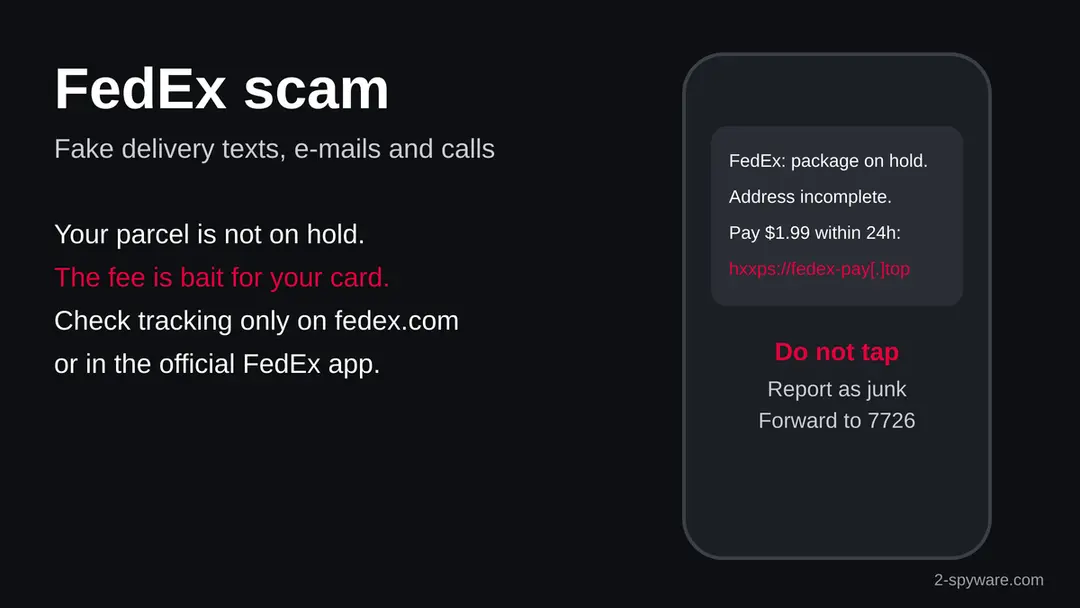
FedEx scam: summary
| Type | Delivery scam (smishing and phishing) using the FedEx name; not a message from FedEx |
|---|---|
| Risk | High if you typed a card, a password or ID data or opened a file; low if you only read it |
| Symptoms | A text or e-mail saying a FedEx parcel is on hold, an address is incomplete or a fee or duty is due, with a link |
| Channels | Text message, e-mail, phone call, fake social media accounts and fake job offers |
| What it wants | Card number and bank codes, account passwords, Social Security number, or a payment |
| Our check (10 October 2026) | Desk check of FTC data, Apple and Google help and vendor research; no single scam address to test |
| Removal | Scan the PC with security software to find and remove the malware and anything installed with it. Fortect scans Windows for malware and repairs the system files and settings it damaged. Remove it nowTo use the full-featured product, you have to purchase a license for Fortect. The scan is free. |
Show 9 more facts
| How to get rid of it | Report and delete the message; block your card if you paid; remove any app or file you installed |
|---|---|
| Name | FedEx scam |
| Evidence | One write-up by a security site; details still limited |
| Arrives as | Text message |
| Pretends to be | FedEx |
| Claim | A FedEx parcel is on hold until you pay a small fee or confirm your address |
| Asks for | Card details |
| First seen | 1 January 2020 |
| Facts checked | 10 October 2026 |
Facts checked on 10 October 2026 against the FTC, Apple Support, Google Messages help and Moonlock's FedEx scam research. This report covers a wave of messages, not one address, so our server tested no page. FedEx's own fraud page refused our request that day.
What the FedEx scam is
The FedEx scam is a family of fake messages and calls that use the FedEx name to get your card number, your passwords or your money. FedEx is a real courier, but these messages do not come from it, and the parcel they mention usually does not exist.
Most people meet it as a text that says a parcel is on hold, the address is incomplete or a small fee is due. Others get an e-mail headed "FedEx Delivery Attempt Failed" or "Your Shipping Invoice is Ready". A smaller group gets a phone call about a seized parcel, or a job offer that says it works for FedEx.
- What it is
- Delivery scam (smishing and phishing) that borrows the FedEx brand. It is not a virus by itself
- How it reaches you
- Text message, e-mail, phone call, social media account or a fake job post
- What it wants
- Card details and bank codes, account logins, personal data, or a payment by phone
- Scale
- Fake package delivery problems were the most reported text scam in the United States in 2024, according to the FTC
Searches for "fedex scam" rose by about half in the week of this report, which matches the usual pattern: these waves grow before holidays and big sale days, when almost everyone expects a parcel. The scammers do not need to know whether you ordered anything. They send the same text to thousands of numbers and wait for the people who are expecting a delivery.
What the FedEx scam e-mail looks like
FedEx Delivery Attempt Failed
Your Package is on Hold
Your Shipping Invoice is Ready
Action Required: Confirm Delivery Address
How to tell the FedEx scam e-mail is fake
How to tell a real FedEx message from a fake one
The safest test does not depend on the message at all: close it and look up your parcel yourself. If FedEx really holds a parcel for you, the official site or app will show it.
Apple lists the signs of a phishing message that apply here word for word: the sender does not match the company, a link does not match the company's website, the message looks different from the company's usual messages, it asks for card numbers or passwords, or it arrives unasked with an attachment.
On an iPhone you can touch and hold a link to see where it goes without opening it. On a Mac or PC, hover over it.
The FTC's advice is the same for every courier.
Warning: Never click links or reply to unexpected texts.
If you think the message might be real, contact the company through a phone number or website you know is real, not the one in the message. For FedEx that means typing fedex.com or opening the FedEx app you installed from the App Store or Google Play.
A real tracking number comes from the shop where you ordered, in its own order e-mail or in your account on its site. If you did not order anything, there is nothing to track. If someone sent you a gift, the sender can share the real tracking number with you.
How to keep FedEx scams away
You cannot stop scammers from sending texts, but you can make them easy to spot and harmless when they arrive.
Do
- Track parcels only from the shop's order e-mail, fedex.com typed by hand, or the official FedEx app.
- Turn on your phone's spam filter: Filter Unknown Senders on iPhone, spam protection in Google Messages on Android.
- Use a card with a low limit or a virtual card number for online shopping, and turn on payment alerts in your bank app.
- Use two-step verification on e-mail and banking, so a stolen password alone is not enough.
- Tell older relatives about the fee text before the holiday season, when these waves peak.
Don't
- Do not tap a link in an unexpected delivery text or e-mail, even to see where it goes.
- Do not reply STOP or anything else: it tells the sender your number is active.
- Do not open invoice or label attachments you did not expect.
- Do not pay a fee, duty or fine because a caller or a text says so.
- Do not take a delivery job that asks for a training fee or asks you to reship parcels.
Is FedEx scam dangerous? What the senders want
What we checked for this report
This job came from a rise in searches, not from a single address, so there was no website for our server to open. We read the FTC's data and advice, Apple's and Google's help pages and a security vendor's write-up, and we say what we could not check.
FedEx scam · desk check · 10 October 2026
- Text scams overallThe FTC counted $470 million in reported losses to text scams in 2024, more than five times the 2020 figure, and named fake package delivery problems as the top text scam.
- FedEx wordingA July 2026 write-up by Moonlock (MacPaw) lists fee texts, missed delivery texts, customs texts, phishing e-mails, phone calls, fake support accounts and job scams that use the FedEx name.
- A single scam addressNone. The job had no domain, so our server ran no plain request and RDAP had nothing to look up. Scam pages move to new addresses every few days, so any one address would be stale soon.
- FedEx's own fraud pageOur requests to the FedEx fraud pages on fedex.com were refused with a permission error on 10 October 2026, so we do not quote FedEx's reporting address here. Find it by typing fedex.com yourself.
- How to check a real parcelType fedex.com or open the official FedEx app and enter the tracking number from the shop's order e-mail. Never use the link in the message.
Scam, dangerous only if you act on it Reading the text or e-mail did nothing to your device. The harm starts when you type a card, a password or personal data, call the number, or install a file. A quiet test of one page would never clear the rest of the wave.
What a fake FedEx text or e-mail looks like
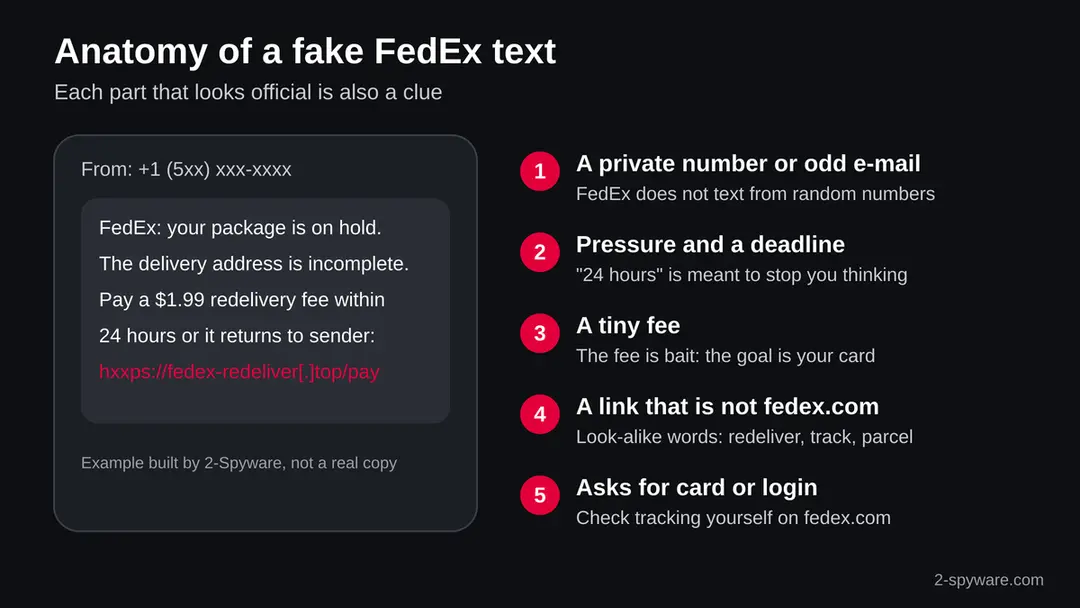
The messages are short, urgent and built around one link. The picture below shows the parts of a typical text, and the table pairs what the message says with what is wrong with it.
| What the message says | What is really going on |
|---|---|
| "FedEx: your package is on hold" or "Delivery attempt failed" | The same words go to thousands of numbers. The scammer does not know whether you ordered anything. |
| "The delivery address is incomplete, please update it" | A real courier works from the address the shop gave it. The form behind the link collects your name, address and phone number for later scams. |
| "Pay a $1.99 redelivery fee" or "Customs duty is due" | The FTC says many people paid a small redelivery fee and that it was a trick to get their card or Social Security number. |
| "Within 24 hours or the parcel returns to sender" | An invented deadline. Pressure stops you from checking. |
| A link with words like track, redeliver or parcel | The address is not fedex.com. It may use a free domain, an odd ending or a link shortener. |
| "Your Shipping Invoice is Ready" with an attached file | An unexpected invoice file is a classic way to deliver malware to a Windows PC. Do not open it. |
| Sender is a private number or a free e-mail address | Apple's guidance: a sender that does not match the company is a sign of phishing. |
Moonlock quotes e-mail subjects such as "FedEx Delivery Attempt Failed", "Your Package is on Hold", "Your Shipping Invoice is Ready" and "Action Required: Confirm Delivery Address". Some of the links in those e-mails open fake Gmail, Yahoo or Outlook sign-in pages rather than a FedEx look-alike, because the scammers want the mailbox itself.
The five kinds of FedEx scam
The FedEx name is used for several different scams. Each one asks for something different, so what you need to do depends on which one reached you.
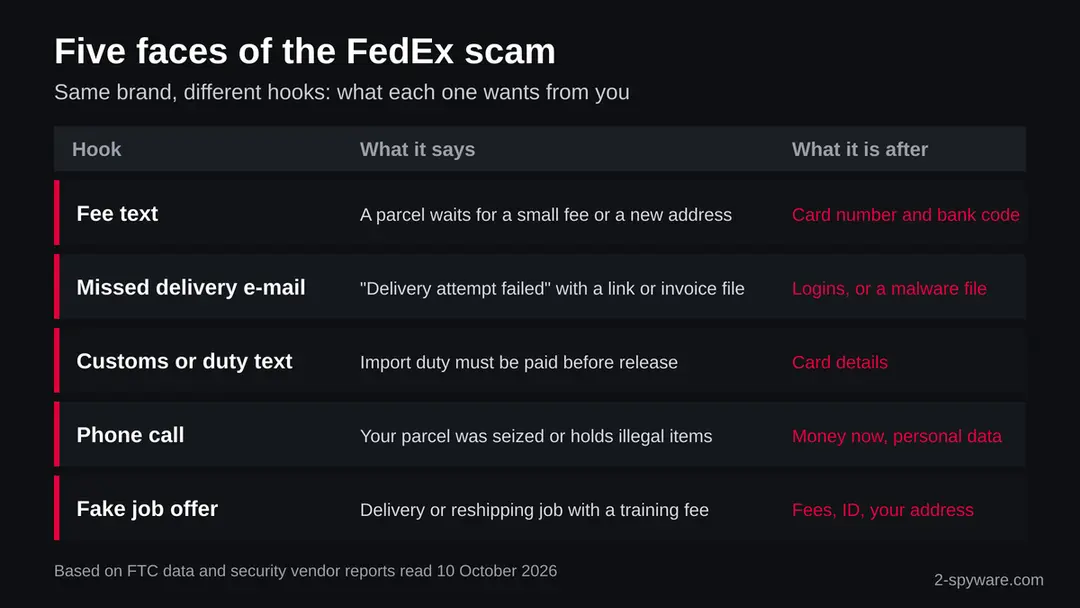
- 1
The fee or address text
A text says your parcel is on hold and asks for a small fee or a corrected address. The link opens a page dressed as FedEx that takes your card number, the expiry date, the security code and often the one-time code your bank sends.
- 2
The missed delivery e-mail
An e-mail says a delivery failed or a package is held. It links to a fake login page or carries an attachment called an invoice or a label. On a Windows PC that file can be a loader for stealer malware.
- 3
The customs or duty text
A text says import duty must be paid before release. Moonlock reports that these lean on confusion about the 2025 tariff changes. FedEx does charge real duties on some imports, which makes this hook believable, so always check in the official app.
- 4
The phone call
A caller says a parcel in your name was seized or holds illegal items, threatens fines or police, and demands payment or personal data at once. Hang up. FedEx does not settle legal matters through a cold call.
- 5
The fake job or support account
Fake recruiters offer delivery or quality control jobs and ask for a training fee or ID, or recruit you to reship parcels bought with stolen cards. Fake social media accounts reply to complaints with a link. Moonlock lists @FedEx and @FedExHelp as the official X accounts.
The real risks, from most to least serious
The text itself cannot hurt you. What you do after it decides the risk.
- High
Card details typed on the fake page
The fee is a few dollars, but the page keeps your card number, expiry date and security code. With the bank code it asks for next, the scammers can add the card to their own phone wallet and spend far more later.
- High
Personal data such as a Social Security number
The FTC notes that the small fee was used to get card or Social Security numbers. With those, someone can open accounts in your name, so a fraud alert or a credit freeze is worth the time.
- High
A file or app installed from the message
An invoice attachment on a PC or an app offered for tracking on Android can be malware that steals saved passwords and browser sessions. This is the one case where the device itself needs cleaning.
- Medium
A password typed on a fake login page
E-mail links that open a fake Gmail, Yahoo or Outlook page take the mailbox. A taken mailbox is then used to reset other accounts and to send the same scam to your contacts.
- Low
You only tapped the link and closed it
Opening the page is very unlikely to install anything on an up-to-date phone or computer. Your number is now known to answer, so expect more scam texts and report each one.
If you clicked the link or replied
If you tapped the link on an iPhone or Android phone
Most FedEx scams arrive as texts, so most clicks happen on phones. Tapping a link in Safari or Chrome does not install anything by itself; the steps below cover what you may have typed or allowed.
On an iPhone, close the tab in Safari. If you typed a card, call your bank first. If you typed an Apple Account password, change it in Settings by tapping your name, then Sign-In & Security. Apple says it will never ask you to sign in on a website from a message, tap Allow on a two-factor request you did not start, or give your verification code.
On Android, also check what you allowed. If the page asked you to install a tracking app, open Settings > Apps, find any app you do not recognise and uninstall it. If uninstall is greyed out, open Settings > Security and privacy > More security settings > Device admin apps, switch the app off there, then uninstall it. The menu names differ slightly on Samsung One UI and older Android versions.
Then report the text so the next person is warned. In Apple Messages tap Report Junk under the message. In Google Messages, Google's help says to touch and hold the conversation and tap Block, then Report spam and OK, which also moves it to the Spam & blocked folder. In the United States you can also forward the text to 7726 (SPAM) for your carrier.
If you paid, typed a password or opened a file
Start with the step that matches what you did. Card and identity steps are urgent; the others can follow the same day.
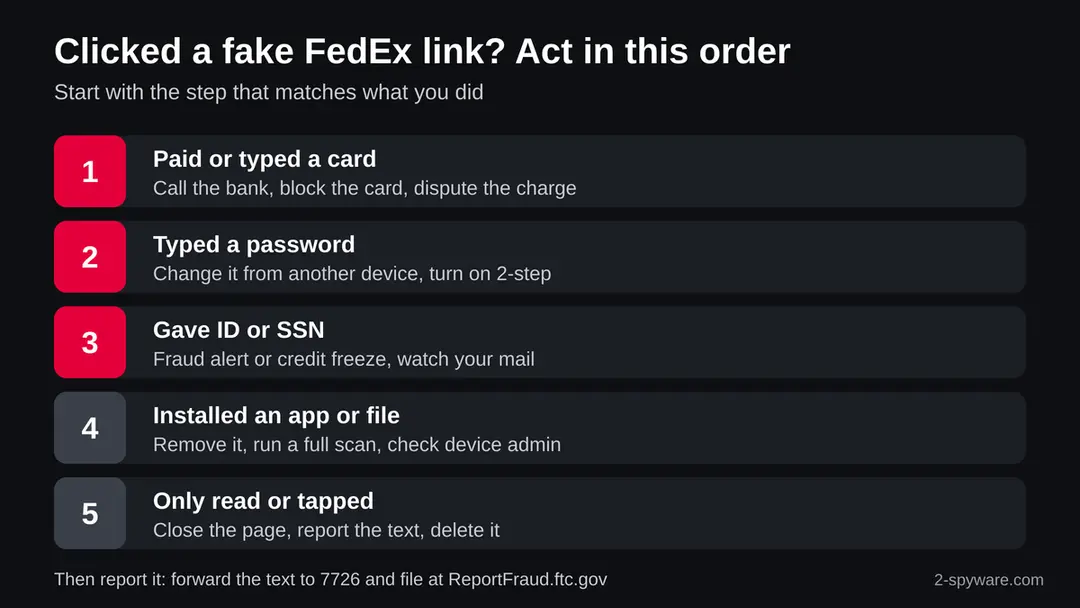
- 1
You paid a fee or typed a card
Call the number printed on your card or use your bank's app to block the card and order a new one. Tell the bank the details went to a scam site, ask it to dispute the fee and watch for attempts to add the card to a phone wallet. Do not approve any code or request you did not start.
- 2
You typed a password
Change it from another device you trust, starting with the e-mail account, then any account that used the same password. Turn on two-step verification and sign out of other sessions where the service allows it.
- 3
You gave your Social Security number, date of birth or ID
In the United States, place a fraud alert or a credit freeze with the credit bureaus and report identity theft at IdentityTheft.gov. Watch for new accounts and for mail you did not expect.
- 4
You opened an attachment or installed an app
On a Windows PC, run a full scan with Microsoft Defender and an offline scan, then change your saved passwords from a clean device. On Android, remove the app as described above and check Device admin apps.
- 5
A follow-up call from your bank or FedEx
Be careful. Scammers who got your number or card often call next, posing as the bank's fraud team or as FedEx, and ask for a code or a transfer to a safe account. Hang up and call the number you know is real.
What to do after the FedEx scam message
If you only received the message, reporting it is enough.
If you entered card details, start with the card.
Step 1: Block the card if you entered it
Card details entered on a fake page are used within hours. Block the card in your bank's app or by calling the number on the card, and ask for a replacement.
Dispute every charge you did not make, and keep the scam message as evidence for the bank. Do not reuse the same card number on any site until it is replaced, whether you shop on a phone or a Windows 11 or Windows 10 PC.
Full procedure with screenshots: What to do after paying a scammer
Step 2: Stop replying and keep the evidence
Do not reply, pay, or send documents, even to "cancel" or "verify" something: every answer marks you as a target worth more messages. Take screenshots of the messages, the sender address, the phone numbers and any payment details, then block the sender.
If you already sent money or an ID document, the next steps cover what to do. The screenshots work the same on a phone or on Windows 11 and Windows 10, where Windows + Shift + S captures part of the screen.
Full procedure with screenshots: What to do after paying a scammer
Step 3: Report it
A report takes ten minutes and helps take FedEx scam down.
Send it to ReportFraud.ftc.gov in the US (and ic3.gov when money was lost), to Action Fraud in the UK, or to your national police in the EU, with screenshots, sender details and any payment references.
Report the message inside the mail or chat app too. Keep a copy of everything until the case is closed, whether you use a phone or a Windows 11 or Windows 10 PC.
Full procedure with screenshots: Report a cyber attack or scam to the authorities
How to report FedEx scam
Reporting takes a minute and helps carriers and FedEx block the next wave. Keep a screenshot of the message before you delete it.
In the United States, forward the text to 7726 (SPAM) so your carrier can block similar messages, and report it at ReportFraud.ftc.gov with the sender, the link and any money you lost. If you lost money or your identity was used, also tell your local police.
Report the message to FedEx through the fraud page on fedex.com, which you should open by typing the address yourself. Outside the United States, use your national fraud reporting service; the FedEx site lists the right contact per country.
Questions about FedEx scam
Is the FedEx text about a package on hold a scam?
Almost always, if you did not expect it and it carries a link to pay a fee or update an address. Fake package delivery problems were the most reported text scam in the United States in 2024, the FTC says.
Do not tap the link. Check your parcel by typing fedex.com or opening the official FedEx app and entering the tracking number from the shop's order e-mail.
Does FedEx send text messages at all?
Yes, FedEx can send delivery updates by text when you or the shipper sign up for them. A real update gives a tracking number you can check yourself and does not ask you to pay a fee or type card details through a random link.
If a text pushes you to pay or log in, treat it as a scam and check the parcel on fedex.com instead.
I clicked the link in a FedEx scam text. Is my phone hacked?
Tapping the link alone is very unlikely to install anything on an up-to-date iPhone or Android phone. The risk is what you typed or allowed afterwards.
If you only looked, close the page, report the text and delete it. If you typed a card, call your bank now. If you installed an app on Android, uninstall it and check Device admin apps.
I paid the small FedEx redelivery fee. What should I do?
Block the card today through your bank's app or the number printed on the card, and ask for a replacement. Tell the bank the payment was made on a scam site and ask it to dispute the charge.
The fee is small, but the scammers now have the full card details and may try larger purchases or add the card to a phone wallet.
Can a FedEx scam e-mail infect my computer?
Reading the e-mail does not, but opening its attachment can. Files sent as an invoice, a shipping label or a delivery form are a common way to get malware onto Windows PCs. If you opened one, run a full scan and an offline scan with Microsoft Defender, then change your saved passwords from another device.
Someone called saying my FedEx package holds illegal items. Is it real?
No. This is a phone version of the scam. The caller threatens fines or police to scare you into paying or giving personal data at once.
FedEx does not settle legal matters through a cold call, and police do not ask for payment by phone. Hang up and, if you are worried, call FedEx on the number on fedex.com.
How do I report a FedEx scam text?
In the United States, forward it to 7726 (SPAM) and report it at ReportFraud.ftc.gov. In Apple Messages, tap Report Junk under the message.
In Google Messages, touch and hold the conversation, then tap Block, Report spam and OK. You can also report it to FedEx through the fraud page you open by typing fedex.com yourself.
Is a FedEx job offer by text or social media real?
Be very careful. Fake recruiters use the FedEx name to offer delivery or quality control jobs and then ask for a training fee, your ID or bank details, or ask you to reship parcels. Real jobs are listed on the company's own careers site and never charge you to start.
Why do I keep getting FedEx scam texts?
Scammers send to long lists of numbers, many bought or guessed, and send more to numbers that reply or click.
Do not reply, report each one as junk or spam, and turn on your phone's filter for unknown senders. The waves usually grow before holidays and big sale days. Each report helps your carrier block the sender for others.
Will Fortect remove FedEx scam?
Fortect scans Windows for malware and unwanted programs and repairs the system files and settings they change, and its free scan shows what it finds on your PC before you decide anything.
For FedEx scam, follow the plan above as well: the browser steps take back permissions and settings that no scanner treats as a threat, and uninstalling the program that brought it removes the source.
Run Microsoft Defender's full scan and, if anything was found, its offline scan as a second opinion. If the symptoms are gone after the plan and both scans are clean, there is nothing more to do.
Sources
- FTC Data Spotlight: Top text scams of 2024 (read October 10, 2026)
- FTC Consumer Advice: How to recognize and report spam text messages (read October 10, 2026)
- Apple Support: Recognize and avoid phishing messages, phony support calls and other scams (read October 10, 2026)
- Google Messages Help: Block, unblock and report spam (read October 10, 2026)
- Moonlock (MacPaw): How to spot a FedEx scam and what to do if you've already clicked (read October 10, 2026)