
Shipments free scam on iPhone and Android: fake delivery texts and free shipping offers
"Shipments free scam" is what people type after a text says a shipment is held or free to claim, or after an ad offers a free item if you only pay shipping. The text is a known scam pattern, the ad often is one, and the safe move for both on iPhone and Android is the same:
- do not tap
- check the parcel yourself
- report it
Facts checked October 12, 2026. Steps checked against Apple's and Google's current documentation and the reports we cite. We have not run the app or the link on a phone ourselves.
Do it yourself · free Remove shipments free scam yourself 7 steps, about 21 minutes, no software needed.
Start the steps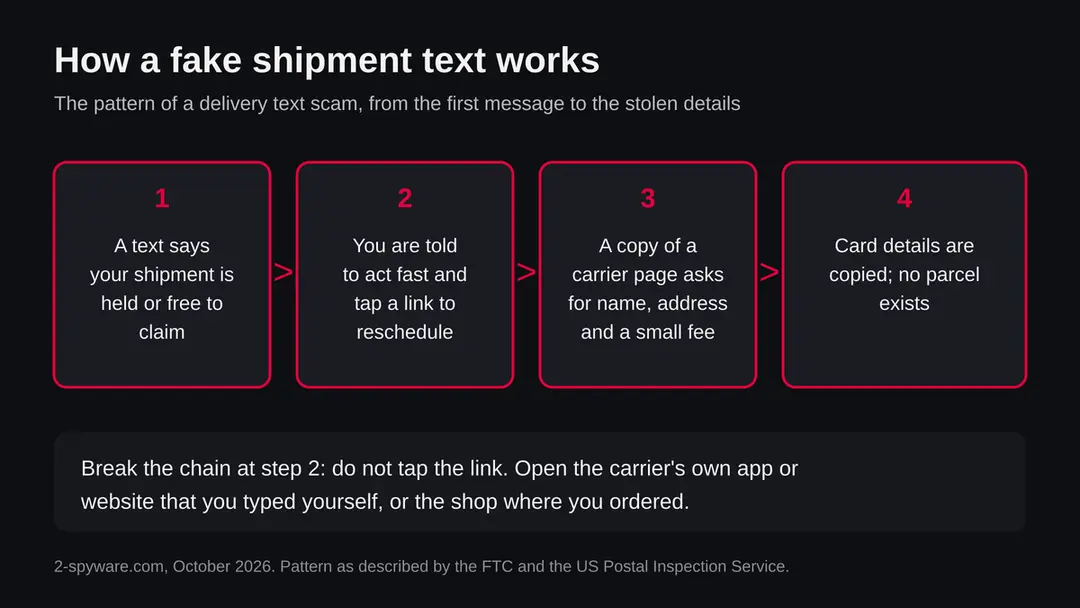
Shipments free scam: summary
| Name | Shipments free scam (a search phrase, not one named program or website) |
|---|---|
| Type | Two scam patterns: the fake delivery text (smishing) and the free item, pay only shipping offer |
| Risk | Medium to high if you tap the link and enter card details; low if you only read the message |
| Symptoms | A text about a shipment you did not order, a link to fix an address or pay a small fee, or an ad for a free item with a shipping charge |
| How to get rid of it | Do not tap the link; check the parcel in the carrier's app or the shop you used; report the message; if you paid, call your bank |
| Our check (12 October 2026) | No address to test: the subject is a phrase. No URLhaus entry and no registration data apply; the facts come from the FTC, the US Postal Inspection Service, Apple, Google and the Better Business Bureau |
Show 7 more facts
| Devices | iPhone and Android phones, also any computer that receives the link |
|---|---|
| Microsoft detection | None: this is a message or an ad, not a Windows file, so Microsoft has no detection name of the form Trojan:Win32/... for it |
| Evidence | 0 write-ups by security sites; details still limited |
| First seen | 12 October 2026 |
| Distribution | Typically fake installers, cracked programs, e-mail attachments, fake "verify you are human" pages and ads for popular apps |
| Damage | Installs other malware, often several programs at once |
| Facts checked | 12 October 2026 |
Facts checked on 12 October 2026 against the US Postal Inspection Service's smishing page, Apple Support, Google Messages Help and the Better Business Bureau warnings as reported in news. The FTC advice reached us through a security press summary. We had no address to test and did not receive or click any message.
Is the shipments free scam real? What the phrase means
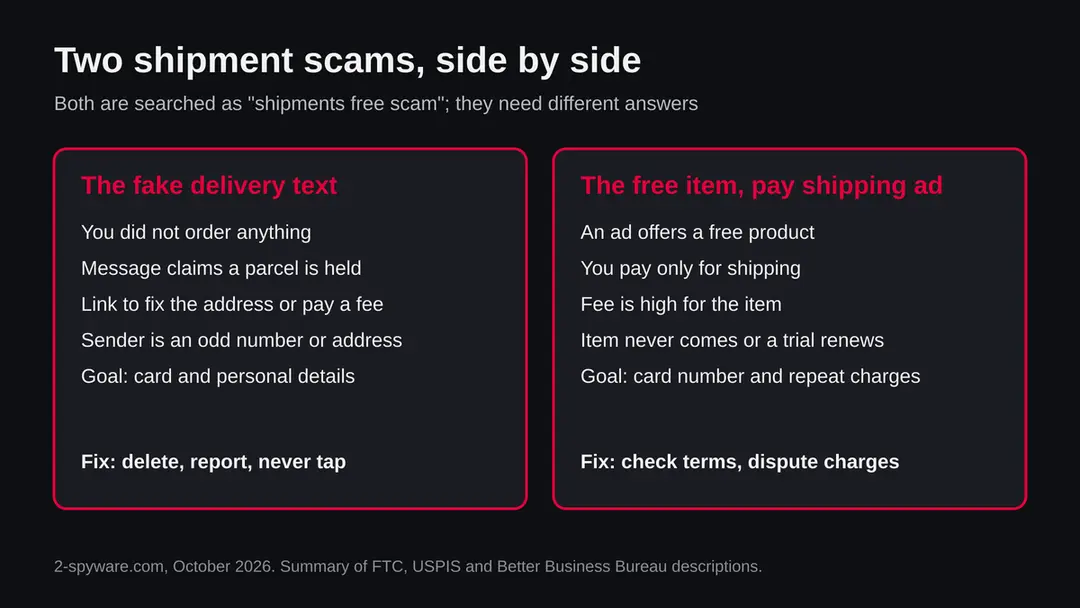
"Shipments free scam" is a search phrase, not the name of one program or one website, and it covers two different scams. One is the fake delivery text that says a shipment is held, needs a new address or is free to claim. The other is the free item offer where you pay only for shipping. Both aim at your card details and both can be dealt with from the phone, with no removal tool.
We chose to answer both on one page because we cannot tell which one you met. We have no single address behind this phrase, so there is no website we tested. Instead we read what the US Federal Trade Commission, the US Postal Inspection Service, Apple, Google and the Better Business Bureau say, and we mark below what is known and what is not.
In plain words: if the message came by text and you ordered nothing, assume it is a scam. If it came from an ad, read the shipping charge and the terms before you pay anything. If you already tapped or paid, go straight to the section on what to do after you clicked.
- What it is
- A phrase people search for after a shipment message or a free shipping ad; two scam patterns share it
- Where it arrives
- SMS or iMessage text, sometimes email, social media ads and web ads
- What it wants
- A tap on a link, then your name, address, card number or a bank code
- Is anything installed
- Not by the text itself; only if you install an app or a profile the page offers
- Not the same as
- A parcel you ordered, a real carrier alert you signed up for, or a virus on the phone
What shipments free scam does on an infected phone
The fake delivery text: how to recognize it
A delivery text is a scam when you have no matching order, the sender is an odd number or address, it creates urgency and it asks you to tap a link or give details. The US Postal Inspection Service calls this smishing and says the USPS does not send unsolicited delivery texts, only messages you signed up for.
The FTC's advice, as relayed by security press, is simple: if you get a message about an unexpected package that tells you to tap a link, do not tap. If you think it might be real, contact the shipping company using a phone number or website you know is genuine, not the one in the message. Look up the order in the shop where you bought the item instead.
The wording changes all the time, so do not look for one exact sentence. Look for the pattern. The message is short and vague, it names a carrier but no order number from a shop you used, and it gives you a reason to hurry:
- a held parcel
- a failed delivery
- a small fee to release it
- a free shipment waiting to be claimed
The link often looks close to a carrier's address but is not the carrier's own website.
| Sign | What you see | What it tells you |
|---|---|---|
| No matching order | A shipment you did not order or expect | The message went to a large list, not to you in particular |
| Odd sender | A long number, a short code you do not know, or an email address | Carriers use their own known channels; an odd sender is a warning |
| Urgency | Held, returned, expires today, last attempt | Pressure is used so you act before you think |
| Link to fix it | A short or lookalike address to reschedule or pay a fee | The page copies a carrier and collects details |
| A small fee | A payment of a few dollars to release the parcel | The aim is your card number, not the fee |
| Free to claim | A free shipment or prize waiting for you | A free claim that needs a card is the scam |
What we checked for this guide, and what we could not
The subject is a search phrase, so we had no address to open and no site to test. We read five public pages and we did not click on, order from or install anything.
shipments free scam · desk check · 12 October 2026
- Official description of the text scamThe US Postal Inspection Service describes smishing and gives the report address spam@uspis.gov; the FTC advice reached us through a security press summary, not the FTC page itself.
- Free item, pay shipping patternThe Better Business Bureau's warnings, as reported in local news, describe non delivery, stolen card details and subscription traps.
- Phone reporting stepsApple Support names Report Junk in Messages; Google's help page describes Block and report spam in Google Messages.
- A real text or adWe did not receive or test the text or ad that made you search. We cannot say who sent it.
- Web address, registration, malware listsThere is no address, so RDAP registration data, a plain request and a URLhaus lookup do not apply. A quiet result would not clear a link anyway.
A scam pattern, not one program A shipment text you did not expect should be treated as a scam, and a free item offer should be judged by its terms. Nothing here is a file on your phone.
How the scam works step by step
The scam depends on one thing: you tapping a link and then typing details into a page that copies a carrier. It does not need access to your phone, which is why the best defense is a habit and not a program.
- 1
A text arrives
It names a carrier or a shipment and says something is wrong or free. It reaches many people at once.
- 2
You are hurried
A deadline or a held parcel makes you tap before you check whether you ordered anything.
- 3
A copy of a carrier page opens
The page asks for your name, address and sometimes a small fee. Everything you type goes to the sender.
- 4
Your card details are collected
The fee is paid with a card. The scammers keep the number and can use it again.
- 5
No parcel exists
Nothing is delivered. Some victims also get follow up calls that pretend to be their bank, so never share a one time code.
Real parcel alert or scam: a quick comparison
A real carrier alert is something you asked for, about an order you know. A scam arrives unasked and pushes you. Use this table when you are not sure.
| Question | Real alert | Scam |
|---|---|---|
| Did you sign up for alerts? | Yes, with the carrier or the shop | No, it arrives out of nowhere |
| Do you have an order? | Yes, and the shop emailed a tracking number | No order, or the message gives no order detail |
| Does it ask for card details? | Not to deliver a parcel | Often, for a small fee |
| What does the link do? | Opens the carrier's own known website | Opens a lookalike page, often after a short link |
| How does it sound? | Plain status of a parcel | Urgent, with a deadline or a prize |
What scammers ask for in these messages
- Your name and home address
- A small fee by card
- Card number and security code
- A one time code from your bank
- An app or profile installation
- A reply to confirm your number
How shipments free scam got on your phone
An ad that gives away a free product for the cost of shipping is a known pattern, and the Better Business Bureau has warned about it. The risks it lists are no product, a product that does not match the ad, stolen card details and a free trial that turns into repeat charges.
The cases reported by the Bureau and by local news include a fishing lure offer where buyers paid a shipping fee of about fifty dollars and waited months, a free dog bed offer that drew complaints from people in dozens of states, and ads that used celebrities or TV shows that never endorsed the product.
We name no company here, because this page covers the pattern and not a specific seller.
Not every free item offer is fraud. A consumer information site noted that many sit in a gray area: the seller is real, but the shipping charge covers the cost of the item and more, the product is poor, and the cancellation terms are hard to find.
The honest way to judge an offer is to look at the total you pay, the seller's name and address, the return and cancellation terms and whether the seller can be reached.
- High
Your card is used for more than shipping
A card number given for a small fee can be charged again or sold. The Bureau reports victims whose card details were stolen after a pay only shipping offer.
- Medium
A free trial becomes a subscription
Terms in small print can enrol you in repeat shipments or monthly charges. Read the terms before you enter a card number, and look for the cancel route.
- Medium
The product never comes or is not what the ad showed
The Bureau lists non delivery and mismatched products among the complaints. Keep the order page and the ad as proof.
- Low
Fake endorsements
Ads that show a celebrity or a TV show are a warning sign, because the Bureau reports that the people named never backed the product.
How to remove shipments free scam
There is nothing on the phone to uninstall, so the plan is about the message, your accounts and your card.
Do the steps in order and stop after the step that matches what actually happened.
Step 1: Do not tap the link or reply
Leave the message as it is.
Warning: Do not tap the link, do not call a number in it and do not reply STOP, because a reply tells the sender your number is active.
On iPhone you can touch and hold a link to see its destination, as Apple Support describes, but you do not need to. If you already tapped, close the page and go to the step on your card.
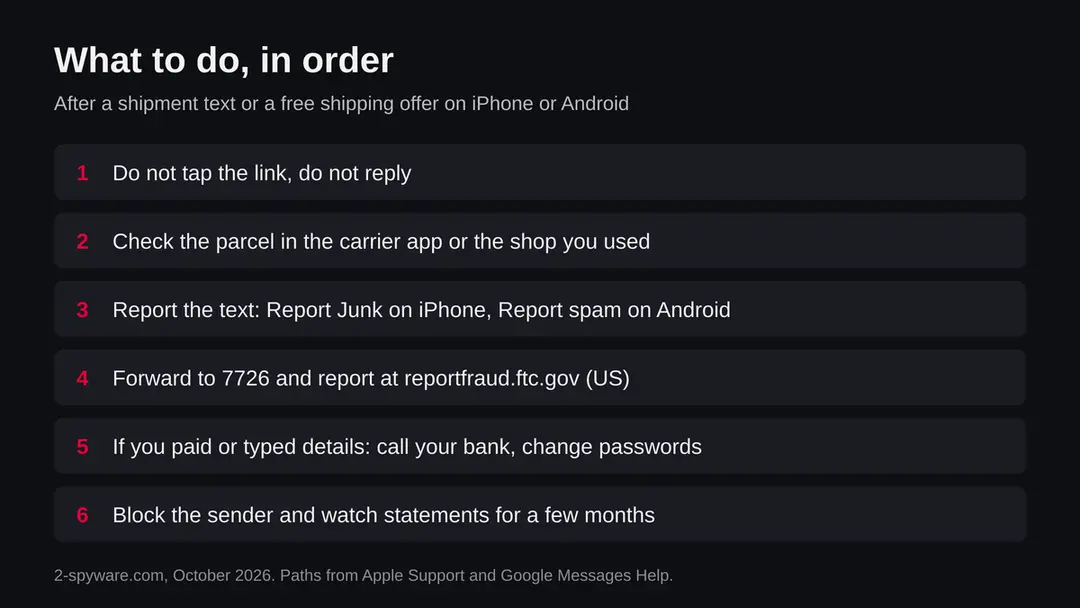
The order of actions for iPhone and Android, with the menu paths from Apple Support and Google Messages Help. Step 2: Check the parcel yourself
If you ordered something, open the shop's order page or the carrier's own app and enter the tracking number from your order email. Do not use the phone number or link in the message.
The FTC advises contacting the shipping company with a number or website you know is genuine. If you have no order, there is nothing to check and you can go on to the report.
Step 3: Report the text on iPhone
Open the message in Messages and tap Report Junk under it, as Apple Support describes (iOS 26 and earlier versions with this option). Then block the sender from the conversation details.
If the message pretends to be from Apple, Apple says to take a screenshot and email it to reportphishing@apple.com. The report does not remove the message from other people, but it helps filtering.
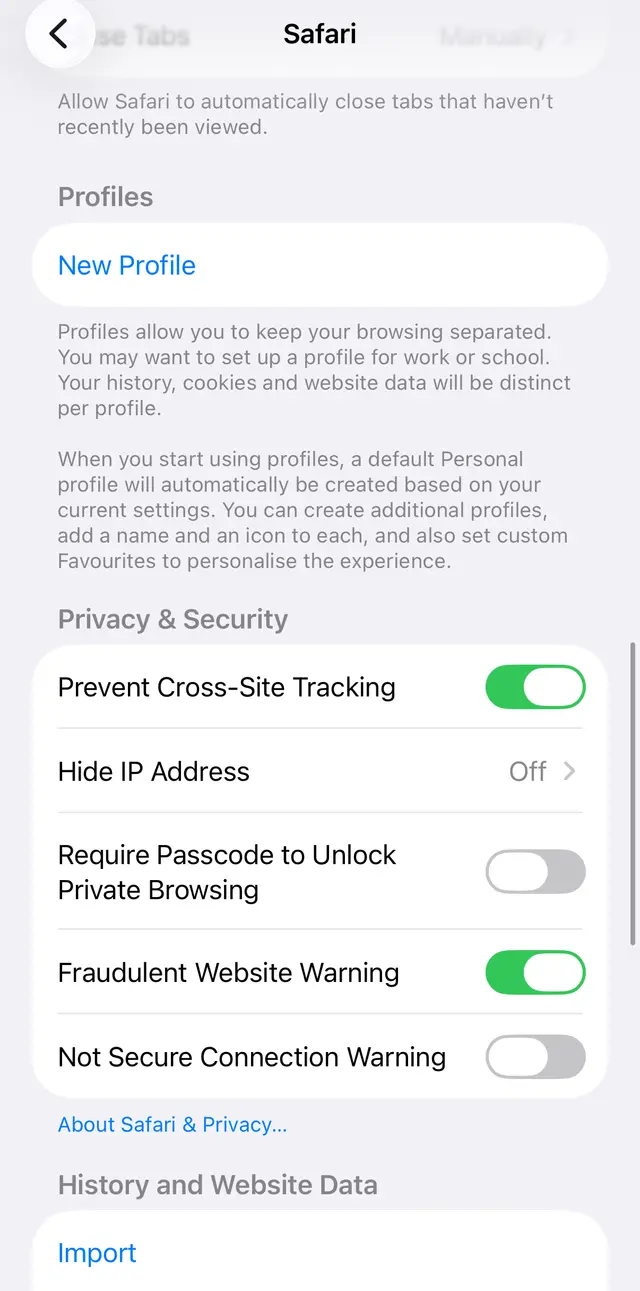
iOS 26: Settings, Apps, Safari. Keep Fraudulent Website Warning on, it warns before a known fake site opens. Step 4: Report the text on Android
In Google Messages touch and hold the conversation, tap the block option, choose Report spam and confirm with OK. From inside the conversation tap More options > Details > Block & report spam.
Google says the sender is reported and the message moves to the Spam & blocked folder. You can report without blocking, and you can undo a report by marking the conversation as not spam.
Step 5: Report it to the authorities
In the United States forward the text to 7726 (SPAM) without tapping the link and report it at reportfraud.ftc.gov.
For a fake USPS message, email spam@uspis.gov with the message text and a screenshot showing the sender's number and the date, as the Postal Inspection Service asks.
Outside the United States use your national fraud site; we did not confirm each country's page, so check yours.
Step 6: If you entered card details or codes
Call your bank at once and ask it to block or replace the card. Change any password you typed from another device, and never share a one time code with anyone who contacts you.
Watch your statements and credit reports for a few months, as the FTC advises. For a paid free item offer, keep the ad and the order page and ask your card issuer to dispute the charge.
Step 7: Check for an installed app or profile
If the page made you install anything, remove it. On iPhone open Settings > General > VPN & Device Management and remove a profile you did not choose.
On Android uninstall the app, search Settings for Install unknown apps and switch it off for the browser and messengers, and run Scan apps with Play Protect in Google Play.
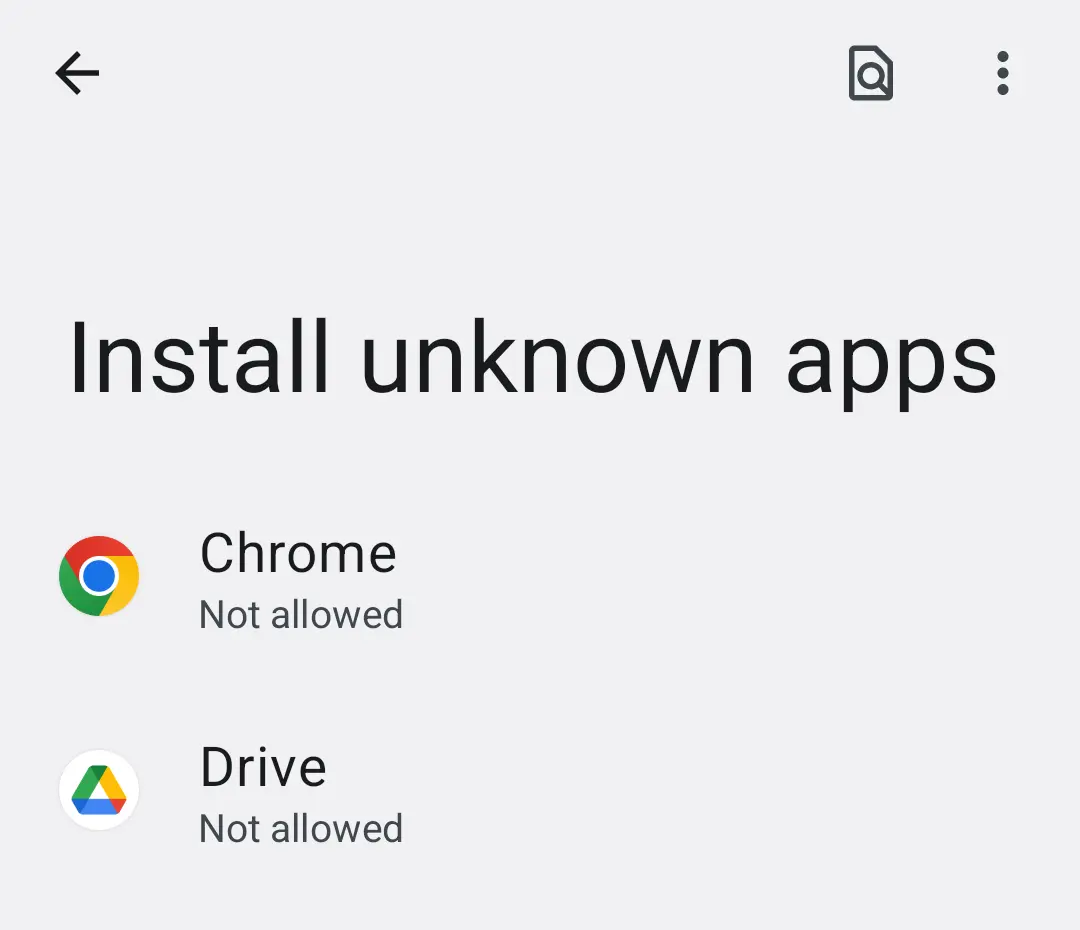
Android 14: Settings, Install unknown apps. Keep the permission off for the browser and messengers.
After removal: passwords, accounts and prevention
If you tapped the link, replied or paid
What matters is what you did after the tap. Opening a page is different from typing a card number, and both are different from installing something.
- 1
You only read the message
Delete it and report it. Nothing has happened to the phone.
- 2
You tapped the link but typed nothing
Close the page, delete the message and report it. Keep the phone updated. On iPhone you can clear Safari data under Settings, Apps, Safari if you want to be thorough.
- 3
You entered card details
Call your bank now and say the card may be exposed. Ask it to block or replace the card, change passwords you typed, and watch statements and credit reports for a few months, as the FTC advises.
- 4
You gave a one time code or a password
Change that password from another device at once, tell your bank, and turn on two factor sign in where it exists. A one time code is meant for you only.
- 5
You installed an app or profile
Remove it. On iPhone check Settings, General, VPN and Device Management for a profile you did not choose. On Android uninstall the app and run Scan apps with Play Protect in Google Play.
- 6
You paid for a free item offer
Keep the ad, the order page and the receipt, ask the seller to cancel, and tell your card issuer you want to dispute the charge. Do this soon, because dispute time limits can apply.
How to report it
Reporting takes a minute and helps block the same message for others. Do not tap the link while you do it.
| Where | How | Source |
|---|---|---|
| iPhone Messages | Open the message and tap Report Junk under it | Apple Support |
| Google Messages on Android | Open the conversation, More options, Details, Block and report spam, then OK | Google Messages Help |
| Your mobile carrier (United States) | Forward the text to 7726 (SPAM) without clicking any link | FTC advice, via security press |
| FTC (United States) | Report at reportfraud.ftc.gov | FTC advice, via security press |
| USPS (United States) | Email spam@uspis.gov with the message text and a screenshot showing the sender's number and the date | US Postal Inspection Service |
| Other countries | Use your national fraud reporting site and your mobile carrier's spam reporting; we did not read each country's page | Not confirmed here |
How to report it
Reporting takes a minute and helps block the same message for others. Do not tap the link while you do it.
| Where | How | Source |
|---|---|---|
| iPhone Messages | Open the message and tap Report Junk under it | Apple Support |
| Google Messages on Android | Open the conversation, More options, Details, Block and report spam, then OK | Google Messages Help |
| Your mobile carrier (United States) | Forward the text to 7726 (SPAM) without clicking any link | FTC advice, via security press |
| FTC (United States) | Report at reportfraud.ftc.gov | FTC advice, via security press |
| USPS (United States) | Email spam@uspis.gov with the message text and a screenshot showing the sender's number and the date | US Postal Inspection Service |
| Other countries | Use your national fraud reporting site and your mobile carrier's spam reporting; we did not read each country's page | Not confirmed here |
How to keep these messages away
Do
- Track parcels in the carrier's app or on a website you type yourself, with the tracking number from your order email.
- Touch and hold a link on iPhone to see where it goes before you open it.
- Report and block the sender so your phone filters later messages.
- Read the shipping charge, the terms and the cancellation route before paying for a free item offer.
- Use a card or payment service that lets you dispute a charge.
Don't
- Tap a link in a text about a shipment you did not order.
- Pay a small release fee or give card details to a page opened from a text.
- Share a one time code with anyone who contacts you.
- Install an app or a profile because a message or ad says it is needed for delivery.
- Pay for a program that promises to remove a scam text.
Questions about shipments free scam
Is a "shipments free" text a scam?
If you did not order anything and the text says a shipment is held, needs a new address or is free to claim, treat it as a scam. The US Postal Inspection Service describes this pattern as smishing: a text that looks like it comes from a carrier and pushes you to tap a link.
The USPS says it does not send unsolicited delivery texts, only alerts you signed up for. Do not tap the link. Check your parcels in the carrier's own app or on its website that you type yourself.
What is the free item, pay only shipping offer, and is it a scam?
It is an ad that offers a free product and asks you to pay only for shipping. The Better Business Bureau has warned about such offers:
- some buyers never received the product
- some got something that did not match the ad
- some found card details used for charges they never agreed to
Not every such offer is fraud, but a shipping fee that is high for the item, vague product details and no easy way to reach the seller are warning signs. Read the terms before you enter a card number.
What should I do if I tapped the link in a shipment text?
Close the page and do not type anything into it. If you only tapped and entered nothing, the risk is low, but delete the message and report it.
If you entered a card number, call your bank at once so it can watch the card or replace it, change any password you typed, and check your statements and credit reports for the next few months. The FTC gives the same advice. Report the message at reportfraud.ftc.gov if you live in the United States.
How do I report a fake delivery text on iPhone and Android?
On iPhone, open the message in Messages and tap Report Junk under it, as Apple Support describes. On Android with Google Messages, open the conversation, tap More options, then Details, then Block and report spam, and confirm.
In the United States you can also forward the text to 7726 (SPAM) without tapping the link, report it at reportfraud.ftc.gov, and send a fake USPS text to spam@uspis.gov with a screenshot showing the sender's number and the date.
Do I need an app to remove a shipments free scam?
No. A scam text or an ad is not a program on your phone, so there is nothing to uninstall. Anyone who sells you a remover for a text message is using the scare to sell you something.
The free steps are to delete the message, report it, block the sender and, if you tapped and entered details, protect your card and passwords. Only if the link made you install an app or a profile do you need to remove that item, and the plan below shows where.
Why do I get shipment texts when I ordered nothing?
Scammers send the same text to very large lists of numbers and wait for the few people who are expecting a parcel to tap. The message does not know what you ordered.
That is why the sender is often a long odd number or an email address, and why the message is vague, with no order number from a shop you used. If you do expect a parcel, still do not use the link: open the carrier's app or the shop's order page instead.
Is a free shipment or free shipping offer ever real?
Yes. Many shops offer free shipping, and some companies do send a free sample. The difference is that a real offer comes from a shop you know or can check, shows the full price and terms before you pay, and does not hurry you.
Be careful when a free item needs a card number for shipping only, when a free trial can renew, or when the ad uses a celebrity or TV show that never endorsed it, which the Better Business Bureau has reported.
Can scammers steal money just from my tapping a link?
Tapping alone mostly opens a web page; the damage comes from what you type or install afterwards. Some pages ask you to install an app or a profile, which is more serious, and some ask for a one time code your bank sent.
Never share that code. On iPhone you can touch and hold a link to see its destination before opening it, which Apple recommends. If anything beyond the tap happened, follow the steps in the plan and call your bank.
Where do I check a parcel safely?
Use the app of the carrier or the website you type into the browser yourself, with the tracking number from your order email or the shop's order page. Do not use the phone number or link in the text.
The FTC advises that if the message might be real, you contact the shipping company with a number or website you know is genuine. If you have no order, no tracking number exists for you to check, and the message can be deleted.
Sources
- US Postal Inspection Service: Smishing (fake package delivery texts) and how to report (read October 12, 2026)
- Panda Security: FTC warns of text messaging scam claiming to be from UPS, FedEx (read October 12, 2026)
- Apple Support: Recognize and avoid social engineering schemes (fake texts, Report Junk) (read October 12, 2026)
- Google Messages Help: Report spam and block numbers (read October 12, 2026)
- CBS Austin: Facebook ads for free items with a shipping fee have the BBB investigating (read October 12, 2026)