
Venmo scam calls on iPhone and Android: is it real and what to do
Venmo scam calls are phone calls or voicemails from people who pretend to be Venmo, its fraud team or someone who sent you money, to get a code, a password or a payment. Hang up, open the Venmo app yourself to check your account, and never act on a number or link the caller gave you.
Facts checked October 12, 2026. Steps checked against Apple's and Google's current documentation and the reports we cite. We have not run the app or the link on a phone ourselves.
Do it yourself · free Remove Venmo scam calls yourself 8 steps, about 24 minutes, no software needed.
Start the steps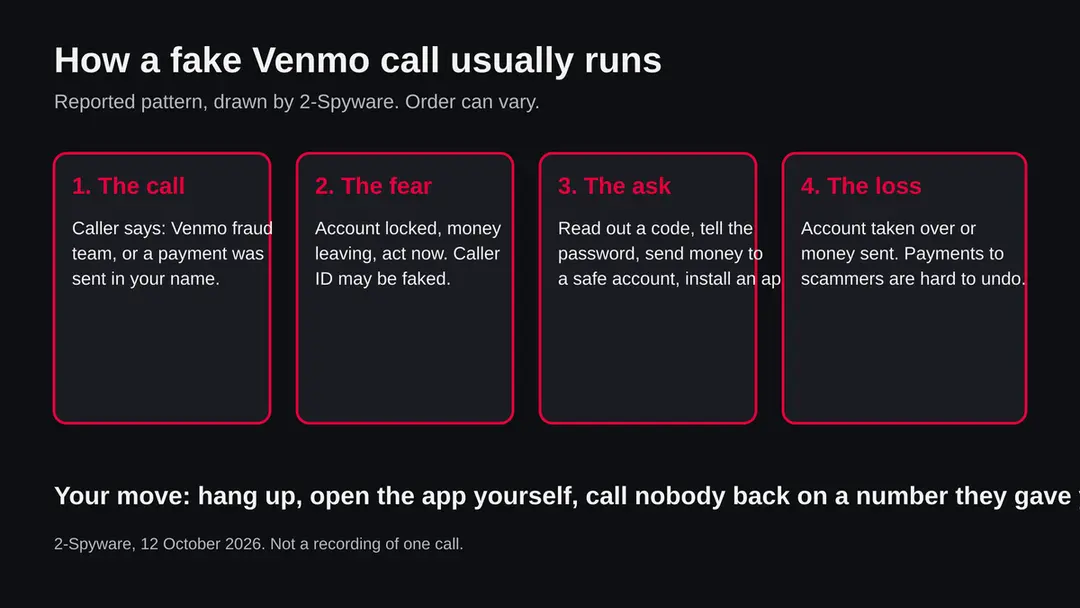
Venmo scam calls: summary
| Name | Venmo scam calls (calls and voicemails that pretend to come from Venmo) |
|---|---|
| Type | Phone scam by impersonation; no program or file is involved unless the caller makes you install one |
| Risk | High if you follow the caller: stolen codes, a taken-over account, money sent that is hard to get back |
| Symptoms | An unexpected call or voicemail about a Venmo payment, a locked account or fraud; a request for a code, password or a transfer; a caller who says to act now |
| How to get rid of it | Hang up, check the Venmo app yourself, change passwords if you shared anything, report it, block and screen the number |
| Our check (12 October 2026) | Desk research only: no address to test, no URLhaus entry, one Venmo help page and FTC and Google pages read; Venmo's own scam page could not be read |
Show 7 more facts
| Devices | Any phone: iPhone and Android |
|---|---|
| Microsoft detection | No Microsoft detection name is known: a scam call is not a file, and we read no Microsoft page naming one for an app a caller might ask you to install |
| Evidence | 0 write-ups by security sites; details still limited |
| First seen | 12 October 2026 |
| Distribution | Typically fake installers, cracked programs, e-mail attachments, fake "verify you are human" pages and ads for popular apps |
| Damage | Installs other malware, often several programs at once |
| Facts checked | 12 October 2026 |
Facts checked on 12 October 2026 against one Venmo help page, the FTC phishing page and Google's Call Screen help page. Venmo's own scam guidance could not be read, so this guide states no Venmo rule. We made no site test: the subject is a kind of call, not an address.
What are Venmo scam calls
Venmo scam calls are calls, voicemails and robocalls from people who claim to be Venmo, or a Venmo fraud team, or a person who says they sent you money. The goal is always the same: get you to hand over a login code, a password or a payment before you stop to think.
Venmo is a payment app, and apps that move money attract callers who pretend to be the company. The scammer does not need to hack anything if you give the access yourself.
A typical call says that a payment was made in your name, that your account will be closed or frozen, or that someone is trying to log in. The voice is calm and official, and the caller offers to fix it if you follow a few steps.
This page covers what such a call looks like, how to check whether a call is real without trusting the caller, what to do if you already followed it, and how to block and report. It is written for iPhone and Android because the call arrives on the phone, even though the money moves in the app.
- What it is
- A phone scam in which the caller pretends to be Venmo or a Venmo customer
- What they want
- A text message code, your password, a transfer of money, or an app installed on your phone
- How it reaches you
- Call, voicemail, robocall, often followed or preceded by a text or an email
- Why it works
- Fear and speed: a claim of lost money and a demand to act at once
- Not the same as
- A virus: a call cannot infect a phone, only what you do after it can
Is a call from Venmo real? What we could and could not confirm
You cannot tell from the call. A real company and a scammer can both ring from a number that looks right, and caller ID can be faked, so the way to check is to end the call and look inside the app yourself.
We want to be plain about the limits of this guide. The page we tried for Venmo's own scam guidance did not load any advice, and the Venmo help article we did read covers payment privacy, not scams.
So we do not quote Venmo's rules on when it calls, and we do not write what Venmo will or will never ask. Where this page describes scam scripts, it describes reported patterns of phone fraud, and it says so.
Venmo scam calls · desk check · 12 October 2026
- Venmo help article readVenmo's help page on payment privacy explains that you can set payments to Public, Friends or Private and hide past payments. It does not mention scam calls.
- FTC phishing page readThe FTC says an unexpected message that claims a problem with your account or payment, or asks you to confirm details, is a warning sign, and that you should contact the company with a number or website you know is real.
- Google call screening page readGoogle's help page describes Call Screen in the Phone app, with a Report as spam answer, on Pixel phones and on selected Android devices in the US and Canada.
- Venmo's own scam guidanceNot read. The safety page we opened was a profile page with a Contact Us link only. We state no Venmo rule.
- A site or number to testNone. The subject is a kind of call, not an address, so we made no site test and found no URLhaus entry to report.
- Any one numberWe name no phone number as a scammer's. Numbers change, and a number that rang you is the least useful clue.
Check yourself, trust no caller Treat every unexpected call about Venmo as a scam until you have checked in the app yourself. We cannot clear or condemn a number from here.
What Venmo scam calls does on an infected phone
What a Venmo scam call sounds like: the common scripts
Most Venmo scam calls follow a handful of scripts. They differ in the story but share the same ending: you are asked to share something or send something.
These are reported patterns of payment app fraud and phone fraud in general. We did not hear a recording of the call you may have received, and your call may differ. If it matches none of them, the same rules still apply.
The fraud department script claims that a large payment, a new device or a login from another country was seen on your account. The caller says they will cancel it, and to do so they ask for the six digit code that has just arrived by text.
That code is the real login code, and reading it out lets the scammer sign in. The overpayment script claims that someone sent you money by mistake, and asks you to return it. The voicemail script leaves a message with a callback number and an urgent tone, so that you phone the scammer yourself.
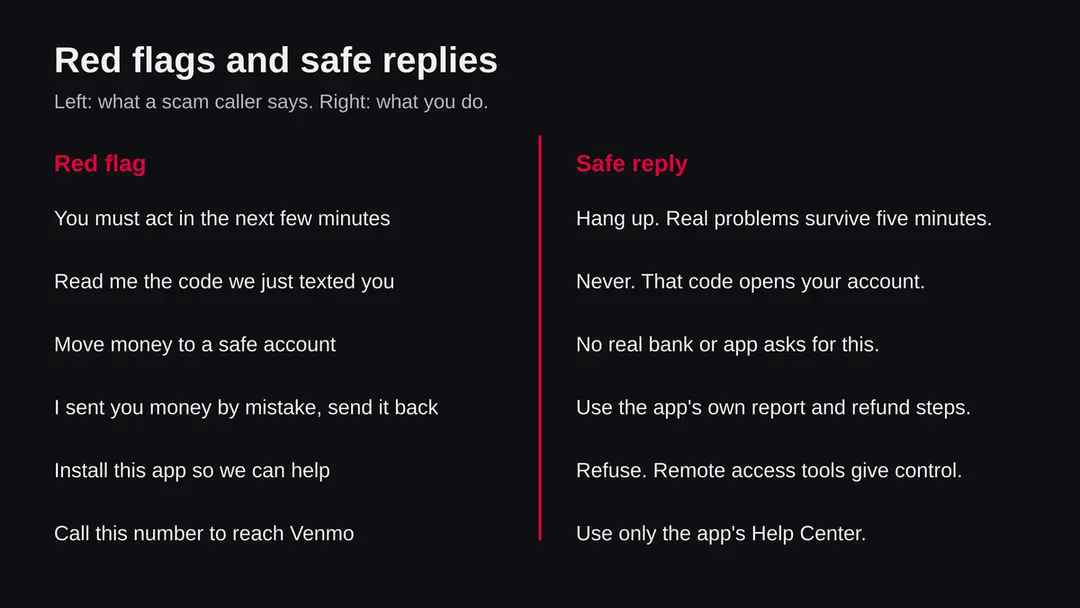
| Script | What the caller says | What they really want |
|---|---|---|
| Fraud team | A payment or login on your account looks suspicious | Your login code, password or card details |
| Safe account | Move your money to a protected account to keep it safe | Your money, sent where they control it |
| Sent by mistake | I sent you money by accident, please send it back | Your own money, once their payment is reversed |
| Support number | Call this number to reach Venmo support | A chat with a scammer who sounds helpful |
| Remote help | Install this app so we can fix your account | Control of your phone and your banking apps |
| Prize or refund | You are owed a refund or a prize through Venmo | A fee, a card number or a code |
The login code trap and the account takeover
The most damaging moment in a Venmo scam call is when you read out a code. A code sent by text is a key that the real company sends you, and it is for you alone.
Here is how the trap works, as a reported pattern. The scammer already has your phone number and tries to sign in to your account, or to reset your password.
A real code arrives on your phone. The caller, who is on the line with you, says it is a code to cancel the fraud, and asks you to read it. You do, and they are in.
After that, a scammer can try to move money, change the email address and phone number on the account, and use the account to send the same call to your contacts. This is why we advise changing the password at once if you shared a code, and why we ask you to tell your bank as well as Venmo.
How Venmo scam calls got on your phone
Scammers pick a name that many people recognise and that holds their money. A payment app fits both, and a worry about money gets a faster answer than a worry about anything else.
Several things make the story convincing. Many people use payment apps every week and expect a text with a code now and then. A payment can be sent in seconds.
A caller who already knows your name and the last digits of a number, which are often bought or leaked, seems to be genuine. And the caller uses time pressure, because a rushed person does not stop to open the app and look.
The FTC's page on phishing lists the same signs for messages that claim to come from a company you know:
- a problem with your account or payment
- a request to confirm personal or financial details
- a link to update your details
A phone call is the same trick with a voice, and the voice makes it harder to say no.
How to remove Venmo scam calls
How to deal with a Venmo scam call on iPhone and Android
There is nothing to uninstall unless the caller made you install something.
You end the call, check your account yourself, secure what you shared, and block and report.
Step 1: Hang up and keep the details
End the call without pressing a key. Write down the number, the time and the story the caller told, because you may need them for a report.
Warning: Do not call the number back.
A real problem with an account will still be there in five minutes, and it will be visible inside the app.
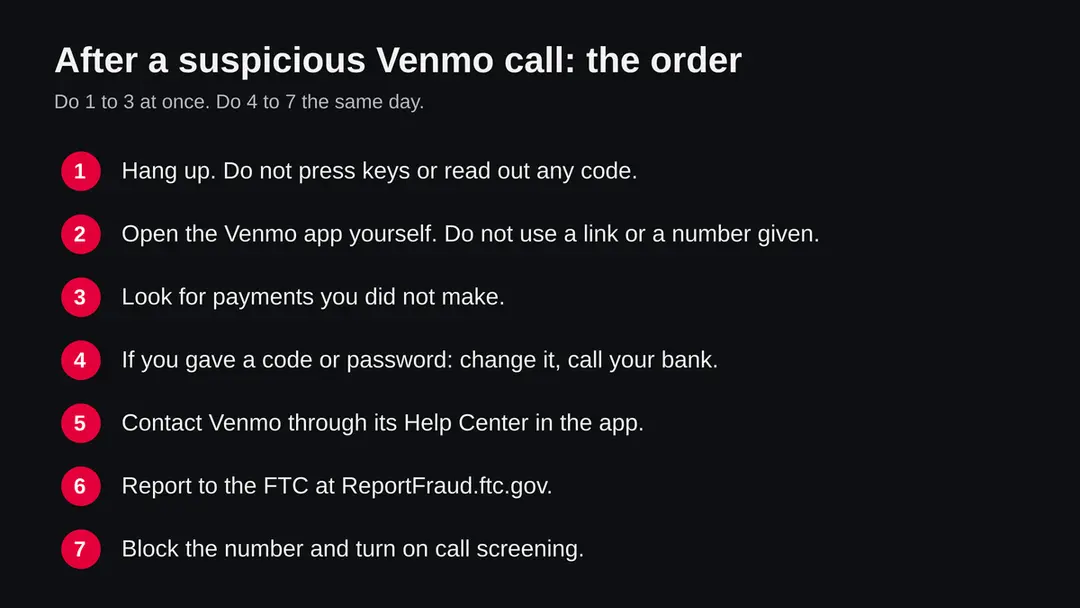
The order of actions after a suspicious Venmo call on iPhone or Android, drawn by 2-Spyware on 12 October 2026. Step 2: Check the account in the app
Open the Venmo app from its own icon, not from a link. Look at your recent payments and at any notice in the app.
If you see a payment you did not make, do not wait: go to the Help Center in the app or the Contact Us form on help.venmo.com. If everything is yours, the call was probably an attempt only.
Step 3: Secure what you shared
If you read out a code or told a password, change your Venmo password now and then your email password. Turn on two step verification where it is offered.
Tell your bank or card issuer if you gave card or account numbers. The FTC points to IdentityTheft.gov for the steps that match what you lost.
Step 4: Remove anything the caller had you install
On Android, search Settings for Device admin apps and switch off any app you do not know, then uninstall it, and run Scan apps with Play Protect in Google Play.
On iPhone, touch and hold the icon and choose Remove App. A remote access app gives a stranger a view of your screen, so treat the phone as exposed and change your passwords from another device.
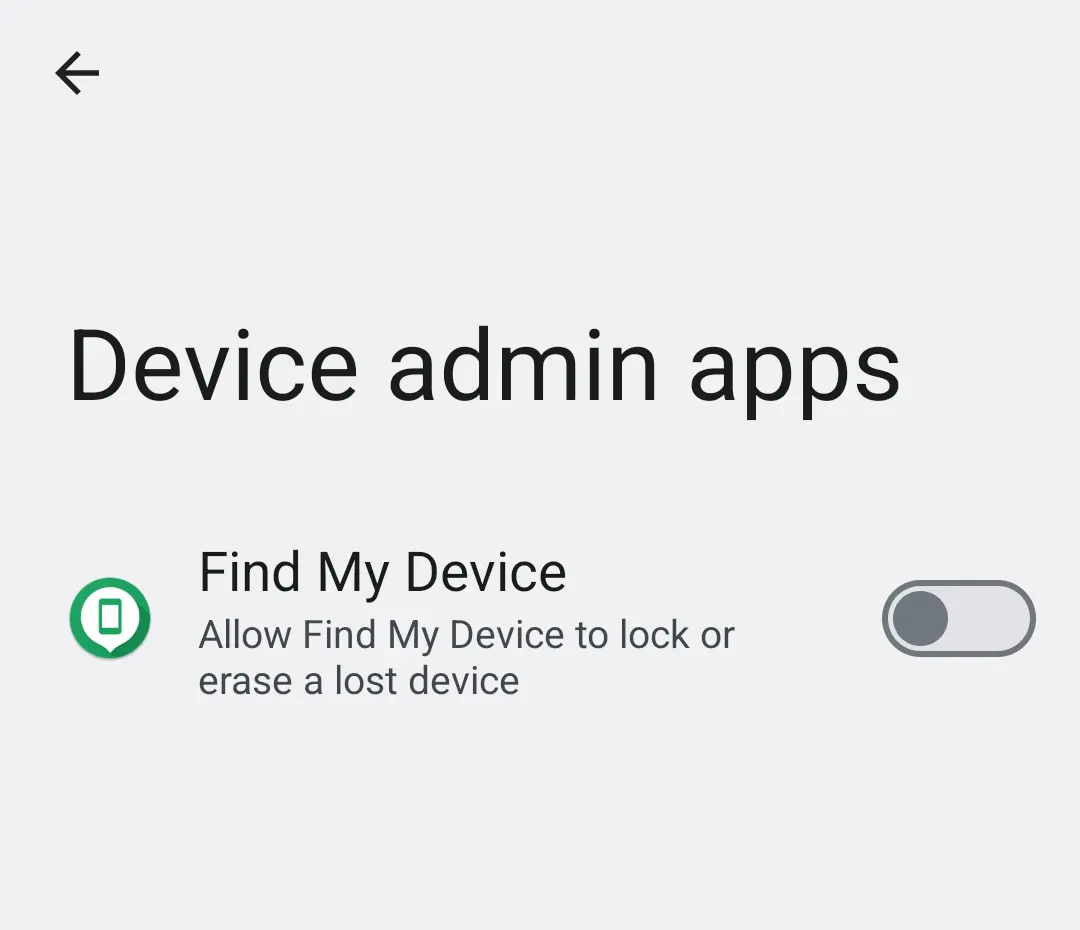
Android 14: Settings, Device admin apps. An app a caller made you install has no reason to be switched on here. Step 5: Report the call
Report it at ReportFraud.ftc.gov. If the scam also came as a text, forward the text to 7726 (SPAM), as the FTC's page says.
Tell Venmo through its Help Center. Reports do not always bring money back, but they help others and the people who track these numbers.
Step 6: Block and screen on Android
Open the Phone app, tap More > Settings > Spam and Call Screen and turn on screening, as Google's help page describes for Pixel phones; on a Pixel 7 or newer the toggle is under Protection level.
Other Android makers use their own menus, so search Settings for spam or call screening. Google notes manual screening works on selected devices in the US and Canada.
Step 7: Block and silence on iPhone
Open Phone > Recents, tap the info icon next to the number and choose Block this Caller. Apple's page on blocking was not read for this guide, so check Apple Support for the wording on your iOS version.
Blocking one number helps only a little, because scammers change numbers; ask your phone company about its spam call tools too.
Step 8: Ignore removal offers
There is no Venmo scam call remover. A person or page that offers to recover lost money for a fee is often a second scam aimed at people who were just scammed. The steps above are free.
What to do right now if a call comes in
End the call. You do not owe a caller an explanation, politeness or a goodbye. Then check your account yourself, in the app, not through anything the caller gave you.
- 1
Hang up and do not press any key
Pressing a key to opt out or to speak to someone only tells the dialer that your number is live. Just end the call. If it was a voicemail, do not call the number back.
- 2
Open the Venmo app yourself
Use the app icon you already have, or type the address into your browser. Never use a link from a text or an email that came with the call. Look at your recent payments and at any notice inside the app.
- 3
Look for what you did not do
If every payment is one you made, the call was probably the opening of a scam. If you see a payment you did not make, go to the section below on what to do if money was sent.
- 4
Tell someone
Tell a family member, especially an older relative, that you got the call. Scammers call many people from one list.
How to block and screen scam calls on iPhone and Android
Blocking one number rarely ends the calls, because scammers change numbers. Screening unknown callers works better, and it takes a minute to turn on.
On Android, Google's help page says to open the Phone app, tap More, then Settings, then Spam and Call Screen. On a Pixel 7 or newer, automatic screening is under Protection level, with a toggle that screens spam, possibly faked numbers and first time callers.
On a Pixel 6 or older, it is under Unknown call settings. Manual screening is available on Pixel phones in several countries and on selected Android devices in the US and Canada.
On iPhone, you can block a caller from Phone > Recents by tapping the info icon next to the number and choosing Block this Caller. Apple's page on this was not read for this guide, so confirm the wording on your iOS version in Apple Support.
After removal: passwords, accounts and prevention
If you already gave a code, a password or money
Speed matters more than blame. Anyone can be fooled by a calm voice that knows a few facts. Work down the list in order and do not feel ashamed.
- 1
You read out a code
Open Venmo yourself and change your password. Change the password of your email account, because that is how many resets arrive. Turn on two step verification where it is offered. Check the email address and phone number on the account are yours.
- 2
You told them a password or card number
Change the password everywhere you use it. Call the number on the back of your card and tell the card issuer, so that the card can be replaced. The FTC points to IdentityTheft.gov for steps matched to what you lost.
- 3
You sent money
Contact your bank or card issuer first, because they handle the transfer. Then contact Venmo through the Help Center in the app or the Contact Us form on help.venmo.com. We cannot promise that money can be recovered, and we did not read Venmo's rules on it.
- 4
You installed an app at their request
Uninstall it at once. On Android, search Settings for Device admin apps and switch off anything you do not know, then run Play Protect. Treat the phone as exposed: change your passwords from another device, and watch your bank for some weeks.
- 5
You clicked a link
The FTC says to update your security software, run a scan and remove anything flagged. On a phone, that means installing the system updates and removing apps you do not know.
How to report a Venmo scam call
Report in three places: the FTC, Venmo and your phone. A report will not always bring your money back, but it helps others, and it is part of how numbers get blocked.
The FTC takes reports of scam attempts at ReportFraud.ftc.gov. Its phishing page also says that scam texts can be forwarded to 7726 (SPAM) and phishing emails to reportphishing@apwg.org.
For Venmo, the page we opened shows a Contact Us link that leads to help.venmo.com/hc/en-us/requests/new; the Help Center inside the app is the other way in. Tell your phone company or use your phone's own spam report, such as Report as spam in Google's Call Screen.
How to keep Venmo scam calls from working on you
Do
- Hang up on any unexpected call that mentions money, then open the app yourself.
- Contact a company only through the app, or a website you typed in.
- Keep your phone and apps updated, and turn on two step verification.
- Check Venmo's privacy settings so fewer people see your payments: Me tab > Settings > Privacy, as Venmo's help page describes.
- Tell older relatives about these calls before one reaches them.
Don't
- Read out a code that was sent to your phone, to anyone.
- Call back a number from a voicemail or a text.
- Send money to get money back or to a safe account.
- Install an app or allow remote access because a caller asked.
- Trust a caller because the number looks local or familiar.
Questions about Venmo scam calls
Are Venmo scam calls real?
Yes, scam calls that claim to come from Venmo are a known pattern of phone fraud, though we could not read a Venmo statement about them for this guide. The caller pretends to be a fraud team, says money left your account or an account was opened in your name, and pushes you to act at once.
The Federal Trade Commission describes the same pattern for payment apps in general: a message about a problem with your account or payment, and a request to confirm details. Treat any unexpected call that mentions Venmo as a scam until you have checked inside the app yourself.
Does Venmo call customers?
We could not confirm from Venmo's own pages whether or when Venmo phones customers, because the safety page we tried did not load any scam guidance. So we do not state a rule on Venmo's behalf. The safe habit does not depend on the answer: never act on an incoming call.
Hang up, open the Venmo app yourself, and look at your account and the Help Center there. If Venmo really needs something from you, the app will show it. Use the Contact Us form on help.venmo.com for questions.
I got a call saying a Venmo payment was sent from my account. What do I do?
Hang up without pressing any key. Then open the Venmo app yourself, never a link from a text, and look at your payment history. If you see no payment you did not make, the call was almost certainly the start of a scam.
If you do see one, contact Venmo through the Help Center in the app, change your password, and tell your bank. Do not call back the number that rang you, and do not let anyone on the line guide you through the app.
A stranger says they sent me Venmo money by mistake and calls me to send it back. Is that a scam?
It can be. A common trick is to send money, often from a stolen card or account, and then ask you to return it by a different route, so that the first payment is later reversed and you lose your own money.
We did not find Venmo's page on this, so we call it a reported pattern, not a confirmed rule. Do not send money to a caller. Use only the app's own report and refund options, and ask Venmo before you move any money.
Is the number that called me from Venmo?
You cannot tell from the screen. Scammers can fake the caller ID so that a call looks like it comes from a company or a local number, and a number that looks right proves nothing.
The only reliable check is to end the call and contact the company yourself, through the app or a website you typed in. The FTC gives the same advice for messages: if you do have an account, do not use the contact details in the message.
What if I already gave the caller a code or password?
Act within minutes. Open Venmo yourself and change your password, then change the password of your email account and of any account that uses the same one. Tell your bank or card issuer what you shared.
The FTC points people who gave out sensitive information such as a Social Security, card or bank account number to IdentityTheft.gov for steps matched to what was lost. If the caller made you install an app, remove it and see our steps for phones below.
How do I report a Venmo scam call?
Report the call to the FTC at ReportFraud.ftc.gov. Report it to Venmo through the Contact Us form on help.venmo.com or the Help Center in the app.
If the scam started with a text, the FTC says to forward it to 7726 (SPAM), and phishing emails go to reportphishing@apwg.org. If you lost money, tell your bank or card issuer at once, because they are the ones who can try to stop a transfer.
How do I block Venmo scam calls on my phone?
On an iPhone, open Phone > Recents, tap the info icon next to the number and choose Block this Caller; Apple's page on this was not read for this guide, so check Apple Support if the wording differs on your iOS version.
On an Android Pixel, open the Phone app, tap More > Settings > Spam and Call Screen, as Google's help page describes, and switch on screening. Blocking one number helps little because scammers change numbers, so screening unknown callers works better.
Is a Venmo scam call a virus on my phone?
No. A call is not a virus and cannot infect a phone by ringing. The danger starts when you do what the caller asks:
- read out a code
- open a link
- type your password
- install an app that gives them control of the phone
If you did install something, remove it, check which apps have Device admin or Accessibility access on Android, and see the steps below. If you only answered and hung up, nothing was installed.
Sources
- Venmo Help Center: payment privacy article opened at this address (it does not cover scams) (read October 12, 2026)
- Venmo: safety page (a profile page with a Contact Us link; no scam guidance) (read October 12, 2026)
- FTC Consumer Advice: How to recognize and avoid phishing scams (read October 12, 2026)
- Google Phone app Help: Call Screen and spam reporting (read October 12, 2026)
- Venmo Help Center: Contact Us form (address taken from the Venmo safety page) (read October 12, 2026)