
niggersmp.net: a Minecraft cheat client site whose .jar downloads URLhaus tags SilentNet, and what to do if you ran one
niggersmp.net is a website that offers free Minecraft cheat clients, and URLhaus lists four of its .jar downloads (Radium_Client.jar, krypton.jar, 4E_Client.jar and Zyphers_Rig_Mod.jar) as malware tagged SilentNet. A .jar file does nothing by being on a server; it matters only if someone ran it.
If you only saw the name, nothing is proven; if you ran one of these files, treat the PC and every account you used on it as exposed:
- change passwords from another device
- then scan and clean
- reset the system
Facts checked October 11, 2026. Removal steps tested on Windows 11 (26H2) and checked against Microsoft's and the browser makers' current documentation.
Automatic
Get a free scan and check if your PC is infected.
Fortect finds malware, unwanted programs and the Windows damage they leave behind, and repairs it in one pass.
Programs like a .jar file downloaded from niggersmp.net and run through Java or the Minecraft launcher usually arrive in groups; a free scan lists the companions that are easy to miss.
Do it yourself · free Remove niggersmp.net (SilentNet, Minecraft client .jar files) yourself 5 steps, about 15 minutes, no software needed.
Start the steps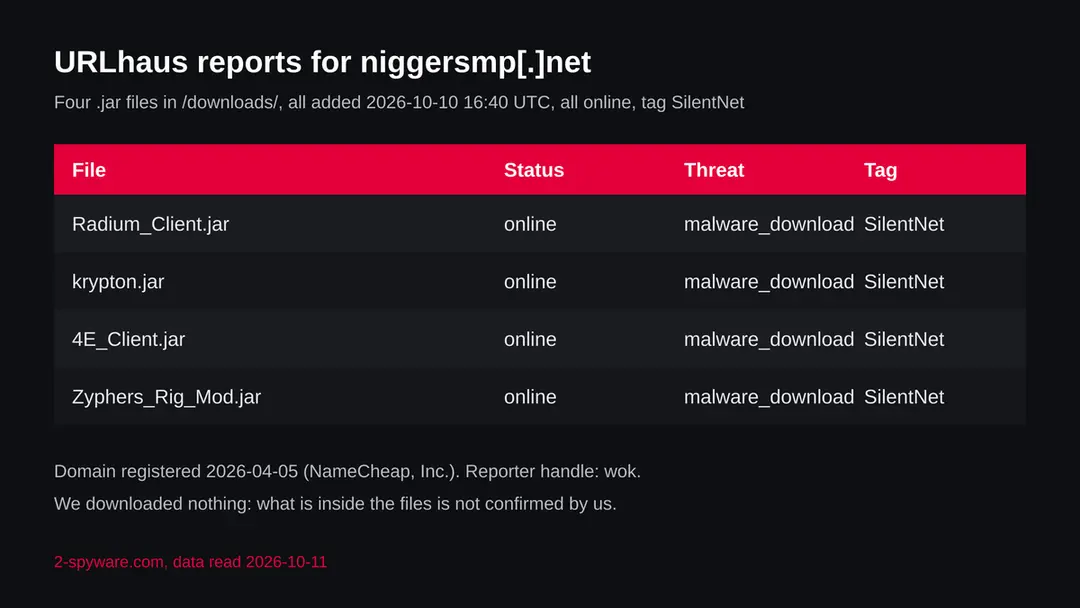
Niggersmp.net (SilentNet, Minecraft client .jar files): summary
| Type | A website offering Minecraft cheat clients; URLhaus lists four of its .jar files as malware tagged SilentNet |
|---|---|
| Risk | High if you ran one of the files: your Minecraft session and other logins may be taken. Low if you only saw the name |
| Symptoms | Often none. A Java process running when Minecraft is closed, or account activity you did not start, are the signs the reports suggest |
| How to get rid of it | Change passwords from another device, run Microsoft Defender Offline, remove the file and its startup entries, and reset the system if you are not sure |
| Our check (11 October 2026) | One plain request to the home page: status 200 behind Cloudflare, title about free Minecraft cheat clients. A quiet page clears nothing; the rating comes from URLhaus |
| Running since / first seen | Domain registered 5 April 2026; the four files first reported 10 October 2026 |
| Removal | Scan the PC with security software to find and remove the malware and anything installed with it. Fortect scans Windows for malware and repairs the system files and settings it damaged. Remove it nowTo use the full-featured product, you have to purchase a license for Fortect. The scan is free. |
Show 9 more facts
| Platform | Computers that run Java and Minecraft: Java Edition. Nothing we read says phones or consoles are affected |
|---|---|
| Detection names | No Microsoft detection name is known for these files, because we did not open them. The abuse.ch tag is SilentNet |
| Name | Niggersmp.net |
| Domain registered | 5 April 2026 |
| Evidence | 4 write-ups by security sites; details still limited |
| First seen | 10 October 2026 |
| Distribution | Typically fake installers, cracked programs, e-mail attachments, fake "verify you are human" pages and ads for popular apps |
| Damage | Installs other malware, often several programs at once |
| Facts checked | 11 October 2026 |
Facts checked on 11 October 2026 against the URLhaus data for niggersmp.net held in our database (the abuse.ch host page itself is not fetched by our tool), RDAP, one plain request from our server, and pages by MalwareBazaar, Check Point Research, Microsoft and the FTC. We did not download the files and we infected no computer; the removal steps follow Microsoft's pages and were not tried on a live infection.
What niggersmp.net is, and what we know about it
niggersmp.net is not a program on your computer. It is a web address that the abuse.ch project URLhaus lists as a place where malware was served: four Java archive files in a folder called downloads. The domain name contains a racial slur; we print it only because the reports name it. We found no public write-up of this address, so this page rests on URLhaus, our own plain request and vendor research on Minecraft malware.
- 1
What URLhaus lists
Four file addresses on niggersmp.net, all in the folder /downloads/ and all ending in .jar: Radium_Client.jar, krypton.jar, 4E_Client.jar and Zyphers_Rig_Mod.jar. All four were added at the same moment, 16:40 UTC on 10 October 2026, by one reporter with the handle wok. All four are marked online, all carry the threat label malware_download, and all carry one tag: SilentNet.
- 2
What the names suggest
The file names look like Minecraft cheat clients and mods, and the home page of the site calls itself a place for free Minecraft cheat clients and mods. That fits the lure that researchers describe for Minecraft malware: a cheat or a mod that players want, offered for free. It is our reading of the names, not something the reports say.
- 3
What the tag means
SilentNet is a name used on the abuse.ch malware sample site MalwareBazaar for Java malware aimed at Minecraft. One MalwareBazaar entry we read is a fake build of a known Minecraft client on a lookalike site, labelled SilentNet, and it describes stealing the Minecraft session and starting again as a hidden process. That entry is a different file from the four here. We did not download these four, so we cannot say what is inside them.
- 4
What this means for you
If you only saw the name in a log, a blocked request or a warning, you are not infected by that alone. The risk is for a person who downloaded one of these .jar files and ran it, usually by double clicking it or by dropping it into the Minecraft mods folder.
- Kind of threat
- A website offering Minecraft cheat clients; four of its .jar downloads are reported as malware tagged SilentNet
- Where the files are
- hxxps://niggersmp[.]net/downloads/ with the names Radium_Client.jar, krypton.jar, 4E_Client.jar and Zyphers_Rig_Mod.jar
- Domain registered
- 5 April 2026 through NameCheap, Inc.; status client transfer prohibited (RDAP, read 10 October 2026). The domain is about six months old
- URLhaus entries
- 4 file addresses, all added 10 October 2026 at 16:40 UTC by the reporter wok; all 4 online in our copy of the data
- File type
- .jar, a Java archive. It runs wherever Java is installed, and Minecraft: Java Edition installs its own Java
- Platform
- Any computer that runs Java and Minecraft: Java Edition (Windows, Mac, Linux). Nothing we read says iPhone, Android or the console editions are affected
What niggersmp.net (SilentNet, Minecraft client .jar files) does on an infected PC
What we checked on 11 October 2026, and what we could not
Our check was one plain request to the home page from our server, without a browser and without clicks. It does not show what a visitor with a real browser, another country or a second visit would be shown. A quiet answer clears nothing.
Our request, 11 October 2026
- The home page answeredThe server answered with status 200 and no redirect. The page title is Cheat Clients, Free Minecraft Cheat Clients and Mods. The site sits behind Cloudflare, a service that hides the real server and can show different answers to different visitors.
- Notification requestThe page text of this one plain request did not mention the browser notification system. We ran no browser, so a request that appears after a click or a delay would not show.
- Why that is not a clean resultA site that hands out malware can look like an ordinary download page. The files, not the front page, are what URLhaus reports, and we did not open them.
- URLhaus listingFour .jar files in /downloads/ tagged SilentNet and malware_download; all four online in our copy of the data on 11 October 2026.
- Downloads and the files themselvesWe did not download any .jar and we ran nothing. We cannot tell you what the files contain, where they send data or whether they differ for different visitors.
Dangerous: do not download or run files from this site Our request was one visit and proves nothing either way. The rating comes from the four URLhaus reports and their tag, not from the front page. Do not download from this address.
What happened to niggersmp.net, from registration to our check
The domain is young and the reports are a day old. The dates come from RDAP and from the URLhaus data we hold; the times are UTC.
5 April 2026
The domain is registered
RDAP shows niggersmp.net registered on 5 April 2026 through NameCheap, Inc., with the status client transfer prohibited. That status is a common lock against moving a domain away and says nothing about the content.
10 October 2026, 16:40 UTC
Four .jar files are reported
The reporter wok adds Radium_Client.jar, krypton.jar, 4E_Client.jar and Zyphers_Rig_Mod.jar in one batch. Each is labelled malware_download and tagged SilentNet. All are online at the time of listing.
11 October 2026
Our request
A plain request to the home page returns status 200 through Cloudflare, with the title Cheat Clients, Free Minecraft Cheat Clients and Mods. All four reported files are still marked online in our data.
The four URLhaus entries for niggersmp.net on 11 October 2026: one folder, four client names, one tag.
What the pattern suggests, and what it does not: four different client names added in one batch on a domain six months old looks like a site built to offer many cheat downloads, with several of them carrying the same malware family. That is our reading of the dates and names. No report says who runs the site or whether the owner knows what the files contain.
How a .jar cheat client can steal from a player
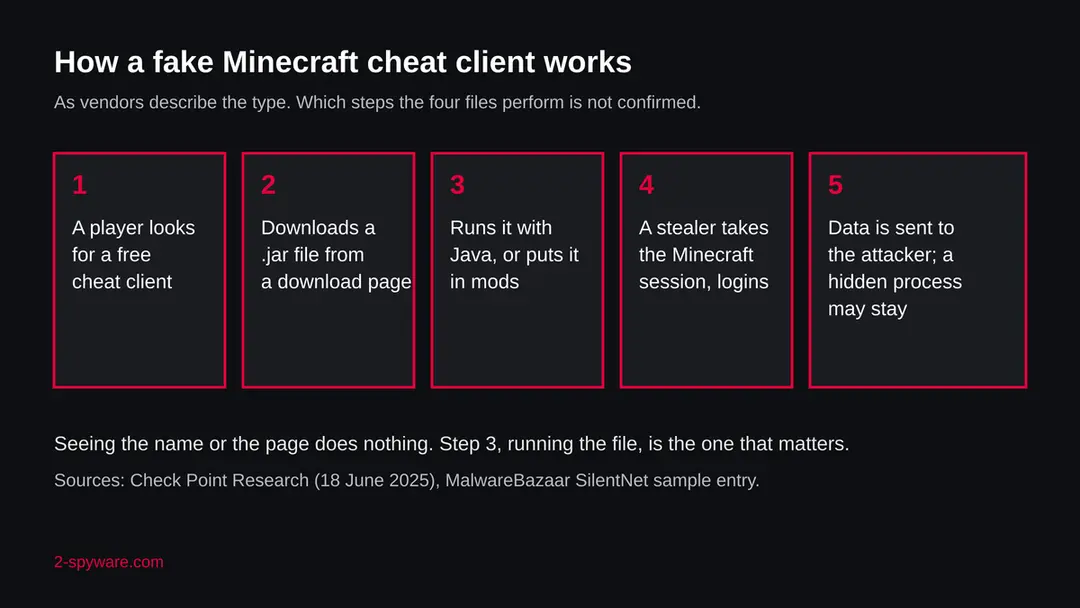
A .jar file is a program. Unlike a picture or a document, it is made to run, and a Minecraft client or mod runs with the same rights as you. We did not open the files on niggersmp.net; this is how Check Point Research describes a Minecraft cheat malware campaign it studied in 2025, and how the MalwareBazaar entry describes a SilentNet sample.
- 1
The lure is a free cheat
Check Point Research (18 June 2025) describes fake cheat and macro tools for Minecraft, called Oringo and Taunahi, shared through the Stargazers Ghost Network, a service that runs many fake accounts on GitHub to make malware look popular. Players look for free clients, find a page that offers one and download it.
- 2
The first stage is Java
In that campaign the first stage downloader and the second stage stealer were written in Java and needed Minecraft to be installed. That matches a .jar file that a player runs on purpose. Check Point reports a third stage written in .NET with wider stealing functions.
- 3
The client may still work
A common trick is to hide the malicious part inside something that behaves like the promised client, so the player sees a menu and thinks all is well. We do not know whether the files on this site do this.
- 4
The Minecraft session and more are taken
The MalwareBazaar entry we read, a fake build of a known client labelled SilentNet, describes stealing the Minecraft session and starting again as a hidden process. Check Point's campaign also went for other stored logins. A stolen session lets someone act as the player's account.
- 5
The data goes to the attacker
The stolen data is sent to a server the attacker controls. We do not know where the four files here would send it, because we did not run them.
A caution on names: SilentNet is a label used by researchers and by the sample site, not a product name from a large vendor, and we did not find a full vendor analysis of it. Where we say what SilentNet does, we mean what one listed sample is described as doing, not a proven description of these four files.
What we can and cannot say about the SilentNet tag
The tag is the only technical fact URLhaus gives for these four files. It is worth being exact about what it supports.
| Question | What the sources say | Source |
|---|---|---|
| Is the tag specific to Minecraft? | The sample we read is a Minecraft client for a named Minecraft version, labelled SilentNet | MalwareBazaar |
| What does the sample do? | Steals the Minecraft session and relaunches itself as a hidden process, according to its entry | MalwareBazaar |
| Do the four files here do the same? | Not known. The tag is the same, the files were not opened by us | Not available |
| Is there a vendor analysis of the tag? | We did not find one from a large vendor. Treat the name as a researcher label | Our search |
| Are the files harmless clients with a false alarm? | Not ruled out by anything we can show, but four files tagged by a reporter on an unvetted download site is not a result to bet an account on | Our reading |
| What is the Microsoft detection name? | Not known for these files. Do not trust a page that invents one | Not available |
What niggersmp.net (SilentNet, Minecraft client .jar files) can steal or download
What Minecraft stealer malware can take
The list below is what the sources say Minecraft-targeting stealers go for. It is not a list of what these four files do; for that we have no evidence.
Reported as possible for this kind of malware
- Your Minecraft session
- Microsoft account sign in data
- Saved browser passwords
- Discord login data
- Cryptocurrency wallet data
- Files and screenshots
- A hidden process that starts again
- Extra malware downloaded
| Data | Detail | Source |
|---|---|---|
| Minecraft session | Stolen so the attacker can act as your account; described for a SilentNet-labelled sample | MalwareBazaar |
| Other stored logins | Check Point describes a stealer stage in the campaign it studied that goes beyond the game | Check Point Research |
| Persistence | The sample starts again as a hidden process | MalwareBazaar |
What this can cost you
Reading the site or seeing its name costs nothing. The risks below apply to a computer where one of these .jar files was run.
- High
Your Microsoft and Minecraft account
A stolen session can let someone use the account without the password. Changing the password from the same computer does not help while the stealer is still running.
- High
Other logins on the same computer
If the file goes beyond the game, as the campaign Check Point describes does, browser passwords and other stored logins are at risk, including Discord and email. Email matters most, because it resets everything else.
- Medium
Crypto wallets
If a wallet or seed phrase was ever on the computer, assume it may be known. Crypto sent away cannot be called back.
- Medium
More malware
A first stage can fetch more. If the PC is shared, other family members' accounts are in question too.
- Medium
Children and shared PCs
Cheat clients attract young players. A child who ran a file on a family computer can expose the parents' logins as well.
- Low
Nothing, if you only saw the name
A name in a log, a block list or a warning is not an infection.
What you may notice, and what you may not
Stealers try to be quiet. The signs below come from the sources and from what they imply. None is certain and many victims notice nothing.
| Sign | What the reports show |
|---|---|
| A Java process you did not start | The SilentNet-labelled sample is described as relaunching as a hidden process. A java or javaw process running while Minecraft is closed is worth a look |
| Your Minecraft or Microsoft account used by someone else | Follows from a stolen session. Look for sign ins from new places and for changes to your skin, name or server access. This is our reading, not a quote |
| Password reset emails or login alerts you did not ask for | Follows from stolen logins |
| Messages sent from your Discord account | Discord token theft is described for some Minecraft malware; we cannot say it applies here |
| A client that does nothing, crashes or shows only a blank window | Possible when the file was only a carrier. Not proof either way |
| Nothing at all | Quiet running is the point of a stealer |
How to check the PC for niggersmp.net (SilentNet, Minecraft client .jar files)
How a person ends up with one of these files
Unlike a loader fetching a picture, this is a download a person chooses. That is why the realistic routes are about trust: a link in a video, a chat or a search result that promises something free for the game.
- 1
A search for a free cheat client
The site calls itself a place for free Minecraft cheat clients and mods, so a player who searches for a free client can land on it. Search results are one of the routes the Minecraft malware reports describe.
- 2
A link shared in a video, server or chat
Cheat links spread in video descriptions, game chats and Discord servers. We have no evidence of how links to this site are shared; this is a route that is known for the type.
- 3
A file renamed to look like a real mod
Some malware uses the name of a well known mod or library, so the file looks routine in the mods folder. Check where a mod came from, not just its name.
- 4
The Minecraft launcher is not the source
A file only reaches the game if you put it there. The official launcher does not fetch cheat clients from sites like this, so a client from a download page is something a person installed by hand.
Check your computer before you delete anything
Start with the question that matters: did you or someone on this computer download a .jar from niggersmp.net, or run a free cheat client from anywhere? If you saw the name in a firewall or DNS log, find the device that asked. If the answer is yes or you are not sure, do the checks below. None of them deletes anything.
While you check, stop using the computer for banking, email, school, work or crypto. If you can, disconnect it from the network.
- 1
Disconnect first
Turn off Wi-Fi or unplug the cable. A stealer that is already running needs the connection to send data.
- 2
Find the file
Open the Downloads folder and the Minecraft mods folder and look for Radium_Client.jar, krypton.jar, 4E_Client.jar or Zyphers_Rig_Mod.jar, or any client you got from a site rather than from its makers. Note the names and the date; do not run anything. Do not delete yet if you want to give the file to a security vendor.
- 3
Open Protection history
In Windows Security > Virus & threat protection, choose Scan options and then Protection history. Look for any detection or block at the time you downloaded or ran the file. Microsoft says the results of an offline scan appear in the same place.
- 4
Look at running programs
Open Task Manager and look for java.exe or javaw.exe when Minecraft is closed, and for programs you do not know with a lot of network use. A Java process is normal while the game runs and is not proof of anything when it does.
- 5
Look at Startup apps
Open Settings > Apps > Startup and look for entries you did not make. A program that starts again after a restart is one way a hidden process stays.
- 6
Check your accounts from another device
Look at the sign in activity of your Microsoft account, email, Discord and any crypto exchange, and at wallet balances. This is quicker than any file check, and it must be done from a device that never ran the file.
- 7
A scan helps, but it does not clear the computer
A scan with Microsoft Defender or another product can find known files. A clean result is one data point, like a clean site test. We did not infect a computer, so the order of this plan is our judgement from Microsoft's pages, not a tested result.
How to remove niggersmp.net (SilentNet, Minecraft client .jar files)
How to remove niggersmp.net
A loader's job is to install other malware, so treat the PC as infected with more than one program until the scans are clean.
Step 1: Delete scheduled tasks that bring it back
Open Task Scheduler from the Start menu and click Task Scheduler Library. Select each task you do not recognise and read the Actions tab:
- a task that starts a file in
%AppData%or%Temp% - runs
powershellwith a long encoded line - opens a web address belongs to niggersmp.net or a similar program
Right-click such a task and choose Delete, and check the subfolders too. Leave tasks from Microsoft, your PC's maker and programs you use. Task Scheduler is the same in Windows 11 and Windows 10.

Windows 11: Task Scheduler Library, the task selected, the Actions tab shows the file it runs. Full procedure with screenshots: Remove what malware leaves behind in Windows
- a task that starts a file in
Step 2: Remove it from startup
Whatever niggersmp.net installed usually starts with Windows. Open Task Manager with Ctrl + Shift + Esc, go to Startup apps in Windows 11 or the Startup tab in Windows 10, and disable what you do not know, starting with entries that have an empty Publisher column.
Open file location on the right-click menu shows the file, which helps you decide and tells you what to delete later. Disabling is safe: if something you need stops working, switch it back on.
Full procedure with screenshots: Stop apps from opening at startup On uGetFix
Step 3: Delete the folders left behind
What the uninstaller leaves behind is usually in the user folders. Open File Explorer, switch on View > Show > Hidden items (in Windows 10 View > Hidden items), and go through
%LocalAppData%,%AppData%, %ProgramData% and the two Program Files folders.Sort by Date modified and delete folders that appeared together with the problem and belong to no program you use. Folders with random names that hold
.exe,.dll, .js or .ps1 files are the strongest sign.Full procedure with screenshots: Remove what malware leaves behind in Windows
Step 4: Scan the PC, then run the offline scan
Open Windows Security > Virus & threat protection > Scan options, run a Full scan and remove everything it finds. Then select Microsoft Defender Antivirus (offline scan) and click Scan now: the PC restarts and scans before Windows loads, which finds files that hide while Windows runs.
Save your work first, because the offline scan takes about 15 minutes. Both scans are built into Windows 11 and Windows 10, and a second scanner from another vendor is a useful extra opinion.

Windows 11: Windows Security > Virus & threat protection > Scan options. Full procedure with screenshots: Run a Microsoft Defender Offline scan
Step 5: Change passwords from another device and sign out other sessions
Assume that the passwords saved in this PC's browsers, and the accounts that were open in them, are known to the attacker. From a phone or a clean computer, change the e-mail password first, then banking, shopping, social and gaming accounts.
Use each service's option to sign out of all other sessions, because stolen cookies keep a session open even after a password change. Turn on two-step verification on each account. Wait with the infected Windows 11 or Windows 10 PC until the scans are clean.
Full procedure with screenshots: Turn on two-step verification / secure a hacked account
If you use a Mac, Linux, a phone or a console
A .jar file is not tied to Windows. Whether these four files only work on Windows is not known. Our sources describe Java malware that needs Minecraft: Java Edition and a computer that runs Java.
| Your device | What we know | What to do |
|---|---|---|
| Mac or Linux with Minecraft: Java Edition | Java runs there, so a .jar can start. We do not know whether these files contain code for those systems | If you ran one, treat it as exposed: change passwords from another device and sign out of your Microsoft account everywhere. We did not verify Mac removal steps, so for a Mac the safe answer is a clean macOS reinstall after you save documents |
| iPhone or iPad | Java .jar files do not run in the normal iOS apps, and no source mentions this threat on iOS | Nothing to remove. If you typed passwords on a page of the site, change them |
| Android | No source mentions this threat on Android | Nothing to remove for this threat; change passwords if you entered any |
| Console or Bedrock Edition | Cheat clients like these target the Java Edition | Nothing to remove for this threat |
After removal: passwords, accounts and prevention
After a clean computer: protect what was taken
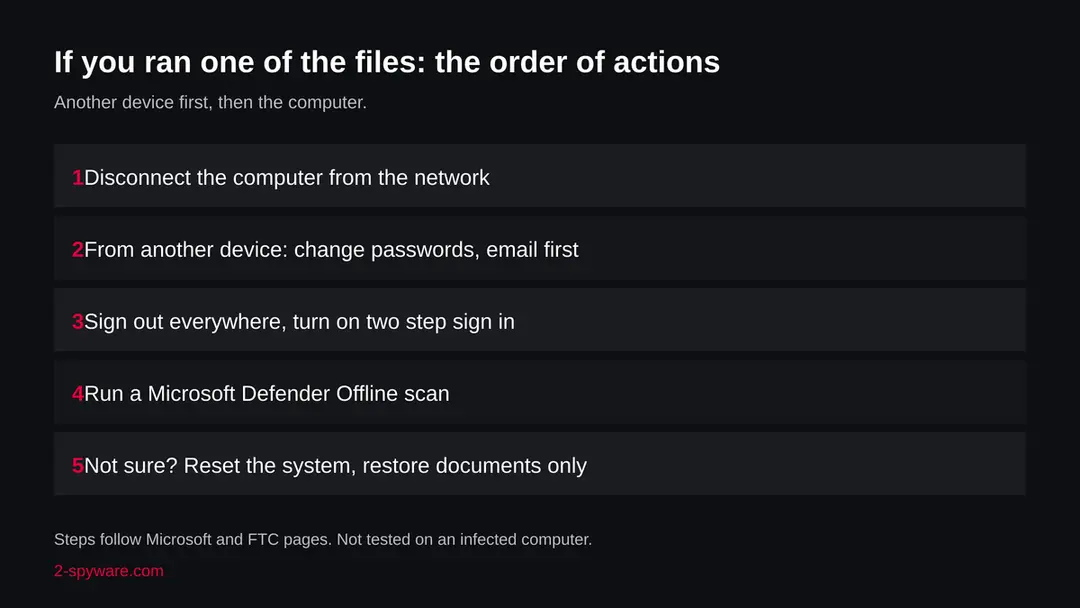
The computer is one half. The other half is everything you typed or stored on it while the file was there. The order matters: another device first, then the computer.
- 1
Change passwords from a clean device
Start with email, because it resets everything else, then your Microsoft account, Discord, bank, school or work and crypto. The FTC says to choose a unique, strong password, and gives 12 to 15 characters or a passphrase as a guide. Anything typed on the computer after the file ran may already be known.
- 2
Sign out everywhere and turn on two step sign in
The FTC says to sign out of the account on all devices and to turn on two factor authentication if it is offered, so a password alone does not let anyone in. Update the recovery email and phone number while you are there, and check for email forwarding rules you did not make.
- 3
Move crypto first if a wallet was on the computer
If a seed phrase or wallet file was ever on it, assume it is known. Create a new wallet and recovery phrase on a clean device and move the funds there.
- 4
Run Microsoft Defender Offline
Microsoft says to open Windows Security > Virus & threat protection > Scan options, choose Microsoft Defender Offline scan and select Scan now. Save your work first: Windows signs you out and restarts, and the scan takes about 15 minutes. If BitLocker is on, Microsoft says to suspend it first or the restart may ask for the recovery key. Results are under Protection history.
- 5
Remove the file and what it started
Once you have noted the names, delete the .jar from Downloads and the mods folder, and remove startup entries you can tie to it. If you cannot tell, do not guess: the safe answer is the reset below.
- 6
If you are not sure, reset Windows
Microsoft's recovery page says Reset this PC reinstalls Windows and can be started from Settings or from the Windows Recovery Environment under Troubleshoot > Reset this PC. You can choose to keep your personal files or remove everything; in both cases apps and settings are removed. If the computer ran the file with accounts open, the full wipe is the answer that does not depend on finding every piece. Back up first; with BitLocker you need the recovery key.
- 7
Restore only documents by hand
Copy back documents and photos, not programs and not .jar files. Install Minecraft again from the official launcher, and get mods only from their makers or well known mod sites.
- 8
Report and watch
Check card statements and exchange logs for a few weeks and turn on alerts. The FTC says to report stolen personal information at IdentityTheft.gov for a recovery plan. Tell friends and server admins if your Discord account sent links.
If you run a site and the file is yours
A listing can mean a site built to spread malware, and it can also mean a hacked or careless site. We do not know which this is, and we do not claim to.
- 1
Check whether you uploaded the files
If the files in the downloads folder are not yours, or you did not put them there, your site may be hacked. Remove them, and change every password and key for the site, the hosting account and the domain account.
- 2
Rebuild the clients from source you trust
If you do make clients, build them from source you control and publish a file hash next to each download, so a player can check it. An unknown binary from a third party is the risk for you as well.
- 3
Ask for a review
After cleaning, URLhaus lists have to be updated by the reporters; there is no promise of a time. We do not know the site's contact. If you own it, contact abuse.ch through their site after the files are gone.
Keep a computer out of this kind of chain
Every report we read starts with a file a person chose to run. That is both the problem and the defence.
Do
- Get Minecraft only from minecraft.net and the Microsoft Store, and mods from their makers' own pages or well known mod sites.
- Treat a free cheat client as an attack on your account, whatever the video or the page says.
- Keep Windows and Microsoft Defender updated; the offline scan uses the latest definitions.
- Use a password manager and two step sign in, so one stolen password is not enough.
- Give a child a separate user account on the family computer, without access to your files or logins.
- Show file endings in File Explorer so a .jar posing as a mod is visible.
Don't
- Do not download .jar files from sites that promise free versions of paid or banned game advantages.
- Do not turn off your antivirus because a download page tells you the alert is false.
- Do not change your passwords on the computer you suspect.
- Do not rely on a quiet scan to say you are safe.
- Do not trust a mod because its name matches a well known one.
Questions about niggersmp.net (SilentNet, Minecraft client .jar files)
What is niggersmp.net?
It is a website that presents itself as a place for free Minecraft cheat clients and mods. The abuse.ch project URLhaus lists four of its .jar downloads (Radium_Client.jar, krypton.jar, 4E_Client.jar and Zyphers_Rig_Mod.jar) as malware, all tagged SilentNet and all added on 10 October 2026.
The domain was registered on 5 April 2026. It is not a program on your computer. We did not download the files, so what they contain is not confirmed by us.
Is niggersmp.net safe to open or download from?
Do not download from it. Four of its files are reported as malware and were still marked online when we checked.
Our own plain request to the home page got an ordinary answer with status 200, but that proves nothing: a download page can look normal while the files are the problem, and the site is behind Cloudflare, which can show different visitors different things. The rating comes from the URLhaus reports, not from our visit.
What does the SilentNet tag mean?
SilentNet is a label on the abuse.ch sample site MalwareBazaar for Java malware aimed at Minecraft. One entry we read is a fake build of a known Minecraft client that steals the Minecraft session and relaunches as a hidden process.
We did not find a full analysis from a large security vendor, so treat it as a researcher label. We cannot say that the four files here behave the same way, because we did not open them.
I downloaded and ran one of these .jar files. What now?
Disconnect the computer from the network. From another device, change the password of your email first, then your Microsoft account, Discord, banking and crypto, and sign out of every device.
Then run a Microsoft Defender Offline scan on the computer, remove the file and anything that starts with the system that you did not make, and reset the system if you are not sure. Restore documents by hand, not programs.
I only saw niggersmp.net in a log or a warning. Am I infected?
Not by that alone. The name in a firewall log, a DNS log or a browser warning means a device asked for it, and a person may have clicked a link. It does not mean a file ran.
Find the device, check Downloads and the Minecraft mods folder for the four file names, look at Protection history in Windows Security, and run a scan. If you find none of the files, nothing on this page says you were hit, but a quiet check never fully clears a computer.
Can Minecraft cheat clients steal my account?
Yes, that is the point of many fake ones. Check Point Research described fake Minecraft cheat tools in 2025 that used a Java first stage, a Java stealer and a .NET stealer stage, and a MalwareBazaar entry describes a SilentNet-labelled fake client stealing the Minecraft session.
A stolen session or login lets someone act as you. Cheats are also against the rules of most servers, so the safe choice is not to use a client from an unknown site.
Does this affect Mac, Linux, iPhone or Android?
A .jar file runs wherever Java runs, so a Mac or Linux computer with Minecraft: Java Edition could run it. We do not know whether these four files contain code that works there, and no source we read says so.
An iPhone, an Android phone and the console editions do not run these files in the normal way, and no source mentions them. If you ran a file on a Mac, treat it as exposed and change passwords from another device.
Will resetting the system remove it, and are my accounts safe afterwards?
A reset removes apps and settings, which is the answer that does not depend on finding every piece. Microsoft says you can keep your personal files or remove everything. It does not undo what was already taken.
Passwords, sessions and wallet phrases that a stealer saw stay exposed until you change them from another device and turn on two step sign in. Restore documents by hand and install Minecraft again from the official launcher.
Why would a site like this hand out malware?
We do not know the motive or the owner of this site, and no source tells us. For the type, the reports describe a simple trade: players want free cheats, and a file that looks like a cheat is an easy way to get an account, a wallet or a login.
The site may also be hacked or careless rather than built for it. Either way, the files are reported, and the safe choice is to stay away.
Will Fortect remove niggersmp.net?
Fortect scans Windows for malware and unwanted programs and repairs the system files and settings they change, and its free scan shows what it finds on your PC before you decide anything.
For niggersmp.net, follow the plan above as well: the browser steps take back permissions and settings that no scanner treats as a threat, and uninstalling the program that brought it removes the source.
Run Microsoft Defender's full scan and, if anything was found, its offline scan as a second opinion. If the symptoms are gone after the plan and both scans are clean, there is nothing more to do.
Sources
- MalwareBazaar (abuse.ch): sample page for a SilentNet-labelled Minecraft client (read October 11, 2026)
- Check Point Research: Minecraft mod malware, Stargazers Ghost Network (18 June 2025) (read October 11, 2026)
- Microsoft Learn: Microsoft Defender Offline scan in Windows (updated 25 August 2026) (read October 11, 2026)
- Microsoft Support: Recovery options in Windows (Reset this PC) (read October 11, 2026)
- FTC: Email or social media hacked? Here's what to do (read October 11, 2026)