
Vista Smart Security: what it is and how to remove it
Vista Smart Security is a rogue anti-spyware program that uses misleading advertising to make you think that your computer is infected with malware and that you should purchase the program to remove the infections. The rogue program comes from fake online scanners, misleading video sites, software bundles, deceptive ads, etc.
Facts checked October 6, 2026. Removal steps tested on Windows 11 (26H2) and checked against Microsoft's and the browser makers' current documentation. Sections marked as our earlier report are the original text: they describe the threat as it was then and have not been reviewed since. The 2026 status, the removal steps and the questions are current.
Automatic
Get a free scan and check if your PC is infected.
Fortect finds malware, unwanted programs and the Windows damage they leave behind, and repairs it in one pass.
If Vista Smart Security keeps coming back after uninstalling, a scan can find what reinstalls it.
Do it yourself · free Remove Vista Smart Security yourself 5 steps, about 15 minutes, no software needed.
Start the steps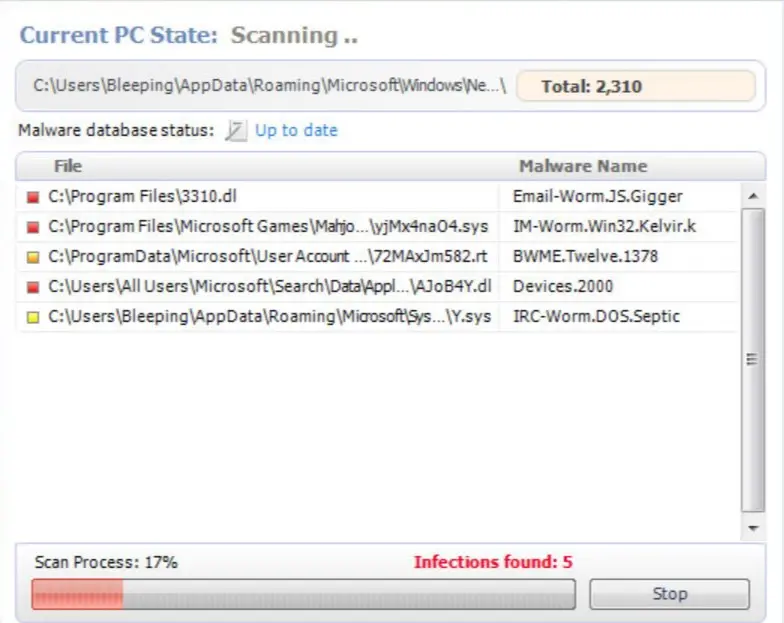
Vista Smart Security: summary
| Damage | Money loss, infection with severe malware |
|---|---|
| name | Vista Smart Security |
| Type | Rogue antispyware, fake security program |
| Main goal | Push its licensed version by stating that only it can remove imaginary viruses found on your Windows computer |
| Detection names | No Microsoft detection name is known |
| Distribution | Not recorded in the old report |
| Removal | Scan the PC with security software to find and remove the malware and anything installed with it. Fortect scans Windows for malware and repairs the system files and settings it damaged. Remove it nowTo use the full-featured product, you have to purchase a license for Fortect. The scan is free. |
Show 6 more facts
| Name | Vista Smart Security |
|---|---|
| Symptoms | An unknown program in Installed apps |
| Evidence | One write-up by a security site; details still limited |
| Program | Vista Smart Security |
| First seen | 29 April 2021 |
| Facts checked | 6 October 2026 |
Is Vista Smart Security a real security program?
From our report of Apr 2021 · not reviewed since
Vista Smart Security – a fake cybersecurity program full of misleading tricks
Vista Smart Security is a rogue anti-spyware program that uses misleading advertising to make you think that your computer is infected with malware and that you should purchase the program to remove the infections. The rogue program comes from fake online scanners, misleading video sites, software bundles, deceptive ads, etc.
It may also be promoted on popular social networks. Of course, it may also enter a computer through system vulnerabilities. One way or another, the main goal of Vista Smart Security remains the same - to trick you into purchasing the program. Please don't buy it!
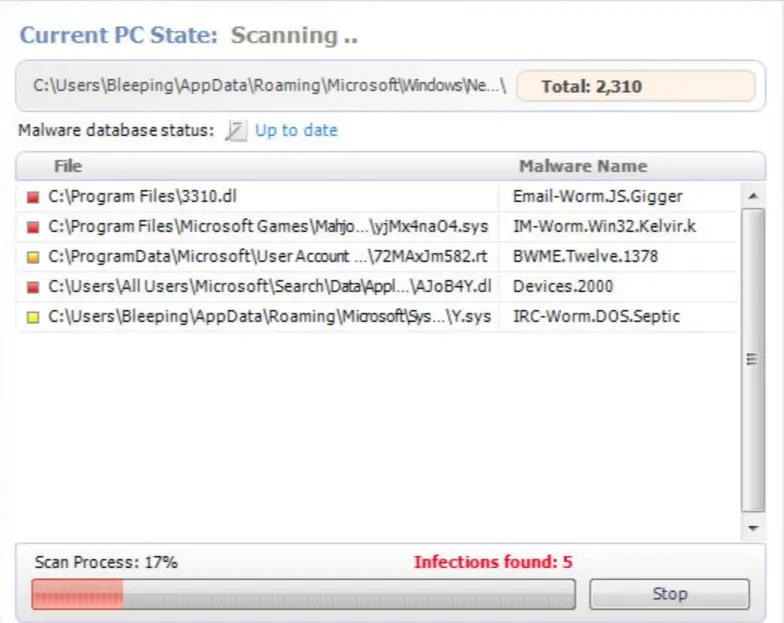
While this fake program is running, you will also see security alerts appear in your Windows taskbar that state your computer is being attacked from a remote computer or is infected with malware. These alerts, though, are fake as well and are only being shown to scare you further.
Don't worry about those fake alerts too much. Simply ignore them as they don't pose any security threat. What is more, VistaSmartSecurity will block antivirus and antispyware programs to protect itself from being removed. It may block security-related websites too.
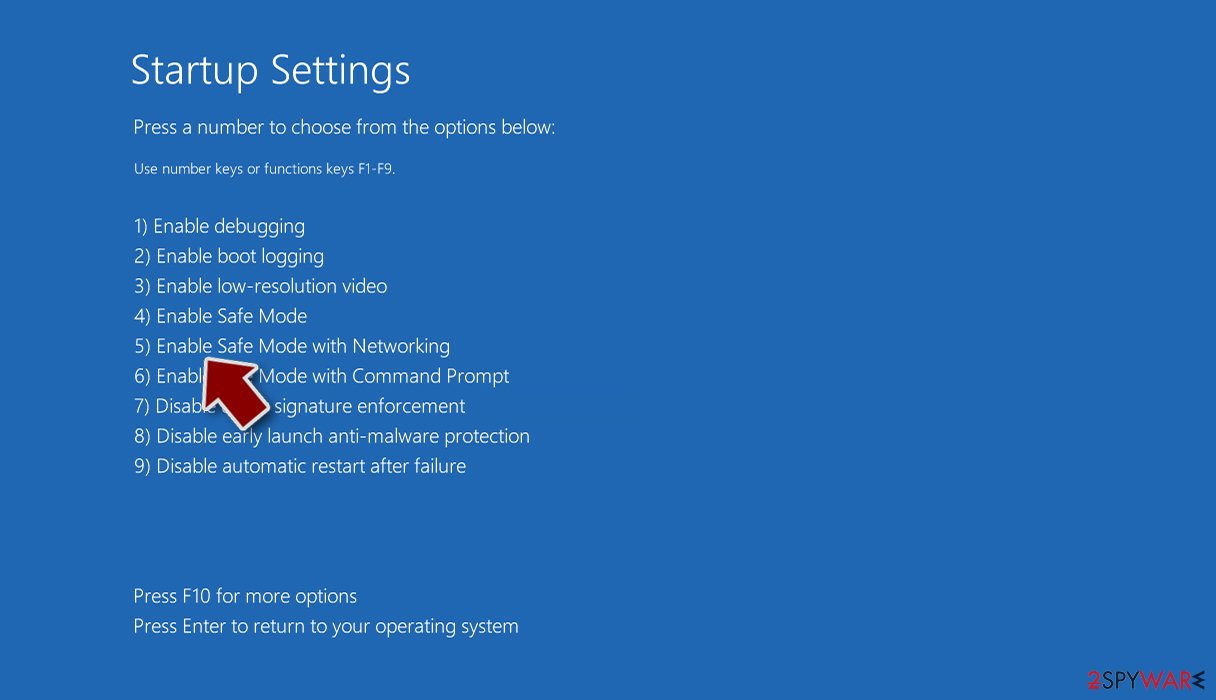
If you find that your computer is infected with this virus, please perform its removal ASAP. Since it could block you from downloading and installing a proper AV tool, do that in Safe Mode with Networking (directions on launching your computer in it are below).
Then download a trustworthy tool and scan your entire computer system with it. That will remove the fake security tool along with all of its pieces.
From our report of Apr 2021 · not reviewed since
More from our earlier report on Vista Smart Security
- Remove this rogue software by performing a full system scan with proper anti-malware software
- Resolve any system irregularities by running system diagnostics with the app
How to remove Vista Smart Security
Nothing it reports is real.
These steps remove it and undo a payment if you made one.
Step 1: Do not pay, and undo a payment if you made one
Vista Smart Security reports problems to sell a licence: the "threats" or "errors" it lists are invented or harmless leftovers. If you already paid, ask your card issuer to dispute the charge and cancel the subscription both in the seller's account and through your bank.
If you called a phone number it showed and let someone connect, treat the PC as remotely accessed and remove the remote tool. Uninstalling it from Windows 11 or Windows 10 does not cancel a subscription by itself.
Full procedure with screenshots: What to do after paying a scammer
Step 2: Uninstall Vista Smart Security
Open Settings > Apps > Installed apps in Windows 11, or Settings > Apps > Apps & features in Windows 10.
Sort the list by install date and find Vista Smart Security, then choose Uninstall from the three-dot menu next to it (in Windows 10, click the entry and then Uninstall).
Remove anything else installed on the same day that you do not recognise, because such programs usually arrive together in one installer. If the uninstaller opens a browser page with an offer or a survey, close it: the program is removed either way.
Full procedure with screenshots: Uninstall a program or app in Windows On uGetFix
Step 3: Remove it from startup
Whatever Vista Smart Security installed usually starts with Windows.
Open Task Manager with Ctrl + Shift + Esc, go to Startup apps in Windows 11 or the Startup tab in Windows 10, and disable what you do not know, starting with entries that have an empty Publisher column.
Open file location on the right-click menu shows the file, which helps you decide and tells you what to delete later. Disabling is safe: if something you need stops working, switch it back on.
Full procedure with screenshots: Stop apps from opening at startup On uGetFix
Step 4: Delete the folders left behind
What the uninstaller leaves behind is usually in the user folders. Open File Explorer, switch on View > Show > Hidden items (in Windows 10 View > Hidden items), and go through
%LocalAppData%,%AppData%, %ProgramData% and the two Program Files folders.Sort by Date modified and delete folders that appeared together with the problem and belong to no program you use. Folders with random names that hold
.exe,.dll, .js or .ps1 files are the strongest sign.Full procedure with screenshots: Remove what malware leaves behind in Windows
Step 5: Scan the PC, then run the offline scan
Open Windows Security > Virus & threat protection > Scan options, run a Full scan and remove everything it finds. Then select Microsoft Defender Antivirus (offline scan) and click Scan now: the PC restarts and scans before Windows loads, which finds files that hide while Windows runs.
Save your work first, because the offline scan takes about 15 minutes. Both scans are built into Windows 11 and Windows 10, and a second scanner from another vendor is a useful extra opinion.

Windows 11: Windows Security > Virus & threat protection > Scan options. Full procedure with screenshots: Run a Microsoft Defender Offline scan
Instructions for each browser and system
The detailed steps for every browser and system this guide covers. Open the one you use.
Manual removal using Safe Mode
Important! →
Manual removal guide might be too complicated for regular computer users. It requires advanced IT knowledge to be performed correctly (if vital system files are removed or damaged, it might result in full Windows compromise), and it also might take hours to complete. Therefore, we highly advise using the automatic method provided above instead.
Step 1. Access Safe Mode with Networking
Manual malware removal should be best performed in the Safe Mode environment.
Windows 7 / Vista / XP
- Click Start > Shutdown > Restart > OK.
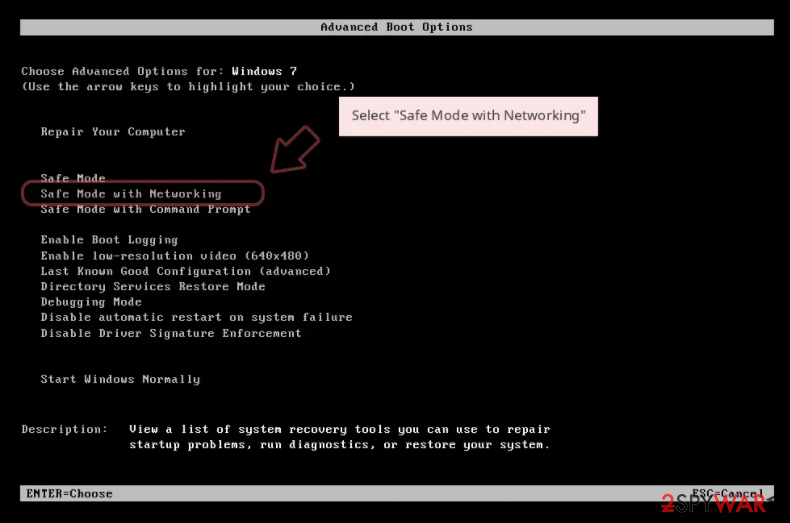
- When your computer becomes active, start pressing F8 button (if that does not work, try F2, F12, Del, etc. - it all depends on your motherboard model) multiple times until you see the Advanced Boot Options window.
- Select Safe Mode with Networking from the list.
Windows 10 / Windows 8
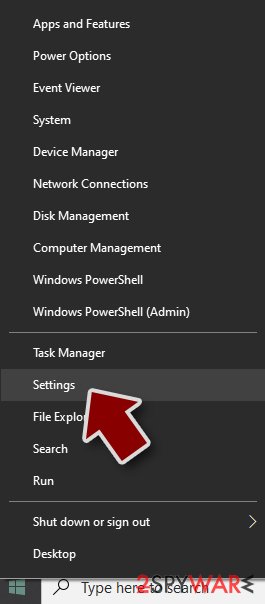
- Right-click on Start button and select Settings.
- Scroll down to pick Update & Security.
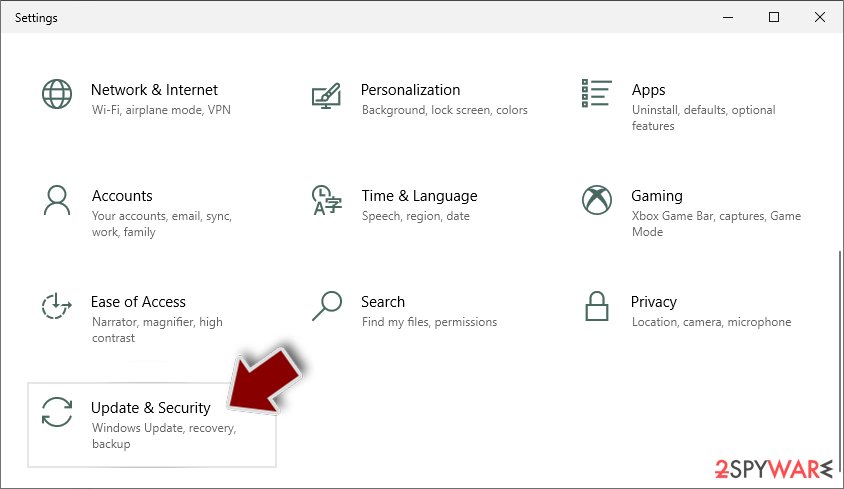
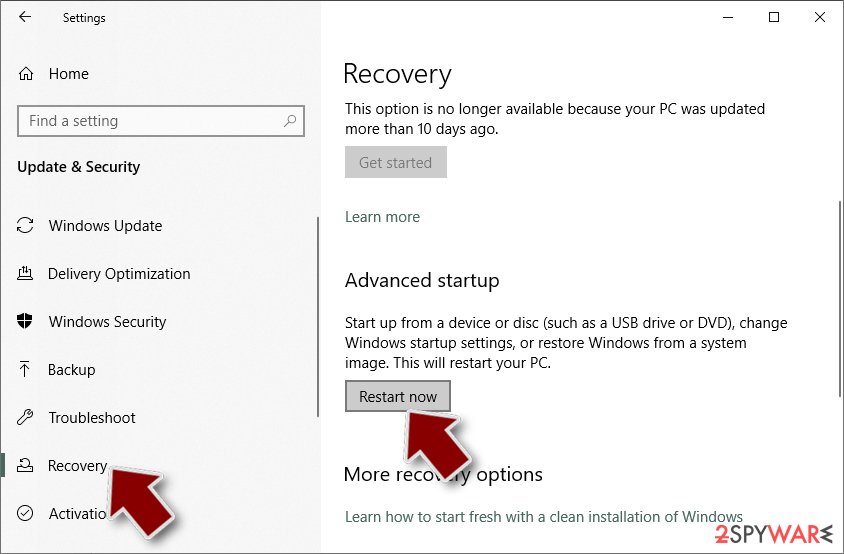
- On the left side of the window, pick Recovery.
- Now scroll down to find Advanced Startup section.
- Click Restart now.
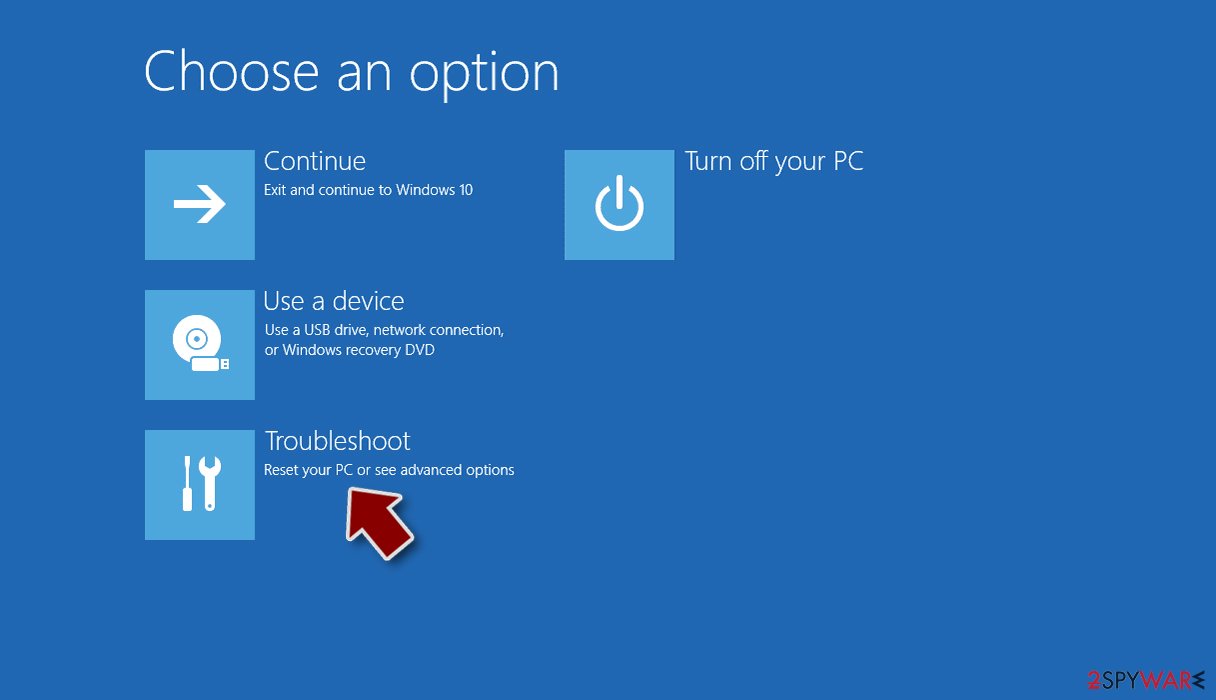
- Select Troubleshoot.
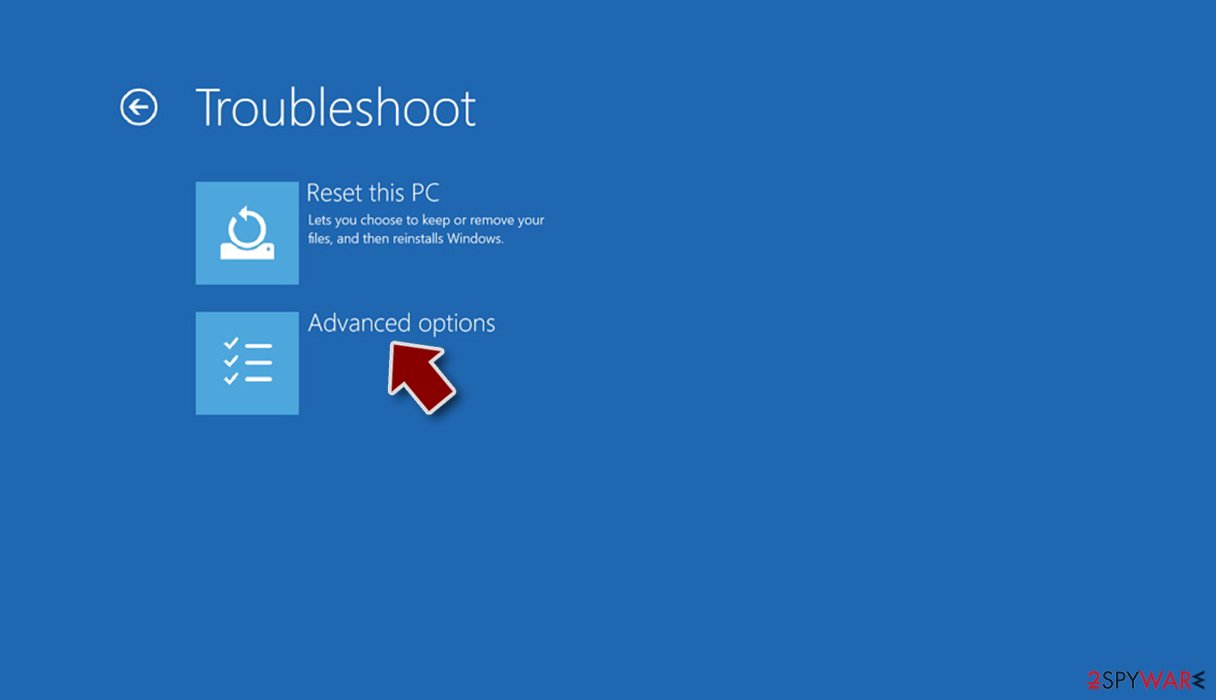
- Go to Advanced options.
- Select Startup Settings.
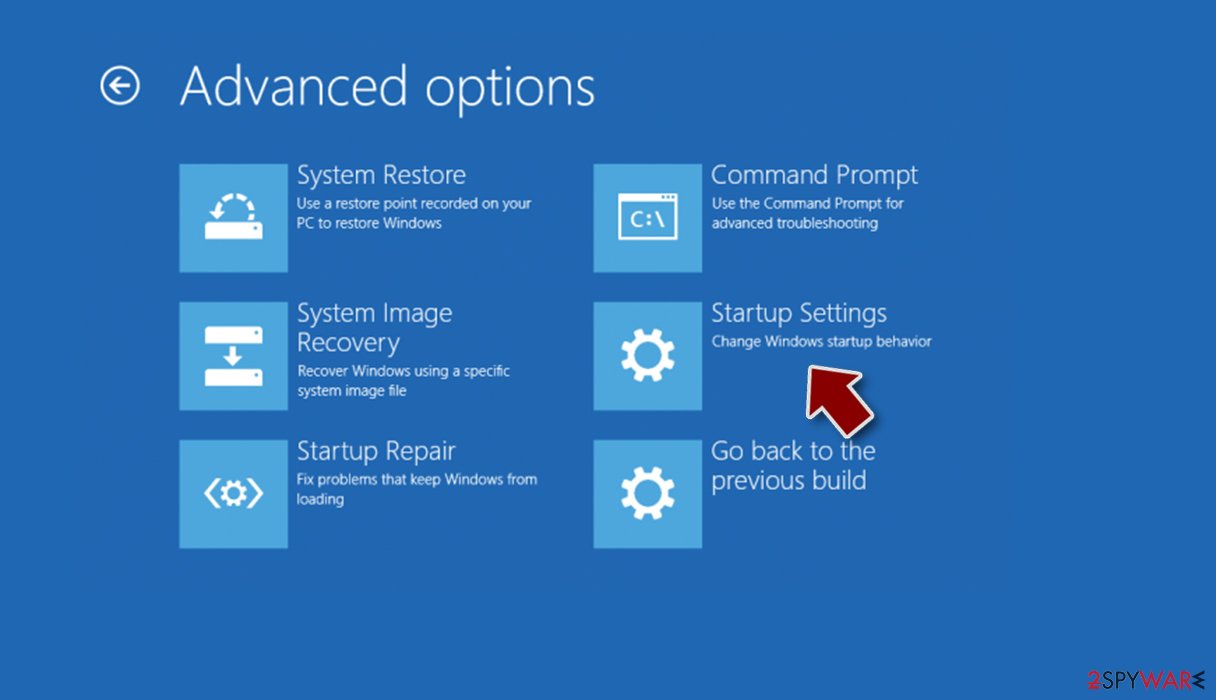
- Press Restart.
- Now press 5 or click 5) Enable Safe Mode with Networking.
Step 2. Shut down suspicious processes
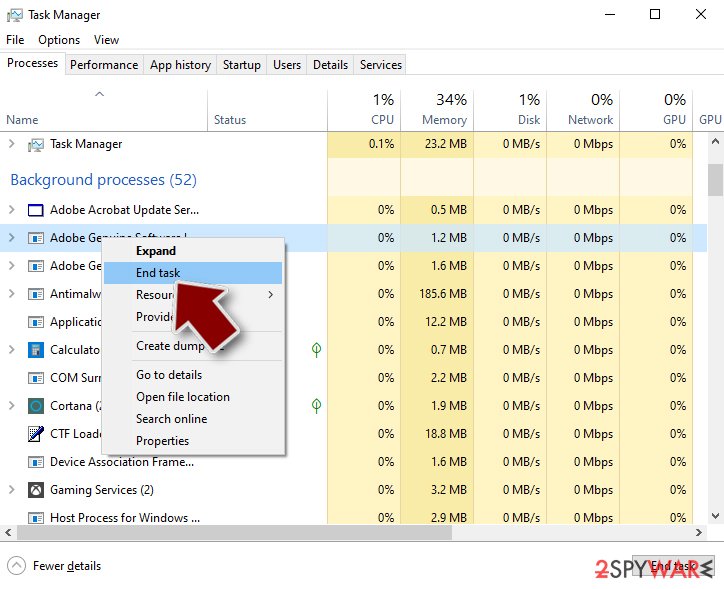
Windows Task Manager is a useful tool that shows all the processes running in the background. If malware is running a process, you need to shut it down:
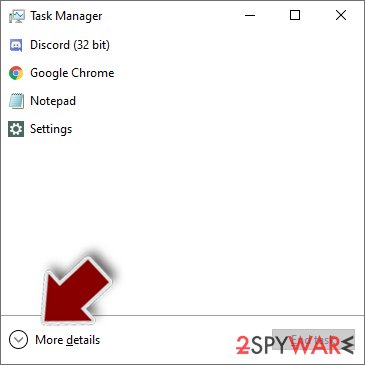
- Press Ctrl + Shift + Esc on your keyboard to open Windows Task Manager.
- Click on More details.
- Scroll down to Background processes section, and look for anything suspicious.
- Right-click and select Open file location.
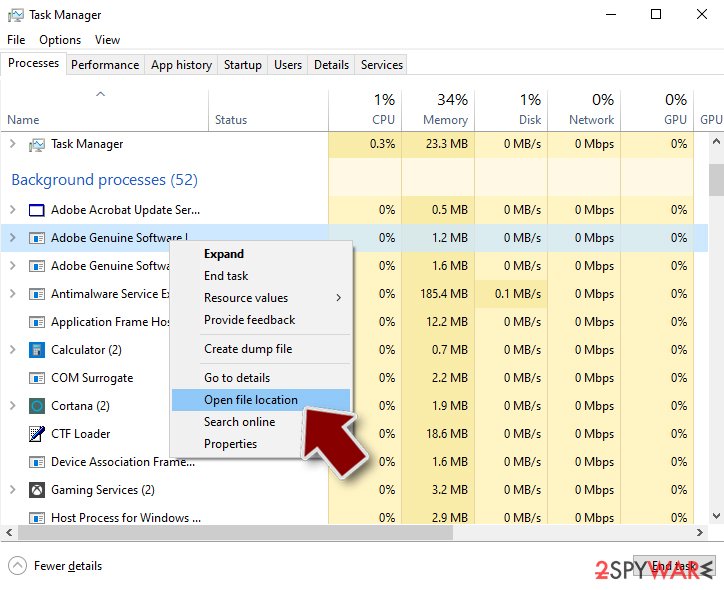
- Go back to the process, right-click and pick End Task.
- Delete the contents of the malicious folder.
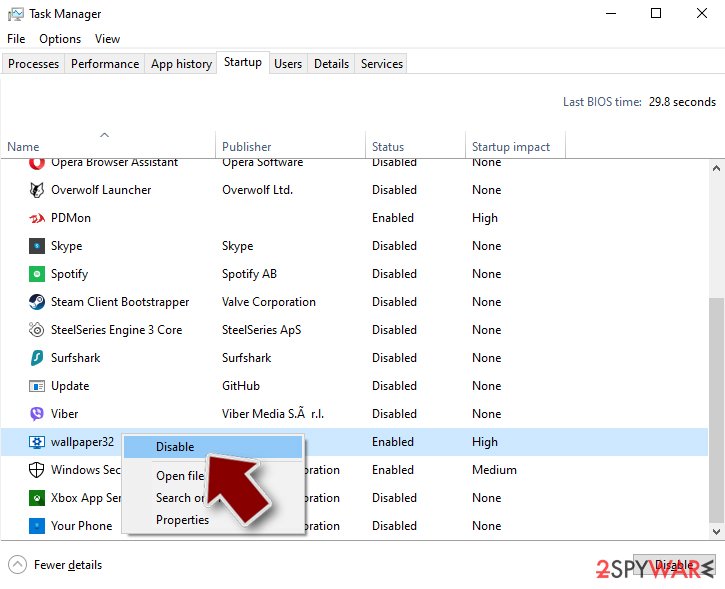
Step 3. Check program Startup
- Press Ctrl + Shift + Esc on your keyboard to open Windows Task Manager.
- Go to Startup tab.
- Right-click on the suspicious program and pick Disable.
Step 4. Delete virus files
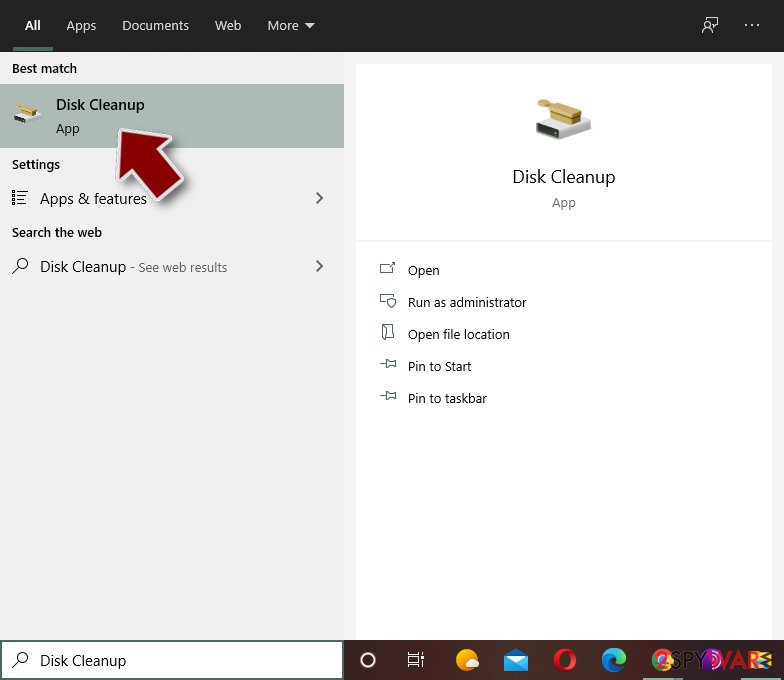
Malware-related files can be found in various places within your computer. Here are instructions that could help you find them:
- Type in Disk Cleanup in Windows search and press Enter.
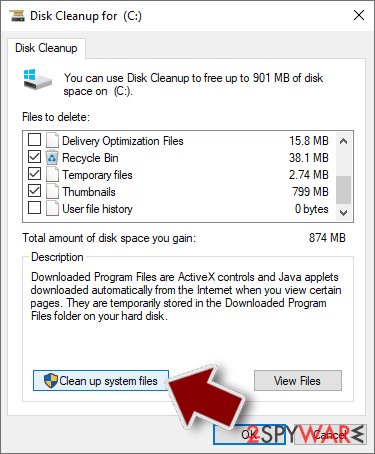
- Select the drive you want to clean (C: is your main drive by default and is likely to be the one that has malicious files in).
- Scroll through the Files to delete list and select the following:
Temporary Internet Files
Downloads
Recycle Bin
Temporary files - Pick Clean up system files.
- You can also look for other malicious files hidden in the following folders (type these entries in Windows Search and press Enter):
%AppData%
%LocalAppData%
%ProgramData%
%WinDir%
After you are finished, reboot the PC in normal mode.
Stream videos without limitations, no matter where you are
There are multiple parties that could find out almost anything about you by checking your online activity.
While this is highly unlikely, advertisers and tech companies are constantly tracking you online. The first step to privacy should be a secure browser that focuses on tracker reduction to a minimum.
Even if you employ a secure browser, you will not be able to access websites that are restricted due to local government laws or other reasons. In other words, you may not be able to stream Disney+ or US-based Netflix in some countries. To bypass these restrictions, you can employ a powerful VPN, which provides dedicated servers for torrenting and streaming, not slowing you down in the process.
Data backups are important - recover your lost files
Ransomware is one of the biggest threats to personal data.
Once it is executed on a machine, it launches a sophisticated encryption algorithm that locks all your files, although it does not destroy them. The most common misconception is that anti-malware software can return files to their previous states. This is not true, however, and data remains locked after the malicious payload is deleted.
While regular data backups are the only secure method to recover your files after a ransomware attack, tools such as can also be effective and restore at least some of your lost data.
Questions about Vista Smart Security
Can I safely uninstall Vista Smart Security?
If you did not install Vista Smart Security yourself and it is not part of your hardware or a program you rely on, yes. Uninstalling an unwanted program does not harm Windows.
Before you do, search the exact name and publisher to be sure it is not a driver tool, a printer utility or a game launcher with an odd name. Then remove it from Settings, Apps, Installed apps.
Ignore any offers or warnings in its uninstaller about losing protection or performance. Afterwards check Startup apps and your browsers for leftovers, and restart once to confirm that it does not reinstall itself.
How do I stop programs like Vista Smart Security from being installed again?
Most unwanted programs arrive through installers, so the fix is in how you install software. Download programs from their official sites or the Microsoft Store, not from download portals or ads above search results. During setup, choose Custom or Advanced installation and untick every extra offer, including browsers, toolbars and optimizers.
Decline update prompts that appear inside other programs unless you know them. In Windows Security, turn on reputation-based protection and potentially unwanted app blocking. These steps would most likely have stopped Vista Smart Security before it reached the app list.
Do I need to buy antivirus after removing Vista Smart Security?
No. Windows 11 and Windows 10 include Microsoft Defender in Windows Security, which provides real-time protection, scheduled scans, the offline scan and protection against unwanted apps at no cost. Keep it switched on and updated, and turn on Reputation-based protection under App & browser control.
If you prefer a third-party product, buy it from the vendor's own site after reading independent test results, never from a pop-up or a phone call. The lesson of Vista Smart Security is that security offers which arrive unasked are the ones to avoid.
I let a technician connect to my PC because of Vista Smart Security. Is it safe now?
Not until you check. While connected, the caller could install other programs, create a user account or look at saved passwords. Disconnect from the internet, uninstall the remote access program and anything else installed during the call, and run a full scan and the Microsoft Defender offline scan.
From another device, change your e-mail and banking passwords and turn on two-step verification. If the caller opened your online banking, call the bank today. A reset of Windows is the safest option if you cannot tell what was done.
Vista Smart Security has no uninstaller. How do I get rid of it?
Some scareware does not register an uninstaller, or its uninstaller only opens another sales page. In that case, end the program in Task Manager, then go to Task Manager > Startup apps, right-click its entry and choose Open file location to find its folder. Disable the startup entry, restart in Safe Mode and delete the folder.
Check Task Scheduler for tasks with the same name. Finally, run the Microsoft Defender offline scan, which removes remaining files that Microsoft knows about. Restart afterwards and check that nothing named after Vista Smart Security starts again.
Will the seller of Vista Smart Security refund me if I ask?
Sometimes, but do not depend on it and do not let them steer the process. If you contact the seller, do it in writing and keep the replies. Never install software, share your screen or give banking details to get a refund.
The more reliable route is your card issuer or PayPal: a chargeback or dispute for a product sold with false claims. If the seller or anyone claiming to represent them calls you first about a refund, treat it as a scam and hang up.
What is Vista Smart Security?
Vista Smart Security is fake security software, sometimes called a rogue antivirus or scareware. The program, Vista Smart Security, shows invented or exaggerated problems to make you pay for a licence, and some versions send you to phone "support".
It does not protect the PC, and the threats it lists are not a reason to pay. Fake security programs usually arrive through fake virus warnings on websites, extra offers in free installers or ads for faster PCs. Uninstall it and use the free protection built into Windows instead.
I entered my card number in Vista Smart Security. What should I do?
Call your card issuer using the number on the back of the card, report the purchase as fraud and ask for a new card. Ask them to block further charges from the same merchant. Watch your statements for small test charges, which often come before larger ones.
If you used a password on the order page or the same e-mail for the purchase, change that password and expect phishing e-mails that mention the purchase. Your bank can also tell you whether the merchant is linked to other fraud reports.
How do I know Vista Smart Security is fake?
Three things give it away. It appears as vista Smart Security in the list of installed apps, a window from a program rather than from Windows Security. It pushes you to act quickly by calling, paying or downloading.
And the threats it reports never show up when you run a scan in the real Windows Security app. Microsoft does not put phone numbers in warnings or charge for removing threats through pop-ups. Close the window, do not call, and follow the steps to find and uninstall the program behind it.
Will Fortect remove Vista Smart Security?
Fortect scans Windows for malware and unwanted programs and repairs the system files and settings they change, and its free scan shows what it finds on your PC before you decide anything.
For Vista Smart Security, follow the plan above as well: the browser steps take back permissions and settings that no scanner treats as a threat, and uninstalling the program that brought it removes the source.
Run Microsoft Defender's full scan and, if anything was found, its offline scan as a second opinion. If the symptoms are gone after the plan and both scans are clean, there is nothing more to do.
Sources
- FTC: How to recognize, remove and avoid malware (read October 6, 2026)
- Microsoft Learn: Microsoft Defender Offline (read October 6, 2026)
- Microsoft Learn: How Microsoft names malware (read October 6, 2026)